instrument cluster Ram 2500 2017 Owners Manual
[x] Cancel search | Manufacturer: RAM, Model Year: 2017, Model line: 2500, Model: Ram 2500 2017Pages: 734, PDF Size: 7.3 MB
Page 450 of 734
Tire/Jack Mode
To assist with changing a tire, the air suspension system
has a feature which allows the automatic leveling to be
disabled. Refer to “Instrument Cluster Display” in “Under-
standing Your Instrument Panel” or “Uconnect Settings” in
“Understanding Your Instrument Panel” if equipped with
a touch screen radio for further information.
NOTE:This mode is intended to be enabled with engine
running.
Transport Mode
For towing your vehicle with four wheels off the road, the
air suspension system has a feature which will put the
vehicle into Entry/Exit height and disable the automatic
load leveling system. Refer to “Instrument Cluster Dis-
play” in “Understanding Your Instrument Panel” or
“Uconnect Settings” in “Understanding Your Instrument
Panel” if equipped with a touch screen radio for further
information.
NOTE: This mode is intended to be enabled with engine
running. Wheel Alignment Mode
Before performing a wheel alignment, this mode must be
enabled. Refer to “Instrument Cluster Display” in “Under-
standing Your Instrument Panel” or “Uconnect Settings” in
“Understanding Your Instrument Panel” if equipped with
a touch screen radio for further information.
NOTE:
This mode is intended to be enabled with engine
running.
Protection Strategy
In order to “protect” the air suspension system, the vehicle
will disable load leveling as required (suspension over-
loaded, battery charge low, etc.). Load leveling will auto-
matically resume as soon as system operation requirements
are met. See your authorized dealer if system does not
resume.
NOTE: If towing with air suspension refer to “Trailer
Towing” in “Starting And Operating” for further informa-
tion.
448 STARTING AND OPERATING
Page 451 of 734

Instrument Cluster Display Messages
When the appropriate conditions exist, a message will
appear in the instrument cluster display. Refer to “Instru-
ment Cluster Display” in “Understanding Your Instrument
Panel” for further information.
An audible chime will be heard whenever a system error
has been detected.
Operation
The indicator lamps 3 through 6 will illuminate to show the
current position of the vehicle. Flashing indicator lamps
will show a position which the system is working to
achieve. When raising or lowering, the flashing indicator
lamp is the position the system is working to achieve.
Pushing the “Up” button once will move the suspension
one position higher from the current position, assuming all
conditions are met (i.e. key in ON/RUN position, engine
running, speed below threshold, etc). The “Up” button can
be pushed multiple times, each push will raise the re-
quested level by one position up to a maximum position of
OR or the highest position allowed based on current
conditions (i.e. vehicle speed, etc).Pushing the “DOWN” button once will move the suspen-
sion one position lower from the current level, assuming all
conditions are met (i.e. key in ON/RUN position, engine
running, doors closed, speed below threshold, etc). The
“DOWN” button can be pushed multiple times, each push
will lower the requested level by one position down to a
minimum of Entry/Exit Mode or the lowest position
allowed based on current conditions (i.e. vehicle speed,
etc.)
Automatic height changes will occur based on vehicle
speed and the current vehicle height. The indicator lamps
and instrument cluster display messages will operate the
same for automatic changes and user requested changes.
•
Off-Road (OR) – Indicator lamps 3, 4, 5 and 6 will be
illuminated when the vehicle is in OR.
• Normal Ride Height (NRH) – Indicator lamps 3, 4 and 5
will be illuminated when the vehicle is in NRH.
• Aero Mode – Indicator lamps 3 and 4 will be illuminated
when the vehicle is in Aero Mode.
5
STARTING AND OPERATING 449
Page 454 of 734
Air Suspension Modes
The air suspension system has multiple modes to protect
the system in unique situations:
Tire/Jack Mode
To assist with changing a tire, the air suspension system
has a feature which allows the automatic leveling to be
disabled. This mode is intended to be enabled with engine
running. Refer to “Instrument Cluster Display” in “Under-
standing Your Instrument Panel” or “Uconnect Settings” in
“Understanding Your Instrument Panel” if equipped with
a touch screen radio for further information.
NOTE:This mode is intended to be enabled with engine
running.
Transport Mode
For towing your vehicle with four wheels off the road, the
air suspension system has a feature which will put the
vehicle below Normal Ride Height (NRH) and disable the
automatic load leveling system. This mode is intended to
be enabled with engine running. Refer to “Instrument
Cluster Display” in “Understanding Your Instrument
Panel” or “Uconnect Settings” in “Understanding Your
Instrument Panel” if equipped with a touch screen radio
for further information. NOTE:
This mode is intended to be enabled with engine
running.
Wheel Alignment Mode
Before performing a wheel alignment this mode must be
enabled. Refer to “Instrument Cluster Display” in “Under-
standing Your Instrument Panel” or “Uconnect Settings” in
“Understanding Your Instrument Panel” if equipped with
a touch screen radio for further information.
NOTE: This mode is intended to be enabled with engine
running.
Protection Strategy
In order to “protect” the air suspension system, the vehicle
will disable load leveling as required (suspension over-
loaded, battery charge low, etc.). Load leveling will auto-
matically resume as soon as system operation requirements
are met. See your authorized dealer if system does not
resume.
452 STARTING AND OPERATING
Page 455 of 734
Instrument Cluster Display Messages
When the appropriate conditions exist, a message will
appear in the instrument cluster display. Refer to “Instru-
ment Cluster Display” in “Understanding Your Instrument
Panel” for further information.
An audible chime will be heard whenever a system error
has been detected.
See your authorized dealer for system service if normal
operation does not resume.
Operation
Pushing the Alternate Trailer Height (ATH) button once
while at Normal Ride Height (NRH), will lower the vehicle
to Alternate Trailer Height (ATH) and will illuminate the
LED.
NOTE:The LED will continuously blink until vehicle
Alternate Trailer Height (ATH) has been achieved and the
LED will turn off.
Pushing the Alternate Trailer Height (ATH) again will raise
the vehicle to Normal Ride Height (NRH).
NOTE: The LED will continuously blink until Normal Ride
Height (NRH) has been achieved. •
Transport Mode – No indicator lamps will be illumi-
nated. Transport Mode is disabled by driving the ve-
hicle.
• Tire/Jack Mode – No indicator lamps will be illumi-
nated. Tire/Jack Mode is disabled by driving the vehicle.
• Wheel Alignment Mode – No indicator lamps will be
illuminated. Wheel Alignment Mode is disabled by
driving the vehicle.
AXLE LOCKER SYSTEM — POWER WAGON
MODELS ONLY (IF EQUIPPED)
This vehicle is equipped with electronically locking front
and rear differentials. These differentials, when engaged,
mechanically lock together the axle shafts forcing the
wheels to spin at an equal rate. This allows the vehicle to
maintain its momentum and prevents it from becoming
stuck. The locking front and rear differentials should only
be engaged during low-speed, extreme off-road situations
where one wheel is likely to not be in contact with the
ground. It is not recommended to drive the vehicle with
the differentials locked on pavement due to the reduced
ability to turn and speed limitations.
5
STARTING AND OPERATING 453
Page 492 of 734
Double Line
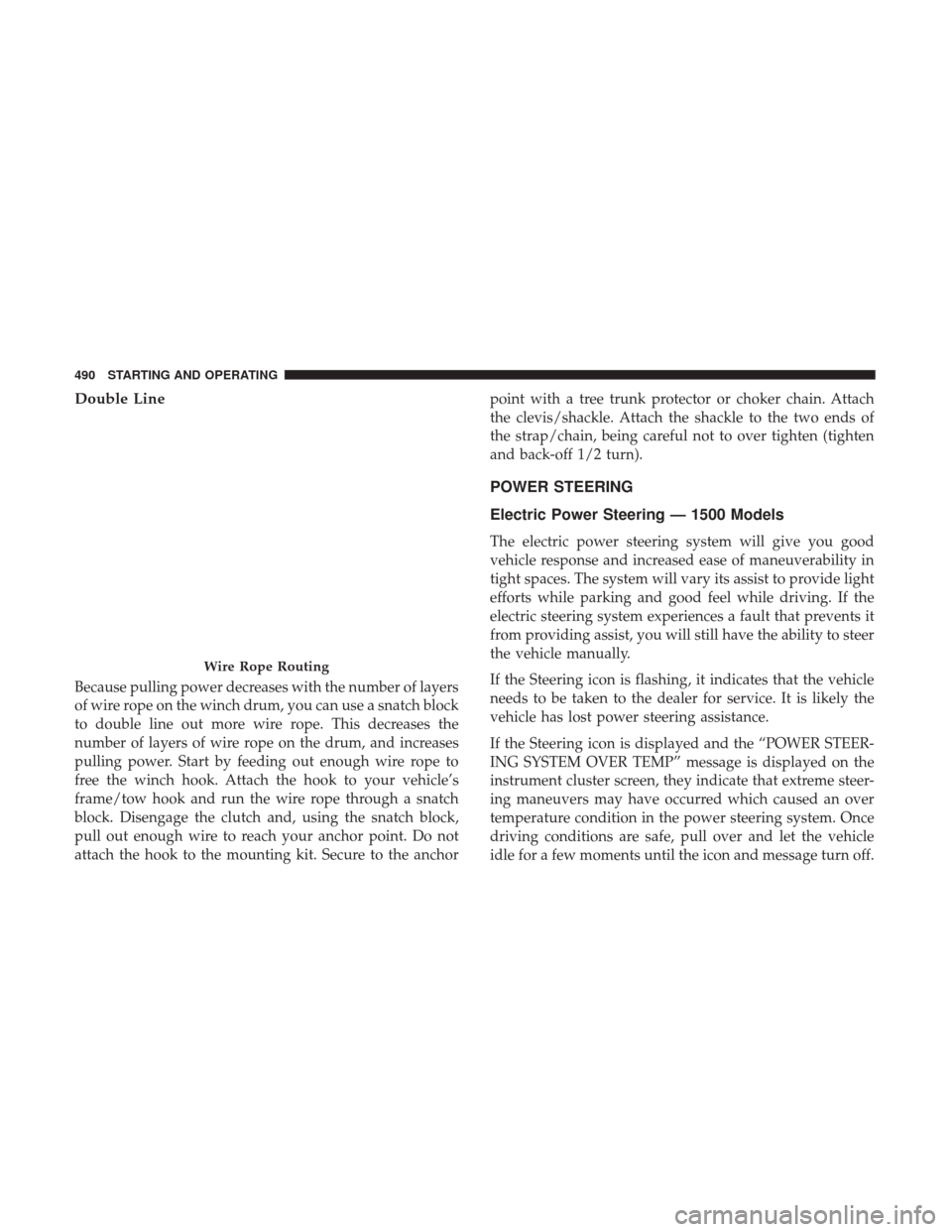
Because pulling power decreases with the number of layers
of wire rope on the winch drum, you can use a snatch block
to double line out more wire rope. This decreases the
number of layers of wire rope on the drum, and increases
pulling power. Start by feeding out enough wire rope to
free the winch hook. Attach the hook to your vehicle’s
frame/tow hook and run the wire rope through a snatch
block. Disengage the clutch and, using the snatch block,
pull out enough wire to reach your anchor point. Do not
attach the hook to the mounting kit. Secure to the anchorpoint with a tree trunk protector or choker chain. Attach
the clevis/shackle. Attach the shackle to the two ends of
the strap/chain, being careful not to over tighten (tighten
and back-off 1/2 turn).
POWER STEERING
Electric Power Steering — 1500 Models
The electric power steering system will give you good
vehicle response and increased ease of maneuverability in
tight spaces. The system will vary its assist to provide light
efforts while parking and good feel while driving. If the
electric steering system experiences a fault that prevents it
from providing assist, you will still have the ability to steer
the vehicle manually.
If the Steering icon is flashing, it indicates that the vehicle
needs to be taken to the dealer for service. It is likely the
vehicle has lost power steering assistance.
If the Steering icon is displayed and the “POWER STEER-
ING SYSTEM OVER TEMP” message is displayed on the
instrument cluster screen, they indicate that extreme steer-
ing maneuvers may have occurred which caused an over
temperature condition in the power steering system. Once
driving conditions are safe, pull over and let the vehicle
idle for a few moments until the icon and message turn off.
Wire Rope Routing
490 STARTING AND OPERATING
Page 493 of 734

Refer to “Instrument Cluster Display” in “Understanding
Your Instrument Panel” for further information.
If the Steering icon is displayed and the “SERVICE POWER
STEERING – ASSIST OFF” message is displayed the in-
strument cluster screen, they indicate the vehicle needs to
be taken to the dealer for service. Refer to “Instrument
Cluster Display” in “Understanding Your Instrument
Panel” for further information.
NOTE:
•Even if the power steering assistance is no longer
operational, it is still possible to steer the vehicle. Under
these conditions there will be a substantial increase in
steering effort, especially at low speeds and during
parking maneuvers.
• If the condition persists, see your authorized dealer for
service.
Hydraulic Power Steering — 2500/3500 Models
The standard power steering system will give you good
vehicle response and increased ease of maneuverability in
tight spaces. The system will provide mechanical steering
capability if power assist is lost. If for some reason the power assist is interrupted, it will
still be possible to steer your vehicle. Under these condi-
tions, you will observe a substantial increase in steering
effort, especially at very low vehicle speeds and during
parking maneuvers.
NOTE:
•
Increased noise levels at the end of the steering wheel
travel are considered normal and do not indicate that
there is a problem with the power steering system.
• Upon initial start-up in cold weather, the power steering
pump may make noise for a short amount of time. This
is due to the cold, thick fluid in the steering system. This
noise should be considered normal, and it does not in
any way damage the steering system.
CAUTION!
Prolonged operation of the steering system at the end
of the steering wheel travel will increase the steering
fluid temperature and it should be avoided when
possible. Damage to the power steering pump may
occur.
5
STARTING AND OPERATING 491
Page 495 of 734

When the parking brake is applied with the ignition switch
ON, the “Brake Warning Light” in the instrument cluster
will illuminate.
NOTE:
•When the parking brake is applied and the transmission
is placed in gear, the “Brake Warning Light” will flash. If
vehicle speed is detected, a chime will sound to alert the
driver. Fully release the parking brake before attempting
to move the vehicle.
• This light only shows that the parking brake is applied.
It does not show the degree of brake application. When parking on a hill, it is important to turn the front
wheels toward the curb on a downhill grade and away
from the curb on an uphill grade. Apply the parking brake
before placing the gear selector in PARK, otherwise the
load on the transmission locking mechanism may make it
difficult to move the gear selector out of PARK. The
parking brake should always be applied whenever the
driver is not in the vehicle.
WARNING!
•
Never use the PARK position as a substitute for the
parking brake. Always apply the parking brake fully
when parked to guard against vehicle movement and
possible injury or damage.
• Never leave children alone in a vehicle, or with
access to an unlocked vehicle. Leaving unattended
children in a vehicle is dangerous for a number of
reasons. A child or others could be seriously or
fatally injured.
(Continued)
Parking Brake Release
5
STARTING AND OPERATING 493
Page 501 of 734

Towing With HSA
HSA will also provide assistance to mitigate roll back while
towing a trailer.
WARNING!
•If you use a trailer brake controller with your trailer,
the trailer brakes may be activated and deactivated
with the brake switch. If so, there may not be enough
brake pressure to hold both the vehicle and the
trailer on a hill when the brake pedal is released. In
order to avoid rolling down an incline while resum-
ing acceleration, manually activate the trailer brake
or apply more vehicle brake pressure prior to releas-
ing the brake pedal.
• HSA is not a parking brake. Always apply the
parking brake fully when leaving your vehicle. Also,
be certain to leave the transmission in PARK.
• Failure to follow these warnings may cause the
vehicle to roll down the incline and could collide
with another vehicle, object or person, and cause
serious or fatal injury. Always remember to use the
parking brake while parking on a hill and that the
driver is responsible for braking the vehicle.
Disabling And Enabling HSA
This feature can be turned on or turned off. To change the
current setting, proceed as follows:
• For vehicles equipped with the instrument cluster dis-
play, refer to “Instrument Cluster Display” in “Under-
standing Your Instrument Panel” for further informa-
tion.
• If disabling HSA using Uconnect Settings, refer to
“Uconnect Settings” in “Understanding Your Instrument
Panel” for further information.
For vehicles not equipped with the instrument cluster
display, perform the following steps:
1. Center the steering wheel (front wheels pointing straight forward).
2. Shift the transmission into PARK.
3. Apply the parking brake.
4. Start the engine.
5. Rotate the steering wheel slightly more than one-half turn to the left.
5
STARTING AND OPERATING 499
Page 503 of 734
The “ESC Activation/Malfunction Indicator Light” located
in the instrument cluster will start to flash as soon as the ESC
system becomes active. The “ESC Activation/Malfunction
Indicator Light” also flashes when the TCS is active. If the
“ESC Activation/Malfunction Indicator Light” begins to
flash during acceleration, ease up on the accelerator and
apply as little throttle as possible. Be sure to adapt your
speed and driving to the prevailing road conditions.
WARNING!
•Electronic Stability Control (ESC) cannot prevent the
natural laws of physics from acting on the vehicle, nor
can it increase the traction afforded by prevailing road
conditions. ESC cannot prevent accidents, including
those resulting from excessive speed in turns, driving
on very slippery surfaces, or hydroplaning. ESC also
cannot prevent accidents resulting from loss of vehicle
control due to inappropriate driver input for the con-
ditions. Only a safe, attentive, and skillful driver can
prevent accidents. The capabilities of an ESC
equipped vehicle must never be exploited in a reckless
or dangerous manner which could jeopardize the us-
er ’s safety or the safety of others.
(Continued)
WARNING! (Continued)
•Vehicle modifications, or failure to properly main-
tain your vehicle, may change the handling charac-
teristics of your vehicle, and may negatively affect
the performance of the ESC system. Changes to the
steering system, suspension, braking system, tire
type and size or wheel size may adversely affect ESC
performance. Improperly inflated and unevenly
worn tires may also degrade ESC performance. Any
vehicle modification or poor vehicle maintenance
that reduces the effectiveness of the ESC system can
increase the risk of loss of vehicle control, vehicle
rollover, personal injury and death.
ESC Operating Modes
NOTE: Depending upon model and mode of operation, the
ESC system may have multiple operating modes.
ESC On
This is the normal operating mode for the ESC. Whenever
the vehicle is started, the ESC system will be in this mode.
This mode should be used for most driving conditions.
Alternate ESC modes should only be used for specific
reasons as noted in the following paragraphs.
5
STARTING AND OPERATING 501
Page 504 of 734

Partial Off
The “Partial Off” mode is intended for times when a more
spirited driving experience is desired. This mode may
modify TCS and ESC thresholds for activation, which
allows for more wheel spin than normally allowed. This
mode may be useful if the vehicle becomes stuck.
To enter the “Partial Off” mode, momentarily push the
“ESC Off” switch and the “ESC Off Indicator Light” will
illuminate. To turn the ESC on again, momentarily push
the “ESC Off” switch and the “ESC Off Indicator Light”
will turn off.
NOTE:For vehicles with multiple partial ESC modes a
momentary button push will toggle the ESC mode. Mul-
tiple momentary button pushed may be required to return
to ESC On.
NOTE:
• When in “Partial Off” mode, the TCS functionality of
ESC, (except for the limited slip feature described in the
TCS section), has been disabled and the “ESC Off
Indicator Light” will be illuminated. When in “Partial
Off” mode, the engine power reduction feature of TCS is
disabled, and the enhanced vehicle stability offered by
the ESC system is reduced. •
Trailer Sway control (TSC) is disabled when the ESC
system is in the “Partial Off” mode.
Full Off – If Equipped
This mode is intended for off-highway or off-road use only
and should not be used on any public roadways. In this
mode, TCS and ESC features are turned OFF. To enter the
“Full Off” mode, push and hold the “ESC Off” switch for
five seconds while the vehicle is stopped with the engine
running. After five seconds, a chime will sound, the “ESC
Off Indicator Light” will illuminate, and the “ESC OFF”
message will display in the instrument cluster. To turn ESC
on again, momentarily push the “ESC Off” switch.
NOTE: System may switch from ESC “Full Off” to “Partial
Off” mode when vehicle exceeds a predetermined speed.
When the vehicle speed slows below the predetermined
speed the system will return to ESC “Full Off”.
ESC modes may also be affected by drive modes (if
equipped).
502 STARTING AND OPERATING