ad blue Ram 2500 2017 User Guide
[x] Cancel search | Manufacturer: RAM, Model Year: 2017, Model line: 2500, Model: Ram 2500 2017Pages: 734, PDF Size: 7.3 MB
Page 358 of 734
Media
Uconnect offers connections via USB, Bluetooth and auxil-
iary ports (If Equipped). Voice operation is only available
for connected USB and iPod devices. (Remote CD player
optional and not available on all vehicles.)
Push the VR button
. After the beep, say one of the
following commands and follow the prompts to switch
your media source or choose an artist.
• Change source to Bluetooth
• Change source to iPod
• Change source to USB
• Play artist Beethoven; Play album Greatest Hits; Play
song Moonlight Sonata; Play genreClassical
TIP: For the Uconnect 3.0, Uconnect 5.0 and 8.4/8.4 NAV
systems, select Browse to see all of the music on your iPod
or USB device. Your Voice Command must match exactly
how the artist, album, song and genre information is
displayed.
Uconnect 3.0 Media
356 UNDERSTANDING YOUR INSTRUMENT PANEL
Page 362 of 734
Voice Text Reply
Uconnect will announceincomingtext messages. Push the
Phone button
and say Listen.(Must have compatible
mobile phone paired to Uconnect system.)
1. Once an incoming text message is read to you, push the
Phone button
. After the beep, say: “Reply.”
2. Listen to the Uconnect prompts. After the beep, repeat
one of the pre-defined messages and follow the system
prompts.
PRE-DEFINED VOICE TEXT REPLY RESPONSES
Yes. Stuck in traffic. See you later.
No. Start without
me. I’ll be late.
Okay. Where are you? I will be
minutes late.
Call me. Are you there
yet?
I’ll call you later. I need
directions. See you in
I’m on my way. Can’t talk right
now.
I’m lost. Thanks.TIP:
Your mobile phone must have the full implementation of
the Message Access Profile (MAP) to take advantage of this
feature. For details about MAP, visit UconnectPhone.com.
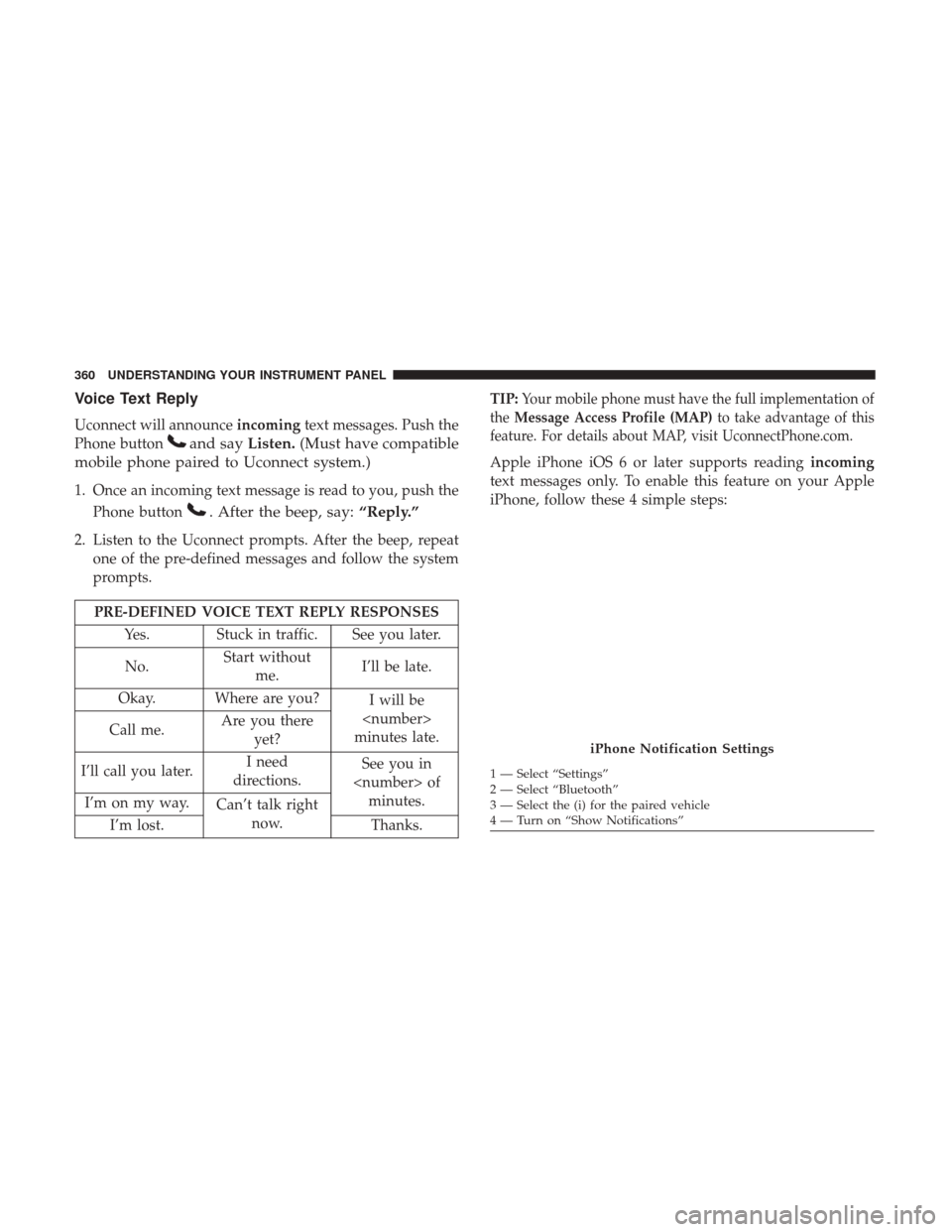
Apple iPhone iOS 6 or later supports reading incoming
text messages only. To enable this feature on your Apple
iPhone, follow these 4 simple steps:
iPhone Notification Settings
1 — Select “Settings”
2 — Select “Bluetooth”
3 — Select the (i) for the paired vehicle
4 — Turn on “Show Notifications”
360 UNDERSTANDING YOUR INSTRUMENT PANEL
Page 367 of 734
Mobile App (8.4/8.4 NAV)
You’re only a few steps away from using remote com-
mands and playing your favorite music in your vehicle.To link your internet radio accounts:
1. Download the Uconnect Access App to your mobile
device.
2. Press the Via Mobile icon on the navigation bar at the bottom of the app.
3. Press the app you’d like to connect to your vehicle.
4. Enter your login information for the selected app and press Link.
5. Next time you’re in your vehicle, enable Bluetooth, pair your phone and select the Via Mobile app you want to
play from the Uconnect touchscreen to stream your
personalized music.
NOTE:
• You can also complete this process on the web. Simply
visit moparownerconnect.com log in and click Set Up
Via Mobile Profile (under Quick Links).
• Once you download the app to your compatible mobile
device, you will also be able to start your vehicle and
lock/unlock its doors from virtually anywhere.
Mobile App
4
UNDERSTANDING YOUR INSTRUMENT PANEL 365
Page 368 of 734
Voice Texting (8.4/8.4 NAV)
1. To send a message, push the Phone button. After the
beep, say the following command: “Send messageto
John Smith.”
2. Listen to the prompt. After the beep, dictate the message you would like to send. Wait for Uconnect to process
your message.
3. The Uconnect system will repeat your message and provide a variety of options to add to, delete, send or
hear the message again. After the beep, tell Uconnect
what you’d like to do. For instance, if you’re happy with
your message, after the beep, say: “Send.”
You must be registered with Uconnect Access and have a
compatible MAP – enabled smartphone to use your voice
to send a personalized text message. For details about
MAP, visit UconnectPhone.com.
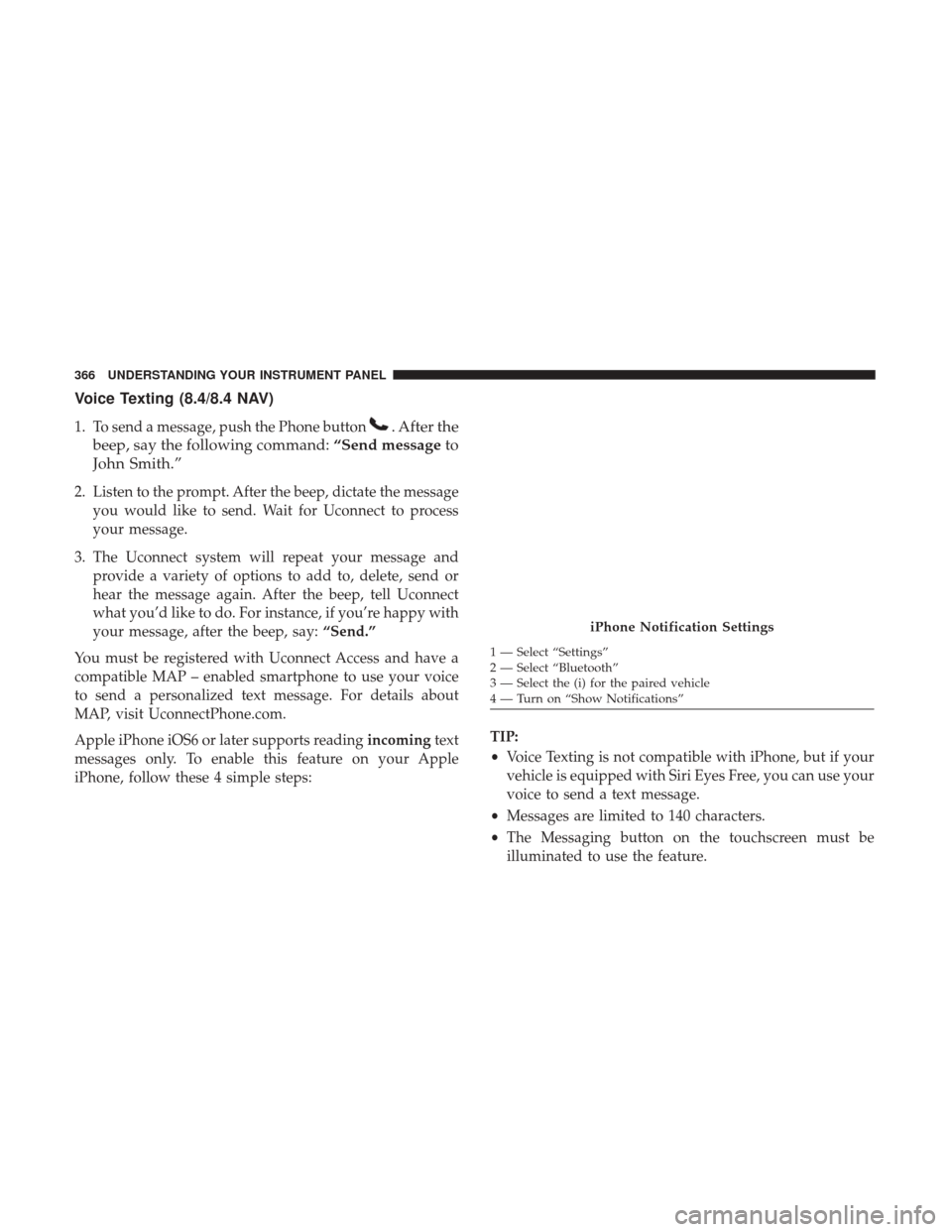
Apple iPhone iOS6 or later supports reading incomingtext
messages only. To enable this feature on your Apple
iPhone, follow these 4 simple steps: TIP:
•
Voice Texting is not compatible with iPhone, but if your
vehicle is equipped with Siri Eyes Free, you can use your
voice to send a text message.
• Messages are limited to 140 characters.
• The Messaging button on the touchscreen must be
illuminated to use the feature.
iPhone Notification Settings
1 — Select “Settings”
2 — Select “Bluetooth”
3 — Select the (i) for the paired vehicle
4 — Turn on “Show Notifications”
366 UNDERSTANDING YOUR INSTRUMENT PANEL
Page 374 of 734
Do Not Disturb
With Do Not Disturb, you can disable notifications from
incoming calls and texts, allowing you to keep your eyes
on the road and hands on the wheel. For your convenience,
there is a counter display to keep track of your missed calls
and text messages while you were using Do Not Disturb.
Do Not Disturb can automatically reply with a text mes-
sage, a call or both, when declining an incoming call and
send it to voicemail.
Automatic reply messages can be:
•“I am driving right now, I will get back to you shortly.”
• Create a custom auto reply message up to 160 characters.
NOTE: Only the first 25 characters can been seen on the
touchscreen while typing a custom message. While in Do Not Disturb, Conference Call can be selected
so you can still place a second call without being inter-
rupted by incoming calls.
NOTE:
•
Reply with text message is not compatible with iPhones.
•
Auto reply with text message is only available on phones
that supporting Bluetooth MAP.
372 UNDERSTANDING YOUR INSTRUMENT PANEL
Page 683 of 734
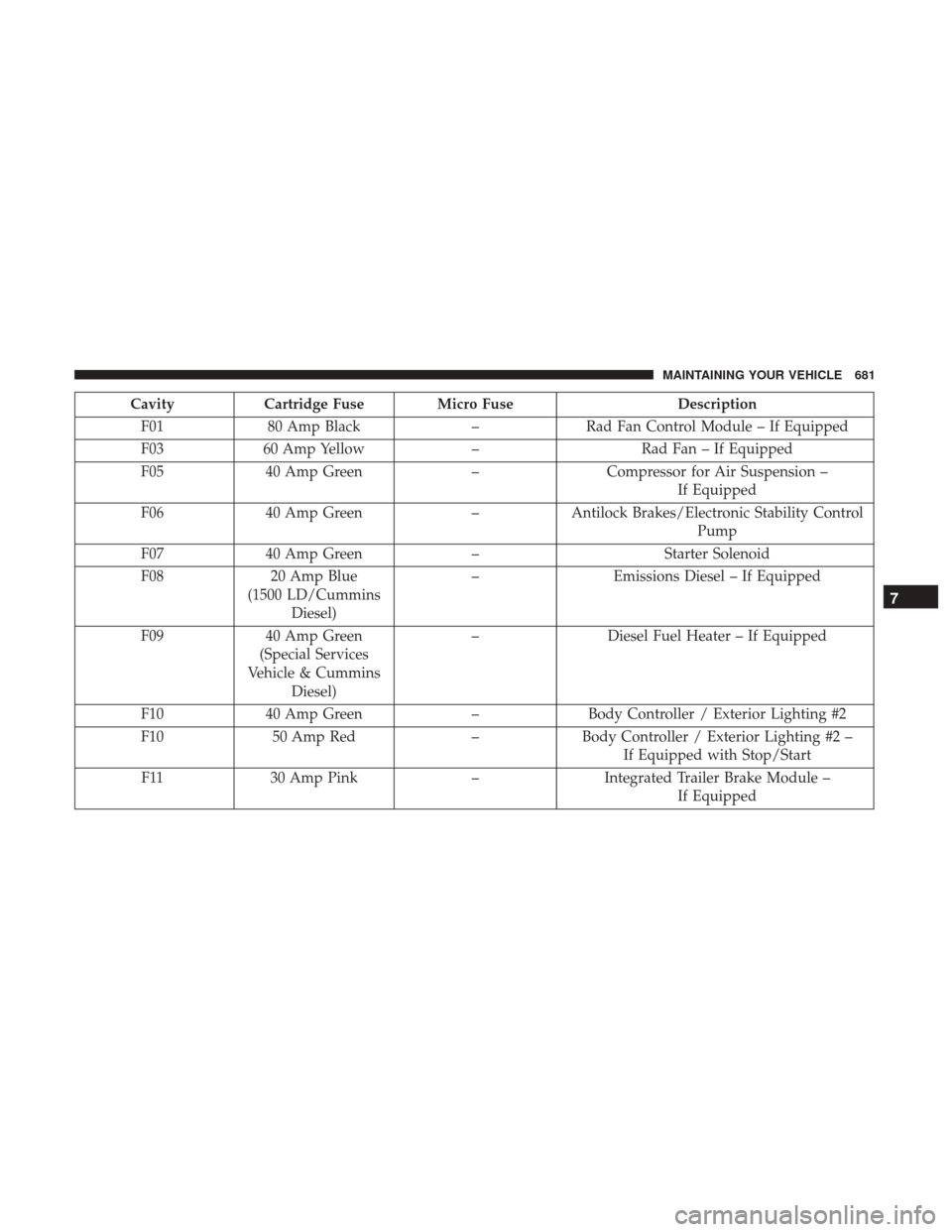
CavityCartridge Fuse Micro Fuse Description
F01 80 Amp Black –Rad Fan Control Module – If Equipped
F03 60 Amp Yellow –Rad Fan – If Equipped
F05 40 Amp Green –Compressor for Air Suspension –
If Equipped
F06 40 Amp Green –Antilock Brakes/Electronic Stability Control
Pump
F07 40 Amp Green –Starter Solenoid
F08 20 Amp Blue
(1500 LD/Cummins Diesel) –
Emissions Diesel – If Equipped
F09 40 Amp Green
(Special Services
Vehicle & Cummins Diesel) –
Diesel Fuel Heater – If Equipped
F10 40 Amp Green –Body Controller / Exterior Lighting #2
F10 50 Amp Red –Body Controller / Exterior Lighting #2 –
If Equipped with Stop/Start
F11 30 Amp Pink –Integrated Trailer Brake Module –
If Equipped
7
MAINTAINING YOUR VEHICLE 681
Page 684 of 734
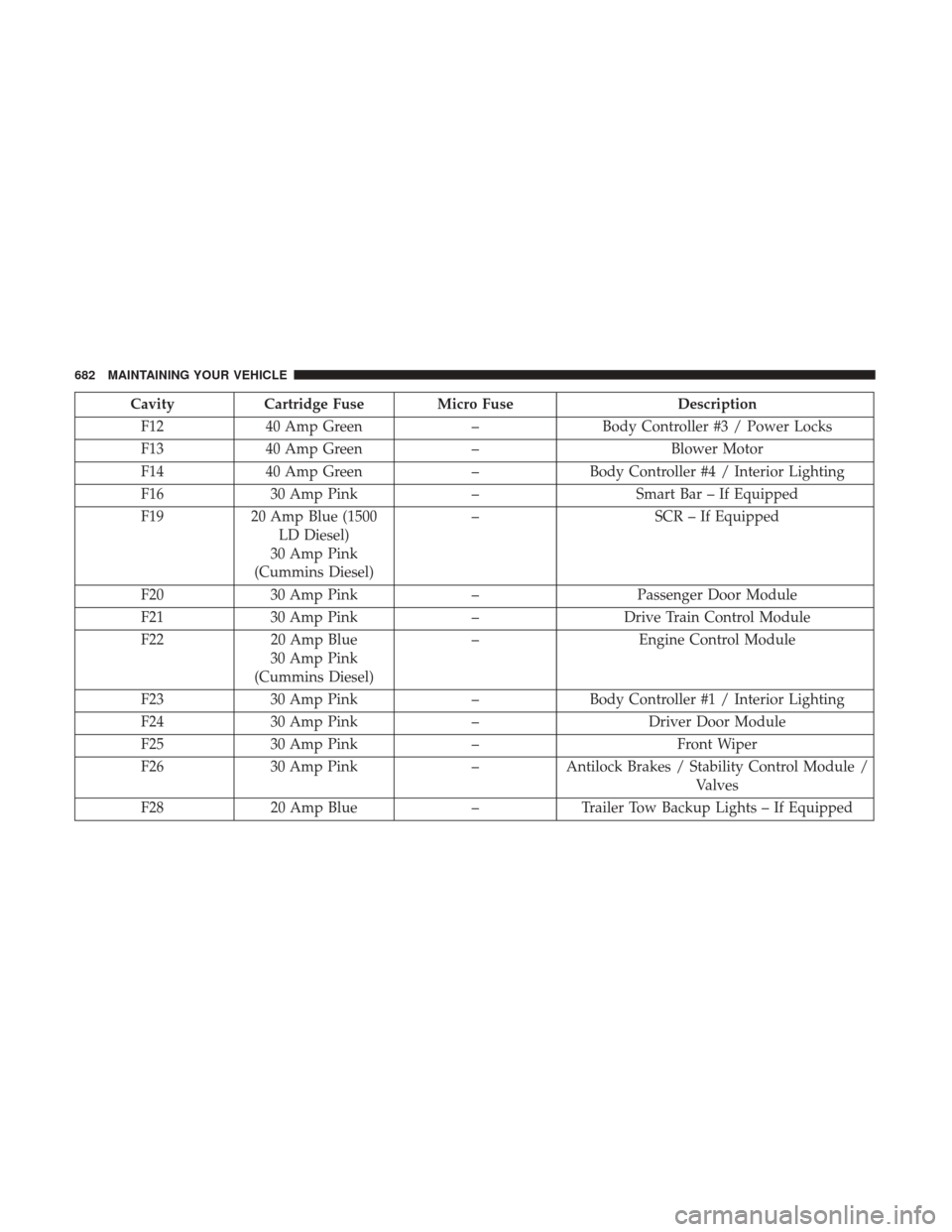
CavityCartridge Fuse Micro Fuse Description
F12 40 Amp Green –Body Controller #3 / Power Locks
F13 40 Amp Green –Blower Motor
F14 40 Amp Green –Body Controller #4 / Interior Lighting
F16 30 Amp Pink –Smart Bar – If Equipped
F19 20 Amp Blue (1500
LD Diesel)
30 Amp Pink
(Cummins Diesel) –
SCR – If Equipped
F20 30 Amp Pink –Passenger Door Module
F21 30 Amp Pink –Drive Train Control Module
F22 20 Amp Blue
30 Amp Pink
(Cummins Diesel) –
Engine Control Module
F23 30 Amp Pink –Body Controller #1 / Interior Lighting
F24 30 Amp Pink –Driver Door Module
F25 30 Amp Pink – Front Wiper
F26 30 Amp Pink –Antilock Brakes / Stability Control Module /
Valves
F28 20 Amp Blue –Trailer Tow Backup Lights – If Equipped
682 MAINTAINING YOUR VEHICLE
Page 685 of 734
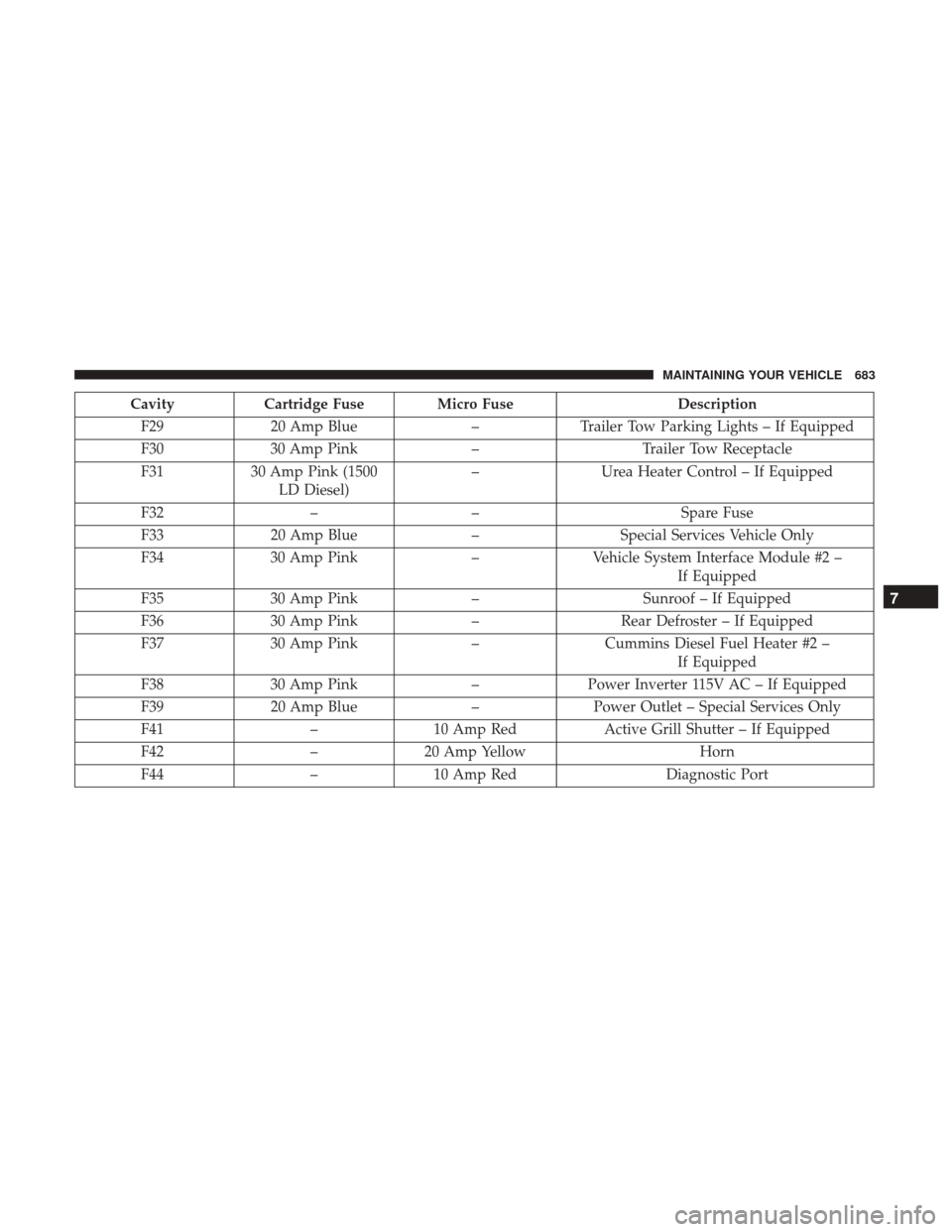
CavityCartridge Fuse Micro Fuse Description
F29 20 Amp Blue –Trailer Tow Parking Lights – If Equipped
F30 30 Amp Pink –Trailer Tow Receptacle
F31 30 Amp Pink (1500
LD Diesel) –
Urea Heater Control – If Equipped
F32 –– Spare Fuse
F33 20 Amp Blue –Special Services Vehicle Only
F34 30 Amp Pink –Vehicle System Interface Module #2 –
If Equipped
F35 30 Amp Pink –Sunroof – If Equipped
F36 30 Amp Pink –Rear Defroster – If Equipped
F37 30 Amp Pink –Cummins Diesel Fuel Heater #2 –
If Equipped
F38 30 Amp Pink –Power Inverter 115V AC – If Equipped
F39 20 Amp Blue –Power Outlet – Special Services Only
F41 –10 Amp Red Active Grill Shutter – If Equipped
F42 –20 Amp Yellow Horn
F44 –10 Amp Red Diagnostic Port
7
MAINTAINING YOUR VEHICLE 683
Page 686 of 734
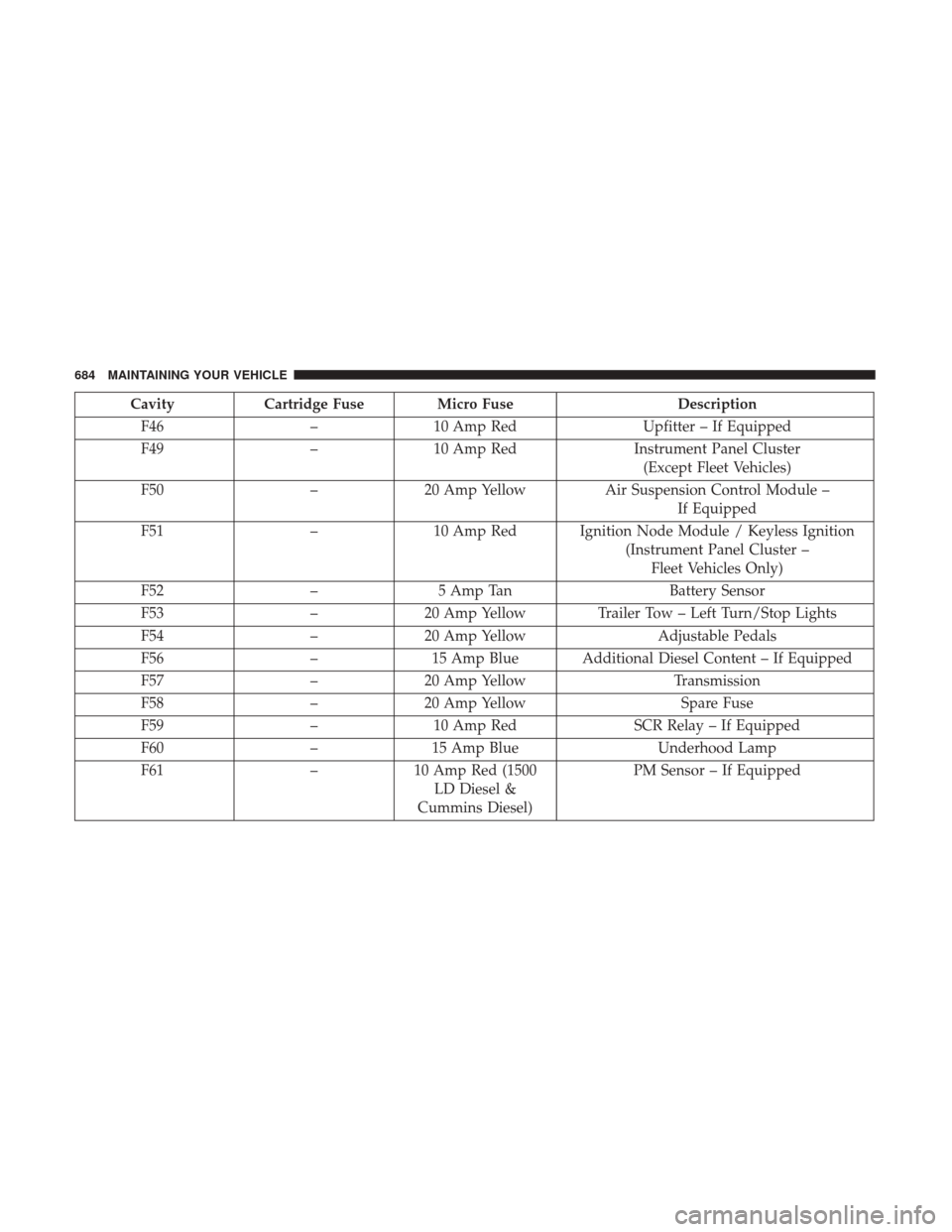
CavityCartridge Fuse Micro Fuse Description
F46 –10 Amp Red Upfitter – If Equipped
F49 –10 Amp Red Instrument Panel Cluster
(Except Fleet Vehicles)
F50 –20 Amp Yellow Air Suspension Control Module –
If Equipped
F51 –10 Amp Red Ignition Node Module / Keyless Ignition
(Instrument Panel Cluster –Fleet Vehicles Only)
F52 –5 Amp Tan Battery Sensor
F53 –20 Amp Yellow Trailer Tow – Left Turn/Stop Lights
F54 –20 Amp Yellow Adjustable Pedals
F56 –15 Amp Blue Additional Diesel Content – If Equipped
F57 –20 Amp Yellow Transmission
F58 –20 Amp Yellow Spare Fuse
F59 –10 Amp Red SCR Relay – If Equipped
F60 –15 Amp Blue Underhood Lamp
F61 –10 Amp Red (1500
LD Diesel &
Cummins Diesel) PM Sensor – If Equipped
684 MAINTAINING YOUR VEHICLE
Page 687 of 734
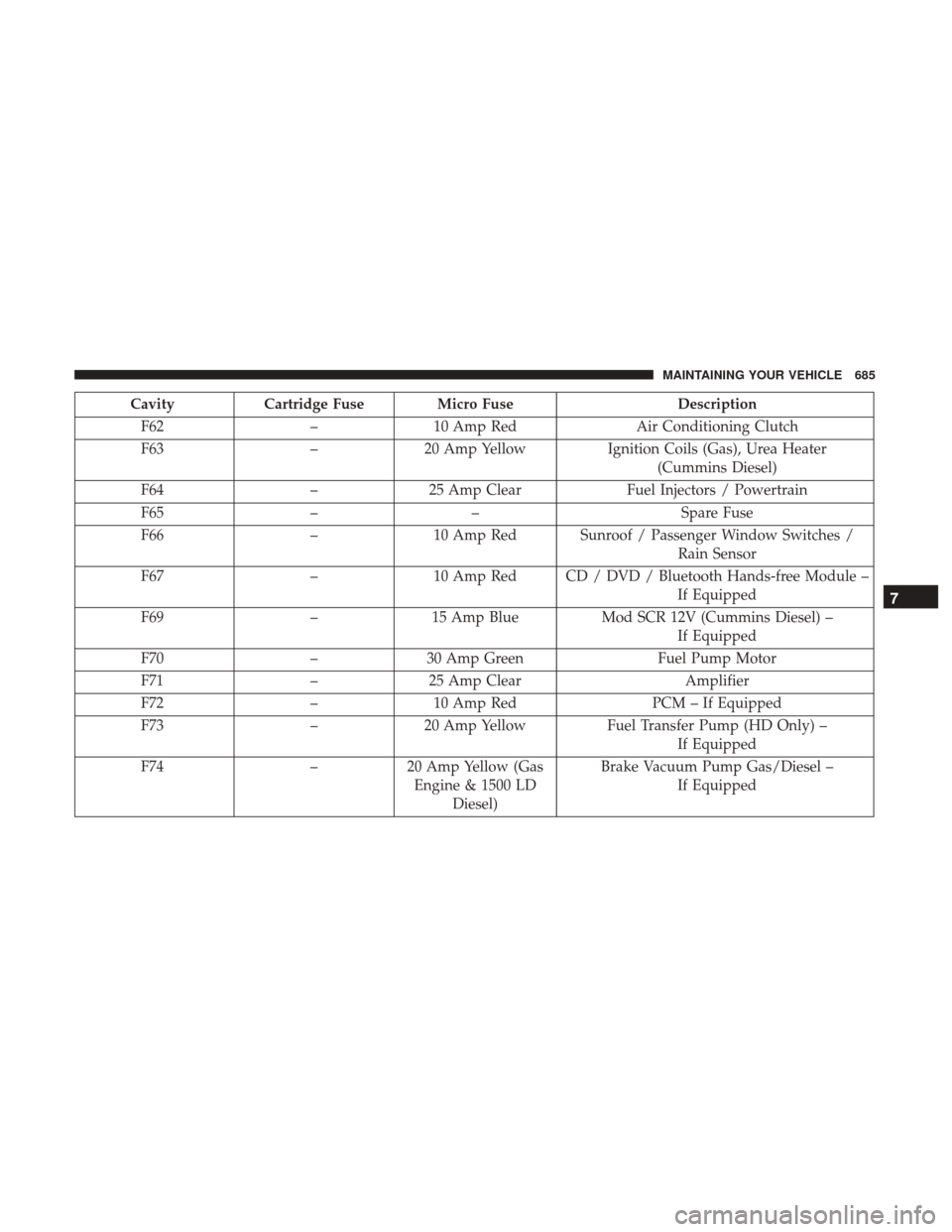
CavityCartridge Fuse Micro Fuse Description
F62 –10 Amp Red Air Conditioning Clutch
F63 –20 Amp Yellow Ignition Coils (Gas), Urea Heater
(Cummins Diesel)
F64 –25 Amp Clear Fuel Injectors / Powertrain
F65 –– Spare Fuse
F66 –10 Amp Red Sunroof / Passenger Window Switches /
Rain Sensor
F67 –10 Amp Red CD / DVD / Bluetooth Hands-free Module –
If Equipped
F69 –15 Amp Blue Mod SCR 12V (Cummins Diesel) –
If Equipped
F70 –30 Amp Green Fuel Pump Motor
F71 –25 Amp Clear Amplifier
F72 –10 Amp Red PCM – If Equipped
F73 –20 Amp Yellow Fuel Transfer Pump (HD Only) –
If Equipped
F74 –20 Amp Yellow (Gas
Engine & 1500 LD Diesel) Brake Vacuum Pump Gas/Diesel –
If Equipped
7
MAINTAINING YOUR VEHICLE 685