brake Ram 2500 2017 Owner's Guide
[x] Cancel search | Manufacturer: RAM, Model Year: 2017, Model line: 2500, Model: Ram 2500 2017Pages: 734, PDF Size: 7.3 MB
Page 267 of 734
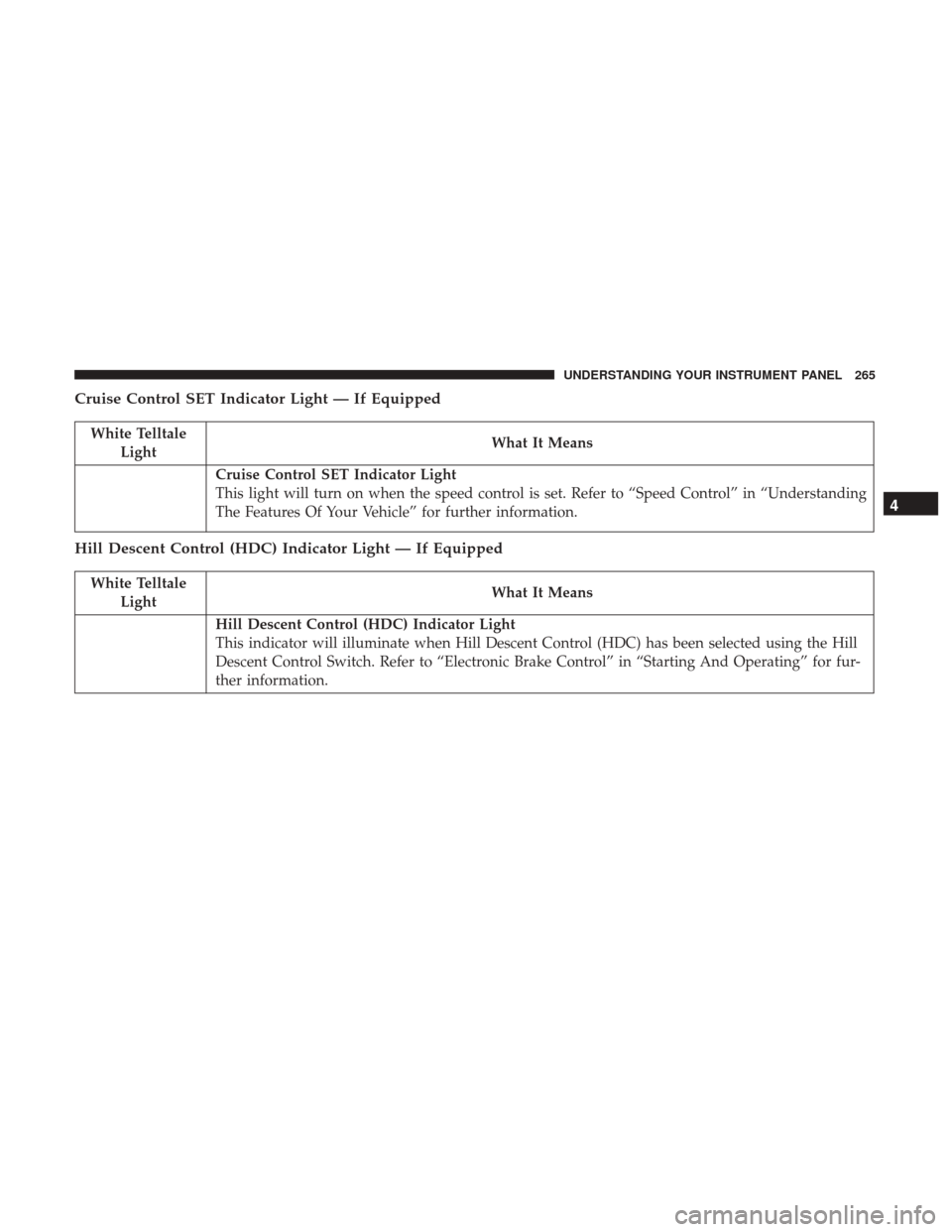
Cruise Control SET Indicator Light — If Equipped
White TelltaleLight What It Means
Cruise Control SET Indicator Light
This light will turn on when the speed control is set. Refer to “Speed Control” in “Understanding
The Features Of Your Vehicle” for further information.
Hill Descent Control (HDC) Indicator Light — If Equipped
White Telltale
Light What It Means
Hill Descent Control (HDC) Indicator Light
This indicator will illuminate when Hill Descent Control (HDC) has been selected using the Hill
Descent Control Switch. Refer to “Electronic Brake Control” in “Starting And Operating” for fur-
ther information.
4
UNDERSTANDING YOUR INSTRUMENT PANEL 265
Page 273 of 734
The instrument cluster display screens are located in the
center portion of the cluster and consists of eight sections:
1.
Main Screen — The inner ring of the display will illumi-
nate in grey under normal conditions, yellow for non
critical warnings, red for critical warnings, and white for
on demand information.
2.Audio / Phone Information and Submenu Information —
Whenever there are sub-menus available, the position
within the submenus is shown here.
3.Selectable Information (Compass, Temp, Range to Empty,
Trip A, Trip B, Average MPG, Trailer Trip (distance only),
Trailer Brake Gain, Time)
4. Telltales/Indicators
5. Gear Selector Status (PRNDL)
6. Selectable Menu Icons
7. Air Suspension Status – If Equipped
8. 4WD Status
9. Selectable Gauge 2 (Trans Temp, Oil Temp, Oil Life,Trailer Brake, Current MPG)
10. Selectable Gauge 1 (Trans Temp, Oil Temp, Oil Life, Trailer Brake, Current MPG) The instrument cluster display area will normally display
the main menu or the screens of a selected feature of the
main menu. The main display area also displays “pop up”
messages that consist of approximately 60 possible warn-
ing or information messages. These pop up messages fall
into several categories:
•
Five Second Stored Messages
When the appropriate conditions occur, this type of mes-
sage takes control of the main display area for five seconds
and then returns to the previous screen. Most of the
messages of this type are then stored (as long as the
condition that activated it remains active) and can be
reviewed from the “Messages” main menu item. As long as
there is a stored message, an “i” will be displayed in the
instrument cluster display’s compass/outside temp line.
Examples of this message type are “Right Front Turn Signal
Lamp Out” and “Low Tire Pressure.”
• Unstored Messages
This message type is displayed indefinitely or until the
condition that activated the message is cleared. Examples
of this message type are “Turn Signal On” (if a turn signal
is left on) and “Lights On” (if driver leaves the vehicle).
4
UNDERSTANDING YOUR INSTRUMENT PANEL 271
Page 274 of 734
•Unstored Messages Until RUN
These messages deal primarily with the Remote Start
feature. This message type is displayed until the ignition is
in the RUN state. Examples of this message type are
“Remote Start Aborted - Door Ajar” and “Press Brake
Pedal and Push Button to Start.”
• Five Second Unstored Messages
When the appropriate conditions occur, this type of mes-
sage takes control of the main display area for five seconds
and then returns to the previous screen. An example of this
message type is “Automatic High Beams On.”
Oil Life Reset
Your vehicle is equipped with an engine oil change indi-
cator system. The “Oil Change Required” message will
display in the instrument cluster display after a single
chime has sounded, to indicate the next scheduled oil
change interval. The engine oil change indicator system is
duty cycle based, which means the engine oil change
interval may fluctuate, dependent upon your personal
driving style.
NOTE: Use the steering wheel instrument cluster display
controls for the following procedure(s). Vehicles Equipped With Passive Entry
1. Without pushing the brake pedal, push the ENGINE
START/STOP button and place the ignition to the
ON/RUN position (do not start the engine).
2. Push and release the downarrow button to scroll
downward through the main menu to “Vehicle Info.”
3. Push and release the rightarrow button to access the
”Vehicle Info” screen, then scroll up or down to select
“Oil Life.”
4. Push and hold the rightarrow button to select “Reset”.
5. Push and release the downarrow button to select “Yes,”
then push and release the rightarrow button to select
reset of the Oil Life to 100%.
6. Push and release the uparrow button to exit the
instrument cluster display screen.
Vehicles Not Equipped With Passive Entry
1. Without pushing the brake pedal, cycle the ignition to the ON/RUN position (do not start the engine).
2. Push and release the downarrow button to scroll
downward through the main menu to “Vehicle Info.”
272 UNDERSTANDING YOUR INSTRUMENT PANEL
Page 276 of 734
Fuel Economy
Push and release theupordown arrow button until the
Fuel Economy menu item is highlighted in the instrument
cluster display. Push and Hold the rightarrow button to
reset Average Fuel Economy.
• Current Fuel Economy Gauge
• Average Fuel Economy Value
• Range To Empty
Trip A/Trip B
Push and release the upordown arrow button until the
Trip menu item is highlighted in the instrument cluster
display. Push and release the rightarrow button to enter
the submenus of Trip A and Trip B. The Trip A or Trip B
information will display the following:
• Distance
• Average MPG
• Elapsed Time
Push and hold rightarrow button to reset all information.
Stop/Start – If Equipped
Push and release the upordown arrow button until the
Stop/Start menu item is highlighted in the instrument
cluster display. Push and release the rightarrow button to
display the Stop/Start status.
Air Suspension — If Equipped
Push and release the upordown arrow button until the Air
Suspension menu item is highlighted in the instrument
cluster display. Push and release the rightarrow button to
display the Air Suspension status.
Trailer Tow
Push and release the upordown arrow button until the
Trailer Tow menu item is highlighted in the instrument
cluster display. Push and release the rightarrow button
and the next screen will display the following trailer trip
information:
• Trip (trailer specific) Distance: Push and hold the right
arrow button to reset the distance.
• Trailer Brake
• Output
• Type
• Gain
274 UNDERSTANDING YOUR INSTRUMENT PANEL
Page 280 of 734
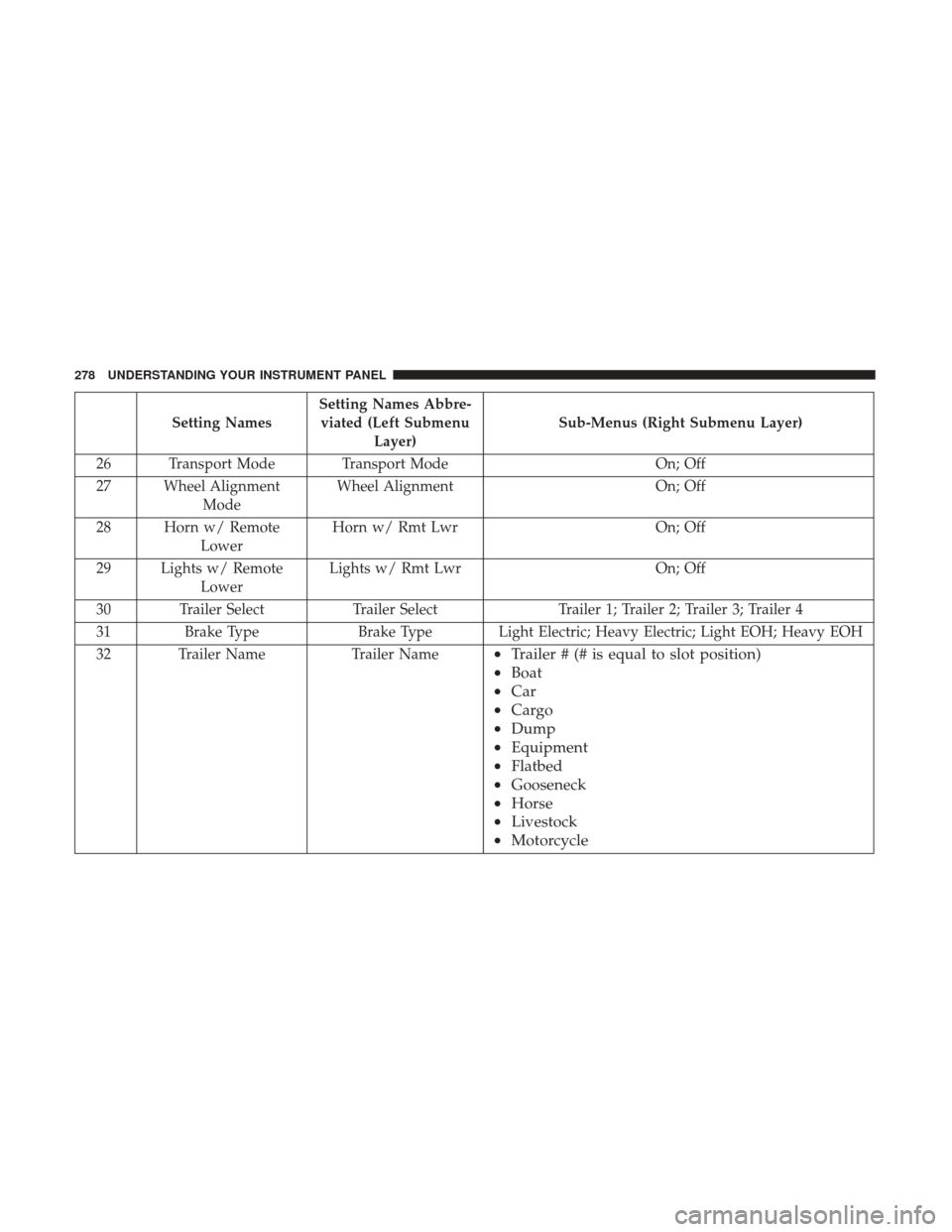
Setting NamesSetting Names Abbre-
viated (Left Submenu Layer) Sub-Menus (Right Submenu Layer)
26 Transport Mode Transport Mode On; Off
27 Wheel Alignment Mode Wheel Alignment
On; Off
28 Horn w/ Remote Lower Horn w/ Rmt Lwr
On; Off
29 Lights w/ Remote Lower Lights w/ Rmt Lwr
On; Off
30 Trailer Select Trailer SelectTrailer 1; Trailer 2; Trailer 3; Trailer 4
31 Brake Type Brake Type Light Electric; Heavy Electric; Light EOH; Heavy EOH
32 Trailer Name Trailer Name
•Trailer # (# is equal to slot position)
• Boat
• Car
• Cargo
• Dump
• Equipment
• Flatbed
• Gooseneck
• Horse
• Livestock
• Motorcycle
278 UNDERSTANDING YOUR INSTRUMENT PANEL
Page 282 of 734
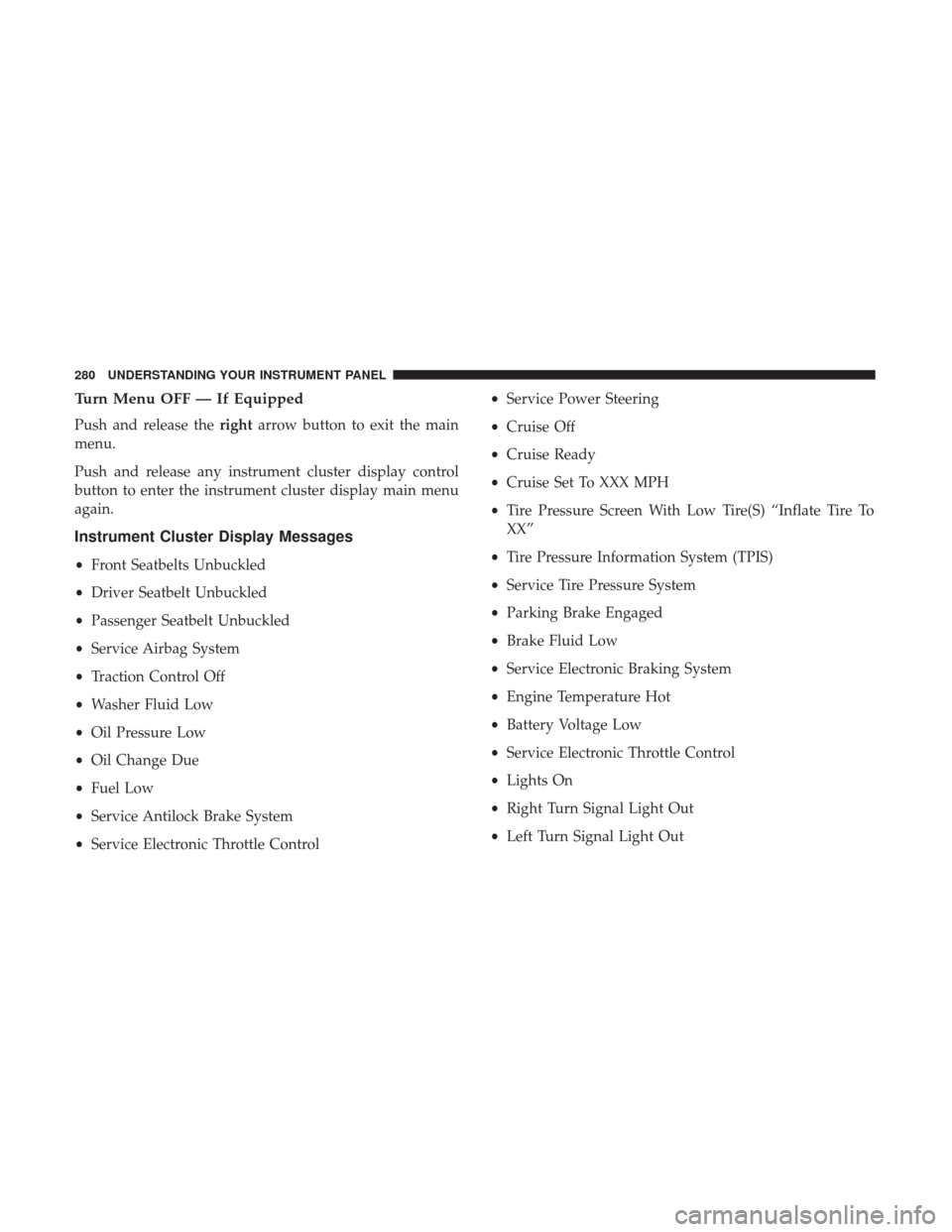
Turn Menu OFF — If Equipped
Push and release therightarrow button to exit the main
menu.
Push and release any instrument cluster display control
button to enter the instrument cluster display main menu
again.
Instrument Cluster Display Messages
• Front Seatbelts Unbuckled
• Driver Seatbelt Unbuckled
• Passenger Seatbelt Unbuckled
• Service Airbag System
• Traction Control Off
• Washer Fluid Low
• Oil Pressure Low
• Oil Change Due
• Fuel Low
• Service Antilock Brake System
• Service Electronic Throttle Control •
Service Power Steering
• Cruise Off
• Cruise Ready
• Cruise Set To XXX MPH
• Tire Pressure Screen With Low Tire(S) “Inflate Tire To
XX”
• Tire Pressure Information System (TPIS)
• Service Tire Pressure System
• Parking Brake Engaged
• Brake Fluid Low
• Service Electronic Braking System
• Engine Temperature Hot
• Battery Voltage Low
• Service Electronic Throttle Control
• Lights On
• Right Turn Signal Light Out
• Left Turn Signal Light Out
280 UNDERSTANDING YOUR INSTRUMENT PANEL
Page 283 of 734

•Turn Signal On
• Sound Horn With Remote Lock: Off; 1st Press; 2nd Press
• Vehicle Not In Park
• Key In Ignition
• Key In Ignition Lights On
• Remote Start Active Key To Run
• Remote Start Active Push Start Button
• Remote Start Aborted Fuel Low
• Remote Start Aborted Too Cold
• Remote Start Aborted Door Open
• Remote Start Aborted Hood Open
• Remote Start Aborted Trunk Open
• Remote Start Aborted Time Expired
• Remote Start Disabled Start To Reset
• Service Airbag System
• Service Airbag Warning Light
• Driver Seatbelt Unbuckled •
Passenger Seatbelt Unbuckled
• Front Seatbelts Unbuckled
• Door Open
• Doors Open
• Gear Not Available
• Shift Not Allowed
• Shift To Neutral Then Drive Or Reverse
• Autostick Unavailable Service Required
• Automatic Unavailable Use Autostick Service Req.
• Transmission Getting Hot Push Brake
• Trans. Hot Stop Safely Shift To Park Wait To Cool
• Transmission Cool Ready To Drive
• Trailer Brake Disconnected
• Service Transmission
• Service Shifter
• Engage Park Brake To Prevent Rolling
• Transmission Too Cold Idle With Engine On
4
UNDERSTANDING YOUR INSTRUMENT PANEL 281
Page 290 of 734
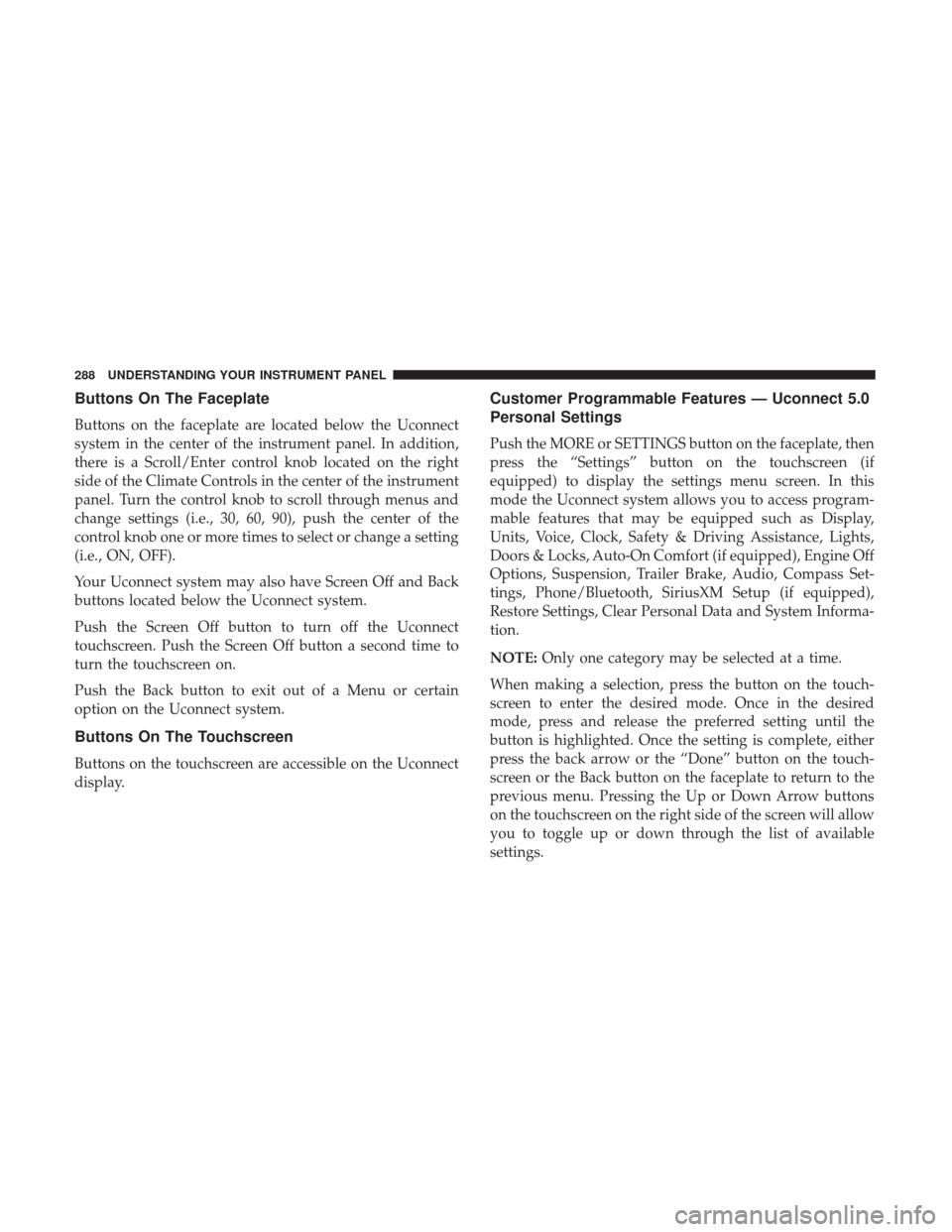
Buttons On The Faceplate
Buttons on the faceplate are located below the Uconnect
system in the center of the instrument panel. In addition,
there is a Scroll/Enter control knob located on the right
side of the Climate Controls in the center of the instrument
panel. Turn the control knob to scroll through menus and
change settings (i.e., 30, 60, 90), push the center of the
control knob one or more times to select or change a setting
(i.e., ON, OFF).
Your Uconnect system may also have Screen Off and Back
buttons located below the Uconnect system.
Push the Screen Off button to turn off the Uconnect
touchscreen. Push the Screen Off button a second time to
turn the touchscreen on.
Push the Back button to exit out of a Menu or certain
option on the Uconnect system.
Buttons On The Touchscreen
Buttons on the touchscreen are accessible on the Uconnect
display.
Customer Programmable Features — Uconnect 5.0
Personal Settings
Push the MORE or SETTINGS button on the faceplate, then
press the “Settings” button on the touchscreen (if
equipped) to display the settings menu screen. In this
mode the Uconnect system allows you to access program-
mable features that may be equipped such as Display,
Units, Voice, Clock, Safety & Driving Assistance, Lights,
Doors & Locks, Auto-On Comfort (if equipped), Engine Off
Options, Suspension, Trailer Brake, Audio, Compass Set-
tings, Phone/Bluetooth, SiriusXM Setup (if equipped),
Restore Settings, Clear Personal Data and System Informa-
tion.
NOTE:Only one category may be selected at a time.
When making a selection, press the button on the touch-
screen to enter the desired mode. Once in the desired
mode, press and release the preferred setting until the
button is highlighted. Once the setting is complete, either
press the back arrow or the “Done” button on the touch-
screen or the Back button on the faceplate to return to the
previous menu. Pressing the Up or Down Arrow buttons
on the touchscreen on the right side of the screen will allow
you to toggle up or down through the list of available
settings.
288 UNDERSTANDING YOUR INSTRUMENT PANEL
Page 302 of 734
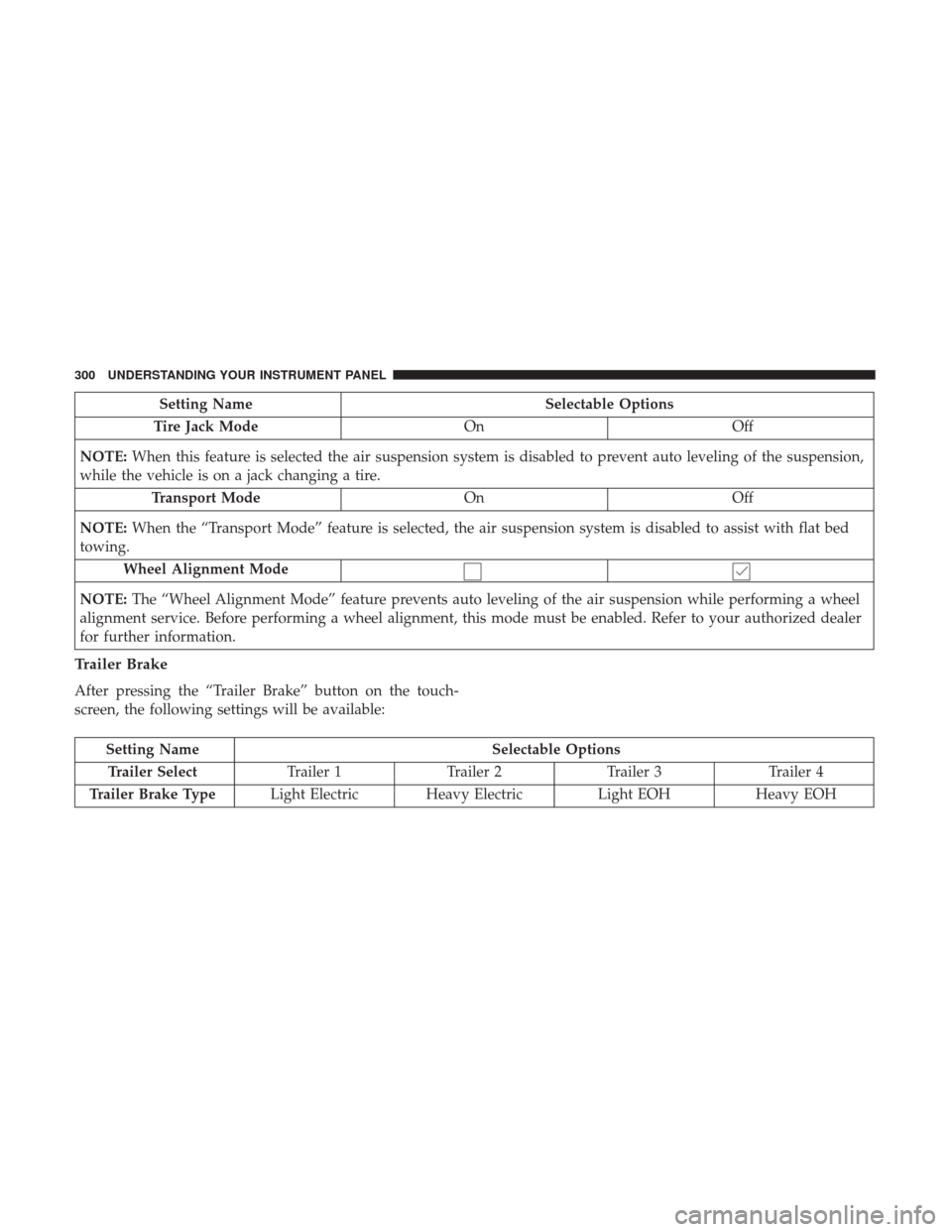
Setting NameSelectable Options
Tire Jack Mode OnOff
NOTE: When this feature is selected the air suspension system is disabled to prevent auto leveling of the suspension,
while the vehicle is on a jack changing a tire.
Transport Mode OnOff
NOTE: When the “Transport Mode” feature is selected, the air suspension system is disabled to assist with flat bed
towing.
Wheel Alignment Mode
NOTE: The “Wheel Alignment Mode” feature prevents auto leveling of the air suspension while performing a wheel
alignment service. Before performing a wheel alignment, this mode must be enabled. Refer to your authorized dealer
for further information.
Trailer Brake
After pressing the “Trailer Brake” button on the touch-
screen, the following settings will be available:
Setting Name Selectable Options
Trailer Select Trailer 1Trailer 2Trailer 3 Trailer 4
Trailer Brake Type Light Electric Heavy Electric Light EOHHeavy EOH
300 UNDERSTANDING YOUR INSTRUMENT PANEL
Page 309 of 734
Customer Programmable Features — Uconnect
8.4/8.4 NAV Personal Settings
Press the “Apps” button on the touchscreen then press the
“Settings” button on the touchscreen to display the settings
menu screen. In this mode the Uconnect system allows you
to access programmable features that may be equipped
such as Display, Voice, Clock, Safety & Driving Assistance,
Lights, Doors & Locks, Auto-On Comfort (if equipped),
Engine Off Options, Suspension, Trailer Brake, Audio,
Phone/Bluetooth, SiriusXM Setup (if equipped), Restore
Settings, Clear Personal Data and System Information.
NOTE:Only one category may be selected at a time. When making a selection, press the button on the touch-
screen to enter the desired mode. Once in the desired
mode, press and release the preferred setting until a
check-mark appears next to the setting, showing that
setting has been selected. Once the setting is complete,
either press the back arrow button on the touchscreen or
the Back button on the faceplate to return to the previous
menu or press the “X” button on the touchscreen to close
out of the settings screen. Pressing the Up or Down Arrow
buttons on the touchscreen on the right side of the screen
will allow you to toggle up or down through the list of
available settings.
NOTE:
All settings should be changed with the ignition in
the RUN position.
4
UNDERSTANDING YOUR INSTRUMENT PANEL 307