change Ram 2500 2018 Manual PDF
[x] Cancel search | Manufacturer: RAM, Model Year: 2018, Model line: 2500, Model: Ram 2500 2018Pages: 372, PDF Size: 7.1 MB
Page 318 of 372
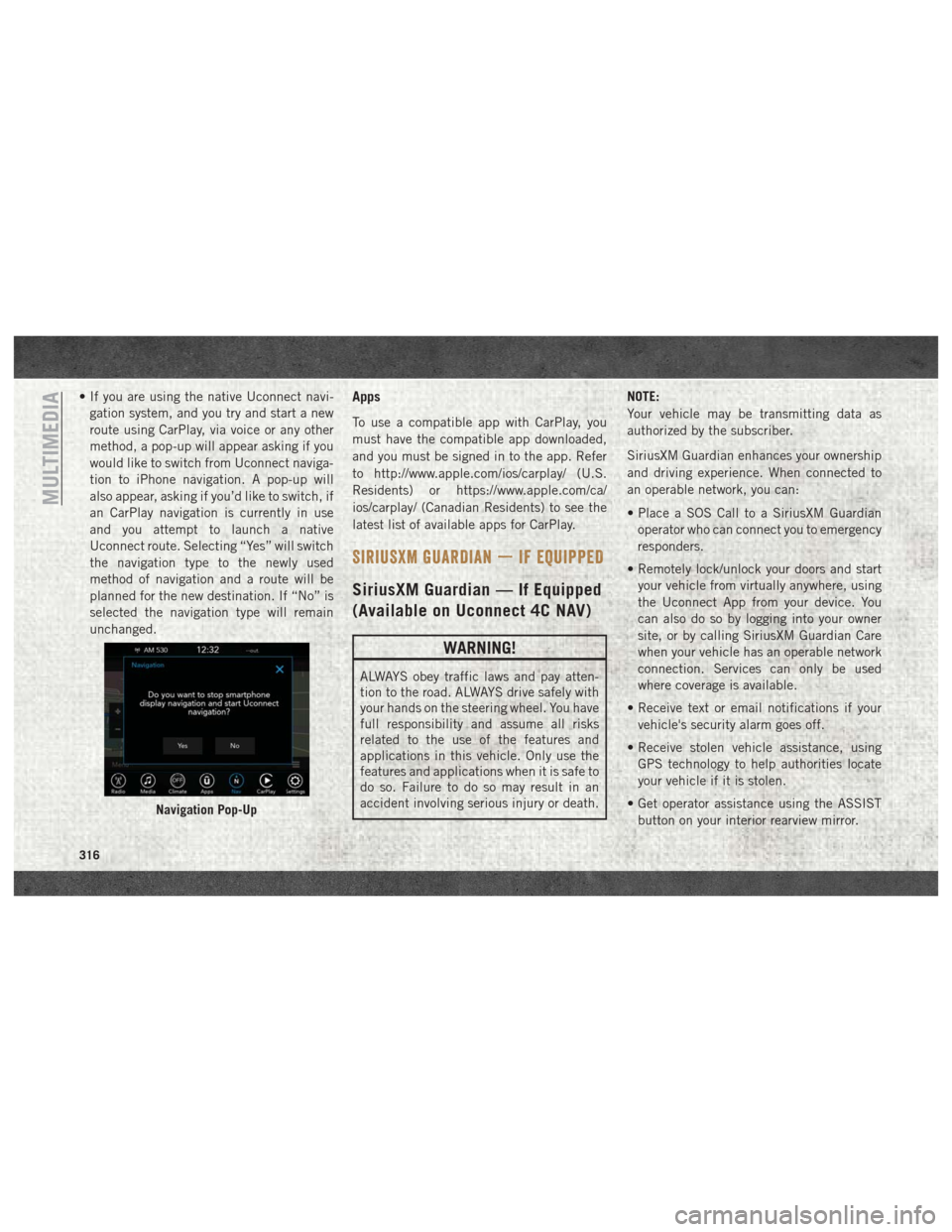
• If you are using the native Uconnect navi-gation system, and you try and start a new
route using CarPlay, via voice or any other
method, a pop-up will appear asking if you
would like to switch from Uconnect naviga-
tion to iPhone navigation. A pop-up will
also appear, asking if you’d like to switch, if
an CarPlay navigation is currently in use
and you attempt to launch a native
Uconnect route. Selecting “Yes” will switch
the navigation type to the newly used
method of navigation and a route will be
planned for the new destination. If “No” is
selected the navigation type will remain
unchanged.Apps
To use a compatible app with CarPlay, you
must have the compatible app downloaded,
and you must be signed in to the app. Refer
to http://www.apple.com/ios/carplay/ (U.S.
Residents) or https://www.apple.com/ca/
ios/carplay/ (Canadian Residents) to see the
latest list of available apps for CarPlay.
SIRIUSXM GUARDIAN — IF EQUIPPED
SiriusXM Guardian — If Equipped
(Available on Uconnect 4C NAV)
WARNING!
ALWAYS obey traffic laws and pay atten-
tion to the road. ALWAYS drive safely with
your hands on the steering wheel. You have
full responsibility and assume all risks
related to the use of the features and
applications in this vehicle. Only use the
features and applications when it is safe to
do so. Failure to do so may result in an
accident involving serious injury or death. NOTE:
Your vehicle may be transmitting data as
authorized by the subscriber.
SiriusXM Guardian enhances your ownership
and driving experience. When connected to
an operable network, you can:
• Place a SOS Call to a SiriusXM Guardian
operator who can connect you to emergency
responders.
• Remotely lock/unlock your doors and start your vehicle from virtually anywhere, using
the Uconnect App from your device. You
can also do so by logging into your owner
site, or by calling SiriusXM Guardian Care
when your vehicle has an operable network
connection. Services can only be used
where coverage is available.
• Receive text or email notifications if your vehicle's security alarm goes off.
• Receive stolen vehicle assistance, using GPS technology to help authorities locate
your vehicle if it is stolen.
• Get operator assistance using the ASSIST button on your interior rearview mirror.
Navigation Pop-Up
MULTIMEDIA
316
Page 327 of 372
TIPS CONTROLS AND GENERAL
INFORMATION
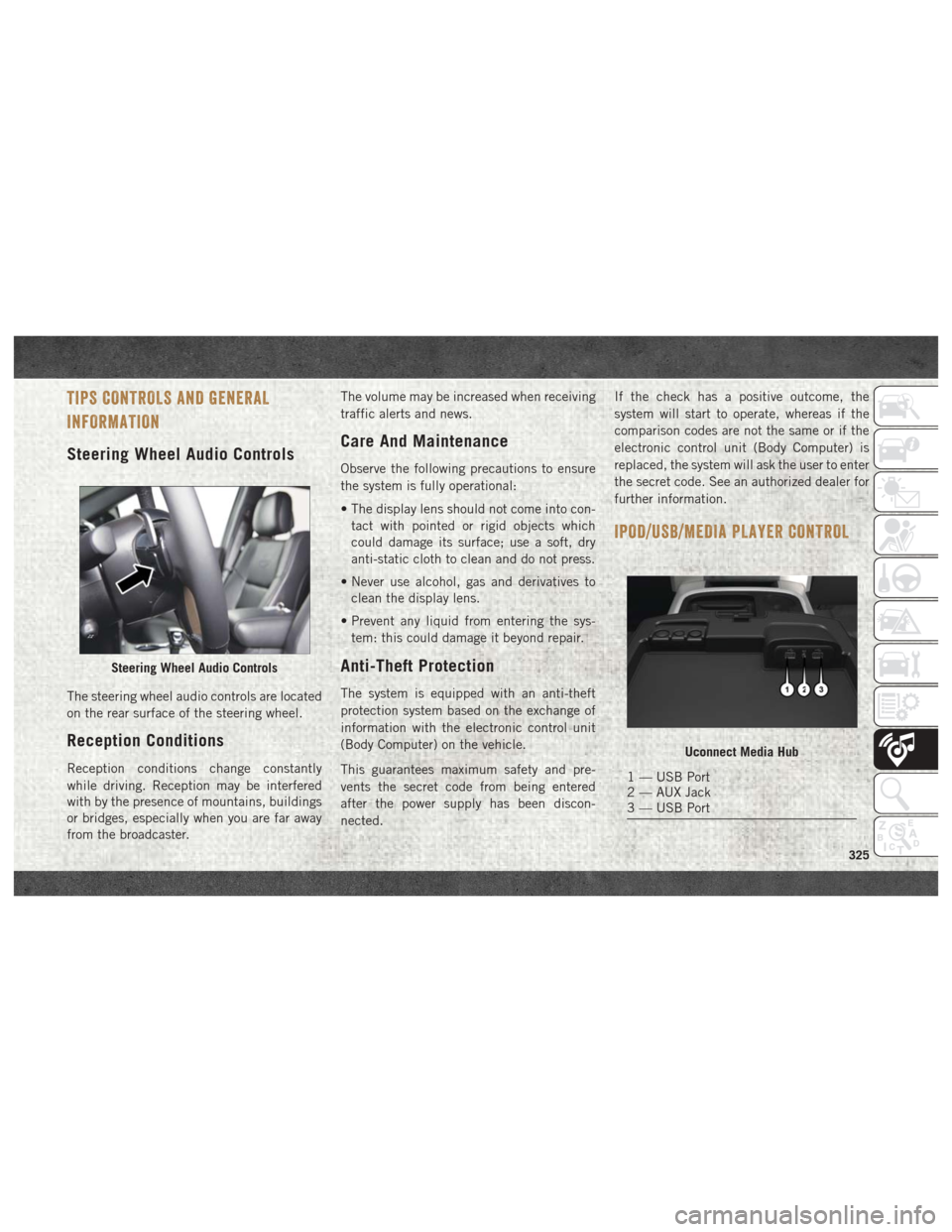
Steering Wheel Audio Controls
The steering wheel audio controls are located
on the rear surface of the steering wheel.
Reception Conditions
Reception conditions change constantly
while driving. Reception may be interfered
with by the presence of mountains, buildings
or bridges, especially when you are far away
from the broadcaster.The volume may be increased when receiving
traffic alerts and news.
Care And Maintenance
Observe the following precautions to ensure
the system is fully operational:
• The display lens should not come into con-
tact with pointed or rigid objects which
could damage its surface; use a soft, dry
anti-static cloth to clean and do not press.
• Never use alcohol, gas and derivatives to clean the display lens.
• Prevent any liquid from entering the sys- tem: this could damage it beyond repair.
Anti-Theft Protection
The system is equipped with an anti-theft
protection system based on the exchange of
information with the electronic control unit
(Body Computer) on the vehicle.
This guarantees maximum safety and pre-
vents the secret code from being entered
after the power supply has been discon-
nected. If the check has a positive outcome, the
system will start to operate, whereas if the
comparison codes are not the same or if the
electronic control unit (Body Computer) is
replaced, the system will ask the user to enter
the secret code. See an authorized dealer for
further information.
IPOD/USB/MEDIA PLAYER CONTROL
Steering Wheel Audio Controls
Uconnect Media Hub
1 — USB Port
2 — AUX Jack
3 — USB Port
325
Page 328 of 372
There are many ways to play music from
MP3 players, or USB devices through your
vehicle's sound system. Press your Media
button on the touchscreen to begin.
Audio Jack (AUX)
• The AUX allows a device to be plugged intothe radio and utilize the vehicle’s sound
system, using a 3.5 mm audio cable, to
amplify the source and play through the
vehicle speakers.
• Pressing the “AUX” button on the touch- screen will change the mode to auxiliary
device if the audio jack is connected, allow-
ing the music from your device to be heard
through the vehicle's speakers. To activate
the AUX, plug in the audio jack.
• The functions of the device are controlled using the device buttons. The volume may
be controlled using the radio or device.
USB Port
• Connect your compatible device using aUSB cable into the USB Port. USB Memory
sticks with audio files can also be used.
Audio from the device can be played on the
vehicles sound system while providing
metadata (artist, track title, album, etc.)
information on the radio display.
• When connected, the compatible USB de- vice can be controlled using the radio or
Steering Wheel Audio Controls to play, skip
to the next or previous track, browse, and
list the contents.
• The battery charges when plugged into the USB port (if supported by the specific de-
vice).
• To route the USB cable out of the center console, use the access cut out. NOTE:
When connecting your device for the first
time, the system may take several minutes to
read your music, depending on the number of
files. For example, the system will take ap-
proximately five minutes for every
1,000 songs loaded on the device. Also dur-
ing the reading process, the Shuffle and
Browse functions will be disabled. This pro-
cess is needed to ensure the full use of your
features and only happens the first time it is
connected. After the first time, the reading
process of your device will take considerably
less time unless changes are made or new
songs are added to the playlist.
Bluetooth Streaming Audio
If using a Bluetooth equipped device you may
also be able to stream music to your vehicle's
sound system. Your connected device must
be Bluetooth compatible and paired with
your system (see Uconnect Phone for pairing
instructions). You can access the music from
your connected Bluetooth device by pressing
the Bluetooth button on the touchscreen
while in Media mode.
MULTIMEDIA
326
Page 345 of 372

Media
Uconnect offers connections via USB,
Bluetooth and auxiliary ports (If Equipped).
Voice operation is only available for con-
nected USB and iPod devices. (Remote CD
player optional and not available on all ve-
hicles.)
Push the VR button
. After the beep, say
one of the following commands and follow
the prompts to switch your media source or
choose an artist.
• Change source to Bluetooth
• Change source to iPod
• Change source to USB
• Play artist Beethoven; Play albumGreatest
Hits; Play song Moonlight Sonata; Play
genre Classical
TIP: Press the Browse button on the touch-
screen to see all of the music on your iPod or
USB device. Your Voice Command must
match exactly how the artist, album, song
and genre information is displayed.
Phone
Making and answering hands-free phone
calls is easy with Uconnect. When the Phone-
book button is illuminated on your touch-
screen, your system is ready.
U.S. residents can visit UconnectPhone.com
to check device and feature compatibility and
to find device pairing instructions.
Push the Phone button
. After the beep,
say one of the following commands…
• Call John Smith
• Dial 123-456-7890 and follow the system
prompts
• Redial (call previous outgoing phone num-
ber)
• Call back (call previous incoming phone
number)Uconnect 3 With 5–inch Display Media
Uconnect 4C/4C NAV With 8.4–inch Display Media
343
Page 350 of 372
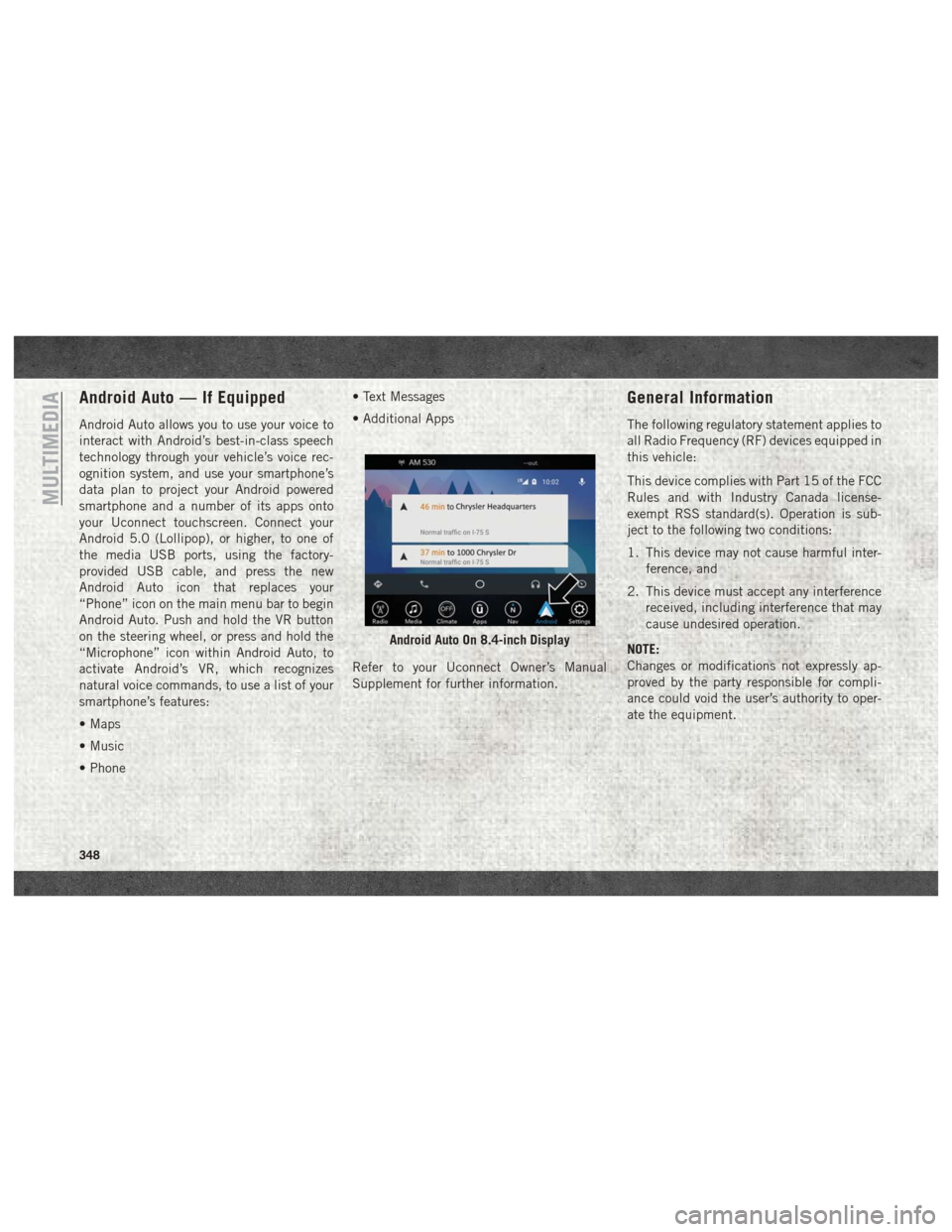
Android Auto — If Equipped
Android Auto allows you to use your voice to
interact with Android’s best-in-class speech
technology through your vehicle’s voice rec-
ognition system, and use your smartphone’s
data plan to project your Android powered
smartphone and a number of its apps onto
your Uconnect touchscreen. Connect your
Android 5.0 (Lollipop), or higher, to one of
the media USB ports, using the factory-
provided USB cable, and press the new
Android Auto icon that replaces your
“Phone” icon on the main menu bar to begin
Android Auto. Push and hold the VR button
on the steering wheel, or press and hold the
“Microphone” icon within Android Auto, to
activate Android’s VR, which recognizes
natural voice commands, to use a list of your
smartphone’s features:
• Maps
• Music
• Phone• Text Messages
• Additional Apps
Refer to your Uconnect Owner’s Manual
Supplement for further information.
General Information
The following regulatory statement applies to
all Radio Frequency (RF) devices equipped in
this vehicle:
This device complies with Part 15 of the FCC
Rules and with Industry Canada license-
exempt RSS standard(s). Operation is sub-
ject to the following two conditions:
1. This device may not cause harmful inter-
ference, and
2. This device must accept any interference received, including interference that may
cause undesired operation.
NOTE:
Changes or modifications not expressly ap-
proved by the party responsible for compli-
ance could void the user’s authority to oper-
ate the equipment.
Android Auto On 8.4-inch Display
MULTIMEDIA
348
Page 361 of 372

FlashersTurn Signal ........32, 33, 83, 136
Flash-To-Pass .................32
Flat Tire Stowage ..............214
Fluid, Brake ..............282, 284
Fluid Capacities ...........278, 279
Fluid Leaks ..................136
Fluids And Lubricants . . . .280, 283, 285
Fog Lights .................32, 82
Folding Rear Seat ...............22
Four-Way Hazard Flasher ..........202
Four Wheel Drive ..............162
Freeing A Stuck Vehicle ..........224
Fuel Adding ...........181, 182, 186
Additives .................182
Diesel ...............283, 285
Filter ................249, 253
Light ....................81
Materials Added ............182
Octane Rating ..............280
Requirements ..............278
Tank Capacity ..........278, 279
Fueling .................182, 186
Fuses .....................203
Garage Door Opener (HomeLink) ......51Gauges
Voltmeter .............149, 151
Gear Select Lever Override ........221
General Information .............93
Guide, Body Builders .............2
Hands-Free Phone (Uconnect) ......332
Hazard Warning Flasher ..........202
Headlight ....................32
Headlights Automatic .................33
Delay ....................32
High Beam ................32
High Beam/Low Beam Select Switch .32
Lights On Reminder ...........32
Passing ..................32
Switch ...................32
Time Delay ................
32
Head Restraints ................27
High Beam/Low Beam Select (Dimmer) Switch ....................32
Hoisting ....................257
HomeLink (Garage Door Opener) ......51
Hood Prop ...................50
Hood Release .................50
Hub Caps ...................217 Idle Up Feature
...............152
Instrument Cluster ..............83
Integrated Trailer Brake Controls .....192
Intermittent Wipers (Delay Wipers) ....35
Intervention Regeneration Strategy . .67, 70
Introduction ...................1
Inverter Outlet (115V) ............56
iPod/USB/MP3 Control Bluetooth Streaming Audio ......332
Jump Starting ................218
Key Fob Panic Alarm ................15
Keyless Enter-N-Go ..........19, 146
Passive Entry ...............19
Passive Entry Programming .......19
Keys .......................13
Lane Change And Turn Signals . . . .32, 33
Lane Change Assist ...........32, 34
Latches ....................136
Hood ....................50
Leaks, Fluid .................136
Life Of Tires .................267
Light Bulbs ..............136, 202
Lights .....................136
359
Page 362 of 372

AirBag ............76, 104, 135
Automatic Headlights..........33
Battery Saver ...............32
Brake Warning ..............76
Bulb Replacement ...........202
Cargo ....................34
Cruise .................83, 84
Daytime Running ............32
Dimmer Switch, Headlight .......32
Engine Temperature Warning .....77
Exterior ..................136
Fog .....................82
Hazard Warning Flasher ........202
Headlights .................32
Headlights On Reminder ........32
Headlight Switch .............32
High Beam ................32
High Beam/Low Beam Select .....32
Instrument Cluster ............32
Lights On Reminder ...........32
Low Fuel ..................81
Malfunction Indicator (Check Engine) .78
Park ....................83
Passing ..................32
Seat Belt Reminder ...........76
Security Alarm ..............77
Service ..................202 Tire Pressure Monitoring (TPMS) .79, 88
Turn Signal
.......32, 33, 83, 136
Warning (Instrument Cluster
Description) .............77, 83
Loading Vehicle Tires ...................261
Low Tire Pressure System ..........88
Lug Nuts ...................276
Maintenance Plan ..........235, 239
Maintenance Schedule .......230, 234, 237, 239
Malfunction Indicator Light (Check Engine) ...............78
Manual, Service ...............355
Manual Transmission Lubricant Selection ..........282
Memory Feature (Memory Seat) ......22
Memory Seat ..................22
Memory Seats And Radio ..........22
Mirrors .....................31
Memory ..................22
Monitor, Tire Pressure System .......88
Mopar .....................287
Mopar
Accessories .............287
Multi-Function Control Lever ........32Navigation
...........327, 329, 330
Navigation System (Uconnect GPS) . . .179
New Vehicle Break-In Period . . . .153, 154
Occupant Restraints .............93
Oil Change Indicator ............238
Oil, Engine ...........280, 283, 285
Capacity ..............278, 279
Filter ............280, 283, 285
Pressure Warning Light .........77
Recommendation ...........278
Viscosity .................278
Oil Pressure Light ...............77
Onboard Diagnostic System .........84
Operating Precautions ............84
Overheating, Engine ............220
Owner's Manual (Operator Manual) . . .355
Panic Alarm ..................15
ParkSense System, Rear ..........179
Passive Entry .................19
Pedals, Adjustable ..............30
Perform Service Indicator, Reset .....239
Personalized Menu Bar ...........309
Pets ......................133
Phone, Hands-Free (Uconnect) ......332
Phone (Pairing) ...............334
INDEX
360