wipers Ram 2500 2019 User Guide
[x] Cancel search | Manufacturer: RAM, Model Year: 2019, Model line: 2500, Model: Ram 2500 2019Pages: 696, PDF Size: 13.89 MB
Page 599 of 696
MULTIMEDIA 597
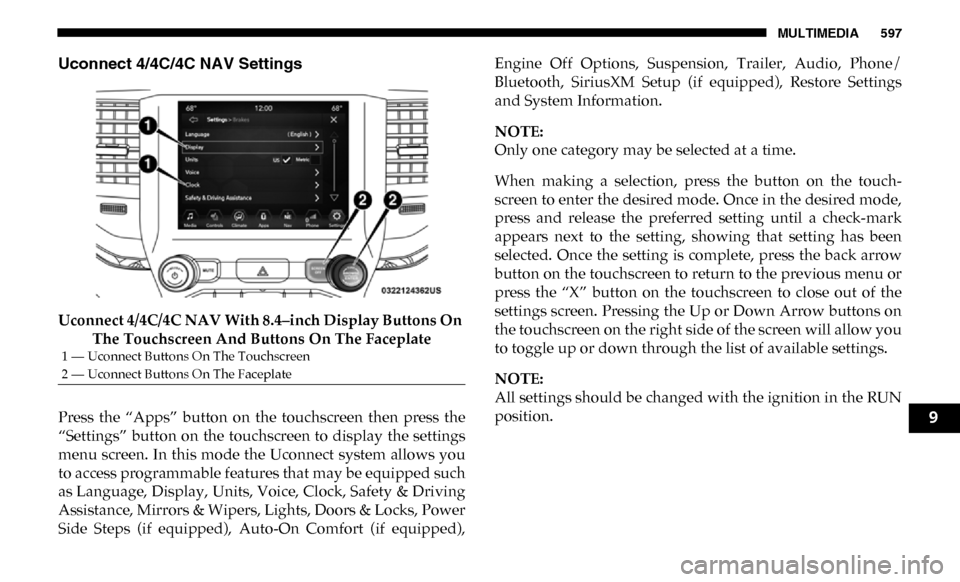
Uconnect 4/4C/4C NAV Settings
Uconnect 4/4C/4C NAV With 8.4–inch Display Buttons On The Touchscreen And Buttons On The Faceplate
Press the “Apps” button on the touchscreen then press the
“Settings” button on the touchscreen to display the settings
menu screen. In this mode the Uconnect system allows you
to access programmable features that may be equipped such
as Language, Display, Units, Voice, Clock, Safety & Driving
Assistance, Mirrors & Wipers, Lights, Doors & Locks, Power
Side Steps (if equipped), Auto-On Comfort (if equipped), Engine Off Options, Suspension, Trailer, Audio, Phone/
Bluetooth, SiriusXM Setup (if equipped), Restore Settings
and System Information.
NOTE:
Only one category may be selected at a time.
When making a selection, press the button on the touch
-
screen to enter the desired mode. Once in the desired mode,
press and release the preferred setting until a check-mark
appears next to the setting, showing that setting has been
selected. Once the setting is complete, press the back arrow
button on the touchscreen to return to the previous menu or
press the “X” button on the touchscreen to close out of the
settings screen. Pressing the Up or Down Arrow buttons on
the touchscreen on the right side of the screen will allow you
to toggle up or down through the list of available settings.
NOTE:
All settings should be changed with the ignition in the RUN
position.
1 — Uconnect Buttons On The Touchscreen
2 — Uconnect Buttons On The Faceplate
9
Page 610 of 696

608 MULTIMEDIA
Mirrors & Wipers
After pressing the “Mirrors & Wipers” button on the touchscreen, the following settings will be available:Setting Name Selectable Options
Tilt Side Mirrors In Reverse — If
Equipped On
Off
NOTE:
When the “Tilt Side Mirrors In Reverse” feature is selected, the outside side-view mirrors will tilt downward when the igni -
tion is in the RUN position and the transmission gear selector is in the REVERSE position. The mirrors will move back to
their previous position when the transmission is shifted out of REVERSE.
Rain Sensing Auto Wipers — If
Equipped On
Off
NOTE:
Automatically adjusts the wiper speed based on the amount of precipitation.
Headlights with Wipers OnOff
Page 611 of 696

MULTIMEDIA 609
Lights
After pressing the “Lights” button on the touchscreen, the following settings will be available:Setting Name Selectable Options
Headlight Off Delay –+
NOTE:
When the “Headlight Off Delay” feature is selected, the driver can choose to have the headlights remain on for 0, 30, 60, or
90 seconds when exiting the vehicle. Headlight Illumination On Approach –+
NOTE:
When the “Headlight Illumination On Approach” feature is selected, the headlights will activate and remain on for 0, 30, 60,
or 90 seconds when the doors are unlocked with the key fob. Headlights With Wipers — If Equipped On
Off
NOTE:
When the “Headlights With Wipers” feature is selected, and the headlight switch is in the AUTO position, the headlights
turn on approximately ten seconds after the wipers are turned on. The headlights also turn off when the wipers are turned
off if they were turned on by this feature. Auto Dim High Beams — If Equipped OnOff
NOTE:
When the “Auto Dim High Beams” feature is selected, the high beam headlights deactivate automatically under certain
conditions.
9
Page 623 of 696
MULTIMEDIA 621
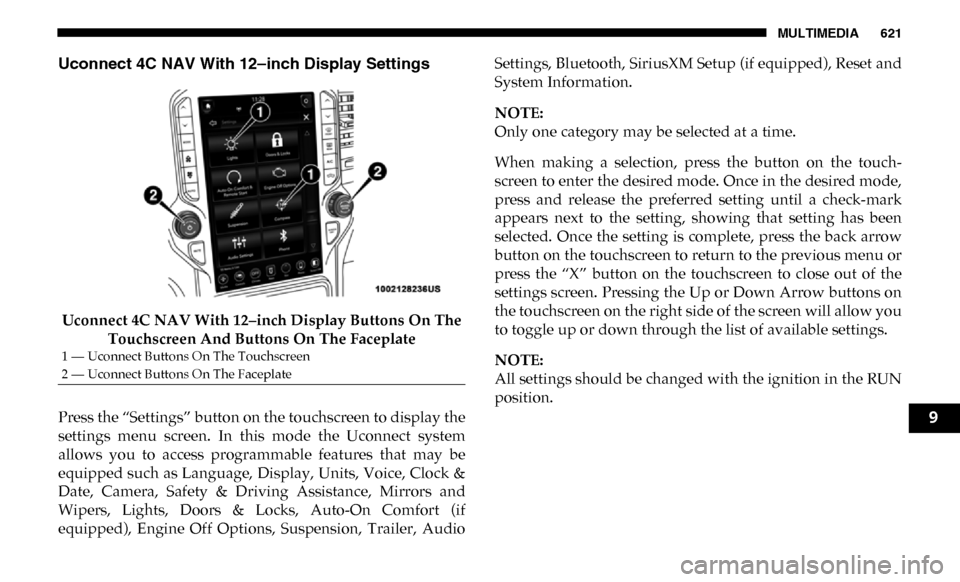
Uconnect 4C NAV With 12–inch Display Settings
Uconnect 4C NAV With 12–inch Display Buttons On The Touchscreen And Buttons On The Faceplate
Press the “Settings” button on the touchscreen to display the
settings menu screen. In this mode the Uconnect system
allows you to access programmable features that may be
equipped such as Language, Display, Units, Voice, Clock &
Date, Camera, Safety & Driving Assistance, Mirrors and
Wipers, Lights, Doors & Locks, Auto-On Comfort (if
equipped), Engine Off Options, Suspension, Trailer, Audio Settings, Bluetooth, SiriusXM Setup (if equipped), Reset and
System Information.
NOTE:
Only one category may be selected at a time.
When making a selection, press the button on the touch
-
screen to enter the desired mode. Once in the desired mode,
press and release the preferred setting until a check-mark
appears next to the setting, showing that setting has been
selected. Once the setting is complete, press the back arrow
button on the touchscreen to return to the previous menu or
press the “X” button on the touchscreen to close out of the
settings screen. Pressing the Up or Down Arrow buttons on
the touchscreen on the right side of the screen will allow you
to toggle up or down through the list of available settings.
NOTE:
All settings should be changed with the ignition in the RUN
position.
1 — Uconnect Buttons On The Touchscreen
2 — Uconnect Buttons On The Faceplate
9
Page 631 of 696

MULTIMEDIA 629
Mirrors & Wipers
After pressing the “Mirror and Wipers” button on the touchscreen, the following settings will be available:Setting Name Selectable Options
Tilt Side Mirrors In Reverse — If
Equipped On
Off
NOTE:
When the “Tilt Side Mirrors In Reverse” feature is selected, the outside side-view mirrors will tilt downward when the igni -
tion is in the RUN position and the transmission gear selector is in the REVERSE position. The mirrors will move back to
their previous position when the transmission is shifted out of REVERSE.
Rain Sensing Auto Wipers OnOff
NOTE:
Automatically adjusts the wiper speed based on the amount of precipitation.
Headlights with Wipers OnOff
9
Page 632 of 696

630 MULTIMEDIA
Lights
After pressing the “Lights” button on the touchscreen, the following settings will be available:Setting Name Selectable Options
Headlight Illumination On Approach –+
NOTE:
When the “Headlight Illumination On Approach” feature is selected, the headlights will activate and remain on for 0, 30, 60,
or 90 seconds when the doors are unlocked with the key fob. Headlight Off Delay -+
NOTE:
When the “Headlight Off Delay” feature is selected, the driver can choose to have the headlights remain on for 0, 30, 60, or
90 seconds when exiting the vehicle. Headlights With Wipers — If Equipped On
Off
NOTE:
When the “Headlights With Wipers” feature is selected, and the headlight switch is in the AUTO position, the headlights
turn on approximately ten seconds after the wipers are turned on. The headlights also turn off when the wipers are turned
off if they were turned on by this feature. Auto Dim High Beams — If Equipped OnOff
NOTE:
When the “Auto Dim High Beams” feature is selected, the high beam headlights deactivate automatically under certain
conditions. Daytime Running Lights OnOff
Page 682 of 696

680
Center High Mounted Stop Light......................................... 453
Center Seat Storage Compartment ....................................... 113
Changing A Flat Tire .............................................................. 469
Chart, Tire Sizing .................................................................... 533
Check Engine Light (Malfunction Indicator Light) ........... 193
Checking Your Vehicle For Safety ........................................ 286
Checks, Safety .......................................................................... 286
Child Restraint ........................................................................ 258
Child Restraints Booster Seats ........................................................................ 262
Child Seat Installation ................................................ 275, 277
How To Stow An unused ALR Seat Belt ......................... 273Infant And Child Restraints .............................................. 260Locating The LATCH Anchorages ................................... 269
Lower Anchors And Tethers For Children ..................... 264Older Children And Child Restraints .............................. 261
Seating Positions ................................................................. 263
Clean Air Gasoline .................................................................. 568
Cleaning Wheels................................................................................... 551
Climate Control ......................................................................... 79 Automatic ............................................................................... 83
Manual .................................................................................... 79
Cold Weather Operation........................................................ 296
Compact Disc (CD) Maintenance ......................................... 672
Compact Spare Tire ................................................................ 549 Contract, Service......................................................................675
Cooling Pressure Cap (Radiator Cap) ..................................525
Cooling System ........................................................................522
Adding Coolant (Antifreeze) .............................................524
Coolant Level ...............................................................522, 525Cooling Capacity .................................................................571
Disposal Of Used Coolant..................................................525Drain, Flush, And Refill .....................................................523
Inspection ............................................................................. 525
Points To Remember ........................................................... 526Pressure Cap ........................................................................525Radiator Cap ........................................................................525Selection Of Coolant (Antifreeze) .....................523, 571, 572
Corrosion Protection ...............................................................557
Cruise Control (Speed Control) ....................................354, 357
Cruise Light .....................................................................191, 192
Cupholders...............................................................................122
Customer Assistance ..............................................................673
Cybersecurity ...........................................................................576 D
Daytime Running Lights ..........................................................68
Dealer Service ..........................................................................506
Defroster, Rear Window ..........................................................79
Defroster, Windshield ......................................................79, 287
Delay (Intermittent) Wipers ....................................................77
Diagnostic System, Onboard .................................................192
Page 685 of 696

683
Glass Cleaning ......................................................................... 563
Gross Axle Weight Rating ..................................................... 412
Gross Vehicle Weight Rating ................................................ 412
GuideBody Builders ........................................................................ 15
GVWR ....................................................................................... 410 H
Hazard Driving Through Flowing, Rising, Or Shallow Standing
Water ..................................................................................... 437
Hazard Warning Flashers ...................................................... 440
Head Restraints ......................................................................... 51
Head Rests ................................................................................. 51
Headlights ................................................................................ 447 Automatic High Beam .......................................................... 68
Cleaning................................................................................ 558
High Beam.............................................................................. 68
Lights On Reminder ............................................................. 70
Passing .................................................................................... 69
Switch...................................................................................... 67
Heated Mirrors .......................................................................... 63
Heater, Engine Block .............................................................. 297
Hill Descent Control ............................................................... 206
Hill Descent Control Indicator .............................................. 206
Hill Start Assist........................................................................ 198 Hitches
Trailer Towing .....................................................................417
Hoisting ....................................................................................531
HomeLink (Garage Door Opener) ........................................104
Hood Prop ................................................................................101
Hood Release ...........................................................................101
Hub Caps..................................................................................487 I
Ignition........................................................................................25 Switch ......................................................................................25
Illuminated Entry ......................................................................76
In Vehicle Help Vehicle User Guide ...............................................................16
Inside Rearview Mirror ........................................57, 58, 59, 441 Instrument Cluster Descriptions .........................................................................191
Display ..................................................................................165
Engine Oil Reset ..................................................................167
Instrument Panel Lens Cleaning...........................................562
Integrated Trailer Brake Control...........................................421
Interior Appearance Care ......................................................561
Interior Lights ............................................................................73 Intermittent Wipers (Delay Wipers) .......................................77
Introduction ...............................................................................13
Inverter Outlet (115V).............................................................126
iPod/USB/MP3 Control ........................................................643
11
Page 694 of 696

692
W
Warning Lights (Instrument Cluster Descriptions) ........... 185
Warnings And Cautions .......................................................... 15
Warranty Information ............................................................ 676
Washers, Windshield ....................................................... 77, 505
Washing Vehicle ..................................................................... 558
Water Driving Through ................................................................. 437
Wheel And Wheel Tire Care ................................................. 551
Wheel And Wheel Tire Trim ................................................. 551
Wheel Covers........................................................................... 487
Winch ........................................................................................ 337 Accessories ........................................................................... 341Operation.............................................................................. 341
Rigging Techniques ............................................................ 352
Usage..................................................................................... 337
Wind Buffeting .................................................................... 97, 99
Window Fogging ...................................................................... 92 Windows ....................................................................................94
Power ......................................................................................94
Rear Sliding ............................................................................97
Reset Auto-Up .......................................................................95
Windshield Defroster .............................................................287
Windshield Washers ................................................... 76, 77, 505 Fluid ................................................................................76, 505
Windshield Wiper Blades ......................................................517
Windshield Wipers ...................................................................76
Wipers Blade Replacement ....................................................517
Wipers, Intermittent .................................................................77
Wipers, Rain Sensitive ..............................................................78
Wireless Charging Pad ........................................................... 129