battery Ram 2500 2019 Owner's Guide
[x] Cancel search | Manufacturer: RAM, Model Year: 2019, Model line: 2500, Model: Ram 2500 2019Pages: 696, PDF Size: 13.89 MB
Page 126 of 696

124 GETTING TO KNOW YOUR VEHICLE
Some vehicles may be equipped with a rear cupholder that
consists of two cup wells for rear passenger convenience.Rear Cup WellsElectrical Power Outlets
The auxiliary 12 Volt (13 Amp) power outlet can provide
power for in-cab accessories designed for use with the stan -
dard “cigar lighter” plug. The 12 Volt power outlets and 5
Volt (2.5 Amp) USB Port (Charge Only) have a cap attached
to the outlet indicating “12V DC,” together with either a key
symbol, battery symbol, or USB symbol.
A key symbol indicates that the key must be in the ON/RUN
or ACC positions for the outlet to provide power. The battery
symbol indicates that the outlet is connected to the battery,
and can provide power at all times.
CAUTION!
• Do not exceed the maximum power of 160 Watts (13 Amps) at 12 Volts. If the 160 Watts (13 Amps) power rating is
exceeded, the fuse protecting the system will need to be
replaced.
• Power outlets are designed for accessory plugs only. Do not insert any other object in the power outlets as this
will damage the outlet and blow the fuse. Improper use
of the power outlet can cause damage not covered by
your New Vehicle Limited Warranty.
Page 127 of 696
GETTING TO KNOW YOUR VEHICLE 125
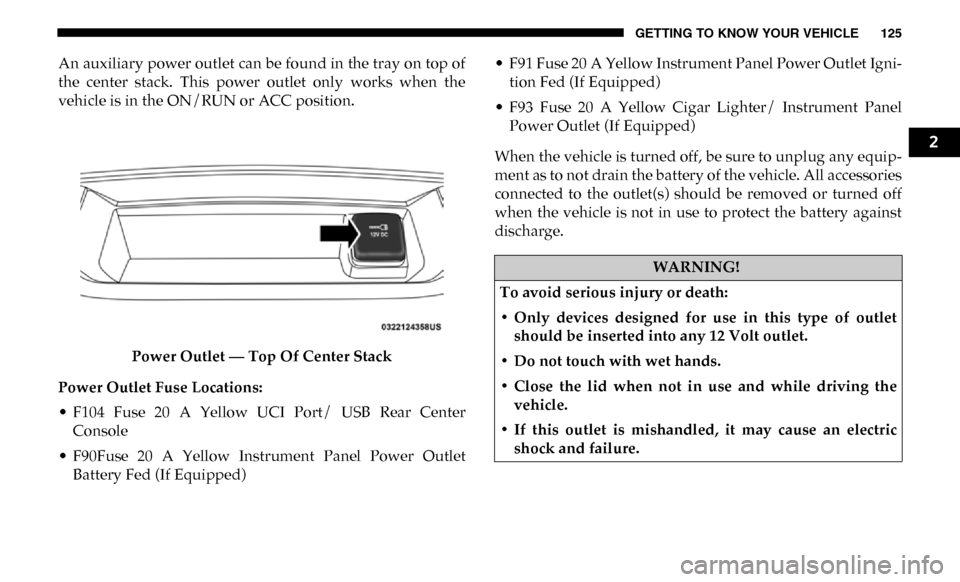
An auxiliary power outlet can be found in the tray on top of
the center stack. This power outlet only works when the
vehicle is in the ON/RUN or ACC position.Power Outlet — Top Of Center Stack
Power Outlet Fuse Locations:
• F104 Fuse 20 A Yellow UCI Port/ USB Rear Center Console
• F90Fuse 20 A Yellow Instrument Panel Power Outlet Battery Fed (If Equipped) • F91 Fuse 20 A Yellow Instrument Panel Power Outlet Igni
-
tion Fed (If Equipped)
• F93 Fuse 20 A Yellow Cigar Lighter/ Instrument Panel Power Outlet (If Equipped)
When the vehicle is turned off, be sure to unplug any equip -
ment as to not drain the battery of the vehicle. All accessories
connected to the outlet(s) should be removed or turned off
when the vehicle is not in use to protect the battery against
discharge.
WARNING!
To avoid serious injury or death:
• Only devices designed for use in this type of outlet should be inserted into any 12 Volt outlet.
• Do not touch with wet hands.
• Close the lid when not in use and while driving the vehicle.
• If this outlet is mishandled, it may cause an electric shock and failure.
2
Page 128 of 696
126 GETTING TO KNOW YOUR VEHICLE
Power Inverter — If Equipped
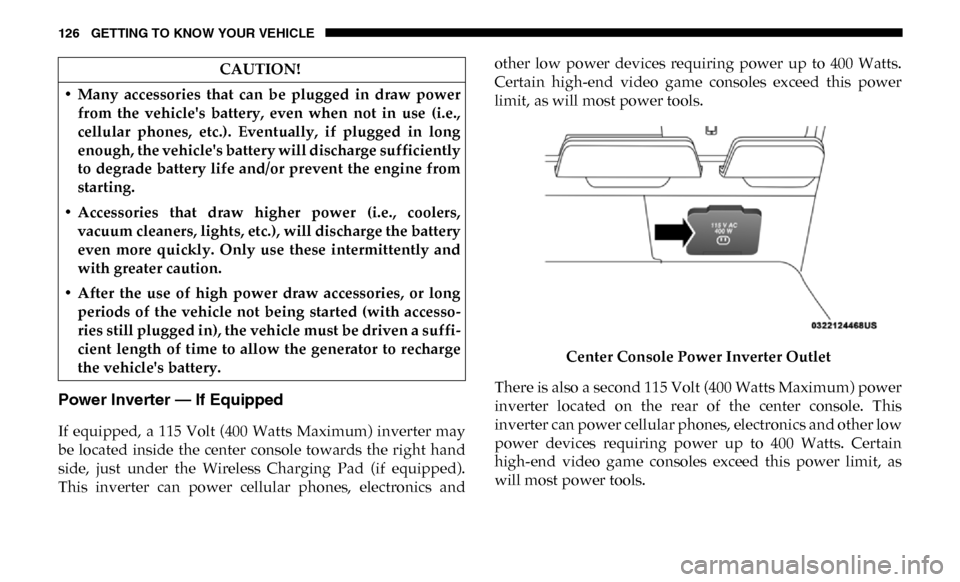
If equipped, a 115 Volt (400 Watts Maximum) inverter may
be located inside the center console towards the right hand
side, just under the Wireless Charging Pad (if equipped).
This inverter can power cellular phones, electronics andother low power devices requiring power up to 400 Watts.
Certain high-end video game consoles exceed this power
limit, as will most power tools.
Center Console Power Inverter Outlet
There is also a second 115 Volt (400 Watts Maximum) power
inverter located on the rear of the center console. This
inverter can power cellular phones, electronics and other low
power devices requiring power up to 400 Watts. Certain
high-end video game consoles exceed this power limit, as
will most power tools.
CAUTION!
• Many accessories that can be plugged in draw power from the vehicle's battery, even when not in use (i.e.,
cellular phones, etc.). Eventually, if plugged in long
enough, the vehicle's battery will discharge sufficiently
to degrade battery life and/or prevent the engine from
starting.
• Accessories that draw higher power (i.e., coolers, vacuum cleaners, lights, etc.), will discharge the battery
even more quickly. Only use these intermittently and
with greater caution.
• After the use of high power draw accessories, or long periods of the vehicle not being started (with accesso -
ries still plugged in), the vehicle must be driven a suffi -
cient length of time to allow the generator to recharge
the vehicle's battery.
Page 137 of 696

GETTING TO KNOW YOUR VEHICLE 135
To open a storage bin with the RamBox unlocked, push and
release the button located on the lid. The RamBox lid will
open upward to allow hand access. Lift the lid to fully open.
NOTE:
RamBox will not open when the pushbutton is pushed if the
RamBox is locked.RamBox Pushbutton And Lock The interior of the RamBox will automatically illuminate
when the lid is opened. In addition to the automatic illumi
-
nation switch, there is a manual on/off switch located at the
rear of each storage bin. Pushing the switch once will turn off
the bin lights, pushing the switch again will turn the lights
back on.CAUTION!
Leaving the lid open for extended periods of time could
cause the vehicle battery to discharge. If the lid is
required to stay open for extended periods of time, it is
recommended that the bin lights be turned off manually
using the on/off switch.
2
Page 163 of 696

GETTING TO KNOW YOUR INSTRUMENT PANEL 161
Base / Midline Instrument Cluster Descriptions
1. Tachometer•Indicates the engine speed in revolutions per minute(RPM x 1000).
2. Voltmeter
•When the vehicle is in the RUN state, the gauge indi -
cates the electrical system voltage. The pointer should
stay within the normal range if the battery is charged.
If the pointer moves to either extreme left or right and
remains there during normal driving, the electrical
system should be serviced.
3. Instrument Cluster Display
•When the appropriate conditions exist, this displayshows the instrument cluster display messages. Refer
to “Instrument Cluster Display” in “Getting To Know
Your Instrument Panel” for further information. 4. Oil Pressure Gauge
•The pointer should always indicate the oil pressurewhen the engine is running. A continuous high or low
reading under normal driving conditions may indicate
a lubrication system malfunction. Immediate service
should be obtained from an authorized dealer.
NOTE:
In vehicles equipped with Stop/Start, an oil pressure indica -
tion of zero is normal during an Autostop.
5. Speedometer
•Indicates vehicle speed.
6. Fuel Gauge
•The pointer shows the level of fuel in the fuel tank whenthe ignition is in the ON/RUN position.
• The fuel pump symbol points to the side of the vehicle where the fuel door is located.
3
Page 171 of 696

GETTING TO KNOW YOUR INSTRUMENT PANEL 169
Display Menu Items
Push and release the up or down arrow button until the
desired selectable menu icon is highlighted in the instrument
cluster display.
Speedometer
Push and release the up or down arrow button until the
speedometer menu item is highlighted in the instrument
cluster display. Push and release the right arrow button to
cycle the display between mph and km/h.
Vehicle Info
Push and release the up or down arrow button until the
Vehicle Info menu item is highlighted in the instrument
cluster display. Push and release the right arrow button to
enter the submenus items of Vehicle Info. Follow the direc -
tional prompts to access or reset any of the following Vehicle
Info submenu items:
• Tire Pressure
• Coolant Temperature — If Equipped
• Transmission Temperature — If Equipped
• Oil Temperature — If Equipped
• Oil Pressure • Exhaust Brake — If Equipped
• Turbo Boost — If Equipped
• Oil Life
• Fuel Filter Life — If Equipped
• Battery Voltage
• Gauge Summary — If Equipped
• Engine Hours
Driver Assist — If Equipped
The Driver Assist menu displays the status of the ACC
system.
Push and release the
up or down arrow button until the
Driver Assist menu is displayed in the instrument cluster
display.
Adaptive Cruise Control (ACC) Feature
The instrument cluster display displays the current ACC
system settings. The information displayed depends on ACC
system status.
3
Page 175 of 696

GETTING TO KNOW YOUR INSTRUMENT PANEL 173
Upper Left
• None
• Compass (Default Setting) — If Equipped
• Outside Temp — If Equipped
• Time
• Range To Empty
• Average MPG
• Current MPG
• Trip A Distance
• Trip B Distance
• Trailer Trip — If Equipped
• Trailer Brake — If Equipped
• Oil Pressure — If Equipped
• Coolant Temperature — If Equipped
• Oil Temperature — If Equipped
• Battery Voltage — If Equipped
• Transmission Temperature — If Equipped
• Oil Life — If Equipped• Exhaust Brake — If Equipped
• Turbo Boost — If Equipped
• Fuel Filter Life — If Equipped
Upper Center
• None
• Compass
• Outside Temp
• Time
• Range To Empty
• Average MPG
• Current MPG
• Trip A Distance
• Trip B Distance
• Trailer Trip
• Audio
• Speedometer (Default Setting)
• Menu Title
3
Page 176 of 696

174 GETTING TO KNOW YOUR INSTRUMENT PANEL
Upper Right
• None
• Compass — If Equipped
• Outside Temp (Default Setting) — If Equipped
• Time
• Range To Empty
• Average MPG
• Current MPG
• Trip A Distance
• Trip B Distance
• Trailer Trip — If Equipped
• Trailer Brake — If Equipped
• Oil Pressure — If Equipped
• Coolant Temperature — If Equipped
• Oil Temperature — If Equipped
• Battery Voltage — If Equipped• Transmission Temperature — If Equipped
• Oil Life — If Equipped
• Exhaust Brake — If Equipped
• Turbo Boost — If Equipped
• Fuel Filter Life — If Equipped
Left Side — If Equipped
• None
• Range
• Average MPG
• Menu Icon (Default Setting)
• Coolant Temperature
• Oil Temperature
• Transmission Temperature
• Oil Life
• Fuel Filter Life — If Equipped
Page 177 of 696

GETTING TO KNOW YOUR INSTRUMENT PANEL 175
Right Side — If Equipped
• None
• Range (Default Setting)
• Average MPG
• Menu Icon
• Coolant Temperature
• Oil Temperature
• Transmission Temperature
• Oil Life
• Fuel Filter Life — If Equipped
Lower Left — If Equipped
• None
• Compass
• Outside Temp
• Time
• Range To Empty• Average MPG
• Current MPG
• Trip A Distance
• Trip B Distance
• Trailer Trip
• Trailer Brake
• Oil Pressure
• Coolant Temperature
• Oil Temperature
• Battery Voltage (Default Setting)
• Transmission Temperature
• Oil Life
• Exhaust Brake — If Equipped
• Turbo Boost — If Equipped
• Fuel Filter Life — If Equipped
3
Page 178 of 696

176 GETTING TO KNOW YOUR INSTRUMENT PANEL
Lower Right — If Equipped
• None
• Compass
• Outside Temp
• Time
• Range To Empty
• Average MPG
• Current MPG
• Trip A Distance
• Trip B Distance
• Trailer Trip
• Trailer Brake
• Oil Pressure (Default Setting)• Coolant Temperature
• Oil Temperature
• Battery Voltage
• Transmission Temperature
• Oil Life
• Exhaust Brake — If Equipped
• Turbo Boost — If Equipped
• Fuel Filter Life — If Equipped
Restore Defaults
• Cancel (Default Setting)
• Ok