brakes Ram 2500 2019 Owner's Guide
[x] Cancel search | Manufacturer: RAM, Model Year: 2019, Model line: 2500, Model: Ram 2500 2019Pages: 696, PDF Size: 13.89 MB
Page 374 of 696
372 STARTING AND OPERATING
• Do not put stickers or easy passes over the camera/radarfield of view.
• Any modifications to the vehicle that may obstruct the field of view of the radar/camera are not recommended.
Cleaning Instructions
Dust and dirt can accumulate on the cover and block the
camera lens. Clean the camera lens with a soft microfiber
cloth, being careful not to damage or scratch the module.
Towing A Trailer
ACC while towing a trailer is recommended only with an
Integrated Trailer Brake Controller. Aftermarket trailer
brake controllers will not activate the trailer brakes when
ACC is braking. Offset Driving
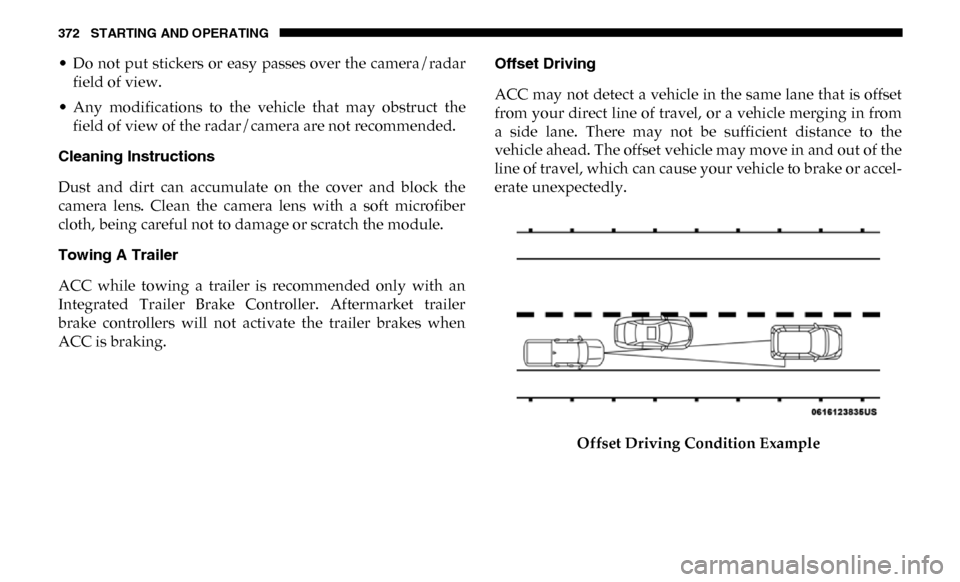
ACC may not detect a vehicle in the same lane that is offset
from your direct line of travel, or a vehicle merging in from
a side lane. There may not be sufficient distance to the
vehicle ahead. The offset vehicle may move in and out of the
line of travel, which can cause your vehicle to brake or accel
-
erate unexpectedly.
Offset Driving Condition Example
Page 376 of 696
374 STARTING AND OPERATING
Lane Changing
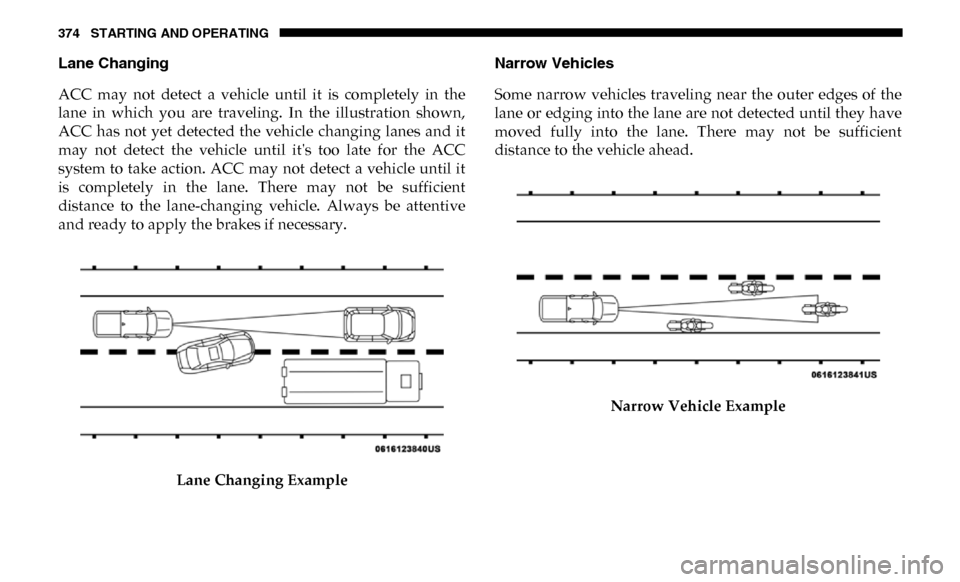
ACC may not detect a vehicle until it is completely in the
lane in which you are traveling. In the illustration shown,
ACC has not yet detected the vehicle changing lanes and it
may not detect the vehicle until it's too late for the ACC
system to take action. ACC may not detect a vehicle until it
is completely in the lane. There may not be sufficient
distance to the lane-changing vehicle. Always be attentive
and ready to apply the brakes if necessary.Lane Changing Example Narrow Vehicles
Some narrow vehicles traveling near the outer edges of the
lane or edging into the lane are not detected until they have
moved fully into the lane. There may not be sufficient
distance to the vehicle ahead.
Narrow Vehicle Example
Page 377 of 696

STARTING AND OPERATING 375
Stationary Objects And Vehicles
ACC does not react to stationary objects and stationary vehi-
cles. For example, ACC will not react in situations where the
vehicle you are following exits your lane and the vehicle
ahead is stopped in your lane. Always be attentive and ready
to apply the brakes if necessary.
Stationary Object And Stationary Vehicle ExampleGeneral Information
The following regulatory statement applies to all Radio
Frequency (RF) devices equipped in this vehicle:
This device complies with Part 15 of the FCC Rules and with
Industry Canada license-exempt RSS standard(s). Operation
is subject to the following two conditions:
1. This device may not cause harmful interference.
2. This device must accept any interference received,including interference that may cause undesired opera -
tion.
NOTE:
Changes or modifications not expressly approved by the
party responsible for compliance could void the user’s
authority to operate the equipment.
5
Page 387 of 696

STARTING AND OPERATING 385
Enabling And Disabling ParkSense
ParkSense can be enabled and disabled with the ParkSense
switch.When the gear selector is moved to REVERSE and
the system is disabled, the instrument cluster
display will show the vehicle graphic with “Off”
over the arcs for as long as the vehicle is in REVERSE.
NOTE:
The ParkSense system will automatically disable when the
system detects that a trailer with trailer brakes has been
connected to the Integrated Trailer Brake Module. The
instrument cluster display will show an “Off” message over
the arcs if the ParkSense system is off, or a “Trailer” message
if the system is on, for as long as the vehicle is in REVERSE.
The ParkSense switch LED will be on when ParkSense is
disabled or defective. The ParkSense switch LED will be off
when the system is enabled.
If the ParkSense switch is pushed, and the system is disabled
or requires service, the ParkSense switch LED will blink
momentarily, and then the LED will be on.
Service The ParkSense Rear Park Assist System
During vehicle start up, when the Rear ParkSense System
has detected a faulted condition, the instrument cluster
display will show the "Rear ParkSense Unavailable Service
Required" or the "Rear ParkSense Unavailable Wipe Sensors"
message.
When the gear selector is moved into REVERSE, a vehicle
graphic will show in the instrument cluster display, along
with the display overlay “Rear ParkSense Unavailable Wipe
Sensors.” If the system needs service, the display overlay will
read “Rear ParkSense Unavailable Service Required” Under
this condition, ParkSense will not operate.
If "Rear ParkSense Unavailable Wipe Sensors" appears in the
instrument cluster display make sure the outer surface and
the underside of the rear fascia/bumper is clean and clear of
snow, ice, mud, dirt or other obstruction, and then cycle the
ignition. If the message continues to appear, see an autho -
rized dealer.
If "Rear ParkSense Unavailable Service Required" appears in
the instrument cluster display, see an authorized dealer.
5
Page 413 of 696

STARTING AND OPERATING 411
Curb Weight
The curb weight of a vehicle is defined as the total weight of
the vehicle with all fluids, including vehicle fuel, at full
capacity conditions, and with no occupants or cargo loaded
into the vehicle. The front and rear curb weight values are
determined by weighing your vehicle on a commercial scale
before any occupants or cargo are added.
Loading
The actual total weight and the weight of the front and rear
of your vehicle at the ground can best be determined by
weighing it when it is loaded and ready for operation.
The entire vehicle should first be weighed on a commercial
scale to insure that the GVWR has not been exceeded. The
weight on the front and rear of the vehicle should then be
determined separately to be sure that the load is properly
distributed over the front and rear axle. Weighing the vehicle
may show that the GAWR of either the front or rear axles has
been exceeded but the total load is within the specified
GVWR. If so, weight must be shifted from front to rear or
rear to front as appropriate until the specified weight limita-
tions are met. Store the heavier items down low and be sure
that the weight is distributed equally. Stow all loose items
securely before driving. Improper weight distributions can have an adverse effect on
the way your vehicle steers and handles and the way the
brakes operate.
TRAILER TOWING
In this section you will find safety tips and information on
limits to the type of towing you can reasonably do with your
vehicle. Before towing a trailer, carefully review this infor
-
mation to tow your load as efficiently and safely as possible.
To maintain the New Vehicle Limited Warranty coverage,
follow the requirements and recommendations in this
manual concerning vehicles used for trailer towing. CAUTION!
Do not load your vehicle any heavier than the GVWR or
the maximum front and rear GAWR. If you do, parts on
your vehicle can break, or it can change the way your
vehicle handles. This could cause you to lose control.
Also overloading can shorten the life of your vehicle.
5
Page 415 of 696

STARTING AND OPERATING 413
Tongue Weight (TW)
The tongue weight is the downward force exerted on the
hitch ball by the trailer. You must consider this as part of the
load on your vehicle.
Trailer Frontal Area
The frontal area is the maximum height multiplied by the
maximum width of the front of a trailer.
Trailer Sway Control
The trailer sway control can be a mechanical telescoping link
that can be installed between the hitch receiver and the
trailer tongue that typically provides adjustable friction asso-
ciated with the telescoping motion to dampen any unwanted
trailer swaying motions while traveling.
If equipped, the electronic Trailer Sway Control (TSC) recog -
nizes a swaying trailer and automatically applies individual
wheel brakes and/or reduces engine power to attempt to
eliminate the trailer sway. Weight-Carrying Hitch
A weight-carrying hitch supports the trailer tongue weight,
just as if it were luggage located at a hitch ball or some other
connecting point of the vehicle. These kinds of hitches are the
most popular on the market today and they are commonly
used to tow small and medium sized trailers.
Weight-Distributing Hitch
A weight-distributing system works by applying leverage
through spring (load) bars. They are typically used for
heavier loads to distribute trailer tongue weight to the tow
vehicle's front axle and the trailer axle(s). When used in
accordance with the manufacturer's directions, it provides
for a more level ride, offering more consistent steering and
brake control, thereby enhancing towing safety. The addi
-
tion of a friction/hydraulic sway control also dampens sway
caused by traffic and crosswinds and contributes positively
to tow vehicle and trailer stability. Trailer sway control and
a weight distributing (load equalizing) hitch are recom -
mended for heavier Tongue Weights (TW) and may be
required depending on vehicle and trailer configuration/
loading to comply with GAWR requirements.
5
Page 421 of 696

STARTING AND OPERATING 419
(Continued)
Perform the maintenance listed in the “Scheduled
Servicing”. Refer to “Scheduled Servicing” in “Servicing
And Maintenance” for the proper maintenance intervals.
When towing a trailer, never exceed the GAWR or GCWR
ratings.• Then, during the first 500 miles (805 km) that a trailer is
towed, do not drive over 50 mph (80 km/h) and do not
make starts at full throttle. This helps the engine and
other parts of the vehicle wear in at the heavier loads.
WARNING!
• Make certain that the load is secured in the trailer and will not shift during travel. When trailering cargo that
is not fully secured, dynamic load shifts can occur that
may be difficult for the driver to control. You could lose
control of your vehicle and have a collision.
• When hauling cargo or towing a trailer, do not overload your vehicle or trailer. Overloading can cause a loss of
control, poor performance or damage to brakes, axle,
engine, transmission, steering, suspension, chassis
structure or tires. CAUTION!
(Continued)
• Safety chains must always be used between your
vehicle and trailer. Always connect the chains to the
hook retainers of the vehicle hitch. Cross the chains
under the trailer tongue and allow enough slack for
turning corners.
• Vehicles with trailers should not be parked on a grade. When parking, apply the parking brake on the tow
vehicle. Put the tow vehicle transmission in PARK. For
four-wheel drive vehicles, make sure the transfer case
is not in NEUTRAL. Always, block or "chock" the
trailer wheels.
• GCWR must not be exceeded.
• Total weight must be distributed between the tow vehicle and the trailer such that the following four
ratings are not exceeded:
1. GVWR
2. GTW
3. GAWR
4. Tongue weight rating for the trailer hitch utilized.
WARNING! (Continued)
5
Page 422 of 696

420 STARTING AND OPERATING
Towing Requirements — Tires
• Do not attempt to tow a trailer while using a compact sparetire.
• Do not drive more than 50 mph (80 km/h) when towing while using a full size spare tire.
• Proper tire inflation pressures are essential to the safe and satisfactory operation of your vehicle. Refer to “Tires” in
“Servicing And Maintenance” for proper tire inflation
procedures.
• Check the trailer tires for proper tire inflation pressures before trailer usage.
• Check for signs of tire wear or visible tire damage before towing a trailer. Refer to “Tires” in “Servicing And Main -
tenance” for the proper inspection procedure.
• When replacing tires, refer to “Tires” in “Servicing And Maintenance” for the proper tire replacement procedures.
Replacing tires with a higher load carrying capacity will
not increase the vehicle's GVWR and GAWR limits. Towing Requirements — Trailer Brakes
• Do
not interconnect the hydraulic brake system or vacuum
system of your vehicle with that of the trailer. This could
cause inadequate braking and possible personal injury.
• An electronically actuated trailer brake controller is required when towing a trailer with electronically actu -
ated brakes. When towing a trailer equipped with a
hydraulic surge actuated brake system, an electronic brake
controller is not required.
• Trailer brakes are recommended for trailers over 1,000 lbs (453 kg) and required for trailers in excess of 2,000 lbs (907 kg).
WARNING!
• Do not connect trailer brakes to your vehicle's hydraulic brake lines. It can overload your brake
system and cause it to fail. You might not have brakes
when you need them and could have an accident.
• Towing any trailer will increase your stopping distance. When towing, you should allow for addi -
tional space between your vehicle and the vehicle in
front of you. Failure to do so could result in an accident.
Page 423 of 696

STARTING AND OPERATING 421
Integrated Trailer Brake Module — If Equipped
Your vehicle may have an Integrated Trailer Brake Module
(ITBM) for Electric and Electric Over Hydraulic (EOH) trailer
brakes.
NOTE:
This module has been designed and verified with electric
trailer brakes and new electric over hydraulic systems. Some
previous EOH systems may not be compatible with ITBM.Integrated Trailer Brake Module (ITBM)
The user interface consists of the following:
Manual Brake Control Lever
Slide the manual brake control lever to the left to activate
power to the trailer's electric brakes independent of the tow
vehicle's brakes. If the manual brake control lever is acti -
vated while the brake is also applied, the greater of the two
inputs determines the power sent to the trailer brakes.
CAUTION!
If the trailer weighs more than 1,000 lbs (453 kg) loaded,
it should have its own brakes and they should be of
adequate capacity. Failure to do this could lead to
accelerated brake lining wear, higher brake pedal effort,
and longer stopping distances.
1 — GAIN Adjustment Button
2 — GAIN Adjustment Button
3 — Manual Brake Control Lever
5
Page 424 of 696

422 STARTING AND OPERATING
The trailer and the vehicle’s stop lamps will come on when
braking normally with the vehicle brake pedal. Only the
trailer stop lamps will come on when the manual brake
control lever is applied.
Trailer Brake Status Indicator Light
This light indicates the trailer electrical connection status.
If no electrical connection is detected after the ignition is
turned on, pushing the GAIN adjustment button or sliding
the manual brake control lever will display the GAIN setting
for 10 seconds and the “Trailer Brake Status Indicator Light”
will not be displayed.
If a fault is detected in the trailer wiring or the Integrated
Trailer Brake Module (ITBM), the “Trailer Brake Status Indi-
cator Light” will flash.
GAIN Adjustment Buttons (+/-)
Pushing these buttons will adjust the brake control power
output to the trailer brakes in 0.5 increments. The GAIN
setting can be increased to a maximum of 10 or decreased to
a minimum of 0 (no trailer braking). GAIN
The GAIN setting is used to set the trailer brake control for
the specific towing condition and should be changed as
towing conditions change. Changes to towing conditions
include trailer load, vehicle load, road conditions and
weather.
Adjusting GAIN
NOTE:
This should only be performed in a traffic free environment
at speeds of approximately 20–25 mph (30–40 km/h).
1. Make sure the trailer brakes are in good working condi
-
tion, functioning normally and properly adjusted. See
your trailer dealer if necessary.
2. Hook up the trailer and make the electrical connections according to the trailer manufacturer's instructions.
3. When a trailer with electric/EOH brakes is plugged in, the trailer connected message should appear in the
instrument cluster display (if the connection is not recog -
nized by the ITBM, braking functions will not be avail -
able), the GAIN setting will illuminate and the correct
type of trailer must be selected from the instrument
cluster display options.