four wheel drive Ram 2500 2019 Owner's Guide
[x] Cancel search | Manufacturer: RAM, Model Year: 2019, Model line: 2500, Model: Ram 2500 2019Pages: 696, PDF Size: 13.89 MB
Page 319 of 696
STARTING AND OPERATING 317
shift completion to occur. The preferred method is with the
vehicle rolling 2 to 3 mph (3 to 5 km/h). Avoid attempting
to engage or disengage 4L with the vehicle moving faster
than 2 to 3 mph (3 to 5 km/h).
• Do not attempt to shift into or out of 4L while the transmis -
sion is in gear.
Transfer Case Position Indicator Light
The “Transfer Case Position Indicator Light” in the instru-
ment cluster is used to alert the driver that the front axle is
fully engaged and all four wheels are driving.
AIR SUSPENSION SYSTEM (2500/3500 MODELS) — IF
EQUIPPED
Description
This air suspension system is a rear leveling ride height
system. The main purpose of this system is to maintain the
truck’s rear ride height level. There are two selectable heights
that can be chosen based on your operating conditions.
The system requires that the ignition be in ON/RUN posi -
tion or the engine running with zero vehicle speed for all
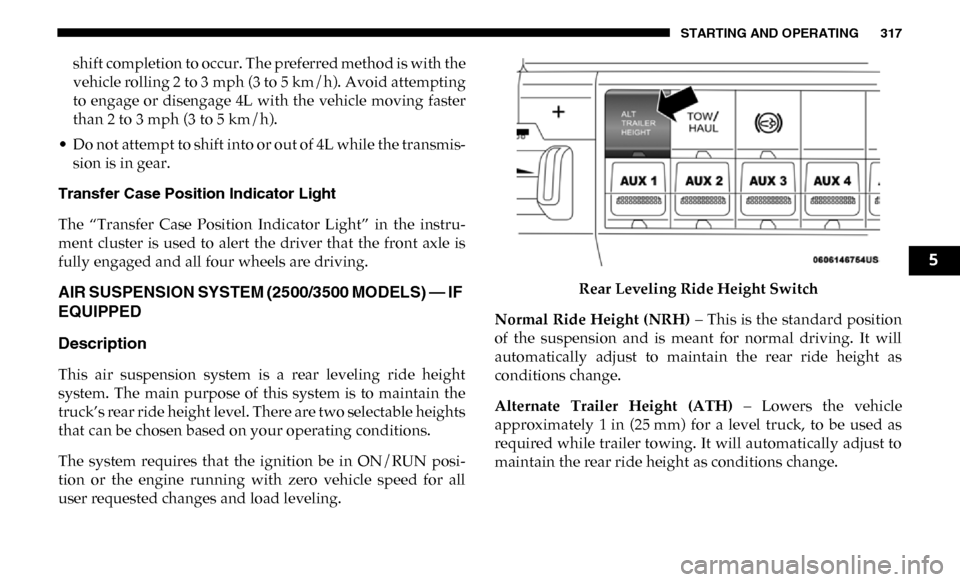
user requested changes and load leveling. Rear Leveling Ride Height Switch
Normal Ride Height (NRH) – This is the standard position
of the suspension and is meant for normal driving. It will
automatically adjust to maintain the rear ride height as
conditions change.
Alternate Trailer Height (ATH) – Lowers the vehicle
approximately 1 in (25 mm) for a level truck, to be used as
required while trailer towing. It will automatically adjust to
maintain the rear ride height as conditions change.
5
Page 324 of 696

322 STARTING AND OPERATING
To lock the rear axle, place the vehicle in 4LO. Refer to “Four
Wheel Drive Operation” in “Starting And Operating” for
further information. Push the REAR LOCK button while
traveling less than 3 mph (5 km/h). The RR indicator light
will remain on when the rear axle is locked.
NOTE:
Left to right wheel speed difference may be necessary to
allow the axle to fully lock. If the indicator light is flashing
after placing the switch in the REAR LOCK or FRONT/
REAR LOCK position, drive the vehicle in a turn or on loose
gravel to expedite the locking action.
To lock the front axle; push the FRONT/REAR LOCK button
while traveling less than 3 mph (5 km/h). The indicator light
will be solid when the front axle is locked.
NOTE:
The rear axle must be locked before the front axle will lock. To unlock the front axle; push the REAR LOCK button. The
FRONT/REAR LOCK indicator light will go out when the
axle is unlocked.
NOTE:
The axle lockers could be torque locked due to side to side
loads on the axle. Driving slowly while turning the steering
wheel from a left hand turn to a right hand turn or driving in
REVERSE for a short distance may be required to release the
torque lock and unlock the axles.
To unlock the rear axle; push the AXLE UNLOCK button.
The REAR LOCK indicator light will go out when the rear
axle is unlocked.
STABILIZER/SWAY BAR SYSTEM — POWER WAGON
ONLY
Your vehicle is equipped with an electronic disconnecting
stabilizer/sway bar. This system allows greater front
suspension travel in off-road situations.
Due to the use of taller springs, this vehicle has an increased
ride height of approximately 1.9 in (48.3 mm) in the front
and 1.5 in (38.1 mm) in the rear. A major advantage to
increasing ride height is the positive effect it has on
approach/departure and break over angles.
WARNING!
Do not use the locked axle position for normal driving. A
locked front axle is intended for off-road driving only.
Locking the front axle during on-road driving will
reduce the steering ability. This could cause a collision
and you may be seriously injured.
Page 325 of 696
STARTING AND OPERATING 323
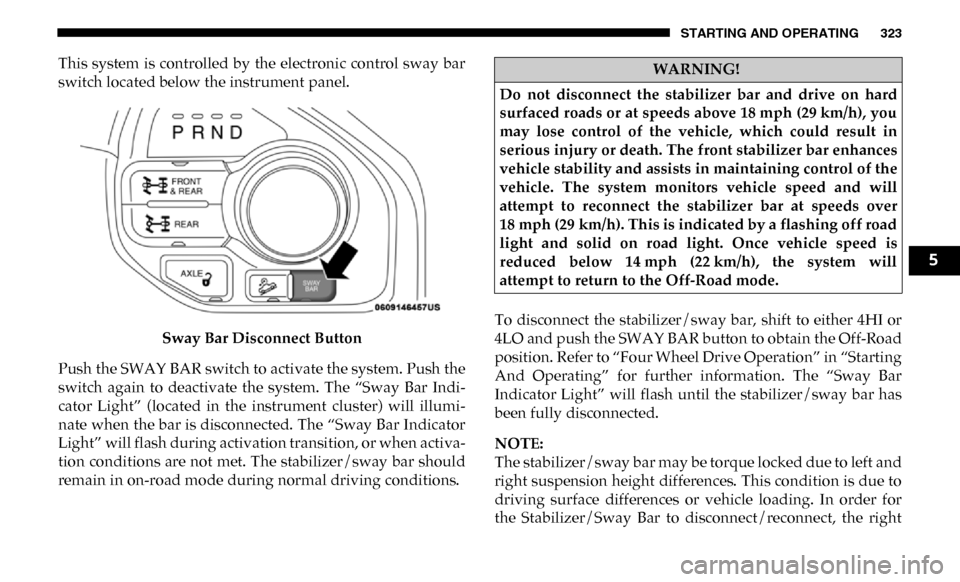
This system is controlled by the electronic control sway bar
switch located below the instrument panel.Sway Bar Disconnect Button
Push the SWAY BAR switch to activate the system. Push the
switch again to deactivate the system. The “Sway Bar Indi -
cator Light” (located in the instrument cluster) will illumi -
nate when the bar is disconnected. The “Sway Bar Indicator
Light” will flash during activation transition, or when activa -
tion conditions are not met. The stabilizer/sway bar should
remain in on-road mode during normal driving conditions. To disconnect the stabilizer/sway bar, shift to either 4HI or
4LO and push the SWAY BAR button to obtain the Off-Road
position. Refer to “Four Wheel Drive Operation” in “Starting
And Operating” for further information. The “Sway Bar
Indicator Light” will flash until the stabilizer/sway bar has
been fully disconnected.
NOTE:
The stabilizer/sway bar may be torque locked due to left and
right suspension height differences. This condition is due to
driving surface differences or vehicle loading. In order for
the Stabilizer/Sway Bar to disconnect/reconnect, the rightWARNING!
Do not disconnect the stabilizer bar and drive on hard
surfaced roads or at speeds above 18 mph (29 km/h), you
may lose control of the vehicle, which could result in
serious injury or death. The front stabilizer bar enhances
vehicle stability and assists in maintaining control of the
vehicle. The system monitors vehicle speed and will
attempt to reconnect the stabilizer bar at speeds over
18 mph (29 km/h). This is indicated by a flashing off road
light and solid on road light. Once vehicle speed is
reduced below 14 mph (22 km/h), the system will
attempt to return to the Off-Road mode.
5
Page 356 of 696

354 STARTING AND OPERATING
FUEL SAVER TECHNOLOGY — IF EQUIPPED
This feature offers improved fuel economy by shutting off
four of the engine's eight cylinders during light load and
cruise conditions. The system is automatic with no driver
inputs or additional driving skills required.
NOTE:
This system may take some time to return to full function-
ality after a battery disconnect.
SPEED CONTROL
When engaged, the Speed Control takes over accelerator
operations at speeds greater than 20 mph (32 km/h).
The Speed Control buttons are located on the right side of the
steering wheel. Speed Control Buttons
NOTE:
In order to ensure proper operation, the Speed Control
System has been designed to shut down if multiple speed
control functions are operated at the same time. If this
occurs, the Speed Control System can be reactivated by
pushing the Speed Control On/Off button and resetting the
desired vehicle set speed.
1 — On/Off Button 3 — SET (-)
2 — RES (+) 4 — CANCEL
Page 362 of 696

360 STARTING AND OPERATING
Activating Adaptive Cruise Control (ACC)
You can only engage ACC if the vehicle speed is above
0 mph (0 km/h).
The minimum set speed for the ACC system is 20 mph (32 km/h).
When the system is turned on and in the ready state, the
instrument cluster display will read “ACC Ready.”
When the system is off, the instrument cluster display will
read “Adaptive Cruise Control (ACC) Off.”
NOTE:
You cannot engage ACC under the following conditions:
• When in Four-Wheel Drive Low.
• When you apply the brakes.
• When the parking brake is applied.
• When the automatic transmission is in PARK, REVERSE orNEUTRAL.
• When the vehicle speed is outside of the speed range.
• When the brakes are overheated.
• When the driver door is open at low speed.
• When the driver seat belt is unbuckled at low speed.
• ESC Full-Off Mode is active.
To Activate/Deactivate
Push and release the Adaptive Cruise Control (ACC) on/off
button. The ACC menu in the instrument cluster displays
“ACC Ready.”
Adaptive Cruise Control Ready
To turn the system off, push and release the Adaptive Cruise
Control (ACC) on/off button again. At this time, the system
will turn off and the instrument cluster display will show
“Adaptive Cruise Control (ACC) Off.”
Page 364 of 696

362 STARTING AND OPERATING
To Cancel
The following conditions cancel the system:
• The brake pedal is applied.
• The CANC (cancel) button is pushed.
• An Anti-Lock Brake System (ABS) event occurs.
• The gear selector is removed from the DRIVE position.
• The Electronic Stability Control/Traction Control System(ESC/TCS) activates.
• The vehicle parking brake is applied.
• Driver seatbelt is unbuckled at low speeds.
• Driver door is opened at low speeds.
• A Trailer Sway Control (TSC) event occurs.
• The driver switches ESC to full-off mode.
• The braking temperature exceeds normal range (overheated).
To Turn Off
The system will turn off and clear the set speed in memory if:
• The Adaptive Cruise Control (ACC) on/off button is pushed. • The Normal (Fixed Speed) Cruise Control on/off button is
pushed.
• The ignition is turned OFF.
• You switch to Four-Wheel Drive Low.
To Resume
If there is a set speed in memory push the RES (+) button and
then remove your foot from the accelerator pedal. The instru-
ment cluster display will display the last set speed.
NOTE:
• If your vehicle stays at standstill for longer than two seconds, the driver will have to push the RES (+) button to
reengage the ACC to the existing set speed.
• ACC cannot be resumed if there is a stationary vehicle in-front of your vehicle in close proximity.
WARNING!
The Resume function should only be used if traffic and road
conditions permit. Resuming a set speed that is too high or
too low for prevailing traffic and road conditions could
cause the vehicle to accelerate or decelerate too sharply for
safe operation. Failure to follow these warnings can result in
a collision and death or serious personal injury.
Page 369 of 696

STARTING AND OPERATING 367
Brake Alert
NOTE:
The “Brake!” Screen in the instrument cluster display is a
warning for the driver to take action and does not necessarily
mean that the Forward Collision Warning system is
applying the brakes autonomously.
Trailer Detect — If Equipped
When a trailer is detected, the ACC system automatically
defaults to the longest setting (four bars). The setting can be
overridden by pushing the Distance Button on the steering
wheel.
Overtake Aid
When driving with ACC engaged and following a vehicle,
the system will provide an additional acceleration up to the
ACC set speed to assist in passing the vehicle. This addi -
tional acceleration is triggered when the driver utilizes the
left turn signal and will only be active when passing on the
left hand side.
ACC Operation At Stop
In the event that the ACC system brings your vehicle to a
standstill while following a target vehicle, if the target
vehicle starts moving within two seconds of your vehicle
coming to a standstill, your vehicle will resume motion
without the need for any driver action.
If the target vehicle does not start moving within two
seconds of your vehicle coming to a standstill, then ACC will
cancel and the driver must take over braking. When the
target vehicle drives off, ACC can be resumed by releasing
the brake and pushing the RES (+) button.5
Page 380 of 696

378 STARTING AND OPERATING
Metric Speed (km/h)
• Pushing the SET (-) button once will result in a 1 km/h decrease in set speed. Each subsequent tap of the button
results in a decrease of 1 km/h.
• If the button is continually pushed, the set speed will continue to decrease in 10 km/h decrements until the
button is released. The decrease in set speed is reflected in
the instrument cluster display.
To Cancel
The following conditions will cancel the Normal (Fixed
Speed) Cruise Control without clearing the memory:
• The brake pedal is applied.
• The CANC button is pushed.
• The Electronic Stability Control/Traction Control System (ESC/TCS) activates.
• The vehicle parking brake is applied.
• The braking temperature exceeds normal range (over -
heated).
• The gear selector is removed from the DRIVE position.
• The driver switches ESC to full-off mode. To Resume Speed
To resume a previously set speed, push the RES (+) button
and release. Resume can be used at any speed above 20 mph
(32 km/h).
To Turn Off
The system will turn off and erase the set speed in memory if:
• The Normal (Fixed Speed) Cruise Control on/off button is
pushed.
• The ignition is turned OFF.
• You engage Four-Wheel Drive Low.
• The Adaptive Cruise Control (ACC) on/off button is pushed.
Page 421 of 696
STARTING AND OPERATING 419
(Continued)
Perform the maintenance listed in the “Scheduled
Servicing”. Refer to “Scheduled Servicing” in “Servicing
And Maintenance” for the proper maintenance intervals.
When towing a trailer, never exceed the GAWR or GCWR
ratings.• Then, during the first 500 miles (805 km) that a trailer is
towed, do not drive over 50 mph (80 km/h) and do not
make starts at full throttle. This helps the engine and
other parts of the vehicle wear in at the heavier loads.
WARNING!
• Make certain that the load is secured in the trailer and will not shift during travel. When trailering cargo that
is not fully secured, dynamic load shifts can occur that
may be difficult for the driver to control. You could lose
control of your vehicle and have a collision.
• When hauling cargo or towing a trailer, do not overload your vehicle or trailer. Overloading can cause a loss of
control, poor performance or damage to brakes, axle,
engine, transmission, steering, suspension, chassis
structure or tires. CAUTION!
(Continued)
• Safety chains must always be used between your
vehicle and trailer. Always connect the chains to the
hook retainers of the vehicle hitch. Cross the chains
under the trailer tongue and allow enough slack for
turning corners.
• Vehicles with trailers should not be parked on a grade. When parking, apply the parking brake on the tow
vehicle. Put the tow vehicle transmission in PARK. For
four-wheel drive vehicles, make sure the transfer case
is not in NEUTRAL. Always, block or "chock" the
trailer wheels.
• GCWR must not be exceeded.
• Total weight must be distributed between the tow vehicle and the trailer such that the following four
ratings are not exceeded:
1. GVWR
2. GTW
3. GAWR
4. Tongue weight rating for the trailer hitch utilized.
WARNING! (Continued)
5
Page 432 of 696

430 STARTING AND OPERATING
RECREATIONAL TOWING (BEHIND MOTORHOME, ETC.)
Towing This Vehicle Behind Another Vehicle
NOTE:
• When towing your vehicle, always follow applicable stateand provincial laws. Contact state and provincial
Highway Safety offices for additional details. • Vehicles equipped with air suspension must be placed in
Transport mode before tying them down (from the body)
on a trailer or flatbed truck. Refer to “Air Suspension – If
Equipped” for more information. If the vehicle cannot be
placed in Transport mode (for example, engine will not
run), tie-downs must be fastened to the axles (not to the
body). Failure to follow these instructions may cause fault
codes to be set and/or cause loss of proper tie-down
tension.
Towing Condition
Wheels OFF The
Ground Two-Wheel
Drive Models Four-Wheel Drive Models
Flat Tow NONENOT ALLOWED See Instructions
• Automatic transmission in PARK
• Transfer case in NEUTRAL (N)
• Tow in forward direction
Dolly Tow Front
NOT ALLOWED NOT ALLOWED
Rear OK NOT ALLOWED
On Trailer ALLOK OK