fuel Ram 2500 2019 Workshop Manual
[x] Cancel search | Manufacturer: RAM, Model Year: 2019, Model line: 2500, Model: Ram 2500 2019Pages: 696, PDF Size: 13.89 MB
Page 571 of 696

TECHNICAL SPECIFICATIONS 569
Do Not Use E-85 In Non-Flex Fuel Vehicles
Non-Flex Fuel Vehicles (FFV) are compatible with gasoline
containing up to 15% ethanol (E-15). Use of gasoline with
higher ethanol content may void the New Vehicle Limited
Warranty.
If a Non-FFV vehicle is inadvertently fueled with E-85 fuel,
the engine will have some or all of these symptoms:
• Operate in a lean mode.
• OBD II Malfunction Indicator Light on.
• Poor engine performance.
• Poor cold start and cold drivability.
• Increased risk for fuel system component corrosion.
CNG And LP Fuel System Modifications
Modifications that allow the engine to run on Compressed
Natural Gas (CNG) or Liquid Propane (LP) may result in
damage to the engine, emissions, and fuel system compo-
nents. Problems that result from running CNG or LP are not
the responsibility of the manufacturer and may void or not
be covered under the New Vehicle Limited Warranty.
MMT In Gasoline
Methylcyclopentadienyl Manganese Tricarbonyl (MMT) is a
manganese-containing metallic additive that is blended into
some gasoline to increase octane. Gasoline blended with
MMT provides no performance advantage beyond gasoline
of the same octane number without MMT. Gasoline blended
with MMT reduces spark plug life and reduces emissions
system performance in some vehicles. The manufacturer
recommends that gasoline without MMT be used in your
vehicle. The MMT content of gasoline may not be indicated
on the gasoline pump; therefore, you should ask your gaso -
line retailer whether the gasoline contains MMT. MMT is
prohibited in Federal and California reformulated gasoline.
8
Page 572 of 696

570 TECHNICAL SPECIFICATIONS
Fuel System Cautions
NOTE:
Intentional tampering with the emissions control system can
result in civil penalties being assessed against you.
Carbon Monoxide Warnings
CAUTION!
Follow these guidelines to maintain your vehicle’s
performance:
• The use of leaded gasoline is prohibited by Federal law. Using leaded gasoline can impair engine perfor -
mance and damage the emissions control system.
• An out-of-tune engine or certain fuel or ignition malfunctions can cause the catalytic converter to over -
heat. If you notice a pungent burning odor or some
light smoke, your engine may be out of tune or
malfunctioning and may require immediate service.
Contact an authorized dealer for service assistance.
• The use of fuel additives, which are now being sold as octane enhancers, is not recommended. Most of these
products contain high concentrations of methanol. Fuel
system damage or vehicle performance problems
resulting from the use of such fuels or additives is not the
responsibility of the manufacturer and may void or not
be covered under the New Vehicle Limited Warranty.
WARNING!
Carbon monoxide (CO) in exhaust gases is deadly.
Follow the precautions below to prevent carbon
monoxide poisoning:
• Do not inhale exhaust gases. They contain carbon monoxide, a colorless and odorless gas, which can kill.
Never run the engine in a closed area, such as a garage,
and never sit in a parked vehicle with the engine
running for an extended period. If the vehicle is
stopped in an open area with the engine running for
more than a short period, adjust the ventilation system
to force fresh, outside air into the vehicle.
• Guard against carbon monoxide with proper mainte -
nance. Have the exhaust system inspected every time
the vehicle is raised. Have any abnormal conditions
repaired promptly. Until repaired, drive with all side
windows fully open.
Page 573 of 696

TECHNICAL SPECIFICATIONS 571
FLUID CAPACITIES
U.S.Metric
Fuel (Approximate)
2500/3500 Shortbed Models 31 Gallons117 Liters
2500/3500 Longbed Models 32 Gallons121 Liters
Engine Oil With Filter
6.4L Engine (We recommend you use SAE 0W-40 engine oil meeting the
requirements of FCA Material Standard MS-12633 for use in all operating
temperatures.) 7 Quarts
6.6 Liters
Cooling System
6.4L Engine – (We recommend you use Mopar Antifreeze/Coolant 10
Year/150,000 Mile Formula that meets the requirements of FCA Material
Standard MS.90032.) 16.6 Quarts
15.7 Liters
8
Page 574 of 696

572 TECHNICAL SPECIFICATIONS
FLUIDS AND LUBRICANTS
Engine
ComponentFluid, Lubricant, or Genuine Part
Engine Coolant We recommend you use Mopar Antifreeze/Coolant 10
Year/150,000 Mile Formula OAT (Organic Additive
Technology).
Engine Oil – 6.4L For best performance and maximum protection under all
types of operating conditions, the manufacturer only
recommends full synthetic engine oils that meet the
American Petroleum Institute (API) categories of SN. The
manufacturer recommends the use of Pennzoil Ultra 0W-40
or equivalent Mopar engine oil meeting the requirements of
FCA Material Standard MS-12633 for use in all operating
temperatures.
Engine Oil Filter We recommend you use Mopar brand Engine Oil Filters.
Spark Plugs We recommend you use Mopar Spark Plugs.
Fuel Selection – 6.4L Engines 89 Octane Recommended - 87 Octane Acceptable, 0-15%
Ethanol.
Page 581 of 696

MULTIMEDIA 579
Display
After pressing the “Display” button on the touchscreen, the following settings will be available.
Units — If Equipped
After pressing “Units” on the touchscreen, the following will be available:Setting Name
Selectable Options
Display Mode AutoManual
Set Language English, Français, Español
Touchscreen Beep OnOff
Fuel Saver Display OnOff
NOTE:
The “Fuel Saver Display” feature will allow you to enable fuel saver mode and will be displayed in the instrument cluster
display.
Setting Name Selectable Options
Units USMetric Custom
Speed MPH km/h
Distance mi km
Fuel Consumption MPG (UG)MPG (UK) L/100 km km/L
Pressure psikPa bar
9
Page 601 of 696

MULTIMEDIA 599
Display Brightness With Headlights
OFF–
+
NOTE:
To make changes to the "Display Brightness with Headlights OFF" setting, the headlights must be off and the interior dimmer
switch must not be in the "party" or "parade" positions.
Touchscreen Beep OnOff
Controls Screen Time-Out — If
Equipped On
Off
Fuel Saver Display in Cluster — If
Equipped On
Off
NOTE:
When selected, the system displays fuel saver mode in the instrument cluster.
Navigation Next Turn Pop-ups
Displayed In Cluster — If Equipped On
Off
Phone Pop-ups Displayed in Cluster
— If Equipped On
Off
Setting Name
Selectable Options
9
Page 602 of 696

600 MULTIMEDIA
Units
After pressing the “Units” button on the touchscreen, you may select each unit of measure independently displayed in the
instrument cluster display, and navigation system (if equipped). The following selectable units of measure are listed below:Setting Name Selectable Options
Units USMetric Custom
NOTE:
When the “Custom” setting is selected, units will appear according to your personally configured settings. To configure these
settings, press the “Custom” bar. The following settings will appear: Speed MPH km/h
Distance mi km
Fuel Consumption MPG (US)MPG (UK) L/100 km km/L
Pressure psikPa bar
Power — If Equipped HP (US)
HP (UK) Kw
Temperature °F °C
Torque — If Equipped lb-ft Nm
Page 625 of 696

MULTIMEDIA 623
NOTE:
To make changes to the "Display Brightness with Headlights OFF" setting, the headlights must be off and the interior dimmer
switch must not be in the "party" or "parade" positions.
Set ThemePre-configured Themes
Touchscreen Beep OnOff
Controls Screen Time-Out — If
Equipped On
Off
Fuel Saver Display — If Equipped OnOff
NOTE:
When selected, the system displays fuel saver mode in the instrument cluster.
Navigation Turn-By-Turn Displayed
in Cluster — If Equipped On
Off
Phone Pop-Ups Displays In Cluster OnOff
Ready To Drive Pop-Ups — If
Equipped On
Off
Setting Name
Selectable Options
9
Page 626 of 696

624 MULTIMEDIA
Units — If Equipped
After pressing “Units” on the touchscreen, the following will be available:
Voice
After pressing the “Voice” button on the touchscreen, the following settings will be available:Setting Name
Selectable Options
Units USMetric Custom
NOTE: When the “Custom” setting is selected, units will appear according to your personally configured settings. To
configure these settings, press the “Custom” bar. The following settings will appear:
Speed MPH km/h
Distance mi km
Fuel Consumption MPG (US)MPG (UK) L/100 km km/L
Pressure psikPa bar
Power — If Equipped HP (US)
HP (UK)
Kw
Temperature °F °C
Torque — If Equipped lb-ft Nm
Setting Name Selectable Options
Voice Response Length Brief Detailed
Show Command List Alwaysw/Help Never
Page 667 of 696
MULTIMEDIA 665
• Press the Location button on the navigation bar at thebottom of the app to bring up a map to locate your vehicle
or send a location to your vehicle’s navigation system.
• Press the Settings button in the upper left corner of the app to bring up app settings and access the Assist Call Centers.
NOTE:
For further information please visit DriveUconnect.com(U.S.
Residents) or DriveUconnect.ca (Canadian Residents).
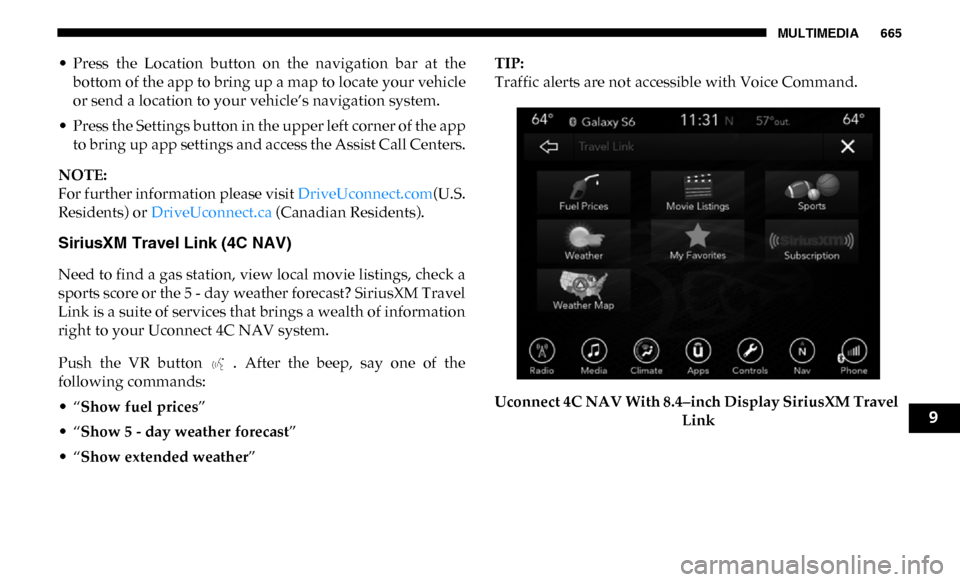
SiriusXM Travel Link (4C NAV)
Need to find a gas station, view local movie listings, check a
sports score or the 5 - day weather forecast? SiriusXM Travel
Link is a suite of services that brings a wealth of information
right to your Uconnect 4C NAV system.
Push the VR button . After the beep, say one of the
following commands:
• “Show fuel prices ”
• “Show 5 - day weather forecast ”
• “Show extended weather ” TIP:
Traffic alerts are not accessible with Voice Command.
Uconnect 4C NAV With 8.4–inch Display SiriusXM Travel
Link
9