door lock Ram 3500 2016 Workshop Manual
[x] Cancel search | Manufacturer: RAM, Model Year: 2016, Model line: 3500, Model: Ram 3500 2016Pages: 919, PDF Size: 6.67 MB
Page 409 of 919
Lock” button on the touchscreen until a check-mark
appears next to setting, showing that setting has been
selected.
•Sound Horn With Lock
When this feature is selected, the horn will sound when
the door locks are activated. To make your selection,
press the “Sound Horn With Lock” button on the touch-
screen and select from “Off”, “1st Press” or “2nd Press”.
• Sound Horn With Remote Start
When this feature is selected, the horn will sound when
the remote start is activated. To make your selection,
press the “Sound Horn With Remote Start” button on the
touchscreen until a check-mark appears next to setting,
showing that setting has been selected.
• 1st Press Of Key Fob Unlocks
When 1st Press Of Key Fob Unlocks “Driver Door” is
selected, only the driver’s door will unlock on the first press of the Remote Keyless Entry (RKE) transmitter
UNLOCK button you must push the RKE transmitter
UNLOCK button twice to unlock the passenger’s doors.
When Unlock “All Doors” On 1st Press is selected, all of
the doors will unlock on the first push of the RKE
transmitter UNLOCK button.
NOTE:
If the vehicle is programmed 1st Press Of Key Fob
Unlocks “All Doors”, all doors will unlock no matter
which Passive Entry equipped door handle is grasped. If
1st Press Of Key Fob Unlocks “Driver Door” is pro-
grammed, only the driver ’s door will unlock when the
driver ’s door is grasped. With Passive Entry, if 1st Press
Of Key Fob Unlocks “Driver Door” is programmed
pushing the handle more than once will only result in the
driver ’s door opening. If driver door is selected, once the
driver door is opened, the interior door lock/unlock
switch can be used to unlock all doors (or use RKE
transmitter).
4
UNDERSTANDING YOUR INSTRUMENT PANEL 407
Page 410 of 919
•Passive Entry — If Equipped
This feature allows you to lock and unlock the vehicles
door(s) without having to push the Remote Keyless Entry
(RKE) transmitter lock or unlock buttons. To make your
selection, press the “Passive Entry” button on the touch-
screen until a check-mark appears next to setting, show-
ing that setting has been selected. Refer to “Keyless
Enter-N-Go” in “Things To Know Before Starting Your
Vehicle”.
• Personal Settings Linked To Key Fob — If Equipped
This feature provides automatic driver seat positioning to
enhance driver mobility when entering and exiting the
vehicle. To make your selection, press the “Personal
Settings Linked To Key Fob” button on the touchscreen
until a check-mark appears next to setting, showing that
setting has been selected. NOTE:
The seat will return to the memorized seat
location (if Personal Settings Linked To Key Fob is set to
ON) when the Remote Keyless Entry (RKE) transmitter is
used to unlock the door. Refer to “Driver Memory Seat”
in “Understanding The Features Of Your Vehicle” for
further information.
Auto Comfort Systems — If Equipped
After pressing the “Auto-On Comfort” button on the
touchscreen the following settings will be available:
• Auto-On Driver Heated/Ventilated Seat & Steering
Wheel With Vehicle Start — If Equipped
When this feature is selected the driver’s heated seat and
heated steering wheel will automatically turn ON when
temperatures are below 40° F (4.4° C). When tempera-
tures are above 80° F (26.7° C) the driver vented seat will
408 UNDERSTANDING YOUR INSTRUMENT PANEL
Page 460 of 919
Uconnect Access (8.4A/8.4AN)
WARNING!
ALWAYS obey traffic laws and pay attention to the
road. Some Uconnect Access services, including 9-1-1
and Assist, will NOT work without an operable 1X
(voice/data) or 3G (data) network connection.
NOTE: Your vehicle may be transmitting data as autho-
rized by the subscriber.
An included trial and/or subscription is required to take
advantage of the Uconnect Access services in the next
section of this guide. To register with Uconnect Access,
press the Apps button on the 8.4-inch touchscreen to get
started. Detailed registration instructions can be found
on the next page. NOTE:
Uconnect Access is available only on equipped
vehicles purchased within the continental United States,
Alaska and Hawaii. Services can only be used where
coverage is available; see coverage map for details.9-1-1 Call
Security Alarm Notification
Remote Door Lock/Unlock
Stolen Vehicle Assistance
Remote Vehicle Start**
Remote Horn and Lights
Yelp Search
Voice Texting
Roadside Assistance Call
458 UNDERSTANDING YOUR INSTRUMENT PANEL
Page 463 of 919
3. Press the app you’d like to connect to your vehicle.
4. Enter your login information for the selected app andpress Link.
5. Next time you’re in your vehicle, enable Bluetooth, pair your phone and select the Via Mobile app you
want to play from the Uconnect touchscreen to stream
your personalized music.
NOTE:
• You can also complete this process on the web. Simply
visit moparownerconnect.com log in and click Set Up
Via Mobile Profile (under Quick Links).
• Once you download the app to your compatible
mobile device, you will also be able to start your
vehicle and lock/unlock its doors from virtually any-
where.Voice Texting (8.4A/8.4AN)
1. To send a message, push the Phone button. After
the beep, say the following command: “Send mes-
sage to John Smith.”
2. Listen to the prompt. After the beep, dictate the
message you would like to send. Wait for Uconnect to
process your message.
3. The Uconnect system will repeat your message and provide a variety of options to add to, delete, send or
hear the message again. After the beep, tell Uconnect
what you’d like to do. For instance, if you’re happy
with your message, after the beep, say: “Send.”
You must be registered with Uconnect Access and have a
compatible MAP – enabled smartphone to use your voice
to send a personalized text message. For details about
MAP, visit UconnectPhone.com.4
UNDERSTANDING YOUR INSTRUMENT PANEL 461
Page 686 of 919
Maintenance
CAUTION!
Do not use ethanol mixture greater than 85% in your
vehicle. It will cause difficulty in cold starting and
may affect drivability.
ADDING FUEL
The fuel filler cap (gas cap) is located behind the fuel
filler door, on the left side of the vehicle. Open the fuel
door and remove the fuel cap by turning it counter-
clockwise.NOTE:When removing the fuel filler cap, lay the cap
tether in the hook, located on the fuel filler door.
Fuel Filler Cap
684 STARTING AND OPERATING
Page 813 of 919
proper maintenance intervals. Use MOPAR Type
MS-6560 (lithium-based grease), or equivalent.
Body Lubrication
Locks and all body pivot points, including such items as
seat tracks, door hinge pivot points and rollers, liftgate,
tailgate, decklid, sliding doors and hood hinges, shouldbe lubricated periodically with a lithium based grease,
such as MOPAR Spray White Lube to assure quiet, easy
operation and to protect against rust and wear. Prior to
the application of any lubricant, the parts concerned
should be wiped clean to remove dust and grit; after
lubricating excess oil and grease should be removed.
Particular attention should also be given to hood latching
components to ensure proper function. When performing
other underhood services, the hood latch, release mecha-
nism and safety catch should be cleaned and lubricated.
The external lock cylinders should be lubricated twice a
year, preferably in the Fall and Spring. Apply a small
amount of a high quality lubricant, such as MOPAR Lock
Cylinder Lubricant directly into the lock cylinder.
Front Drive Shaft Double Cardan Joint
7
MAINTAINING YOUR VEHICLE 811
Page 846 of 919

Cavity Cartridge Fuse Micro FuseDescription
F10 40 Amp Green –Body Controller / Exterior Lighting #2
F10 50 Amp Red –Body Controller / Exterior Lighting #2 – If
Equipped with Stop/Start
F11 30 Amp Pink –Integrated Trailer Brake Module – If
Equipped
F12 40 Amp Green –Body Controller #3 / Power Locks
F13 40 Amp Green –Blower Motor
F14 40 Amp Green –Body Controller #4 / Interior Lighting
F16 30 Amp Pink –Smart Bar – If Equipped
F19 20 Amp Blue (1500 LD Diesel)
30 Amp Pink (Cum- mins Diesel) –
SCR – If Equipped
F20 30 Amp Pink –Passenger Door Module
F21 30 Amp Pink –Drive Train Control Module
844 MAINTAINING YOUR VEHICLE
Page 847 of 919
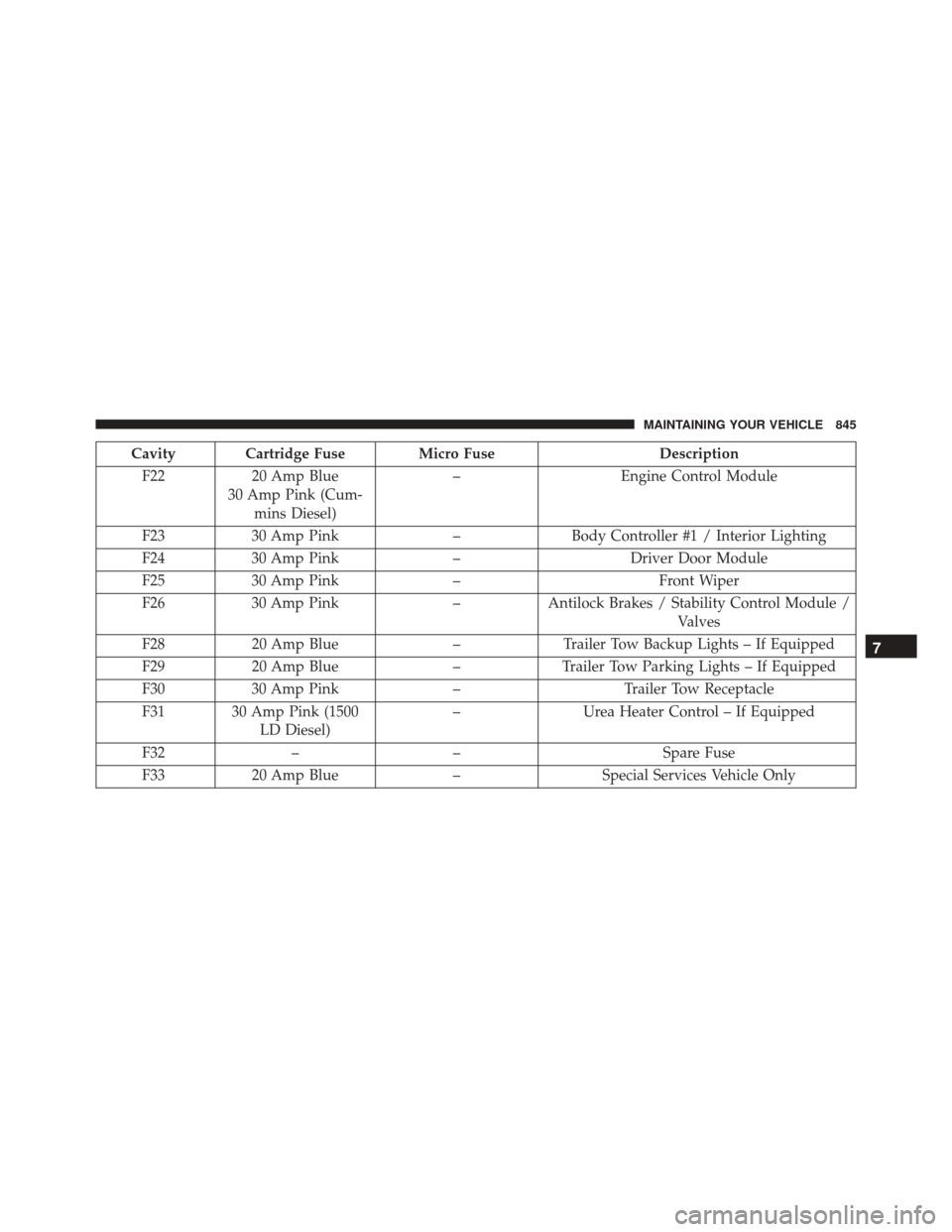
Cavity Cartridge Fuse Micro FuseDescription
F22 20 Amp Blue
30 Amp Pink (Cum- mins Diesel) –
Engine Control Module
F23 30 Amp Pink –Body Controller #1 / Interior Lighting
F24 30 Amp Pink –Driver Door Module
F25 30 Amp Pink – Front Wiper
F26 30 Amp Pink –Antilock Brakes / Stability Control Module /
Valves
F28 20 Amp Blue –Trailer Tow Backup Lights – If Equipped
F29 20 Amp Blue –Trailer Tow Parking Lights – If Equipped
F30 30 Amp Pink –Trailer Tow Receptacle
F31 30 Amp Pink (1500 LD Diesel) –
Urea Heater Control – If Equipped
F32 – – Spare Fuse
F33 20 Amp Blue –Special Services Vehicle Only
7
MAINTAINING YOUR VEHICLE 845
Page 851 of 919
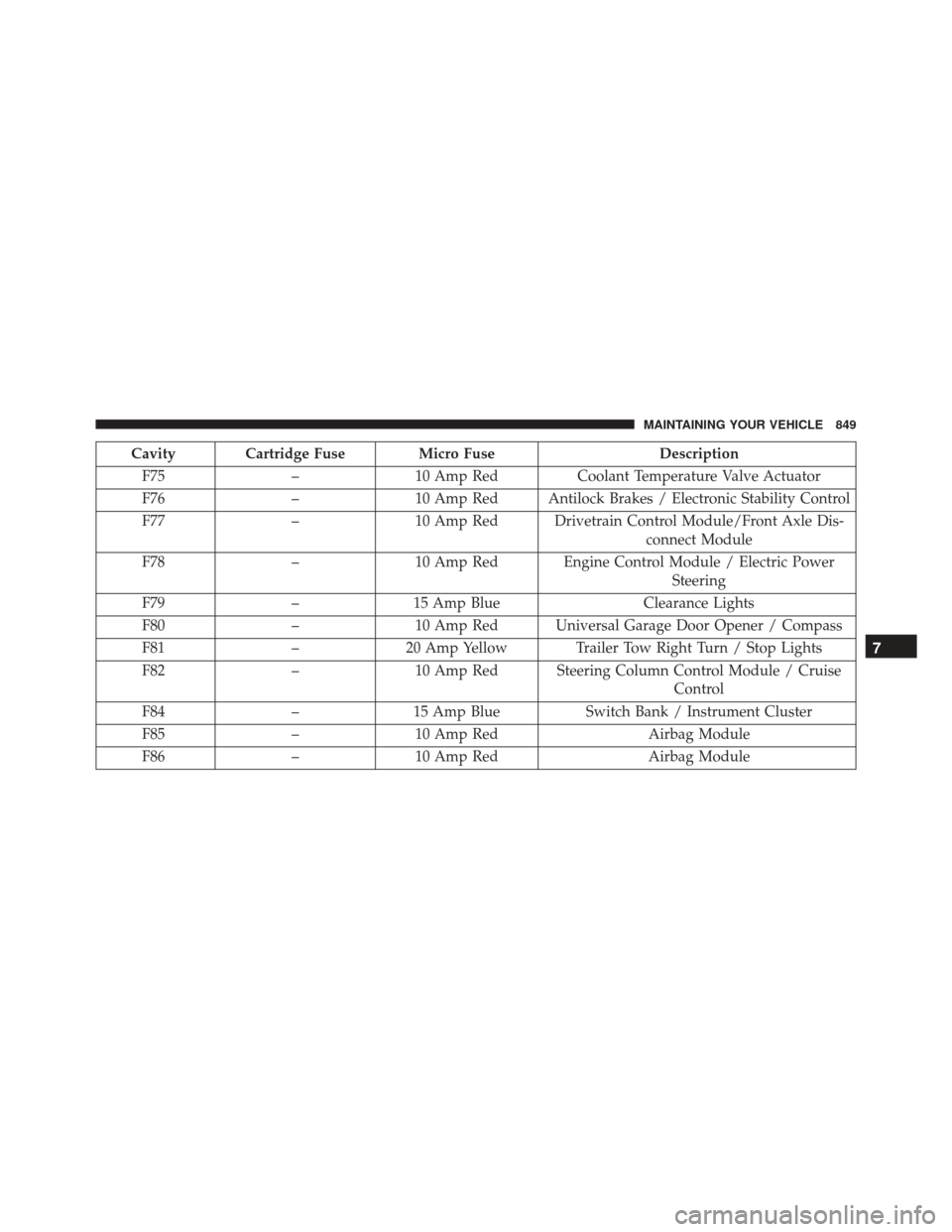
Cavity Cartridge Fuse Micro FuseDescription
F75 –10 Amp Red Coolant Temperature Valve Actuator
F76 –10 Amp Red Antilock Brakes / Electronic Stability Control
F77 –10 Amp Red Drivetrain Control Module/Front Axle Dis-
connect Module
F78 –10 Amp Red Engine Control Module / Electric Power
Steering
F79 –15 Amp Blue Clearance Lights
F80 –10 Amp Red Universal Garage Door Opener / Compass
F81 –20 Amp Yellow Trailer Tow Right Turn / Stop Lights
F82 –10 Amp Red Steering Column Control Module / Cruise
Control
F84 –15 Amp Blue Switch Bank / Instrument Cluster
F85 –10 Amp Red Airbag Module
F86 –10 Amp Red Airbag Module
7
MAINTAINING YOUR VEHICLE 849
Page 899 of 919
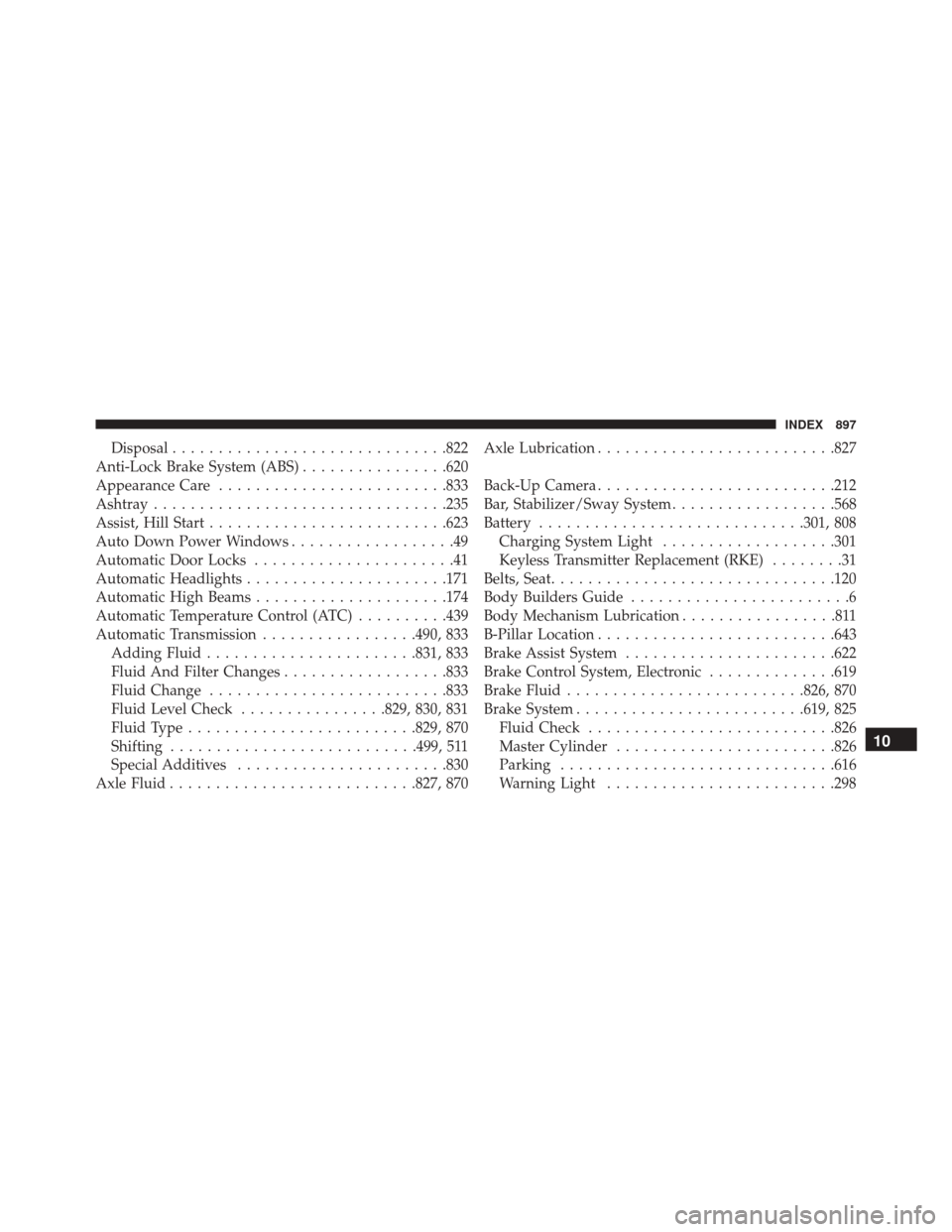
Disposal............................. .822
Anti-Lock Brake System (ABS) ................620
Appearance Care ........................ .833
Ashtray ............................... .235
Assist, Hill Start ......................... .623
Auto Down Power Windows ..................49
Automatic Door Locks ......................41
Automatic Headlights ..................... .171
Automatic High Beams .....................174
Automatic Temperature Control (ATC) ..........439
Automatic Transmission .................490, 833
Adding Fluid ...................... .831, 833
Fluid And Filter Changes ..................833
Fluid Change ......................... .833
Fluid Level Check ................829, 830, 831
Fluid Type ........................ .829, 870
Shifting .......................... .499, 511
Special Additives ...................... .830
Axle Fluid .......................... .827, 870Axle Lubrication
......................... .827
Back-Up Camera ......................... .212
Bar, Stabilizer/Sway System ..................568
Battery ............................ .301, 808
Charging System Light ...................301
Keyless Transmitter Replacement (RKE) ........31
Belts, Seat .............................. .120
Body Builders Guide ........................6
Body Mechanism Lubrication .................811
B-Pillar Location ......................... .643
Brake Assist System ...................... .622
Brake Control System, Electronic ..............619
Brake Fluid ......................... .826, 870
Brake System ........................ .619, 825
Fluid Check .......................... .826
Master Cylinder ....................... .826
Parking ............................. .616
W
arning Light ........................ .298
10
INDEX 897