door lock Ram 3500 2017 Owner's Guide
[x] Cancel search | Manufacturer: RAM, Model Year: 2017, Model line: 3500, Model: Ram 3500 2017Pages: 734, PDF Size: 7.3 MB
Page 176 of 734
Courtesy/Reading Lights
Both lights in the overhead console and rear passenger
compartment will illuminate as courtesy lights when a
door is opened, when the dimmer control is rotated to the
courtesy light position (full right position), or when the
unlock button is pushed on the Remote Keyless Entry key
fob, if equipped. These lights are also operated individu-
ally as reading lights by pushing on the corresponding
lens.NOTE:The courtesy/reading lights will remain on until
the switch is pushed a second time, so be sure they have
been turned off before leaving the vehicle. If the interior
lights are left on after the ignition is turned off, they will
automatically turn off after 15 minutes.
Front Courtesy/Reading Lights
Rear Passenger Courtesy/Reading Light
174 UNDERSTANDING THE FEATURES OF YOUR VEHICLE
Page 182 of 734

Reprogramming A Single HomeLink Button
(Canadian/Gate Operator)
To reprogram a channel that has been previously trained,
follow these steps:
1. Turn the ignition switch to the ON/RUN position.
For vehicle’s equipped with Keyless Enter-N-Go, place the
ignition in the RUN position with the Engine ON.
2. Push and hold the desired HomeLink button until theinstrument cluster display shows “CHANNEL #
TRAINING” Do not release the button.
3. Without releasing the button proceed with “Canadian/
Gate Operator Programming” Step 2 and follow all
remaining steps.
Using HomeLink
To operate, push and release the programmed HomeLink
button. Activation will now occur for the programmed
device (i.e. garage door opener, gate operator, security
system, entry door lock, home/office lighting, etc.) The
hand-held transmitter of the device may also be used at
any time.
Security
It is advised to erase all channels before you sell or turn in
your vehicle.
To erase the channels press and hold the two outside
HomeLink buttons (I and III) for up 20 seconds. The
instrument cluster display will display “CLEARING
CHANNELS.” Release the buttons when the instrument
cluster display shows “CHANNELS CLEARED.”
The HomeLink Universal Transceiver is disabled when the
Vehicle Security Alarm is active.
Troubleshooting Tips
If you are having trouble programming HomeLink, here
are some of the most common solutions:
• Replace the battery in the Garage Door Opener hand-
held transmitter.
• Push the LEARN button on the Garage Door Opener to
complete the training for a Rolling Code.
• Did you unplug the device for programming and re-
member to plug it back in?
180 UNDERSTANDING THE FEATURES OF YOUR VEHICLE
Page 186 of 734
Wind Buffeting
Wind buffeting can be described as the perception of
pressure on the ears or a helicopter-type sound in the ears.
Your vehicle may exhibit wind buffeting with the windows
down, or the sunroof (if equipped) in certain open or
partially open positions. This is a normal occurrence and
can be minimized. If the buffeting occurs with the rear
windows open, open the front and rear windows together
to minimize the buffeting. If the buffeting occurs with the
sunroof open, adjust the sunroof opening to minimize the
buffeting or open any window.
Sunroof Maintenance
Use only a nonabrasive cleaner and a soft cloth to clean the
glass panel.
Ignition Off Operation
The power sunroof switch will remain active in Accessory
Delay for up to approximately ten minutes after the
ignition switch is turned to the lock position. Opening
either front door will cancel this feature.
NOTE:Ignition Off time is programmable through the
Uconnect System. Refer to “Uconnect Settings/Customer
Programmable Features” in “Understanding Your Instru-
ment Panel” for further information.
ELECTRICAL POWER OUTLETS
The auxiliary 12 Volt (13 Amp) power outlets can provide
power for in-cab accessories designed for use with the
standard “cigar lighter” plug. The 12 Volt power outlets
and USB Port (Charge Only) have a cap attached to the
outlet indicating “12V DC,” together with either a key
symbol, battery symbol, or USB symbol.
A key symbol indicates that the key must be in the
ON/RUN or ACC positions for the outlet to provide
power. The battery symbol indicates that the outlet is
connected to the battery, and can provide power at all
times.
NOTE: To ensure proper operation, a MOPAR knob and
element must be used.
CAUTION!
• Do not exceed the maximum power of 160 Watts
(13 Amps) at 12 Volts. If the 160 Watts (13 Amps)
power rating is exceeded, the fuse protecting the
system will need to be replaced.
(Continued)
184 UNDERSTANDING THE FEATURES OF YOUR VEHICLE
Page 213 of 734
CAUTION!
Leaving the lid open for extended periods of time
could cause the vehicle battery to discharge. If the lid
is required to stay open for extended periods of time, it
is recommended that the bin lights be turned off
manually using the on/off switch.
Cargo bins feature two removable drain plugs (to allow
water to drain from bins). To remove plug, pull up on the
edge. To install push plug downward into drain hole.
NOTE: Provisions are provided in the bins for cargo
dividers and shelf supports. These accessories (in addition
to other RamBox accessories) are available from MOPAR.
Locking And Unlocking RamBox
Push and release the lock or unlock button on the key fob
to lock and unlock all doors, the tailgate and the RamBox
(if equipped). Refer to “Remote Keyless Entry” for further
details. The RamBox storage bins can be locked using the vehicle key. To lock and unlock the storage bin, insert the
key into the keyhole on the push button and turn clockwise
to lock or counterclockwise to unlock. Always return the
key to the upright (vertical) position before removing the
key from the push button.
CAUTION!
•
Ensure cargo bin lids are closed and latched before
moving or driving vehicle.
• Loads applied to the top of the bin lid should be
minimized to prevent damage to the lid and latching/
hinging mechanisms.
• Damage to the RamBox bin may occur due to heavy/
sharp objects placed in bin that shift due to vehicle
motion. In order to minimize potential for damage,
secure all cargo to prevent movement and protect
inside surfaces of bin from heavy/sharp objects with
appropriate padding.
3
UNDERSTANDING THE FEATURES OF YOUR VEHICLE 211
Page 278 of 734
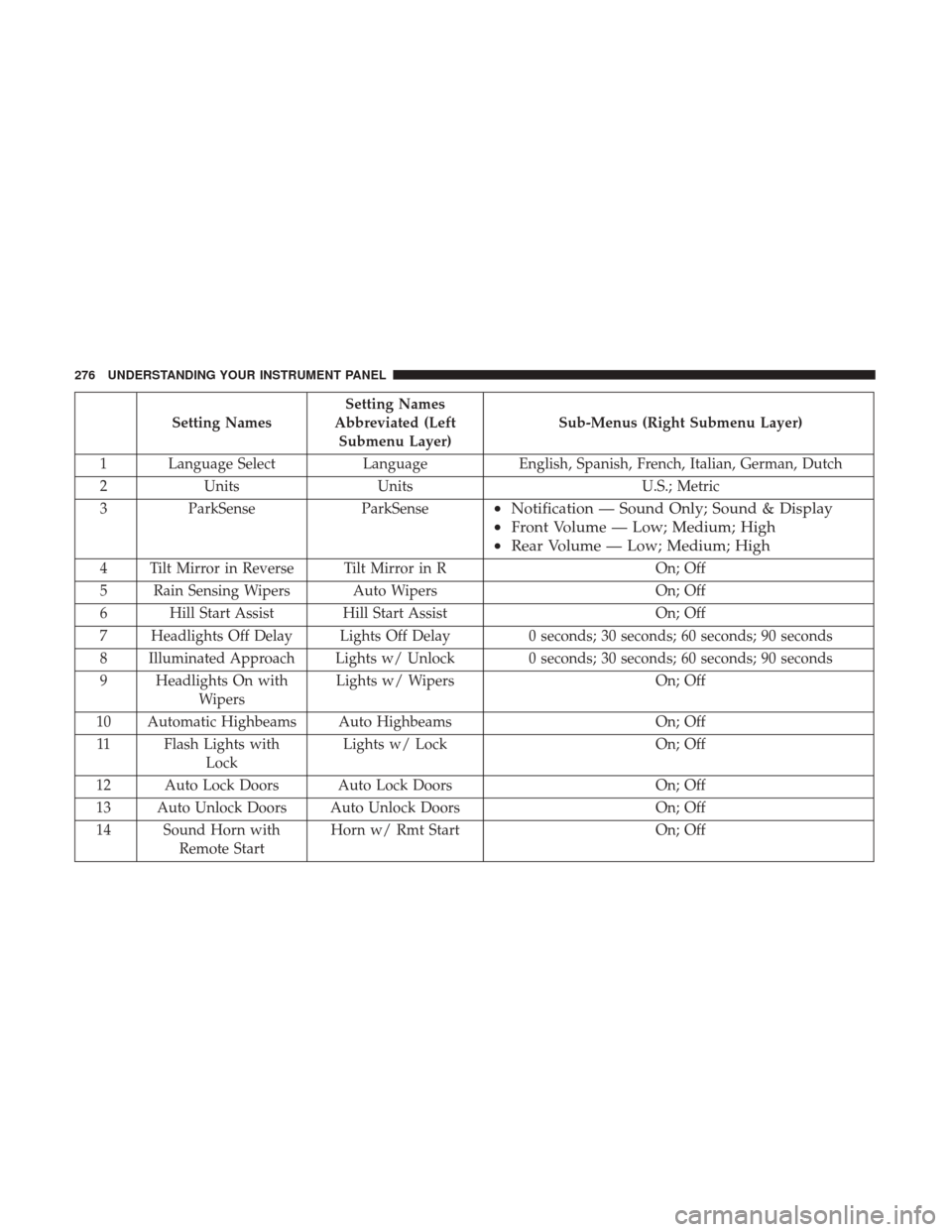
Setting NamesSetting Names
Abbreviated (Left Submenu Layer) Sub-Menus (Right Submenu Layer)
1 Language Select LanguageEnglish, Spanish, French, Italian, German, Dutch
2 Units Units U.S.; Metric
3 ParkSense ParkSense
•Notification — Sound Only; Sound & Display
• Front Volume — Low; Medium; High
• Rear Volume — Low; Medium; High
4 Tilt Mirror in Reverse Tilt Mirror in R On; Off
5 Rain Sensing Wipers Auto Wipers On; Off
6 Hill Start Assist Hill Start Assist On; Off
7 Headlights Off Delay Lights Off Delay 0 seconds; 30 seconds; 60 seconds; 90 seconds
8 Illuminated Approach Lights w/ Unlock 0 seconds; 30 seconds; 60 seconds; 90 seconds
9 Headlights On with Wipers Lights w/ Wipers
On; Off
10 Automatic Highbeams Auto Highbeams On; Off
11 Flash Lights with Lock Lights w/ Lock
On; Off
12 Auto Lock Doors Auto Lock Doors On; Off
13 Auto Unlock Doors Auto Unlock Doors On; Off
14 Sound Horn with Remote Start Horn w/ Rmt Start
On; Off
276 UNDERSTANDING YOUR INSTRUMENT PANEL
Page 279 of 734
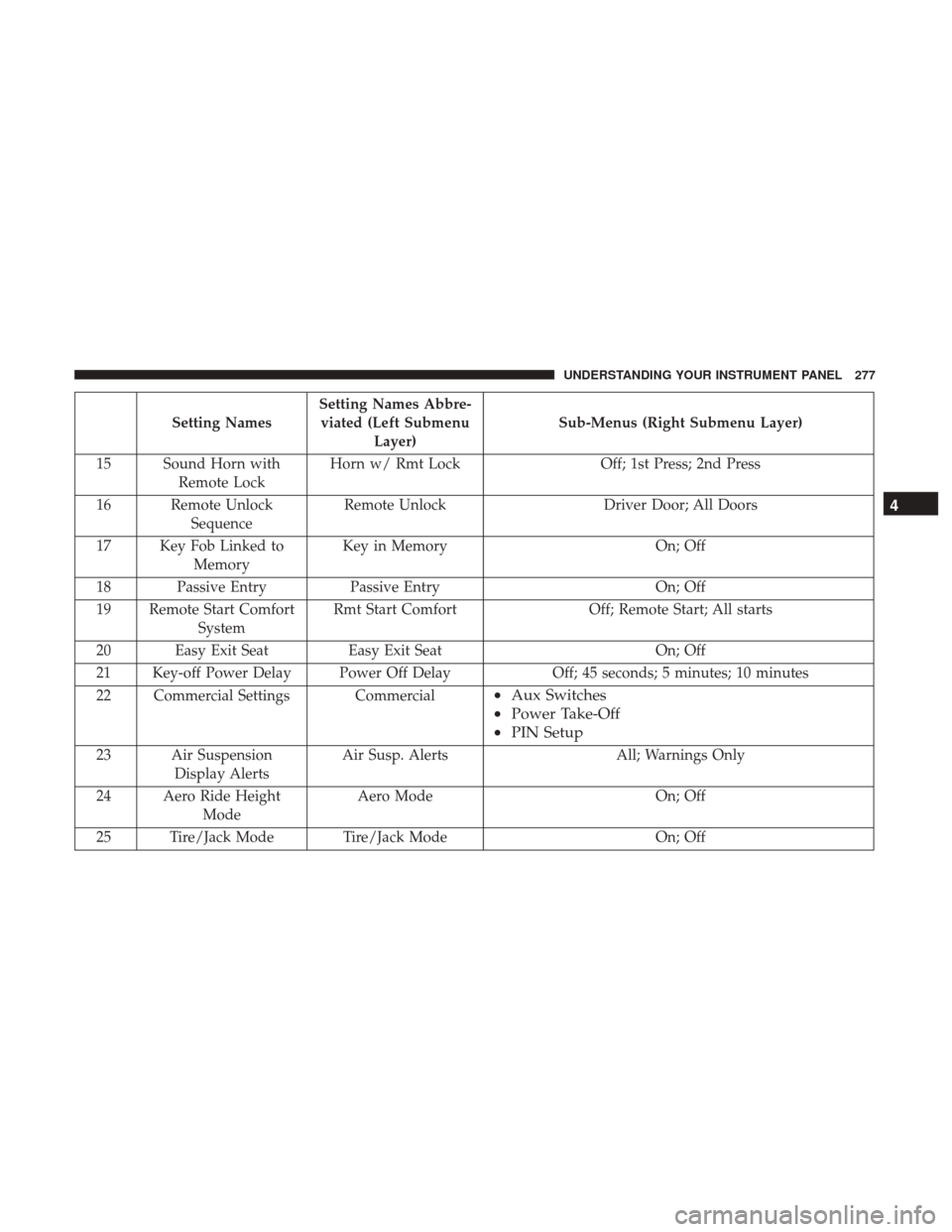
Setting NamesSetting Names Abbre-
viated (Left Submenu Layer) Sub-Menus (Right Submenu Layer)
15 Sound Horn with Remote Lock Horn w/ Rmt Lock
Off; 1st Press; 2nd Press
16 Remote Unlock Sequence Remote Unlock
Driver Door; All Doors
17 Key Fob Linked to Memory Key in Memory
On; Off
18 Passive Entry Passive Entry On; Off
19 Remote Start Comfort System Rmt Start Comfort
Off; Remote Start; All starts
20 Easy Exit Seat Easy Exit Seat On; Off
21 Key-off Power Delay Power Off Delay Off; 45 seconds; 5 minutes; 10 minutes
22 Commercial Settings Commercial
• Aux Switches
• Power Take-Off
• PIN Setup
23 Air Suspension
Display Alerts Air Susp. Alerts All; Warnings Only
24 Aero Ride Height Mode Aero Mode
On; Off
25 Tire/Jack Mode Tire/Jack Mode On; Off
4
UNDERSTANDING YOUR INSTRUMENT PANEL 277
Page 283 of 734
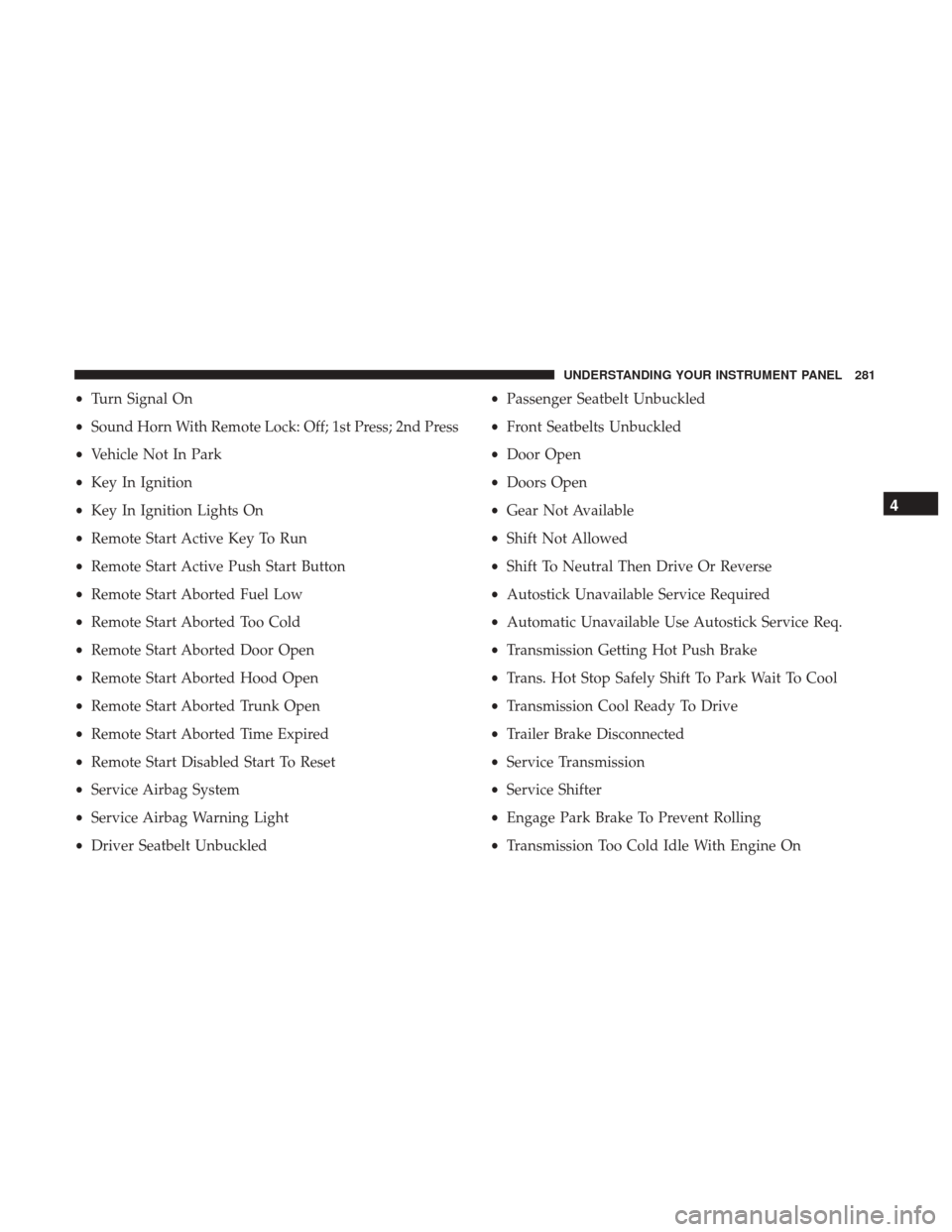
•Turn Signal On
• Sound Horn With Remote Lock: Off; 1st Press; 2nd Press
• Vehicle Not In Park
• Key In Ignition
• Key In Ignition Lights On
• Remote Start Active Key To Run
• Remote Start Active Push Start Button
• Remote Start Aborted Fuel Low
• Remote Start Aborted Too Cold
• Remote Start Aborted Door Open
• Remote Start Aborted Hood Open
• Remote Start Aborted Trunk Open
• Remote Start Aborted Time Expired
• Remote Start Disabled Start To Reset
• Service Airbag System
• Service Airbag Warning Light
• Driver Seatbelt Unbuckled •
Passenger Seatbelt Unbuckled
• Front Seatbelts Unbuckled
• Door Open
• Doors Open
• Gear Not Available
• Shift Not Allowed
• Shift To Neutral Then Drive Or Reverse
• Autostick Unavailable Service Required
• Automatic Unavailable Use Autostick Service Req.
• Transmission Getting Hot Push Brake
• Trans. Hot Stop Safely Shift To Park Wait To Cool
• Transmission Cool Ready To Drive
• Trailer Brake Disconnected
• Service Transmission
• Service Shifter
• Engage Park Brake To Prevent Rolling
• Transmission Too Cold Idle With Engine On
4
UNDERSTANDING YOUR INSTRUMENT PANEL 281
Page 290 of 734
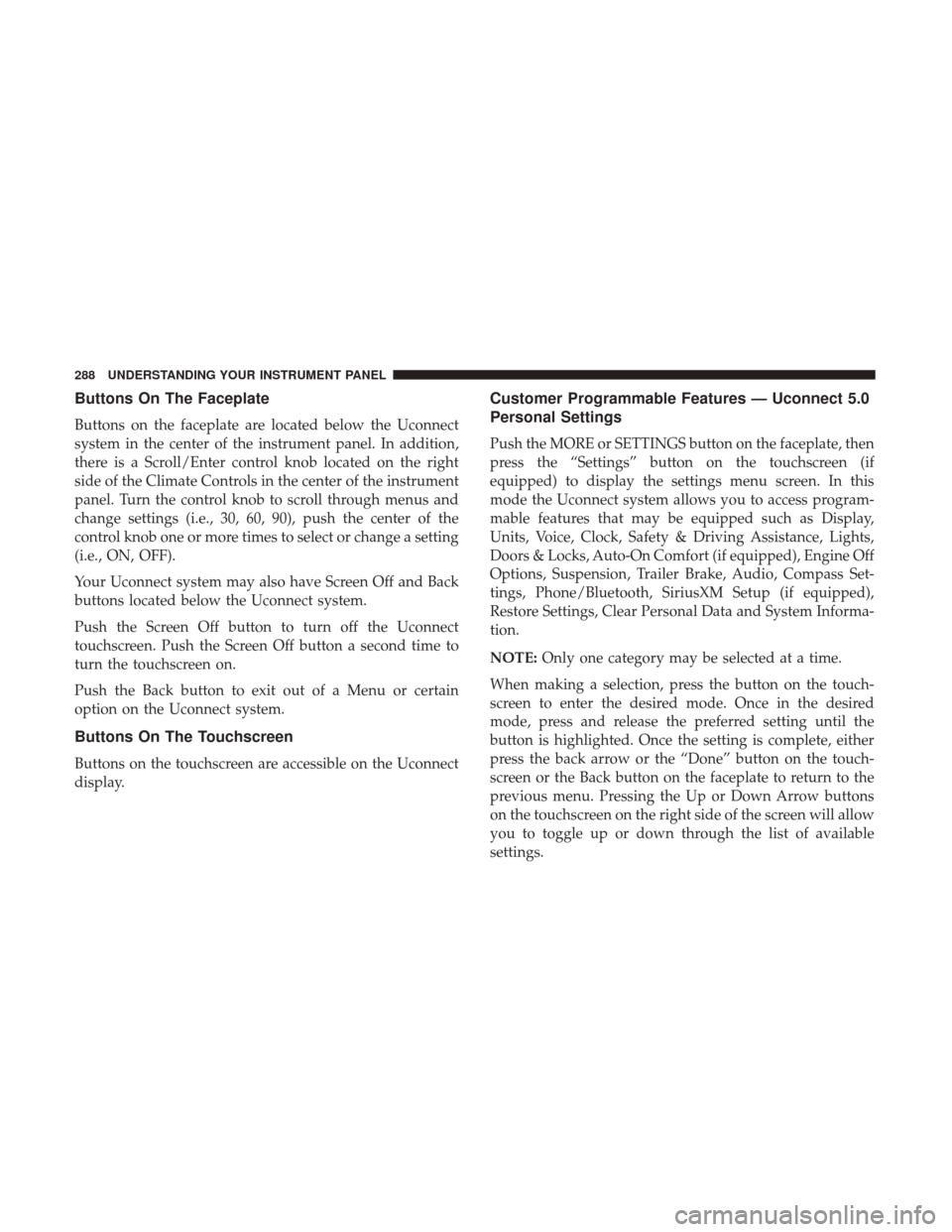
Buttons On The Faceplate
Buttons on the faceplate are located below the Uconnect
system in the center of the instrument panel. In addition,
there is a Scroll/Enter control knob located on the right
side of the Climate Controls in the center of the instrument
panel. Turn the control knob to scroll through menus and
change settings (i.e., 30, 60, 90), push the center of the
control knob one or more times to select or change a setting
(i.e., ON, OFF).
Your Uconnect system may also have Screen Off and Back
buttons located below the Uconnect system.
Push the Screen Off button to turn off the Uconnect
touchscreen. Push the Screen Off button a second time to
turn the touchscreen on.
Push the Back button to exit out of a Menu or certain
option on the Uconnect system.
Buttons On The Touchscreen
Buttons on the touchscreen are accessible on the Uconnect
display.
Customer Programmable Features — Uconnect 5.0
Personal Settings
Push the MORE or SETTINGS button on the faceplate, then
press the “Settings” button on the touchscreen (if
equipped) to display the settings menu screen. In this
mode the Uconnect system allows you to access program-
mable features that may be equipped such as Display,
Units, Voice, Clock, Safety & Driving Assistance, Lights,
Doors & Locks, Auto-On Comfort (if equipped), Engine Off
Options, Suspension, Trailer Brake, Audio, Compass Set-
tings, Phone/Bluetooth, SiriusXM Setup (if equipped),
Restore Settings, Clear Personal Data and System Informa-
tion.
NOTE:Only one category may be selected at a time.
When making a selection, press the button on the touch-
screen to enter the desired mode. Once in the desired
mode, press and release the preferred setting until the
button is highlighted. Once the setting is complete, either
press the back arrow or the “Done” button on the touch-
screen or the Back button on the faceplate to return to the
previous menu. Pressing the Up or Down Arrow buttons
on the touchscreen on the right side of the screen will allow
you to toggle up or down through the list of available
settings.
288 UNDERSTANDING YOUR INSTRUMENT PANEL
Page 296 of 734
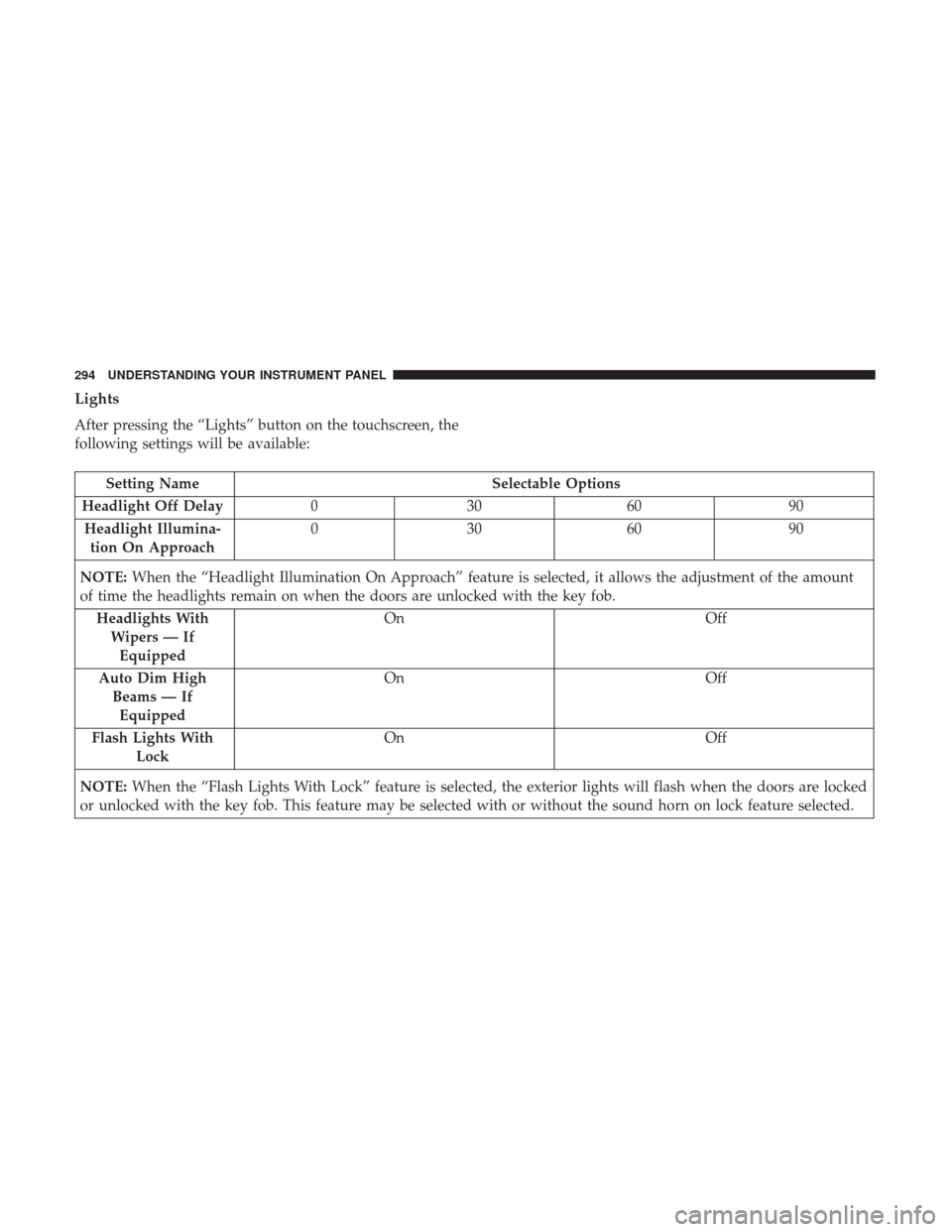
Lights
After pressing the “Lights” button on the touchscreen, the
following settings will be available:
Setting NameSelectable Options
Headlight Off Delay 030609 0
Headlight Illumina- tion On Approach 03
0609 0
NOTE: When the “Headlight Illumination On Approach” feature is selected, it allows the adjustment of the amount
of time the headlights remain on when the doors are unlocked with the key fob.
Headlights WithWipers — IfEquipped On
Off
Auto Dim High Beams — IfEquipped On
Off
Flash Lights With Lock On
Off
NOTE: When the “Flash Lights With Lock” feature is selected, the exterior lights will flash when the doors are locked
or unlocked with the key fob. This feature may be selected with or without the sound horn on lock feature selected.
294 UNDERSTANDING YOUR INSTRUMENT PANEL
Page 297 of 734

Doors & Locks
After pressing the “Doors & Locks” button on the touch-
screen, the following settings will be available:
Setting NameSelectable Options
Auto Door Locks On Off
NOTE: When the “Auto Door Locks” feature is selected, all doors will lock automatically when the vehicle reaches a
speed of 15 mph (24 km/h).
Auto Unlock On Exit On Off
NOTE: When the “Auto Unlock On Exit” feature is selected, all doors will unlock when the vehicle is stopped, the
transmission is in the PARK or NEUTRAL position and the driver’s door is opened.
Sound Horn With Lock Off1st Press 2nd Press
Remote Door Unlock All Driver
NOTE: The “Remote Door Unlock” feature will allow you to program your remote door locks to open “All doors” or
only the “Driver door” with the first push of the key fob or grabbing the Passive Entry door handle.
Sound Horn With Remote Start On
Off
NOTE: When the “Sound Horn With Remote Start” feature is selected, the horn will sound when the remote start is
activated.
4
UNDERSTANDING YOUR INSTRUMENT PANEL 295