instrument cluster Ram 3500 2018 Owner's Manual
[x] Cancel search | Manufacturer: RAM, Model Year: 2018, Model line: 3500, Model: Ram 3500 2018Pages: 700, PDF Size: 8.87 MB
Page 431 of 700

Repeat steps 8 and 9 until the GAIN setting is at a point just
below trailer wheel lockup. If towing a heavier trailer,trailer wheel lockup may not be attainable even with the
maximum GAIN setting of 10.
Light Electric Heavy Electric Light EOH
Heavy EOH
Type of Trailer Brakes Electric Trailer Brakes Electric Trailer Brakes Electric over Hydrau- lic Trailer BrakesElectric over Hydrau-
lic Trailer Brakes
Load *Under 10,000 lbs *Above 10,000 lbs *Under 10,000 lbs *Above 10,000 lbs
* The suggested selection depends and may change de-
pending on the customer preferences for braking perfor-
mance. Condition of the trailer brakes, driving and road
state may also affect the selection.
Display Messages
The trailer brake control interacts with the instrument
cluster display. Display messages, along with a single
chime, will be displayed when a malfunction is determined
in the trailer connection, trailer brake control, or on the
trailer. Refer to “Instrument Cluster Display” in “Getting
To Know Your Instrument Panel” for further information.
CAUTION!
Connecting a trailer that is not compatible with the
ITBM system may result in reduced or complete loss of
trailer braking. There may be a increase in stopping
distance or trailer instability which could result in
damage to your vehicle, trailer, or other property.
WARNING!
Connecting a trailer that is not compatible with the
ITBM system may result in reduced or complete loss of
trailer braking. There may be a increase in stopping
distance or trailer instability which could result in
personal injury.
6
STARTING AND OPERATING 429
Page 466 of 700

CavityCartridge Fuse Micro Fuse Description
F34 30 Amp Pink –Vehicle System Interface Module #2 – If
Equipped
F35 30 Amp Pink –Sunroof – If Equipped
F36 30 Amp Pink –Rear Defroster – If Equipped
F37 30 Amp Pink –Cummins Diesel Fuel Heater #2 – If
Equipped
F38 30 Amp Pink –Power Inverter 115V AC – If Equipped
F39 20 Amp Blue –Power Outlet – Special Services Only
F41 –10 Amp Red Active Grill Shutter – If Equipped
F42 –20 Amp Yellow Horn
F44 –10 Amp Red Diagnostic Port
F46 –10 Amp Red Upfitter – If Equipped
F49 –10 Amp Red Instrument Panel Cluster
(Except Fleet Vehicles)
F50 –20 Amp Yellow Air Suspension Control Module – If
Equipped
F51 –10 Amp Red Ignition Node Module / Keyless Ignition
(Instrument Panel Cluster – Fleet VehiclesOnly)
F52 –5 Amp Tan Battery Sensor
F53 –20 Amp Yellow Trailer Tow – Left Turn/Stop Lights
464 IN CASE OF EMERGENCY
Page 468 of 700

CavityCartridge Fuse Micro Fuse Description
F71 –25 Amp Clear Amplifier
F72 –10 Amp Red PCM – If Equipped
F73 –20 Amp Yellow Fuel Transfer Pump (HD Only) – If
Equipped
F74 –20 Amp Yellow
(Gas Engine & 1500 LD Diesel) Brake Vacuum Pump Gas/Diesel – If
Equipped
F75 –10 Amp Red Coolant Temperature Valve Actuator
F76 –10 Amp Red Antilock Brakes / Electronic Stability Control
F77 –10 Amp Red Drivetrain Control Module/Front Axle
Disconnect Module
F78 –10 Amp Red Engine Control Module / Electric Power
Steering
F79 –15 Amp Blue Clearance Lights
F80 –10 Amp Red Universal Garage Door Opener / Compass
F81 –20 Amp Yellow Trailer Tow Right Turn / Stop Lights
F82 –10 Amp Red Steering Column Control Module /
Cruise Control
F84 –15 Amp Blue Switch Bank / Instrument Cluster
F85 –10 Amp Red Airbag Module
F86 –10 Amp Red Airbag Module
466 IN CASE OF EMERGENCY
Page 469 of 700
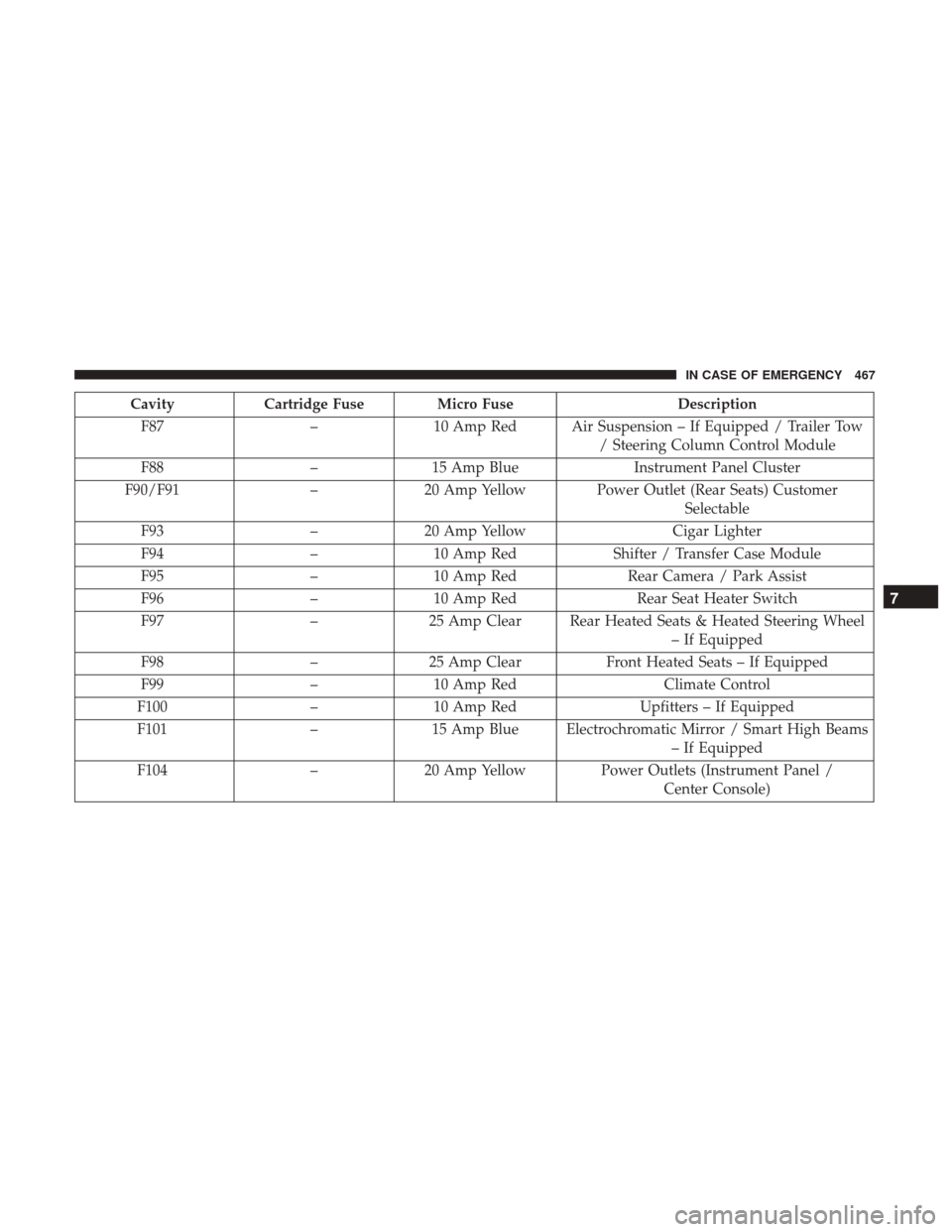
CavityCartridge Fuse Micro Fuse Description
F87 –10 Amp Red Air Suspension – If Equipped / Trailer Tow
/ Steering Column Control Module
F88 –15 Amp Blue Instrument Panel Cluster
F90/F91 –20 Amp Yellow Power Outlet (Rear Seats) Customer
Selectable
F93 –20 Amp Yellow Cigar Lighter
F94 –10 Amp Red Shifter / Transfer Case Module
F95 –10 Amp Red Rear Camera / Park Assist
F96 –10 Amp Red Rear Seat Heater Switch
F97 –25 Amp Clear Rear Heated Seats & Heated Steering Wheel
– If Equipped
F98 –25 Amp Clear Front Heated Seats – If Equipped
F99 –10 Amp Red Climate Control
F100 –10 Amp Red Upfitters – If Equipped
F101 –15 Amp Blue Electrochromatic Mirror / Smart High Beams
– If Equipped
F104 –20 Amp Yellow Power Outlets (Instrument Panel /
Center Console)
7
IN CASE OF EMERGENCY 467
Page 471 of 700

If your vehicle is not equipped with a touchscreen, this
feature can be activated through the instrument cluster
display. Refer to “Instrument Cluster Display” in “Getting
To Know Your Instrument Panel” for further information.
Jack Location
The jack and jack tools are stored under the front passenger
seat.
Removal Of Jack And Tools (1500 Series)
To access the jack and jack tools, you must remove the
plastic access cover located on the side of the front passen-
ger ’s seat. To remove the cover, pull the front part of the
cover (closest to the front of the seat) toward you to release
a locking tab. Once the front of the cover is loose, slide the
cover toward the front of the seat until it is free from the
seat frame.
Jack Access Cover
7
IN CASE OF EMERGENCY 469
Page 519 of 700
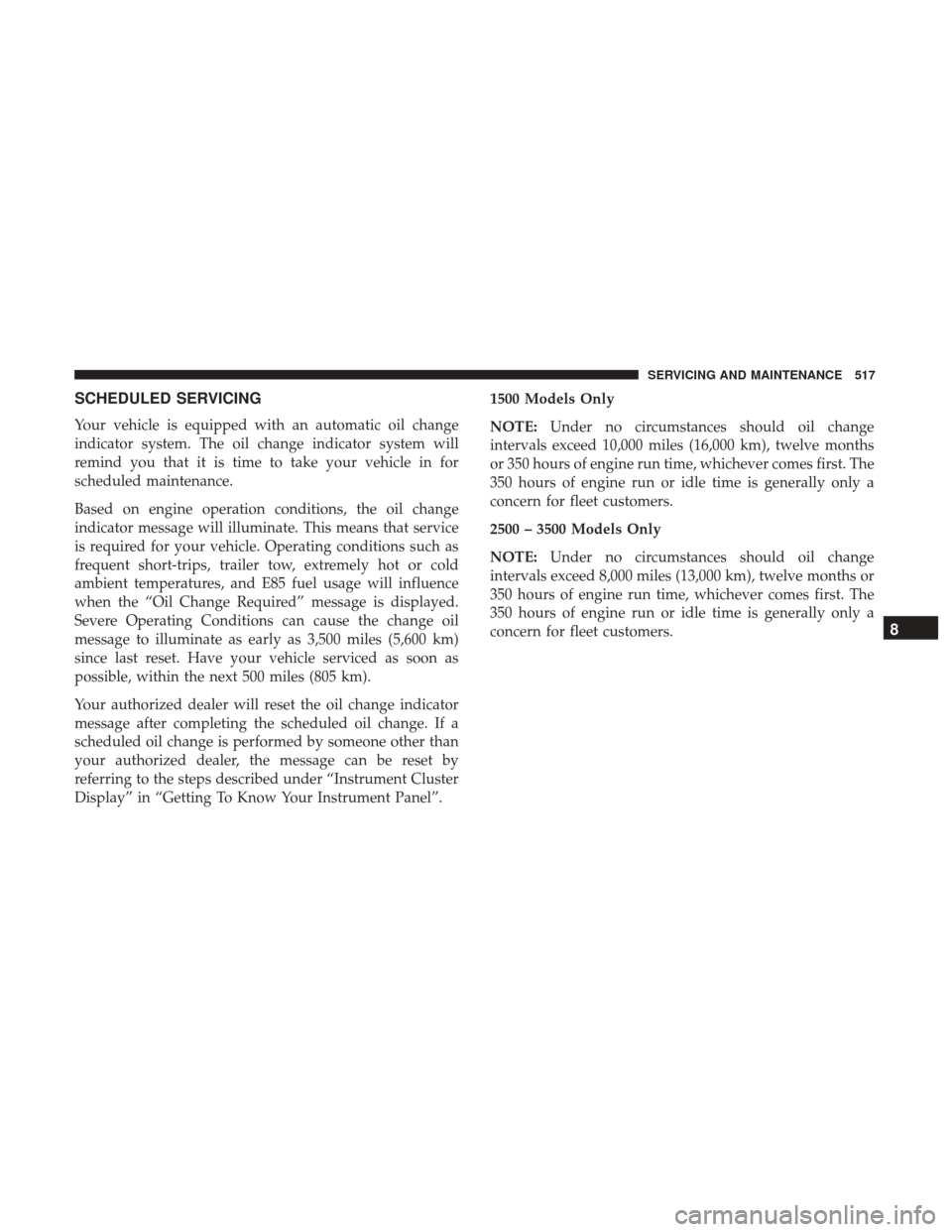
SCHEDULED SERVICING
Your vehicle is equipped with an automatic oil change
indicator system. The oil change indicator system will
remind you that it is time to take your vehicle in for
scheduled maintenance.
Based on engine operation conditions, the oil change
indicator message will illuminate. This means that service
is required for your vehicle. Operating conditions such as
frequent short-trips, trailer tow, extremely hot or cold
ambient temperatures, and E85 fuel usage will influence
when the “Oil Change Required” message is displayed.
Severe Operating Conditions can cause the change oil
message to illuminate as early as 3,500 miles (5,600 km)
since last reset. Have your vehicle serviced as soon as
possible, within the next 500 miles (805 km).
Your authorized dealer will reset the oil change indicator
message after completing the scheduled oil change. If a
scheduled oil change is performed by someone other than
your authorized dealer, the message can be reset by
referring to the steps described under “Instrument Cluster
Display” in “Getting To Know Your Instrument Panel”.1500 Models Only
NOTE:
Under no circumstances should oil change
intervals exceed 10,000 miles (16,000 km), twelve months
or 350 hours of engine run time, whichever comes first. The
350 hours of engine run or idle time is generally only a
concern for fleet customers.
2500 – 3500 Models Only
NOTE: Under no circumstances should oil change
intervals exceed 8,000 miles (13,000 km), twelve months or
350 hours of engine run time, whichever comes first. The
350 hours of engine run or idle time is generally only a
concern for fleet customers.
8
SERVICING AND MAINTENANCE 517
Page 556 of 700
CAUTION!
Do not use chemical flushes in your transmission as
the chemicals can damage your transmission compo-
nents. Such damage is not covered by the New Vehicle
Limited Warranty.
Fluid Level Check — Eight-Speed Transmission
The fluid level is preset at the factory and does not require
adjustment under normal operating conditions. Routine
fluid level checks are not required, therefore the transmis-
sion has no dipstick. Your authorized dealer can check
your transmission fluid level using special service tools.
If you notice fluid leakage or transmission malfunction,
visit your authorized dealer immediately to have the
transmission fluid level checked. Operating the vehicle
with an improper fluid level can cause severe transmission
damage.
CAUTION!
If a transmission fluid leak occurs, visit your autho-
rized dealer immediately. Severe transmission damage
(Continued)
CAUTION!(Continued)
may occur. Your authorized dealer has the proper tools
to adjust the fluid level accurately.
Fluid Level Check — Six-Speed Transmission
It is best to check the fluid level when the transmission is
at normal operating temperature (170-180°F / 77-82°C).
This normally occurs after at least 15 miles (25 km) of
driving. At normal operating temperature the fluid cannot
be held comfortably between the fingertips. You can read
the transmission sump temperature in the instrument
cluster screen (refer to “Instrument Cluster Display” for
further information).
Use the following procedure to check the transmission
fluid level properly:
1. Monitor the transmission temperature using the instru-
ment cluster display, and operate the vehicle as required
to reach the normal operating temperature. If the trans-
mission is not functioning properly, or the vehicle
cannot be driven, see the NOTE and CAUTION below
about checking the fluid level at colder temperatures.
2. Park the vehicle on level ground.
554 SERVICING AND MAINTENANCE
Page 584 of 700

Dual Rear Wheels — If Equipped
The tires used on dual wheel assemblies should be
matched for wear to prevent overloading one tire in a set.
To check if tires are even, lay a straight edge across all four
tires. The straight edge should touch all the tires.
NOTE:If your vehicle is equipped with a Tire Pressure
Information System (TPIS):
• The Tire Pressure Information System (TPIS) uses
unique sensors in the inner rear wheels to help identify
them from the outer rear wheels, because of this, the
inner and outer wheel locations can’t be switched. •
After a tire rotation is completed, as shown below, the
system can auto learn the locations of each sensor ID.
Auto learning/localization occurs when the vehicle ig-
nition status is changed from Off to On and speeds of
greater than 5 mph (8km/h) are obtained and remain
over 5 mph (8km/h) for at about a 15 minute period.
You may need to drive for 20 minutes to account slower
speeds and stops.
• If the tires are rotated incorrectly, The auto localization
of the TPIS sensors will fail to locate correctly resulting
in incorrect locations for the pressure values displayed
in the instrument cluster.
CAUTION!
•3500 Dual Rear Tires may only have one approved
direction of rotation. This is to accommodate the
asymmetrical design (tread pattern) of the On/Off-
Road tire and the use of Outline White Letter (OWL)
tires.
• When replacing a flat, the spare tire may have to be
remounted on the rim, or installed at a different
location, to maintain the correct placement of the tire
on the wheel relative to the tire/wheel position on
(Continued)
Tire Rotation
582 SERVICING AND MAINTENANCE
Page 591 of 700
CAUTION!(Continued)
painted, or decorated surfaces of the interior may
causepermanent damage. Wipe away immediately.
• Damage caused by these type of products may not be
covered by your New Vehicle Limited Warranty.
Cleaning Plastic Instrument Cluster Lenses
The lenses in front of the instruments in this vehicle are
molded in clear plastic. When cleaning the lenses, care
must be taken to avoid scratching the plastic.
1. Clean with a wet soft cloth. A mild soap solution may be
used, but do not use high alcohol content or abrasive
cleaners. If soap is used, wipe clean with a clean damp
cloth.
2. Dry with a soft cloth.
Leather Parts
Mopar Total Clean is specifically recommended for leather
upholstery.
Your leather upholstery can be best preserved by regular
cleaning with a damp soft cloth. Small particles of dirt can act as an abrasive and damage the leather upholstery and
should be removed promptly with a damp cloth. Stubborn
soils can be removed easily with a soft cloth and Mopar
Total Clean. Care should be taken to avoid soaking your
leather upholstery with any liquid. Please do not use
polishes, oils, cleaning fluids, solvents, detergents, or
ammonia-based cleaners to clean your leather upholstery.
Application of a leather conditioner is not required to
maintain the original condition.
NOTE:
If equipped with light colored leather, it tends to
show any foreign material, dirt, and fabric dye transfer
more so than darker colors. The leather is designed for easy
cleaning, and FCA recommends Mopar total care leather
cleaner applied on a cloth to clean the leather seats as
needed.
CAUTION!
Do not use Alcohol and Alcohol-based and/or Ketone
based cleaning products to clean leather seats, as
damage to the seat may result.
8
SERVICING AND MAINTENANCE 589
Page 618 of 700

Display
After pressing the “Display” button on the touchscreen, the
following settings will be available.
Setting NameSelectable Options
Display Mode AutoManual
Set Language English, Français, Español
Touchscreen Beep OnOff
Fuel Saver Display OnOff
NOTE:
The “Fuel Saver Display” feature will allow you to enable fuel saver mode and will be displayed in the instrument
cluster display.
Units — If Equipped
After pressing “Units” on the touchscreen, the following
will be available:
Setting Name Selectable Options
Units USMetric
616 MULTIMEDIA