ignition Ram 3500 Chassis Cab 2016 Repair Manual
[x] Cancel search | Manufacturer: RAM, Model Year: 2016, Model line: 3500 Chassis Cab, Model: Ram 3500 Chassis Cab 2016Pages: 669, PDF Size: 4.78 MB
Page 250 of 669
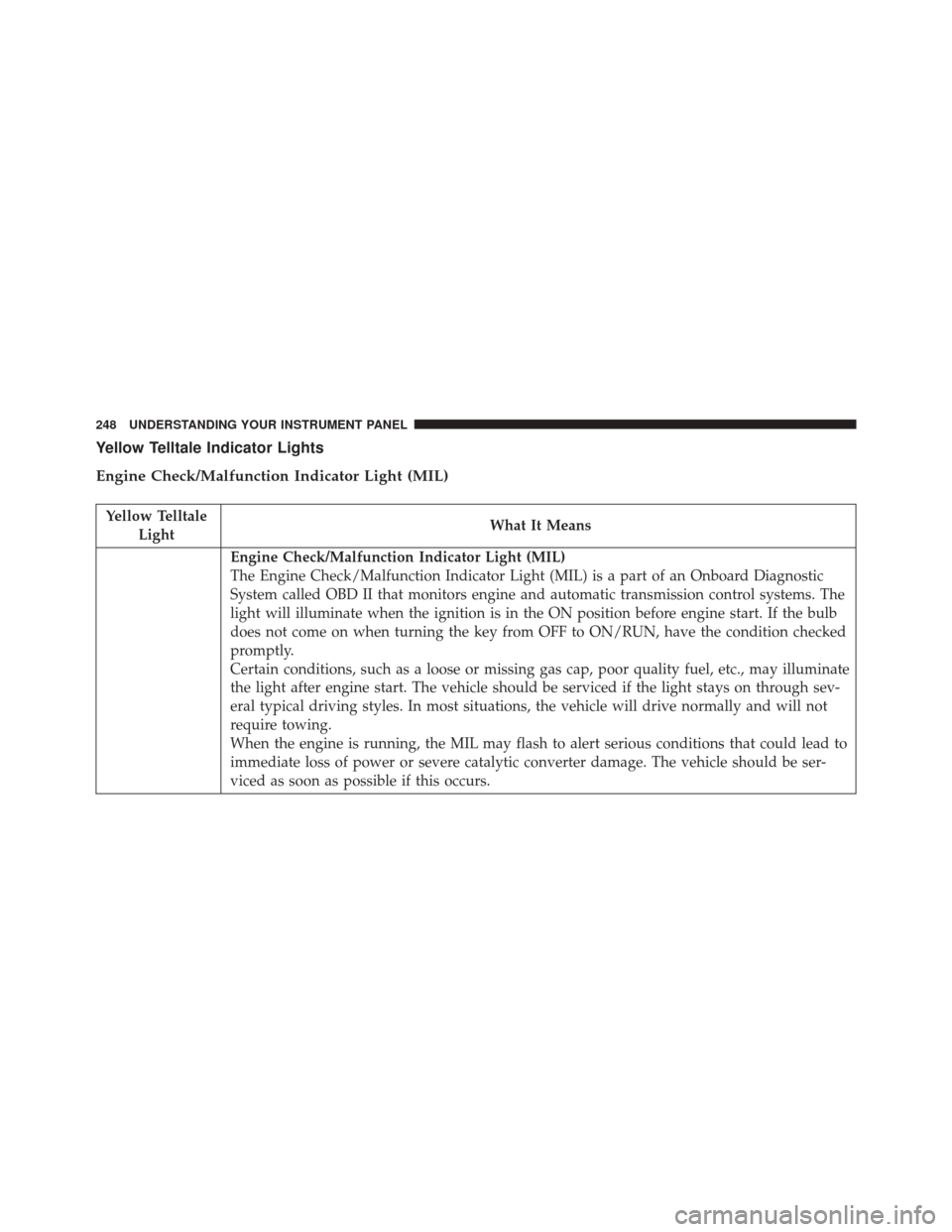
Yellow Telltale Indicator Lights
Engine Check/Malfunction Indicator Light (MIL)
Yellow TelltaleLight What It Means
Engine Check/Malfunction Indicator Light (MIL)
The Engine Check/Malfunction Indicator Light (MIL) is a part of an Onboard Diagnostic
System called OBD II that monitors engine and automatic transmission control systems. The
light will illuminate when the ignition is in the ON position before engine start. If the bulb
does not come on when turning the key from OFF to ON/RUN, have the condition checked
promptly.
Certain conditions, such as a loose or missing gas cap, poor quality fuel, etc., may illuminate
the light after engine start. The vehicle should be serviced if the light stays on through sev-
eral typical driving styles. In most situations, the vehicle will drive normally and will not
require towing.
When the engine is running, the MIL may flash to alert serious conditions that could lead to
immediate loss of power or severe catalytic converter damage. The vehicle should be ser-
viced as soon as possible if this occurs.
248 UNDERSTANDING YOUR INSTRUMENT PANEL
Page 252 of 669

Electronic Stability Control (ESC) Indicator Light — If Equipped
Yellow TelltaleLight What It Means
Electronic Stability Control (ESC) Indicator Light
The “ESC Indicator Light” in the instrument cluster will come on when the ignition switch
is turned to the ON/RUN position. It should go out with the engine running. If the “ESC
Indicator Light” comes on continuously with the engine running, a malfunction has been
detected in the ESC system. If this light remains on after several ignition cycles, and the ve-
hicle has been driven several miles (kilometers) at speeds greater than 30 mph (48 km/h),
see your authorized dealer as soon as possible to have the problem diagnosed and corrected.
•
The “ESC Off Indicator Light” and the “ESC Indicator Light” come on momentarily each
time the ignition switch is turned to ON/RUN.
• Each time the ignition is turned to ON/RUN, the ESC system will be ON, even if it was
turned off previously.
• The ESC system will make buzzing or clicking sounds when it is active. This is normal;
the sounds will stop when ESC becomes inactive following the maneuver that caused
the ESC activation.
250 UNDERSTANDING YOUR INSTRUMENT PANEL
Page 257 of 669
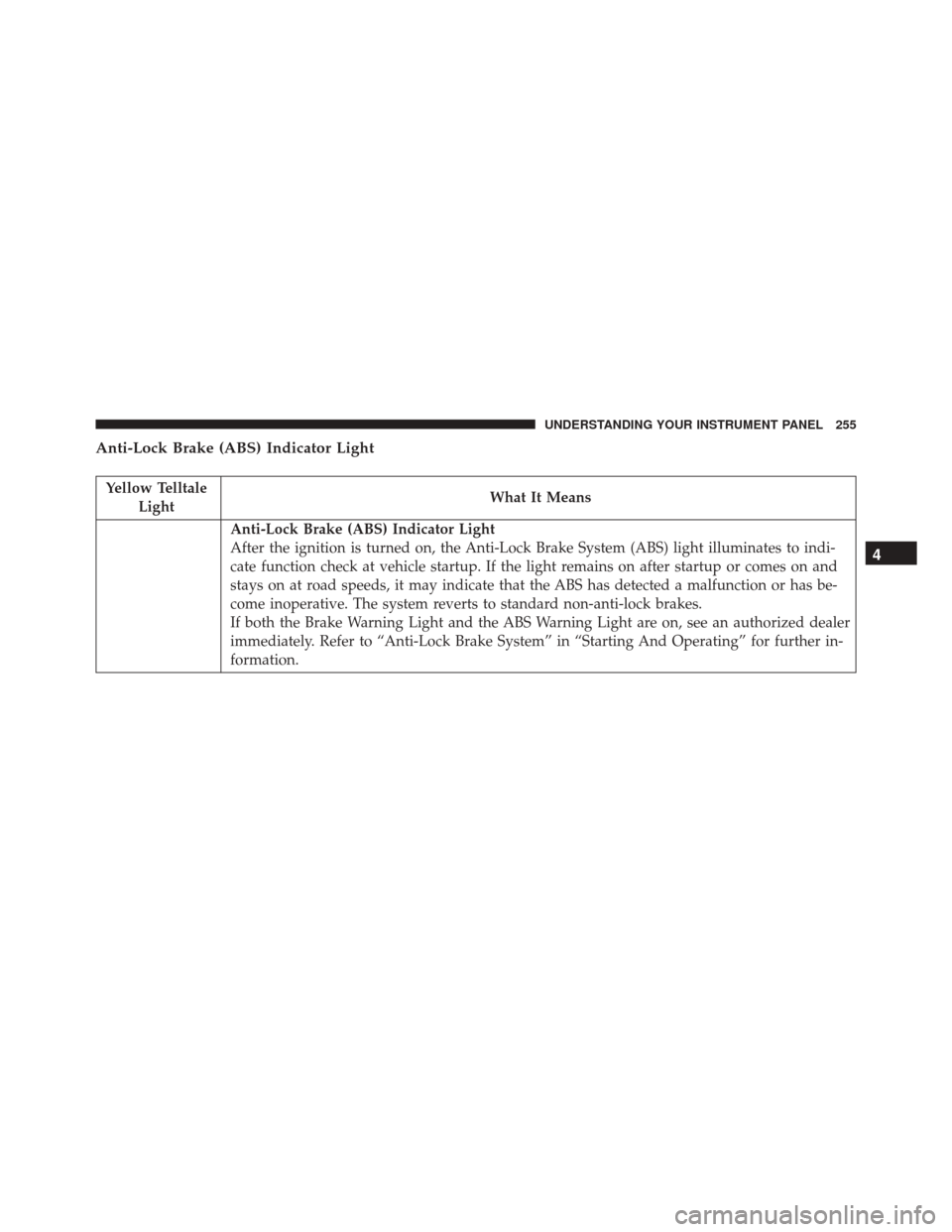
Anti-Lock Brake (ABS) Indicator Light
Yellow TelltaleLight What It Means
Anti-Lock Brake (ABS) Indicator Light
After the ignition is turned on, the Anti-Lock Brake System (ABS) light illuminates to indi-
cate function check at vehicle startup. If the light remains on after startup or comes on and
stays on at road speeds, it may indicate that the ABS has detected a malfunction or has be-
come inoperative. The system reverts to standard non-anti-lock brakes.
If both the Brake Warning Light and the ABS Warning Light are on, see an authorized dealer
immediately. Refer to “Anti-Lock Brake System” in “Starting And Operating” for further in-
formation.
4
UNDERSTANDING YOUR INSTRUMENT PANEL 255
Page 272 of 669

•Unstored Messages
This message type is displayed indefinitely or until the
condition that activated the message is cleared. Examples
of this message type are “Turn Signal On” (if a turn signal
is left on) and “Lights On” (if driver leaves the vehicle).
• Unstored Messages Until RUN
These messages deal primarily with the Remote Start
feature. This message type is displayed until the ignition
is in the RUN state. Examples of this message type are
“Remote Start Aborted - Door Ajar” and “Press Brake
Pedal and Push Button to Start.”
• Five Second Unstored Messages
When the appropriate conditions occur, this type of
message takes control of the main display area for five
seconds and then returns to the previous screen. An
example of this message type is “Automatic High Beams
On.”Oil Life Reset
Your vehicle is equipped with an engine oil change
indicator system. The “Oil Change Required” message
will display for approximately 10 seconds after a single
chime has sounded, to indicate the next scheduled oil
change interval. The engine oil change indicator system
is duty cycle based, which means the engine oil change
interval may fluctuate, dependent upon your personal
driving style.
NOTE: Use the steering wheel controls for the following
procedure(s)
Vehicles Equipped With Passive Entry
1. Without pushing the brake pedal, push the ENGINE START/STOP button and cycle the ignition to the
ON/RUN position (do not start the engine).
2. Push and release the DOWN arrow button to scroll downward through the main menu to “Vehicle Info.”
270 UNDERSTANDING YOUR INSTRUMENT PANEL
Page 273 of 669

3. Push and release the RIGHT arrow button to accessthe “Oil Life” screen.
4. Push and hold the RIGHT arrow button for one second to access the “Oil Life Reset” screen.
5. Push and release the DOWN arrow button to select “Yes,” then push and release the RIGHT arrow button
to select reset of the Oil Life.
6. Push and release the UP arrow button to exit the EVIC screen.
Vehicles Not Equipped With Passive Entry
1. Without pushing the brake pedal, cycle the ignition to the ON/RUN position (do not start the engine).
2. Push and release the DOWN arrow button to scroll downward through the main menu to “Vehicle Info.”
3. Push and release the RIGHT arrow button to access the “Oil Life” screen. 4. Push and hold the RIGHT arrow button for one
second to access the “Oil Life Reset” screen.
5. Push and release the DOWN arrow button to select “Yes,” then push and release the RIGHT arrow button
to select reset of the Oil Life.
6. Push and release the UP arrow button to exit the EVIC screen.
NOTE: If the indicator message illuminates when you
start the vehicle, the oil change indicator system did not
reset. If necessary, repeat this procedure.
EVIC Messages
• Front Seatbelts Unbuckled
• Driver Seatbelt Unbuckled
• Passenger Seatbelt Unbuckled
• Service Airbag System
4
UNDERSTANDING YOUR INSTRUMENT PANEL 271
Page 275 of 669
•Sound Horn with Remote Lock: Off; 1st Press; 2nd
Press
• Vehicle Not in Park
• Key in Ignition
• Key in Ignition Lights On
• Remote Start Active Key to Run
• Remote Start Active Push Start Button
• Remote Start Aborted Fuel Low
• Remote Start Aborted Too Cold
• Remote Start Aborted Door Open
• Remote Start Aborted Hood Open
• Remote Start Aborted Trunk Open
• Remote Start Aborted Time Expired •
Remote Start Disabled Start to Reset
• Service Airbag System
• Service Airbag Warning Light
• Driver Seatbelt Unbuckled
• Passenger Seatbelt Unbuckled
• Front Seatbelts Unbuckled
• Door Open
• Doors Open
• Gear Not Available
• Shift Not Allowed
• Shift to Neutral then Drive or Reverse
• Automatic Unavailable Use Autostick Service Req.
• Transmission Getting Hot Press Brake
4
UNDERSTANDING YOUR INSTRUMENT PANEL 273
Page 280 of 669
•Vehicle Not in Park
• Key in Ignition
• Key in Ignition Lights On
• Remote Start Active Key to Run
• Remote Start Active Push Start Button
• Remote Start Aborted Fuel Low
• Remote Start Aborted Too Cold
• Remote Start Aborted Door Open
• Remote Start Aborted Hood Open
• Remote Start Aborted Trunk Open
• Remote Start Aborted Time Expired
• Remote Start Disabled Start to Reset
• Service Airbag System •
Service Airbag Warning Light
• Driver Seatbelt Unbuckled
• Passenger Seatbelt Unbuckled
• Front Seatbelts Unbuckled
• Door Open
• Doors Open
• Gear Not Available
• Shift Not Allowed
• Shift to Neutral then Drive or Reverse
• Automatic Unavailable Use Autostick Service Req.
• Transmission Getting Hot Press Brake
• Trans. Hot Stop Safely Shift to Park Wait to Cool
• Transmission Cool Ready to Drive
278 UNDERSTANDING YOUR INSTRUMENT PANEL
Page 291 of 669
9. Selectable Gauge 1 (Trans Temp, Oil Temp, Oil Life,Trailer Brake, Current MPG)
The main display area will normally display the main
menu or the screens of a selected feature of the main
menu. The main display area also displays “pop up”
messages that consist of approximately 60 possible warn-
ing or information messages. These pop up messages fall
into several categories:
• Five Second Stored Messages
When the appropriate conditions occur, this type of
message takes control of the main display area for five
seconds and then returns to the previous screen. Most of
the messages of this type are then stored (as long as the
condition that activated it remains active) and can be
reviewed from the “Messages” main menu item. As long
as there is a stored message, an “i” will be displayed in
the DID’s compass/outside temp line. Examples of this
message type are “Right Front Turn Signal Lamp Out”
and “Low Tire Pressure.” •
Unstored Messages
This message type is displayed indefinitely or until the
condition that activated the message is cleared. Examples
of this message type are “Turn Signal On” (if a turn signal
is left on) and “Lights On” (if driver leaves the vehicle).
• Unstored Messages Until RUN
These messages deal primarily with the Remote Start
feature. This message type is displayed until the ignition
is in the RUN state. Examples of this message type are
“Remote Start Aborted - Door Ajar” and “Press Brake
Pedal and Push Button to Start.”
• Five Second Unstored Messages
When the appropriate conditions occur, this type of
message takes control of the main display area for five
seconds and then returns to the previous screen. An
example of this message type is “Automatic High Beams
On.”
4
UNDERSTANDING YOUR INSTRUMENT PANEL 289
Page 292 of 669

Oil Life Reset
Your vehicle is equipped with an engine oil change
indicator system. The “Oil Change Required” message
will flash in the DID display for approximately 10
seconds after a single chime has sounded, to indicate the
next scheduled oil change interval. The engine oil change
indicator system is duty cycle based, which means the
engine oil change interval may fluctuate, dependent
upon your personal driving style.
NOTE:Use the steering wheel DID controls for the
following procedure(s).
Vehicles Equipped With Passive Entry
1. Without pushing the brake pedal, push the ENGINE START/STOP button and cycle the ignition to the
ON/RUN position (do not start the engine).
2. Push and release the DOWNarrow button to scroll
downward through the main menu to “Vehicle Info.” 3. Push and release the
RIGHTarrow button to access
the “Oil Life” screen.
4. Push and hold the RIGHTarrow button for one
second to access the “Oil Life Reset” screen.
5. Push and release the DOWNarrow button to select
“Yes,” then push and release the RIGHT arrow button
to select reset of the Oil Life.
6. Push and release the UParrow button to exit the DID
screen.
Vehicles Not Equipped With Passive Entry
1. Without pushing the brake pedal, cycle the ignition to the ON/RUN position (do not start the engine).
2. Push and release the DOWNarrow button to scroll
downward through the main menu to “Vehicle Info.”
3. Push and release the RIGHTarrow button to access
the “Oil Life” screen.
290 UNDERSTANDING YOUR INSTRUMENT PANEL
Page 294 of 669

•Tire Pressure Information System (TPIS)
• Service Tire Pressure System
• Parking Brake Engaged
• Brake Fluid Low
• Service Electronic Braking System
• Engine Temperature Hot
• Battery Voltage Low
• Service Electronic Throttle Control
• Lights On
• Right Turn Signal Light Out
• Left Turn Signal Light Out
• Turn Signal On •
Sound Horn with Remote Lock: Off; 1st Press; 2nd
Press
• Vehicle Not in Park
• Key in Ignition
• Key in Ignition Lights On
• Remote Start Active Key to Run
• Remote Start Active Push Start Button
• Remote Start Aborted Fuel Low
• Remote Start Aborted Too Cold
• Remote Start Aborted Door Open
• Remote Start Aborted Hood Open
• Remote Start Aborted Trunk Open
• Remote Start Aborted Time Expired
292 UNDERSTANDING YOUR INSTRUMENT PANEL