instrument cluster Ram 4500 Chassis Cab 2017 Workshop Manual
[x] Cancel search | Manufacturer: RAM, Model Year: 2017, Model line: 4500 Chassis Cab, Model: Ram 4500 Chassis Cab 2017Pages: 534, PDF Size: 4.74 MB
Page 230 of 534
Vehicle Info
Push and release theUPorDOWNarrow button
until the Vehicle Info menu item is highlighted in the
Instrument Cluster Display. Push and release the
RIGHT
arrow button to enter the submenus items of
Vehicle Info. follow the directional prompts to access or
reset any of the following Vehicle Info submenu items:
• Tire Pressure
• Air Suspension — If Equipped
• Coolant Temp — If Equipped
• Transmission Temp (Automatic only)
• Oil Temp
• Oil Pressure — If Equipped
• Oil Life
• Battery Voltage — If Equipped
• Gauge Summary — If Equipped
• Engine Hours
Fuel Economy
Push and release the UPorDOWNarrow button
until the Fuel Economy menu item is highlighted in the
Instrument Cluster Display. Push and Hold the RIGHT
arrow button to reset Average Fuel Economy.
•Current Fuel Economy Gauge
• Average Fuel Economy value
• Range to Empty
• Dual Fuel Tank levels — If Equipped
• Push and release the RIGHT
arrow button to dis-
play the Fuel Tank Level submenu item. Your Instru-
ment Cluster Display will display the fuel levels of
the Front and Rear fuel tanks. The fuel is automati-
cally transferred from the Rear tank to the Front tank
based on both tank levels. Fuel transfer is complete
once the Front Fuel Level is greater than the Rear Fuel
Level.
228 UNDERSTANDING YOUR INSTRUMENT PANEL
Page 231 of 534
Trip A/Trip B
Push and release theUPorDOWNarrow button
until the Trip menu item is highlighted in the Instru-
ment Cluster Display. Push and release the RIGHT
arrow button to enter the submenus of Trip A and
Trip B. The Trip A or Trip B information will display the
following:
• Distance
• Average MPG
• Elapsed Time
Push and hold RIGHT
arrow button to reset all
information.
Trailer Tow
Push and release the UPorDOWNarrow button
until the Trailer Tow menu item is highlighted in the
Instrument Cluster Display. Push and release the
RIGHT
arrow button and the next screen will dis-
play the following trailer trip information:
• Trip (trailer specific) Distance: Push and hold the
RIGHT
arrow button to reset the distance.
• Trailer Brake
• Output
• Type
• Gain
Audio
Push and release the UPorDOWNarrow button
until the Audio display icon is highlighted in the
Instrument Cluster Display. Push and release the
RIGHT
arrow button to display the active source.
Stored Messages
Push and release the UPorDOWNar-
row button until the Messages Menu item is
highlighted. This feature shows the number of
stored warning messages. Pushing the RIGHT
arrow button will allow you to see what the stored
messages are.
When no messages are present, main menu icon will be a
closed envelope.
4
UNDERSTANDING YOUR INSTRUMENT PANEL 229
Page 232 of 534

Screen Setup Menu Item
Push and release theUPorDOWNarrow button
until the Screen Setup menu item is highlighted in the
Instrument Cluster Display. Push and release the
RIGHT
arrow button to enter the Screen Setup
submenu. The Screen Setup feature allows you to
change what information is displayed in the instrument
cluster as well as the location that information is
displayed.
Vehicle Settings Menu Item
Personal Settings allows the driver to set and recall features
when the transmission is in PARK. Push and release the
UP
andDOWNbutton until
Settings displays in the Instrument Cluster Display.
Follow the prompts to display and set any of the following
Vehicle Settings.
NOTE: Your vehicle may be equipped with the following
settings.
• If equipped with a base radio (Non-Touchscreen) Vehicle
Settings will be included in the Instrument Cluster
Display.
• If equipped with a Touchscreen radio, the Vehicle Set-
tings will be included in the radio head unit.
Setting Names Setting Names Abbreviated (Left
Submenu Layer) Sub-Menus (Right Submenu
Layer)
1 Language Select LanguageEnglish, Spanish, French, Italian,
German, Dutch
2 Units UnitsU.S.; Metric
3 ParkSense ParkSense
•Notification — Sound Only;
Sound & Display
• Front Volume — Low; Me-
dium; High
230 UNDERSTANDING YOUR INSTRUMENT PANEL
Page 236 of 534
Turn Menu OFF — If Equipped
Push and release theRIGHTarrow button to exit the
main menu.
Push and release any Instrument Cluster Display control
button to enter the Instrument Cluster Display main menu
again.
Instrument Cluster Display Messages
• Front Seatbelts Unbuckled
• Driver Seatbelt Unbuckled
• Passenger Seatbelt Unbuckled
• Service Airbag System
• Traction Control Off
• Washer Fluid Low
• Oil Pressure Low
• Oil Change Due
• Fuel Low
• Service Antilock Brake System
• Service Electronic Throttle Control
• Service Power Steering •
Cruise Off
• Cruise Ready
• Cruise Set To XXX MPH
• Tire Pressure Screen With Low Tire(s) “Inflate Tire To
XX”
• Tire Pressure Information System (TPIS)
• Service Tire Pressure System
• Parking Brake Engaged
• Brake Fluid Low
• Service Electronic Braking System
• Engine Temperature Hot
• Battery Voltage Low
• Service Electronic Throttle Control
• Lights On
• Right Turn Signal Light Out
• Left Turn Signal Light Out
• Turn Signal On
234 UNDERSTANDING YOUR INSTRUMENT PANEL
Page 238 of 534
The Reconfigurable Telltales section is divided into the
white telltales area on the right, yellow telltales in the
middle, and red telltales on the left.
Battery Saver On/Battery Saver Mode Message —
Electrical Load Reduction Actions — If Equipped
This vehicle is equipped with an Intelligent Battery Sensor
(IBS) to perform additional monitoring of the electrical
system and status of the vehicle battery.
In cases when the IBS detects charging system failure, or
the vehicle battery conditions are deteriorating, electrical
load reduction actions will take place to extend the driving
time and distance of the vehicle. This is done by reducing
power to or turning off non-essential electrical loads.
Load reduction is only active when the engine is running.
It will display a message if there is a risk of battery
depletion to the point where the vehicle may stall due to
lack of electrical supply, or will not restart after the current
drive cycle.
When load reduction is activated, the message “Battery
Saver On” or “Battery Saver Mode” will appear in the
Instrument Cluster.These messages indicate the vehicle battery has a low state
of charge and continues to lose electrical charge at a rate
that the charging system cannot sustain.
NOTE:
•
The charging system is independent from load reduc-
tion. The charging system performs a diagnostic on the
charging system continuously.
• If the Battery Charge Warning Light is on it may indicate
a problem with the charging system. Refer to “Battery
Charge Warning Light” in “Understanding Your Instru-
ment Panel” for further information.
The electrical loads that may be switched off (if equipped),
and vehicle functions which can be effected by load
reduction:
• Heated Seat/Vented Seats/Heated Wheel
• Heated/Cooled Cup Holders — If Equipped
• Rear Defroster And Heated Mirrors
• HVAC System
• 115V AC Power Inverter System
• Audio and Telematics System
236 UNDERSTANDING YOUR INSTRUMENT PANEL
Page 244 of 534
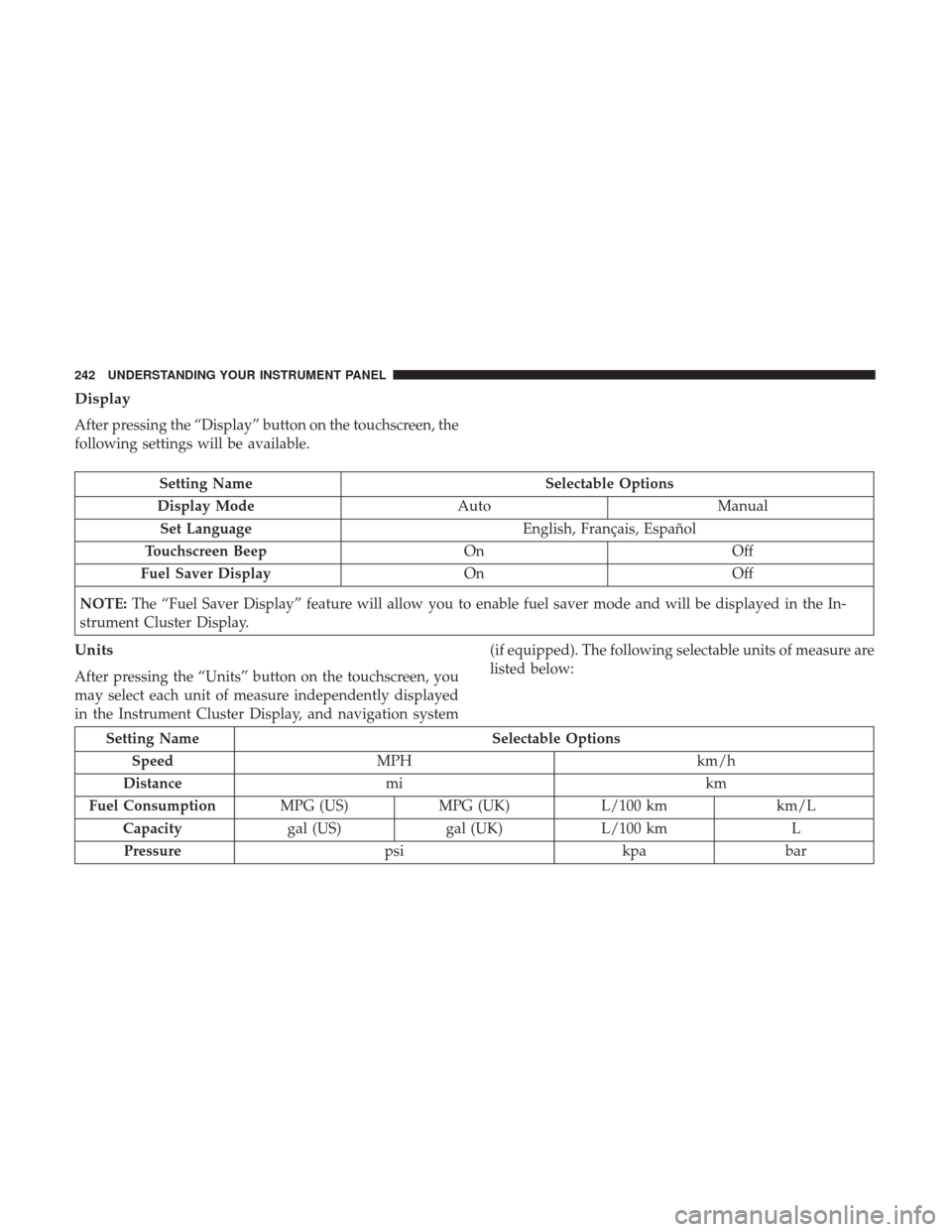
Display
After pressing the “Display” button on the touchscreen, the
following settings will be available.
Setting NameSelectable Options
Display Mode AutoManual
Set Language English, Français, Español
Touchscreen Beep OnOff
Fuel Saver Display OnOff
NOTE: The “Fuel Saver Display” feature will allow you to enable fuel saver mode and will be displayed in the In-
strument Cluster Display.
Units
After pressing the “Units” button on the touchscreen, you
may select each unit of measure independently displayed
in the Instrument Cluster Display, and navigation system (if equipped). The following selectable units of measure are
listed below:
Setting Name
Selectable Options
Speed MPH km/h
Distance mi km
Fuel Consumption MPG (US)MPG (UK) L/100 km km/L
Capacity gal (US)gal (UK)L/100 km L
Pressure psikpabar
242 UNDERSTANDING YOUR INSTRUMENT PANEL
Page 260 of 534
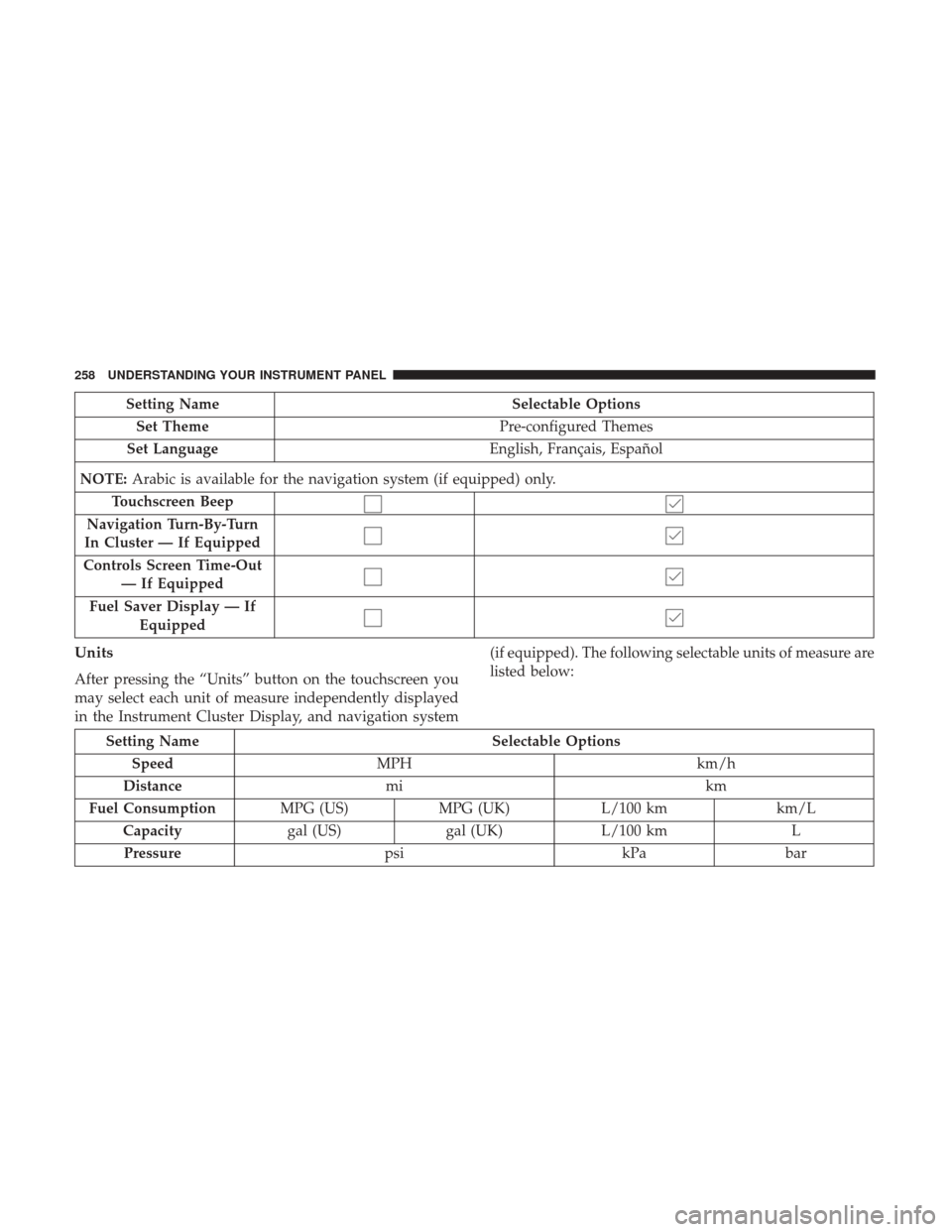
Setting NameSelectable Options
Set Theme Pre-configured Themes
Set Language English, Français, Español
NOTE: Arabic is available for the navigation system (if equipped) only.
Touchscreen Beep
Navigation Turn-By-Turn
In Cluster — If Equipped
Controls Screen Time-Out — If Equipped
Fuel Saver Display — If Equipped
Units
After pressing the “Units” button on the touchscreen you
may select each unit of measure independently displayed
in the Instrument Cluster Display, and navigation system (if equipped). The following selectable units of measure are
listed below:
Setting Name
Selectable Options
Speed MPH km/h
Distance mi km
Fuel Consumption MPG (US)MPG (UK) L/100 km km/L
Capacity gal (US)gal (UK)L/100 km L
Pressure psikPabar
258 UNDERSTANDING YOUR INSTRUMENT PANEL
Page 324 of 534
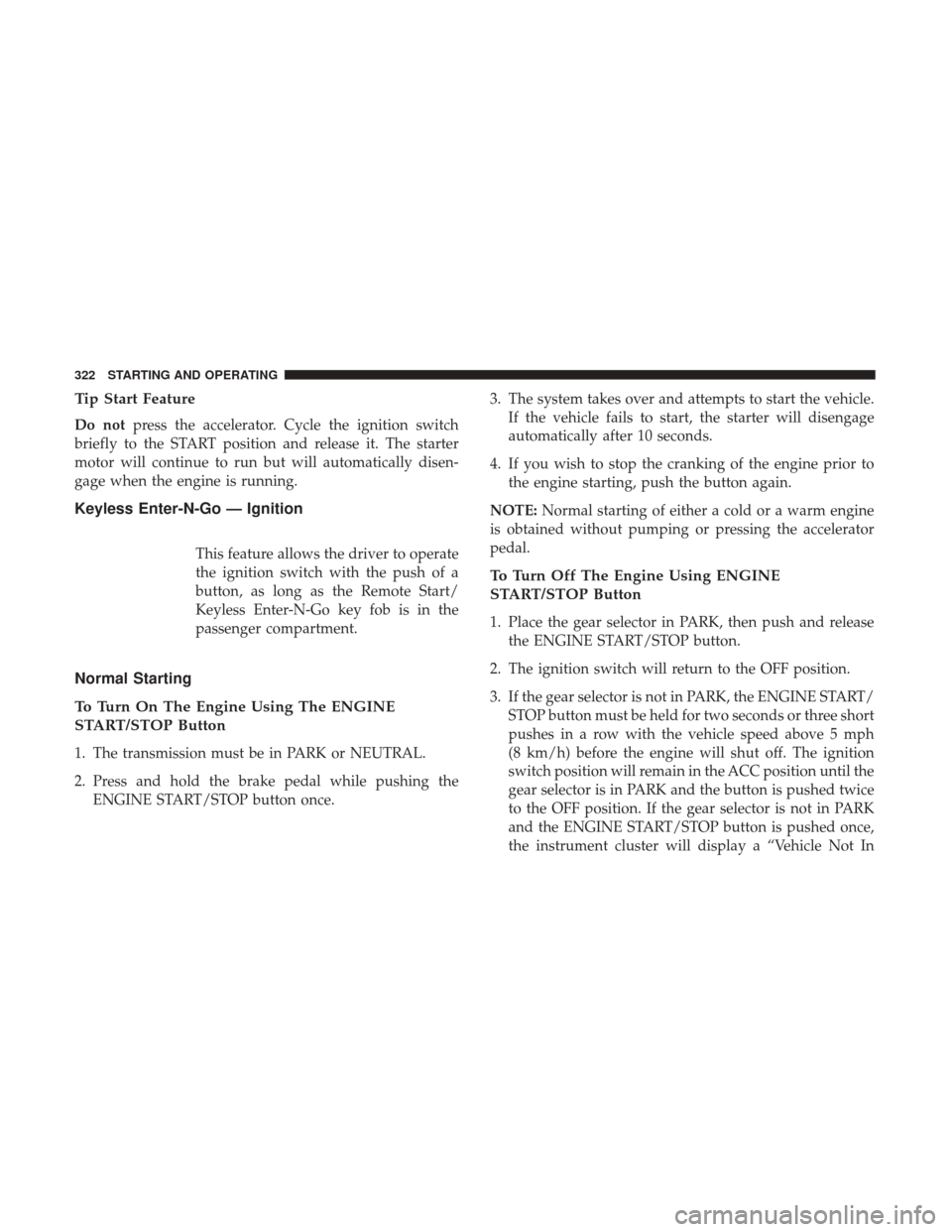
Tip Start Feature
Do notpress the accelerator. Cycle the ignition switch
briefly to the START position and release it. The starter
motor will continue to run but will automatically disen-
gage when the engine is running.
Keyless Enter-N-Go — Ignition
This feature allows the driver to operate
the ignition switch with the push of a
button, as long as the Remote Start/
Keyless Enter-N-Go key fob is in the
passenger compartment.
Normal Starting
To Turn On The Engine Using The ENGINE
START/STOP Button
1. The transmission must be in PARK or NEUTRAL.
2. Press and hold the brake pedal while pushing the ENGINE START/STOP button once. 3. The system takes over and attempts to start the vehicle.
If the vehicle fails to start, the starter will disengage
automatically after 10 seconds.
4. If you wish to stop the cranking of the engine prior to the engine starting, push the button again.
NOTE: Normal starting of either a cold or a warm engine
is obtained without pumping or pressing the accelerator
pedal.
To Turn Off The Engine Using ENGINE
START/STOP Button
1. Place the gear selector in PARK, then push and release the ENGINE START/STOP button.
2. The ignition switch will return to the OFF position.
3. If the gear selector is not in PARK, the ENGINE START/ STOP button must be held for two seconds or three short
pushes in a row with the vehicle speed above 5 mph
(8 km/h) before the engine will shut off. The ignition
switch position will remain in the ACC position until the
gear selector is in PARK and the button is pushed twice
to the OFF position. If the gear selector is not in PARK
and the ENGINE START/STOP button is pushed once,
the instrument cluster will display a “Vehicle Not In
322 STARTING AND OPERATING
Page 329 of 534

ignition when the ignition is in the LOCK/OFF position,
and the transmission is locked in PARK whenever the
ignition is in the LOCK/OFF position.
NOTE:If a malfunction occurs, the system will trap the
key fob in the ignition to warn you that this safety feature
is inoperable. The engine can be started and stopped but
the key fob cannot be removed until you obtain service.
Brake/Transmission Shift Interlock System
This vehicle is equipped with a Brake Transmission Shift
Interlock system (BTSI) that holds the transmission gear
selector in PARK unless the brakes are applied. To shift the
transmission out of PARK, the ignition must be turned to
the ON/RUN mode (engine running or not) and the brake
pedal must be pressed.
Six–Speed Automatic Transmission — If Equipped
Chassis Cab models (with automatic transmission) may
use either the AS66RC transmission (which is equipped
with a Power Take-Off (PTO) access cover on the side of the
transmission case), or the 66RFE transmission (which has
no PTO access cover).
The transmission gear position display (located in the
instrument cluster) indicates the transmission gear range.
The gear selector is mounted on the right side of the steering column. You must press the brake pedal to move
the gear selector out of PARK (refer to “Brake/
Transmission Shift Interlock System” in this section). To
drive, move the gear selector from PARK or NEUTRAL to
the DRIVE position. Pull the gear selector toward you
when shifting into REVERSE or PARK, or when shifting
out of PARK.
The electronically-controlled transmission provides a pre-
cise shift schedule. The transmission electronics are self-
calibrating; therefore, the first few shifts on a new vehicle
may be somewhat abrupt. This is a normal condition, and
precision shifts will develop within a few hundred miles
(kilometers).
Only shift from DRIVE to PARK or REVERSE when the
accelerator pedal is released and the vehicle is stopped. Be
sure to keep your foot on the brake pedal when shifting
between these gears.
The transmission gear selector has only PARK, REVERSE,
NEUTRAL, and DRIVE shift positions. Manual downshifts
can be made using the Electronic Range Select (ERS) shift
control (refer to “Electronic Range Select [ERS] Operation”
in this section for further information). Pushing the ERS
(-/+) switches (on the gear selector) while in the DRIVE
position will select the highest available transmission gear,
5
STARTING AND OPERATING 327
Page 330 of 534

and will display that gear limit in the instrument cluster as
1, 2, 3, etc. Some models will display both the selected gear
limit, and the actual current gear, while in ERS mode.
Gear Ranges
DO NOT race the engine when shifting from PARK or
NEUTRAL into another gear range.
NOTE:After selecting any gear range, wait a moment to
allow the selected gear to engage before accelerating. This
is especially important when the engine is cold.
PARK (P)
This range supplements the parking brake by locking the
transmission. The engine can be started in this range.
Never attempt to use PARK while the vehicle is in motion.
Apply the parking brake when leaving the vehicle in this
range.
When parking on a level surface, you may shift the
transmission into PARK first, and then apply the parking
brake.
When parking on a hill, apply the parking brake before
shifting the transmission to PARK, otherwise the load on
the transmission locking mechanism may make it difficult
to move the gear selector out of PARK. As an added precaution, turn the front wheels toward the curb on a
downhill grade and away from the curb on an uphill grade.
NOTE:
On four-wheel drive vehicles be sure that the
transfer case is in a drive position.
When exiting the vehicle, always:
• Apply the parking brake.
• Shift the transmission into PARK.
• Turn the engine OFF.
• Remove the key fob.
WARNING!
•Never use the PARK position as a substitute for the
parking brake. Always apply the parking brake fully
when parked to guard against vehicle movement and
possible injury or damage.
• Your vehicle could move and injure you and others if
it is not in PARK. Check by trying to move the gear
selector out of PARK with the brake pedal released.
Make sure the transmission is in PARK before leav-
ing the vehicle.
(Continued)
328 STARTING AND OPERATING