headlights Ram 4500 Chassis Cab 2019 User Guide
[x] Cancel search | Manufacturer: RAM, Model Year: 2019, Model line: 4500 Chassis Cab, Model: Ram 4500 Chassis Cab 2019Pages: 607, PDF Size: 10.72 MB
Page 159 of 607
GETTING TO KNOW YOUR INSTRUMENT PANEL 157
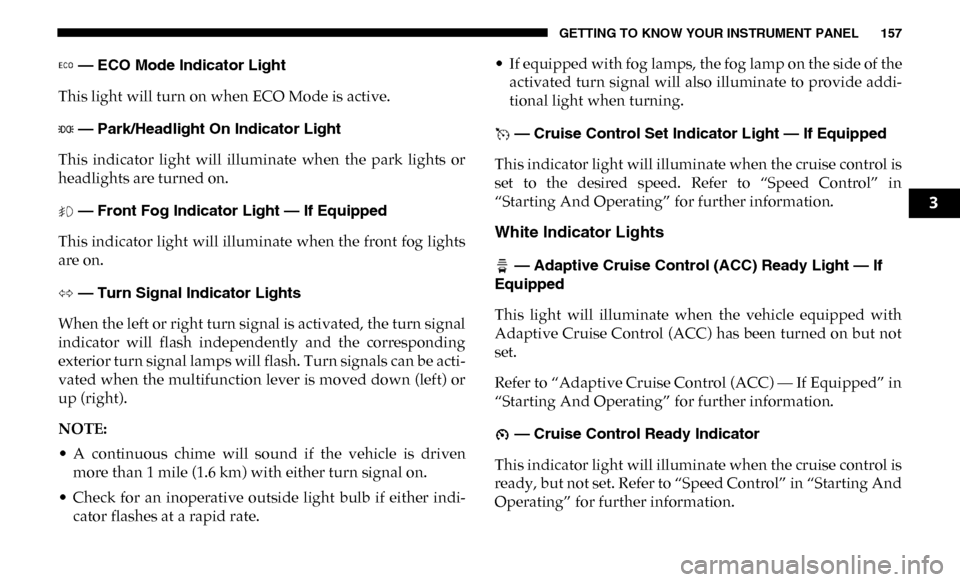
— ECO Mode Indicator Light
This light will turn on when ECO Mode is active.
— Park/Headlight On Indicator Light
This indicator light will illuminate when the park lights or
headlights are turned on.
— Front Fog Indicator Light — If Equipped
This indicator light will illuminate when the front fog lights
are on.
— Turn Signal Indicator Lights
When the left or right turn signal is activated, the turn signal
indicator will flash independently and the corresponding
exterior turn signal lamps will flash. Turn signals can be acti -
vated when the multifunction lever is moved down (left) or
up (right).
NOTE:
• A continuous chime will sound if the vehicle is driven more than 1 mile (1.6 km) with either turn signal on.
• Check for an inoperative outside light bulb if either indi -
cator flashes at a rapid rate. • If equipped with fog lamps, the fog lamp on the side of the
activated turn signal will also illuminate to provide addi -
tional light when turning.
— Cruise Control Set Indicator Light — If Equipped
This indicator light will illuminate when the cruise control is
set to the desired speed. Refer to “Speed Control” in
“Starting And Operating” for further information.
White Indicator Lights
— Adaptive Cruise Control (ACC) Ready Light — If
Equipped
This light will illuminate when the vehicle equipped with
Adaptive Cruise Control (ACC) has been turned on but not
set.
Refer to “Adaptive Cruise Control (ACC) — If Equipped” in
“Starting And Operating” for further information.
— Cruise Control Ready Indicator
This indicator light will illuminate when the cruise control is
ready, but not set. Refer to “Speed Control” in “Starting And
Operating” for further information.
3
Page 160 of 607
158 GETTING TO KNOW YOUR INSTRUMENT PANEL
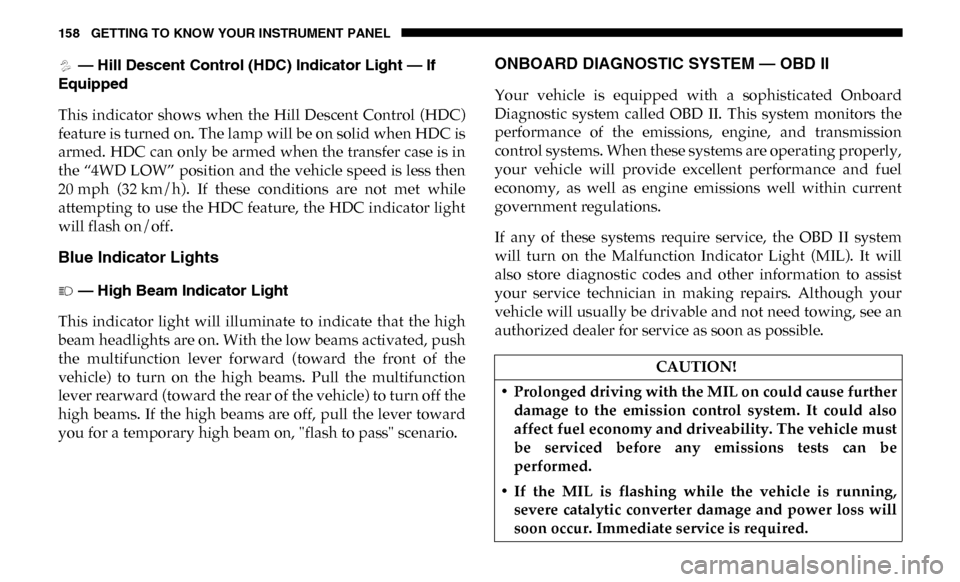
— Hill Descent Control (HDC) Indicator Light — If
Equipped
This indicator shows when the Hill Descent Control (HDC)
feature is turned on. The lamp will be on solid when HDC is
armed. HDC can only be armed when the transfer case is in
the “4WD LOW” position and the vehicle speed is less then
20 mph (32 km/h). If these conditions are not met while
attempting to use the HDC feature, the HDC indicator light
will flash on/off.
Blue Indicator Lights
— High Beam Indicator Light
This indicator light will illuminate to indicate that the high
beam headlights are on. With the low beams activated, push
the multifunction lever forward (toward the front of the
vehicle) to turn on the high beams. Pull the multifunction
lever rearward (toward the rear of the vehicle) to turn off the
high beams. If the high beams are off, pull the lever toward
you for a temporary high beam on, "flash to pass" scenario.
ONBOARD DIAGNOSTIC SYSTEM — OBD II
Your vehicle is equipped with a sophisticated Onboard
Diagnostic system called OBD II. This system monitors the
performance of the emissions, engine, and transmission
control systems. When these systems are operating properly,
your vehicle will provide excellent performance and fuel
economy, as well as engine emissions well within current
government regulations.
If any of these systems require service, the OBD II system
will turn on the Malfunction Indicator Light (MIL). It will
also store diagnostic codes and other information to assist
your service technician in making repairs. Although your
vehicle will usually be drivable and not need towing, see an
authorized dealer for service as soon as possible.
CAUTION!
• Prolonged driving with the MIL on could cause further damage to the emission control system. It could also
affect fuel economy and driveability. The vehicle must
be serviced before any emissions tests can be
performed.
• If the MIL is flashing while the vehicle is running, severe catalytic converter damage and power loss will
soon occur. Immediate service is required.
Page 214 of 607

212 SAFETY
Enhanced Accident Response System
In the event of an impact, if the communication network
remains intact, and the power remains intact, depending on
the nature of the event, the ORC will determine whether to
have the Enhanced Accident Response System perform the
following functions:
• Cut off fuel to the engine (If Equipped)
• Cut off battery power to the electric motor (If Equipped)
• Flash hazard lights as long as the battery has power
• Turn on the interior lights, which remain on as long as thebattery has power or for 15 minutes from the intervention
of the Enhanced Accident Response System.
• Unlock the power door locks.
Your vehicle may also be designed to perform any of these
other functions in response to the Enhanced Accident
Response System:
• Turn off the Fuel Filter Heater, Turn off the HVAC Blower Motor, Close the HVAC Circulation Door • Cut off battery power to the:
• Engine
• Electric Motor (if equipped)
• Electric power steering
• Brake booster
• Electric park brake
• Automatic transmission gear selector
• Horn
• Front wiper
• Headlamp washer pump
NOTE:
After an accident, remember to cycle the ignition to the STOP
(OFF/LOCK) position and remove the key from the ignition
switch to avoid draining the battery. Carefully check the
vehicle for fuel leaks in the engine compartment and on the
ground near the engine compartment and fuel tank before
resetting the system and starting the engine. If there are no
fuel leaks or damage to the vehicle electrical devices (e.g.
headlights) after an accident, reset the system by following
the procedure described below. If you have any doubt,
contact an authorized dealer.
Page 473 of 607

SERVICING AND MAINTENANCE 471
What Causes Corrosion?
Corrosion is the result of deterioration or removal of paint
and protective coatings from your vehicle.
The most common causes are:
• Road salt, dirt and moisture accumulation.
• Stone and gravel impact.
• Insects, tree sap and tar.
• Salt in the air near seacoast localities.
• Atmospheric fallout/industrial pollutants.
Body And Underbody Maintenance
Cleaning Headlights
Your vehicle is equipped with plastic headlights and fog
lights that are lighter and less susceptible to stone breakage
than glass headlights.
Plastic is not as scratch resistant as glass and therefore
different lens cleaning procedures must be followed.
To minimize the possibility of scratching the lenses and
reducing light output, avoid wiping with a dry cloth. To
remove road dirt, wash with a mild soap solution followed
by rinsing.Do not use abrasive cleaning components, solvents, steel
wool or other aggressive material to clean the lenses.
Preserving The Bodywork
Washing
• Wash your vehicle regularly. Always wash your vehicle in
the shade using Mopar Car Wash, or a mild car wash soap,
and rinse the panels completely with clear water.
• If insects, tar, or other similar deposits have accumulated on your vehicle, use Mopar Super Kleen Bug and Tar
Remover to remove.
• Use a high quality cleaner wax, such as Mopar Cleaner Wax to remove road film, stains and to protect your paint
finish. Take care never to scratch the paint.
• Avoid using abrasive compounds and power buffing that may diminish the gloss or thin out the paint finish.
CAUTION!
• Do not use abrasive or strong cleaning materials such as steel wool or scouring powder that will scratch metal
and painted surfaces.
• Use of power washers exceeding 1,200 psi (8,274 kPa) can result in damage or removal of paint and decals.
7
Page 498 of 607

496 MULTIMEDIA
Lights
After pressing the “Lights” button on the touchscreen, the following settings will be available:Hill Start Assist — If
Equipped
On
Off
NOTE:
When the “Hill Start Assist” feature is selected, the Hill Start Assist (HSA) system becomes active.
Tire Fill Assist OnOff
Setting Name
Selectable Options
Setting NameSelectable Options
Headlight Off Delay 0 sec
30 sec
60 sec 90 sec
Headlight Illumination On Approach 0 sec
30 sec
60 sec 90 sec
NOTE:
When the “Headlight Illumination On Approach” feature is selected, it allows the adjustment of the amount of time the head -
lights remain on when the doors are unlocked with the key fob.
Headlights With Wipers — If
Equipped On
Off
Auto Dim High Beams — If Equipped OnOff
Flash Lights With Lock OnOff
Page 499 of 607

MULTIMEDIA 497
Doors & Locks
After pressing the “Doors & Locks” button on the touchscreen, the following settings will be available:NOTE:
When the “Flash Lights With Lock” feature is selected, the exterior lights flash when the doors are locked or unlocked with
the key fob. This feature may be selected with or without the sound horn on lock feature selected.
Steering Directed Lights
OnOff
NOTE:
When the “Steering Directed Lights” feature is selected, the headlights turn with the direction of the steering wheel.
Rear Cargo Guidance Lights — If
Equipped On
Off
NOTE:
When the “Rear Cargo Guidance Lights” feature is selected, the lights in the cargo and bed of the truck will come on either
when the headlight switch is pressed, or the button on the back bed of the truck is pressed. Setting Name
Selectable Options
Setting NameSelectable Options
Auto Door Locks — If
Equipped On
Off
NOTE:
When the “Auto Door Locks” feature is selected, all doors lock automatically when the vehicle reaches a speed of 15 mph
(24 km/h).
Auto Unlock On Exit OnOff
9
Page 512 of 607

510 MULTIMEDIA
Language
After pressing the “Language” button on the touchscreen, the following settings will be available:
Display
After pressing the “Display” button on the touchscreen, the following settings will be available:Setting Name
Selectable Options
Set Language EnglishFrançaisEspañol
NOTE:
When the “Set Language” feature is selected, you may select one of multiple languages (English / Français / Español) for all
display nomenclature, including the trip functions and the navigation system (if equipped). Press the “Set Language” button
on the touchscreen, then press the desired language button on the touchscreen until a check-mark appears next to the
language, showing that setting has been selected.
Setting Name Selectable Options
Display Mode AutoManual
NOTE:
When Day or Night is selected for the Display Mode, the usage of the Parade Mode feature will cause the radio to activate
the Display Brightness Day control even though the headlights are on.
Display Brightness With Headlights
ON –
+
NOTE:
To make changes to the "Display Brightness with Headlights ON" setting, the headlights must be on and the interior dimmer
switch must not be in the "party" or "parade" positions.
Page 513 of 607

MULTIMEDIA 511
Display Brightness With Headlights
OFF–
+
NOTE:
To make changes to the "Display Brightness with Headlights OFF" setting, the headlights must be off and the interior dimmer
switch must not be in the "party" or "parade" positions.
Touchscreen Beep OnOff
Controls Screen Time-Out — If
Equipped On
Off
Fuel Saver Display in Cluster — If
Equipped On
Off
NOTE:
When selected, the system displays fuel saver mode in the instrument cluster.
Navigation Next Turn Pop-ups
Displayed In Cluster — If Equipped On
Off
Phone Pop-ups Displayed in Cluster
— If Equipped On
Off
Setting Name
Selectable Options
9
Page 519 of 607

MULTIMEDIA 517
Mirrors & Wipers
After pressing the “Mirrors & Wipers” button on the touchscreen, the following settings will be available:NOTE:
Brakes the vehicle while in reverse if potential rear collision is detected.
Hill Start Assist — If
Equipped
On
Off
Tire Fill Assist — If
Equipped On
Off
Setting Name
Selectable Options
Setting NameSelectable Options
Tilt Side Mirrors In Reverse — If
Equipped On
Off
NOTE:
When the “Tilt Side Mirrors In Reverse” feature is selected, the outside side-view mirrors will tilt downward when the igni -
tion is in the RUN position and the transmission gear selector is in the REVERSE position. The mirrors will move back to
their previous position when the transmission is shifted out of REVERSE.
Rain Sensing Auto Wipers — If
Equipped On
Off
NOTE:
Automatically adjusts the wiper speed based on the amount of precipitation.
Headlights with Wipers OnOff
9
Page 520 of 607

518 MULTIMEDIA
Lights
After pressing the “Lights” button on the touchscreen, the following settings will be available:Setting Name Selectable Options
Headlight Off Delay –+
NOTE:
When the “Headlight Off Delay” feature is selected, the driver can choose to have the headlights remain on for 0, 30, 60, or
90 seconds when exiting the vehicle. Headlight Illumination On Approach –+
NOTE:
When the “Headlight Illumination On Approach” feature is selected, the headlights will activate and remain on for 0, 30, 60,
or 90 seconds when the doors are unlocked with the key fob. Headlights With Wipers — If Equipped On
Off
NOTE:
When the “Headlights With Wipers” feature is selected, and the headlight switch is in the AUTO position, the headlights
turn on approximately ten seconds after the wipers are turned on. The headlights also turn off when the wipers are turned
off if they were turned on by this feature. Auto Dim High Beams — If Equipped OnOff
NOTE:
When the “Auto Dim High Beams” feature is selected, the high beam headlights deactivate automatically under certain
conditions. Daytime Running Lights — If Equipped On
Off