lights Ram 4500 Chassis Cab 2019 Owner's Guide
[x] Cancel search | Manufacturer: RAM, Model Year: 2019, Model line: 4500 Chassis Cab, Model: Ram 4500 Chassis Cab 2019Pages: 607, PDF Size: 10.72 MB
Page 245 of 607
SAFETY 243
Periodic Safety Checks You Should Make Outside
The Vehicle
Tires
Examine tires for excessive tread wear and uneven wear
patterns. Check for stones, nails, glass, or other objects
lodged in the tread or sidewall. Inspect the tread for cuts and
cracks. Inspect sidewalls for cuts, cracks, and bulges. Check
the wheel bolts for tightness. Check the tires (including
spare) for proper cold inflation pressure.
Lights
Have someone observe the operation of brake lights and
exterior lights while you work the controls. Check turn
signal and high beam indicator lights on the instrument
panel.
Door Latches
Check for proper closing, latching, and locking.
Fluid Leaks
Check area under the vehicle after overnight parking for
fuel, coolant, oil, or other fluid leaks. Also, if gasoline fumes
are detected or if fuel, or brake fluid leaks are suspected. The
cause should be located and corrected immediately.
• ALWAYS make sure objects cannot fall or slide into the
driver’s side floor area when the vehicle is moving.
Objects can become trapped under accelerator, brake,
or clutch pedals and could cause a loss of vehicle
control.
• NEVER place any objects under the floor mat (e.g., towels, keys, etc.). These objects could change the posi -
tion of the floor mat and may cause interference with
the accelerator, brake, or clutch pedals.
• If the vehicle carpet has been removed and re-installed, always properly attach carpet to the floor and check the
floor mat fasteners are secure to the vehicle carpet.
Fully depress each pedal to check for interference with
the accelerator, brake, or clutch pedals then re-install
the floor mats.
• It is recommended to only use mild soap and water to clean your floor mats. After cleaning, always check
your floor mat has been properly installed and is
secured to your vehicle using the floor mat fasteners by
lightly pulling mat.
WARNING! (Continued)
4
Page 276 of 607
274 STARTING AND OPERATING
This electronically shifted transfer case is designed to be
driven in the two–wheel drive position (2WD) for normal
street and highway conditions on dry hard surfaced roads).
Driving the vehicle in 2WD will have greater fuel economy
benefits as the front axle is not engaged in 2WD.
When additional traction is required, the transfer case 4WD
HIGH and 4WD LOW positions can be used to maximize
torque to the front driveshaft, forcing the front and rear
wheels to rotate at the same speed. This is accomplished by
pushing the desired position on the 4WD control switch.
Refer to “Shifting Procedure” in this section for specific
shifting instructions.
The 4WD HIGH and 4WD LOW positions are designed for
loose, slippery road surfaces only. Driving in the 4WD HIGHand 4WD LOW positions on dry hard surfaced roads may
cause increased tire wear and damage to the driveline
components.
NOTE:
The transfer case NEUTRAL button is located in the center of
the 4WD Control Switch and is pushed by using a ballpoint
pen or similar object. The transfer case NEUTRAL position is
to be used for recreational towing only. Refer to “Recre
-
ational Towing” in “Starting And Operating” for further
information.
Transfer Case Position Indicator Lights
The Transfer Case Position Indicator Lights (4WD and
4LOW) are located in the instrument cluster and indicate the
current and desired transfer case selection. When you select
a different transfer case position, the indicator lights will do
the following:
If All Of The Following Shift Conditions Are Met:
1. The current position indicator light will turn OFF.
2. The selected position indicator light will flash until the transfer case completes the shift.
• The transmission may not engage PARK if the vehicle
is moving. Always bring the vehicle to a complete stop
before shifting to PARK, and verify that the transmis -
sion gear position indicator solidly indicates PARK (P)
without blinking. Ensure that the vehicle is completely
stopped, and the PARK position is properly indicated,
before exiting the vehicle.
WARNING! (Continued)
Page 279 of 607

STARTING AND OPERATING 277
4. After the desired position indicator light is ON (notflashing), shift the transmission back into gear.
Alternate Procedure
1. Bring the vehicle to a complete stop.
2. With the ignition switch in the ON position and the engine running, shift the transmission into NEUTRAL.
3. Push the desired position on the transfer case control switch.
4. After the desired position indicator light is ON (not flashing), shift the transmission back into gear.
NOTE:
• If Steps 1 or 2 of either the Preferred or Alternate Proce -
dure are not satisfied prior to attempting the shift, then the
desired position indicator light will flash continuously
while the original position indicator light is ON, until all
requirements have been met.
• The ignition switch must be in the ON position for a shift to take place and for the position indicator lights to be
operable. If the ignition switch is not in the ON position,
the shift will not take place and no position indicator lights
will be on or flashing.Manually Shifted Transfer Case — If Equipped
The transfer case provides four mode positions:
• Two-Wheel Drive High Range (2H)
• Four-Wheel Drive Lock High Range (4H)
• Neutral (N)
• Four-Wheel Drive Low Range (4L)
For additional information on the appropriate use of each
transfer case mode position, see the information below:
2H
Two-Wheel Drive High Range — This range is for normal
street and highway driving on dry, hard surfaced roads.
4H
Four-Wheel Drive Lock High Range — This range locks the
front and rear driveshafts together forcing the front and rear
wheels to rotate at the same speed. Additional traction for
loose, slippery road surfaces only.
5
Page 299 of 607

STARTING AND OPERATING 297
Distance Setting 1 Bar (Short)
The system automatically defaults to the longest distance
setting. To decrease the distance setting, push the Distance
Button and release. Each time the button is pushed, the
distance setting decreases by one bar. Once the shortest
setting is reached, if the button is pushed again it will reset
to the default setting (longest).
If there is no vehicle ahead, the vehicle will maintain the set
speed. If a slower moving vehicle is detected in the same
lane, the instrument cluster displays the “Sensed Vehicle
Indicator” icon, and the system adjusts vehicle speed auto -
matically to maintain the distance setting, regardless of the
set speed. The vehicle will then maintain the set distance until:
• The vehicle ahead accelerates to a speed above the set
speed.
• The vehicle ahead moves out of your lane or view of the sensor.
• The distance setting is changed.
• The system disengages. (Refer to the information on ACC Activation).
The maximum braking applied by ACC is limited; however,
the driver can always apply the brakes manually, if neces -
sary.
NOTE:
The brake lights will illuminate whenever the ACC system
applies the brakes.
A Proximity Warning will alert the driver if ACC predicts
that its maximum braking level is not sufficient to maintain
the set distance. If this occurs, a visual alert “BRAKE” will
flash in the instrument cluster display and a chime will
sound while ACC continues to apply its maximum braking
capacity.5
Page 354 of 607
352 STARTING AND OPERATING
NOTE:
• An aftermarket controller may be available for use withtrailers with air or electric-over-hydraulic trailer brake
systems. To determine the type of brakes on your trailer
and the availability of controllers, check with your trailer
manufacturer or dealer.
• Removal of the ITBM will cause errors and it may cause damage to the electrical system and electronic modules of
the vehicle. See your authorized dealer if an aftermarket
module is to be installed.
Towing Requirements — Trailer Lights And Wiring
Whenever you pull a trailer, regardless of the trailer size,
stoplights and turn signals on the trailer are required for
motoring safety.
The Trailer Tow Package may include a four- and seven-pin
wiring harness. Use a factory approved trailer harness and
connector.
NOTE:
Do not cut or splice wiring into the vehicle’s wiring harness.
The electrical connections are all complete to the vehicle but
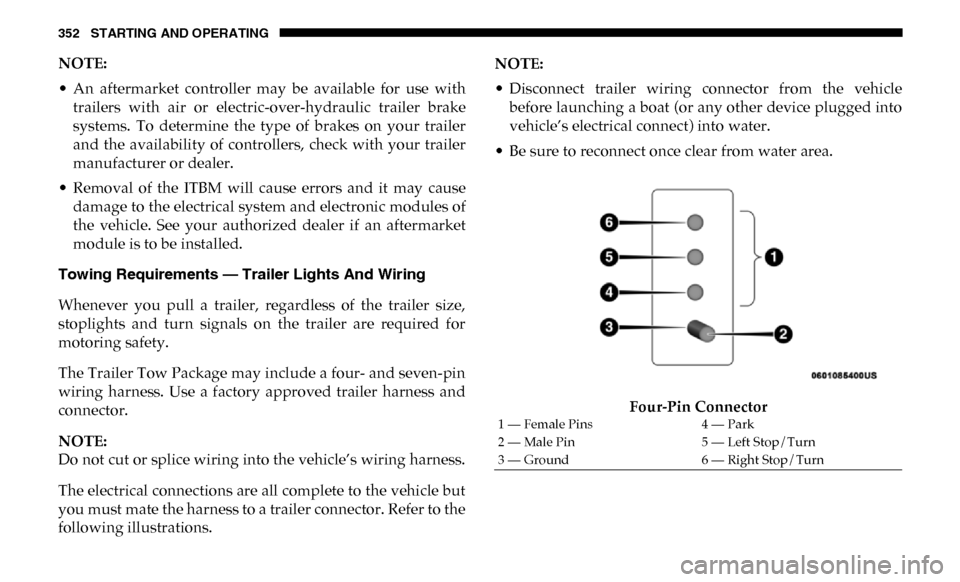
you must mate the harness to a trailer connector. Refer to the
following illustrations. NOTE:
• Disconnect trailer wiring connector from the vehicle
before launching a boat (or any other device plugged into
vehicle’s electrical connect) into water.
• Be sure to reconnect once clear from water area.
Four-Pin Connector
1 — Female Pins 4 — Park
2 — Male Pin 5 — Left Stop/Turn
3 — Ground 6 — Right Stop/Turn
Page 364 of 607

362 STARTING AND OPERATING
• The ignition must be in the ON/RUN mode for a shift totake place and for the position indicator lights to be oper -
able. If the ignition is not in the ON/RUN mode, the shift
will not take place and no position indicator lights will be
on or flashing.
• A flashing NEUTRAL (N) position indicator light indi -
cates that shift requirements have not been met.
Shifting Out Of NEUTRAL (N)
Use the following procedure to prepare your vehicle for
normal usage:
1. Bring the vehicle to a complete stop, leaving it connected to the tow vehicle.
2. Firmly apply the parking brake.
3. Press and hold the brake pedal.
4. Start the engine, and shift the transmission into NEUTRAL.
• With manual shift transfer case, shift the transfer case lever to the desired position.
• With electronic shift transfer case with rotary selector switch, push and hold the transfer case NEUTRAL (N)
button until the NEUTRAL (N) indicator light turns off. After the NEUTRAL (N) indicator light turns off,
release the NEUTRAL (N) button. After the NEUTRAL
(N) button has been released, the transfer case will shift
to the position indicated by the selector switch.
• With electronic shift transfer case with push-button selector switch, push and hold the switch for the
desired transfer case position, until the NEUTRAL (N)
indicator light turns off and the desired position indi -
cator light turns on.
NOTE:
When shifting out of transfer case NEUTRAL (N), turning
the engine OFF is not required, but may be helpful to avoid
gear clash. With 8-speed automatic transmission, the engine
must remain running, since turning the engine OFF will shift
the transmission to PARK (and the transmission must be in
NEUTRAL for the transfer case to shift out of NEUTRAL).
5. Turn the engine OFF. Shift automatic transmission into PARK. On 8-speed transmissions the shifter will auto -
matically select PARK when the engine is turned off.
6. Release the brake pedal.
7. Disconnect vehicle from the tow vehicle.
8. Start the engine.
Page 365 of 607

STARTING AND OPERATING 363
9. Press and hold the brake pedal.
10. Release the parking brake.
11. Shift the transmission into gear, release the brake pedal,and check that the vehicle operates normally.
NOTE:
With electronic shift transfer case:
• Steps 3 and 4 are requirements that must be met before pushing the button to shift out of NEUTRAL (N), and must
continue to be met until the shift has been completed. If
any of these requirements are not met before pushing the
button or are no longer met during the shift, the
NEUTRAL (N) indicator light will flash continuously until
all requirements are met or until the button is released.
• The ignition must be in the ON/RUN mode for a shift to take place and for the position indicator lights to be oper -
able. If the ignition is not in the ON/RUN mode, the shift
will not take place and no position indicator lights will be
on or flashing.
• A flashing NEUTRAL (N) position indicator light indi -
cates that shift requirements have not been met.DRIVING TIPS
Driving On Slippery Surfaces
Acceleration
Rapid acceleration on snow covered, wet, or other slippery
surfaces may cause the driving wheels to pull erratically to
the right or left. This phenomenon occurs when there is a
difference in the surface traction under the rear (driving)
wheels.
WARNING!
Rapid acceleration on slippery surfaces is dangerous.
Unequal traction can cause sudden pulling of the rear
wheels. You could lose control of the vehicle and
possibly have a collision. Accelerate slowly and carefully
whenever there is likely to be poor traction (ice, snow,
wet, mud, loose sand, etc.).
5
Page 385 of 607

IN CASE OF EMERGENCY 383
F2030 Amp Pink –Passenger Door Module
F21 30 Amp Pink –Drive Train Control Module
F22 20 Amp Blue –Engine Control Module GPEC / Heavy Duty / Other –
If Equipped
F22 25 Amp White
(Cummins Diesel) –
PCM – If Equipped
F23 30 Amp Pink –CBC Feed # 1
F24 30 Amp Pink –Driver Door Module
F25 30 Amp Pink –Front Wiper
F26 30 Amp Pink –Antilock Brakes / Stability Control Module / Valves – If
Equipped (DS 1500 Only)
F28 20 Amp Blue –Trailer Tow Backup Lights – If Equipped
F29 20 Amp Blue –Trailer Tow Parking Lights – If Equipped
F30 30 Amp Pink –Trailer Tow Receptacle / Trailer Tow (Separate
E-Brake)/Trailer Tow (BUX)
F31 30 Amp Pink –Diesel Heater Control – If Equipped (DS 1500 LD Diesel)
F31 20 Amp Blue –Aux App SSV Only - If Equipped
F32 – –Aux Feed, Special Services Vehicle-If Equipped (DS 1500
Only)
F33 20 Amp Blue –Trans Control Module – If Equipped (HD Only)
Aux Feed, SSV Only (DS 1500 Only)
Cavity Cartridge Fuse
Micro FuseDescription
6
Page 387 of 607

IN CASE OF EMERGENCY 385
F50–20 Amp Yellow Air Suspension Control Module – If Equipped
F51 –10 Amp Red Ignition Node Module / Keyless Ignition Node Module,
Radio Frequency Hub Module / Electric Steering
Column Lock - If Equipped
F52 –5 Amp Tan Battery Sensor
F53 –20 Amp Yellow Trailer Tow – Left Turn/Stop Lights - If Equipped
F54 –20 Amp Yellow Non Memory Adjustable Pedals - If Equipped
F56 –15 Amp Blue Additional Diesel Content - If Equipped (DS 1500 Only)
F57 –20 Amp Yellow TCM/PCM / Solenoid Trans Pressure SW (RFE Trans
Only) – If Equipped (HD Only)
Transmission (DS 1500 Only)
F58 –10 Amp Red Bed Lighting (LED) – If Equipped (HD Only)
F60 –15 Amp Blue Underhood Lamp / TCM – If Equipped (DS 1500 Only)
F61 –10 Amp Red UREA Sensor / PM Sensor – If Equipped (DS 1500 LD
Diesel & Cummins Diesel)
F62 –10 Amp Red Air Conditioning Clutch
F63 –20 Amp Yellow Ignition Coils (Gas), Ignition Coils Capacitors (Gas) /
Short Runner Valve Actuator / Urea Heater Control
Unit (DS 1500 LD Diesel) / RLY Coil Feed-SCR (DS 1500
LD Diesel)
Cavity Cartridge Fuse
Micro FuseDescription
6
Page 389 of 607

IN CASE OF EMERGENCY 387
F74–20 Amp Yellow Brake Vacuum Pump Gas/Diesel – If Equipped (DS 1500
Only)
F74 –10 Amp Red Backup Alarm – If Equipped (HD Only)
F75 –10 Amp Red ATMM / Coil-SCR Module RLY– If Equipped
(HD Only)
Coolant Temperature Valve – If Equipped
(DS 1500 Only)
F76 –10 Amp Red Electronic Stability Control (HD Only)
Brake System Module / Stop Lamp Switch / Electric
Park Brake / Clutch Pedal Switch (DS 1500 Only)
F77 –10 Amp Red Drivetrain Control Module / Front Axle Disconnect
Module / TCM (HD Only)
Drivetrain Control Module / ELSD / Front Axle
Disconnect Module / Transmission Control Relay /
RDM / Power Take Off Unit – If Equipped (DS 1500
Only)
F78 –10 Amp Red Engine Control Module / Powertrain Control Module /
Electric Power Steering (DS 1500 Only)
F78 –15 Amp Blue Engine Control Module / Powertrain Control Module /
AEB RACM MOD / Feed To AUX PDC Relay Coils (HD
Only)
F79 –15 Amp Blue ID / Clearance Lights
Cavity Cartridge Fuse
Micro FuseDescription
6