instrument panel Ram 4500 Chassis Cab 2019 Owner's Manual
[x] Cancel search | Manufacturer: RAM, Model Year: 2019, Model line: 4500 Chassis Cab, Model: Ram 4500 Chassis Cab 2019Pages: 607, PDF Size: 10.72 MB
Page 3 of 607

TABLE OF CONTENTS
1
2
3
4
5
6
7
8
9
10
11
1 INTRODUCTION ................................................................................................................................................................................. 122 GETTING TO KNOW YOUR VEHICLE ......................................................................................................................................... 15
3 GETTING TO KNOW YOUR INSTRUMENT PANEL .............................................................................................................. 123
4 SAFETY ................................................................................................................................................................................................. 161
5 STARTING AND OPERATING ...................................................................................................................................................... 244
6 IN CASE OF EMERGENCY .............................................................................................................................................................. 366
7 SERVICING AND MAINTENANCE ............................................................................................................................................. 410
8 TECHNICAL SPECIFICATIONS .................................................................................................................................................... 475
9 MULTIMEDIA .................................................................................................................................................................................... 487
10 CUSTOMER ASSISTANCE ............................................................................................................................................................. 585
11 INDEX .................................................................................................................................................................................................... 590
Page 6 of 607

4
CLIMATE CONTROLS ..................................................... 77
Climate Controls Without A Touchscreen
Overview ...................................................................... 77
Climate Controls With A Touchscreen Overview .... 81
Climate Control Functions ........................................... 88
Automatic Temperature Control (ATC) ................... 89
Operating Tips .............................................................. 89
WINDOWS .......................................................................... 92
Power Windows ........................................................... 92
Wind Buffeting .............................................................. 95
HOOD ............................................................................... 95
To Open The Hood ....................................................... 95
To Close The Hood........................................................ 96
GARAGE DOOR OPENER — IF EQUIPPED .............. 97
Before You Begin Programming HomeLink ............. 98
Canadian/Gate Operator Programming ................. 101
Using HomeLink ......................................................... 102
Security ......................................................................... 103
Troubleshooting Tips .................................................. 103
General Information .................................................... 103
INTERNAL EQUIPMENT ...............................................104
Storage ...........................................................................104
Cupholders ..................................................................115
Electrical Power Outlets ............................................117
Power Inverter — If Equipped ................................. 119
Wireless Charging Pad — If Equipped ...................121
Overhead Sunglass Storage........................................122
GETTING TO KNOW YOUR INSTRUMENT
PANEL
BASE / MIDLINE INSTRUMENT CLUSTER ..............123
Base / Midline Instrument Cluster Descriptions ....124
PREMIUM INSTRUMENT CLUSTER ...........................126
Premium Instrument Cluster Descriptions..............127
INSTRUMENT CLUSTER DISPLAY..............................128
Instrument Cluster Display Controls........................ 128
Oil Life Reset ................................................................130
Display Menu Items ....................................................131
Battery Saver On/Battery Saver Mode Message —
Electrical Load Reduction Actions —
If Equipped ................................................................144
Page 15 of 607

INTRODUCTION 13
be identified with the wording “If Equipped”. All data
contained in this publication are intended to help you use
your vehicle in the best possible way. FCA aims at a constant
improvement of the vehicles produced. For this reason, it
reserves the right to make changes to the model described for
technical and/or commercial reasons. For further informa-
tion, contact an authorized dealer.
If applicable, refer to the Owner’s Manual Supplement for
related information.
NOTE:
After reviewing the Owner’s Information, it should be stored
in the vehicle for convenient referencing, and remain with
the vehicle when sold.
When it comes to service, remember that your authorized
dealer knows your vehicle best, has factory-trained techni -
cians and genuine MOPAR® parts, and cares about your
satisfaction.HOW TO USE THIS MANUAL
Essential Information
Consult the Table of Contents to determine which section
contains the information you desire.
Since the specification of your vehicle depends on the items
of equipment ordered, certain descriptions and illustrations
may differ from your vehicle's equipment.
The detailed index at the back of this Owner's Manual
contains a complete listing of all subjects.
Symbols
Some vehicle components have colored labels whose
symbols indicate precautions to be observed when using this
component. Refer to “Warning Lights and Messages” in
“Getting To Know Your Instrument Panel” for further infor -
mation on the symbols used in your vehicle.
1
Page 20 of 607

18 GETTING TO KNOW YOUR VEHICLE
In a situation where the battery is low or fully depleted, a
back up method can be used to operate the ignition switch.
Put the nose side of the key fob (side opposite of the Emer-
gency Key) against the ENGINE START/STOP button and
push to operate the ignition switch.
To Unlock The Doors
Push and release the unlock button on the key fob once to
unlock the driver’s door. Push the unlock button twice
within five seconds to unlock all doors. The turn signal lights
will flash to acknowledge the unlock signal. The illuminated
entry system will also turn on.
NOTE:
The instrument cluster display or Uconnect Settings are
setup for driver door first, otherwise this will unlock all
doors.
To Lock The Doors
Push and release the lock button on the key fob to lock all
doors. The turn signal lights will flash and the horn will
chirp to acknowledge the signal. Sound Horn With Remote Key Lock
This feature will cause the horn to chirp when the doors are
locked with the key fob. This feature can be turned on or
turned off.
NOTE:
Pushing the lock button on the key fob while you are in the
vehicle will activate the vehicle security alarm system.
Opening a door with the vehicle security alarm system acti
-
vated will cause the alarm to sound. Push the unlock button
to deactivate the vehicle security alarm system.
Refer to “Instrument Cluster Display” in “Getting To Know
Your Instrument Panel” for further information.
Using The Panic Alarm
To turn the Panic Alarm feature on or off, push the Panic
button on the key fob. When the Panic Alarm is activated, the
turn signals will flash, the horn will pulse on and off, and the
interior lights will turn on.
Page 33 of 607

GETTING TO KNOW YOUR VEHICLE 31
3. If any doors are open, close them.
The vehicle security alarm will set when you use the power
door locks, or use the key fob to lock the doors. After all the
doors are locked and closed, the vehicle security light, in the
instrument panel cluster, will flash rapidly for about 16
seconds to indicate that the alarm is being set. After the
alarm is set, the vehicle security light will flash at a slower
rate to indicate that the system is armed.
To Disarm The System
The vehicle security alarm can be disarmed using any of the
following methods:
1. Push the unlock button on the key fob.
2. Grasp the Passive Entry Unlock Door Handle with a validkey fob within 5 ft (1.5 m) of the passive entry door
handle. If equipped, refer to "Keyless Enter-N-Go —
Passive Entry" in "Getting To Know Your Vehicle" for
further information.
3. Place the ignition out of the “OFF” position. The vehicle security alarm is designed to protect your
vehicle. However, you can create conditions where the
system will give you a false alarm. If one of the previously
described arming sequences has occurred, the vehicle secu-
rity alarm will arm regardless of whether you are in the
vehicle or not. If you remain in the vehicle and open a door,
the alarm will sound. If this occurs, disarm the vehicle secu-
rity alarm.
If the vehicle security alarm is armed and the battery
becomes disconnected, the vehicle security alarm will
remain armed when the battery is reconnected; the exterior
lights will flash, and the horn will sound. If this occurs,
disarm the vehicle security alarm.
Rearming Of The System
If something triggers the alarm, and no action is taken to
disarm it, the vehicle security alarm will turn the horn off
after 29 seconds, 5 seconds between cycles, up to 8 cycles if
the trigger remains active and then the vehicle security alarm
will rearm itself.
2
Page 38 of 607

36 GETTING TO KNOW YOUR VEHICLE
Do NOT grab the door handle when pushing the door
handle lock button. This could unlock the door(s).Do NOT Grab The Door Handle When Locking
NOTE:
• After pushing the door handle lock button, you must wait two seconds before you can lock or unlock the doors, using
either Passive Entry door handle. This is done to allow you
to check if the vehicle is locked by pulling the door handle,
without the vehicle reacting and unlocking.
• The Passive Entry system depends on a key fob that is not fully discharged of its coin battery capacity. • The LED light on the key fob will not blink if the key fob
battery is low or fully depleted, but a low key fob battery
condition will still support the Passive Entry system func -
tionality. When the key fob battery is low, the instrument
cluster will display a message indicating that the key fob
battery is low. Refer to “Keys” in “Getting To Know Your
Vehicle” for further information.
The vehicle doors can also be locked by using the key fob
lock button or the lock button located on the vehicle’s inte -
rior door panel.
General Information
The following regulatory statement applies to all radio
frequency (RF) devices equipped in this vehicle:
This device complies with Part 15 of the FCC Rules and with
Industry Canada license-exempt RSS standard(s). Operation
is subject to the following two conditions:
1. This device may not cause harmful interference, and
2. This device must accept any interference received, including interference that may cause undesired opera -
tion.
Page 39 of 607

GETTING TO KNOW YOUR VEHICLE 37
NOTE:
Changes or modifications not expressly approved by the
party responsible for compliance could void the user’s
authority to operate the equipment.
Automatic Door Locks — If Equipped
The auto door lock feature default condition is enabled.
When enabled, the door locks will lock automatically when
the vehicle's speed exceeds 15 mph (24 km/h). The auto door
lock feature can be enabled or disabled by an authorized
dealer per written request of the customer. Please see an
authorized dealer for service.
Automatic Doors Unlock — If Equipped
This feature unlocks all of the doors of the vehicle when
either front door is opened. This will occur only after the
vehicle has been shifted into the PARK position after the
vehicle has been driven (shifted out of PARK and all doors
closed).Automatic Doors Unlock Programming — If Equipped
The Automatic Doors Unlock feature can be enabled or
disabled as follows:
• For vehicles not equipped with a touchscreen radio, refer
to “Instrument Cluster Display” in “Getting To Know
Your Instrument Panel” for further information.
• For vehicles equipped with a touchscreen radio, refer to “Uconnect Settings” in “Multimedia” for further informa -
tion.
NOTE:
Use the Auto Unlock Doors feature in accordance with local
laws.
2
Page 48 of 607

46 GETTING TO KNOW YOUR VEHICLE
4. Push and release button (1) or (2) accordingly. “MemoryProfile Set” (1 or 2) will display in the instrument cluster.
5. Push and release the lock button on the key fob within 10 seconds.
NOTE:
Your key fob can be unlinked to your memory settings by
pushing the set (S) button, and within 10 seconds, followed
by pushing the unlock button on the key fob.
Memory Position Recall
NOTE:
The vehicle speed must be lower than 5 mph (8 km/h) to
recall memory positions. If a recall is attempted when the
vehicle speed is greater than 5 mph (8 km/h), a message will
be displayed in the instrument cluster display.
Driver One Memory Position Recall
• To recall the memory settings for driver one using the memory buttons on the door panel, push memory button (1).
• To recall the memory settings for driver one using the key fob, push the unlock button on the key fob linked to
memory position 1. Driver Two Memory Position Recall
• To recall the memory setting for driver two using the memory
buttons on the door panel, push memory button (2).
• To recall the memory settings for driver two using the key fob, push the unlock button on the key fob linked to
memory position 2.
A recall can be cancelled by pushing any of the memory
buttons during a recall (S, 1, or 2). When a recall is canceled,
the driver's seat and the power pedals (if equipped) stop
moving. A delay of one second will occur before another
recall can be selected.
Easy Entry/Exit Seat
This feature provides automatic driver’s seat positioning to
enhance driver mobility when entering and exiting the vehicle.
The distance the driver’s seat moves depends on where you
have the driver’s seat positioned when you remove the key
fob from the ignition.
• When you remove the key fob from the ignition, the driver’s seat will move about 2.4 inches (60 mm) rearward
if the driver’s seat position is greater than or equal to
2.7 inches (67.7 mm) forward of the rear stop. The seat will
return to its previously set position when you place the
ignition into the ACC or RUN position.
Page 50 of 607
48 GETTING TO KNOW YOUR VEHICLE
Front Heated Seats
The heated seats control buttons are located on the center
instrument panel below the touchscreen, and are also located
within the climate or controls screen of the touchscreen.
• Push the heated seat button once to turn the HI setting on.
• Push the heated seat button a second time to turn theMED setting on.
• Push the heated seat button a third time to turn the LO setting on.
• Push the heated seat button a fourth time to turn the heating elements off.
NOTE:
• The engine must be running for the heated seats to operate.
• The level of heat selected will stay on until the operator changes it. Vehicles Equipped With Remote Start
On models that are equipped with remote start, the driver’s
seat can be programmed to come on during a remote start.
This feature can be programmed through the Uconnect
system. Refer to “Uconnect Settings” in “Multimedia” for
further information.
Rear Heated Seats
On some models, the two outboard rear seats are equipped
with heated seats. The heated seat switches for these seats are
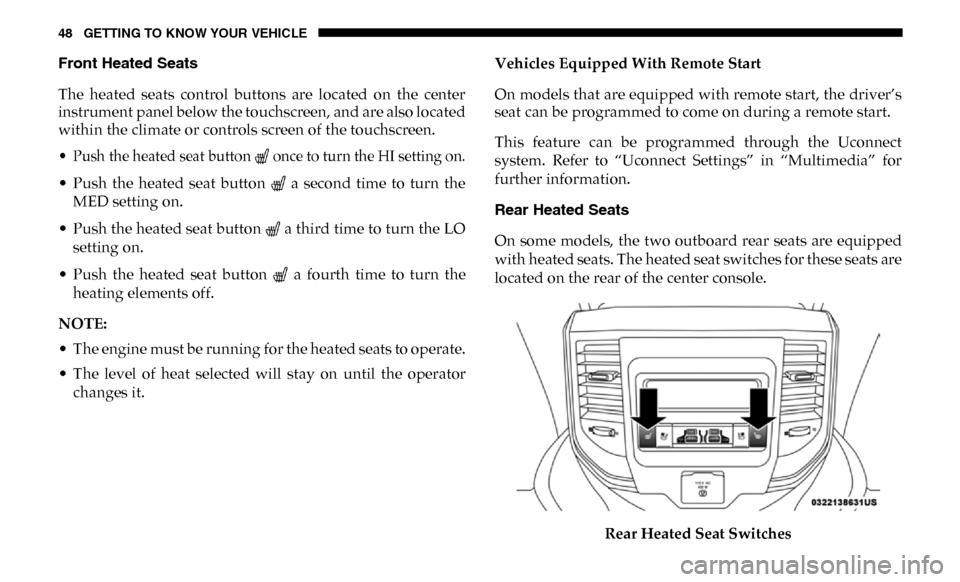
located on the rear of the center console.
Rear Heated Seat Switches
Page 51 of 607
GETTING TO KNOW YOUR VEHICLE 49
There are two heated seat switches that allow the rear
passengers to operate the seats independently. You can
choose from HI, MED, LO, or OFF heat settings. Amber indi-
cator lights in each switch indicate the level of heat in use.
• Push the heated seat button once to turn the HI setting on.
• Push the heated seat button a second time to turn the MED setting on.
• Push the heated seat button a third time to turn the LO setting on.
• Push the heated seat button a fourth time to turn the heating elements off.
NOTE:
• The level of heat selected will stay on until the operator changes it.
• Once a heat setting is selected, heat will be felt within two to five minutes.
• The engine must be running for the heated seats to operate.Ventilated Seats — If Equipped
Front Ventilated Seats
Located in the seat cushion are small fans that draw the air
from the passenger compartment and move air through fine
perforations in the seat cover to help keep the driver and
front passenger cooler in higher ambient temperatures. The
fans operate at three speeds, HI, MED and LO.
The front ventilated seats control buttons are located on the
center instrument panel below the touchscreen, and are also
located within the climate or controls screen of the touch -
screen.
• Press the ventilated seat button once to choose HI.
• Press the ventilated seat button a second time to choose MED.
• Press the ventilated seat button a third time to choose LO.
• Press the ventilated seat button a fourth time to turn the ventilation off.
NOTE:
The engine must be running for the ventilated seats to
operate.
2