instrument cluster Ram 5500 Chassis Cab 2014 User Guide
[x] Cancel search | Manufacturer: RAM, Model Year: 2014, Model line: 5500 Chassis Cab, Model: Ram 5500 Chassis Cab 2014Pages: 546, PDF Size: 3.76 MB
Page 202 of 546
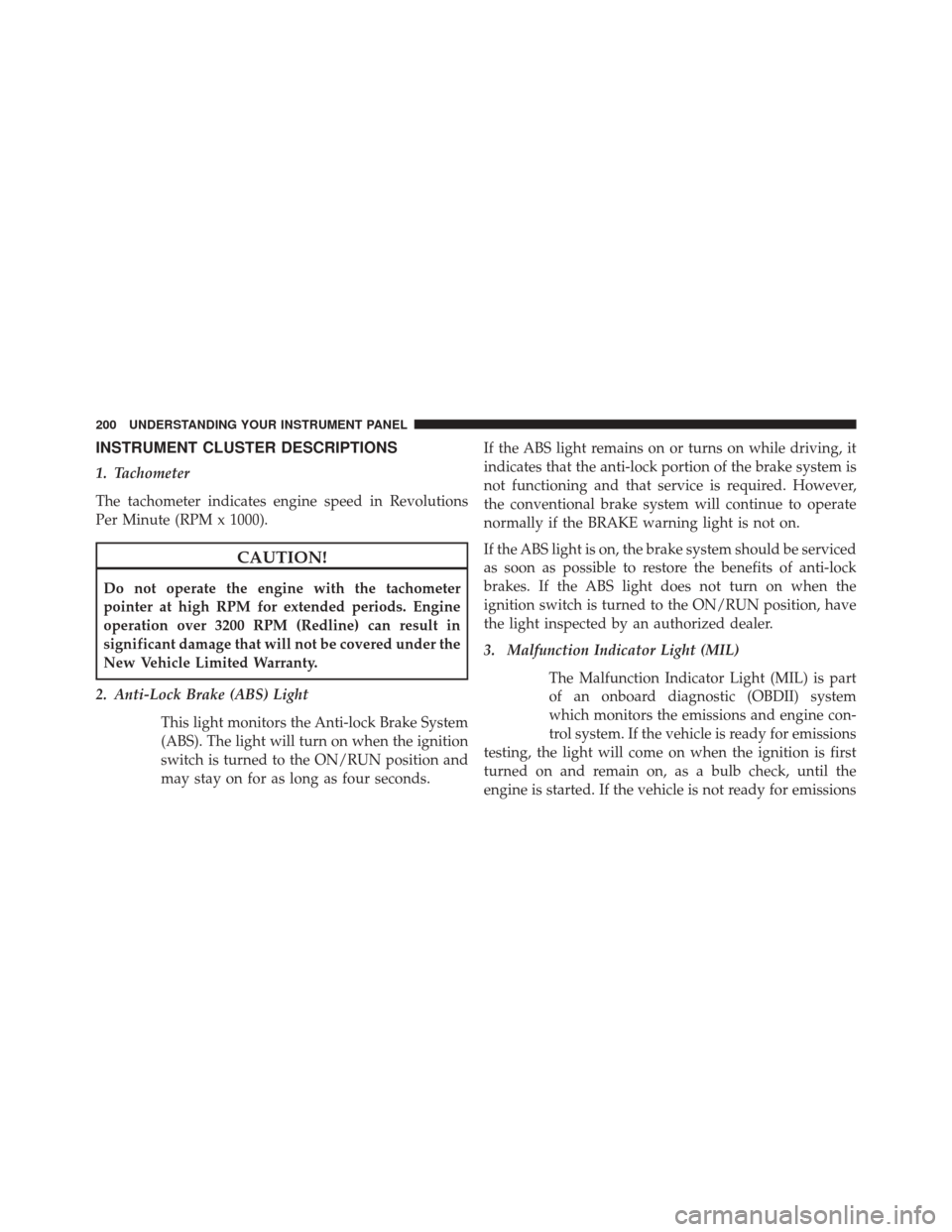
INSTRUMENT CLUSTER DESCRIPTIONS
1. Tachometer
The tachometer indicates engine speed in Revolutions
Per Minute (RPM x 1000).
CAUTION!
Do not operate the engine with the tachometer
pointer at high RPM for extended periods. Engine
operation over 3200 RPM (Redline) can result in
significant damage that will not be covered under the
New Vehicle Limited Warranty.
2. Anti-Lock Brake (ABS) Light This light monitors the Anti-lock Brake System
(ABS). The light will turn on when the ignition
switch is turned to the ON/RUN position and
may stay on for as long as four seconds. If the ABS light remains on or turns on while driving, it
indicates that the anti-lock portion of the brake system is
not functioning and that service is required. However,
the conventional brake system will continue to operate
normally if the BRAKE warning light is not on.
If the ABS light is on, the brake system should be serviced
as soon as possible to restore the benefits of anti-lock
brakes. If the ABS light does not turn on when the
ignition switch is turned to the ON/RUN position, have
the light inspected by an authorized dealer.
3. Malfunction Indicator Light (MIL)
The Malfunction Indicator Light (MIL) is part
of an onboard diagnostic (OBDII) system
which monitors the emissions and engine con-
trol system. If the vehicle is ready for emissions
testing, the light will come on when the ignition is first
turned on and remain on, as a bulb check, until the
engine is started. If the vehicle is not ready for emissions
200 UNDERSTANDING YOUR INSTRUMENT PANEL
Page 209 of 546
of reasons, including the installation of replacement or
alternate tires or wheels on the vehicle that prevent the
TPMS from functioning properly. Always check the
TPMS malfunction telltale after replacing one or more
tires or wheels on your vehicle, to ensure that the
replacement or alternate tires and wheels allow the TPMS
to continue to function properly.
CAUTION!
The TPMS has been optimized for the original
equipment tires and wheels. TPMS pressures and
warning have been established for the tire size
equipped on your vehicle. Undesirable system opera-
tion or sensor damage may result when using re-
placement equipment that is not of the same size,
type, and/or style. Aftermarket wheels can cause
sensor damage. Do not use tire sealant from a can or
balance beads if your vehicle is equipped with a
TPMS, as damage to the sensors may result.NOTE:
The TPMS telltale is also accompanied by a “Low
Tire” message in the odometer (Base Cluster), or in the
Electronic Vehicle Information Center (EVIC) screen in-
dicating “Low Tire” for EVIC enabled clusters.
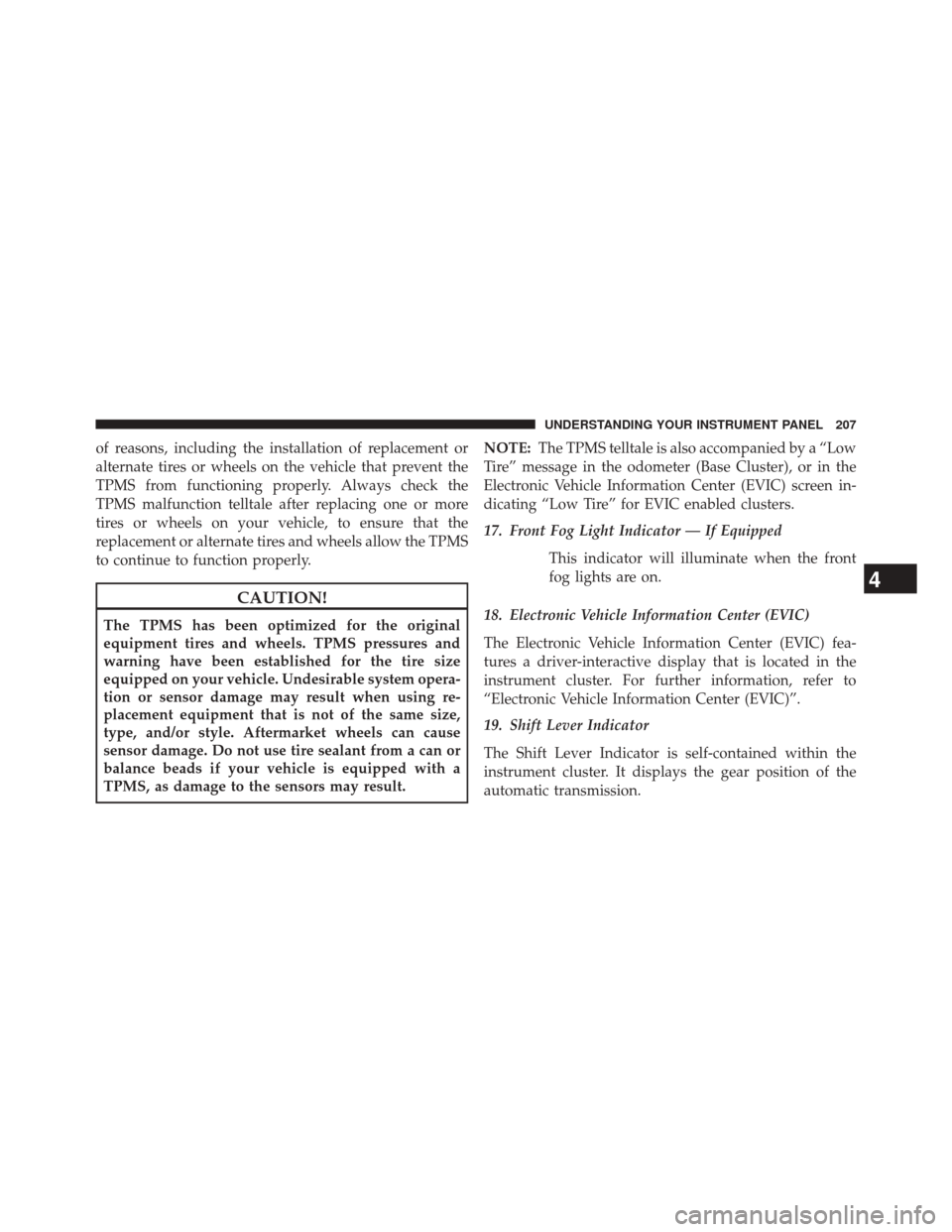
17. Front Fog Light Indicator — If Equipped
This indicator will illuminate when the front
fog lights are on.
18. Electronic Vehicle Information Center (EVIC)
The Electronic Vehicle Information Center (EVIC) fea-
tures a driver-interactive display that is located in the
instrument cluster. For further information, refer to
“Electronic Vehicle Information Center (EVIC)”.
19. Shift Lever Indicator
The Shift Lever Indicator is self-contained within the
instrument cluster. It displays the gear position of the
automatic transmission.
4
UNDERSTANDING YOUR INSTRUMENT PANEL 207
Page 210 of 546
NOTE:The highest available transmission gear is dis-
played in the lower right corner of the Electronic Vehicle
Information Center (EVIC) whenever the Electronic
Range Select (ERS) feature is active. Use the +/- selector
on the shift lever to activate ERS. Refer to “Automatic
Transmission” in “Starting And Operating” for further
information.
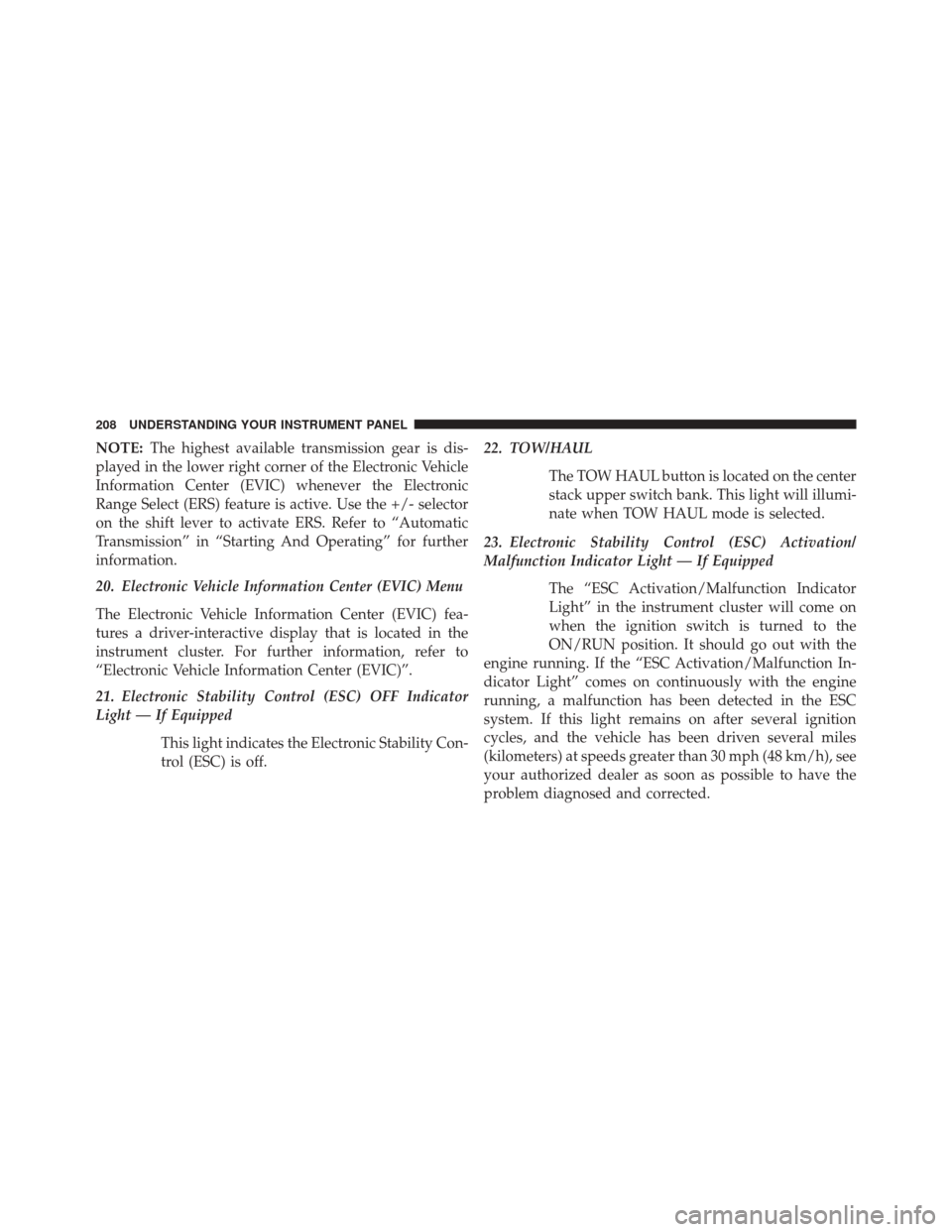
20. Electronic Vehicle Information Center (EVIC) Menu
The Electronic Vehicle Information Center (EVIC) fea-
tures a driver-interactive display that is located in the
instrument cluster. For further information, refer to
“Electronic Vehicle Information Center (EVIC)”.
21. Electronic Stability Control (ESC) OFF Indicator
Light — If Equipped
This light indicates the Electronic Stability Con-
trol (ESC) is off. 22. TOW/HAUL
The TOW HAUL button is located on the center
stack upper switch bank. This light will illumi-
nate when TOW HAUL mode is selected.
23. Electronic Stability Control (ESC) Activation/
Malfunction Indicator Light — If Equipped The “ESC Activation/Malfunction Indicator
Light” in the instrument cluster will come on
when the ignition switch is turned to the
ON/RUN position. It should go out with the
engine running. If the “ESC Activation/Malfunction In-
dicator Light” comes on continuously with the engine
running, a malfunction has been detected in the ESC
system. If this light remains on after several ignition
cycles, and the vehicle has been driven several miles
(kilometers) at speeds greater than 30 mph (48 km/h), see
your authorized dealer as soon as possible to have the
problem diagnosed and corrected.
208 UNDERSTANDING YOUR INSTRUMENT PANEL
Page 214 of 546

32. 4WD AUTO Indicator Light — If EquippedThis light alerts the driver that the vehicle is in
the four-wheel drive auto mode, and the front
axle is engaged, but the vehicle’s power is sent
to the rear wheels. Four-wheel drive will be
automatically engaged when the vehicle senses a loss of
traction.
For further information on four-wheel drive operation
and proper use, refer to “Four-Wheel Drive Operation —
If Equipped” in “Starting And Operating”.
33. 4WD Indicator Light — If Equipped
This light alerts the driver that the vehicle is in
the four-wheel drive mode, and the front and
rear driveshafts are mechanically locked to-
gether forcing the front and rear wheels to
rotate at the same speed. For further information on four-wheel drive operation
and proper use, refer to “Four-Wheel Drive Operation —
If Equipped” in “Starting And Operating”.
ELECTRONIC VEHICLE INFORMATION CENTER
(EVIC)
The Electronic Vehicle Information Center (EVIC) fea-
tures a driver-interactive display that is located in the
instrument cluster.
212 UNDERSTANDING YOUR INSTRUMENT PANEL
Page 217 of 546

Electronic Vehicle Information Center (EVIC)
Displays — 3.5” DisplayThe EVIC displays are located in the center portion of the
cluster and consists of seven sections:
1. Compass Display
Displays the current direction. For further information,
refer to “Compass Settings” under “Customer Program-
mable Features — Uconnect® 5.0/8.4 Settings”.
2. Temperature Display
Displays the temperature in degrees Celsius or degrees
Fahrenheit.
3. Main Screen
Displays main menu, sub-menus, settings.
4
UNDERSTANDING YOUR INSTRUMENT PANEL 215
Page 225 of 546
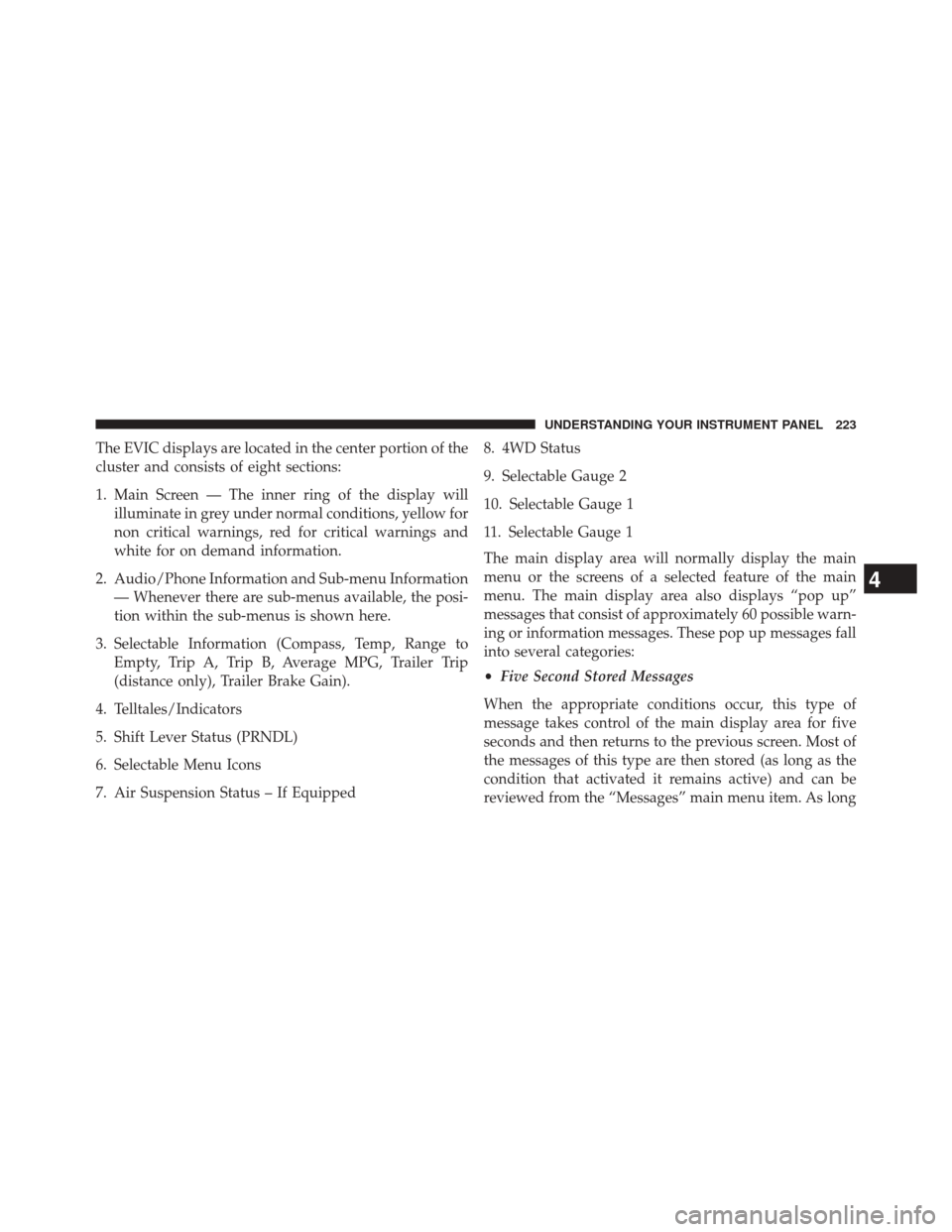
The EVIC displays are located in the center portion of the
cluster and consists of eight sections:
1. Main Screen — The inner ring of the display willilluminate in grey under normal conditions, yellow for
non critical warnings, red for critical warnings and
white for on demand information.
2. Audio/Phone Information and Sub-menu Information — Whenever there are sub-menus available, the posi-
tion within the sub-menus is shown here.
3. Selectable Information (Compass, Temp, Range to Empty, Trip A, Trip B, Average MPG, Trailer Trip
(distance only), Trailer Brake Gain).
4. Telltales/Indicators
5. Shift Lever Status (PRNDL)
6. Selectable Menu Icons
7. Air Suspension Status – If Equipped 8. 4WD Status
9. Selectable Gauge 2
10. Selectable Gauge 1
11. Selectable Gauge 1
The main display area will normally display the main
menu or the screens of a selected feature of the main
menu. The main display area also displays “pop up”
messages that consist of approximately 60 possible warn-
ing or information messages. These pop up messages fall
into several categories:
•
Five Second Stored Messages
When the appropriate conditions occur, this type of
message takes control of the main display area for five
seconds and then returns to the previous screen. Most of
the messages of this type are then stored (as long as the
condition that activated it remains active) and can be
reviewed from the “Messages” main menu item. As long
4
UNDERSTANDING YOUR INSTRUMENT PANEL 223
Page 235 of 546
you to change what information is displayed in the
instrument cluster as well as the location that information
is displayed.
Screen Setup Driver Selectable Items
Odometer
•000
• 000.0
Upper Left
• None
• Compass
• Outside Temp (default setting)
• Trans Temp
• Oil Temp
• Time •
Range To Empty (RTE)
• Average MPG
• Current MPG
• Trip A
• Trip B
• Trailer Trip (distance only)
• Trailer Brake Gain
Upper Right
• None
• Compass (default setting)
• Outside Temp
• Trans Temp
• Oil Temp
4
UNDERSTANDING YOUR INSTRUMENT PANEL 233
Page 251 of 546
•Set Language
When in this display, you may select one of three
languages for all display nomenclature, including the trip
functions and the navigation system (if equipped). Touch
the “Set Language” soft-key and then touch the desired
language soft-key until a check-mark appears next to the
language, showing that setting has been selected. Touch
the back arrow soft-key to return to the previous menu.
• Units
When in this display, you may select to have the EVIC,
odometer, and navigation system (if equipped) changed
between US and Metric units of measure. Touch “US” or
“Metric” until a check-mark appears next to the setting,
showing that setting has been selected. Touch the back
arrow soft-key to return to the previous menu. •
Voice Response Length
When in this display, you may change the Voice Re-
sponse Length settings. To change the Voice Response
Length, touch the “Brief” or “Detailed” soft-key until a
check-mark appears next to the setting, showing that
setting has been selected. Touch the back arrow soft-key
to return to the previous menu.
• Touchscreen Beep
When in this display, you may turn on or shut off the
sound heard when a touchscreen button (soft-key) is
pressed. Touch the “Touchscreen Beep” soft-key until a
check-mark appears next to the setting, showing that
setting has been selected. Touch the back arrow soft-key
to return to the previous menu.
• Navigation Turn-By-Turn In Cluster — If Equipped
When this feature is selected, the turn-by-turn directions
will appear in the display as the vehicle approaches a
4
UNDERSTANDING YOUR INSTRUMENT PANEL 249
Page 252 of 546

designated turn within a programmed route. To make
your selection, touch the “Navigation Turn-By-Turn In
Cluster” soft-key, until a check-mark appears next to the
setting, showing that setting has been selected. Touch the
back arrow soft-key to return to the previous menu.
•Fuel Saver Display In Cluster
The “ECO” message is located in the instrument cluster
display, this message can be turned on or off. To make
your selection, touch the “Fuel Saver Display” soft-key,
until a check-mark appears next to the setting, showing
that setting has been selected. Touch the back arrow
soft-key to return to the previous menu.
Clock
After pressing the “Clock” soft-key the following settings
will be available: •
Sync Time With GPS
When in this display, you may automatically have the
radio set the time. To change the Sync Time setting, touch
the “Sync with GPS Time” soft-key until a check-mark
appears next to the setting, showing that setting has been
selected. Touch the back arrow soft-key to return to the
previous menu.
• Set Time Hours
When in this display, you may adjust the hours. The
“Sync with GPS Time” soft-key must be unchecked. To
make your selection, touch the “+” or “–” soft-keys to
adjust the hours up or down. Touch the back arrow
soft-key to return to the previous menu or touch the” X”
soft-key to close out of the settings screen.
• Set Time Minutes
When in this display, you may adjust the minutes. The
“Sync with GPS Time” soft-key must be unchecked. To
250 UNDERSTANDING YOUR INSTRUMENT PANEL
Page 302 of 546

before the ignition switch can be turned to the full OFF
(key removal) position. The Key Fob can only be re-
moved from the ignition when the ignition is in the full
OFF position, and the transmission is locked in PARK
whenever the ignition switch is in the full OFF position.
NOTE:If a malfunction occurs, the system will trap the
Key Fob in the ignition switch to warn you that this
safety feature is inoperable. The engine can be started
and stopped but the Key Fob cannot be removed until
you obtain service.
Brake/Transmission Shift Interlock System
This vehicle is equipped with a Brake Transmission Shift
Interlock system (BTSI) that holds the shift lever in PARK
unless the brakes are applied. To shift the transmission
out of PARK, the ignition switch must be turned to the
ON/RUN position (engine running or not) and the brake
pedal must be pressed.
Six–Speed Automatic Transmission — If
Equipped
Chassis Cab models (with automatic transmission) may
use either the AS66RC transmission (which is equipped
with Power Take-Off (PTO) access covers on each side of
the transmission case), or the 66RFE transmission (which
has no PTO access covers).
The transmission gear position display (located in the
instrument cluster) indicates the transmission gear range.
The shift lever is mounted on the right side of the steering
column. You must press the brake pedal to move the shift
lever out of PARK (refer to “Brake/Transmission Shift
Interlock System” in this section). To drive, move the shift
lever from PARK or NEUTRAL to the DRIVE position.
Pull the shift lever toward you when shifting into RE-
VERSE or PARK, or when shifting out of PARK.
The electronically-controlled transmission provides a
precise shift schedule. The transmission electronics are
300 STARTING AND OPERATING