brakes Ram 5500 Chassis Cab 2015 User Guide
[x] Cancel search | Manufacturer: RAM, Model Year: 2015, Model line: 5500 Chassis Cab, Model: Ram 5500 Chassis Cab 2015Pages: 599, PDF Size: 4.51 MB
Page 442 of 599

Towing Requirements — Trailer Brakes
WARNING!
•Do not connect trailer brakes to your vehicle’s
hydraulic brake lines. It can overload your brake
system and cause it to fail. You might not have
brakes when you need them and could have an
accident.
• Towing any trailer will increase your stopping
distance. When towing you should allow for addi-
tional space between your vehicle and the vehicle
in front of you. Failure to do so could result in an
accident.
CAUTION!
If the trailer weighs more than 1,000 lbs (454 kg)
loaded, it should have its own brakes and they
should be of adequate capacity. Failure to do this
could lead to accelerated brake lining wear, higher
brake pedal effort, and longer stopping distances.
• Do not interconnect the hydraulic brake system or
vacuum system of your vehicle with that of the trailer.
This could cause inadequate braking and possible
personal injury.
• An electronically actuated trailer brake controller is
required when towing a trailer with electronically
actuated brakes. When towing a trailer equipped with
a hydraulic surge actuated brake system, an electronic
brake controller is not required.
440 STARTING AND OPERATING
Page 443 of 599
•Trailer brakes are recommended for trailers over
1,000 lbs (454 kg) and required for trailers in excess of
1,653 lbs (750 kg).
Integrated Trailer Brake Module — If Equipped
Your vehicle may have an Integrated Trailer Brake Mod-
ule (ITBM) for Electric and Electric Over Hydraulic
(EOH) trailer brakes.
NOTE: This module has been designed and verified
with electric trailer brakes and new electric over hydrau-
lic systems. Some previous EOH systems may not be
compatible with ITBM.
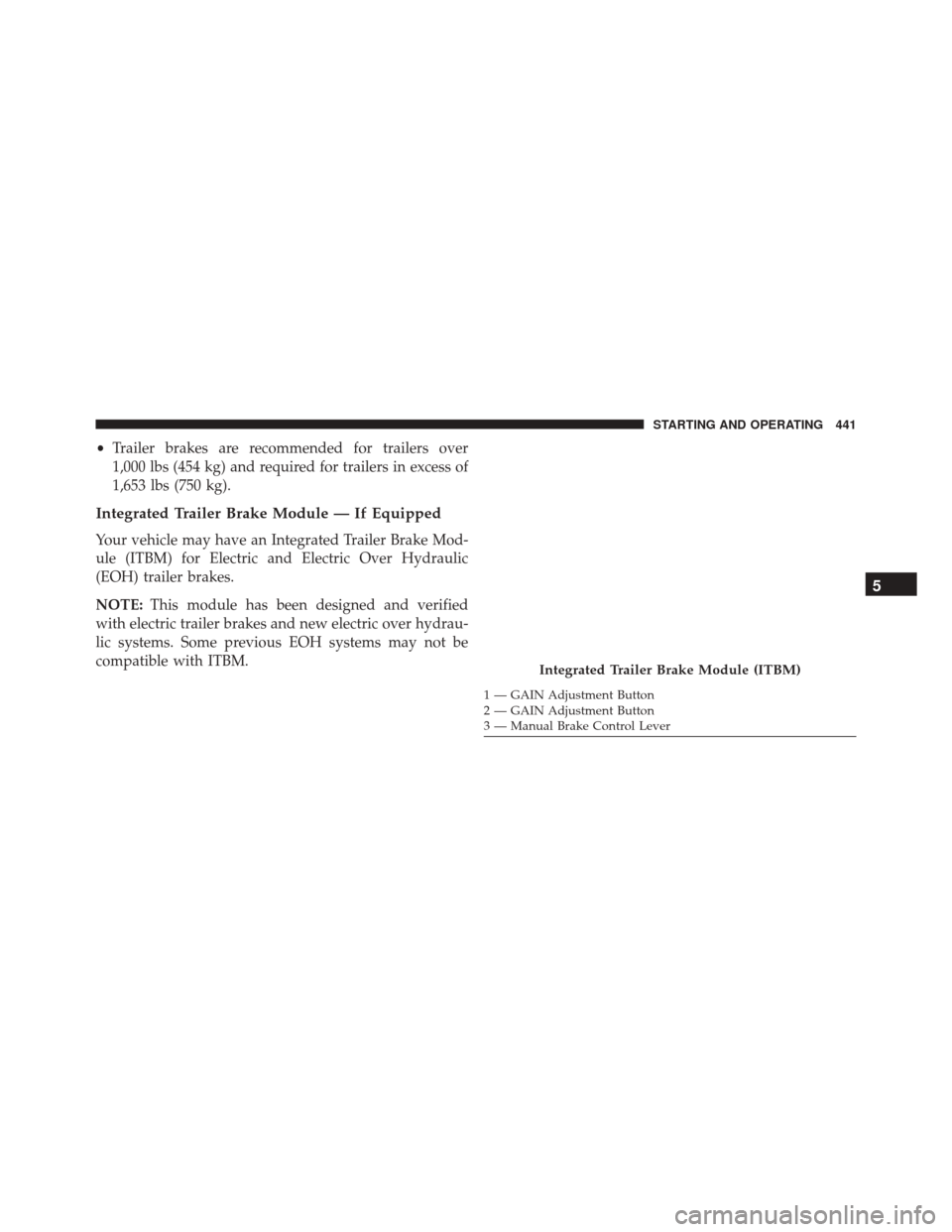
Integrated Trailer Brake Module (ITBM)
1 — GAIN Adjustment Button
2 — GAIN Adjustment Button
3 — Manual Brake Control Lever
5
STARTING AND OPERATING 441
Page 444 of 599
The user interface consists of the following:
Manual Brake Control Lever
Slide the manual brake control lever to the right to
activate power to the trailer’s electric brakes independent
of the tow vehicle’s brakes. If the manual brake control
lever is activated while the brake is also applied, the
greater of the two inputs determines the power sent to
the trailer brakes.
The trailer and the vehicle’s brake lamps will come on
when either vehicle braking or manual trailer brakes are
applied.
Trailer Brake Status Indicator Light
This light indicates the trailer electrical connection status.
If no electrical connection is detected after the ignition is
turned on, pressing the GAIN adjustment button orsliding the manual brake control lever will display the
GAIN setting for 10 seconds and the “Trailer Brake Status
Indicator Light” will not be displayed.
If a fault is detected in the trailer wiring or the Integrated
Trailer Brake Module (ITBM), the “Trailer Brake Status
Indicator Light” will flash.
GAIN Adjustment Buttons (+/-)
Pressing these buttons will adjust the brake control
power output to the trailer brakes in 0.5 increments. The
GAIN setting can be increased to a maximum of 10 or
decreased to a minimum of 0 (no trailer braking).
GAIN
The GAIN setting is used to set the trailer brake control
for the specific towing condition and should be changed
as towing conditions change. Changes to towing condi-
tions include trailer load, vehicle load, road conditions
and weather.
442 STARTING AND OPERATING
Page 445 of 599
Adjusting GAIN
NOTE:This should only be performed in a traffic free
environment at speeds of approximately 20–25 mph
(30–40 km/h).
1. Make sure the trailer brakes are in good working condition, functioning normally and properly ad-
justed. See your trailer dealer if necessary.
2. Hook up the trailer and make the electrical connec- tions according to the trailer manufacturer’s instruc-
tions.
3. When a trailer with electric/EOH brakes is plugged in, the trailer connected message should appear in the
EVIC/DID (if the connection is not recognized by the
ITBM, braking functions will not be available), the
GAIN setting will illuminate and the correct type of
trailer must be selected from the EVIC/DID options. 4. Press the UP or DOWN button on the steering wheel
until “TRAILER TOW” appears on the screen.
5. Press the RIGHT arrow on the steering wheel to enter “TRAILER TOW”.
6. Press the UP or DOWN buttons until Trailer Brake Type appears on the screen.
7. Press the RIGHT arrow and then press the UP or DOWN buttons until the proper Trailer Brake Type
appears on the screen.
8. In a traffic-free environment, tow the trailer on a dry, level surface at a speed of 20–25 mph (30–40 km/h)
and squeeze the manual brake control lever com-
pletely.
9. If the trailer wheels lockup (indicated by squealing tires), reduce the GAIN setting; if the trailer wheels
turn freely, increase the GAIN setting.
5
STARTING AND OPERATING 443
Page 446 of 599
Repeat steps 8 and 9 until the GAIN setting is at a point
just below trailer wheel lockup. If towing a heavier
trailer, trailer wheel lockup may not be attainable even
with the maximum GAIN setting of 10.
Light Electric Heavy Electric Light EOHHeavy EOH
Type of Trailer
Brakes Electric Trailer
BrakesElectric Trailer
BrakesElectric over
Hydraulic Trailer
BrakesElectric over
Hydraulic Trailer
Brakes
Load *Under 10,000 lbs *Above 10,000 lbs *Under 10,000 lbs *Above 10,000 lbs
* The suggested selection depends and may change
depending on the customer preferences for braking per-
formance. Condition of the trailer brakes, driving and
road state may also affect the selection.
444 STARTING AND OPERATING
Page 447 of 599

EVIC/DID Display Messages
The trailer brake control interacts with the Electronic
Vehicle Information Center (EVIC)/Driver Information
Display (DID). Display messages, along with a single
chime, will be displayed when a malfunction is deter-
mined in the trailer connection, trailer brake control, or
on the trailer. Refer to “Electronic Vehicle Information
Center/Driver Information Display (DID)” in “Under-
standing Your Instrument Panel” for further information.
CAUTION!
Connecting a trailer that is not compatible with the
ITBM system may result in reduced or complete loss
of trailer braking. There may be a increase in stop-
ping distance or trailer instability which could result
in damage to your vehicle, trailer, or other property.
WARNING!
Connecting a trailer that is not compatible with the
ITBM system may result in reduced or complete loss
of trailer braking. There may be a increase in stop-
ping distance or trailer instability which could result
in personal injury.
NOTE:
• An aftermarket controller may be available for use
with trailers with air or electric-over-hydraulic trailer
brake systems. To determine the type of brakes on
your trailer and the availability of controllers, check
with your trailer manufacturer or dealer.
• Removal of the ITBM will cause errors and it may
cause damage to the electrical system and electronic
modules of the vehicle. See your authorized dealer if
an aftermarket module is to be installed.
5
STARTING AND OPERATING 445
Page 523 of 599
•Do not change the thermostat for Summer or Winter
operation. If replacement is ever necessary, install
ONLY the correct type thermostat. Other designs may
result in unsatisfactory engine coolant (antifreeze)
performance, poor gas mileage, and increased emis-
sions.
Brake System
In order to assure brake system performance, all brake
system components should be inspected periodically.
Refer to the “Maintenance Schedule” for the proper
maintenance intervals.
WARNING!
Riding the brakes can lead to brake failure and
possibly a collision. Driving with your foot resting or
riding on the brake pedal can result in abnormally
(Continued)
WARNING! (Continued)
high brake temperatures, excessive lining wear, and
possible brake damage. You would not have your full
braking capacity in an emergency.
Brake Fluid Level Check
The fluid level of the master cylinder should be checked
when performing under the hood service or immediately
if the brake system warning lamp indicates system
failure.
The brake master cylinder has a translucent plastic
reservoir. On the outboard side of the reservoir, there is a
“MAX” dot and an “MIN” dot. The fluid level must be
kept within these two dots. Do not add fluid above the
MAX mark because leakage may occur at the cap.
7
MAINTAINING YOUR VEHICLE 521
Page 524 of 599
With disc brakes the fluid level can be expected to fall as
the brake linings wear. However, an unexpected drop in
fluid level may be caused by a leak and a system check
should be conducted.
Use only the manufacturer’s recommended brake fluid.
Refer to “Fluids, Lubricants, and Genuine Parts” in
“Maintaining Your Vehicle” for further information.
WARNING!
•Use only manufacturer’s recommended brake fluid.
Refer to “Fluids, Lubricants, and Genuine Parts” in
“Maintaining Your Vehicle” for further information.
Using the wrong type of brake fluid can severely
damage your brake system and/or impair its perfor-
mance. The proper type of brake fluid for your
vehicle is also identified on the original factory
installed hydraulic master cylinder reservoir.
(Continued)
WARNING! (Continued)
•To avoid contamination from foreign matter or
moisture, use only new brake fluid or fluid that has
been in a tightly closed container. Keep the master
cylinder reservoir cap secured at all times. Brake
fluid in a open container absorbs moisture from the
air resulting in a lower boiling point. This may
cause it to boil unexpectedly during hard or pro-
longed braking, resulting in sudden brake failure.
This could result in a collision.
• Overfilling the brake fluid reservoir can result in
spilling brake fluid on hot engine parts, causing
the brake fluid to catch fire. Brake fluid can also
damage painted and vinyl surfaces, care should be
taken to avoid its contact with these surfaces.
(Continued)
522 MAINTAINING YOUR VEHICLE
Page 539 of 599
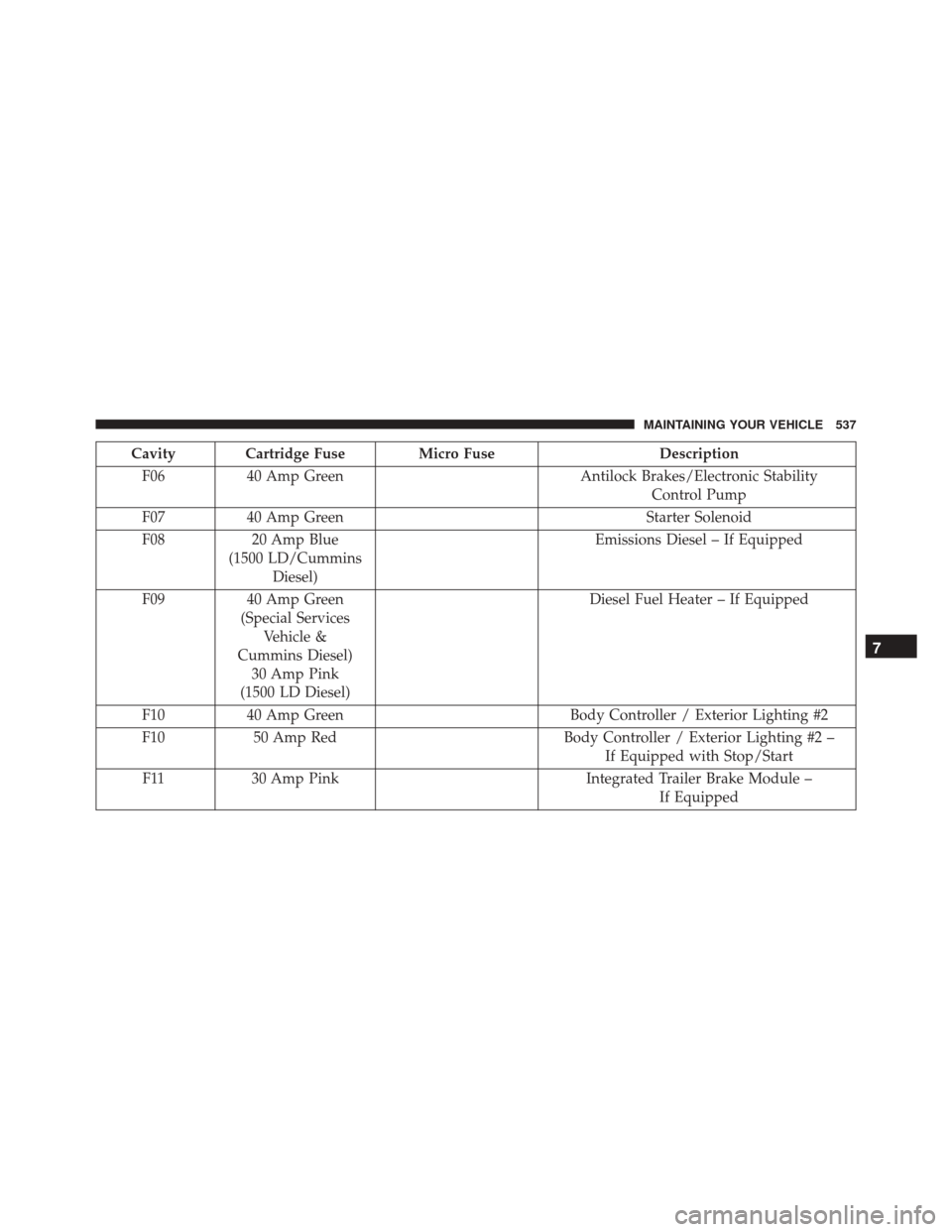
Cavity Cartridge Fuse Micro FuseDescription
F06 40 Amp Green Antilock Brakes/Electronic Stability
Control Pump
F07 40 Amp Green Starter Solenoid
F08 20 Amp Blue
(1500 LD/Cummins Diesel) Emissions Diesel – If Equipped
F09 40 Amp Green
(Special Services Vehicle &
Cummins Diesel) 30 Amp Pink
(1500 LD Diesel) Diesel Fuel Heater – If Equipped
F10 40 Amp Green Body Controller / Exterior Lighting #2
F10 50 Amp Red Body Controller / Exterior Lighting #2 –
If Equipped with Stop/Start
F11 30 Amp Pink Integrated Trailer Brake Module –
If Equipped
7
MAINTAINING YOUR VEHICLE 537
Page 541 of 599
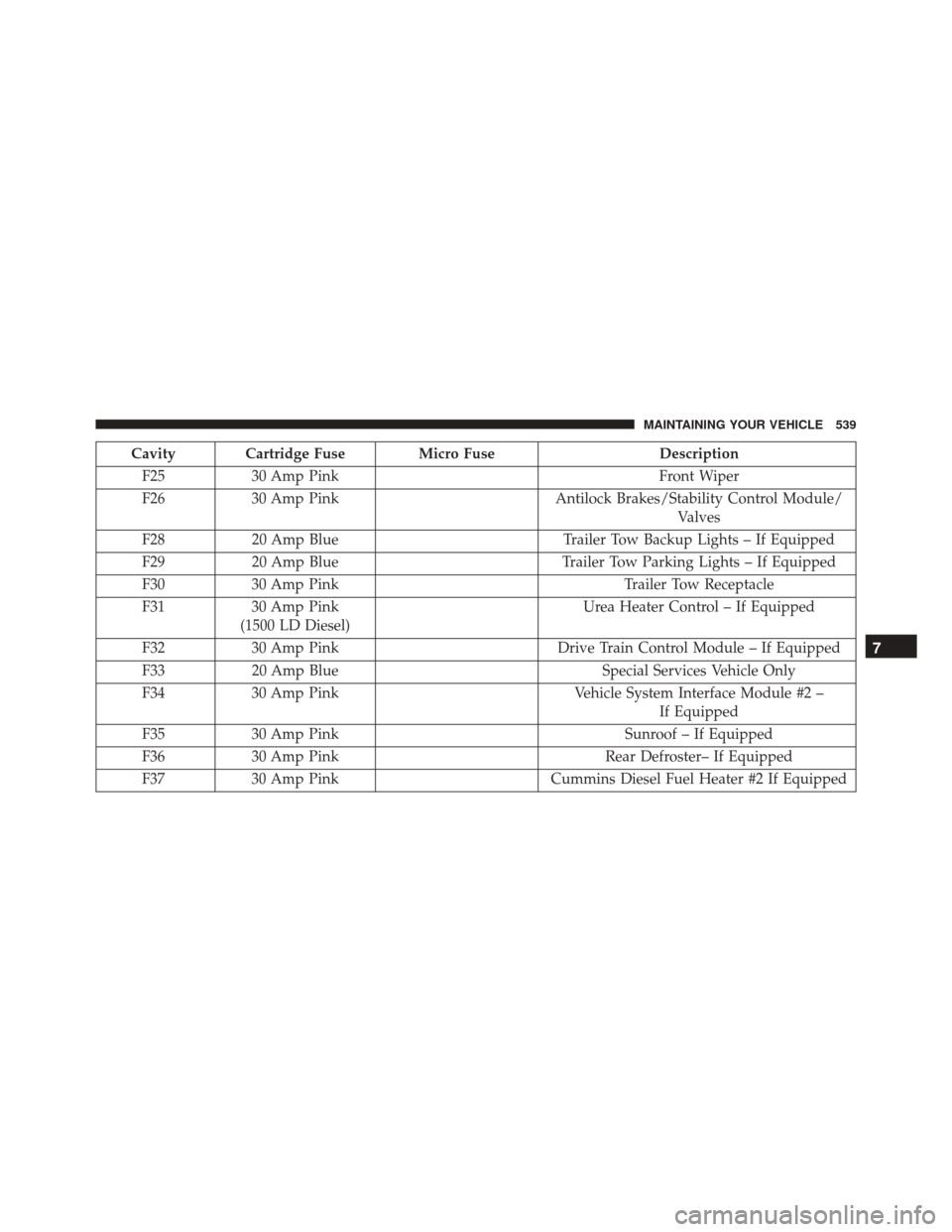
Cavity Cartridge Fuse Micro FuseDescription
F25 30 Amp Pink Front Wiper
F26 30 Amp Pink Antilock Brakes/Stability Control Module/
Valves
F28 20 Amp Blue Trailer Tow Backup Lights – If Equipped
F29 20 Amp Blue Trailer Tow Parking Lights – If Equipped
F30 30 Amp Pink Trailer Tow Receptacle
F31 30 Amp Pink
(1500 LD Diesel) Urea Heater Control – If Equipped
F32 30 Amp Pink Drive Train Control Module – If Equipped
F33 20 Amp Blue Special Services Vehicle Only
F34 30 Amp Pink Vehicle System Interface Module #2 –
If Equipped
F35 30 Amp Pink Sunroof – If Equipped
F36 30 Amp Pink Rear Defroster– If Equipped
F37 30 Amp Pink Cummins Diesel Fuel Heater #2 If Equipped
7
MAINTAINING YOUR VEHICLE 539