lights Ram 5500 Chassis Cab 2015 Owner's Guide
[x] Cancel search | Manufacturer: RAM, Model Year: 2015, Model line: 5500 Chassis Cab, Model: Ram 5500 Chassis Cab 2015Pages: 599, PDF Size: 4.51 MB
Page 178 of 599
NOTE:The courtesy/reading lights will remain on until
the switch is pressed a second time, so be sure they have
been turned off before leaving the vehicle. If the interior
lights are left on after the ignition is turned OFF, they will
automatically turn off after 15 minutes.
ELECTRICAL POWER OUTLETS
The auxiliary 12 Volt (13 Amp) power outlets can provide
power for in-cab accessories designed for use with the
standard “cigar lighter” plug. The 12 Volt power outlets
have a cap attached to the outlet indicating “12V DC,”
together with either a key symbol or a battery symbol.
A key symbol indicates that the key must be in the
ON/RUN or ACC positions for the outlet to provide
power. The battery symbol indicates that the outlet is
connected to the battery, and can provide power at all
times.
NOTE: To ensure proper operation, a MOPAR® knob
and element must be used.
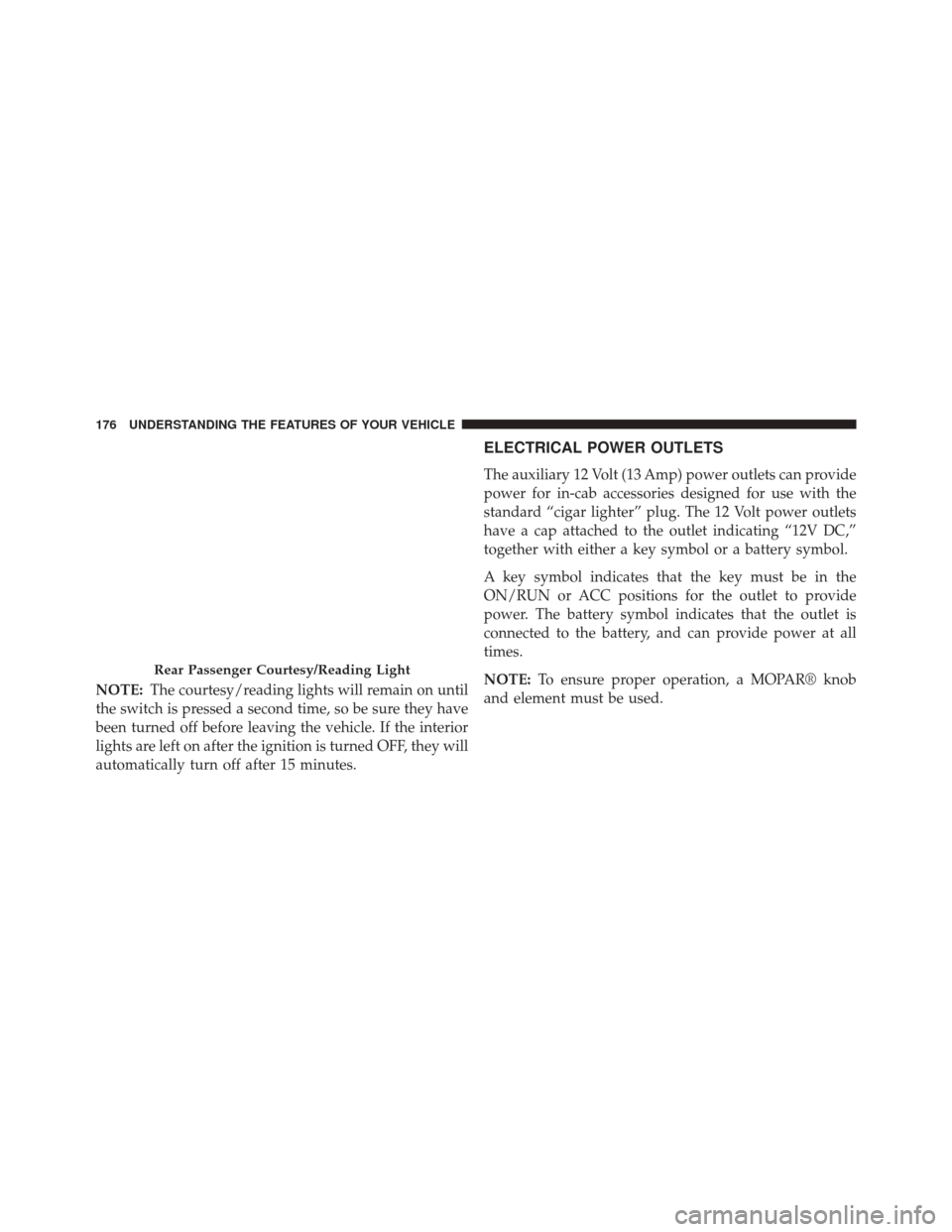
Rear Passenger Courtesy/Reading Light
176 UNDERSTANDING THE FEATURES OF YOUR VEHICLE
Page 183 of 599
CAUTION!
•Many accessories that can be plugged in draw
power from the vehicle’s battery, even when not in
use (i.e., cellular phones, etc.). Eventually, if
plugged in long enough, the vehicle’s battery will
discharge sufficiently to degrade battery life and/or
prevent the engine from starting.
• Accessories that draw higher power (i.e., coolers,
vacuum cleaners, lights, etc.), will discharge the
battery even more quickly. Only use these intermit-
tently and with greater caution.
• After the use of high power draw accessories, or
long periods of the vehicle not being started (with
accessories still plugged in), the vehicle must be
driven a sufficient length of time to allow the
generator to recharge the vehicle’s battery.
AUXILIARY SWITCHES — IF EQUIPPED
There can be up to five auxiliary switches located in the
lower switch bank of the instrument panel which can be
used to power various electronic devices and PTO
(Power Take Off) – If Equipped. Connections to the
switches are found under the hood in the connectors
attached to the auxiliary Power Distribution Center.
You have the ability to configure the functionality of the
auxiliary switches via the Electronic Vehicle Information
Center (EVIC) or Driver Information Display (DID). All
switches can now be configured for ignition or battery
power, saving or not saving state across a key cycle, and
momentary or latching switch operation.
For further information on using the auxiliary switches,
please refer to the Ram Body Builders Guide by accessing
www.rambodybuilder.com and choosing the appropriate
links.
3
UNDERSTANDING THE FEATURES OF YOUR VEHICLE 181
Page 207 of 599
unless the parking brake is applied or a brake fault is
detected. If the light does not illuminate, have the light
inspected by an authorized dealer.
The light also will turn on when the parking brake is
applied with the ignition switch in the ON/RUN posi-
tion.
NOTE:This light shows only that the parking brake is
applied. It does not show the degree of brake application.
7. High Beam Indicator
This light shows that the high beam headlights
are on. Push the multifunction control lever
away from you to switch the headlights to high
beam. Pull the lever toward you to switch the headlights
back to low beam. If the driver’s door is open, and the
headlights or park lights are left on, the high beam
indicator light will remain illuminated and a chime will
sound. 8. Seat Belt Reminder Light
When the ignition switch is first turned to
ON/RUN, this light will turn on for four to
eight seconds as a bulb check. During the bulb
check, if the driver’s seat belt is unbuckled, a
chime will sound. After the bulb check or when driving,
if the driver’s seat belt remains unbuckled, the seat belt
reminder light will flash or remain on continuously. Refer
to “Occupant Restraints” in “Things To Know Before
Starting Your Vehicle” for further information.
9. Air Bag Warning Light
This light will turn on for four to eight seconds
as a bulb check when the ignition switch is first
turned to ON/RUN. If the light is either not on
during starting, stays on, or turns on while
driving, have the system inspected at an authorized
dealer as soon as possible. Refer to “Occupant Restraints”
in “Things To Know Before Starting Your Vehicle” for
further information.
4
UNDERSTANDING YOUR INSTRUMENT PANEL 205
Page 208 of 599
10. Oil Pressure Gauge — If EquippedThe pointer should always indicate some oil pres-
sure when the engine is running. A continuous high or
low reading under normal driving conditions may indi-
cate a lubrication system malfunction. Immediate service
should be obtained from an authorized dealer.
11. Speedometer
The speedometer shows the vehicle speed in miles per
hour and/or kilometers per hour (mph/km/h).
12. Park/Headlight ON Indicator — If Equipped
This indicator will illuminate when the park
lights or headlights are turned on. 13. Cargo Light — If Equipped
The cargo light will illuminate when the cargo
light is activated by pressing the cargo light
button on the headlight switch.
14. Fuel Gauge
Shows level of fuel in tank when ignition switch is in the
ON/RUN position.
15. Vehicle Security Light — If Equipped This light will flash at a fast rate for approxi-
mately 15 seconds, when the vehicle security
alarm is arming, and then will flash slowly
until the vehicle is disarmed.
206 UNDERSTANDING YOUR INSTRUMENT PANEL
Page 210 of 599
of reasons, including the installation of replacement or
alternate tires or wheels on the vehicle that prevent the
TPMS from functioning properly. Always check the
TPMS malfunction telltale after replacing one or more
tires or wheels on your vehicle, to ensure that the
replacement or alternate tires and wheels allow the TPMS
to continue to function properly.
CAUTION!
The TPMS has been optimized for the original
equipment tires and wheels. TPMS pressures and
warning have been established for the tire size
equipped on your vehicle. Undesirable system opera-
tion or sensor damage may result when using re-
placement equipment that is not of the same size,
type, and/or style. Aftermarket wheels can cause
sensor damage. Using aftermarket tire sealants may
(Continued)
CAUTION!(Continued)
cause the Tire Pressure Monitoring System (TPMS)
sensor to become inoperable. After using an after-
market tire sealant it is recommended that you take
your vehicle to an authorized dealership to have your
sensor function checked.
NOTE: The TPMS telltale is also accompanied by a “Low
Tire” message in the odometer (Base Cluster), or in the
Electronic Vehicle Information Center (EVIC) screen in-
dicating “Low Tire” for EVIC enabled clusters.
17. Front Fog Light Indicator — If Equipped
This indicator will illuminate when the front
fog lights are on.
208 UNDERSTANDING YOUR INSTRUMENT PANEL
Page 219 of 599
6. EVIC Red Telltales
7. Audio/Phone Information And Sub-menu Information
Whenever there are sub-menus available, the position
within the sub-menu is shown here.
The main display area will normally display the main
menu or the screens of a selected feature of the main
menu. The main display area also displays “pop up”
messages that consist of approximately 60 possible warn-
ing or information messages. These pop up messages fall
into several categories:
•Five Second Stored Messages
When the appropriate conditions occur, this type of
message takes control of the main display area for five
seconds and then returns to the previous screen. Most of
the messages of this type are then stored (as long as the
condition that activated it remains active) and can be
reviewed from the “Messages” main menu item. As long as there is a stored message, an “i” will be displayed in
the EVIC’s compass/outside temp line. Examples of this
message type are “Right Front Turn Signal Lamp Out”
and “Low Tire Pressure.”
•
Unstored Messages
This message type is displayed indefinitely or until the
condition that activated the message is cleared. Examples
of this message type are “Turn Signal On” (if a turn signal
is left on) and “Lights On” (if driver leaves the vehicle).
• Unstored Messages Until RUN
These messages deal primarily with the Remote Start
feature. This message type is displayed until the ignition
is in the RUN state. Examples of this message type are
“Remote Start Aborted - Door Ajar” and “Press Brake
Pedal and Push Button to Start.”
4
UNDERSTANDING YOUR INSTRUMENT PANEL 217
Page 222 of 599
•Cruise Off
• Cruise Ready
• Cruise Set To XXX MPH
• Tire Pressure Screen With Low Tire(s) “Inflate Tire to
XX”
• Tire Pressure Information System (TPIS)
• Service Tire Pressure System
• Parking Brake Engaged
• Brake Fluid Low
• Service Electronic Braking System
• Engine Temperature Hot
• Battery Voltage Low
• Service Electronic Throttle Control •
Lights On
• Right Turn Signal Light Out
• Left Turn Signal Light Out
• Turn Signal On
• Sound Horn with Remote Lock: Off; 1st Press; 2nd
Press
• Vehicle Not in Park
• Key in Ignition
• Key in Ignition Lights On
• Remote Start Active Key to Run
• Remote Start Active Push Start Button
• Remote Start Aborted Fuel Low
• Remote Start Aborted Too Cold
220 UNDERSTANDING YOUR INSTRUMENT PANEL
Page 231 of 599
•Tire Pressure Screen With Low Tire(s) “Inflate Tire to
XX”
• Tire Pressure Information System (TPIS)
• Service Tire Pressure System
• Parking Brake Engaged
• Brake Fluid Low
• Service Electronic Braking System
• Engine Temperature Hot
• Battery Voltage Low
• Service Electronic Throttle Control
• Lights On
• Right Turn Signal Light Out
• Left Turn Signal Light Out •
Turn Signal On
• Sound Horn with Remote Lock: Off; 1st Press; 2nd
Press
• Vehicle Not in Park
• Key in Ignition
• Key in Ignition Lights On
• Remote Start Active Key to Run
• Remote Start Active Push Start Button
• Remote Start Aborted Fuel Low
• Remote Start Aborted Too Cold
• Remote Start Aborted Door Open
• Remote Start Aborted Hood Open
• Remote Start Aborted Trunk Open
4
UNDERSTANDING YOUR INSTRUMENT PANEL 229
Page 234 of 599
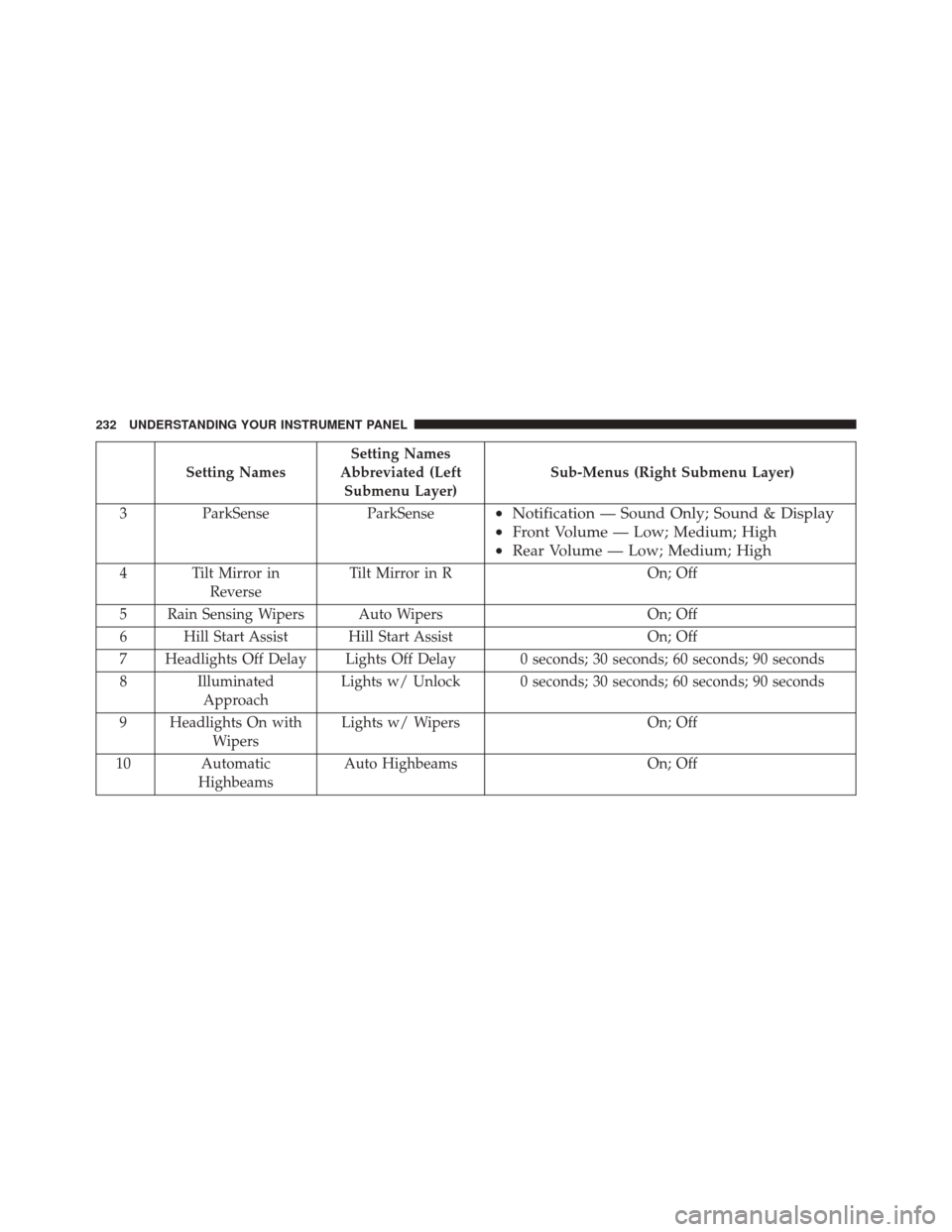
Setting NamesSetting Names
Abbreviated (Left Submenu Layer) Sub-Menus (Right Submenu Layer)
3 ParkSense ParkSense
•Notification — Sound Only; Sound & Display
• Front Volume — Low; Medium; High
• Rear Volume — Low; Medium; High
4 Tilt Mirror in
Reverse Tilt Mirror in R
On; Off
5 Rain Sensing Wipers Auto Wipers On; Off
6 Hill Start Assist Hill Start Assist On; Off
7 Headlights Off Delay Lights Off Delay 0 seconds; 30 seconds; 60 seconds; 90 seconds
8 Illuminated Approach Lights w/ Unlock 0 seconds; 30 seconds; 60 seconds; 90 seconds
9 Headlights On with Wipers Lights w/ Wipers
On; Off
10 Automatic Highbeams Auto Highbeams
On; Off
232 UNDERSTANDING YOUR INSTRUMENT PANEL
Page 235 of 599
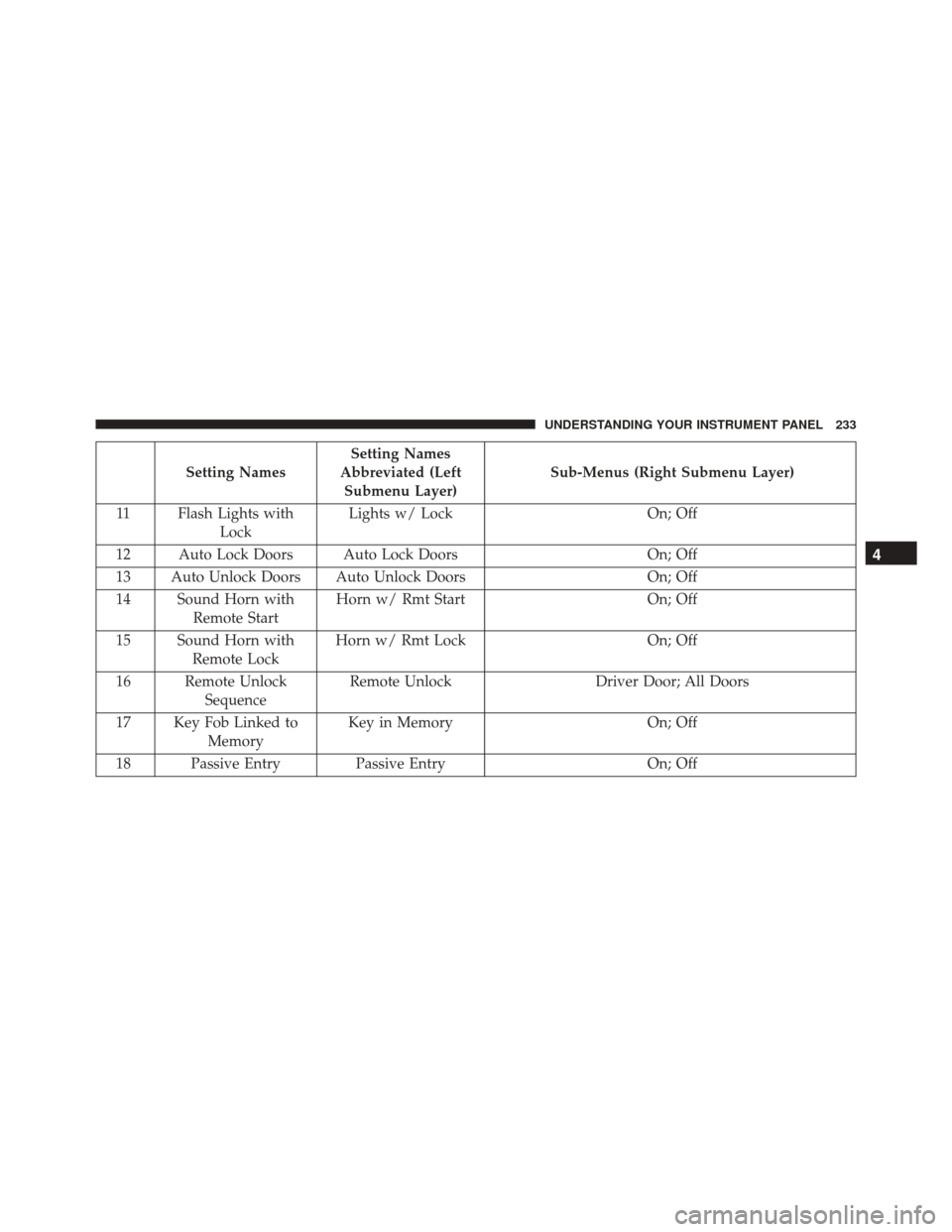
Setting NamesSetting Names
Abbreviated (Left Submenu Layer) Sub-Menus (Right Submenu Layer)
11 Flash Lights with Lock Lights w/ Lock
On; Off
12 Auto Lock Doors Auto Lock Doors On; Off
13 Auto Unlock Doors Auto Unlock Doors On; Off
14 Sound Horn with Remote Start Horn w/ Rmt Start
On; Off
15 Sound Horn with Remote Lock Horn w/ Rmt Lock
On; Off
16 Remote Unlock Sequence Remote Unlock
Driver Door; All Doors
17 Key Fob Linked to Memory Key in Memory
On; Off
18 Passive Entry Passive Entry On; Off
4
UNDERSTANDING YOUR INSTRUMENT PANEL 233