trailer Ram 5500 Chassis Cab 2016 Diesel Supplement
[x] Cancel search | Manufacturer: RAM, Model Year: 2016, Model line: 5500 Chassis Cab, Model: Ram 5500 Chassis Cab 2016Pages: 338, PDF Size: 1.63 MB
Page 124 of 338
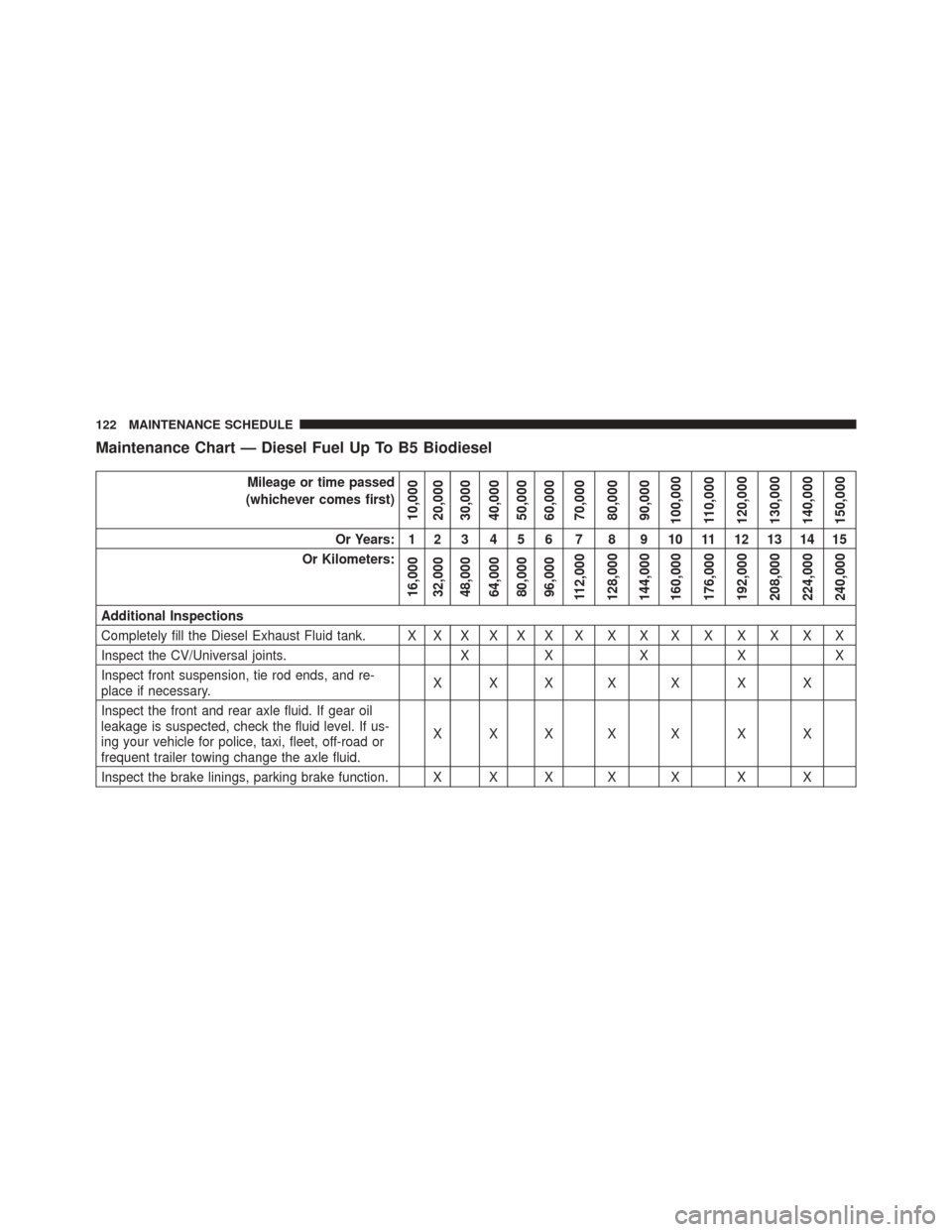
Maintenance Chart — Diesel Fuel Up To B5 Biodiesel
Mileage or time passed
(whichever comes first)
10,000
20,000
30,000
40,000
50,000
60,000
70,000
80,000
90,000
100,000
110,000
120,000
130,000
140,000
150,000
Or Years: 1 2 3 4 5 6 7 8 9 10 11 12 13 14 15
Or Kilometers:
16,000
32,000
48,000
64,000
80,000
96,000
112,000
128,000
144,000
160,000
176,000
192,000
208,000
224,000
240,000
Additional Inspections
Completely fill the Diesel Exhaust Fluid tank. X X X X X X X X X X X X X X X
Inspect the CV/Universal joints. XX X X X
Inspect front suspension, tie rod ends, and re-
place if necessary. XXX X X X X
Inspect the front and rear axle fluid. If gear oil
leakage is suspected, check the fluid level. If us-
ing your vehicle for police, taxi, fleet, off-road or
frequent trailer towing change the axle fluid. XXX X X X X
Inspect the brake linings, parking brake function. X X X X X X X
122 MAINTENANCE SCHEDULE
Page 126 of 338
Mileage or time passed
(whichever comes first)
10,000
20,000
30,000
40,000
50,000
60,000
70,000
80,000
90,000
100,000
110,000
120,000
130,000
140,000
150,000
Or Years: 1 2 3 4 5 6 7 8 9 10 11 12 13 14 15
Or Kilometers:
16,000
32,000
48,000
64,000
80,000
96,000
112,000
128,000
144,000
160,000
176,000
192,000
208,000
224,000
240,000
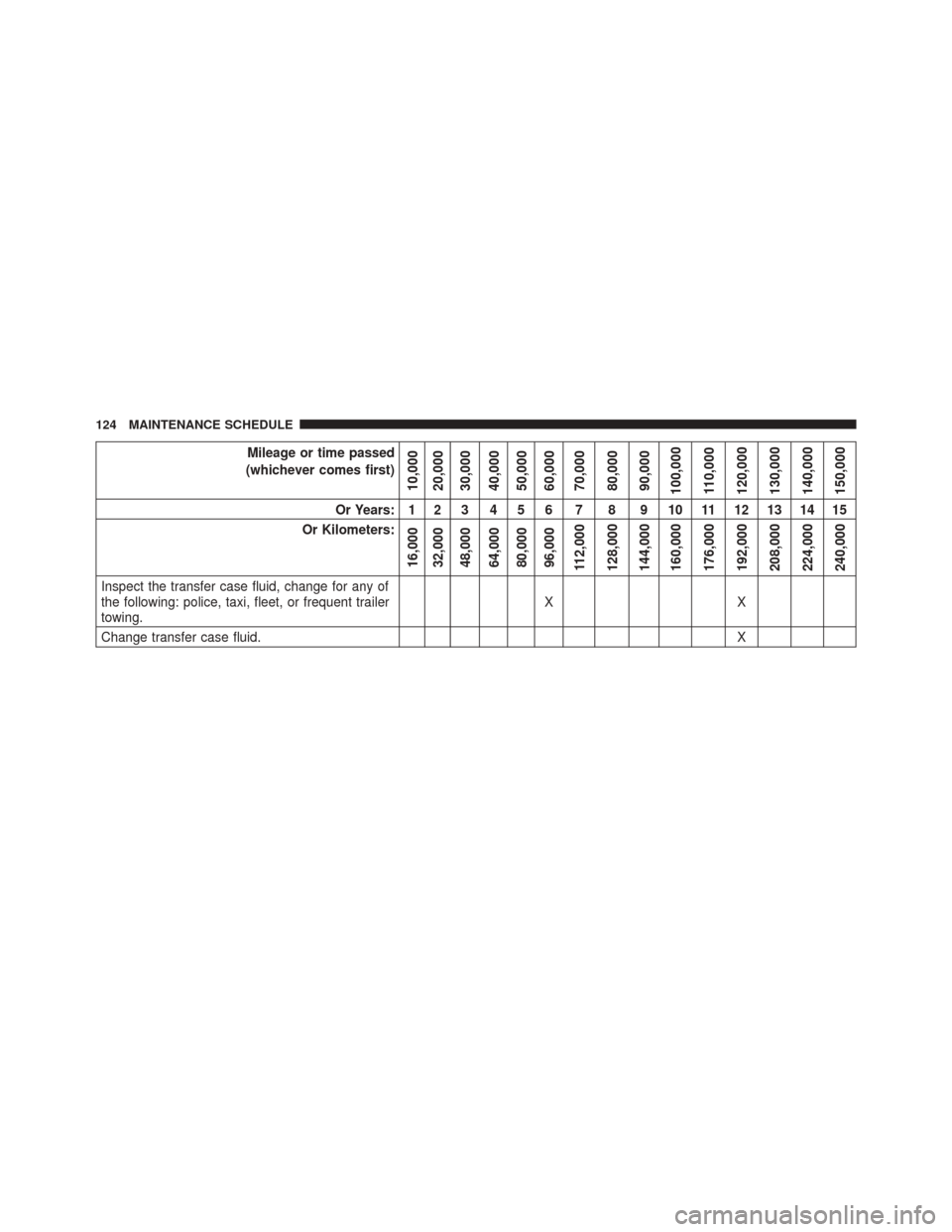
Inspect the transfer case fluid, change for any of
the following: police, taxi, fleet, or frequent trailer
towing. XX
Change transfer case fluid. X
124 MAINTENANCE SCHEDULE
Page 143 of 338
Remote Start Comfort Systems — If Equipped
When remote start is activated, the heated steering
wheel, and driver heated seat features will automatically
turn on in cold weather. In warm weather, the driver
vented seat feature will automatically turn on when the
remote start is activated. These features will stay on
through the duration of remote start or until the ignition
switch is turned to the ON position.
The Remote Start Comfort System can be activated and
deactivated through the EVIC/DID. For more informa-
tion on Remote Start Comfort System operation refer to
your Owners Manual.
ENGINE BREAK-IN RECOMMENDATIONS
The Cummins turbocharged diesel engine does not re-
quire a break-in period due to its construction. Normal
operation is allowed, providing the following recommen-
dations are followed:•
Warm up the engine before placing it under load.
• Do not operate the engine at idle for prolonged
periods.
• Use the appropriate transmission gear to prevent
engine lugging.
• Observe vehicle oil pressure and temperature indica-
tors.
• Check the coolant and oil levels frequently.
• Vary throttle position at highway speeds when carry-
ing or towing significant weight.
NOTE: Light duty operation such as light trailer towing
or no load operation will extend the time before the
engine is at full efficiency. Reduced fuel economy and
power may be seen at this time.
2
THINGS TO KNOW BEFORE STARTING YOUR VEHICLE 141
Page 144 of 338
For additional vehicle break-in requirements, refer to
“Trailer Towing” in “Starting And Operating” of the
Owners Manual.
Because of the construction of the Cummins turbo-
charged diesel engine, engine run-in is enhanced by
loaded operating conditions which allow the engine
parts to achieve final finish and fit during the first
6,000 miles (10 000 km).
142 THINGS TO KNOW BEFORE STARTING YOUR VEHICLE
Page 175 of 338
Driver Information Display (DID) — 7” Display
The Driver Information Display (DID) display is located
in the center portion of the cluster and consists of eight
sections:1. Main Screen — The inner ring of the display will
illuminate in grey under normal conditions, yellow for
non critical warnings, red for critical warnings and
white for on demand information.
2. Audio Information and Submenu Information — Whenever there are submenus available, the position
within the submenus is shown here.
3. Selectable Information (Compass, Temp, Range to Empty, Trip A, Trip B, Average MPG, Trailer Trip
(distance only), Trailer Brake Gain).
4. Air Suspension Status – If Equipped
5. Transmission Gear Position Indicator (PRND)
6. Status Menu Icons
7. Telltales/Indicators
8. 4WD Status
4
UNDERSTANDING YOUR INSTRUMENT PANEL 173
Page 176 of 338
9. Selectable Gauge (Trans Temp, Oil Temp, Oil Life,Trailer Brake, Current MPG, Fuel Filter Life, Turbo
Boost, Exhaust Brake, Battery Voltage)
10. Main Menu Items (Digital Speedometer, Vehicle Info, Fuel Economy, Trip A, Trip B, Trailer Tow, Audio,
Stored Messages, Screen Setup, Vehicle Settings)
11. Selectable Gauge (Trans Temp, Oil Temp, Oil Life, Trailer Brake, Current MPG, Fuel Filter Life, Turbo
Boost, Exhaust Brake, Battery Voltage)
The main display area will normally display the main
menu or the screens of a selected feature of the main
menu. The main display area also displays “pop up”
messages that consist of approximately 60 possible warn-
ing or information messages. These pop up messages fall
into several categories: •
Five Second Stored Messages
When the appropriate conditions occur, this type of
message takes control of the main display area for five
seconds and then returns to the previous screen. Most of
the messages of this type are then stored (as long as the
condition that activated it remains active) and can be
reviewed from the “Messages” main menu item. As long
as there is a stored message, an “i” will be displayed in
the DID’s compass/outside temp line. Examples of this
message type are “Right Front Turn Signal Lamp Out”
and “Low Tire Pressure”.
• Unstored Messages
This message type is displayed indefinitely or until the
condition that activated the message is cleared. Examples
of this message type are “Turn Signal On” (if a turn signal
is left on) and “Lights On” (if driver leaves the vehicle).
174 UNDERSTANDING YOUR INSTRUMENT PANEL
Page 187 of 338
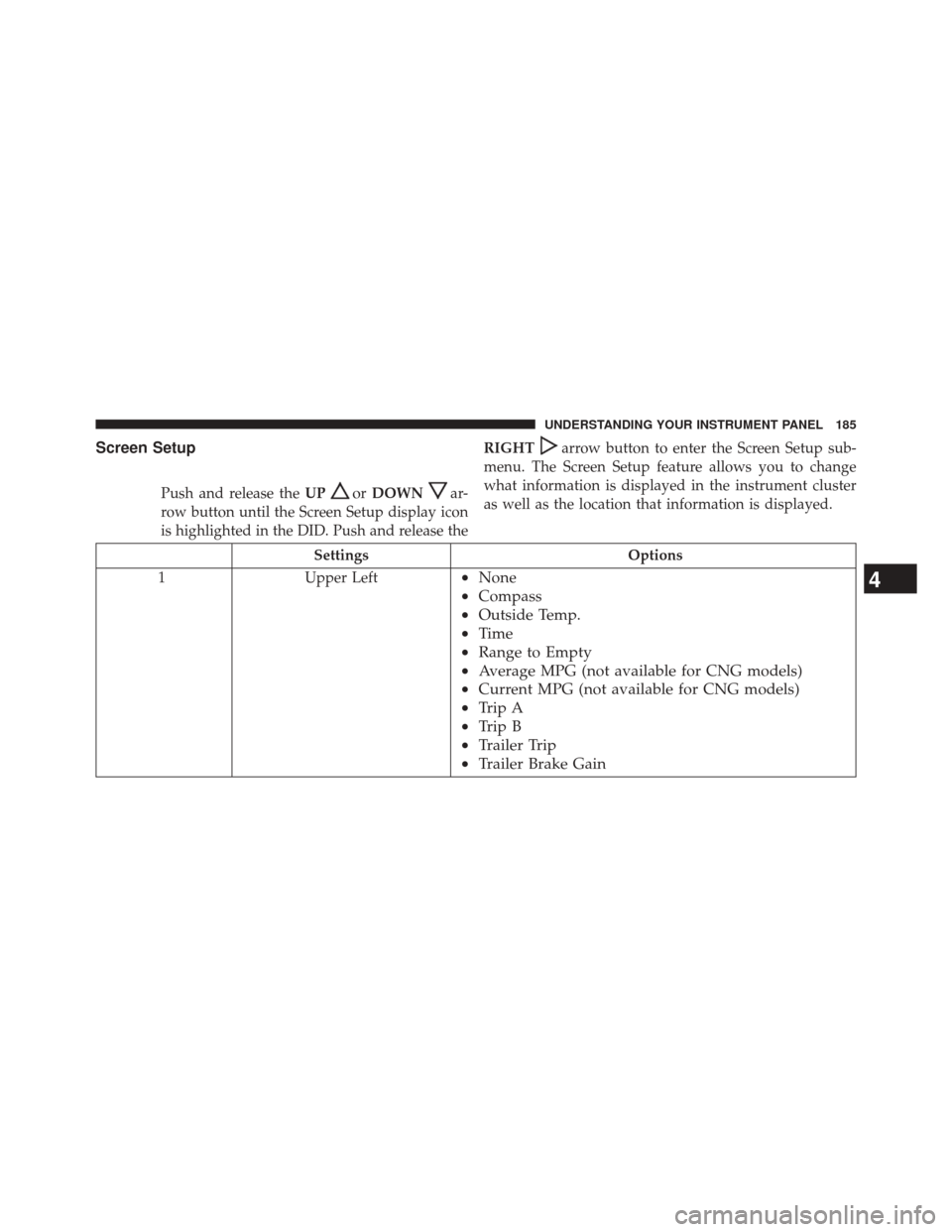
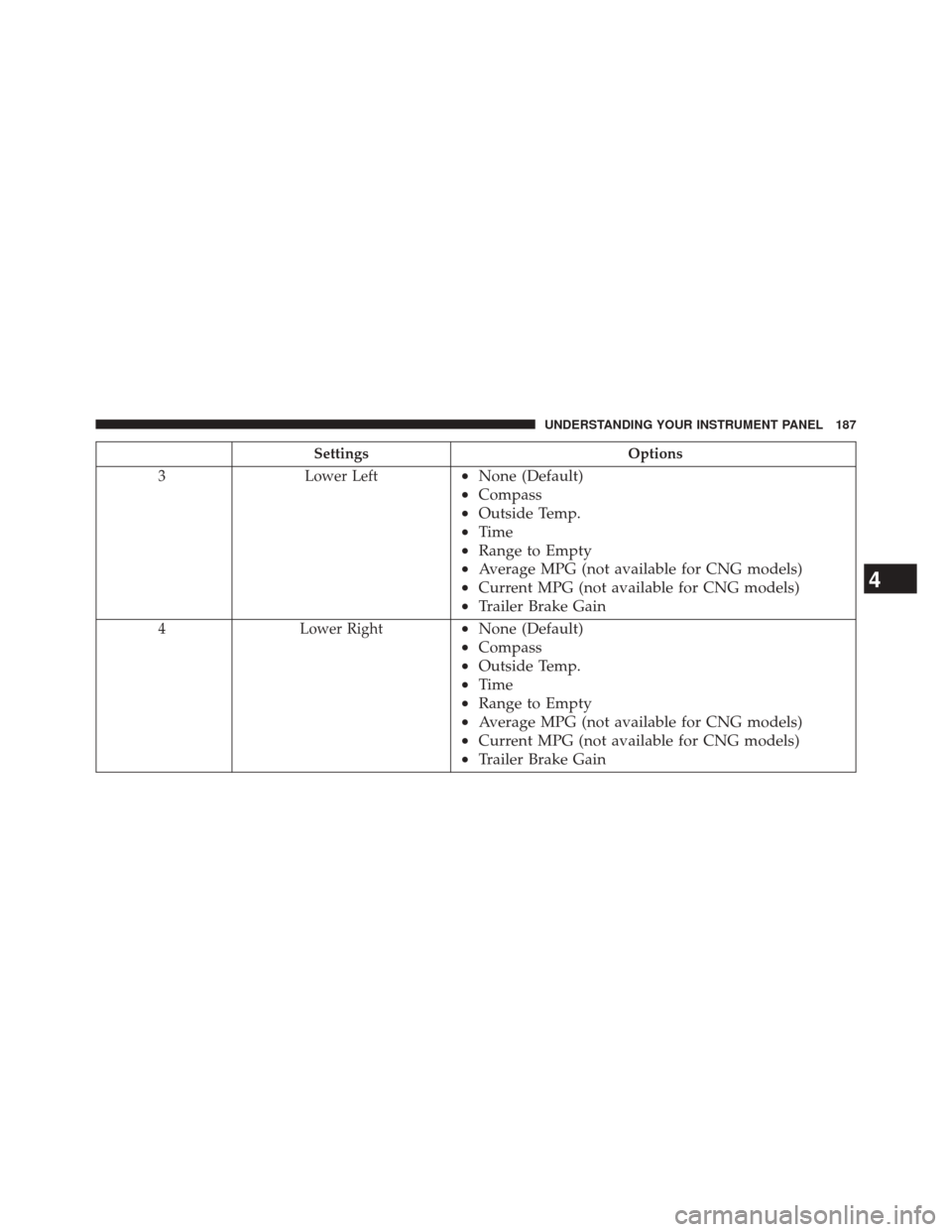
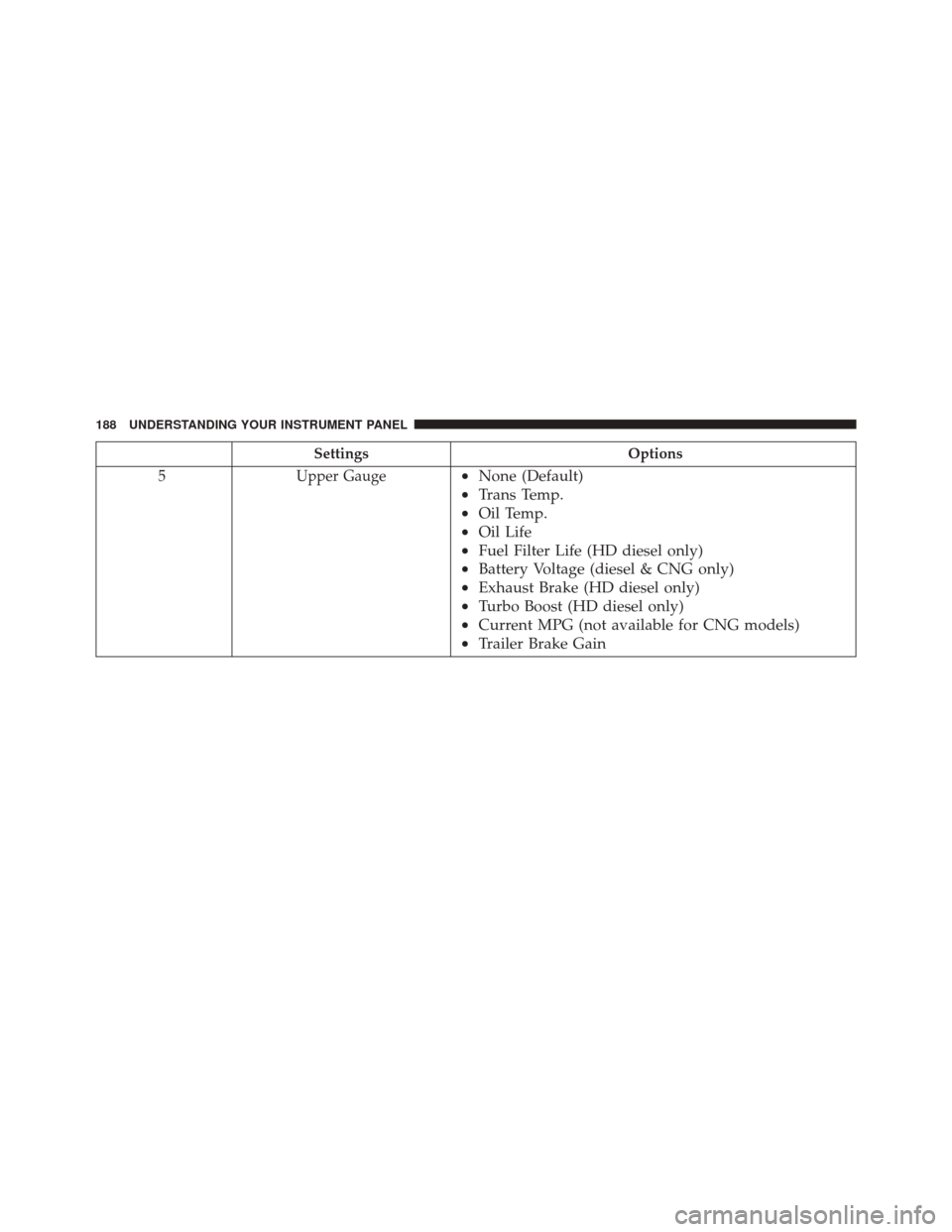
Screen Setup
Push and release theUPorDOWNar-
row button until the Screen Setup display icon
is highlighted in the DID. Push and release the RIGHT
arrow button to enter the Screen Setup sub-
menu. The Screen Setup feature allows you to change
what information is displayed in the instrument cluster
as well as the location that information is displayed.
Settings Options
1 Upper Left
•None
• Compass
• Outside Temp.
• Time
• Range to Empty
• Average MPG (not available for CNG models)
• Current MPG (not available for CNG models)
• Trip A
• Trip B
• Trailer Trip
• Trailer Brake Gain4
UNDERSTANDING YOUR INSTRUMENT PANEL 185
Page 188 of 338
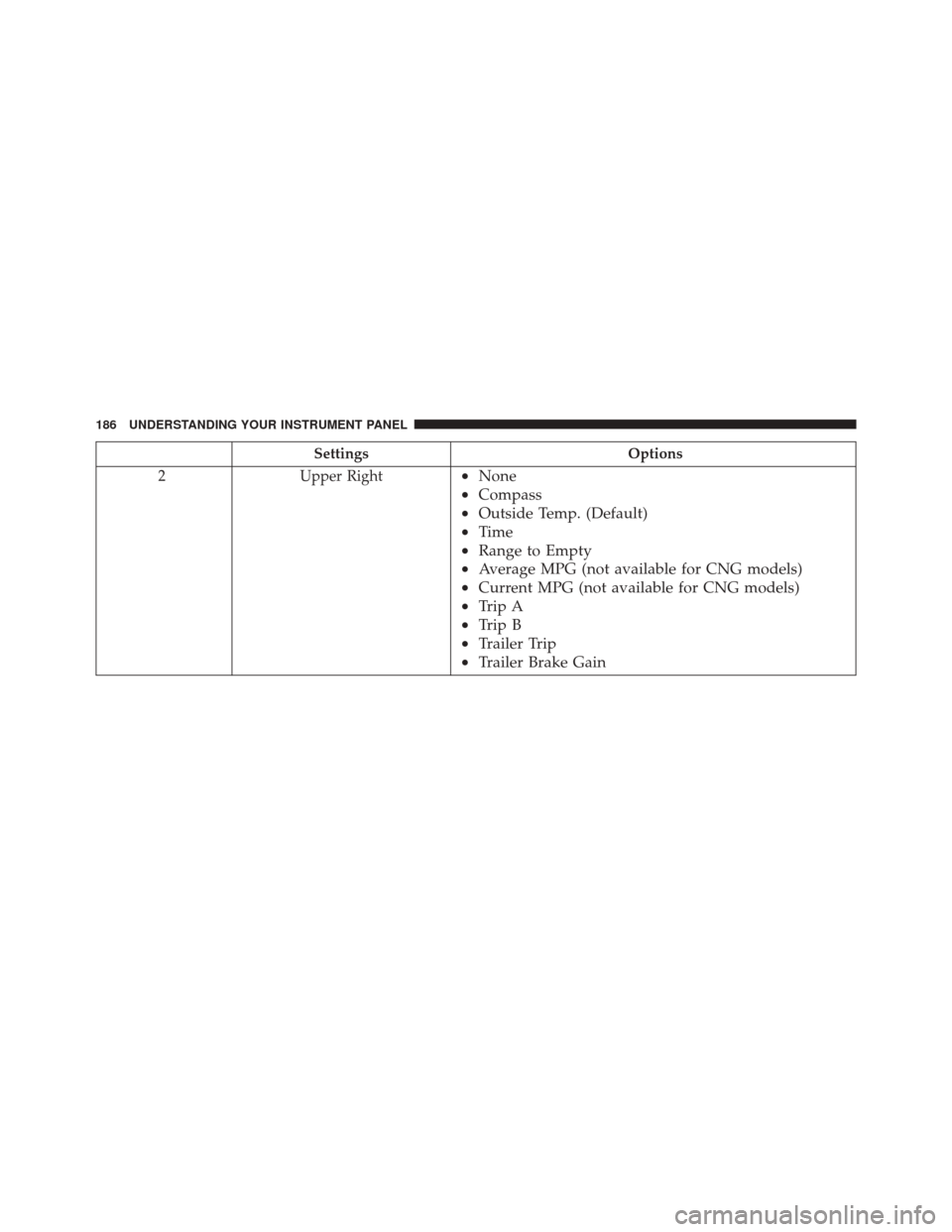
SettingsOptions
2 Upper Right
•None
• Compass
• Outside Temp. (Default)
• Time
• Range to Empty
• Average MPG (not available for CNG models)
• Current MPG (not available for CNG models)
• Trip A
• Trip B
• Trailer Trip
• Trailer Brake Gain
186 UNDERSTANDING YOUR INSTRUMENT PANEL
Page 189 of 338
SettingsOptions
3 Lower Left
•None (Default)
• Compass
• Outside Temp.
• Time
• Range to Empty
• Average MPG (not available for CNG models)
• Current MPG (not available for CNG models)
• Trailer Brake Gain
4 Lower Right•None (Default)
• Compass
• Outside Temp.
• Time
• Range to Empty
• Average MPG (not available for CNG models)
• Current MPG (not available for CNG models)
• Trailer Brake Gain
4
UNDERSTANDING YOUR INSTRUMENT PANEL 187
Page 190 of 338
SettingsOptions
5 Upper Gauge
•None (Default)
• Trans Temp.
• Oil Temp.
• Oil Life
• Fuel Filter Life (HD diesel only)
• Battery Voltage (diesel & CNG only)
• Exhaust Brake (HD diesel only)
• Turbo Boost (HD diesel only)
• Current MPG (not available for CNG models)
• Trailer Brake Gain
188 UNDERSTANDING YOUR INSTRUMENT PANEL