mirror Ram Cargo Van 2014 Owner's Guide
[x] Cancel search | Manufacturer: RAM, Model Year: 2014, Model line: Cargo Van, Model: Ram Cargo Van 2014Pages: 666, PDF Size: 5.09 MB
Page 280 of 666
REAR WINDOW FEATURES
Rear Window Defroster
The rear window defroster button is located on
the climate control (Mode) knob. Press this button
to turn on the rear window defroster and the heated
outside mirrors (if equipped). An indicator in the button
will illuminate when the rear window defroster is on. The
rear window defroster automatically turns off after ap-
proximately 10 minutes. For an additional five minutes of
operation, press the button a second time.
NOTE:
• You can turn off the heated mirror feature at anytime
by pressing the rear window defroster switch a second
time.
Deluxe Load Floor Tie Down Locations (Rear View)
278 UNDERSTANDING THE FEATURES OF YOUR VEHICLE
Page 316 of 666
present, the BSM system will illuminate the icon only on
the side of interference as long as interference is present.
Service Blind Spot System — This message is displayed
to indicate the Blind Spot Monitor (BSM) system is
permanently unavailable. The driver will receive an
EVIC message and the BSM display warning in both
mirrors will be permanently illuminated. If this message
is present see an authorized dealer.
EVIC White Telltale Lights
This area will show reconfigurable white caution tell-
tales. These telltales include:
•Electronic Range Select (ERS) Status
The shift lever status “5,4,3,2,1” are displayed indicating
the shift lever position. Telltales “5,4,3,2,1” indicate the
Electronic Range Select (ERS) feature has been engaged
and the gear selected is displayed. For further informa-
tion on ERS, refer to “Starting And Operating”. •
Electronic Speed Control Ready
This light will turn on when the electronic
speed control is ready. For further information,
refer to “Electronic Speed Control” in “Under-
standing The Features Of Your Vehicle.”
• Electronic Speed Control SET
This light will turn on when the electronic
speed control is SET. For further information,
refer to “Electronic Speed Control” in “Under-
standing The Features Of Your Vehicle.”
314 UNDERSTANDING YOUR INSTRUMENT PANEL
Page 329 of 666
transmitter UNLOCK button twice, to unlock the passen-
ger’s doors. WhenAll Doors 1st Press is selected, all of
the doors will unlock on the first press of the RKE
transmitter UNLOCK button. To make your selection,
press and release the SELECT button until a check-mark
appears next to the feature showing the system has been
activated or the check-mark is removed showing the
system has been deactivated.
RKE Linked To Memory — If Equipped
When this feature is selected the memory seat, mirror,
and radio settings will return to the memory set position
when the RKE transmitter UNLOCK button is pressed. If
this feature is not selected then the memory seat, mirror,
and radio settings can only return to the memory set
position using the door mounted switch. To make your
selection, press and release the SELECT button until a
check-mark appears next to the feature showing the system has been activated or the check-mark is removed
showing the system has been deactivated.
Remote Start Comfort Sys. — If Equipped
When this feature is selected and the remote start is
activated, the heated steering wheel and driver heated
seat features will automatically turn on in cold weather.
In warm weather, the driver vented seat feature will
automatically turn on when the remote start is activated.
These features will stay on through the duration of
remote start or until the key is turned to RUN. To make
your selection, press and release the SELECT button until
a check-mark appears next to the feature showing the
system has been activated or the check-mark is removed
showing the system has been deactivated.
Horn With Remote Lock — If Equipped
When this feature is selected, a short horn sound will
occur when the RKE transmitter LOCK button is pressed.
This feature may be selected with or without the Flash
4
UNDERSTANDING YOUR INSTRUMENT PANEL 327
Page 333 of 666
Tilt Mirror In Reverse — If Equipped
When this feature is selected and the vehicle is placed in
a reverse gear, the driver’s side mirror will tilt downward
to allow the driver to see into the previous blind spot and
avoid objects in close proximity to the rear of the vehicle.
To make your selection, press and release the SELECT
button until a check-mark appears next to the feature
showing the system has been activated or the check-mark
is removed showing the system has been deactivated.
Blind Spot Alert — If Equipped
There are three selections when operating Blind Spot
Alert (“Blind Spot Alert Lights”, “Blind Spot Alert
Lights/CHM”, “Blind Spot Alert Off”). The Blind Spot
Alert feature can be activated in “Blind Spot Alert Lights”
mode, when this mode is selected the Blind Spot Monitor
(BSM) system is activated and will only show a visual
alert in the outside mirrors. The Blind Spot Alert feature
can be activated in “Blind Spot Alert Lights/CHM”mode, in this mode the Blind Spot Monitor (BSM) will
show a visual alert in the outside mirrors as well as an
audible alert when the turn signal is on. When “Blind
Spot Alert Off” is selected the Blind Spot Monitor (BSM)
system is deactivated.
To make your selection, press and release the SELECT
button until a check-mark appears next to the feature
showing the system has been activated or the check-mark
is removed showing the system has been deactivated.
NOTE:
If your vehicle has experienced any damage in
the area where the sensor is located, even if the fascia is
not damaged, the sensor may have become misaligned.
Take your vehicle to an authorized dealer to verify sensor
alignment. Having a sensor that is misaligned will result
in the BSM not operating to specification.
Calibrate Compass
Refer to “Compass Display” for more information.
4
UNDERSTANDING YOUR INSTRUMENT PANEL 331
Page 418 of 666
The rear airflow modes will mirror the front unit opera-
tion. Rear Panel mode is automatically selected when the
front control is in the Panel mode. When the front unit is
in Bi-Level mode, airflow will be emitted from both the
upper and lower rear outlets. When the front control is in
Floor, Defrost, or Mix modes, airflow will be directed out
of the rear floor outlets.1. Left Front Temperature Control
Provides left front seat occupant with independent tem-
perature control. Turn left for cooler or right for warmer
temperature settings.
Manual Temperature Control
416 UNDERSTANDING YOUR INSTRUMENT PANEL
Page 420 of 666
NOTE:The air conditioning compressor may operate in
Mix and Defrost, even if the A/C button is not pressed.
This dehumidifies the air to help dry the windshield. To
improve fuel economy, use these modes only when
necessary.
8. Electronic Rear Window Defrost
Press this button to turn on the rear window
defroster and the heated outside mirrors (if
equipped). An indicator in the button will illuminate
when the rear window defroster is on. The rear window
defroster automatically turns off after approximately 10
minutes.
NOTE:
•You can turn off the heated mirror feature at anytime
by pressing the rear window defroster switch a
second time. •
To prevent excessive battery drain, use the rear
window defroster only when the engine is operating.
CAUTION!
Failure to follow these cautions can cause damage to
the heating elements:
• Use care when washing the inside of the rear
window. Do not use abrasive window cleaners on
the interior surface of the window. Use a soft cloth
and a mild washing solution, wiping parallel to the
heating elements. Labels can be peeled off after
soaking with warm water.
• Do not use scrapers, sharp instruments, or abrasive
window cleaners on the interior surface of the
window.
• Keep all objects a safe distance from the window.
(Continued)
418 UNDERSTANDING YOUR INSTRUMENT PANEL
Page 443 of 666
STARTING PROCEDURES
Before starting your vehicle, adjust your seat, adjust the
inside and outside mirrors, fasten your seat belt, and if
present, instruct all other occupants to buckle their seat
belts.
WARNING!
•When leaving the vehicle, always remove the key
fob from the ignition and lock your vehicle.
• Never leave children alone in a vehicle, or with
access to an unlocked vehicle.
• Allowing children to be in a vehicle unattended is
dangerous for a number of reasons. A child or
others could be seriously or fatally injured. Chil-
dren should be warned not to touch the parking
brake, brake pedal or the shift lever.
(Continued)
WARNING! (Continued)
•Do not leave the key fob in or near the vehicle, or
in a location accessible to children. A child could
operate power windows, other controls, or move
the vehicle.
Automatic Transmission
The shift lever must be in the NEUTRAL or PARK
position before you can start the engine. Press the brake
pedal before shifting into any driving gear.
Normal Starting
1. Do not press the accelerator.
2. Use the Fob with Integrated Key to briefly turn the ignition switch to the START position and release it as
soon as the starter engages. The starter motor will
continue to run, and it will disengage automatically
when the engine is running.
5
STARTING AND OPERATING 441
Page 609 of 666
To minimize the possibility of scratching the lenses and
reducing light output, avoid wiping with a dry cloth. To
remove road dirt, wash with a mild soap solution fol-
lowed by rinsing.
Do not use abrasive cleaning components, solvents, steel
wool or other aggressive material to clean the lenses.
Glass Surfaces
All glass surfaces should be cleaned on a regular basis
with MOPAR® Glass Cleaner, or any commercial
household-type glass cleaner. Never use an abrasive type
cleaner. Use caution when cleaning the inside rear win-
dow equipped with electric defrosters or the right rear
quarter window equipped with the radio antenna. Do
not use scrapers or other sharp instrument that may
scratch the elements.When cleaning the rear view mirror, spray cleaner on the
towel or rag that you are using. Do not spray cleaner
directly on the mirror.
Cleaning Plastic Instrument Cluster Lenses
The lenses in front of the instruments in this vehicle are
molded in clear plastic. When cleaning the lenses, care
must be taken to avoid scratching the plastic.
1. Clean with a wet soft rag. A mild soap solution may be
used, but do not use high alcohol content or abrasive
cleaners. If soap is used, wipe clean with a clean damp
rag.
2. Dry with a soft cloth.
7
MAINTAINING YOUR VEHICLE 607
Page 617 of 666
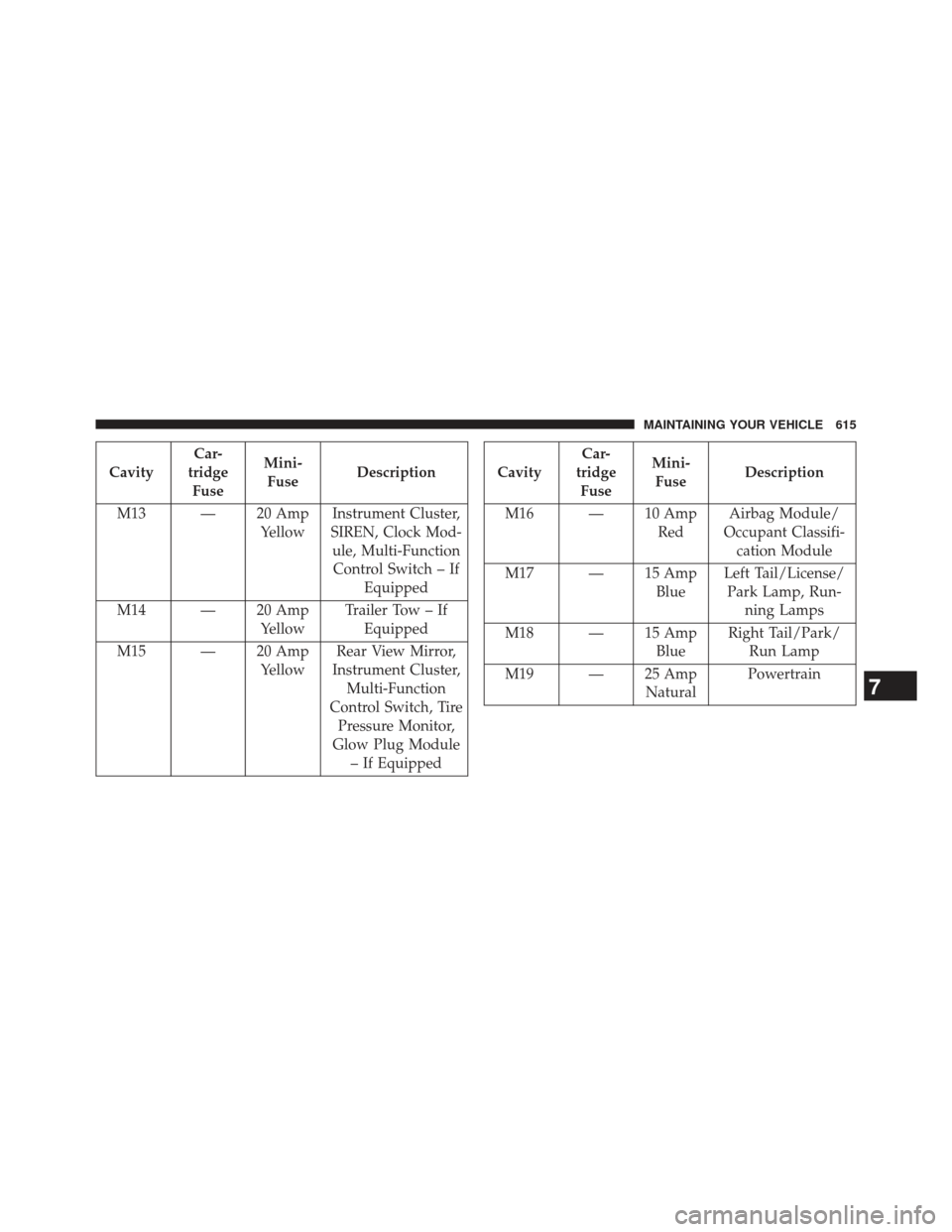
CavityCar-
tridge Fuse Mini-
Fuse Description
M13 — 20 Amp YellowInstrument Cluster,
SIREN, Clock Mod- ule, Multi-FunctionControl Switch – If Equipped
M14 — 20 Amp YellowTrailer Tow – If
Equipped
M15 — 20 Amp YellowRear View Mirror,
Instrument Cluster, Multi-Function
Control Switch, Tire Pressure Monitor,
Glow Plug Module – If EquippedCavity Car-
tridge Fuse Mini-
Fuse Description
M16 — 10 Amp RedAirbag Module/
Occupant Classifi- cation Module
M17 — 15 Amp BlueLeft Tail/License/
Park Lamp, Run- ning Lamps
M18 — 15 Amp BlueRight Tail/Park/
Run Lamp
M19 — 25 Amp NaturalPowertrain
7
MAINTAINING YOUR VEHICLE 615
Page 618 of 666
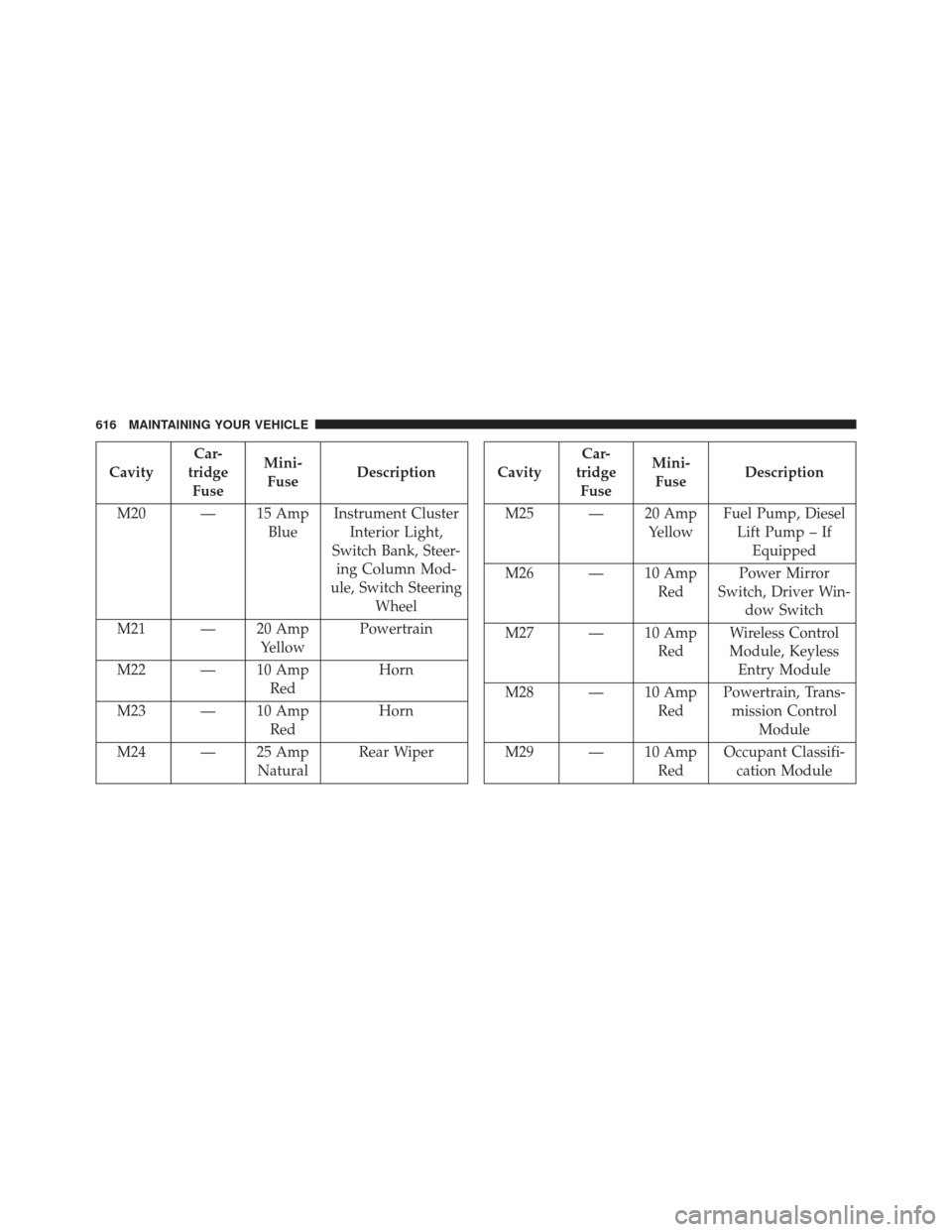
CavityCar-
tridge Fuse Mini-
Fuse Description
M20 — 15 Amp BlueInstrument Cluster
Interior Light,
Switch Bank, Steer- ing Column Mod-
ule, Switch Steering Wheel
M21 — 20 Amp YellowPowertrain
M22 — 10 Amp RedHorn
M23 — 10 Amp RedHorn
M24 — 25 Amp NaturalRear WiperCavityCar-
tridge Fuse Mini-
Fuse Description
M25 — 20 Amp YellowFuel Pump, Diesel
Lift Pump – If Equipped
M26 — 10 Amp RedPower Mirror
Switch, Driver Win- dow Switch
M27 — 10 Amp RedWireless Control
Module, Keyless Entry Module
M28 — 10 Amp RedPowertrain, Trans-
mission Control Module
M29 — 10 Amp RedOccupant Classifi-
cation Module
616 MAINTAINING YOUR VEHICLE