lights Ram Cargo Van 2014 Service Manual
[x] Cancel search | Manufacturer: RAM, Model Year: 2014, Model line: Cargo Van, Model: Ram Cargo Van 2014Pages: 666, PDF Size: 5.09 MB
Page 331 of 666
your selection, press and release the SELECT button until
a check-mark appears next to the setting, showing that
the setting has been selected.
Headlamps With Wipers (Available With Auto
Headlights Only)
When ON is selected, and the headlight switch is in the
AUTO position, the headlights will turn on approxi-
mately 10 seconds after the wipers are turned on. The
headlights will also turn off when the wipers are turned
off if they were turned on by this feature. To make your
selection, press and release the SELECT button until a
check-mark appears next to the setting, showing that the
setting has been selected.
NOTE:Turning the headlights on during the daytime
causes the instrument panel lights to dim. To increase the
brightness, refer to “Lights” in “Understanding The
Features Of Your Vehicle.”
Intermittent Wiper Options — If Equipped
When ON is selected, the system will automatically
activate the windshield wipers if it senses moisture on
the windshield. To make your selection, press and release
the SELECT button until a check-mark appears next to
the feature showing the system has been activated or the
check-mark is removed showing the system has been
deactivated. When the system is deactivated, the system
reverts to the standard intermittent wiper operation.
Key-Off Power Delay
When this feature is selected, the power window
switches, radio, Uconnect® phone (if equipped), DVD
video system (if equipped), power sunroof (if equipped),
and power outlets will remain active for up to 10 minutes
after the ignition switch is turned OFF. Opening either
front vehicle door will cancel this feature. To make your
selection, scroll up or down until the preferred setting is
4
UNDERSTANDING YOUR INSTRUMENT PANEL 329
Page 332 of 666
highlighted, then press and release the SELECT button
until a check-mark appears next to the setting, showing
that the setting has been selected.
Illuminated Approach
When this feature is selected, the headlights will activate
and remain on for up to 90 seconds when the doors are
unlocked with the RKE transmitter. To make your selec-
tion, scroll up or down until the preferred setting is
highlighted, then press and release the SELECT button
until a check-mark appears next to the setting, showing
that the setting has been selected.
Flashers With Sliding Door
When this feature is selected the signal lamps activate
when power or manual sliding doors are in operation,
signaling other drivers that someone may be exiting or
entering the vehicle. To make your selection, press and
release the SELECT button until a check-mark appearsnext to the feature showing the system has been activated
or the check-mark is removed showing the system has
been deactivated.
Easy Entry/Exit Seat — If Equipped
This feature provides automatic driver seat positioning to
enhance driver mobility when entering and exiting the
vehicle. To make your selection, press and release the
SELECT button until a check-mark appears next to the
feature showing the system has been activated or the
check-mark is removed showing the system has been
deactivated.
NOTE:
The seat will return to the memorized seat
location (if Recall Memory with Remote Key Unlock is set
to ON) when the RKE transmitter is used to unlock the
door. Refer to “Driver Memory Seat” in “Understanding
The Features Of Your Vehicle” for further information.
330 UNDERSTANDING YOUR INSTRUMENT PANEL
Page 333 of 666
Tilt Mirror In Reverse — If Equipped
When this feature is selected and the vehicle is placed in
a reverse gear, the driver’s side mirror will tilt downward
to allow the driver to see into the previous blind spot and
avoid objects in close proximity to the rear of the vehicle.
To make your selection, press and release the SELECT
button until a check-mark appears next to the feature
showing the system has been activated or the check-mark
is removed showing the system has been deactivated.
Blind Spot Alert — If Equipped
There are three selections when operating Blind Spot
Alert (“Blind Spot Alert Lights”, “Blind Spot Alert
Lights/CHM”, “Blind Spot Alert Off”). The Blind Spot
Alert feature can be activated in “Blind Spot Alert Lights”
mode, when this mode is selected the Blind Spot Monitor
(BSM) system is activated and will only show a visual
alert in the outside mirrors. The Blind Spot Alert feature
can be activated in “Blind Spot Alert Lights/CHM”mode, in this mode the Blind Spot Monitor (BSM) will
show a visual alert in the outside mirrors as well as an
audible alert when the turn signal is on. When “Blind
Spot Alert Off” is selected the Blind Spot Monitor (BSM)
system is deactivated.
To make your selection, press and release the SELECT
button until a check-mark appears next to the feature
showing the system has been activated or the check-mark
is removed showing the system has been deactivated.
NOTE:
If your vehicle has experienced any damage in
the area where the sensor is located, even if the fascia is
not damaged, the sensor may have become misaligned.
Take your vehicle to an authorized dealer to verify sensor
alignment. Having a sensor that is misaligned will result
in the BSM not operating to specification.
Calibrate Compass
Refer to “Compass Display” for more information.
4
UNDERSTANDING YOUR INSTRUMENT PANEL 331
Page 535 of 666
Towing Requirements — Trailer Lights And Wiring
Whenever you pull a trailer, regardless of the trailer size,
stoplights and turn signals on the trailer are required for
motoring safety.
The Trailer Tow Package may include a four- and seven-
pin wiring harness. Use a factory approved trailer har-
ness and connector.
NOTE:Do not cut or splice wiring into the vehicles
wiring harness.
The electrical connections are all complete to the vehicle
but you must mate the harness to a trailer connector.
Refer to the following illustrations.
Four-Pin Connector
1 — Female Pins 4 — Park
2 — Male Pin 5 — Left Stop/Turn
3 — Ground 6 — Right Stop/Turn
5
STARTING AND OPERATING 533
Page 608 of 666
Cleaning Interior Trim
Interior trim should be cleaned starting with a damp
cloth, a damp cloth with MOPAR® Total Clean or equiva-
lent, then MOPAR® Spot & Stain Remover or equivalent
if absolutely necessary. Do not use harsh cleaners or
Armor All®. Use MOPAR® Total Clean or equivalent to
clean vinyl upholstery.
Cleaning Leather Upholstery
MOPAR® Total Clean or equivalent is specifically recom-
mended for leather upholstery.
Your leather upholstery can be best preserved by regular
cleaning with a damp soft cloth. Small particles of dirt
can act as an abrasive and damage the leather upholstery
and should be removed promptly with a damp cloth.
Stubborn soils can be removed easily with a soft cloth
and MOPAR® Total Clean or equivalent. Care should be
taken to avoid soaking your leather upholstery with anyliquid. Please do not use polishes, oils, cleaning fluids,
solvents, detergents, or ammonia-based cleaners to clean
your leather upholstery. Application of a leather condi-
tioner is not required to maintain the original condition.
WARNING!
Do not use volatile solvents for cleaning purposes.
Many are potentially flammable, and if used in
closed areas they may cause respiratory harm.
Cleaning Headlights
Your vehicle is equipped with plastic headlights and fog
lights that are lighter and less susceptible to stone break-
age than glass headlights.
Plastic is not as scratch resistant as glass and therefore
different lens cleaning procedures must be followed.
606 MAINTAINING YOUR VEHICLE
Page 631 of 666
•Check tire pressure and look for unusual wear or
damage. Rotate tires at the first sign of irregular wear,
even if it occurs before the oil indicator system turns
on.
• Check the fluid levels of the coolant reservoir, brake
master cylinder, and power steering and fill as needed
• Check function of all interior and exterior lights
Required Maintenance Intervals.
Refer to the maintenance schedules on the following
page for the required maintenance intervals.
At Every Oil Change Interval As Indicated By Oil Change Indicator System:
•Change oil and filter.
• Rotate the tires. Rotate at the first sign of irregu-
lar wear, even if it occurs before the oil indicator
system turns on.
At Every Oil Change Interval As Indicated By Oil Change Indicator System:
•Inspect battery and clean and tighten terminals as
required.
• Inspect automatic transmission fluid if equipped
with dipstick.
• Inspect brake pads, shoes, rotors, drums, hoses
and park brake.
• Inspect engine cooling system protection and
hoses.
• Inspect exhaust system.
• Inspect engine air cleaner if using in dusty or
off-road conditions.
Maintenance Chart
Refer to the Maintenance Schedules on the following
pages for the required maintenance intervals.
8
M A I
N T
E
N
A
N
C E
S
C
H E
D
U L
E
SMAINTENANCE SCHEDULES 629
Page 646 of 666
Adding Engine Coolant (Antifreeze)............594
Adding Fuel ............................ .518
Adding Washer Fluid ..................... .591
Additives, Fuel .......................... .513
Adjustable Pedals ........................ .217
Airbag ..................................72
Airbag Deployment ........................82
Airbag Light .............................79
Airbag Maintenance ........................83
Airbag, Side ..............................76
Airbag, Window (Side Curtain) ................78
Air Cleaner, Engine (Engine Air Cleaner Filter) . . . .583
Air Conditioner Maintenance .................587
Air Conditioning ......................... .415
Air Conditioning Controls ...................415
Air Conditioning Filter .....................434
Air Conditioning, Rear Zone .................421
Air Conditioning Refrigerant .................587
Air Conditioning System ....................415 Air Conditioning System, Zone Control
..........415
Air Pressure, Tires ........................ .488
Alarm Light ............................ .303
Alarm (Security Alarm) ......................17
Alterations/Modifications, Vehicle ...............7
Antenna, Satellite Radio .....................355
Antifreeze (Engine Coolant) ..................593
Disposal ............................. .596
Anti-Lock Warning Light ....................298
Appearance Care ........................ .602
Ashtray ............................... .261
Assistance Towing ........................ .143
Assist, Hill Start ......................... .473
Auto Down Power Windows ..................41
Automatic Dimming Mirror ..................114
Automatic Door Locks ......................37
Automatic Headlights ..................... .204
Automatic Temperature Control (ATC) ..........423
644 INDEX
Page 649 of 666
Coolant Pressure Cap (Radiator Cap)...........595
Cooling System .......................... .592
Adding Coolant (Antifreeze) ...............594
Coolant Capacity ...................... .624
Coolant Level ......................... .592
Disposal of Used Coolant .................596
Drain, Flush, and Refill ...................593
Inspection ........................... .596
Points to Remember .....................597
Pressure Cap ......................... .595
Radiator Cap ......................... .595
Selection of Coolant (Antifreeze) .............593
Corrosion Protection ...................... .602
Cupholders ............................ .258
Customer Assistance ...................... .635
Data Recorder, Event .......................85
Daytime Running Lights ....................206
Dealer Service ........................... .579Defroster, Windshield
..................... .103
Delay (Intermittent) Wipers ..................212
Diagnostic System, Onboard .................576
Dimmer Control ......................... .206
Dipsticks Automatic Transmission ..................601
Oil (Engine) .......................... .580
Power Steering ........................ .461
Disabled Vehicle Towing ....................570
Disposal Antifreeze (Engine Coolant) ................596
Door Locks ..............................34
Door Opener, Garage ...................... .239
Driving Through Flowing, Rising, or Shallow Standing
Water ............................... .458
Driving to Achieve Maximum Fuel Economy ......319
DVD Player (Video Entertainment System™) ......365
10
INDEX 647
Page 651 of 666
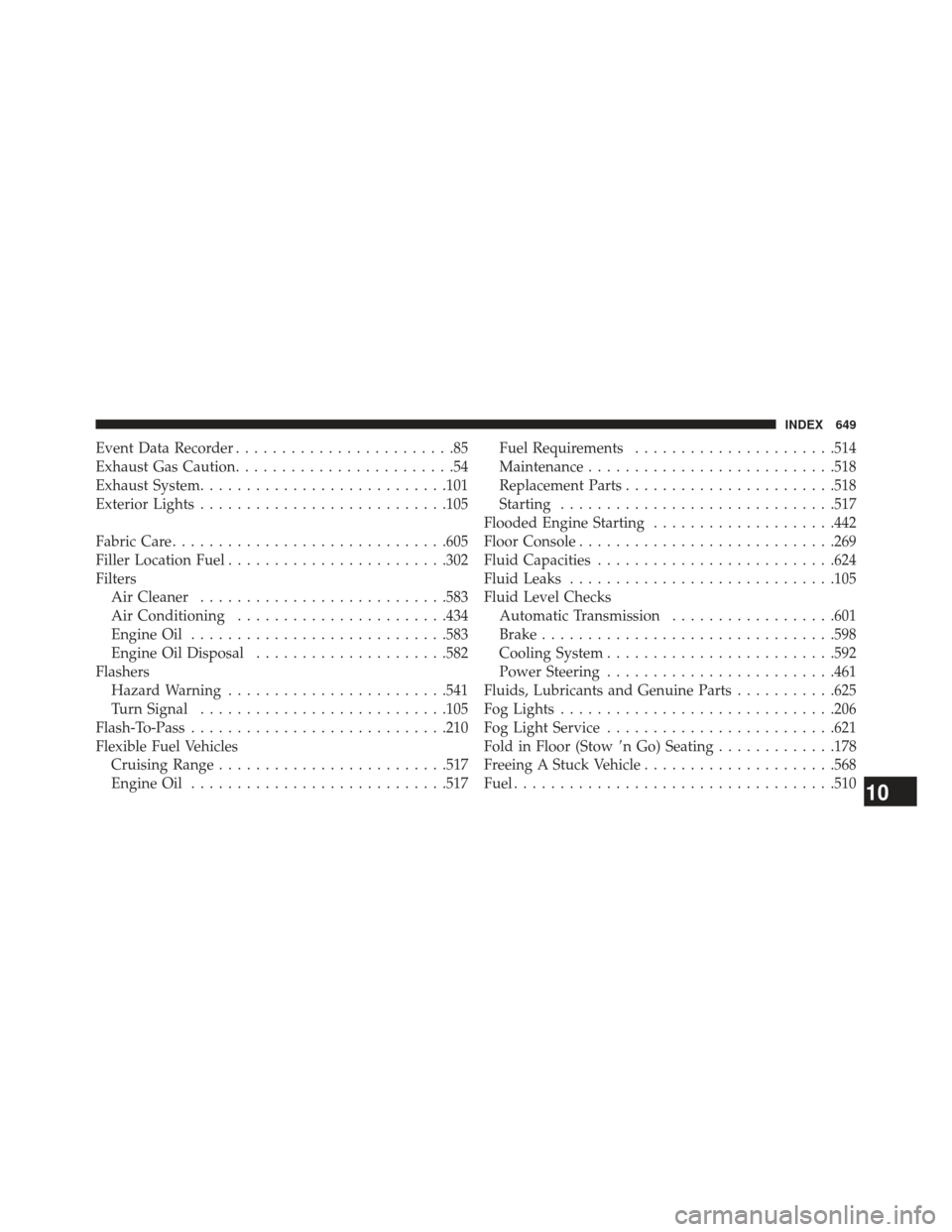
Event Data Recorder........................85
Exhaust Gas Caution ........................54
Exhaust System .......................... .101
Exterior Lights .......................... .105
Fabric Care ............................. .605
Filler Location Fuel ....................... .302
Filters Air Cleaner .......................... .583
Air Conditioning ...................... .434
Engine Oil ........................... .583
Engine Oil Disposal .....................582
Flashers Hazard Warning ....................... .541
Turn Signal .......................... .105
Flash-To-Pass ........................... .210
Flexible Fuel Vehicles Cruising Range ........................ .517
Engine Oil ........................... .517Fuel Requirements
..................... .514
Maintenance .......................... .518
Replacement Parts ...................... .518
Starting ............................. .517
Flooded Engine Starting ....................442
Floor Console ........................... .269
Fluid Capacities ......................... .624
Fluid Leaks ............................ .105
Fluid Level Checks Automatic Transmission ..................601
Brake ............................... .598
Cooling System ........................ .592
Power Steering ........................ .461
Fluids, Lubricants and Genuine Parts ...........625
Fog Lights ............................. .206
Fog Light Service ........................ .621
Fold in Floor (Stow n Go) Seating.............178
Freeing A Stuck Vehicle .....................568
Fuel .................................. .510
10
INDEX 649
Page 653 of 666
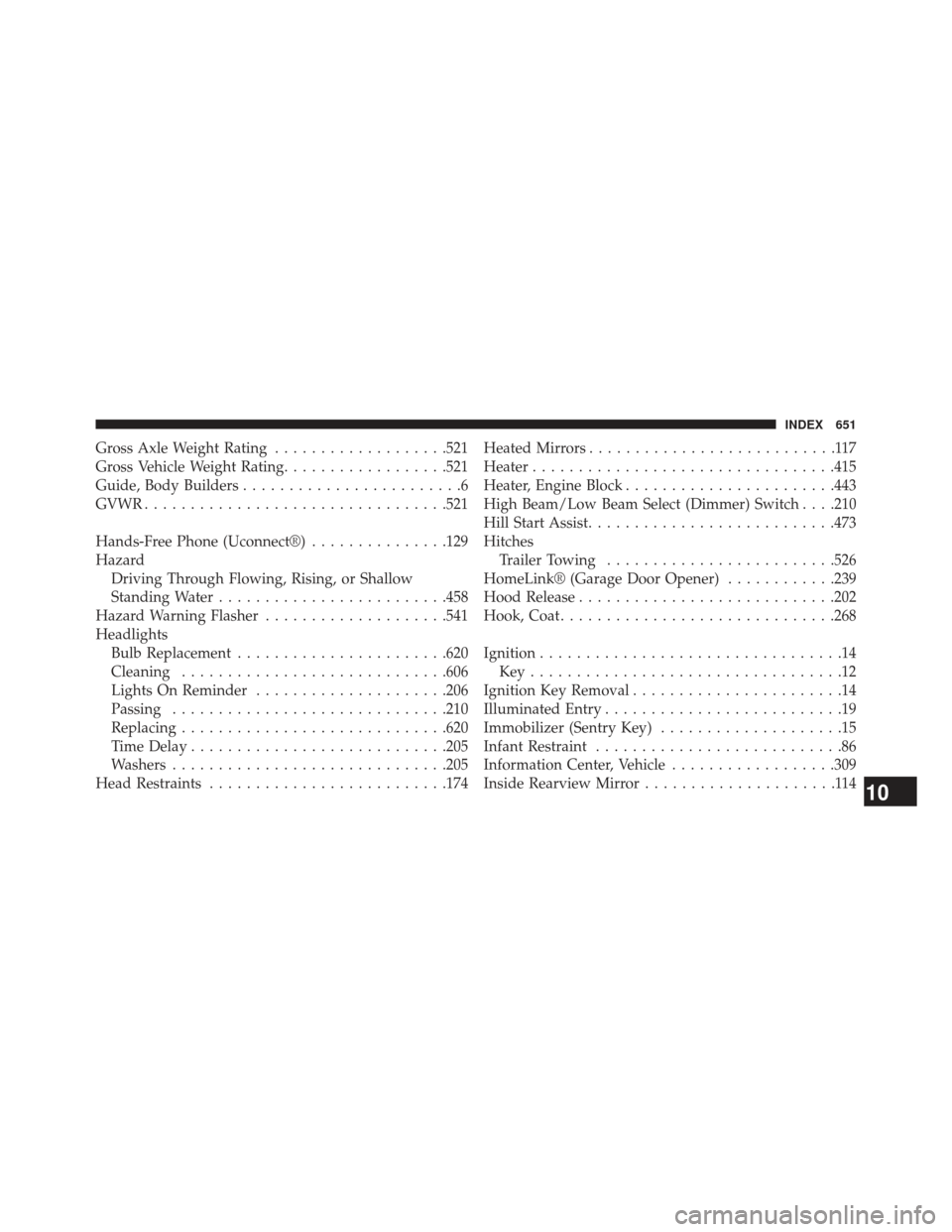
Gross Axle Weight Rating...................521
Gross Vehicle Weight Rating ..................521
Guide, Body Builders ........................6
GVWR ................................ .521
Hands-Free Phone (Uconnect®) ...............129
Hazard Driving Through Flowing, Rising, or Shallow
Standing Water ........................ .458
Hazard Warning Flasher ....................541
Headlights Bulb Replacement ...................... .620
Cleaning ............................ .606
Lights On Reminder .....................206
Passing ............................. .210
Replacing ............................ .620
Time Delay ........................... .205
Washers ............................. .205
Head Restraints ......................... .174Heated Mirrors
...........................117
Heater ................................ .415
Heater, Engine Block ...................... .443
High Beam/Low Beam Select (Dimmer) Switch . . . .210
Hill Start Assist .......................... .473
Hitches Trailer Towing ........................ .526
HomeLink® (Garage Door Opener) ............239
Hood Release ........................... .202
Hook, Coat ............................. .268
Ignition .................................14
Key..................................12
Ignition Key Removal .......................14
Illuminated Entry ..........................19
Immobilizer (Sentry Key) ....................15
Infant Restraint ...........................86
Information Center, Vehicle ..................309
Inside Rearview Mirror .....................114
10
INDEX 651