center console Ram Cargo Van 2015 User Guide
[x] Cancel search | Manufacturer: RAM, Model Year: 2015, Model line: Cargo Van, Model: Ram Cargo Van 2015Pages: 671, PDF Size: 5.05 MB
Page 548 of 671
2. Open the front drawer to expose the storage compart-ment.
3. Remove the liner from the console’s storage compart- ment to access the spare tire winch drive nut.Premium/Base/Cargo Center Console
Pull the Winch Cover assembly plug (if equipped) to
access the winch drive nut.
Drive Nut Access
Winch Cover Assembly Plug (If Equipped)
546 WHAT TO DO IN EMERGENCIES
Page 550 of 671
Spare Tire Removal Instructions
The spare tire is located under the vehicle beneath the
center console area.
1. Assemble the spare tire tools into a T-handle and placethe square end over the spare tire winch drive nut.
Assembling The Spare Tire Hook
1 — Spare Tire Hook/T-handle
2 — Extension 1
3 — Extension 2
Spare Tire And Cover
548 WHAT TO DO IN EMERGENCIES
Page 616 of 671
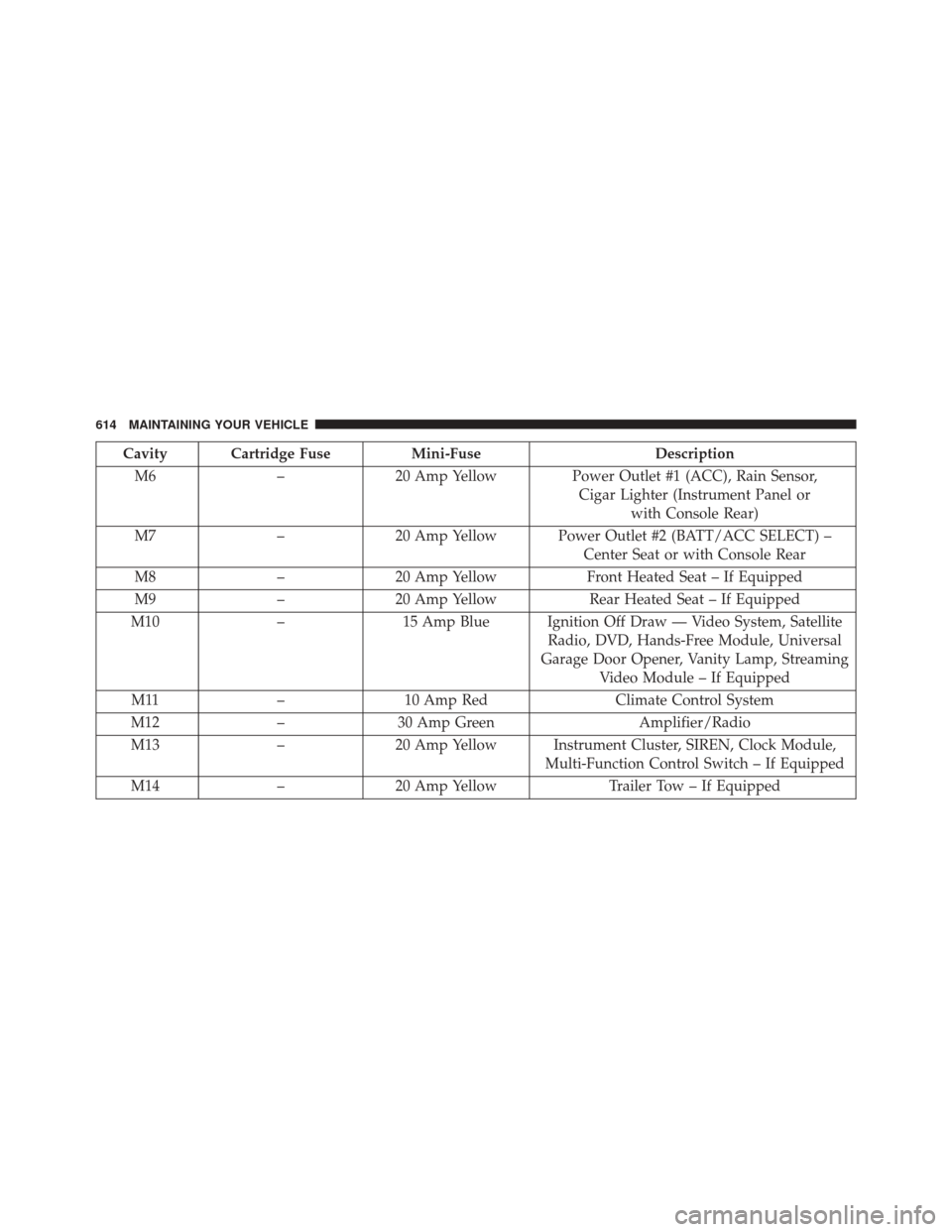
Cavity Cartridge FuseMini-FuseDescription
M6 –20 Amp Yellow Power Outlet #1 (ACC), Rain Sensor,
Cigar Lighter (Instrument Panel or with Console Rear)
M7 –20 Amp Yellow Power Outlet #2 (BATT/ACC SELECT) –
Center Seat or with Console Rear
M8 –20 Amp Yellow Front Heated Seat – If Equipped
M9 –20 Amp Yellow Rear Heated Seat – If Equipped
M10 –15 Amp Blue Ignition Off Draw — Video System, Satellite
Radio, DVD, Hands-Free Module, Universal
Garage Door Opener, Vanity Lamp, Streaming Video Module – If Equipped
M11 –10 Amp Red Climate Control System
M12 –30 Amp Green Amplifier/Radio
M13 –20 Amp Yellow Instrument Cluster, SIREN, Clock Module,
Multi-Function Control Switch – If Equipped
M14 –20 Amp Yellow Trailer Tow – If Equipped
614 MAINTAINING YOUR VEHICLE
Page 619 of 671
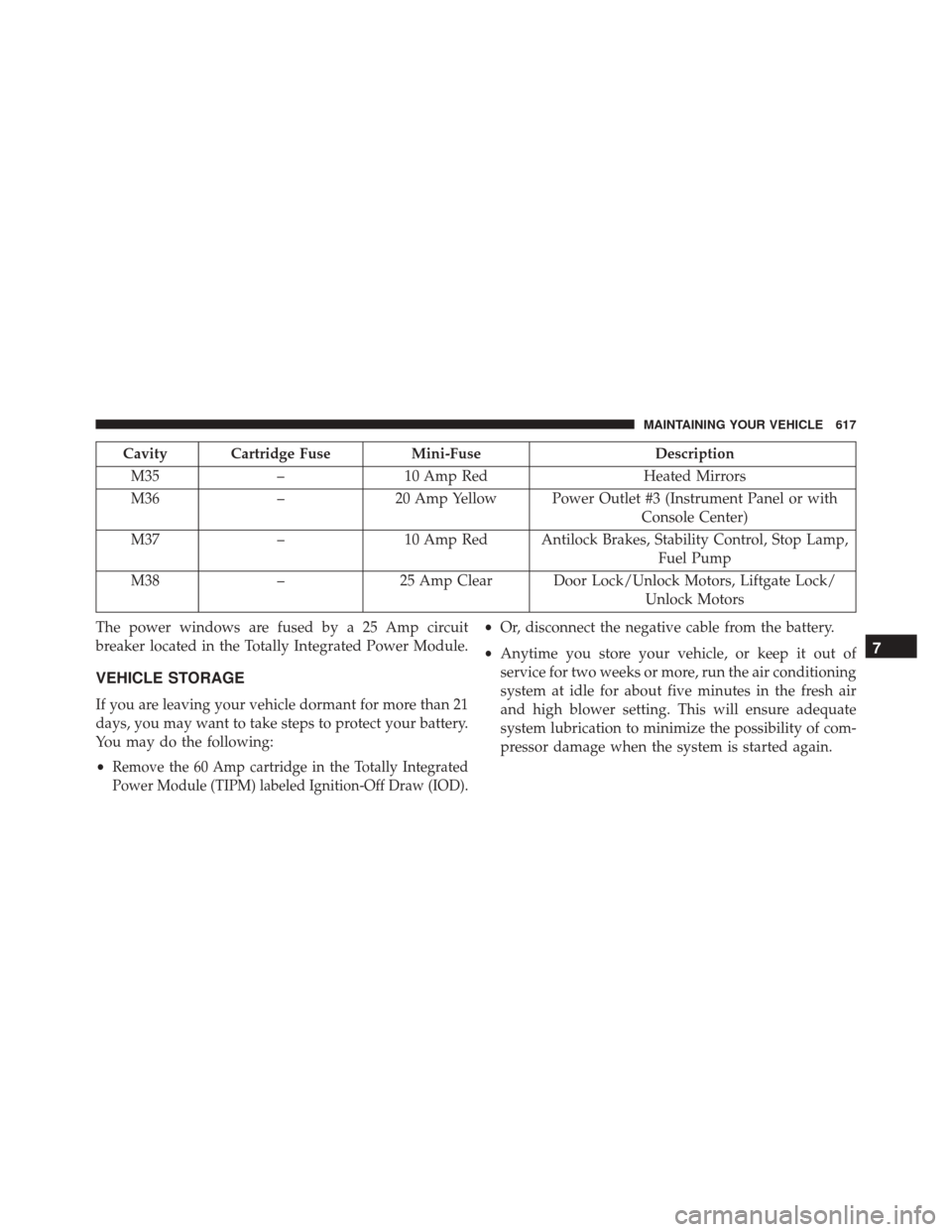
Cavity Cartridge FuseMini-FuseDescription
M35 –10 Amp Red Heated Mirrors
M36 –20 Amp Yellow Power Outlet #3 (Instrument Panel or with
Console Center)
M37 –10 Amp Red Antilock Brakes, Stability Control, Stop Lamp,
Fuel Pump
M38 –25 Amp Clear Door Lock/Unlock Motors, Liftgate Lock/
Unlock Motors
The power windows are fused by a 25 Amp circuit
breaker located in the Totally Integrated Power Module.
VEHICLE STORAGE
If you are leaving your vehicle dormant for more than 21
days, you may want to take steps to protect your battery.
You may do the following:
•
Remove the 60 Amp cartridge in the Totally Integrated
Power Module (TIPM) labeled Ignition-Off Draw (IOD).
• Or, disconnect the negative cable from the battery.
• Anytime you store your vehicle, or keep it out of
service for two weeks or more, run the air conditioning
system at idle for about five minutes in the fresh air
and high blower setting. This will ensure adequate
system lubrication to minimize the possibility of com-
pressor damage when the system is started again.
7
MAINTAINING YOUR VEHICLE 617
Page 620 of 671
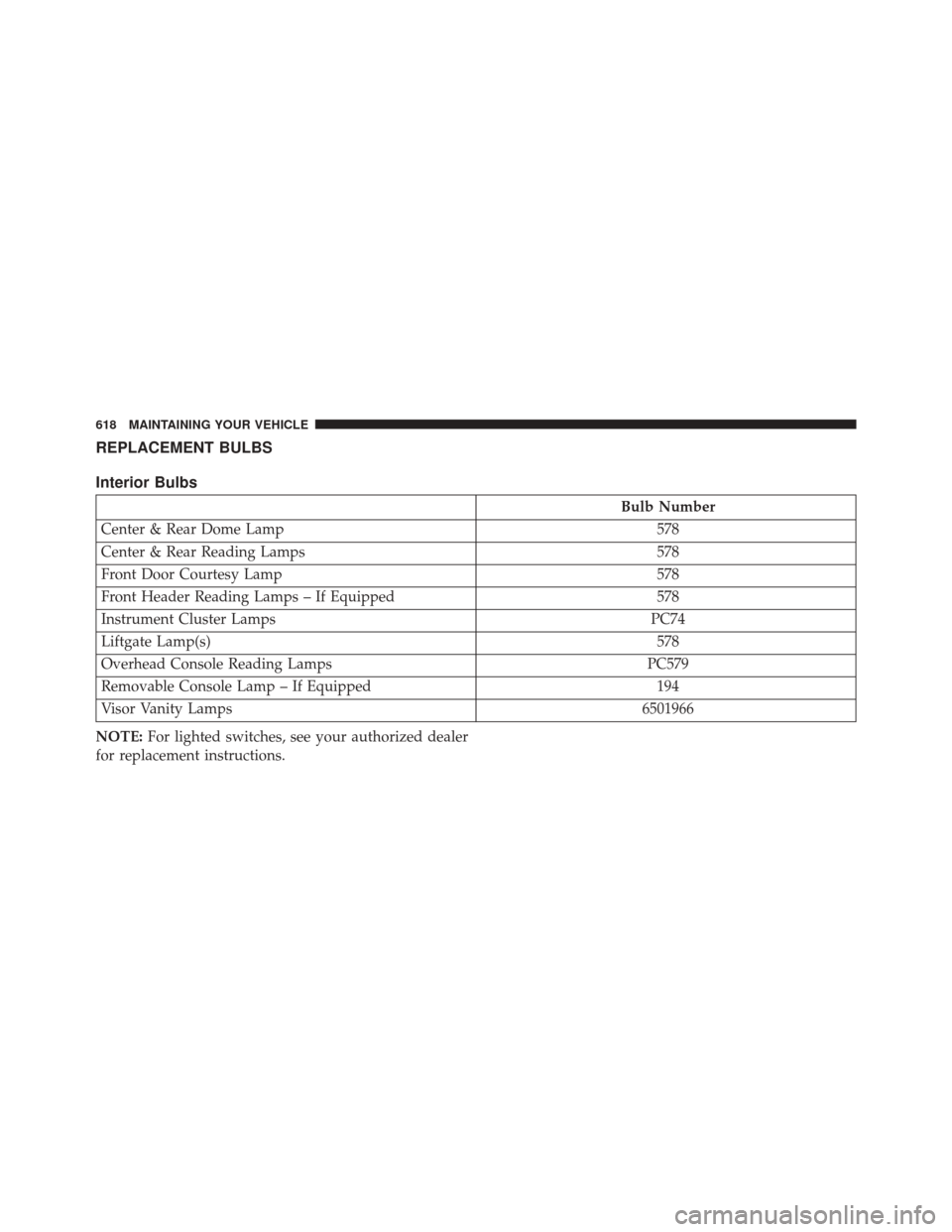
REPLACEMENT BULBS
Interior Bulbs
Bulb Number
Center & Rear Dome Lamp 578
Center & Rear Reading Lamps 578
Front Door Courtesy Lamp 578
Front Header Reading Lamps – If Equipped 578
Instrument Cluster Lamps PC74
Liftgate Lamp(s) 578
Overhead Console Reading Lamps PC579
Removable Console Lamp – If Equipped 194
Visor Vanity Lamps 6501966
NOTE: For lighted switches, see your authorized dealer
for replacement instructions.
618 MAINTAINING YOUR VEHICLE
Page 661 of 671
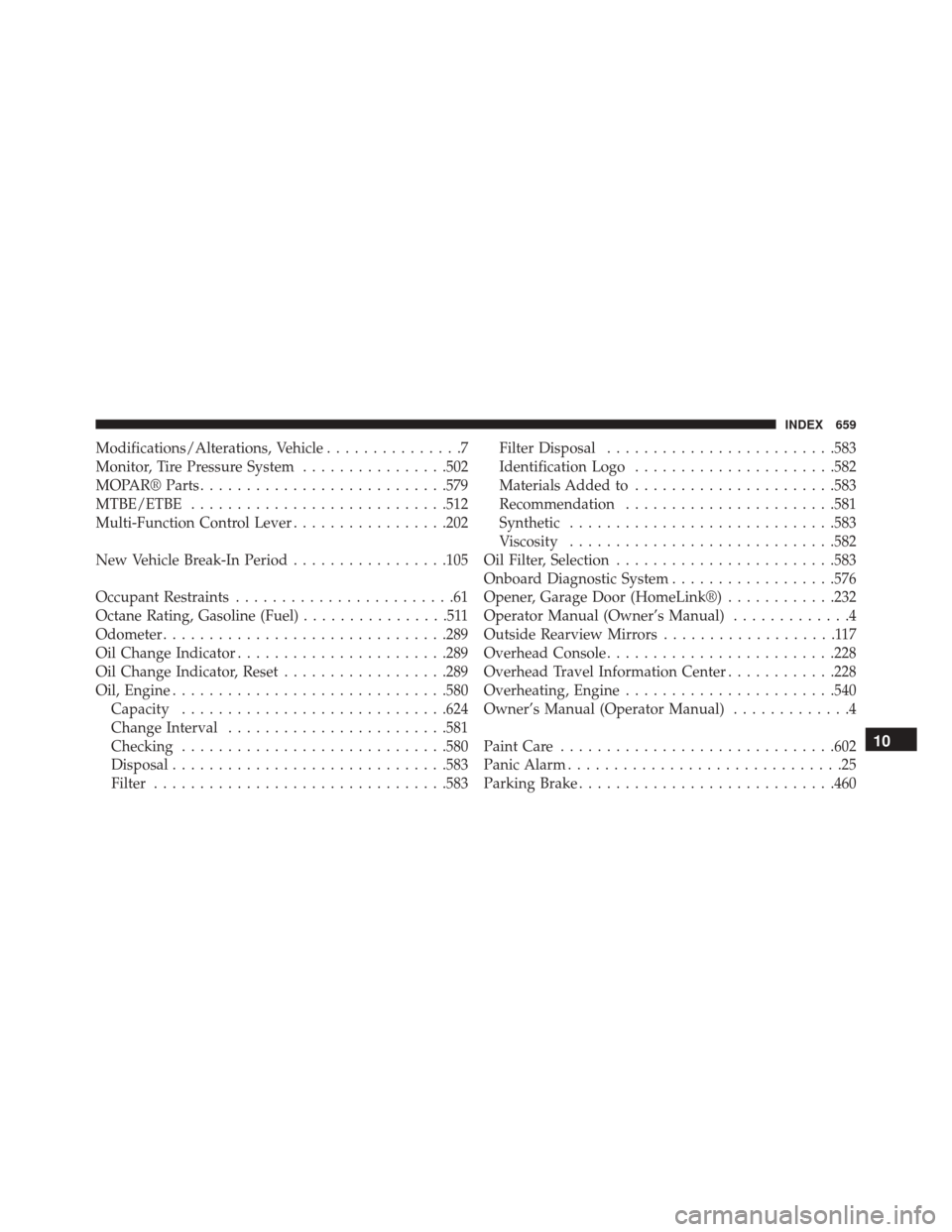
Modifications/Alterations, Vehicle...............7
Monitor, Tire Pressure System ................502
MOPAR® Parts .......................... .579
MTBE/ETBE ........................... .512
Multi-Function Control Lever .................202
New Vehicle Break-In Period .................105
Occupant Restraints ........................61
Octane Rating, Gasoline (Fuel) ................511
Odometer .............................. .289
Oil Change Indicator ...................... .289
Oil Change Indicator, Reset ..................289
Oil, Engine ............................. .580
Capacity ............................ .624
Change Interval ....................... .581
Checking ............................ .580
Disposal ............................. .583
Filter ............................... .583Filter Disposal
........................ .583
Identification Logo ..................... .582
Materials Added to ..................... .583
Recommendation ...................... .581
Synthetic ............................ .583
Viscosity ............................ .582
Oil Filter, Selection ....................... .583
Onboard Diagnostic System ..................576
Opener, Garage Door (HomeLink®) ............232
Operator Manual (Owner’s Manual) .............4
Outside Rearview Mirrors ...................117
Overhead Console ........................ .228
Overhead Travel Information Center ............228
Overheating, Engine ...................... .540
Owner’s Manual (Operator Manual) .............4
Paint Care ............................. .602
Panic Alarm ..............................25
Parking Brake ........................... .460
10
INDEX 659