door lock RAM CHASSIS CAB 2011 User Guide
[x] Cancel search | Manufacturer: RAM, Model Year: 2011, Model line: CHASSIS CAB, Model: RAM CHASSIS CAB 2011Pages: 472, PDF Size: 7.38 MB
Page 24 of 472

Sound Horn with Remote Key Lock
This feature will cause the horn to chirp when the doors
are locked with the RKE transmitter. This feature can be
turned on or turned off. To change the current setting,
proceed as follows:
• For vehicles equipped with the EVIC, refer to “Electronic
Vehicle Information Center (EVIC)/Customer-Program-
mable Features (System Setup)” in “Understanding Your
Instrument Panel” for further information.
• For vehicles not equipped with the EVIC, perform the
following procedure:
1. Press the LOCK button on a programmed RKE trans-
mitter for at least four seconds, but no longer than ten
seconds. Then, press the PANIC button while still hold-
ing the LOCK button.
2. Release both buttons at the same time. 3. Test the feature while outside of the vehicle by press-
ing the LOCK button on the RKE transmitter with the
ignition switch in the OFF position and the key removed.
4. Repeat these steps if you want to return this feature to
its previous setting.
NOTE: Pressing the LOCK button on the RKE transmit-
ter while you are in the vehicle will activate the Vehicle
Security Alarm System. Opening a door with the Vehicle
Security Alarm System activated will cause the alarm to
sound. Press the UNLOCK button to deactivate the
Vehicle Security Alarm System.
Remote Open Window Feature — If Equipped
This feature allows you to remotely lower both front door
windows at the same time. To use this feature, press and
release the UNLOCK button on the RKE transmitter and
then immediately press and hold the UNLOCK button
until the windows lower to the level desired or until they
lower completely. 2 THINGS TO KNOW BEFORE STARTING YOUR VEHICLE 23
Page 27 of 472

REMOTE STARTING SYSTEM — IF EQUIPPED
This system uses the Remote Keyless Entry
(RKE) transmitter to start the engine conve-
niently from outside the vehicle while still
maintaining security. The system has a range of
approximately 300 ft (91 m).
NOTE: The vehicle must be equipped with an auto-
matic transmission to be equipped with Remote Start.
How To Use Remote Start
All of the following conditions must be met before the
engine will remote start:
• Shift lever in PARK
• Doors closed
• Hood closed
• HAZARD switch off
• BRAKE switch inactive (brake pedal not pressed) • Ignition key removed from ignition switch
• Battery at an acceptable charge level
• RKE PANIC button not pressed
• Fuel meets minimum requirement
WARNING!• Do not start or run an engine in a closed garage or
confined area. Exhaust gas contains Carbon Mon-
oxide (CO) which is odorless and colorless. Car-
bon Monoxide is poisonous and can cause serious
injury or death when inhaled.
• Keep Remote Keyless Entry (RKE) transmitters
away from children. Operation of the Remote Start
System, windows, door locks or other controls
could cause serious injury or death.26 THINGS TO KNOW BEFORE STARTING YOUR VEHICLE
Page 29 of 472

NOTE: To avoid unintentional shut downs, the system
will disable the one time press of the REMOTE START
button for two seconds after receiving a valid Remote
Start request.
To Exit Remote Start Mode and Drive the Vehicle
Before the end of the 15-minute cycle, press and release
the UNLOCK button on the RKE transmitter to unlock
the doors and disarm the Vehicle Security Alarm System
(if equipped). Insert the Key Fob into the ignition switch
and turn the switch to the ON/RUN position.
NOTE:
• The ignition switch must be in the ON/RUN position
in order to drive the vehicle.
• For vehicles equipped with the Electronic Vehicle
Information Center (EVIC), the message “Insert Key/
Turn To On” will flash in the EVIC until you insert the
Key Fob into the ignition swich. Once inserted, the message “Turn To On” will flash in the EVIC until you
turn the ignition switch to the ON/RUN position.
Remote Start Comfort Systems — If Equipped
When remote start is activated, the heated steering
wheel, and driver heated seat features will automatically
turn on in cold weather. In warm weather, the driver
vented seat feature will automatically turn on when the
remote start is activated. These features will stay on
through the duration of remote start or until the ignition
switch is turned to the ON/RUN position.
The Remote Start Comfort System can be activated and
deactivated through the Electronic Vehicle Information
Center (EVIC). For more information on Remote Start
Comfort System operation refer to “Electronic Vehicle
Information Center (EVIC)/Customer-Programmable
Features (System Setup)” in “Understanding Your Instru-
ment Panel”.28 THINGS TO KNOW BEFORE STARTING YOUR VEHICLE
Page 30 of 472

DOOR LOCKS
Manual Door Locks
Front and rear doors may be locked by moving the lock
knob down or unlocked by moving the lock knob up.
Front doors may be opened with the inside door handle
without lifting the lock knob.
Doors locked before closing will remain locked when
closed.
The emergency key will unlock the driver door lock on
your vehicle. WARNING!• For personal security and safety in the event of an
accident, lock the vehicle doors when you drive as
well as when you park and leave the vehicle.
• Never leave children alone in a vehicle. Leaving
unattended children in a vehicle is dangerous for a
number of reasons. A child or others could be
seriously or fatally injured. Don’t leave the key in
the ignition. A child could operate power win-
dows, other controls, or move the vehicle.
2 THINGS TO KNOW BEFORE STARTING YOUR VEHICLE 29
Page 31 of 472

Power Door Locks — If Equipped
A power door LOCK switch is on each front door trim
panel. Use this switch to lock or unlock the doors.
If you press the power door LOCK switch while the Key
Fob is in the ignition, and any front door is open, the power locks will not operate. This prevents you from
accidentally locking your Key Fob in the vehicle. Remov-
ing the Key Fob or closing the door will allow the locks to
operate. A chime will sound if the Key Fob is in the
ignition switch and a door is open, as a reminder to
remove the Key Fob.
Auto Lock Doors — If Equipped
If this feature is enabled, your door locks will lock
automatically when the vehicle’s speed exceeds 15 mph
(24 km/h).
Auto Lock Doors Programming
The Auto Lock Doors feature can be enabled or disabled
as follows:
• For vehicles equipped with the EVIC, refer to “Elec-
tronic Vehicle Information Center (EVIC)/Personal
Settings (System Setup)” in “Understanding Your In-
strument Panel” for further information.Power Door Lock Switch Location1 - Unlock 2 - Lock30 THINGS TO KNOW BEFORE STARTING YOUR VEHICLE
Page 32 of 472

• For vehicles not equipped with the EVIC, perform the
following procedure:
1. Enter your vehicle and close all doors.
2. Fasten your seat belt. (Fastening the seat belt will
cancel any chiming that may confuse you during this
programming procedure.)
3. Place the Key Fob into the ignition.
4. Within 15 seconds cycle the Key Fob from the OFF
position to the ON/RUN position a minimum of four
times, ending in the OFF position. (Do not start the
engine) .
5. Within 30 seconds, press the driver’s door LOCK
switch.
6. A single chime will be heard to indicate the feature has
been disabled.
7. To reactivate this feature, repeat the above steps. 8. If a chime is not heard, program mode was canceled
before the feature could be disabled. If necessary, repeat
the above procedure.
Auto Unlock Doors — If Equipped
This feature unlocks all of the doors of the vehicle when
either front door is opened. This will occur only after the
vehicle has been shifted into the PARK position after the
vehicle has been driven (shifted out of PARK and all
doors closed).
Auto Unlock Doors Programming — If Equipped
The Auto Unlock Doors feature can be enabled or dis-
abled as follows:
• For vehicles equipped with the EVIC, refer to “Elec-
tronic Vehicle Information Center (EVIC)/Personal
Settings (System Setup)” in “Understanding Your In-
strument Panel” for further information. 2 THINGS TO KNOW BEFORE STARTING YOUR VEHICLE 31
Page 33 of 472

• For vehicles not equipped with the EVIC, perform the
following procedure:
1. Enter your vehicle and close all doors.
2. Fasten your seat belt. (Fastening the seat belt will
cancel any chimes that may be confusing during this
programming procedure.)
3. Insert the Key Fob into the ignition.
4. Within 15 seconds, cycle the Key Fob from the OFF
position to the ON/RUN position a minimum of four
times, ending in the OFF position. (Do not start the
engine) .
5. Within 30 seconds, press the driver’s door UNLOCK
switch.
6. A single chime will sound to indicate the feature has
been changed.
7. Repeat the above steps to alternate the availability of
this feature. 8. If a chime is not heard, the program mode was
canceled before the feature could be changed. If neces-
sary, repeat the above procedure.
Child-Protection Door Lock
To provide a safer environment for children riding in the
rear seat, the rear doors (if equipped) of your vehicle
have the Child-Protection Door Lock system.
Child-Protection Door Lock Location32 THINGS TO KNOW BEFORE STARTING YOUR VEHICLE
Page 34 of 472

To use the system, open each rear door, use a flat blade
screwdriver (or emergency key) and rotate the dial to
engage and disengage the Child-Protection locks. When
the system on a door is engaged, that door can only be
opened by using the outside door handle even if the
inside door lock is in the unlocked position. WARNING!Avoid trapping anyone in a vehicle in a collision.
Remember that the rear doors can only be opened
from the outside when the Child-Protection locks are
engaged.
NOTE:
• After setting the Child-Protection Door Lock system,
always test the door from the inside to make certain it
is in the desired position.
• For emergency exit with the system engaged, move
the door lock switch to the UNLOCK position, roll
down the window and open the door with the outside
door handle.
Child Lock Control 2 THINGS TO KNOW BEFORE STARTING YOUR VEHICLE 33
Page 37 of 472
rough road conditions may trigger the auto reverse
function unexpectedly during auto closure. If this
happens, pull the switch lightly to the first detent and
hold to close the window manually.
• If the Auto-Up function is lost, reset the Auto-Up
function by running the window all the way up (by
holding the switch in the first up detent) and then hold
the switch in the full up position for two seconds.
WARNING!There is no anti-pinch protection when the window
is almost closed. Be sure to clear all objects from the
window before closing.
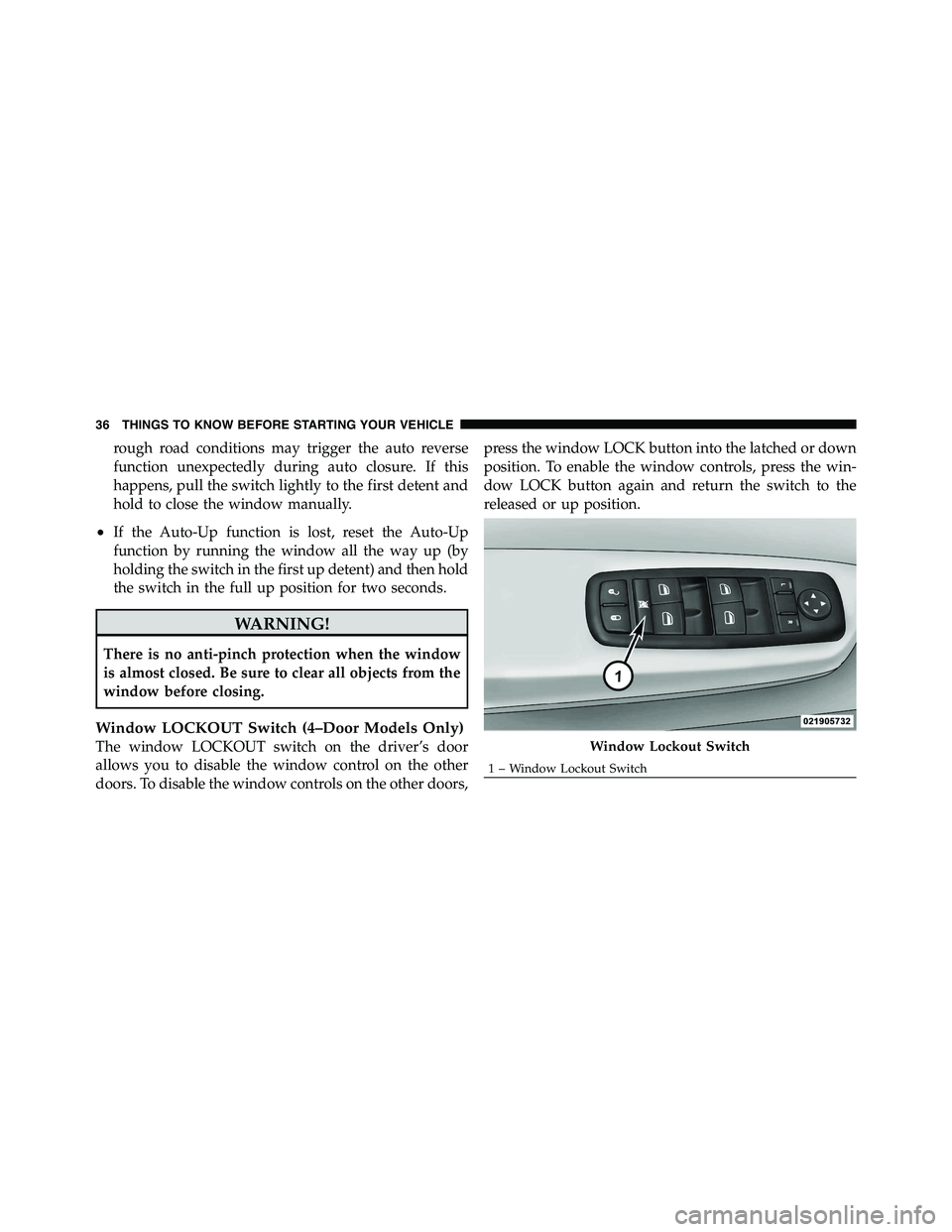
Window LOCKOUT Switch (4–Door Models Only)
The window LOCKOUT switch on the driver’s door
allows you to disable the window control on the other
doors. To disable the window controls on the other doors, press the window LOCK button into the latched or down
position. To enable the window controls, press the win-
dow LOCK button again and return the switch to the
released or up position.
Window Lockout Switch1 – Window Lockout Switch36 THINGS TO KNOW BEFORE STARTING YOUR VEHICLE
Page 57 of 472
instrument panel separate and fold out of the way as the
airbags inflate to their full size. The airbags fully inflate in
about 50 to 70 milliseconds. This is about half of the time
it takes to blink your eyes. The airbags then quickly
deflate while helping to restrain the driver and front
passenger.
The Advanced Front Airbag gas is vented through the
vent holes in the sides of the airbag. In this way, the
airbags do not interfere with your control of the vehicle.
Enhanced Accident Response System
In the event of an impact causing airbag deployment, if
the communication network remains intact, and the
power remains intact, depending on the nature of the
event the ORC will determine whether to have the
Enhanced Accident Response System perform the follow-
ing functions:
• Cut off fuel to the engine. • Flash hazard lights as long as the battery has power or
until the ignition key is turned off.
• Turn on the interior lights, which remain on as long as
the battery has power or until the ignition key is
removed.
• Unlock the doors automatically.
If a Deployment Occurs
The front airbags are designed to deflate immediately
after deployment.
NOTE: Front airbags will not deploy in all collisions.
This does not mean something is wrong with the airbag
system.56 THINGS TO KNOW BEFORE STARTING YOUR VEHICLE