brake light RAM CHASSIS CAB 2011 Owner's Manual
[x] Cancel search | Manufacturer: RAM, Model Year: 2011, Model line: CHASSIS CAB, Model: RAM CHASSIS CAB 2011Pages: 472, PDF Size: 7.38 MB
Page 337 of 472
lever is activated while the brake is also applied, the
greater of the two inputs determines the power sent to
the trailer brakes.
The trailer and the vehicle’s brake lamps will come on
when either vehicle braking or manual trailer brakes are
applied.
Trailer Brake Status Indicator Light
This light indicates the trailer electrical connection status.
If no electrical connection is detected after the ignition is
turned on, pressing the GAIN adjustment button or
sliding the manual brake control lever will display the
GAIN setting for 10 seconds and the “Trailer Brake Status
Indicator Light” will not be displayed.
If a fault is detected in the trailer wiring or the Integrated
Trailer Brake Module (ITBM), the “Trailer Brake Status
Indicator Light” will flash. GAIN Adjustment Buttons (+/-)
Pressing these buttons will adjust the brake control
power output to the trailer brakes in 0.5 increments. The
GAIN setting can be increased to a maximum of 10 or
decreased to a minimum of 0 (no trailer braking).
GAIN
The GAIN setting is used to set the trailer brake control
for the specific towing condition and should be changed
as towing conditions change. Changes to towing condi-
tions include trailer load, vehicle load, road conditions
and weather.
Adjusting GAIN
NOTE: This should only be performed in a traffic free
environment at speeds of approximately 20–25 mph
(30–40 km/h).336 STARTING AND OPERATING
Page 339 of 472
CAUTION!The ITBM module has been designed and verified
for electric trailer brakes. Connecting a trailer that is
not compatible with the ITBM system may result in
reduced or complete loss of trailer braking. There
may be a increase in stopping distance or trailer
instability which could result in damage to your
vehicle, trailer, or other property.
WARNING!The ITBM module has been designed and verified
for electric trailer brakes. Connecting a trailer that is
not compatible with the ITBM system may result in
reduced or complete loss of trailer braking. There
may be a increase in stopping distance or trailer
instability which could result in personal injury. NOTE:
• An aftermarket controller may be available for use
with trailers with air or electric-over-hydraulic trailer
brake systems. To determine the type of brakes on
your trailer and the availability of controllers, check
with your trailer manufacturer or dealer.
• Removal of the ITBM will cause errors and it may
cause damage to the electrical system and electronic
modules of the vehicle. See your authorized dealer if
an aftermarket module is to be installed.
Towing Requirements – Trailer Lights and Wiring
Whenever you pull a trailer, regardless of the trailer size,
stop lights and turn signals on the trailer are required for
motoring safety.
NOTE: Do not cut or splice wiring into the vehicle’s
wiring harness.338 STARTING AND OPERATING
Page 351 of 472
1. Bring the vehicle to a complete stop. Shift automatic
transmission into PARK.
2. Turn OFF the engine.
3. Turn the ignition switch to the ON/RUN position, but
do not start the engine.
4. Press and hold the brake pedal.
5. Shift the automatic transmission into NEUTRAL or
press the clutch pedal on a manual transmission.
6. Press and hold the transfer case NEUTRAL button
(located by the selector switch). The NEUTRAL indicator
light will blink while the shift is in progress. The light
will stop blinking (stay on solid) when the shift to
NEUTRAL is complete. 7. After the shift is completed and the NEUTRAL light
stays on, release the NEUTRAL button.
8. Start the engine.
9. Shift the transmission into REVERSE.
10. Release the brake pedal (and clutch pedal on manual
transmissions) for five seconds and ensure that there is
no vehicle movement.
11. Repeat steps 9 and 10 with automatic transmission in
DRIVE or manual transmission in first gear.
12. Turn OFF the engine.
13. Firmly apply the parking brake.
14. Shift the transmission into PARK or place manual
transmission in gear (not in Neutral).350 STARTING AND OPERATING
Page 352 of 472
CAUTION!Damage to the transmission may occur if the trans-
mission is shifted into PARK with the transfer case in
NEUTRAL and the engine running. With the transfer
case in NEUTRAL, ensure that the engine is OFF
prior to shifting the transmission into PARK.
15. Remove the key fob from the ignition switch.
16. Attach the vehicle to the tow vehicle using a suitable
tow bar.
17. Release the parking brake.
NOTE:
• The transfer case cannot be shifted into NEUTRAL
from the 4WD AUTO (if equipped) position. • Steps 1 through 5 are requirements that must be met
prior to pressing the NEUTRAL button, and must
continue to be met until the shift has been completed.
If any of these requirements are not met prior to
pressing the NEUTRAL button or are no longer met
during the shift, the NEUTRAL indicator light will
flash continuously until all requirements are met or
until the NEUTRAL button is released.
• The ignition switch must be in the ON/RUN position
for a shift to take place and for the position indicator
lights to be operable. If the ignition switch is not in the
ON/RUN position, the shift will not take place and no
position indicator lights will be on or flashing.
• A flashing NEUTRAL indicator light indicates that
shift requirements have not been met.
5 STARTING AND OPERATING 351
Page 353 of 472
Shifting Out of Neutral – Electronic Shift Transfer
Case (If Equipped)
Use the following procedure to prepare your vehicle for
normal usage:
1. Bring the vehicle to a complete stop, leaving it con-
nected to the tow vehicle.
2. Firmly apply the parking brake.
3. Insert the key fob into the ignition switch and turn it to
the ON/RUN position, but do not start the engine.
4. Press and hold the brake pedal.
5. Shift the transmission into NEUTRAL.
6. Press and hold the transfer case NEUTRAL button
(located by the selector switch) until the NEUTRAL
indicator light turns off.
7. After the NEUTRAL indicator light turns off, release
the NEUTRAL button. 8. After the NEUTRAL button has been released, the
transfer case will shift to the position identified by the
selector switch.
NOTE: When shifting out of transfer case NEUTRAL,
turning the engine OFF may be required to avoid gear
clash.
9. Shift the automatic transmission into PARK, or place
manual transmission in Neutral.
10. Release the brake pedal.
11. Disconnect vehicle from the tow vehicle.
12. Start the engine.
13. Press and hold the brake pedal.
14. Release the parking brake.352 STARTING AND OPERATING
Page 354 of 472
15. Shift the transmission into gear, release the brake
pedal (and clutch pedal on manual transmissions), and
check that the vehicle operates normally.
NOTE:
• Steps 1 through 5 are requirements that must be met
prior to pressing the transfer case NEUTRAL button
and must continue to be met until the shift has been
completed. If any of these requirements are not met
prior to pressing the NEUTRAL button, or are no
longer met during the shift, the NEUTRAL indicator
light will flash continuously until all requirements are
met or until the NEUTRAL button is released. • The ignition switch must be in the ON/RUN position
for a transfer case shift to take place and for the
position indicator lights to be operable. If the ignition
switch is not in the ON/RUN position, the shift will
not take place and no position indicator lights will be
on or flashing.
• A flashing NEUTRAL position indicator light indicates
that shift requirements have not been met.
5 STARTING AND OPERATING 353
Page 405 of 472
room temperature, it should be between the “HOT”
(upper) reference holes when the transmission reaches
180°F (82°C). Remember it is best to check the level at the
normal operating temperature.
CAUTION!Be aware that if the fluid temperature is below 50°F
(10°C) it may not register on the dipstick. Do not add
fluid until the temperature is elevated enough to
produce an accurate reading.
7. Check for leaks. Release parking brake.
To prevent dirt and water from entering the transmission
after checking or replenishing fluid, make certain that the
dipstick cap is properly reseated. It is normal for the
dipstick cap to spring back slightly from its fully seated
position, as long as its seal remains engaged in the
dipstick tube. Automatic Transmission Fluid and Filter Change
Refer to “Maintenance Schedule” for the proper mainte-
nance intervals.
NOTE: If the transmission is disassembled for any
reason, the fluid and filter(s) should be changed.
It is important that proper lubricant is used in the trans-
mission. Refer to “Fluids, Lubricants, and Genuine Parts”
in “Maintaining Your Vehicle” for further information.
Special Additives
Automatic Transmission Fluid (ATF) is an engineered
product and its performance may be impaired by supple-
mental additives. Therefore, do not add any fluid addi-
tives to the transmission. The only exception to this
policy is the use of special dyes to aid in detecting fluid
leaks. In addition, avoid using transmission sealers as
they may adversely affect seals.404 MAINTAINING YOUR VEHICLE
Page 412 of 472
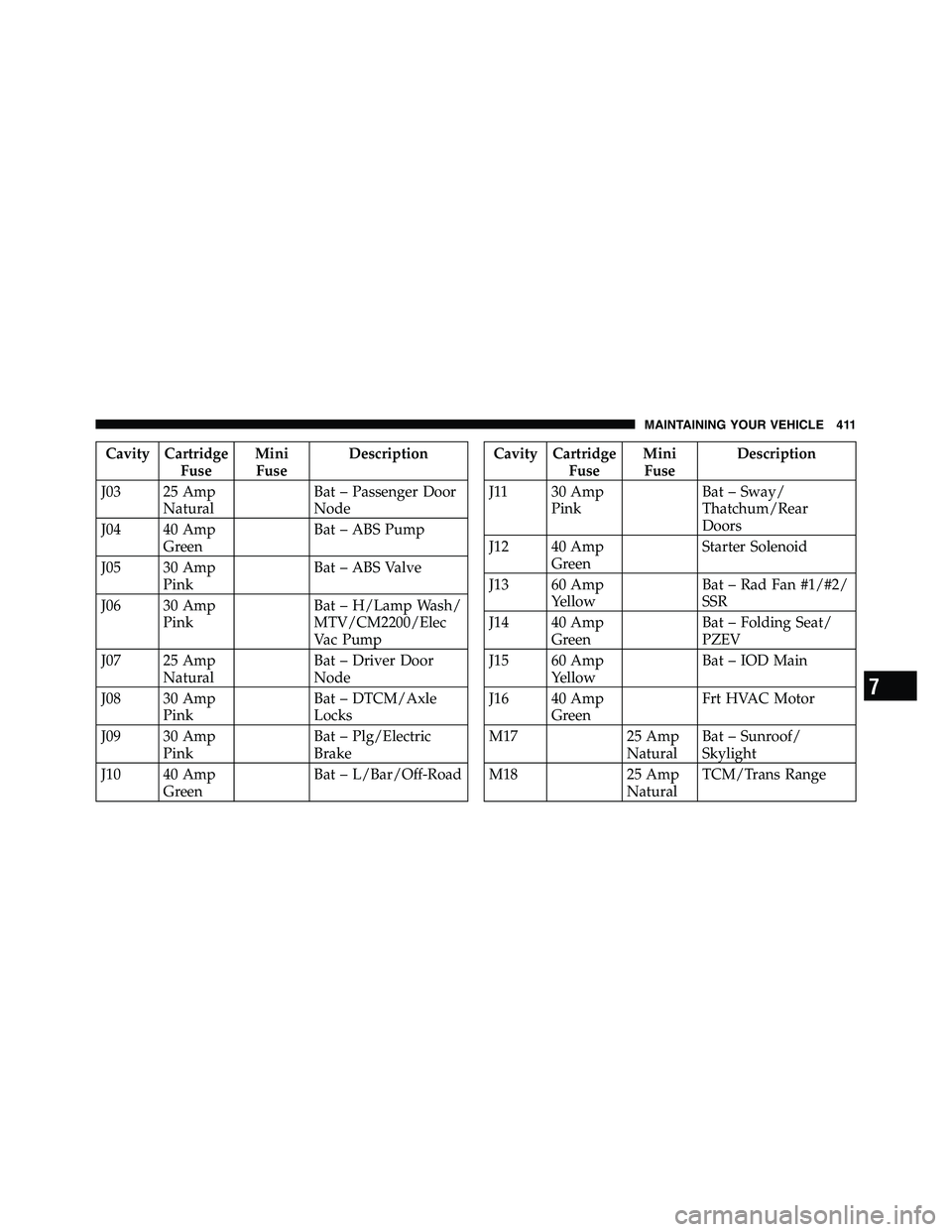
Cavity Cartridge
Fuse Mini
Fuse Description
J03 25 Amp
Natural Bat – Passenger Door
Node
J04 40 Amp
Green Bat – ABS Pump
J05 30 Amp
Pink Bat – ABS Valve
J06 30 Amp
Pink Bat – H/Lamp Wash/
MTV/CM2200/Elec
Vac Pump
J07 25 Amp
Natural Bat – Driver Door
Node
J08 30 Amp
Pink Bat – DTCM/Axle
Locks
J09 30 Amp
Pink Bat – Plg/Electric
Brake
J10 40 Amp
Green Bat – L/Bar/Off-Road Cavity Cartridge
Fuse Mini
Fuse Description
J11 30 Amp
Pink Bat – Sway/
Thatchum/Rear
Doors
J12 40 Amp
Green Starter Solenoid
J13 60 Amp
Yellow Bat – Rad Fan #1/#2/
SSR
J14 40 Amp
Green Bat – Folding Seat/
PZEV
J15 60 Amp
Yellow Bat – IOD Main
J16 40 Amp
Green Frt HVAC Motor
M17 25 Amp
Natural Bat – Sunroof/
Skylight
M18 25 Amp
Natural TCM/Trans Range
7 MAINTAINING YOUR VEHICLE 411
Page 413 of 472
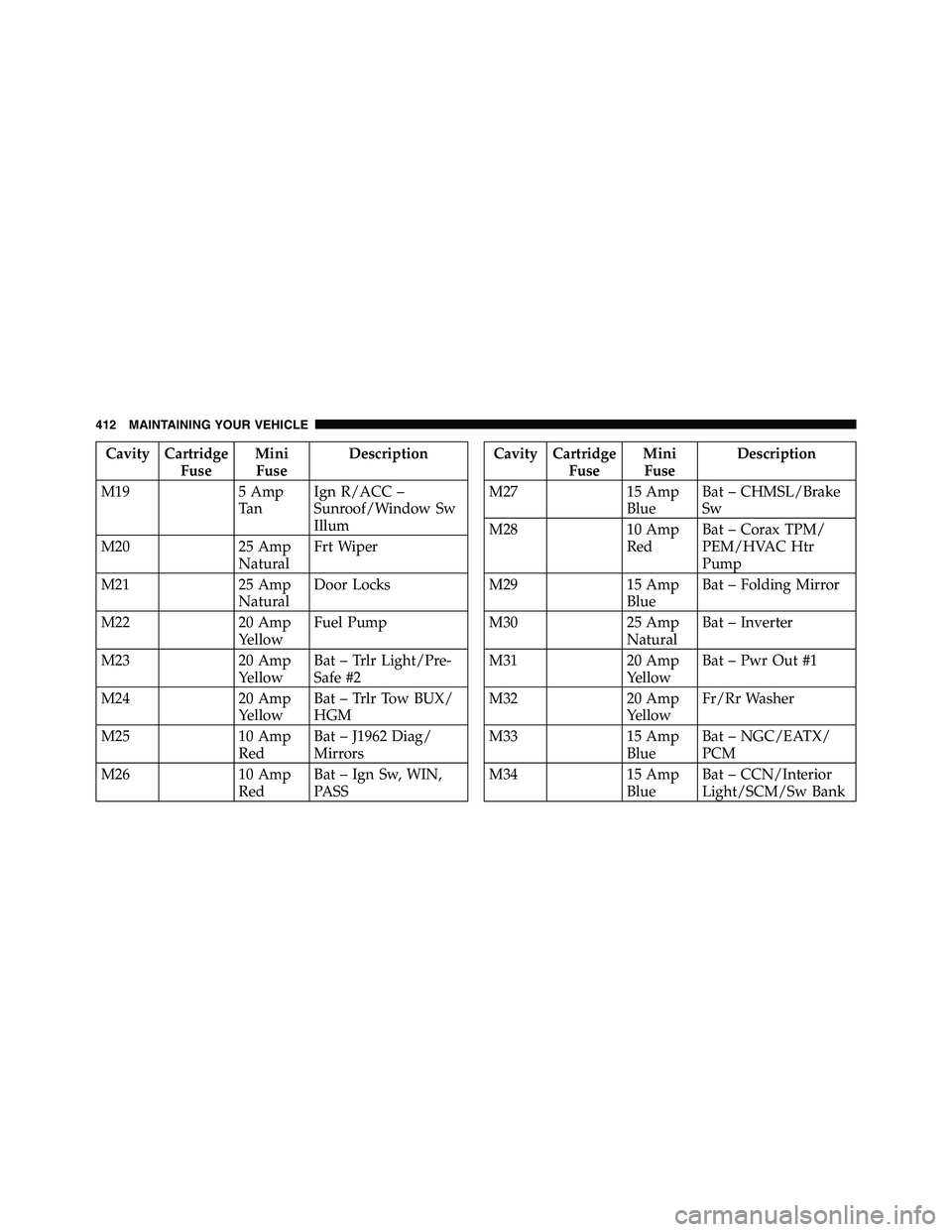
Cavity Cartridge
Fuse Mini
Fuse Description
M19 5 Amp
Ta n Ign R/ACC –
Sunroof/Window Sw
Illum
M20 25 Amp
Natural Frt Wiper
M21 25 Amp
Natural Door Locks
M22 20 Amp
Yellow Fuel Pump
M23 20 Amp
Yellow Bat – Trlr Light/Pre-
Safe #2
M24 20 Amp
Yellow Bat – Trlr Tow BUX/
HGM
M25 10 Amp
Red Bat – J1962 Diag/
Mirrors
M26 10 Amp
Red Bat – Ign Sw, WIN,
PASS Cavity Cartridge
Fuse Mini
Fuse Description
M27 15 Amp
Blue Bat – CHMSL/Brake
Sw
M28 10 Amp
Red Bat – Corax TPM/
PEM/HVAC Htr
Pump
M29 15 Amp
Blue Bat – Folding Mirror
M30 25 Amp
Natural Bat – Inverter
M31 20 Amp
Yellow Bat – Pwr Out #1
M32 20 Amp
Yellow Fr/Rr Washer
M33 15 Amp
Blue Bat – NGC/EATX/
PCM
M34 15 Amp
Blue Bat – CCN/Interior
Light/SCM/Sw Bank412 MAINTAINING YOUR VEHICLE
Page 429 of 472
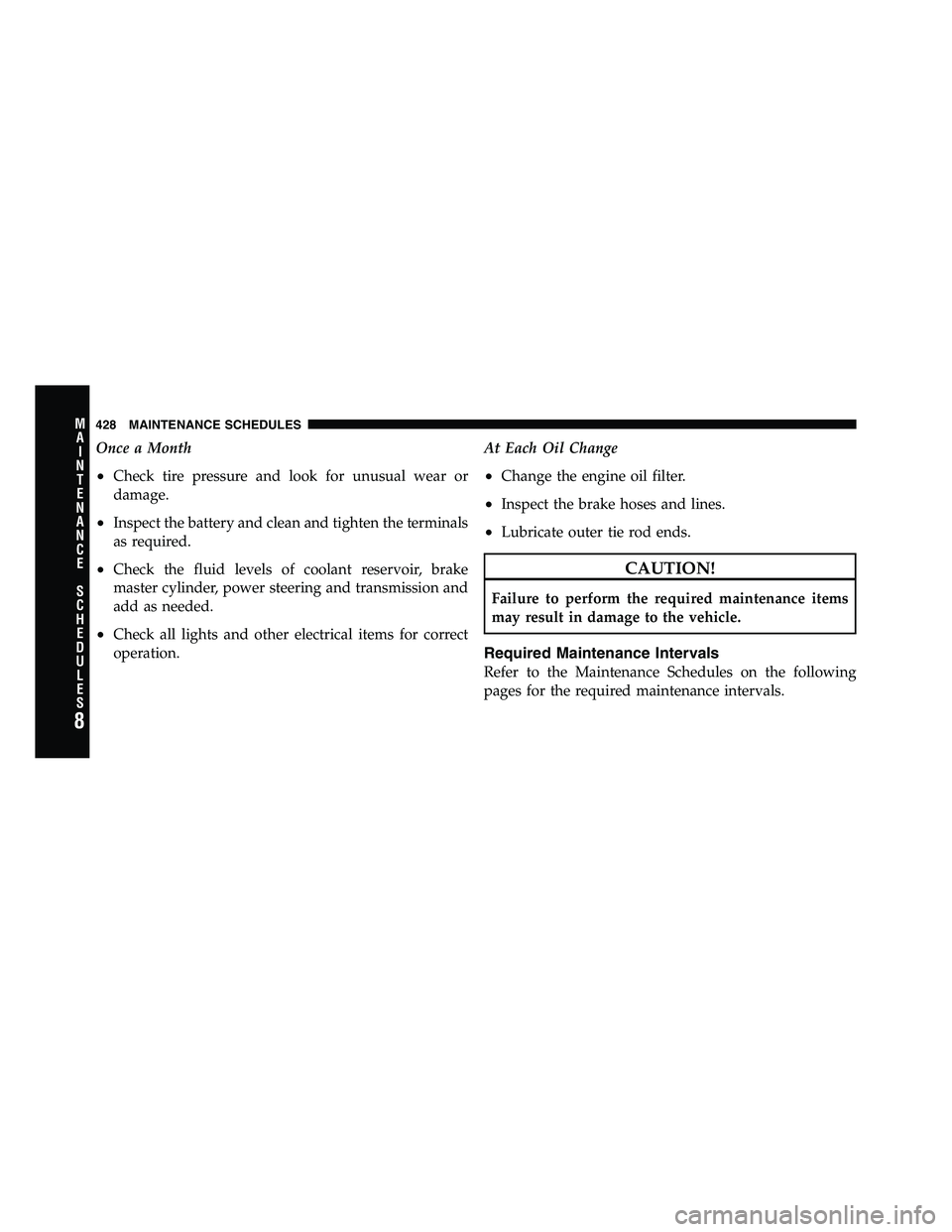
Once a Month
• Check tire pressure and look for unusual wear or
damage.
• Inspect the battery and clean and tighten the terminals
as required.
• Check the fluid levels of coolant reservoir, brake
master cylinder, power steering and transmission and
add as needed.
• Check all lights and other electrical items for correct
operation. At Each Oil Change
• Change the engine oil filter.
• Inspect the brake hoses and lines.
• Lubricate outer tie rod ends.
CAUTION!Failure to perform the required maintenance items
may result in damage to the vehicle.
Required Maintenance Intervals
Refer to the Maintenance Schedules on the following
pages for the required maintenance intervals.
8 M
A
I
N
T
E
N
A
N
C
E
S
C
H
E
D
U
L
E
S 428 MAINTENANCE SCHEDULES