AUX RAM CHASSIS CAB 2019 User Guide
[x] Cancel search | Manufacturer: RAM, Model Year: 2019, Model line: CHASSIS CAB, Model: RAM CHASSIS CAB 2019Pages: 607, PDF Size: 12.68 MB
Page 386 of 607

384 IN CASE OF EMERGENCY
F34 30 Amp Pink – Vehicle System Interface Module #2 – If Equipped
(HD Only)
SSV (DS 1500 Only)
F35 30 Amp Pink – Sunroof – If Equipped
F36 30 Amp Pink – Electric Back Light – If Equipped
F37 30 Amp Pink – Fuel Heater #2, Aux Relay 2 – If Equipped (HD Only)
SSV (DS 1500 Only)
F38 30 Amp Pink – Integrated Trailer Brake Module – If Equipped
(HD Only)
Power Inverter 115V AC – If Equipped (DS 1500 Only)
F39 20 Amp Blue
– Power Outlet – SSV Only
F40 – 10 Amp Red Ventilated Seats – If Equipped (HD Only)
F41 – 10 Amp Red Active Grille Shutter / Active Air Dam – If Equipped
F42 – 20 Amp Yellow Horn
F43 – 15 Amp Blue Heated Steering Wheel – If Equipped (HD Only)
F44 – 10 Amp Red Diagnostic Port
F46 – 10 Amp Red Upfitters Relay Coil – If Equipped (HD Only)
Spare (DS 1500 Only)
F49 – 10 Amp Red Instrument Panel Cluster / HVAC (DS 1500 Only)
Instrument Cluster / MOD CSG (HD Only)Cavity Cartridge Fuse Micro Fuse Description
Page 389 of 607

IN CASE OF EMERGENCY 387
F74 – 20 Amp Yellow Brake Vacuum Pump Gas/Diesel – If Equipped (DS 1500
Only)
F74 – 10 Amp Red Backup Alarm – If Equipped (HD Only)
F75 – 10 Amp Red ATMM / Coil-SCR Module RLY– If Equipped
(HD Only)
Coolant Temperature Valve – If Equipped
(DS 1500 Only)
F76 – 10 Amp Red Electronic Stability Control (HD Only)
Brake System Module / Stop Lamp Switch / Electric
Park Brake / Clutch Pedal Switch (DS 1500 Only)
F77 – 10 Amp Red Drivetrain Control Module / Front Axle Disconnect
Module / TCM (HD Only)
Drivetrain Control Module / ELSD / Front Axle
Disconnect Module / Transmission Control Relay /
RDM / Power Take Off Unit – If Equipped (DS 1500
Only)
F78 – 10 Amp Red Engine Control Module / Powertrain Control Module /
Electric Power Steering (DS 1500 Only)
F78 – 15 Amp Blue Engine Control Module / Powertrain Control Module /
AEB RACM MOD / Feed To AUX PDC Relay Coils (HD
Only)
F79 – 15 Amp Blue ID / Clearance LightsCavity Cartridge Fuse Micro Fuse Description
6
Page 505 of 607

MULTIMEDIA 503
NOTE:
The “Speed Adjusted Volume” feature increases or decreases volume relative to vehicle speed.
Surround Sound — If
Equipped On Off
NOTE:
The “Surround Sound” feature provides simulated surround sound mode.
AUX Volume Offset
— If Equipped On Off
NOTE:
The “AUX Volume Offset” feature provides the ability to tune the audio level for portable devices connected through the
AUX input.
Loudness — If
Equipped On Off
NOTE:
The “Loudness” feature improves sound quality at lower volumes. Setting Name Selectable Options
9
Page 528 of 607

526 MULTIMEDIA
Phone/Bluetooth Settings
After pressing the “Phone/Bluetooth Settings” button on the touchscreen, the following settings will be available: AUX Volume Offset
— If Equipped On Off
NOTE:
The “AUX Volume Offset” feature provides the ability to tune the audio level for portable devices connected through the
AUX input.
Auto Play On OffSetting Name Selectable Options
Setting Name Selectable Options
Phone Pop-ups Displayed in Cluster
— If Equipped On Off
Do Not Disturb List of Settings
NOTE:
Press “Do Not Disturb” to access the available settings. The following settings are: Auto Reply (both, text, call), Auto Reply
Message (custom, default) and Custom Auto Reply Message (create message).
Paired Phones and Audio Devices List Of Paired Phones and Audio Sources
NOTE:
The “Paired Phones and Audio Devices” feature shows which phones and audio sources are paired to the Phone and Audio
Sources Settings system. For further information, refer to the Uconnect Owner’s Manual Supplement.
Smartphone Projection Manager On Off
Page 548 of 607

546 MULTIMEDIA
Bluetooth
After pressing the “Bluetooth” button on the touchscreen, the following settings will be available: AUX Volume Offset
— If Equipped On Off
NOTE:
The “AUX Volume Offset” feature provides the ability to tune the audio level for portable devices connected through the
AUX input.
Auto Play On OffSetting Name Selectable Options
Setting Name Selectable Options
Phone Pop-Ups Displayed in
Cluster On Off
Do Not Disturb List of Settings
NOTE:
Press “Do Not Disturb” to access the available settings. The following settings are: Auto Reply (both, text, call), Auto Reply
Message (custom, default) and Custom Auto Reply Message (create message).
Paired Phones and Audio
Devices List Of Paired Phones and Audio Sources
NOTE:
The “Paired Phones and Audio Sources” feature shows which phones and audio sources are paired to the Phone and Audio
Sources Settings system. For further information, refer to the Uconnect Owner’s Manual Supplement.
Page 553 of 607

MULTIMEDIA 551
Media Mode
Pushing the top of the switch once will go to the next track
on the selected media (AUX/USB/Bluetooth/CD). Pushing
the bottom of the switch once goes to the beginning of the
current track, or to the beginning of the previous track if it is
within eight seconds after the current track begins to play.
IPOD/USB/MP3 CONTROL — IF EQUIPPED
Located on the center stack, just below the instrument panel,
is the main media hub. There are four total USB Ports : Two
Mini-USBs (Type C) and two Standard USBs (Type A). There
is also an AUX Port located in the middle of the USB Ports.
All four of the USB Ports include a USB Trident and a numer -
ical value one through three, which indicates that the vehicle
can support three fully-functioning USB Ports at a time. Each
USB Port will support media and charging simultaneously.
NOTE:
• The Type C USB port is the primary media port for the
radio. Two devices can be plugged in at the same time and
both ports provide charging capabilities, but only one port
can transfer data to the head unit at a time.
• Both ports share a single data connection. However, the
user cannot switch between Type A or Type C. For example, if a device is plugged into the Type A USB port
and another device is plugged into the Type C port, connec -
tion to the Type A port will be lost. Alternatively, if a device
is plugged into the Type C port and another device is
plugged into the Type A port, the Type C device maintains
primary connection.
Center Stack USB/AUX Media Hub 1 — Standard USB Type A Port #1
2 — AUX Port
3 — Standard USB Type A Port #2
9
Page 557 of 607
MULTIMEDIA 555
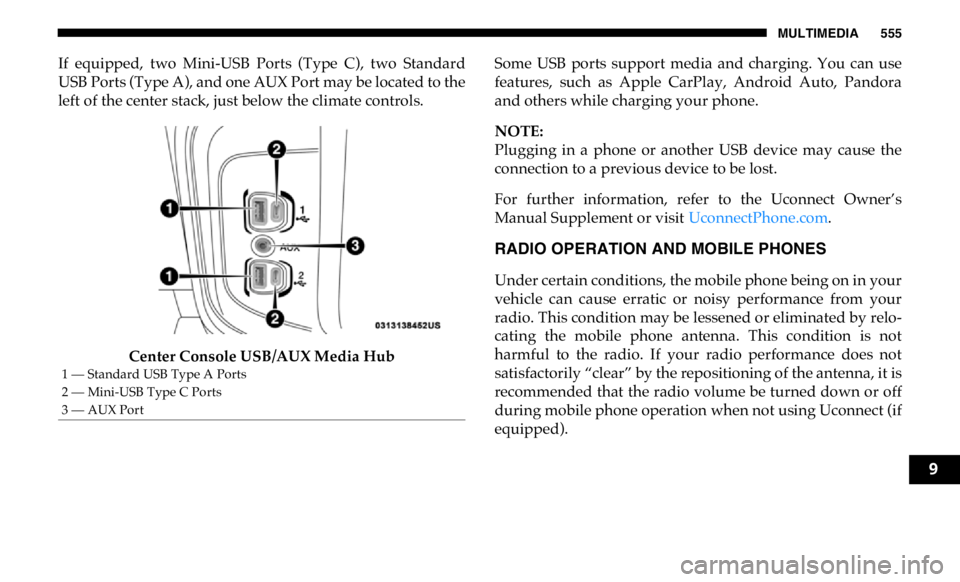
If equipped, two Mini-USB Ports (Type C), two Standard
USB Ports (Type A), and one AUX Port may be located to the
left of the center stack, just below the climate controls.
Center Console USB/AUX Media Hub Some USB ports support media and charging. You can use
features, such as Apple CarPlay, Android Auto, Pandora
and others while charging your phone.
NOTE:
Plugging in a phone or another USB device may cause the
connection to a previous device to be lost.
For further information, refer to the Uconnect Owner’s
Manual Supplement or visit UconnectPhone.com .
RADIO OPERATION AND MOBILE PHONES
Under certain conditions, the mobile phone being on in your
vehicle can cause erratic or noisy performance from your
radio. This condition may be lessened or eliminated by relo -
cating the mobile phone antenna. This condition is not
harmful to the radio. If your radio performance does not
satisfactorily “clear” by the repositioning of the antenna, it is
recommended that the radio volume be turned down or off
during mobile phone operation when not using Uconnect (if
equipped).1 — Standard USB Type A Ports
2 — Mini-USB Type C Ports
3 — AUX Port
9
Page 566 of 607
564 MULTIMEDIA
Media
Uconnect offers connections via USB, Bluetooth and auxil -
iary ports (If Equipped). Voice operation is only available for
connected USB and AUX devices. (Remote CD player
optional and not available on all vehicles.)
Push the VR button . After the beep, say one of the
following commands and follow the prompts to switch your
media source or choose an artist.
• “ Change source to Bluetooth”
• “ Change source to AUX”
• “ Change source to USB”
• “ Play artist Beethoven”; “ Play album Greatest Hits”;
“ Play song Moonlight Sonata”; “ Play genre Classical”
TIP:
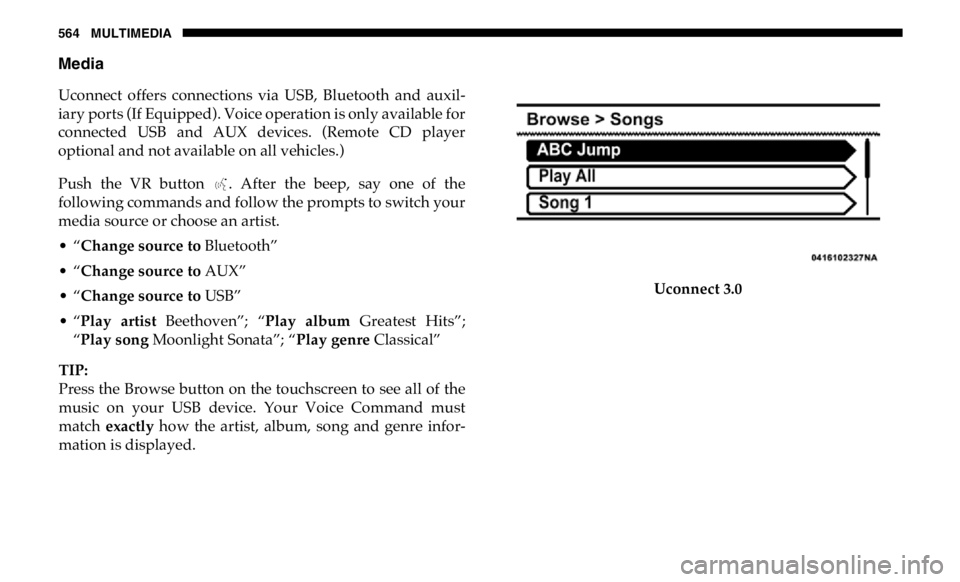
Press the Browse button on the touchscreen to see all of the
music on your USB device. Your Voice Command must
match exactly how the artist, album, song and genre infor -
mation is displayed. Uconnect 3.0
Page 593 of 607

591
Auto Unlock, Doors ................................................................ 269
Automatic Door Locks ............................................................. 37
Automatic Headlights .............................................................. 68
Automatic Temperature Control (ATC) ................................ 89
Automatic Transmission ................................................ 265, 442
Adding Fluid ....................................................................... 442
Fluid And Filter Change .................................................... 442
Fluid Change........................................................................ 442
Fluid Level Check ....................................................... 439, 440
Fluid Type .................................................................... 439, 486
Shifting.................................................................................. 256
Special Additives................................................................. 439
Automatic Transmission Limp Home Mode ...................... 269
Auxiliary Driving Systems .................................................... 174
Axle Fluid................................................................. 442, 443, 486
Axle Lubrication.............................................................. 442, 443
B
Back-Up .................................................................................... 326
Back-Up Camera ..................................................................... 326
Battery............................................................................... 148, 417
Charging System Light....................................................... 148
Keyless Key Fob Replacement ............................................ 19
Battery Saver Feature ............................................................... 71
Belts, Seat ................................................................................. 241
Body Builders Guide ................................................................ 14
Body Mechanism Lubrication ............................................... 428 B-Pillar Location ......................................................................450
Brake Assist System ................................................................163
Brake Control System .............................................................162
Brake Fluid .......................................................................438, 486
Brake System....................................................................438, 476
Fluid Check ..........................................................................438
Master Cylinder ...................................................................438
Parking ..................................................................................252
Warning Light......................................................................146
Brake/Transmission Interlock ..............................................256
Bulb Replacement ...................................................................371
Bulbs, Light ......................................................................243, 371
C
Cab Top Clearance Lights ......................................................379
Camera...................................................................................... 326
Camera, Rear....................................................................326, 330
Capacities, Antifreeze (Engine Coolant) ..............................483
Capacities, Fluid ......................................................................483
Caps, Filler
Oil (Engine) ..................................................................415, 419
Power Steering .....................................................................284
Radiator (Coolant Pressure)...............................................436
Car Washes ..............................................................................471
Carbon Monoxide Warning ...........................................240, 482
Cargo Light ................................................................................71
Cellular Phone .........................................................................555 11
Page 600 of 607

598
O
Occupant Restraints................................................................ 187
Octane Rating, Gasoline (Fuel) ............................................. 479
Oil Filter, Change .................................................................... 419
Oil Filter, Selection.................................................................. 419
Oil Pressure Light ................................................................... 148
Oil Reset ................................................................................... 130
Oil, Engine ....................................................................... 418, 484
Capacity ................................................................................ 483
Change Interval ................................................................... 418
Dipstick................................................................................. 416
Disposal ................................................................................ 419
Filter .............................................................................. 419, 484
Filter Disposal ...................................................................... 419
Identification Logo.............................................................. 418
Materials Added To ............................................................ 419
Pressure Warning Light ..................................................... 148
Recommendation ................................................................ 418
Synthetic ............................................................................... 419
Viscosity ............................................................................... 419
Onboard Diagnostic System .................................................. 158
Operating Precautions............................................................ 158
Operator Manual
Owner's Manual ............................................................ 13, 589
Outside Rearview Mirrors ....................................................... 58
Overdrive ................................................................................. 263 Overdrive OFF Switch............................................................263
Overheating, Engine ...............................................................401
P
Paint Care .................................................................................470
Panic Alarm ...............................................................................18
Parking Brake ..........................................................................252
ParkSense System, Rear .................................................309, 317
Passive Entry..............................................................................34
Pedals, Adjustable .....................................................................55
Personalized Main Menu .......................................................487
Pets ............................................................................................240
Placard, Tire And Loading Information ..............................450
Power
Distribution Center (Fuses)................................................381
Door Locks .............................................................................33
Mirrors ....................................................................................59
Outlet (Auxiliary Electrical Outlet) ..........................117, 119
Seats.........................................................................................42
Sliding Rear Window............................................................94
Steering ...................................................................59, 283, 284
Take-Off Adapter ................................................................281
Take-Off Operation .............................................................281
Windows.................................................................................92
Power Seats
Down .......................................................................................42
Forward ..................................................................................42