steering wheel RAM CHASSIS CAB 2019 User Guide
[x] Cancel search | Manufacturer: RAM, Model Year: 2019, Model line: CHASSIS CAB, Model: RAM CHASSIS CAB 2019Pages: 607, PDF Size: 12.68 MB
Page 130 of 607

128 GETTING TO KNOW YOUR INSTRUMENT PANEL
INSTRUMENT CLUSTER DISPLAY
Your vehicle will be equipped with an instrument cluster
display, which offers useful information to the driver. With
the ignition in the STOP/OFF mode, opening/closing of a
door will activate the display for viewing, and display the
total miles, or kilometers, in the odometer. Your instrument
cluster display is designed to display important information
about your vehicle’s systems and features. Using a driver
interactive display located on the instrument panel, your
instrument cluster display can show you how systems are
working and give you warnings when they are not. The
steering wheel mounted controls allow you to scroll through
the main menus and submenus. You can access the specific
information you want and make selections and adjustments. Instrument Cluster Display Controls
The instrument cluster display features a driver-interactive
display that is located in the instrument cluster.
Base Instrument Cluster DisplayCAUTION!
Driving with a hot engine cooling system could damage
your vehicle. If the temperature gauge reads “H,” pull
over and stop the vehicle. Idle the vehicle with the air
conditioner turned off until the pointer drops back into
the normal range. If the pointer remains on the “H,” turn
the engine off immediately and call an authorized dealer
for service.
1 – Instrument Cluster Display Controls
2 – Instrument Cluster Display Screen
Page 131 of 607
GETTING TO KNOW YOUR INSTRUMENT PANEL 129
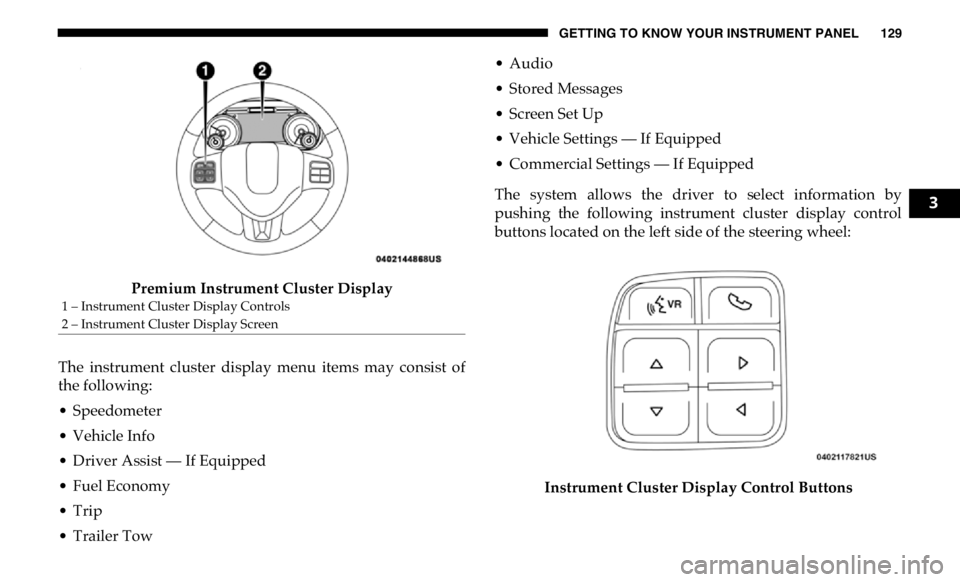
Premium Instrument Cluster Display
The instrument cluster display menu items may consist of
the following:
• Speedometer
• Vehicle Info
• Driver Assist — If Equipped
• Fuel Economy
• Trip
• Trailer Tow • Audio
• Stored Messages
• Screen Set Up
• Vehicle Settings — If Equipped
• Commercial Settings — If Equipped
The system allows the driver to select information by
pushing the following instrument cluster display control
buttons located on the left side of the steering wheel:
Instrument Cluster Display Control Buttons1 – Instrument Cluster Display Controls
2 – Instrument Cluster Display Screen 3
Page 132 of 607

130 GETTING TO KNOW YOUR INSTRUMENT PANEL
• Up Arrow Button
Push and release the up arrow button to scroll
upward through the main menu items, submenu
screen, and vehicle settings.
• Down Arrow Button
Push and release the down arrow button to scroll
downward through the main menu items,
submenu screen, and vehicle settings.
• Right Arrow Button
Push and release the right arrow button to access/
select the information screens or submenu screens
of a main menu item. Push and hold the RIGHT arrow
button for two seconds to reset displayed/selected
features that can be reset.
• Left Arrow Button
Push and release the left arrow button to access/
select the information screens, submenu screens of
a main menu item, or to return to the main menu. Oil Life Reset
Your vehicle is equipped with an engine oil change indicator
system. The “Oil Change Required” message will display in
the instrument cluster display after a single chime has
sounded, to indicate the next scheduled oil change interval.
The engine oil change indicator system is duty cycle based,
which means the engine oil change interval may fluctuate,
dependent upon your personal driving style.
NOTE:
Use the steering wheel instrument cluster display controls
for the following procedure.
Page 134 of 607

132 GETTING TO KNOW YOUR INSTRUMENT PANEL
Vehicle Info
Push and release the up or down arrow button until the
Vehicle Info menu item is highlighted in the instrument
cluster display. Push and release the right arrow button to
enter the submenus items of Vehicle Info. Follow the direc -
tional prompts to access or reset any of the following Vehicle
Info submenu items:
• Tire Pressure
• Coolant Temperature — If Equipped
• Transmission Temperature — If Equipped
• Oil Temperature — If Equipped
• Oil Pressure
• Exhaust Brake — If Equipped
• Turbo Boost — If Equipped
• Diesel Particulate Filter — If Equipped
• Oil Life
• Fuel Filter Life — If Equipped
• Battery Voltage
• Gauge Summary — If Equipped
• Engine Hours Driver Assist — If Equipped
The Driver Assist menu displays the status of the ACC
system.
Push and release the up or down arrow button until the
Driver Assist menu is displayed in the instrument cluster
display.
Adaptive Cruise Control (ACC) Feature
The instrument cluster display displays the current ACC
system settings. The information displayed depends on ACC
system status.
Push the Adaptive Cruise Control (ACC) on/off button
(located on the steering wheel) until one of the following
displays in the instrument cluster display:
Adaptive Cruise Control Off
When ACC is deactivated, the display will read “Adaptive
Cruise Control Off.”
Adaptive Cruise Control Ready
When ACC is activated but the vehicle speed setting has not
been selected, the display will read “Adaptive Cruise
Control Ready.”
Page 135 of 607

GETTING TO KNOW YOUR INSTRUMENT PANEL 133
Push the SET + or the SET- button (located on the steering
wheel) and the following will display in the instrument
cluster display:
ACC SET
When ACC is set, the set speed will display in the instrument
cluster.
The ACC screen may display once again if any ACC activity
occurs, which may include any of the following:
• Distance Setting Change
• System Cancel
• Driver Override
• System Off
• ACC Proximity Warning
• ACC Unavailable Warning
For further information, refer to “Adaptive Cruise Control
(ACC) — If Equipped” in “Starting And Operating.” Fuel Economy
Push and release the up or down arrow button until the Fuel
Economy menu item is highlighted in the instrument cluster
display. Push and Hold the right arrow button to reset
Average Fuel Economy.
• Current Fuel Economy Gauge
• Average Fuel Economy Value
• Range To Empty
• Fuel Tank Levels — If Equipped
Trip A/Trip B
Push and release the up or down arrow button until the Trip
menu item is highlighted in the instrument cluster display.
Push and release the right arrow button to enter the
submenus of Trip A and Trip B. The Trip A or Trip B infor -
mation will display the following:
• Distance
• Average Fuel Economy
• Elapsed Time
Push and hold right arrow button to reset all information. 3
Page 167 of 607

SAFETY 165
Towing With HSA
HSA will also provide assistance to mitigate roll back while
towing a trailer. Disabling And Enabling HSA
This feature can be turned on or turned off. To change the
current setting, proceed as follows:
• If disabling HSA using your instrument cluster display,
refer to “Instrument Cluster Display” in “Getting To Know
Your Instrument Panel” for further information.
• If disabling HSA using Uconnect Settings, refer to “Ucon -
nect Settings” in “Multimedia” for further information.
For vehicles not equipped with an instrument cluster
display, perform the following steps:
1. Center the steering wheel (front wheels pointing straight
forward).
2. Shift the transmission into PARK.
3. Apply the parking brake.
4. Start the engine.
5. Rotate the steering wheel slightly more than one-half turn
to the left.WARNING!
• If you use a trailer brake controller with your trailer, the
trailer brakes may be activated and deactivated with
the brake switch. If so, there may not be enough brake
pressure to hold both the vehicle and the trailer on a
hill when the brake pedal is released. In order to avoid
rolling down an incline while resuming acceleration,
manually activate the trailer brake or apply more
vehicle brake pressure prior to releasing the brake
pedal.
• HSA is not a parking brake. Always apply the parking
brake fully when exiting your vehicle. Also, be certain
to place the transmission in PARK.
• Failure to follow these warnings can result in a colli -
sion or serious personal injury. 4
Page 168 of 607

166 SAFETY
6. Push the “ESC Off” button located in the lower switch
bank below the climate control four times within 20
seconds. The “ESC Off Indicator Light” should turn on
and turn off two times.
7. Rotate the steering wheel back to center and then an addi -
tional slightly more than one-half turn to the right.
8. Turn the ignition to the OFF mode and then back to ON. If the
sequence was completed properly, the “ESC Off Indicator
Light” will blink several times to confirm HSA is disabled.
9. Repeat these steps if you want to return this feature to its
previous setting.
Traction Control System (TCS)
This system monitors the amount of wheel spin of each of the
driven wheels. If wheel spin is detected, the TCS may apply
brake pressure to the spinning wheel(s) and/or reduce engine
power to provide enhanced acceleration and stability. A
feature of the TCS, Brake Limited Differential (BLD), functions
similar to a limited slip differential and controls the wheel spin
across a driven axle. If one wheel on a driven axle is spinning
faster than the other, the system will apply the brake of the
spinning wheel. This will allow more engine power to be
applied to the wheel that is not spinning. BLD may remain
enabled even if TCS and ESC are in a reduced mode. Electronic Stability Control (ESC)
This system enhances directional control and stability of the
vehicle under various driving conditions. ESC corrects for
oversteering or understeering of the vehicle by applying the
brake of the appropriate wheel(s) to assist in counteracting
the oversteer or understeer condition. Engine power may
also be reduced to help the vehicle maintain the desired path.
ESC uses sensors in the vehicle to determine the vehicle path
intended by the driver and compares it to the actual path of
the vehicle. When the actual path does not match the
intended path, ESC applies the brake of the appropriate
wheel to assist in counteracting the oversteer or understeer
condition.
• Oversteer — when the vehicle is turning more than appro -
priate for the steering wheel position.
• Understeer — when the vehicle is turning less than appro -
priate for the steering wheel position.
Page 169 of 607

SAFETY 167
(Continued)The “ESC Activation/Malfunction Indicator Light” located
in the instrument cluster will start to flash as soon as the ESC
system becomes active. The “ESC Activation/Malfunction
Indicator Light” also flashes when the TCS is active. If the
“ESC Activation/Malfunction Indicator Light” begins to
flash during acceleration, ease up on the accelerator and
apply as little throttle as possible. Be sure to adapt your
speed and driving to the prevailing road conditions.
ESC Operating Modes
NOTE:
Depending upon model and mode of operation, the ESC
system may have multiple operating modes.
ESC On
This is the normal operating mode for the ESC. Whenever
the vehicle is started, the ESC system will be in this mode.
This mode should be used for most driving conditions. Alter -
nate ESC modes should only be used for specific reasons as
noted in the following paragraphs.WARNING!
• Electronic Stability Control (ESC) cannot prevent the
natural laws of physics from acting on the vehicle, nor
can it increase the traction afforded by prevailing road
conditions. ESC cannot prevent accidents, including
those resulting from excessive speed in turns, driving
on very slippery surfaces, or hydroplaning. ESC also
cannot prevent accidents resulting from loss of vehicle
control due to inappropriate driver input for the condi -
tions. Only a safe, attentive, and skillful driver can
prevent accidents. The capabilities of an ESC equipped
vehicle must never be exploited in a reckless or
dangerous manner which could jeopardize the user’s
safety or the safety of others. • Vehicle modifications, or failure to properly maintain
your vehicle, may change the handling characteristics of
your vehicle, and may negatively affect the performance
of the ESC system. Changes to the steering system,
suspension, braking system, tire type and size or wheel
size may adversely affect ESC performance. Improperly
inflated and unevenly worn tires may also degrade ESC
performance. Any vehicle modification or poor vehicle
maintenance that reduces the effectiveness of the ESC
system can increase the risk of loss of vehicle control,
vehicle rollover, personal injury and death. WARNING! (Continued)
4
Page 172 of 607

170 SAFETY
The “ESC OFF Indicator Light” indicates the
customer has elected to have the Electronic Stability
Control (ESC) in a reduced mode.
Electronic Roll Mitigation (ERM)
This system anticipates the potential for wheel lift by moni -
toring the driver’s steering wheel input and the speed of the
vehicle. When ERM determines that the rate of change of the
steering wheel angle and vehicle’s speed are sufficient to
potentially cause wheel lift, it then applies the appropriate
brake and may also reduce engine power to lessen the chance
that wheel lift will occur. ERM can only reduce the chance of
wheel lift occurring during severe or evasive driving maneu -
vers; it cannot prevent wheel lift due to other factors, such as
road conditions, leaving the roadway, or striking objects or
other vehicles.
NOTE:
ERM is disabled anytime the ESC is in “Full Off” mode (if
equipped). Refer to “Electronic Stability Control (ESC)” in
this section for a complete explanation of the available ESC
modes. Trailer Sway Control (TSC)
TSC uses sensors in the vehicle to recognize an excessively
swaying trailer and will take the appropriate actions to
attempt to stop the sway. TSC will become active automati -
cally once an excessively swaying trailer is recognized.
NOTE:
TSC cannot stop all trailers from swaying. Always use
caution when towing a trailer and follow the trailer tongue
weight recommendations. Refer to “Trailer Towing” in
“Starting And Operating” for further information. WARNING!
Many factors, such as vehicle loading, road conditions
and driving conditions, influence the chance that wheel
lift or rollover may occur. ERM cannot prevent all wheel
lift or roll overs, especially those that involve leaving the
roadway or striking objects or other vehicles. The
capabilities of an ERM-equipped vehicle must never be
exploited in a reckless or dangerous manner which could
jeopardize the user's safety or the safety of others.
Page 204 of 607
202 SAFETY
3. Allow the seat belt to retract. As the seat belt retracts, you
will hear a clicking sound. This indicates the seat belt is
now in the Automatic Locking Mode.
How To Disengage The Automatic Locking Mode
Unbuckle the combination lap/shoulder belt and allow it to
retract completely to disengage the Automatic Locking
Mode and activate the vehicle sensitive (emergency) locking
mode. Supplemental Restraint Systems (SRS)
Some of the safety features described in this section may be stan -
dard equipment on some models, or may be optional equipment
on others. If you are not sure, ask an authorized dealer.
The air bag system must be ready to protect you in a collision.
The Occupant Restraint Controller (ORC) monitors the
internal circuits and interconnecting wiring associated with
the electrical Air Bag System Components. Your vehicle may
be equipped with the following Air Bag System Components:
Air Bag System Components
• Occupant Restraint Controller (ORC)
• Air Bag Warning Light
• Steering Wheel and Column
• Instrument Panel
• Knee Impact Bolsters
• Driver and Front Passenger Air Bags
• Seat Belt Buckle Switch
• Supplemental Side Air Bags — If Equipped
• Front and Side Impact Sensors — If Equipped
• Seat Belt Pretensioners — If EquippedWARNING!
• The seat belt assembly must be replaced if the switch -
able Automatic Locking Retractor (ALR) feature or any
other seat belt function is not working properly when
checked according to the procedures in the Service
Manual.
• Failure to replace the seat belt assembly could increase
the risk of injury in collisions.
• Do not use the Automatic Locking Mode to restrain
occupants who are wearing the seat belt or children
who are using booster seats. The locked mode is only
used to install rear-facing or forward-facing child
restraints that have a harness for restraining the child.