turn signal RAM CHASSIS CAB 2019 User Guide
[x] Cancel search | Manufacturer: RAM, Model Year: 2019, Model line: CHASSIS CAB, Model: RAM CHASSIS CAB 2019Pages: 607, PDF Size: 12.68 MB
Page 191 of 607
SAFETY 189
Seat Belt Systems
Buckle up even though you are an excellent driver, even on
short trips. Someone on the road may be a poor driver and
could cause a collision that includes you. This can happen far
away from home or on your own street.
Research has shown that seat belts save lives, and they can
reduce the seriousness of injuries in a collision. Some of the
worst injuries happen when people are thrown from the
vehicle. Seat belts reduce the possibility of ejection and the
risk of injury caused by striking the inside of the vehicle.
Everyone in a motor vehicle should be belted at all times. Enhanced Seat Belt Use Reminder System (BeltAlert)
Driver And Passenger BeltAlert — If Equipped
BeltAlert is a feature intended to remind the driver and
outboard front seat passenger (if equipped with outboard
front passenger seat BeltAlert) to buckle their seat belts. The
Belt Alert feature is active whenever the ignition switch is in
the START or ON/RUN position.
Initial Indication
If the driver is unbuckled when the ignition switch is first in
the START or ON/RUN position, a chime will signal for a
few seconds. If the driver or outboard front seat passenger (if
equipped with outboard front passenger seat BeltAlert) is
unbuckled when the ignition switch is first in the START or
ON/RUN position the Seat Belt Reminder Light will turn on
and remain on until both outboard front seat belts are
buckled. The outboard front passenger seat BeltAlert is not
active when an outboard front passenger seat is unoccupied.• Never install a rear-facing child restraint in the front
seat of a vehicle. Only use a rear-facing child restraint
in the rear seat. If the vehicle does not have a rear seat,
do not transport a rear-facing child restraint in that
vehicle. WARNING! (Continued)
4
Page 245 of 607

SAFETY 243
Periodic Safety Checks You Should Make Outside
The Vehicle
Tires
Examine tires for excessive tread wear and uneven wear
patterns. Check for stones, nails, glass, or other objects
lodged in the tread or sidewall. Inspect the tread for cuts and
cracks. Inspect sidewalls for cuts, cracks, and bulges. Check
the wheel bolts for tightness. Check the tires (including
spare) for proper cold inflation pressure.
Lights
Have someone observe the operation of brake lights and
exterior lights while you work the controls. Check turn
signal and high beam indicator lights on the instrument
panel.
Door Latches
Check for proper closing, latching, and locking.
Fluid Leaks
Check area under the vehicle after overnight parking for
fuel, coolant, oil, or other fluid leaks. Also, if gasoline fumes
are detected or if fuel, or brake fluid leaks are suspected. The
cause should be located and corrected immediately.• ALWAYS make sure objects cannot fall or slide into the
driver’s side floor area when the vehicle is moving.
Objects can become trapped under accelerator, brake,
or clutch pedals and could cause a loss of vehicle
control.
• NEVER place any objects under the floor mat (e.g.,
towels, keys, etc.). These objects could change the posi -
tion of the floor mat and may cause interference with
the accelerator, brake, or clutch pedals.
• If the vehicle carpet has been removed and re-installed,
always properly attach carpet to the floor and check the
floor mat fasteners are secure to the vehicle carpet.
Fully depress each pedal to check for interference with
the accelerator, brake, or clutch pedals then re-install
the floor mats.
• It is recommended to only use mild soap and water to
clean your floor mats. After cleaning, always check
your floor mat has been properly installed and is
secured to your vehicle using the floor mat fasteners by
lightly pulling mat. WARNING! (Continued)
4
Page 300 of 607

298 STARTING AND OPERATING
Brake Alert
NOTE:
The “Brake!” Screen in the instrument cluster display is a
warning for the driver to take action and does not necessarily
mean that the Forward Collision Warning system is
applying the brakes autonomously.
Trailer Detect — If Equipped
When a trailer is detected, the ACC system automatically
defaults to the longest setting (four bars). The setting can be
overridden by pushing the Distance Button on the steering
wheel. Overtake Aid
When driving with ACC engaged and following a vehicle,
the system will provide an additional acceleration up to the
ACC set speed to assist in passing the vehicle. This addi -
tional acceleration is triggered when the driver utilizes the
left turn signal and will only be active when passing on the
left hand side.
ACC Operation At Stop
In the event that the ACC system brings your vehicle to a
standstill while following a target vehicle, if the target
vehicle starts moving within two seconds of your vehicle
coming to a standstill, your vehicle will resume motion
without the need for any driver action.
If the target vehicle does not start moving within two
seconds of your vehicle coming to a standstill, then ACC will
cancel and the driver must take over braking. When the
target vehicle drives off, ACC can be resumed by releasing
the brake and pushing the RES (+) button.
Page 354 of 607
352 STARTING AND OPERATING
NOTE:
• An aftermarket controller may be available for use with
trailers with air or electric-over-hydraulic trailer brake
systems. To determine the type of brakes on your trailer
and the availability of controllers, check with your trailer
manufacturer or dealer.
• Removal of the ITBM will cause errors and it may cause
damage to the electrical system and electronic modules of
the vehicle. See your authorized dealer if an aftermarket
module is to be installed.
Towing Requirements — Trailer Lights And Wiring
Whenever you pull a trailer, regardless of the trailer size,
stoplights and turn signals on the trailer are required for
motoring safety.
The Trailer Tow Package may include a four- and seven-pin
wiring harness. Use a factory approved trailer harness and
connector.
NOTE:
Do not cut or splice wiring into the vehicle’s wiring harness.
The electrical connections are all complete to the vehicle but
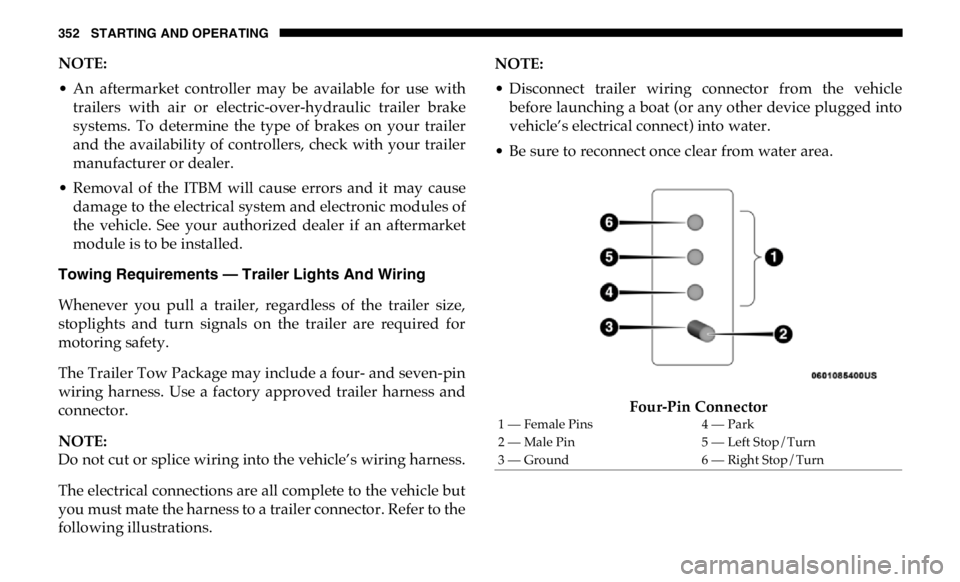
you must mate the harness to a trailer connector. Refer to the
following illustrations. NOTE:
• Disconnect trailer wiring connector from the vehicle
before launching a boat (or any other device plugged into
vehicle’s electrical connect) into water.
• Be sure to reconnect once clear from water area.
Four-Pin Connector1 — Female Pins 4 — Park
2 — Male Pin 5 — Left Stop/Turn
3 — Ground 6 — Right Stop/Turn
Page 368 of 607

366
IN CASE OF EMERGENCYHAZARD WARNING FLASHERS
The Hazard Warning switch is located on the upper
switch bank just below the radio.
NOTE:
If your vehicle is equipped with a 12–inch Uconnect display,
the Hazard Warning switch is located above the display.
Push the switch to turn on the Hazard Warning flasher.
When the switch is activated, all directional turn signals will
flash on and off to warn oncoming traffic of an emergency.
Push the switch a second time to turn off the Hazard
Warning flashers.
This is an emergency warning system and it should not be
used when the vehicle is in motion. Use it when your vehicle
is disabled and it is creating a safety hazard for other motor -
ists.
When you must leave the vehicle to seek assistance, the
Hazard Warning flashers will continue to operate even
though the ignition is placed in the OFF position. NOTE:
With extended use the Hazard Warning flashers may wear
down your battery.
ASSIST AND SOS SYSTEM — IF EQUIPPED
Assist And SOS Buttons1 — ASSIST Button
2 — SOS Button
Page 372 of 607
370 IN CASE OF EMERGENCY
Even if the SOS Call system is fully functional, factors
beyond FCA US LLC’s control may prevent or stop the SOS
Call system operation. These include, but are not limited to,
the following factors:
• Delayed accessories mode is active.
• The ignition is in the OFF position.
• The vehicle’s electrical systems are not intact.
• The SOS Call system software and/or hardware are
damaged during a crash. • The vehicle battery loses power or becomes disconnected
during a vehicle crash.
• LTE (voice/data) or 4G (data) network and/or Global
Positioning Satellite signals are unavailable or obstructed.
• Equipment malfunction at the SOS operator facility.
• Operator error by the SOS operator.
• LTE (voice/data) or 4G (data) network congestion.
• Weather.
• Buildings, structures, geographic terrain, or tunnels.WARNING!
• Ignoring the overhead console light could mean you
will not have SOS Call services. If the overhead console
light is illuminated, have your authorized dealer
service the SOS Call system immediately.
• The Occupant Restraint Control module turns on the
air bag Warning Light on the instrument panel if a
malfunction in any part of the system is detected. If the
Air Bag Warning Light is illuminated, have your autho -
rized dealer service the Occupant Restraint Control
system immediately.
WARNING!
ALWAYS obey traffic laws and pay attention to the road.
ALWAYS drive safely with your hands on the steering
wheel. You have full responsibility and assume all risks
related to the use of the features and applications in this
vehicle. Only use the features and applications when it is
safe to do so. Failure to do so may result in an accident
involving serious injury or death.
Page 374 of 607

372 IN CASE OF EMERGENCY
Exterior Bulbs
Bulb Number
Low Beam (Halogen Reflector Headlamp) H11LL
High Beam (Halogen Reflector Headlamp) 9005LL
Low & High Beam (LED Reflector Headlamp) LED (Serviced At An Authorized Dealer)
Low & High Beam (LED Projector Headlamp) LED (Serviced At An Authorized Dealer)
Turn Signal / Front Position (Halogen Reflector Headlamp) 7444NA
Turn Signal / Front Position (LED Headlamps) LED (Serviced at authorized dealer)
Front Side Marker (Halogen Reflector Headlamp) W5W
Front Side Marker (LED Headlamps) LED (Serviced At An Authorized Dealer)
Front Fog Lamps (Halogen Reflector Headlamp) H11LL
Front Fog Lamps (LED Headlamps) LED (Serviced At An Authorized Dealer)
Side Indicators (Front And Side View Mirror) LED (Serviced at authorized dealer)
Center High Mounted Stop Lamp (CHMSL) 921
Cab Roof Marker Lamps 194NA
Box Off Tail Lamps – Stop/Turn/Tail/License Plate 1157
Box Off Tail Lamps – Back Up 1156
Page 522 of 607

520 MULTIMEDIA
Flash Lights With Lock On Off
NOTE:
When the “Flash Lights With Lock” feature is selected, the front and rear turn signals flash when the doors are locked or
unlocked with the key fob. This feature may be selected with or without the “Sound Horn With Lock” feature selected.
Sound Horn With Lock Off
1st Press 2nd Press
Sound Horn With Remote
Start On Off
1st Press Of Key Fob Unlocks Driver Door All Doors
NOTE:
• When “1st Press Of Key Fob Unlocks: Driver Door” is selected, only the driver's door unlocks on the first press of the key
fob unlock button. You must push the key fob unlock button twice to unlock the passenger's doors.
• When “All Doors” is selected, all of the doors unlock on the first push of the key fob unlock button.
• If the vehicle is programmed “1st Press Of Key Fob Unlocks: All Doors”, all doors will unlock no matter which Passive
Entry equipped door handle is grasped. If “1st Press Of Key Fob Unlocks: Driver Door” is programmed, only the driver’s
door will unlock when the driver’s door is grasped.
• With Passive Entry, if “1st Press Of Key Fob Unlocks: Driver Door” is programmed pushing the handle more than once
only results in the driver’s door opening. If “Driver Door” is selected, once the driver’s door is opened, the interior door
lock/unlock switch can be used to unlock all doors (or use key fob).
Passive Entry — If Equipped On OffSetting Name Selectable Options
Page 541 of 607

MULTIMEDIA 539
Doors & Locks
After pressing the “Doors & Locks” button on the touchscreen, the following settings will be available: NOTE:
When the “Steering Directed Lights” feature is selected, the headlights turn with the direction of the steering wheel.
Rear Cargo Guidance Lights — If
Equipped On Off
NOTE:
When the “Rear Cargo Guidance Lights” feature is selected, the lights in the cargo and bed of the truck will come on either
when the headlight switch is pressed, or the button on the back bed of the truck is pressed. Setting Name Selectable Options
Setting Name Selectable Options
Auto Door Locks On Off
Auto Unlock On Exit On Off
NOTE:
When the “Auto Unlock On Exit” feature is selected, all doors unlock when the vehicle is stopped and the transmission is in
the PARK or NEUTRAL position and the driver's door is opened.
Flash Lights With Lock On Off
NOTE:
When the “Flash Lights With Lock” feature is selected, the front and rear turn signals flash when the doors are locked or
unlocked with the key fob. This feature may be selected with or without the “Sound Horn With Lock” feature selected.
Sound Horn With Remote Start On Off 9
Page 596 of 607

594
Enhanced Accident Response Feature ......................... 212, 409
Entry System, Illuminated ....................................................... 74
Ethanol...................................................................................... 480
Exhaust Gas Cautions .................................................... 240, 482
Exhaust System ............................................................... 240, 431
Exterior Lighting ....................................................................... 66
Exterior Lights ................................................................... 66, 243
F
Filters
Air Cleaner ........................................................................... 420
Air Conditioning ........................................................... 91, 423
Engine Fuel .......................................................................... 484
Engine Oil..................................................................... 419, 484
Engine Oil Disposal ............................................................ 419
Flashers
Turn Signals ........................................................... 70, 157, 243
Flash-To-Pass ............................................................................. 68
Flat Tire Changing .................................................. 390, 444, 461
Flat Tire Stowage .................................................... 396, 444, 461
Fluid Capacities ....................................................................... 483
Fluid Leaks ............................................................................... 243
Fluid Level Checks
Brake ..................................................................................... 438
Power Steering..................................................................... 284
Fluids And Lubricants ........................................................... 484
Fog Lights........................................................................... 70, 377 Fold Flat Load Floor ...............................................................112
Fold-Flat Seats ...........................................................................39
Forward Collision Warning................................................... 174
Four Wheel Drive .................................................................... 272
Four-Way Hazard Flasher .....................................................366
Freeing A Stuck Vehicle .........................................................405
Front Axle (Differential) .........................................................442
Fuel ............................................................................................479
Adding ..................................................................................336
Additives ..............................................................................480
Clean Air...............................................................................479
Ethanol ..................................................................................480
Filler Cap (Gas Cap)............................................................337
Filter ...................................................................................... 484
Gasoline ................................................................................479
Light ...................................................................................... 152
Materials Added ..................................................................480
Methanol...............................................................................480
Octane Rating.......................................................................479
Requirements .......................................................................479
Tank Capacity ......................................................................483
Fuses..........................................................................................380
G
Garage Door Opener (HomeLink) ..........................................97
Gas Cap (Fuel Filler Cap) .......................................................337
Gasoline, Clean Air .................................................................479