change time RAM CHASSIS CAB 2019 Owner's Manual
[x] Cancel search | Manufacturer: RAM, Model Year: 2019, Model line: CHASSIS CAB, Model: RAM CHASSIS CAB 2019Pages: 607, PDF Size: 12.68 MB
Page 319 of 607
STARTING AND OPERATING 317
PARKSENSE FRONT AND REAR PARK ASSIST
The ParkSense Park Assist system provides visual and
audible indications of the distance between the rear, and/or
front fascia/bumper, and a detected obstacle when backing
up or moving forward, e.g. during a parking maneuver.
Refer to “ParkSense System Usage Precautions” in this
section for limitations of this system and recommendations.
ParkSense will retain the last system state (enabled or
disabled) from the last ignition cycle when the ignition is
changed to the ON/RUN position.
ParkSense can be active only when the gear selector is in
REVERSE or DRIVE. If ParkSense is enabled at one of these
gear selector positions, the system will remain active until
the vehicle speed is increased to approximately 7 mph
(11 km/h) or above. A warning will appear in the instrument
cluster display when the vehicle is in REVERSE, indicating
the vehicle is above ParkSense operating speed. The system
will become active again if the vehicle speed is decreased to
speeds less than approximately 6 mph (9 km/h).• Before using ParkSense, it is strongly recommended
that the ball mount and hitch ball assembly is discon -
nected from the vehicle when the vehicle is not used for
towing. Failure to do so can result in injury or damage
to vehicles or obstacles because the hitch ball will be
much closer to the obstacle than the rear fascia when
the loudspeaker sounds the continuous tone. Also, the
sensors could detect the ball mount and hitch ball
assembly, depending on its size and shape, giving a
false indication that an obstacle is behind the vehicle.
CAUTION!
• ParkSense is only a parking aid and it is unable to
recognize every obstacle, including small obstacles.
Parking curbs might be temporarily detected or not
detected at all. Obstacles located above or below the
sensors will not be detected when they are in close
proximity.
• The vehicle must be driven slowly when using Park -
Sense in order to be able to stop in time when an
obstacle is detected. It is recommended that the driver
looks over his/her shoulder when using ParkSense. WARNING! (Continued)
5
Page 329 of 607

STARTING AND OPERATING 327
• The touchscreen button "X" to disable display of the
camera image is made available ONLY when the vehicle is
not in REVERSE.
If Equipped — Cargo Camera Icons:
• — Backup Camera Touchscreen Button
• — Cargo Camera Touchscreen Button
• — AUX Camera Touchscreen Button
If equipped with a Cargo Camera, a touchscreen button to
indicate the current active Camera image being displayed is
made available whenever the Rear View Camera image is
displayed.
If equipped with a Cargo Camera, a touchscreen button to
switch the display to Cargo Camera image is made available
whenever the Rear View Camera image is displayed.
A touchscreen button "X" to disable display of the camera
image is made available when the vehicle is not in REVERSE
gear. When enabled, active guide lines are overlaid on the backup
camera image to illustrate the width of the vehicle and its
projected backup path based on the steering wheel position.
The active guide lines will show separate zones that will help
indicate the distance to the rear of the vehicle.
NOTE:
For further information about how to access and change the
programmable features of the ParkView Rear Backup
Camera, refer to “Uconnect Settings” in “Multimedia.”
A dashed center line overlay indicates the center of the
vehicle to assist with parking or aligning to a hitch/receiver.
The following table shows the approximate distances for
each zone:
Zones Distance To The Rear Of
The Vehicle
Red 0 - 1 ft (0 - 30 cm)
Yellow 1 ft - 6.5 ft (30 cm - 2m)
Green 6.5 ft or greater
(2 m or greater) 5
Page 412 of 607

410
SERVICING AND MAINTENANCESCHEDULED SERVICING
Your vehicle is equipped with an automatic oil change indicator
system. The oil change indicator system will remind you that it
is time to take your vehicle in for scheduled maintenance.
Based on engine operation conditions, the oil change indi -
cator message will illuminate. This means that service is
required for your vehicle. Operating conditions such as
frequent short-trips, trailer tow, extremely hot or cold
ambient temperatures, and E85 fuel usage will influence
when the “Oil Change Required” message is displayed.
Severe Operating Conditions can cause the change oil
message to illuminate as early as 3,500 miles (5,600 km) since
last reset. Have your vehicle serviced as soon as possible,
within the next 500 miles (805 km).
Your authorized dealer will reset the oil change indicator
message after completing the scheduled oil change. If a sched -
uled oil change is performed by someone other than your autho -
rized dealer, the message can be reset by referring to the steps
described under “Instrument Cluster Display” in “Getting To
Know Your Instrument Panel” for further information. Gasoline Engines:
Under no circumstances should oil change intervals exceed
8,000 miles (13,000 km), twelve months or 350 hours of
engine run time, whichever comes first. The 350 hours of
engine run or idle time is generally only a concern for fleet
customers.
Severe Duty:
Change Engine Oil at 4,000 miles (6,500 km) or 350 hours of
engine run time if the vehicle is operated in a dusty and off
road environment or is operated predominately at idle or
very low engine RPM’s. This type of vehicle use is consid -
ered Severe Duty.
Page 414 of 607

412 SERVICING AND MAINTENANCE
Mileage or time passed
(whichever comes first)
20,000
30,000
40,000
50,000
60,000
70,000
80,000
90,000
100,000
110,000
120,000
130,000
140,000
150,000Or Years: 2 3 4 5 6 7 8 9 10 11 12 13 14 15
Or Kilometers:
32,000
48,000
64,000
80,000
96,000
112,000
128,000
144,000
160,000
176,000
192,000
208,000
224,000
240,000Additional Inspections
Inspect the CV/Universal joints. X X X X X
Inspect front suspension, tie rod
ends, and replace if necessary. X
X X X X X X
Inspect the front and rear axle
surfaces. If gear oil leakage is
suspected, check the fluid level.
If using your vehicle for police,
taxi, fleet, off-road or frequent
trailer towing, change axle fluid. X X X X X X X
Inspect the brake linings,
parking brake function. X X X X X X X
Additional Maintenance
Replace engine air filter. X X X X X
Replace spark plugs. 1
X
Page 415 of 607
SERVICING AND MAINTENANCE 413
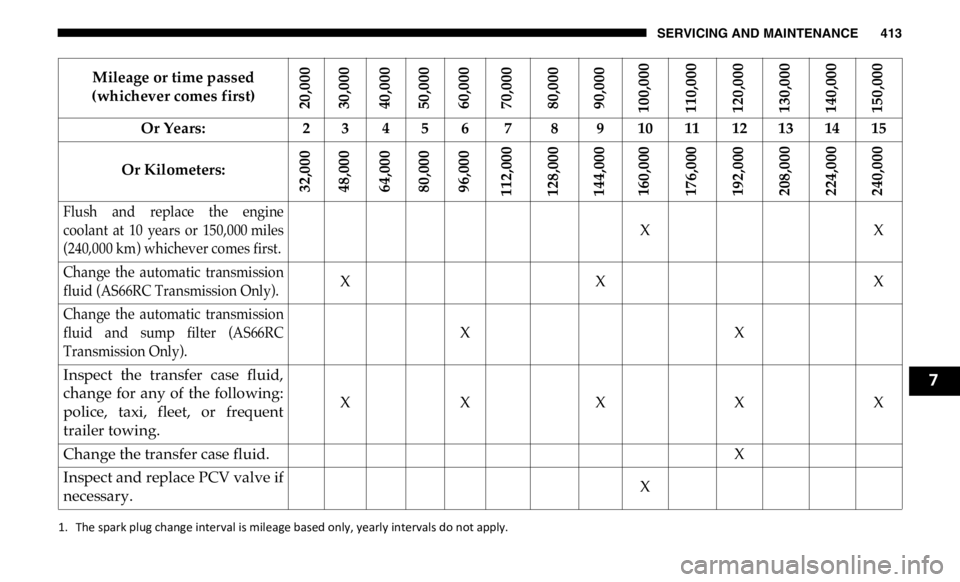
Flush and replace the engine
coolant at 10 years or 150,000 miles
(240,000 km) whichever comes first. X X
Change the automatic transmission
fluid (AS66RC Transmission Only). X X X
Change the automatic transmission
fluid and sump filter (AS66RC
Transmission Only). X X
Inspect the transfer case fluid,
change for any of the following:
police, taxi, fleet, or frequent
trailer towing. X X X X X
Change the transfer case fluid. X
Inspect and replace PCV valve if
necessary. X
1. The spark plug change interval is mileage based only, yearly intervals do not apply. Mileage or time passed
(whichever comes first)
20,000
30,000
40,000
50,000
60,000
70,000
80,000
90,000
100,000
110,000
120,000
130,000
140,000
150,000Or Years: 2 3 4 5 6 7 8 9 10 11 12 13 14 15
Or Kilometers:
32,000
48,000
64,000
80,000
96,000
112,000
128,000
144,000
160,000
176,000
192,000
208,000
224,000
240,000 7
Page 416 of 607
414 SERVICING AND MAINTENANCE
Heavy Duty Use Of The Vehicle
Change engine oil at 4,000 miles (6,500 km) or 350 hours of
engine run time if the vehicle is operated in a dusty and off
road environment or is operated predominately at idle or
only very low engine RPM’s. This type of vehicle use is
considered Severe Duty.WARNING!
• You can be badly injured working on or around a motor
vehicle. Do only service work for which you have the
knowledge and the right equipment. If you have any
doubt about your ability to perform a service job, take
your vehicle to a competent mechanic.
• Failure to properly inspect and maintain your vehicle
could result in a component malfunction and effect
vehicle handling and performance. This could cause an
accident.
Page 420 of 607
418 SERVICING AND MAINTENANCE
Engine Oil — Gas Engine
Change Engine Oil
The oil change indicator system will remind you that it is
time to take your vehicle in for scheduled maintenance. Refer
to “Scheduled Servicing” in this chapter for further informa -
tion.
NOTE:
Under no circumstances should oil change intervals exceed
8,000 miles (13,000 km), twelve months or 350 hours of
engine run time, whichever comes first. The 350 hours of
engine run or idle time is generally only a concern for fleet
customers. Engine Oil Selection — 6.4L
For best performance and maximum protection under all
types of operating conditions, the manufacturer only recom -
mends engine oils that are API Certified and meet the
requirements of FCA Material Standard MS-12633.
American Petroleum Institute (API) Engine Oil
Identification Symbol
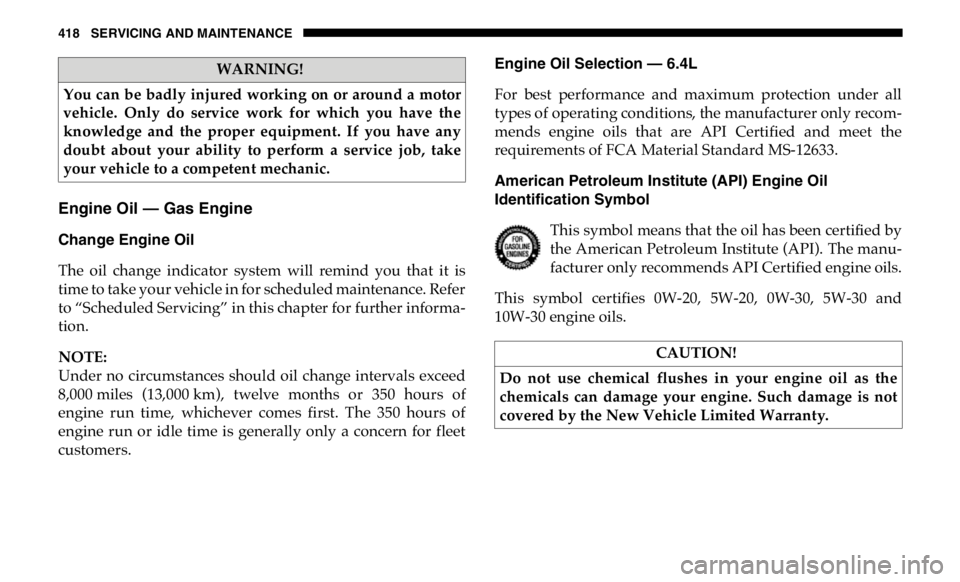
This symbol means that the oil has been certified by
the American Petroleum Institute (API). The manu -
facturer only recommends API Certified engine oils.
This symbol certifies 0W-20, 5W-20, 0W-30, 5W-30 and
10W-30 engine oils.WARNING!
You can be badly injured working on or around a motor
vehicle. Only do service work for which you have the
knowledge and the proper equipment. If you have any
doubt about your ability to perform a service job, take
your vehicle to a competent mechanic.
CAUTION!
Do not use chemical flushes in your engine oil as the
chemicals can damage your engine. Such damage is not
covered by the New Vehicle Limited Warranty.
Page 434 of 607
432 SERVICING AND MAINTENANCE
system and adjacent body areas for broken, damaged, dete -
riorated, or mispositioned parts. Open seams or loose
connections could permit exhaust fumes to seep into the
passenger compartment. In addition, have the exhaust
system inspected each time the vehicle is raised for lubrica -
tion or oil change. Replace as required.
Under normal operating conditions, the catalytic converter
will not require maintenance. However, it is important to
keep the engine properly tuned to assure proper catalyst
operation and prevent possible catalyst damage.
NOTE:
Intentional tampering with emissions control systems can
result in civil penalties being assessed against you.WARNING!
• Exhaust gases can injure or kill. They contain carbon
monoxide (CO), which is colorless and odorless.
Breathing it can make you unconscious and can eventu -
ally poison you. To avoid breathing CO, refer to “Safety
Tips” in “Safety” for further information.
• A hot exhaust system can start a fire if you park over
materials that can burn. Such materials might be grass
or leaves coming into contact with your exhaust system.
Do not park or operate your vehicle in areas where your
exhaust system can contact anything that can burn. CAUTION!
• The catalytic converter requires the use of unleaded
fuel only. Leaded gasoline will destroy the effective -
ness of the catalyst as an emissions control device and
may seriously reduce engine performance and cause
serious damage to the engine.
• Damage to the catalytic converter can result if your
vehicle is not kept in proper operating condition. In the
event of engine malfunction, particularly involving
engine misfire or other apparent loss of performance,
have your vehicle serviced promptly. Continued opera -
tion of your vehicle with a severe malfunction could
cause the converter to overheat, resulting in possible
damage to the converter and vehicle.
Page 443 of 607

SERVICING AND MAINTENANCE 441
5. Place the gear selector momentarily into each gear posi -
tion (allowing time for the transmission to fully engage in
each position), ending with the transmission in PARK.
6. Remove the dipstick, wipe it clean and reinsert it until
seated.
7. Remove the dipstick again and note the fluid level on
both sides. The fluid level reading is only valid if there is
a solid coating of oil on both sides of the dipstick. Note
that the holes in the dipstick will be full of fluid if the
actual level is at or above the hole. The fluid level should
be between the “HOT” (upper) reference holes on the
dipstick at normal operating temperature. If the fluid
level is low, add fluid through the dipstick tube to bring
it to the proper level. Do not overfill. Use ONLY the spec -
ified fluid (see "Fluids And Lubricants" for fluid specifica -
tions). After adding any quantity of oil through the
dipstick tube, wait a minimum of two minutes for the oil
to fully drain into the transmission before rechecking the
fluid level.
NOTE:
If it is necessary to check the transmission below the oper -
ating temperature, the fluid level should be between the two
“COLD” (lower) holes on the dipstick with the fluid at
60-70°F / 16-21°C. Only use the COLD region of the dipstick as a rough reference when setting the fluid level after a trans -
mission service or fluid change. Re-check the fluid level, and
adjust as required, once the transmission reaches normal
operating temperature.
8. Reinsert the dipstick. Check for leaks. Release the parking
brake.
NOTE:
If it is necessary to check the transmission below the oper -
ating temperature, the fluid level should be between the two
COLD (lower) holes on the dipstick with the fluid at 68-86°F
/ 20-30°C. Only use the COLD region of the dipstick as a
rough reference when setting the fluid level after a transmis -
sion service or fluid change. Re-check the fluid level, and
adjust as required, once the transmission reaches normal
operating temperature. CAUTION!
If the fluid temperature is below 50 °F (10 °C) it may not
register on the dipstick. Do not add fluid until the
temperature is elevated enough to produce an accurate
reading. Run the engine at idle, in PARK, to warm the
fluid.
7
Page 489 of 607
487
MULTIMEDIAUCONNECT SYSTEMS
For detailed information about your Uconnect system, refer
to your Uconnect Owner’s Manual Supplement.
NOTE:
Uconnect screen images are for illustration purposes only
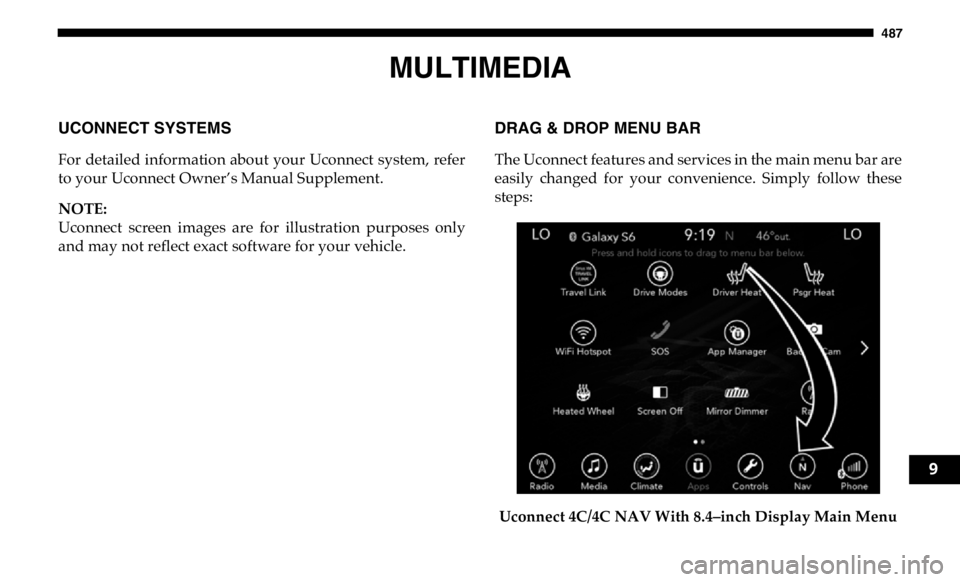
and may not reflect exact software for your vehicle. DRAG & DROP MENU BAR
The Uconnect features and services in the main menu bar are
easily changed for your convenience. Simply follow these
steps:
Uconnect 4C/4C NAV With 8.4–inch Display Main Menu 9