door lock RAM CHASSIS CAB 2019 Owner's Manual
[x] Cancel search | Manufacturer: RAM, Model Year: 2019, Model line: CHASSIS CAB, Model: RAM CHASSIS CAB 2019Pages: 607, PDF Size: 12.68 MB
Page 73 of 607

GETTING TO KNOW YOUR VEHICLE 71
Cargo Lights — If Equipped
The cargo lights (if equipped) and trailer spotter lamps (if
equipped) are turned on by pushing the cargo lights button
located on the lower half of the headlight switch.
Cargo Lights Button On Headlight Switch
The cargo lights will turn on for approximately 60 seconds
when a key fob unlock button is pushed, as part of the Illu -
minated Entry feature. Battery Saver
To protect the life of your vehicle’s battery, load shedding is
provided for both the interior and exterior lights.
If the ignition is OFF, the interior lights will automatically
turn off when:
• Any door is left ajar for 10 minutes.
• The Dome Defeat button is pushed.
• The Cargo and Spotter lights are manually activated by the
headlight switch.
NOTE:
Battery saver mode is canceled if the ignition is ON.
If the headlights remain on while the ignition is cycled OFF,
the exterior lights will automatically turn off after eight
minutes. If the headlights are turned on and left on for eight
minutes while the ignition is OFF, the exterior lights will
automatically turn off. 2
Page 74 of 607

72 GETTING TO KNOW YOUR VEHICLE
INTERIOR LIGHTS
Courtesy Lights
The Courtesy, Dome, and Cargo Lights are turned on when
any door is opened or the Dome On button is pushed on the
overhead console. Also, if your vehicle is equipped with
Remote Keyless Entry, and the unlock button is pushed on
the key fob, the Courtesy, Dome, and Cargo Lights will turn
on.
Courtesy/Reading Lights
The overhead console lights can also be operated individu -
ally as reading lights by pushing the corresponding buttons. Front Courtesy/Reading Lights
NOTE:
On vehicles equipped with an LED overhead console, if both
the Dome On and Dome Defeat buttons are pushed, the Illu -
minated Entry with door ajar feature will be disabled, but the
Dome Lights inside the vehicle will turn on. 1 — Dome Defeat Button
2 — Driver’s Reading Light On/Off Button
3 — Passenger’s Reading Light On/Off Button
4 — Dome On Button
Page 76 of 607

74 GETTING TO KNOW YOUR VEHICLE
NOTE:
• The dimming of the touchscreen is programmable through
the Uconnect system. Refer to “Uconnect Settings” in
“Multimedia” for further details.
• The ambient lights are only active when the headlights or
parking lights are on.
Illuminated Entry
The courtesy lights will turn on when you use the key fob to
unlock the doors or open any door.
This feature also turns on the puddle lamps located beneath
the outside mirrors (if equipped).
The lights will fade to off after approximately 30 seconds, or
they will immediately fade to off once the ignition switch is
turned to ON/RUN from the OFF position.
The front courtesy overhead console and door courtesy
lights will not turn off if the Dome On button on the over -
head console is pushed.
The illuminated entry system will not operate if the Dome
Defeat button on the overhead console is pushed. NOTE:
If your vehicle is equipped with Illuminated Approach lights
under the outside mirrors, they can also be turned off by
pushing the Dome Defeat button.
WINDSHIELD WIPERS AND WASHERS
Windshield Wipers
The wipers and washers are operated by a switch in the
multifunction lever. Turn the end of the lever to select the
desired wiper speed.
Windshield Wiper/Washer Switch
Page 96 of 607
94 GETTING TO KNOW YOUR VEHICLE
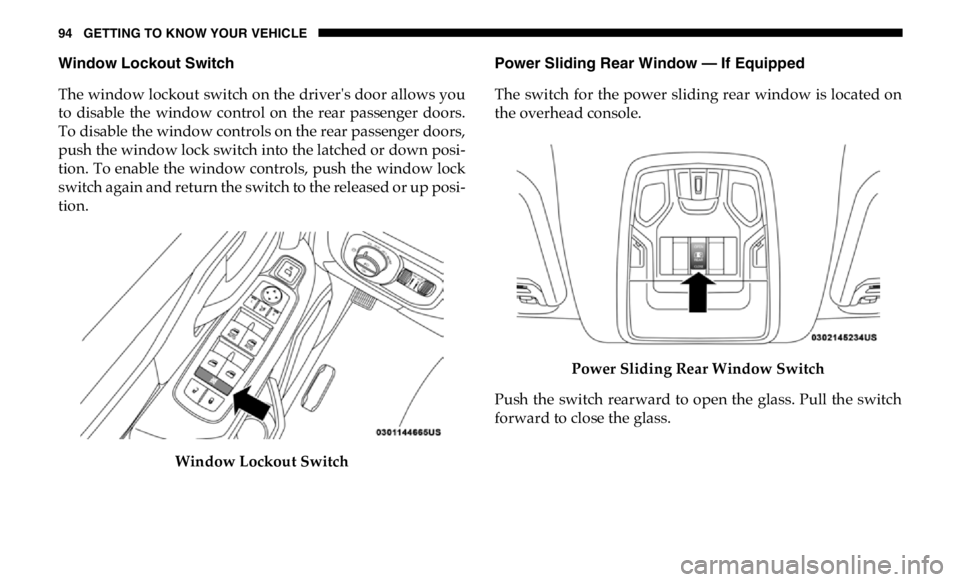
Window Lockout Switch
The window lockout switch on the driver's door allows you
to disable the window control on the rear passenger doors.
To disable the window controls on the rear passenger doors,
push the window lock switch into the latched or down posi -
tion. To enable the window controls, push the window lock
switch again and return the switch to the released or up posi -
tion.
Window Lockout Switch Power Sliding Rear Window — If Equipped
The switch for the power sliding rear window is located on
the overhead console.
Power Sliding Rear Window Switch
Push the switch rearward to open the glass. Pull the switch
forward to close the glass.
Page 104 of 607

102 GETTING TO KNOW YOUR VEHICLE
3. Continue to press and hold the HomeLink button, while
you press and release (“cycle”) your hand-held trans -
mitter every two seconds until HomeLink has success -
fully accepted the frequency signal. The indicator light
will flash slowly and then rapidly when fully trained.
4. Watch for the HomeLink indicator to change flash rates.
When it changes, it is programmed. It may take up to 30
seconds or longer in rare cases. The garage door may
open and close while you are programming.
5. Press and hold the programmed HomeLink button and
observe the indicator light.
NOTE:
• If the indicator light stays on constantly, programming
is complete and the garage door/device should acti -
vate when the HomeLink button is pressed.
• To program the two remaining HomeLink buttons,
repeat each step for each remaining button. DO NOT
erase the channels.
If you unplugged the garage door opener/device for
programming, plug it back in at this time. Reprogramming A Single HomeLink Button (Canadian/
Gate Operator)
To reprogram a channel that has been previously trained,
follow these steps:
1. Cycle the ignition to the ON/RUN position.
2. Press and hold the desired HomeLink button until the
indicator light begins to flash after 20 seconds. Do not
release the button.
3. Without releasing the button, proceed with “Canadian/
Gate Operator Programming” step 2 and follow all
remaining steps.
Using HomeLink
To operate, push and release the programmed HomeLink
button. Activation will now occur for the programmed
device (i.e. garage door opener, gate operator, security
system, entry door lock, home/office lighting, etc.) The
hand-held transmitter of the device may also be used at any
time.
Page 124 of 607
122 GETTING TO KNOW YOUR VEHICLE
Your mobile phone must be designed for Qi wireless
charging. If the phone is not equipped with Qi wireless
charging functionality, an aftermarket sleeve or a specialized
back plate can be purchased from your mobile phone
provider or an local electronics retailer. Please see your
phone’s owner’s manual for further information.
The wireless charging pad is equipped with an anti-slip mat,
an adjustable cradle to hold your mobile phone in place and
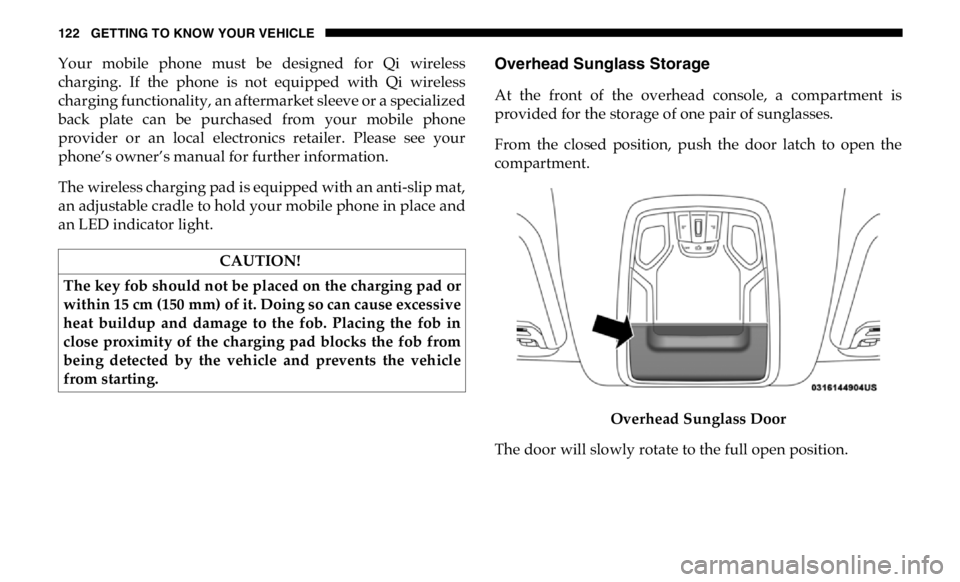
an LED indicator light. Overhead Sunglass Storage
At the front of the overhead console, a compartment is
provided for the storage of one pair of sunglasses.
From the closed position, push the door latch to open the
compartment.
Overhead Sunglass Door
The door will slowly rotate to the full open position.CAUTION!
The key fob should not be placed on the charging pad or
within 15 cm (150 mm) of it. Doing so can cause excessive
heat buildup and damage to the fob. Placing the fob in
close proximity of the charging pad blocks the fob from
being detected by the vehicle and prevents the vehicle
from starting.
Page 142 of 607

140 GETTING TO KNOW YOUR INSTRUMENT PANEL
Automatic Highbeams Auto Highbeams On; Off
Daytime Running Lights Daytime Lights On; Off
Flash Lights with Lock Lights w/ Lock On; Off
Auto Lock Doors Auto Lock Doors On; Off
Auto Unlock Doors Auto Unlock Doors On; Off
Sound Horn with Remote
Start Horn w/ Rmt Start On; Off
Sound Horn with Remote
Lock Horn w/ Rmt Lock Off; 1st Press; 2nd Press
Remote Unlock Sequence Remote Unlock Driver Door; All Doors
Key Fob Linked to
Memory Key in Memory On; Off
Passive Entry Passive Entry On; Off
Remote Start Comfort
System Rmt Start Comfort Off; Remote Start; All starts
Easy Exit Seat Easy Exit Seat On; Off
Key-off Power Delay Power Off Delay Off; 45 seconds; 5 minutes; 10 minutesSetting Names Setting Names
Abbreviated (Left
Submenu Layer) Sub-Menus (Right Submenu Layer)
Page 214 of 607

212 SAFETY
Enhanced Accident Response System
In the event of an impact, if the communication network
remains intact, and the power remains intact, depending on
the nature of the event, the ORC will determine whether to
have the Enhanced Accident Response System perform the
following functions:
• Cut off fuel to the engine (If Equipped)
• Cut off battery power to the electric motor (If Equipped)
• Flash hazard lights as long as the battery has power
• Turn on the interior lights, which remain on as long as the
battery has power or for 15 minutes from the intervention
of the Enhanced Accident Response System.
• Unlock the power door locks.
Your vehicle may also be designed to perform any of these
other functions in response to the Enhanced Accident
Response System:
• Turn off the Fuel Filter Heater, Turn off the HVAC Blower
Motor, Close the HVAC Circulation Door • Cut off battery power to the:
• Engine
• Electric Motor (if equipped)
• Electric power steering
• Brake booster
• Electric park brake
• Automatic transmission gear selector
• Horn
• Front wiper
• Headlamp washer pump
NOTE:
After an accident, remember to cycle the ignition to the STOP
(OFF/LOCK) position and remove the key from the ignition
switch to avoid draining the battery. Carefully check the
vehicle for fuel leaks in the engine compartment and on the
ground near the engine compartment and fuel tank before
resetting the system and starting the engine. If there are no
fuel leaks or damage to the vehicle electrical devices (e.g.
headlights) after an accident, reset the system by following
the procedure described below. If you have any doubt,
contact an authorized dealer.
Page 245 of 607

SAFETY 243
Periodic Safety Checks You Should Make Outside
The Vehicle
Tires
Examine tires for excessive tread wear and uneven wear
patterns. Check for stones, nails, glass, or other objects
lodged in the tread or sidewall. Inspect the tread for cuts and
cracks. Inspect sidewalls for cuts, cracks, and bulges. Check
the wheel bolts for tightness. Check the tires (including
spare) for proper cold inflation pressure.
Lights
Have someone observe the operation of brake lights and
exterior lights while you work the controls. Check turn
signal and high beam indicator lights on the instrument
panel.
Door Latches
Check for proper closing, latching, and locking.
Fluid Leaks
Check area under the vehicle after overnight parking for
fuel, coolant, oil, or other fluid leaks. Also, if gasoline fumes
are detected or if fuel, or brake fluid leaks are suspected. The
cause should be located and corrected immediately.• ALWAYS make sure objects cannot fall or slide into the
driver’s side floor area when the vehicle is moving.
Objects can become trapped under accelerator, brake,
or clutch pedals and could cause a loss of vehicle
control.
• NEVER place any objects under the floor mat (e.g.,
towels, keys, etc.). These objects could change the posi -
tion of the floor mat and may cause interference with
the accelerator, brake, or clutch pedals.
• If the vehicle carpet has been removed and re-installed,
always properly attach carpet to the floor and check the
floor mat fasteners are secure to the vehicle carpet.
Fully depress each pedal to check for interference with
the accelerator, brake, or clutch pedals then re-install
the floor mats.
• It is recommended to only use mild soap and water to
clean your floor mats. After cleaning, always check
your floor mat has been properly installed and is
secured to your vehicle using the floor mat fasteners by
lightly pulling mat. WARNING! (Continued)
4
Page 294 of 607

292 STARTING AND OPERATING
To Set A Desired ACC Speed
When the vehicle reaches the speed desired, push the SET (-)
button and release. The instrument cluster display will show
the set speed.
If the system is set when the vehicle speed is below 20 mph
(32 km/h), the set speed shall be defaulted to 20 mph
(32 km/h). If the system is set when the vehicle speed is
above 20 mph (32 km/h), the set speed shall be the current
speed of the vehicle.
NOTE:
ACC cannot be set if there is a stationary vehicle in front of
your vehicle in close proximity.
Remove your foot from the accelerator pedal, after the ACC
has been set. If you do not, the vehicle may continue to accel -
erate beyond the set speed. If this occurs:
• The message “ACC DRIVER OVERRIDE” will display in
the instrument cluster display.
• The system will not be controlling the distance between
your vehicle and the vehicle ahead. The vehicle speed will
only be determined by the position of the accelerator
pedal. To Cancel
The following conditions cancel the system:
• The brake pedal is applied.
• The CANC (cancel) button is pushed.
• An Anti-Lock Brake System (ABS) event occurs.
• The gear selector is removed from the DRIVE position.
• The Electronic Stability Control/Traction Control System
(ESC/TCS) activates.
• The vehicle parking brake is applied.
• Driver seatbelt is unbuckled at low speeds.
• Driver door is opened at low speeds.
• A Trailer Sway Control (TSC) event occurs.
• The driver switches ESC to full-off mode.
• The braking temperature exceeds normal range (over -
heated).