warning light RAM CHASSIS CAB 2019 Workshop Manual
[x] Cancel search | Manufacturer: RAM, Model Year: 2019, Model line: CHASSIS CAB, Model: RAM CHASSIS CAB 2019Pages: 607, PDF Size: 12.68 MB
Page 273 of 607

STARTING AND OPERATING 271
To exit ERS mode, simply push and hold the GEAR+ switch
until the gear limit display disappears from the instrument
cluster.
When to Use TOW/HAUL Mode
When driving in hilly areas, towing a trailer, carrying a
heavy load, etc., and frequent transmission shifting occurs,
push the TOW/HAUL switch to activate TOW/HAUL
mode. This will improve performance and reduce the poten -
tial for transmission overheating or failure due to excessive
shifting. TOW/HAUL Switch
The “TOW/HAUL Indicator Light” will illuminate in the
instrument cluster to indicate that TOW/HAUL mode has
been activated. Pushing the switch a second time restores
normal operation. Normal operation is always the default at
engine start-up. If TOW/HAUL mode is desired, the switch
must be pushed each time the engine is started.WARNING!
Do not downshift for additional engine braking on a
slippery surface. The drive wheels could lose their grip
and the vehicle could skid, causing a collision or
personal injury.
5
Page 276 of 607
274 STARTING AND OPERATING
This electronically shifted transfer case is designed to be
driven in the two–wheel drive position (2WD) for normal
street and highway conditions on dry hard surfaced roads).
Driving the vehicle in 2WD will have greater fuel economy
benefits as the front axle is not engaged in 2WD.
When additional traction is required, the transfer case 4WD
HIGH and 4WD LOW positions can be used to maximize
torque to the front driveshaft, forcing the front and rear
wheels to rotate at the same speed. This is accomplished by
pushing the desired position on the 4WD control switch.
Refer to “Shifting Procedure” in this section for specific
shifting instructions.
The 4WD HIGH and 4WD LOW positions are designed for
loose, slippery road surfaces only. Driving in the 4WD HIGH and 4WD LOW positions on dry hard surfaced roads may
cause increased tire wear and damage to the driveline
components.
NOTE:
The transfer case NEUTRAL button is located in the center of
the 4WD Control Switch and is pushed by using a ballpoint
pen or similar object. The transfer case NEUTRAL position is
to be used for recreational towing only. Refer to “Recre -
ational Towing” in “Starting And Operating” for further
information.
Transfer Case Position Indicator Lights
The Transfer Case Position Indicator Lights (4WD and
4LOW) are located in the instrument cluster and indicate the
current and desired transfer case selection. When you select
a different transfer case position, the indicator lights will do
the following:
If All Of The Following Shift Conditions Are Met:
1. The current position indicator light will turn OFF.
2. The selected position indicator light will flash until the
transfer case completes the shift.• The transmission may not engage PARK if the vehicle
is moving. Always bring the vehicle to a complete stop
before shifting to PARK, and verify that the transmis -
sion gear position indicator solidly indicates PARK (P)
without blinking. Ensure that the vehicle is completely
stopped, and the PARK position is properly indicated,
before exiting the vehicle. WARNING! (Continued)
Page 277 of 607

STARTING AND OPERATING 275
3. When the shift is complete, the indicator light for the
selected position will stop flashing and remain ON.
If One Or More Of The Following Shift Conditions Are
Not Met:
1. The indicator light for the current position will remain
ON.
2. The newly selected position indicator light will continue
to flash.
3. The transfer case will not shift.
NOTE:
Before retrying a selection, make certain that all the neces -
sary requirements for selecting a new transfer case position
have been met. To retry the selection, push the current posi -
tion, wait five seconds, and retry selection. To find the shift
requirements, refer to the "Shifting Procedure" for your
transfer case, located in this section.
The “SVC 4WD Warning Light” monitors the electronic shift
four-wheel drive system. If this light remains on after engine
start up or illuminates during driving, it means that the
four-wheel drive system is not functioning properly and that
service is required. NOTE:
Do not attempt to make a shift while only the front or rear
wheels are spinning. This could cause damage to driveline
components.
When operating your vehicle in 4WD LOW, the engine
speed is approximately three times that of the 2WD or 4WD
HIGH positions at a given road speed. Take care not to over -
speed the engine and do not exceed 25 mph (40 km/h).
Proper operation of four-wheel drive vehicles depends on
tires of equal size, type and circumference on each wheel.
Any difference in tire size can cause damage to the drive -
train.
Because four-wheel drive provides improved traction, there
is a tendency to exceed safe turning and stopping speeds. Do
not go faster than road conditions permit. WARNING!
Always engage the parking brake when powering down
the vehicle if the “SVC 4WD Warning Light” is
illuminated. Not engaging the parking brake may allow
the vehicle to roll which may cause personal injury or
death.
5
Page 283 of 607
STARTING AND OPERATING 281
LIMITED-SLIP DIFFERENTIAL
The limited-slip differential provides additional traction on
snow, ice, mud, sand and gravel, particularly when there is
a difference between the traction characteristics of the
surface under the right and left rear wheels. During normal
driving and cornering, the limited-slip unit performs simi -
larly to a conventional differential. On slippery surfaces,
however, the differential delivers more of the driving effort
to the rear wheel having the better traction.
The limited-slip differential is especially helpful during slip -
pery driving conditions. With both rear wheels on a slippery
surface, a slight application of the accelerator will supply
maximum traction. When starting with only one rear wheel
on an excessively slippery surface, slight momentary appli -
cation of the parking brake may be necessary to gain
maximum traction. Care should be taken to avoid sudden accelerations when
both rear wheels are on a slippery surface. This could cause
both rear wheels to spin, and allow the vehicle to slide side -
ways on the crowned surface of a road or in a turn.
POWER TAKE OFF OPERATION — IF EQUIPPED
(CHASSIS CAB ONLY)
This vehicle when equipped with PTO Prep and the AS66RC
automatic six-speed, will allow for an aftermarket upfit with
a transmission driven PTO (power take off). The customer
will have the ability to operate the PTO in either a
“stationary” or “mobile” mode. The vehicles will be factory
set to the “stationary” mode. To select “mobile” mode, you
will need to enter the commercial vehicle menu on the instru -
ment cluster screen and select mobile PTO mode. Details of
the PTO selection modes and further PTO information is
available at the Ram Truck Bodybuilders web site:
www.rambodybuilder.com .
AS66RC Six-Speed Automatic Transmission Only
The PTO drive gear (part of the AS66RC) operates at torque
converter turbine speed. The turbine speed will be less than
engine speed when the torque converter clutch is not
engaged and will be same as engine speed when the torque
converter clutch is engaged.WARNING!
On vehicles equipped with a limited-slip differential
never run the engine with one rear wheel off the ground
since the vehicle may drive through the rear wheel
remaining on the ground. You could lose control of the
vehicle. 5
Page 287 of 607
STARTING AND OPERATING 285
SPEED CONTROL
When engaged, the Speed Control takes over accelerator
operations at speeds greater than 20 mph (32 km/h).
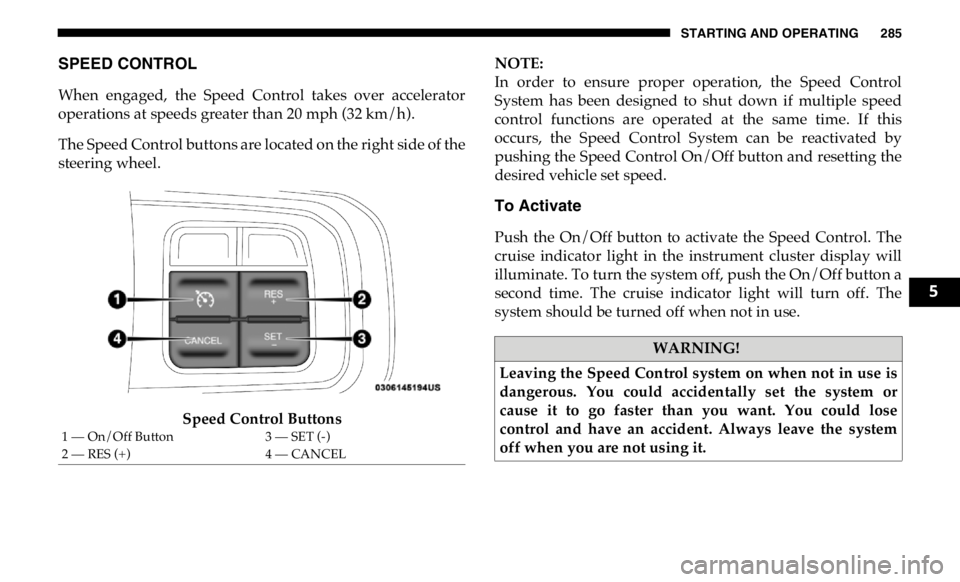
The Speed Control buttons are located on the right side of the
steering wheel.
Speed Control Buttons NOTE:
In order to ensure proper operation, the Speed Control
System has been designed to shut down if multiple speed
control functions are operated at the same time. If this
occurs, the Speed Control System can be reactivated by
pushing the Speed Control On/Off button and resetting the
desired vehicle set speed.
To Activate
Push the On/Off button to activate the Speed Control. The
cruise indicator light in the instrument cluster display will
illuminate. To turn the system off, push the On/Off button a
second time. The cruise indicator light will turn off. The
system should be turned off when not in use.
1 — On/Off Button 3 — SET (-)
2 — RES (+) 4 — CANCEL WARNING!
Leaving the Speed Control system on when not in use is
dangerous. You could accidentally set the system or
cause it to go faster than you want. You could lose
control and have an accident. Always leave the system
off when you are not using it. 5
Page 289 of 607
STARTING AND OPERATING 287
U.S. Speed (mph)
• Pushing the SET (-) button once will result in a 1 mph
decrease in set speed. Each subsequent tap of the button
results in a decrease of 1 mph.
• If the button is continually pushed, the set speed will
continue to decrease until the button is released, then the
new set speed will be established.
Metric Speed (km/h)
• Pushing the SET (-) button once will result in a 1 km/h
decrease in set speed. Each subsequent tap of the button
results in a decrease of 1 km/h.
• If the button is continually pushed, the set speed will
continue to decrease until the button is released, then the
new set speed will be established.
To Accelerate For Passing
Press the accelerator as you would normally. When the pedal
is released, the vehicle will return to the set speed. Using Speed Control On Hills
The transmission may downshift on hills to maintain the
vehicle set speed.
NOTE:
The Speed Control system maintains speed up and down
hills. A slight speed change on moderate hills is normal.
On steep hills, a greater speed loss or gain may occur so it
may be preferable to drive without Speed Control.
WARNING!
Speed Control can be dangerous where the system
cannot maintain a constant speed. Your vehicle could go
too fast for the conditions, and you could lose control
and have an accident. Do not use Speed Control in heavy
traffic or on roads that are winding, icy, snow-covered or
slippery. 5
Page 299 of 607

STARTING AND OPERATING 297
Distance Setting 1 Bar (Short)
The system automatically defaults to the longest distance
setting. To decrease the distance setting, push the Distance
Button and release. Each time the button is pushed, the
distance setting decreases by one bar. Once the shortest
setting is reached, if the button is pushed again it will reset
to the default setting (longest).
If there is no vehicle ahead, the vehicle will maintain the set
speed. If a slower moving vehicle is detected in the same
lane, the instrument cluster displays the “Sensed Vehicle
Indicator” icon, and the system adjusts vehicle speed auto -
matically to maintain the distance setting, regardless of the
set speed. The vehicle will then maintain the set distance until:
• The vehicle ahead accelerates to a speed above the set
speed.
• The vehicle ahead moves out of your lane or view of the
sensor.
• The distance setting is changed.
• The system disengages. (Refer to the information on ACC
Activation).
The maximum braking applied by ACC is limited; however,
the driver can always apply the brakes manually, if neces -
sary.
NOTE:
The brake lights will illuminate whenever the ACC system
applies the brakes.
A Proximity Warning will alert the driver if ACC predicts
that its maximum braking level is not sufficient to maintain
the set distance. If this occurs, a visual alert “BRAKE” will
flash in the instrument cluster display and a chime will
sound while ACC continues to apply its maximum braking
capacity. 5
Page 309 of 607
STARTING AND OPERATING 307
Normal (Fixed Speed) Cruise Control Mode
In addition to Adaptive Cruise Control mode, a Normal
(Fixed Speed) Cruise Control mode is available for cruising
at fixed speeds. The Normal (Fixed Speed) Cruise Control
mode is designed to maintain a set cruising speed without
requiring the driver to operate the accelerator. Speed Control
can only be operated if the vehicle speed is above 20 mph
(32 km/h).
To change between the different control modes, push the
Adaptive Cruise Control (ACC) on/off button which turns
the ACC on and the Normal (Fixed Speed) Cruise Control
off. Pushing of the Normal (Fixed Speed) Cruise Control on/
off button will result in turning on (changing to) the Normal
(Fixed Speed) Cruise Control mode. To Set A Desired Speed
Turn the Normal (Fixed Speed) Cruise Control on.
When the vehicle has reached the desired speed,
push the RES (+) or SET (-) button and release.
Release the accelerator and the vehicle will operate at the
selected speed. Once a speed has been set a message
“CRUISE CONTROL SET TO MPH (km/h)” will appear
indicating what speed was set. This light will turn on when
the system is turned on via the on/off control. It turns green
when the cruise control is set.
To Vary The Speed Setting
To Increase Speed
When the Normal (Fixed Speed) Cruise Control is set, you
can increase speed by pushing the RES (+) button.
The driver's preferred units can be selected through the
instrument panel settings. Refer to ”Instrument Cluster
Display” in “Getting To Know Your Instrument Panel” for
more information. The speed increment shown is dependant
on the speed of U.S. (mph) or Metric (km/h) units:WARNING!
In the Normal (Fixed Speed) Cruise Control mode, the
system will not react to vehicles ahead. In addition, the
proximity warning does not activate and no alarm will
sound even if you are too close to the vehicle ahead since
neither the presence of the vehicle ahead nor the
vehicle-to-vehicle distance is detected. Be sure to
maintain a safe distance between your vehicle and the
vehicle ahead. Always be aware which mode is selected. 5
Page 338 of 607
336 STARTING AND OPERATING
(Continued)Deactivation
Once activated, the image will continue to be displayed in
any gear until the vehicle speed exceeds 8 mph (13 km/h). REFUELING THE VEHICLE — GAS
NOTE:
When the fuel nozzle “clicks” or shuts off the fuel tank is full.WARNING!
Drivers must be careful when backing up even when
using the Surround View Camera. Always check
carefully behind your vehicle, and be sure to check for
pedestrians, animals, other vehicles, obstructions, or
blind spots before backing up. You are responsible for
the safety of your surroundings and must continue to
pay attention while backing up. Failure to do so can
result in serious injury or death.
CAUTION!
• To avoid vehicle damage, Surround View should only
be used as a parking aid. The Surround View camera is
unable to view every obstacle or object in your drive
path.
• To avoid vehicle damage, the vehicle must be driven
slowly when using Surround View to be able to stop in
time when an obstacle is seen. It is recommended that
the driver look frequently over his/her shoulder when
using Surround View. CAUTION!
• Damage to the fuel system or emissions control system
could result from using an improper fuel tank filler
tube cap (fuel filler cap). A poorly fitting cap could let
impurities into the fuel system. Also, a poorly-fitted
aftermarket cap can cause the MIL (Malfunction Indi -
cator Light) to illuminate due to fuel vapors escaping
from the system.
• A poorly fitting fuel filler cap may cause the MIL to
turn on.
• To avoid fuel spillage and overfilling, do not “top off”
the fuel tank after filling.
WARNING!
• Never have any smoking materials lit in or near the
vehicle when the gas cap is removed or the tank is
being filled.
Page 339 of 607
STARTING AND OPERATING 337
NOTE:
Tighten the gas cap ¼ turn until you hear one click. This is an
indication that the cap is properly tightened.
If the gas cap is not tightened properly, the Malfunction Indi -
cator Light will come on. Be sure the gas cap is tightened
every time the vehicle is refueled. Loose Fuel Filler Cap Message
If the vehicle diagnostic system determines that the
fuel filler cap is loose, improperly installed, or
damaged, a loose gascap indicator will display in the
instrument cluster telltale display area. Refer to “Instrument
Cluster Display” in “Getting To Know Your Instrument
Panel” for further information. Tighten the fuel filler cap
properly and push the RIGHT button to turn off the message.
If the problem continues, the message will appear the next
time the vehicle is started.
VEHICLE LOADING
Gross Vehicle Weight Rating (GVWR)
The GVWR is the total permissible weight of your vehicle
including driver, passengers, vehicle, options and cargo. The
label also specifies maximum capacities of front and rear axle
systems (GAWR). Total load must be limited so GVWR and
front and rear GAWR are not exceeded.• Never add fuel to the vehicle when the engine is
running. This is in violation of most state and federal
fire regulations and may cause the MIL to turn on.
WARNING!
A fire may result if gasoline is pumped into a portable
container that is inside of a vehicle. You could be
burned. Always place gas containers on the ground
while filling. WARNING! (Continued)
5