window RAM CHASSIS CAB 2019 Owners Manual
[x] Cancel search | Manufacturer: RAM, Model Year: 2019, Model line: CHASSIS CAB, Model: RAM CHASSIS CAB 2019Pages: 607, PDF Size: 12.68 MB
Page 6 of 607

4
CLIMATE CONTROLS ..................................................... 77
Climate Controls Without A Touchscreen
Overview ...................................................................... 77
Climate Controls With A Touchscreen Overview .... 81
Climate Control Functions ........................................... 88
Automatic Temperature Control (ATC) ................... 89
Operating Tips .............................................................. 89
WINDOWS .......................................................................... 92
Power Windows ........................................................... 92
Wind Buffeting .............................................................. 95
HOOD ............................................................................... 95
To Open The Hood ....................................................... 95
To Close The Hood........................................................ 96
GARAGE DOOR OPENER — IF EQUIPPED .............. 97
Before You Begin Programming HomeLink ............. 98
Canadian/Gate Operator Programming ................. 101
Using HomeLink ......................................................... 102
Security ......................................................................... 103
Troubleshooting Tips .................................................. 103
General Information .................................................... 103 INTERNAL EQUIPMENT ...............................................104
Storage ...........................................................................104
Cupholders ..................................................................115
Electrical Power Outlets ............................................117
Power Inverter — If Equipped ................................. 119
Wireless Charging Pad — If Equipped ...................121
Overhead Sunglass Storage........................................122
GETTING TO KNOW YOUR INSTRUMENT
PANEL BASE / MIDLINE INSTRUMENT CLUSTER ..............123
Base / Midline Instrument Cluster Descriptions ....124
PREMIUM INSTRUMENT CLUSTER ...........................126
Premium Instrument Cluster Descriptions..............127
INSTRUMENT CLUSTER DISPLAY..............................128
Instrument Cluster Display Controls........................ 128
Oil Life Reset ................................................................130
Display Menu Items ....................................................131
Battery Saver On/Battery Saver Mode Message —
Electrical Load Reduction Actions —
If Equipped ................................................................144
Page 27 of 607
GETTING TO KNOW YOUR VEHICLE 25
The engine only runs in the ON/RUN ignition position or
from a remote start request.
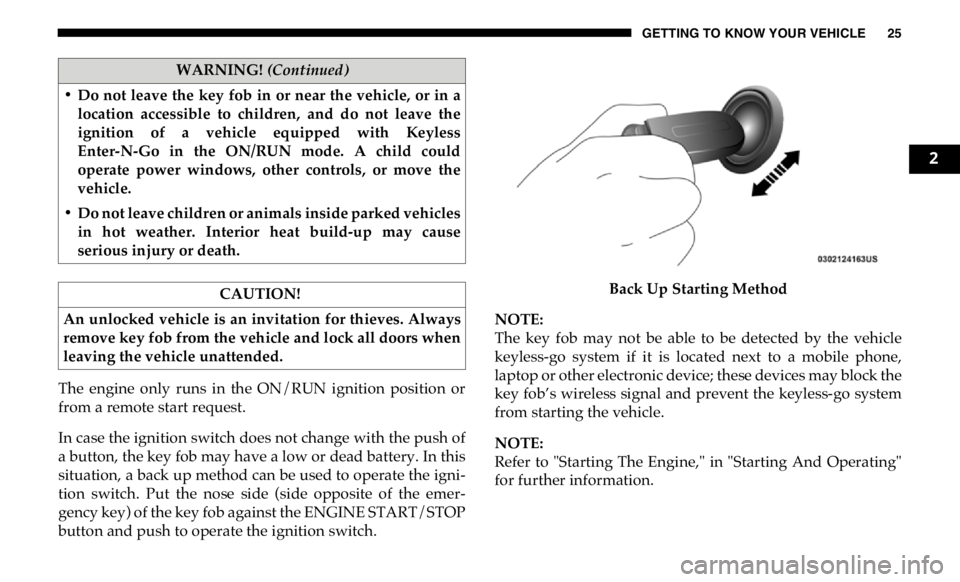
In case the ignition switch does not change with the push of
a button, the key fob may have a low or dead battery. In this
situation, a back up method can be used to operate the igni -
tion switch. Put the nose side (side opposite of the emer -
gency key) of the key fob against the ENGINE START/STOP
button and push to operate the ignition switch. Back Up Starting Method
NOTE:
The key fob may not be able to be detected by the vehicle
keyless-go system if it is located next to a mobile phone,
laptop or other electronic device; these devices may block the
key fob’s wireless signal and prevent the keyless-go system
from starting the vehicle.
NOTE:
Refer to "Starting The Engine," in "Starting And Operating"
for further information.• Do not leave the key fob in or near the vehicle, or in a
location accessible to children, and do not leave the
ignition of a vehicle equipped with Keyless
Enter-N-Go in the ON/RUN mode. A child could
operate power windows, other controls, or move the
vehicle.
• Do not leave children or animals inside parked vehicles
in hot weather. Interior heat build-up may cause
serious injury or death.
CAUTION!
An unlocked vehicle is an invitation for thieves. Always
remove key fob from the vehicle and lock all doors when
leaving the vehicle unattended. WARNING! (Continued)
2
Page 28 of 607
26 GETTING TO KNOW YOUR VEHICLE
REMOTE START — IF EQUIPPED
How To Use Remote Start
All of the following conditions must be met before the engine
will remote start:
• Gear selector in PARK
• Doors closed
• Hood closed
• HAZARD switch off
• BRAKE switch inactive (brake pedal not pushed)
• Battery at an acceptable charge level
• PANIC button not pushed
• Fuel meets minimum requirement
• System not disabled from previous remote start event
• Vehicle security alarm not active Remote Start Abort Message
The following messages will display in the instrument
cluster display if the vehicle fails to remote start or exits
remote start prematurely:
• Remote Start Cancelled — Door Open
• Remote Start Cancelled — Hood Open
• Remote Start Cancelled — Fuel Low
• Remote Start Cancelled — System Fault
• Remote Start Disabled — Start Vehicle to Reset
The instrument cluster display message stays active until the
ignition is turned to the ON/RUN position. WARNING!
• Do not start or run an engine in a closed garage or
confined area. Exhaust gas contains Carbon Monoxide
(CO) which is odorless and colorless. Carbon
Monoxide is poisonous and can cause serious injury or
death when inhaled.
• Keep key fobs away from children. Operation of the
Remote Start System, windows, door locks or other
controls could cause serious injury or death.
Page 29 of 607

GETTING TO KNOW YOUR VEHICLE 27
To Enter Remote Start Mode
Push and release the Remote Start button on the key
fob twice within five seconds. The parking lights
will flash, vehicle doors will lock, and the horn will
chirp twice (if programmed). Once the vehicle has started,
the engine will run for 15 minutes.
NOTE:
• If your power door locks were unlocked, Remote Start will
automatically lock the doors.
• If an engine fault is present or fuel level is low, the vehicle
will start and then shut down in 10 seconds.
• The park lamps will turn on and remain on during Remote
Start mode.
• For security, power window and power sunroof operation
(if equipped) are disabled when the vehicle is in the
Remote Start mode.
• The engine can be started two consecutive times (two
15-minute cycles) with the key fob. However, the ignition
must be placed in the ON/RUN position before you can
repeat the start sequence for a third cycle. To Exit Remote Start Mode Without Driving The
Vehicle
Push and release the remote start button one time or allow
the engine to run for the entire 15-minute cycle.
NOTE:
To avoid unintentional shutdowns, the system will disable
with a one time push of the remote start button for two
seconds after receiving a valid remote start request.
To Exit Remote Start Mode And Drive The Vehicle
Before the end of the 15-minute cycle, push and release the
unlock button on the key fob to unlock the doors and disarm
the vehicle security alarm system (if equipped). Then, prior
to the end of the 15-minute cycle, cycle the ignition to the
ON/RUN position.
Remote Start Comfort Systems — If Equipped
When Remote Start is activated, the heated steering wheel
and driver heated seat features will automatically turn on in
cold weather. In warm weather, the driver vented seat
feature will automatically turn on when the remote start is
activated. These features will stay on through the duration of
Remote Start or until the ignition switch is placed in the ON/
RUN mode. 2
Page 35 of 607
GETTING TO KNOW YOUR VEHICLE 33
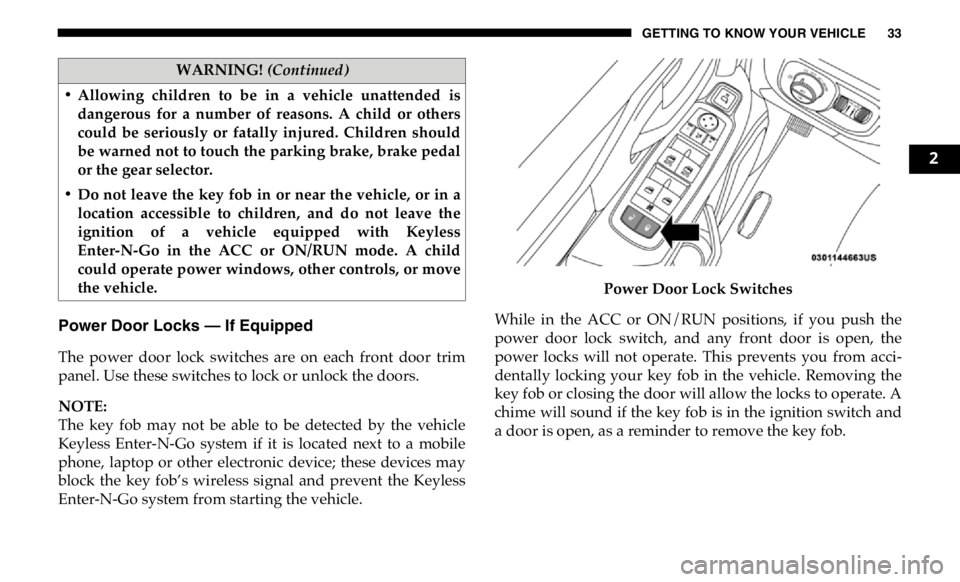
Power Door Locks — If Equipped
The power door lock switches are on each front door trim
panel. Use these switches to lock or unlock the doors.
NOTE:
The key fob may not be able to be detected by the vehicle
Keyless Enter-N-Go system if it is located next to a mobile
phone, laptop or other electronic device; these devices may
block the key fob’s wireless signal and prevent the Keyless
Enter-N-Go system from starting the vehicle. Power Door Lock Switches
While in the ACC or ON/RUN positions, if you push the
power door lock switch, and any front door is open, the
power locks will not operate. This prevents you from acci -
dentally locking your key fob in the vehicle. Removing the
key fob or closing the door will allow the locks to operate. A
chime will sound if the key fob is in the ignition switch and
a door is open, as a reminder to remove the key fob.• Allowing children to be in a vehicle unattended is
dangerous for a number of reasons. A child or others
could be seriously or fatally injured. Children should
be warned not to touch the parking brake, brake pedal
or the gear selector.
• Do not leave the key fob in or near the vehicle, or in a
location accessible to children, and do not leave the
ignition of a vehicle equipped with Keyless
Enter-N-Go in the ACC or ON/RUN mode. A child
could operate power windows, other controls, or move
the vehicle. WARNING! (Continued)
2
Page 41 of 607
GETTING TO KNOW YOUR VEHICLE 39
NOTE:
• After setting the Child-Protection Door Lock system,
always test the door from the inside to make certain it is in
the desired position.
• For emergency exit with the system engaged, move the
door lock switch to the unlock position, roll down the
window, and open the door with the outside door handle.
SEATS
Seats are a part of the Occupant Restraint System of the
vehicle. Manual Front Seat Adjustment
Manual Front Seat Forward/Rearward Adjustment
Both front seats are adjustable forward or rearward. The
manual seat adjustment handle is located under the seat
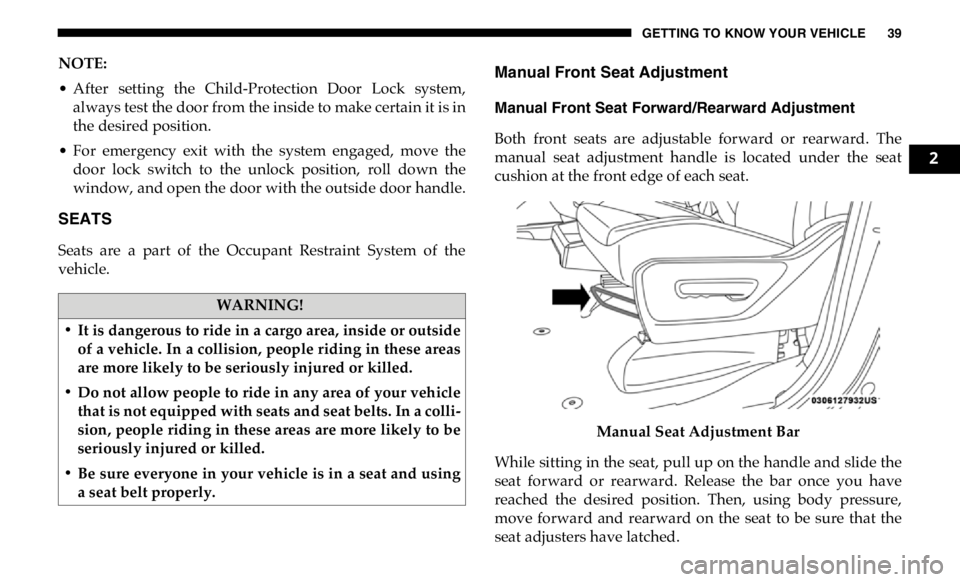
cushion at the front edge of each seat.
Manual Seat Adjustment Bar
While sitting in the seat, pull up on the handle and slide the
seat forward or rearward. Release the bar once you have
reached the desired position. Then, using body pressure,
move forward and rearward on the seat to be sure that the
seat adjusters have latched.WARNING!
• It is dangerous to ride in a cargo area, inside or outside
of a vehicle. In a collision, people riding in these areas
are more likely to be seriously injured or killed.
• Do not allow people to ride in any area of your vehicle
that is not equipped with seats and seat belts. In a colli -
sion, people riding in these areas are more likely to be
seriously injured or killed.
• Be sure everyone in your vehicle is in a seat and using
a seat belt properly. 2
Page 58 of 607

56 GETTING TO KNOW YOUR VEHICLE
NOTE:
• Always adjust the pedals to a position that allows full
pedal travel.
• Further small adjustments may be necessary to find the
best possible seat/pedal position.
• For vehicles equipped with Driver Memory Seat, you can
use your remote keyless entry key fob or the memory
switch on the driver’s door trim panel to return the adjust -
able pedals to pre-programmed positions. Refer to “Driver
Memory Seat” in “Getting To Know Your Vehicle” for
further information. MIRRORS
Inside Day/Night Mirror — If Equipped
The mirror head can be adjusted up, down, left, and right for
various drivers. The mirror should be adjusted to center on
the view through the rear window.
Headlight glare from vehicles behind you can be reduced by
moving the small control under the mirror to the night posi -
tion (toward the rear of the vehicle). The mirror should be
adjusted while set in the day position (toward the wind -
shield).
Adjusting Rearview MirrorWARNING!
Do not adjust the pedals while the vehicle is moving.
You could lose control and have an accident. Always
adjust the pedals while the vehicle is parked.
CAUTION!
Do not place any article under the adjustable pedals or
impede its ability to move, as it may cause damage to the
pedal controls. Pedal travel may become limited if
movement is stopped by an obstruction in the adjustable
pedal's path.
Page 59 of 607

GETTING TO KNOW YOUR VEHICLE 57
Automatic Dimming Mirror — If Equipped
The mirror head can be adjusted up, down, left, and right for
various drivers. The mirror should be adjusted to center on
the view through the rear window.
This mirror automatically adjusts for headlight glare from
vehicles behind you.
NOTE:
The Automatic Dimming feature is disabled when the
vehicle is in REVERSE to improve rear view viewing.
The Automatic Dimming feature can be turned on or off
through the touchscreen.
• Press the mirror dimmer button once to turn the feature
on.
• Press the mirror dimmer button a second time to turn the
feature off. Automatic Dimming Mirror
CAUTION!
To avoid damage to the mirror during cleaning, never
spray any cleaning solution directly onto the mirror.
Apply the solution onto a clean cloth and wipe the
mirror clean. 2
Page 60 of 607

58 GETTING TO KNOW YOUR VEHICLE
Automatic Dimming Mirror With Rear View Camera
Display — If Equipped
A single ball joint mirror is provided in the vehicle. It is a
twist on mirror that has a fixed position at the windshield.
The mirror installs on the windshield button with a counter -
clockwise rotation and requires no tools for mounting. The
mirror head can be adjusted up, down, left, and right for
various drivers. The mirror should be adjusted to center on
the view through the rear window.
This mirror automatically adjusts for headlight glare from
vehicles behind you.
When the vehicle is placed into reverse gear, a video display
illuminates to display the image generated by the rear view
camera (for the 3500, 4500, and 5500 Chassis Cab vehicles,
the Rear Backup Camera is shipped loose and not installed.
Please refer to the Ram Body Builders Guide for more infor -
mation). The auto dimming feature is also disabled to
improve rear view viewing. Automatic Dimming Mirror With Rear View Camera
Outside Mirrors
To receive maximum benefit, adjust the outside mirrors to
center on the adjacent lane of traffic with a slight overlap of
the view obtained on the inside mirror.
NOTE:
If your vehicle is equipped with puddle lamps under the
outside mirrors, they can be turned off through the Uconnect
display. For further information, refer to “Uconnect
Settings” in “Multimedia”.
Page 64 of 607
62 GETTING TO KNOW YOUR VEHICLE
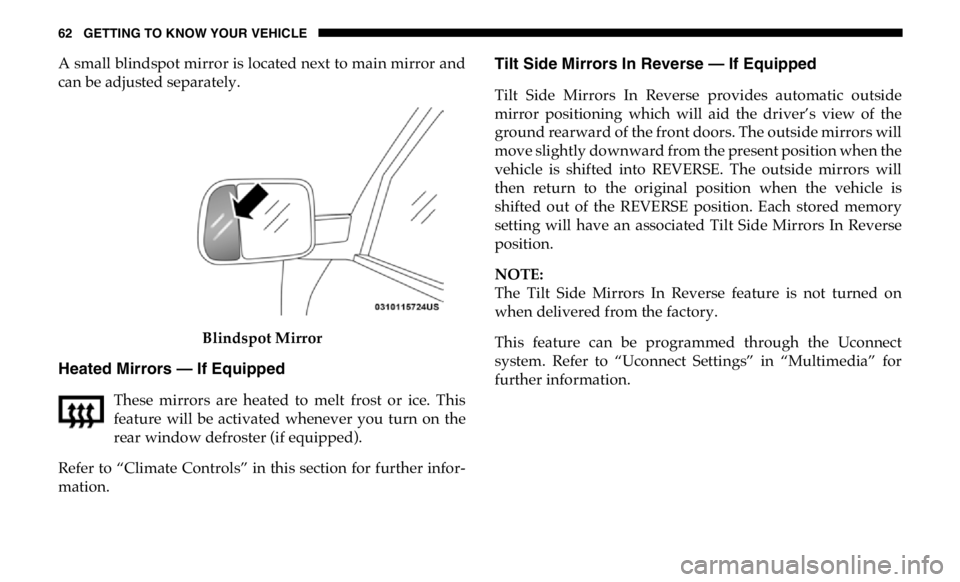
A small blindspot mirror is located next to main mirror and
can be adjusted separately.
Blindspot Mirror
Heated Mirrors — If Equipped
These mirrors are heated to melt frost or ice. This
feature will be activated whenever you turn on the
rear window defroster (if equipped).
Refer to “Climate Controls” in this section for further infor -
mation. Tilt Side Mirrors In Reverse — If Equipped
Tilt Side Mirrors In Reverse provides automatic outside
mirror positioning which will aid the driver’s view of the
ground rearward of the front doors. The outside mirrors will
move slightly downward from the present position when the
vehicle is shifted into REVERSE. The outside mirrors will
then return to the original position when the vehicle is
shifted out of the REVERSE position. Each stored memory
setting will have an associated Tilt Side Mirrors In Reverse
position.
NOTE:
The Tilt Side Mirrors In Reverse feature is not turned on
when delivered from the factory.
This feature can be programmed through the Uconnect
system. Refer to “Uconnect Settings” in “Multimedia” for
further information.