wheel RAM CHASSIS CAB 2020 Owners Manual
[x] Cancel search | Manufacturer: RAM, Model Year: 2020, Model line: CHASSIS CAB, Model: RAM CHASSIS CAB 2020Pages: 516, PDF Size: 16.57 MB
Page 437 of 516

MULTIMEDIA435
Safety & Driving Assistance
After pressing the Safety & Driving Assistance button on the touchscreen, the following settings will be available:Fixed Backup Camera Guidelines — If Equipped
OnOff
Forward Facing Camera Guidelines — If Equipped On
Off
NOTE:
The “Forward Facing Camera Guidelines” feature is an off-road type of feature that shows the path of the tires based on the steering wheel input. CHMSL (Center High Mounted Stop Lamp)
Camera Dynamic Centerline — If Equipped On
Off
NOTE:
When the “CHMSL Camera Dynamic Centerline” feature is selected, it will assist in backing up for trailer alignment and hook up. This feature is only
available if your vehicle is equipped with Surround View Camera. Cargo Camera Dynamic Centerline — If Equipped On
Off
Setting Name Selectable Options
Setting NameSelectable Options
Forward Collision Warning — If
Equipped Off
Warning Only Warning & Braking
NOTE:
Sounds an audible warning for the driver to slow the vehicle in case of collision or sounds an audible warning and applies brakes.9
2020_RAM_CHASSIS_CAB_OM_USA=GUID-6C67832B-7839-4CCF-BEFC-CDF988F949EA=1=en=.book Page 435
Page 442 of 516
440MULTIMEDIA
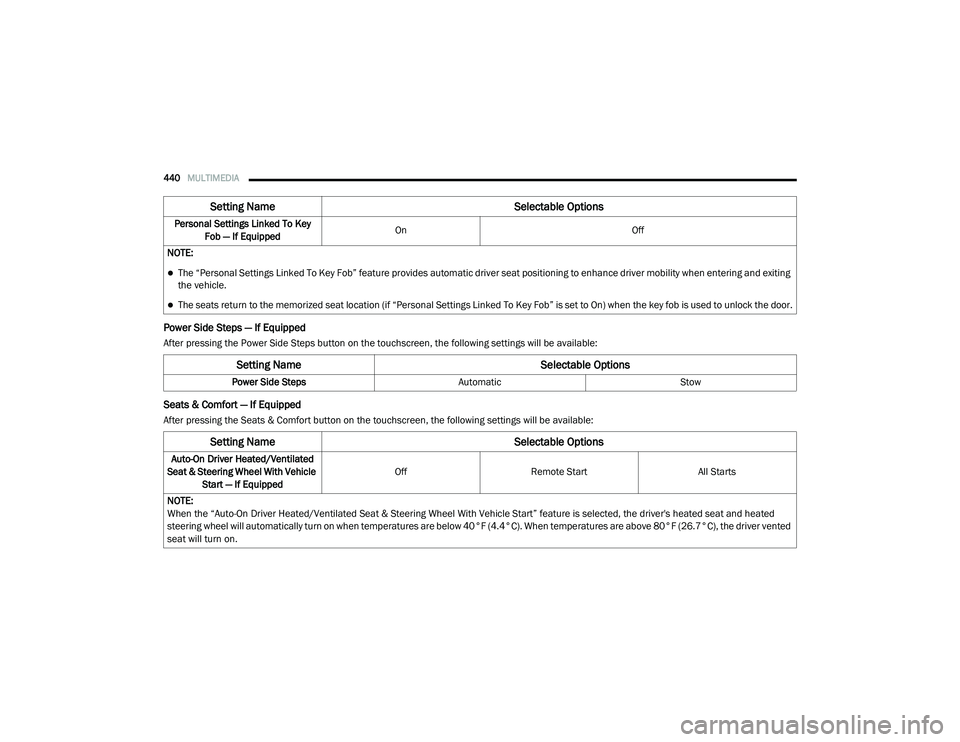
Power Side Steps — If Equipped
After pressing the Power Side Steps button on the touchscreen, the following settings will be available:
Seats & Comfort — If Equipped
After pressing the Seats & Comfort button on the touchscreen, the following settings will be available:Personal Settings Linked To Key
Fob — If Equipped On
Off
NOTE:
The “Personal Settings Linked To Key Fob” feature provides automatic driver seat positioning to enhance driver mobility when entering and exiting
the vehicle.
The seats return to the memorized seat location (if “Personal Settings Linked To Key Fob” is set to On) when the key fob is used to unlock the door.
Setting Name Selectable Options
Setting NameSelectable Options
Power Side StepsAutomaticStow
Setting Name Selectable Options
Auto-On Driver Heated/Ventilated
Seat & Steering Wheel With Vehicle Start — If Equipped Off
Remote Start All Starts
NOTE:
When the “Auto-On Driver Heated/Ventilated Seat & Steering Wheel With Vehicle Start” feature is selected, the driver's heated seat and heated
steering wheel will automatically turn on when temperatures are below 40°F (4.4°C). When temperatures are above 80°F (26.7°C), the driver vented
seat will turn on.
2020_RAM_CHASSIS_CAB_OM_USA=GUID-6C67832B-7839-4CCF-BEFC-CDF988F949EA=1=en=.book Page 440
Page 444 of 516

442MULTIMEDIA
Air Suspension — If Equipped
After pressing the Suspension button on the touchscreen, the following settings will be available:
Setting Name Selectable Options
Display Suspension MessagesAllWarnings Only
Tire Jack Mode On Off
NOTE:
When the “Tire Jack Mode” feature is selected, the air suspension system is disabled to assist with changing a spare tire. Transport Mode On Off
NOTE:
When the “Transport Mode” feature is selected, the air suspension system lowers and then disables to assist with flat bed towing. Wheel Alignment Mode On Off
NOTE:
Before performing a wheel alignment, the “Wheel Alignment Mode” must be enabled. Refer to an authorized dealer for further information.
2020_RAM_CHASSIS_CAB_OM_USA=GUID-6C67832B-7839-4CCF-BEFC-CDF988F949EA=1=en=.book Page 442
Page 446 of 516

444MULTIMEDIA
NOTE:
For further information about Trailer Tire Pressure Monitoring, refer to “Auxiliary Driving Systems” in “Safety.”
Audio
After pressing the Audio button on the touchscreen, the following settings will be available: Trailer Name
List of Trailer Names
NOTE:
You can select and personalize your trailer name depending on the type of trailer you are hauling. Select the trailer name from the following list: trailer,
boat, car, cargo, dump, equipment, flatbed, gooseneck, horse, livestock, motorcycle, snowmobile, travel, utility, and 5th wheel.
Setting Name Selectable Options
Setting NameSelectable Options
Balance/FadeFrontRear LeftRight
NOTE:
The “Balance/Fade” feature allows you to adjust the Balance and Fade settings. Press and drag the Speaker icon or use the arrows to adjust, tap the
C icon to readjust to the center. Equalizer + –
NOTE:
When in the “Equalizer” display you may adjust the Bass, Mid and Treble settings. Speed Adjusted Volume Off123
NOTE:
The “Speed Adjusted Volume” feature increases or decreases volume relative to vehicle speed.
2020_RAM_CHASSIS_CAB_OM_USA=GUID-6C67832B-7839-4CCF-BEFC-CDF988F949EA=1=en=.book Page 444
Page 456 of 516

454MULTIMEDIA
Active Backup Camera Guidelines — If Equipped OnOff
NOTE:
The “Active Backup Camera Guidelines” feature overlays the Rear Backup Camera image with active, or dynamic, grid lines to help illustrate the width
of the vehicle and its projected backup path, based on the steering wheel position when the option is checked. A dashed center line overlay indicates
the center of the vehicle to assist with parking or aligning to a hitch/receiver. Fixed Backup Camera Guidelines — If Equipped OnOff
Forward Facing Camera Guidelines — If Equipped On
Off
NOTE:
The “Forward Facing Camera Guidelines” feature is an off-road type of feature that shows the path of the tires based on the steering wheel input. CHMSL (Center High Mounted Stop Lamp)
Camera Dynamic Centerline — If Equipped On
Off
NOTE:
When the “CHMSL Camera Dynamic Centerline” feature is selected, it will assist in backing up for trailer alignment and hook up. This feature is only
available if your vehicle is equipped with Surround View Camera. Cargo Camera Dynamic Centerline — If Equipped On
Off
Setting Name Selectable Options
2020_RAM_CHASSIS_CAB_OM_USA=GUID-6C67832B-7839-4CCF-BEFC-CDF988F949EA=1=en=.book Page 454
Page 459 of 516

MULTIMEDIA457
Headlights With Wipers — If Equipped OnOff
NOTE:
When the “Headlights With Wipers” feature is selected, and the headlight switch is in the AUTO position, the headlights turn on approximately 10
seconds after the wipers are turned on. The headlights also turn off when the wipers are turned off if they were turned on by this feature. Auto Dim High Beams — If Equipped OnOff
NOTE:
When the “Auto Dim High Beams” feature is selected, the high beam headlights deactivate automatically under certain conditions. Daytime Running Lights OnOff
NOTE:
When the “Daytime Running Lights” feature is selected, the daytime running lights can be turned On or Off. This feature is only available if allowed by
law in the country of the vehicle purchase. Flash Lights with Lock OnOff
NOTE:
When the “Flash Lights With Lock” feature is selected, the exterior lamps flash when the doors are locked or unlocked with the key fob. This feature
may be selected with or without the “Sound Horn With Lock” feature selected. Steering Directed Lights OnOff
NOTE:
When the “Steering Directed Lights” feature is selected, the headlights turn with the direction of the steering wheel. Rear Guidance Lights w/ Cargo Lights — If Equipped On
Off
NOTE:
When the “Rear Guidance Lights w/ Cargo Lights” feature is selected, the lights in the cargo and bed of the truck will come on either when the head -
light switch is pressed, or the button on the back bed of the truck is pressed.
Setting Name Selectable Options
9
2020_RAM_CHASSIS_CAB_OM_USA=GUID-6C67832B-7839-4CCF-BEFC-CDF988F949EA=1=en=.book Page 457
Page 461 of 516

MULTIMEDIA459
Seats & Comfort — If Equipped
After pressing the Seats & Comfort button on the touchscreen, the following settings will be available:Passive Entry — If Equipped
OnOff
NOTE:
The “Passive Entry” feature allows you to lock and unlock the vehicle’s door(s) without having to push the key fob lock or unlock buttons. Personal Settings Linked To Key Fob — If Equipped On
Off
NOTE:
The “Personal Settings Linked To Key Fob” feature provides automatic driver seat positioning to enhance driver mobility when entering and exiting
the vehicle.
The seats return to the memorized seat location (if “Personal Settings Linked To Key Fob” is set to “On”) when the key fob is used to unlock the door.
Setting Name Selectable Options
Setting NameSelectable Options
Auto-On Driver Heated/Vented Seat
& Steering Wheel — If Equipped Off
Remote Start All Starts
NOTE:
When the “Auto-On Driver Heated/Vented Seat & Steering Wheel” feature is selected, the driver's heated seat and heated steering wheel will auto -
matically turn on when temperatures are below 40°F (4.4°C). When temperatures are above 80°F (26.7°C), the driver vented seat will turn on.
9
2020_RAM_CHASSIS_CAB_OM_USA=GUID-6C67832B-7839-4CCF-BEFC-CDF988F949EA=1=en=.book Page 459
Page 463 of 516
MULTIMEDIA461
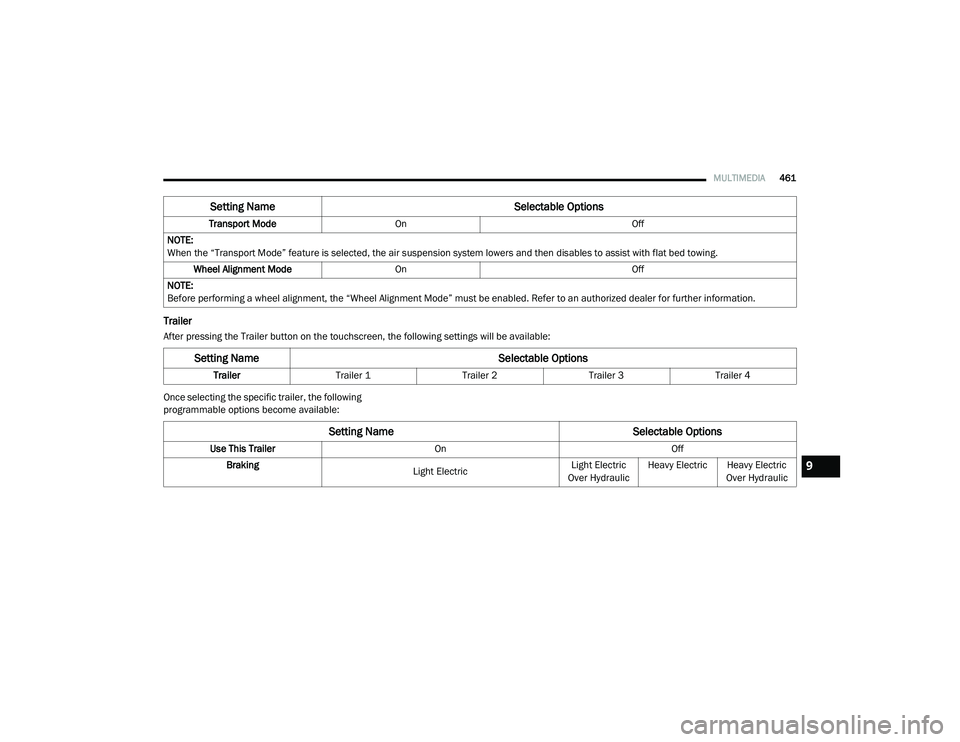
Trailer
After pressing the Trailer button on the touchscreen, the following settings will be available:
Once selecting the specific trailer, the following
programmable options become available:Transport Mode
On Off
NOTE:
When the “Transport Mode” feature is selected, the air suspension system lowers and then disables to assist with flat bed towing. Wheel Alignment Mode On Off
NOTE:
Before performing a wheel alignment, the “Wheel Alignment Mode” must be enabled. Refer to an authorized dealer for further information.
Setting Name Selectable Options
Setting NameSelectable Options
TrailerTrailer 1 Trailer 2Trailer 3Trailer 4
Setting Name Selectable Options
Use This TrailerOn Off
Braking Light ElectricLight Electric
Over Hydraulic Heavy Electric
Heavy Electric
Over Hydraulic
9
2020_RAM_CHASSIS_CAB_OM_USA=GUID-6C67832B-7839-4CCF-BEFC-CDF988F949EA=1=en=.book Page 461
Page 464 of 516
462MULTIMEDIA
NOTE:
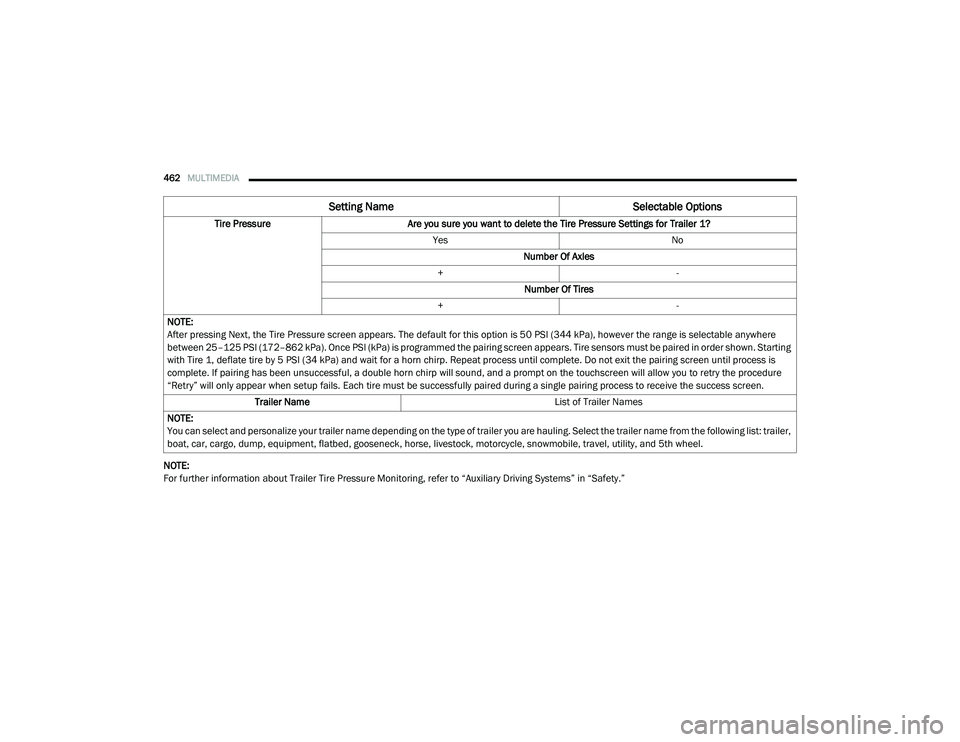
For further information about Trailer Tire Pressure Monitoring, refer to “Auxiliary Driving Systems” in “Safety.”Tire Pressure
Are you sure you want to delete the Tire Pressure Settings for Trailer 1?
Yes No
Number Of Axles
+ -
Number Of Tires
+ -
NOTE:
After pressing Next, the Tire Pressure screen appears. The default for this option is 50 PSI (344 kPa), however the range is selectable anywhere
between 25–125 PSI (172–862 kPa). Once PSI (kPa) is programmed the pairing screen appears. Tire sensors must be paired in order shown. Starting
with Tire 1, deflate tire by 5 PSI (34 kPa) and wait for a horn chirp. Repeat process until complete. Do not exit the pairing screen until process is
complete. If pairing has been unsuccessful, a double horn chirp will sound, and a prompt on the touchscreen will allow you to retry the procedure
“Retry” will only appear when setup fails. Each tire must be successfully paired during a single pairing process to receive the success screen. Trailer Name List of Trailer Names
NOTE:
You can select and personalize your trailer name depending on the type of trailer you are hauling. Select the trailer name from the following list: trailer,
boat, car, cargo, dump, equipment, flatbed, gooseneck, horse, livestock, motorcycle, snowmobile, travel, utility, and 5th wheel.
Setting Name Selectable Options
2020_RAM_CHASSIS_CAB_OM_USA=GUID-6C67832B-7839-4CCF-BEFC-CDF988F949EA=1=en=.book Page 462
Page 469 of 516
MULTIMEDIA467
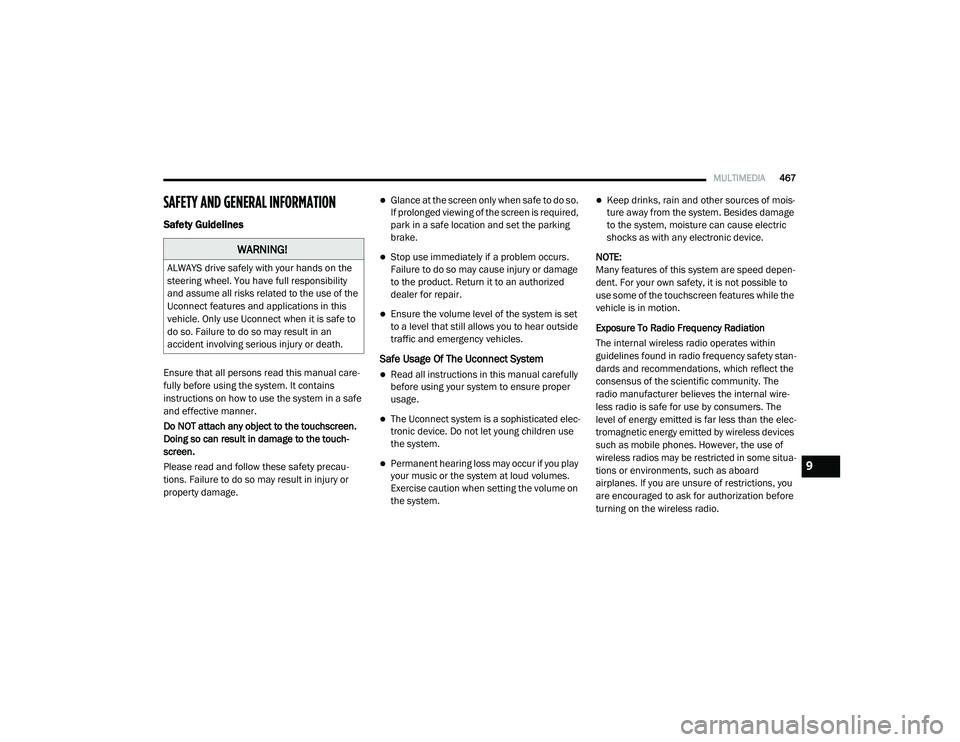
SAFETY AND GENERAL INFORMATION
Safety Guidelines
Ensure that all persons read this manual care -
fully before using the system. It contains
instructions on how to use the system in a safe
and effective manner.
Do NOT attach any object to the touchscreen.
Doing so can result in damage to the touch -
screen.
Please read and follow these safety precau -
tions. Failure to do so may result in injury or
property damage.
Glance at the screen only when safe to do so.
If prolonged viewing of the screen is required,
park in a safe location and set the parking
brake.
Stop use immediately if a problem occurs.
Failure to do so may cause injury or damage
to the product. Return it to an authorized
dealer for repair.
Ensure the volume level of the system is set
to a level that still allows you to hear outside
traffic and emergency vehicles.
Safe Usage Of The Uconnect System
Read all instructions in this manual carefully
before using your system to ensure proper
usage.
The Uconnect system is a sophisticated elec -
tronic device. Do not let young children use
the system.
Permanent hearing loss may occur if you play
your music or the system at loud volumes.
Exercise caution when setting the volume on
the system.
Keep drinks, rain and other sources of mois -
ture away from the system. Besides damage
to the system, moisture can cause electric
shocks as with any electronic device.
NOTE:
Many features of this system are speed depen -
dent. For your own safety, it is not possible to
use some of the touchscreen features while the
vehicle is in motion.
Exposure To Radio Frequency Radiation
The internal wireless radio operates within
guidelines found in radio frequency safety stan -
dards and recommendations, which reflect the
consensus of the scientific community. The
radio manufacturer believes the internal wire -
less radio is safe for use by consumers. The
level of energy emitted is far less than the elec -
tromagnetic energy emitted by wireless devices
such as mobile phones. However, the use of
wireless radios may be restricted in some situa-
tions or environments, such as aboard
airplanes. If you are unsure of restrictions, you
are encouraged to ask for authorization before
turning on the wireless radio.
WARNING!
ALWAYS drive safely with your hands on the
steering wheel. You have full responsibility
and assume all risks related to the use of the
Uconnect features and applications in this
vehicle. Only use Uconnect when it is safe to
do so. Failure to do so may result in an
accident involving serious injury or death.
9
2020_RAM_CHASSIS_CAB_OM_USA=GUID-6C67832B-7839-4CCF-BEFC-CDF988F949EA=1=en=.book Page 467