suspension RAM CHASSIS CAB 2020 User Guide
[x] Cancel search | Manufacturer: RAM, Model Year: 2020, Model line: CHASSIS CAB, Model: RAM CHASSIS CAB 2020Pages: 516, PDF Size: 16.57 MB
Page 392 of 516

390SERVICING AND MAINTENANCE
(Continued)
Dark Vapor Chrome, Black Satin Chrome, or
Low Gloss Clear Coat Wheels
Tire Chains and Traction Devices
Use of traction devices require sufficient
tire-to-body clearance. Due to limited clearance,
the following traction devices are recom-
mended. Follow these recommendations to
guard against damage.
Traction device must be of proper size for the
tire, as recommended by the traction device
manufacturer.
No other tire sizes are recommended for use
with a tire chain or traction device. Chassis Cab 3500 (Single Rear Wheel) Models
Install on rear tires only.
For LT275/70R18E tire, use of a U-class
snow chain is recommended.
Chassis Cab 3500 4x2 (Dual Rear Wheel)
Models
Install on rear tires only.
For a LT235/80R17E tire, use of a U-class
snow chain is recommended.
Chassis Cab 3500 4x4 (Dual Rear Wheel)
Models
Install on front/rear tires.
For a LT235/80R17E tire, use of a U-class
snow chain is recommended.
Chassis Cab 4500/5500 Models
Install on rear tires only.
For a 225/70R19.5G tire, use of a U-class
snow chain is recommended.
CAUTION!
If your vehicle is equipped with these
specialty wheels, DO NOT USE wheel
cleaners, abrasives, or polishing compounds.
They will permanently damage this finish and
such damage is not covered by the New
Vehicle Limited Warranty. HAND WASH ONLY
USING MILD SOAP AND WATER WITH A SOFT
CLOTH. Used on a regular basis; this is all that
is required to maintain this finish.
WARNING!
Using tires of different size and type (M+S,
Snow) between front and rear axles can
cause unpredictable handling. You could lose
control and have a collision.
CAUTION!
To avoid damage to your vehicle or tires,
observe the following precautions:
Because of restricted traction device clear -
ance between tires and other suspension
components, it is important that only trac-
tion devices in good condition are used.
Broken devices can cause serious damage.
Stop the vehicle immediately if noise
occurs that could indicate device breakage.
Remove the damaged parts of the device
before further use.
Install device as tightly as possible and
then retighten after driving about 0.5 mile
(0.8 km). Autosock devices do not require
retightening.
Do not exceed 30 mph (48 km/h).
Drive cautiously and avoid severe turns and
large bumps, especially with a loaded
vehicle.
Do not drive for a prolonged period on dry
pavement.
2020_RAM_CHASSIS_CAB_OM_USA=GUID-6C67832B-7839-4CCF-BEFC-CDF988F949EA=1=en=.book Page 390
Page 417 of 516
MULTIMEDIA415
NOTE:
FCA US LLC or your dealer may contact you
directly regarding software updates.
To help further improve vehicle security and
minimize the potential risk of a security
breach, vehicle owners should:
Routinely check www.driveuconnect.com
(US Residents) or www.driveuconnect.ca
(Canadian Residents) to learn about
available Uconnect software updates.
Only connect and use trusted media devices (e.g. personal mobile phones,
USBs, CDs).
Privacy of any wireless and wired communica -
tions cannot be assured. Third parties may
unlawfully intercept information and private
communications without your consent. For
further information, refer to “Data Collection &
Privacy” in your Uconnect Owner’s Manual
Supplement or “Onboard Diagnostic System
(OBD II) Cybersecurity” in “Getting To Know Your
Instrument Panel”.
UCONNECT SETTINGS
The Uconnect system uses a combination of
buttons on the touchscreen and buttons on the
faceplate located on the center of the instru -
ment panel that allows you to access and
change the customer programmable features.
Many features can vary by vehicle.
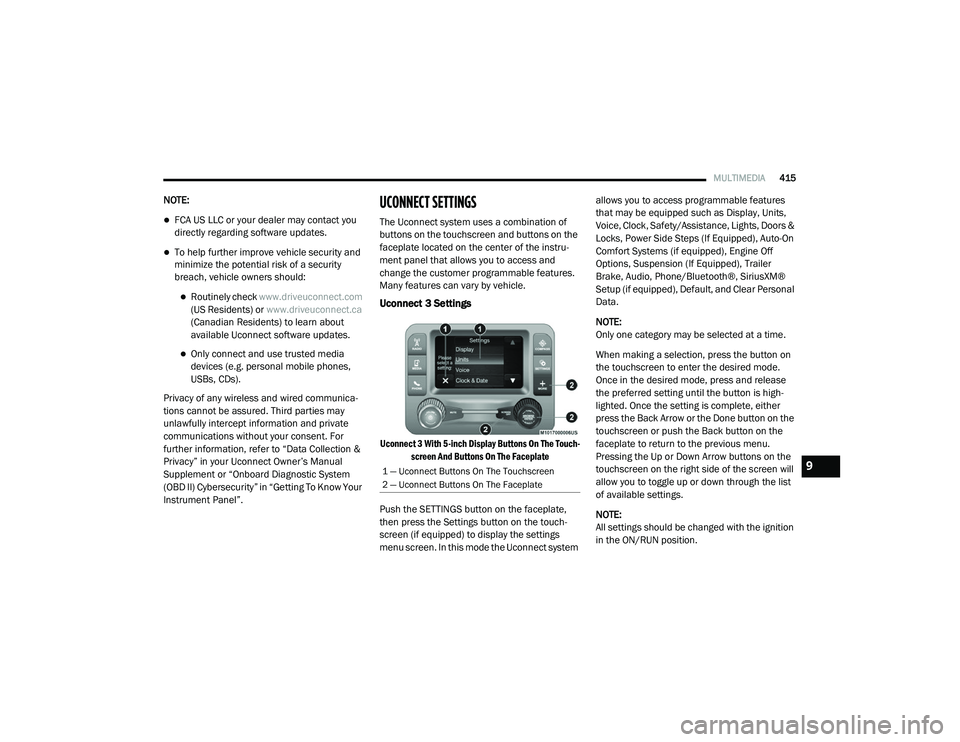
Uconnect 3 Settings
Uconnect 3 With 5-inch Display Buttons On The Touch -
screen And Buttons On The Faceplate
Push the SETTINGS button on the faceplate,
then press the Settings button on the touch -
screen (if equipped) to display the settings
menu screen. In this mode the Uconnect system allows you to access programmable features
that may be equipped such as Display, Units,
Voice, Clock, Safety/Assistance, Lights, Doors &
Locks, Power Side Steps (If Equipped), Auto-On
Comfort Systems (if equipped), Engine Off
Options, Suspension (If Equipped), Trailer
Brake, Audio, Phone/Bluetooth®, SiriusXM®
Setup (if equipped), Default, and Clear Personal
Data.
NOTE:
Only one category may be selected at a time.
When making a selection, press the button on
the touchscreen to enter the desired mode.
Once in the desired mode, press and release
the preferred setting until the button is high
-
lighted. Once the setting is complete, either
press the Back Arrow or the Done button on the
touchscreen or push the Back button on the
faceplate to return to the previous menu.
Pressing the Up or Down Arrow buttons on the
touchscreen on the right side of the screen will
allow you to toggle up or down through the list
of available settings.
NOTE:
All settings should be changed with the ignition
in the ON/RUN position.
1 — Uconnect Buttons On The Touchscreen
2 — Uconnect Buttons On The Faceplate9
2020_RAM_CHASSIS_CAB_OM_USA=GUID-6C67832B-7839-4CCF-BEFC-CDF988F949EA=1=en=.book Page 415
Page 427 of 516
MULTIMEDIA425
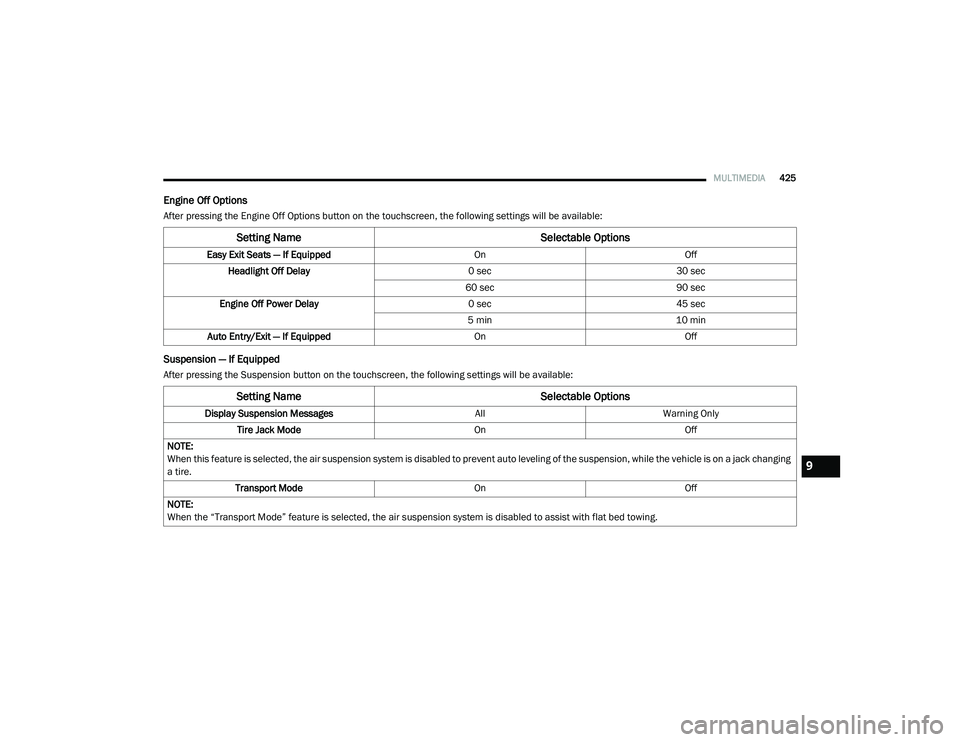
Engine Off Options
After pressing the Engine Off Options button on the touchscreen, the following settings will be available:
Suspension — If Equipped
After pressing the Suspension button on the touchscreen, the following settings will be available:
Setting Name Selectable Options
Easy Exit Seats — If EquippedOnOff
Headlight Off Delay 0 sec30 sec
60 sec 90 sec
Engine Off Power Delay 0 sec45 sec
5 min 10 min
Auto Entry/Exit — If Equipped OnOff
Setting Name Selectable Options
Display Suspension MessagesAllWarning Only
Tire Jack Mode OnOff
NOTE:
When this feature is selected, the air suspension system is disabled to prevent auto leveling of the suspension, while the vehicle is on a jack changing
a tire. Transport Mode OnOff
NOTE:
When the “Transport Mode” feature is selected, the air suspension system is disabled to assist with flat bed towing.
9
2020_RAM_CHASSIS_CAB_OM_USA=GUID-6C67832B-7839-4CCF-BEFC-CDF988F949EA=1=en=.book Page 425
Page 428 of 516

426MULTIMEDIA
Trailer Brake
After pressing the Trailer Brake button on the touchscreen, the following settings will be available:
Audio
After pressing the Audio button on the touchscreen, the following settings will be available:Wheel Alignment Mode
OnOff
NOTE:
The “Wheel Alignment Mode” feature prevents auto leveling of the air suspension while performing a wheel alignment service. Before performing a
wheel alignment, this mode must be enabled. Refer to an authorized dealer for further information.
Setting Name Selectable Options
Setting NameSelectable Options
Trailer SelectTrailer 1Trailer 2Trailer 3Trailer 4
Trailer Brake Type Light ElectricHeavy Electric Light EOHHeavy EOH
Trailer Name List of Trailer Names Available
NOTE:
You can select and personalize your trailer name depending on the type of trailer you are hauling. Select the trailer name from the following list: trailer,
boat, car, cargo, dump, equipment, flatbed, gooseneck, horse, livestock, motorcycle, snowmobile, travel, utility, and 5th wheel.
Setting Name Selectable Options
Balance/FadeFrontBack LeftRight
NOTE:
The “Balance/Fade” feature allows you to adjust the Balance and Fade settings. Press and drag the Speaker icon or use the arrows to adjust, tap the
C icon to readjust to the center.
2020_RAM_CHASSIS_CAB_OM_USA=GUID-6C67832B-7839-4CCF-BEFC-CDF988F949EA=1=en=.book Page 426
Page 432 of 516
430MULTIMEDIA
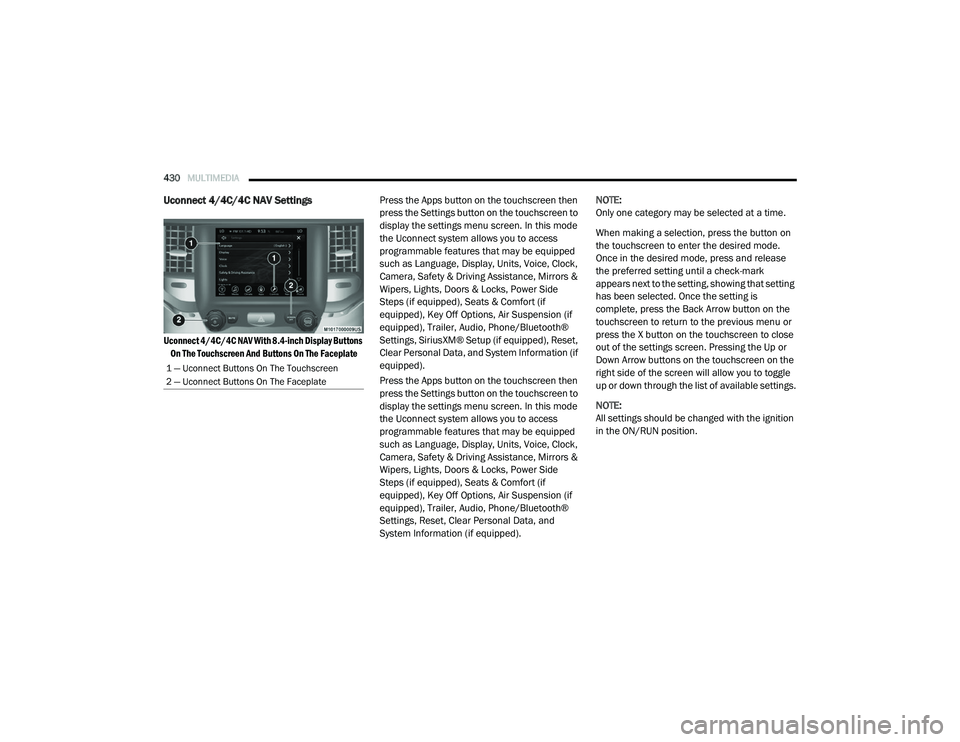
Uconnect 4/4C/4C NAV Settings
Uconnect 4/4C/4C NAV With 8.4-inch Display Buttons
On The Touchscreen And Buttons On The Faceplate
Press the Apps button on the touchscreen then
press the Settings button on the touchscreen to
display the settings menu screen. In this mode
the Uconnect system allows you to access
programmable features that may be equipped
such as Language, Display, Units, Voice, Clock,
Camera, Safety & Driving Assistance, Mirrors &
Wipers, Lights, Doors & Locks, Power Side
Steps (if equipped), Seats & Comfort (if
equipped), Key Off Options, Air Suspension (if
equipped), Trailer, Audio, Phone/Bluetooth®
Settings, SiriusXM® Setup (if equipped), Reset,
Clear Personal Data, and System Information (if
equipped).
Press the Apps button on the touchscreen then
press the Settings button on the touchscreen to
display the settings menu screen. In this mode
the Uconnect system allows you to access
programmable features that may be equipped
such as Language, Display, Units, Voice, Clock,
Camera, Safety & Driving Assistance, Mirrors &
Wipers, Lights, Doors & Locks, Power Side
Steps (if equipped), Seats & Comfort (if
equipped), Key Off Options, Air Suspension (if
equipped), Trailer, Audio, Phone/Bluetooth®
Settings, Reset, Clear Personal Data, and
System Information (if equipped). NOTE:
Only one category may be selected at a time.
When making a selection, press the button on
the touchscreen to enter the desired mode.
Once in the desired mode, press and release
the preferred setting until a check-mark
appears next to the setting, showing that setting
has been selected. Once the setting is
complete, press the Back Arrow button on the
touchscreen to return to the previous menu or
press the X button on the touchscreen to close
out of the settings screen. Pressing the Up or
Down Arrow buttons on the touchscreen on the
right side of the screen will allow you to toggle
up or down through the list of available settings.
NOTE:
All settings should be changed with the ignition
in the ON/RUN position.
1 — Uconnect Buttons On The Touchscreen
2 — Uconnect Buttons On The Faceplate
2020_RAM_CHASSIS_CAB_OM_USA=GUID-6C67832B-7839-4CCF-BEFC-CDF988F949EA=1=en=.book Page 430
Page 444 of 516

442MULTIMEDIA
Air Suspension — If Equipped
After pressing the Suspension button on the touchscreen, the following settings will be available:
Setting Name Selectable Options
Display Suspension MessagesAllWarnings Only
Tire Jack Mode On Off
NOTE:
When the “Tire Jack Mode” feature is selected, the air suspension system is disabled to assist with changing a spare tire. Transport Mode On Off
NOTE:
When the “Transport Mode” feature is selected, the air suspension system lowers and then disables to assist with flat bed towing. Wheel Alignment Mode On Off
NOTE:
Before performing a wheel alignment, the “Wheel Alignment Mode” must be enabled. Refer to an authorized dealer for further information.
2020_RAM_CHASSIS_CAB_OM_USA=GUID-6C67832B-7839-4CCF-BEFC-CDF988F949EA=1=en=.book Page 442
Page 462 of 516
460MULTIMEDIA
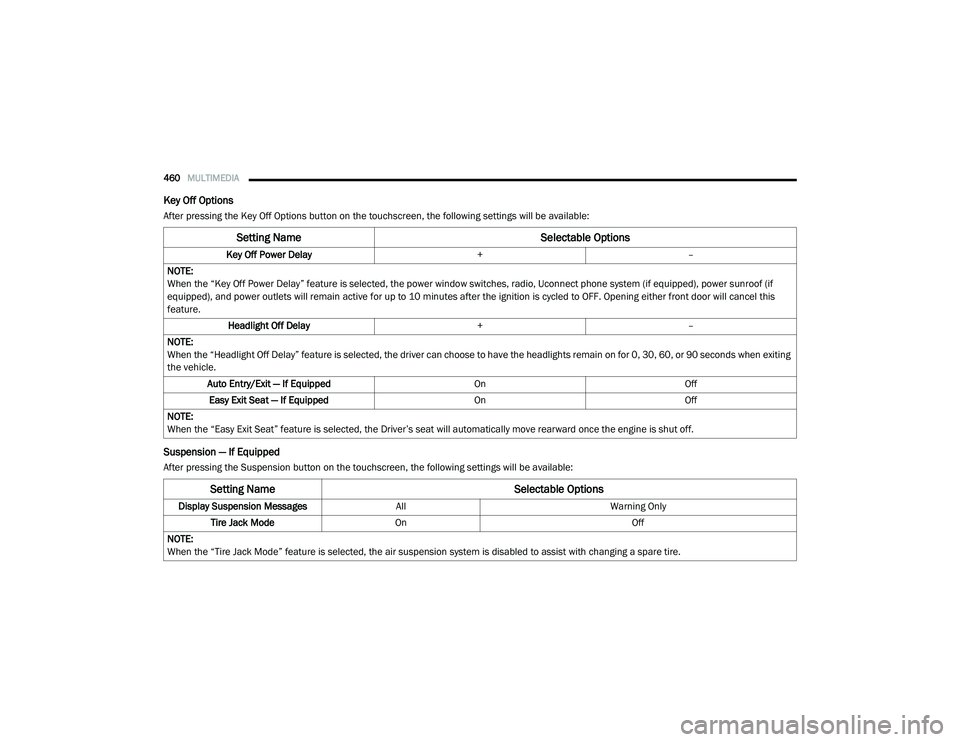
Key Off Options
After pressing the Key Off Options button on the touchscreen, the following settings will be available:
Suspension — If Equipped
After pressing the Suspension button on the touchscreen, the following settings will be available:
Setting Name Selectable Options
Key Off Power Delay+–
NOTE:
When the “Key Off Power Delay” feature is selected, the power window switches, radio, Uconnect phone system (if equipped), power sunroof (if
equipped), and power outlets will remain active for up to 10 minutes after the ignition is cycled to OFF. Opening either front door will cancel this
feature. Headlight Off Delay +–
NOTE:
When the “Headlight Off Delay” feature is selected, the driver can choose to have the headlights remain on for 0, 30, 60, or 90 seconds when exiting
the vehicle. Auto Entry/Exit — If Equipped OnOff
Easy Exit Seat — If Equipped OnOff
NOTE:
When the “Easy Exit Seat” feature is selected, the Driver’s seat will automatically move rearward once the engine is shut off.
Setting Name Selectable Options
Display Suspension MessagesAllWarning Only
Tire Jack Mode On Off
NOTE:
When the “Tire Jack Mode” feature is selected, the air suspension system is disabled to assist with changing a spare tire.
2020_RAM_CHASSIS_CAB_OM_USA=GUID-6C67832B-7839-4CCF-BEFC-CDF988F949EA=1=en=.book Page 460
Page 463 of 516
MULTIMEDIA461
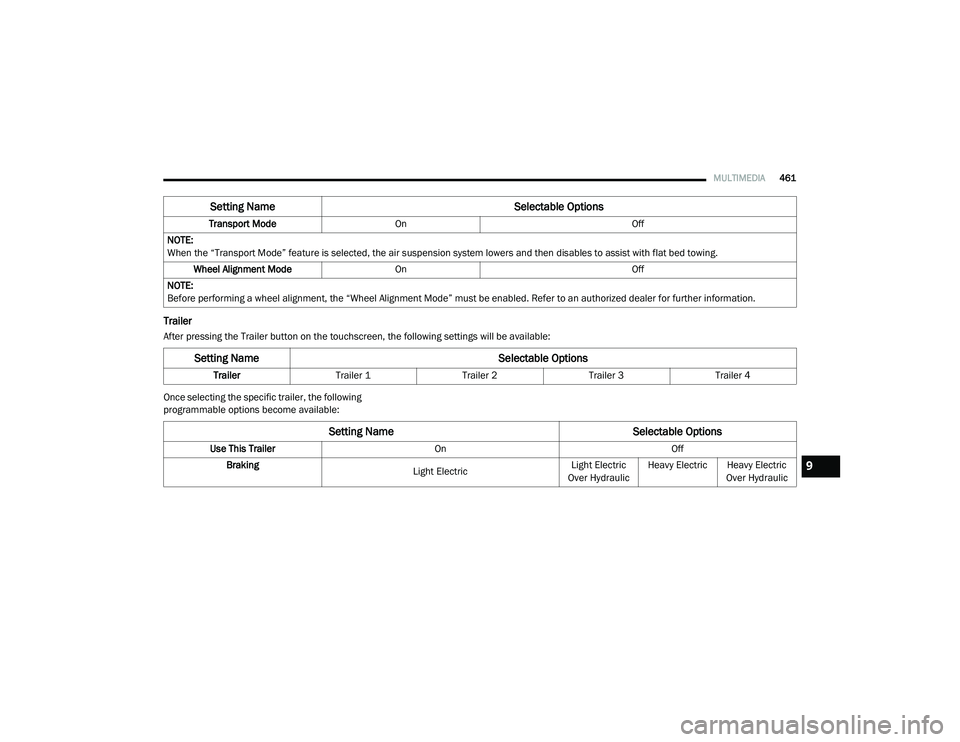
Trailer
After pressing the Trailer button on the touchscreen, the following settings will be available:
Once selecting the specific trailer, the following
programmable options become available:Transport Mode
On Off
NOTE:
When the “Transport Mode” feature is selected, the air suspension system lowers and then disables to assist with flat bed towing. Wheel Alignment Mode On Off
NOTE:
Before performing a wheel alignment, the “Wheel Alignment Mode” must be enabled. Refer to an authorized dealer for further information.
Setting Name Selectable Options
Setting NameSelectable Options
TrailerTrailer 1 Trailer 2Trailer 3Trailer 4
Setting Name Selectable Options
Use This TrailerOn Off
Braking Light ElectricLight Electric
Over Hydraulic Heavy Electric
Heavy Electric
Over Hydraulic
9
2020_RAM_CHASSIS_CAB_OM_USA=GUID-6C67832B-7839-4CCF-BEFC-CDF988F949EA=1=en=.book Page 461