tire pressure RAM CHASSIS CAB 2020 User Guide
[x] Cancel search | Manufacturer: RAM, Model Year: 2020, Model line: CHASSIS CAB, Model: RAM CHASSIS CAB 2020Pages: 516, PDF Size: 16.57 MB
Page 136 of 516
134SAFETY
NOTE:
The TPMS is not intended to replace normal
tire care and maintenance or to provide
warning of a tire failure or condition.
If your vehicle is not equipped with the Tire
Fill Alert feature the TPMS should not be used
as a tire pressure gauge while adjusting your
tire pressure.
Driving on a significantly under-inflated tire
causes the tire to overheat and can lead to
tire failure. Under-inflation also reduces fuel
efficiency and tire tread life, and may affect
the vehicle’s handling and stopping ability.
The TPMS is not a substitute for proper tire
maintenance, and it is the driver’s responsi -
bility to maintain correct tire pressure using
an accurate tire pressure gauge, even if
under-inflation has not reached the level to
trigger illumination of the TPMS Warning
Light.
Seasonal temperature changes will affect
tire pressure, and the TPMS will monitor the
actual tire pressure in the tire.
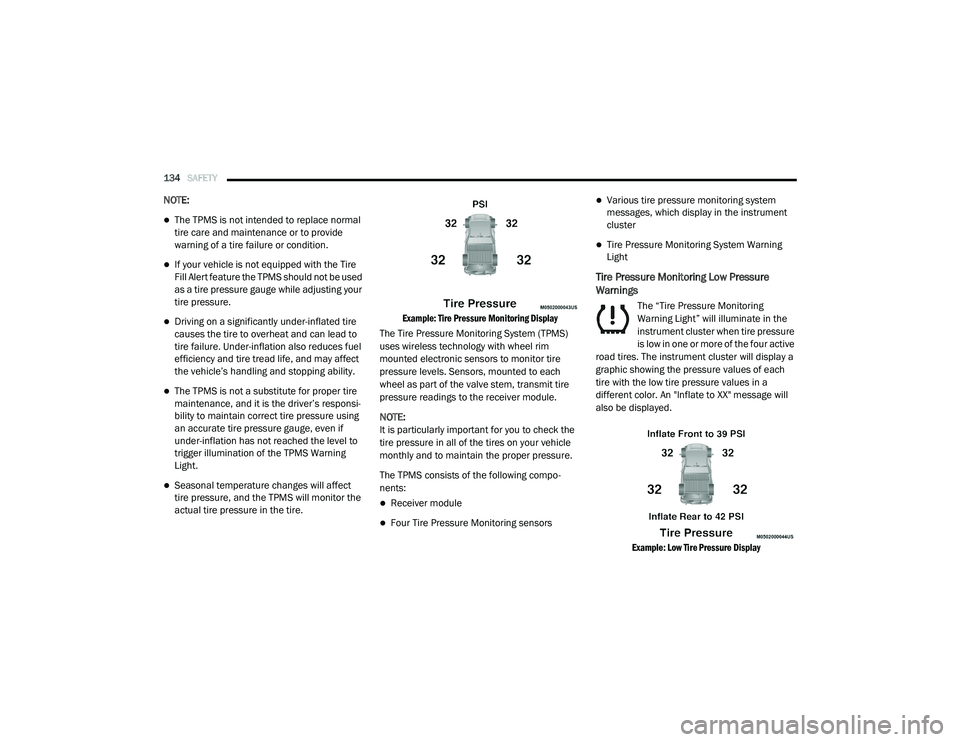
Example: Tire Pressure Monitoring Display
The Tire Pressure Monitoring System (TPMS)
uses wireless technology with wheel rim
mounted electronic sensors to monitor tire
pressure levels. Sensors, mounted to each
wheel as part of the valve stem, transmit tire
pressure readings to the receiver module.
NOTE:
It is particularly important for you to check the
tire pressure in all of the tires on your vehicle
monthly and to maintain the proper pressure.
The TPMS consists of the following compo -
nents:
Receiver module
Four Tire Pressure Monitoring sensors
Various tire pressure monitoring system
messages, which display in the instrument
cluster
Tire Pressure Monitoring System Warning
Light
Tire Pressure Monitoring Low Pressure
Warnings
The “Tire Pressure Monitoring
Warning Light” will illuminate in the
instrument cluster when tire pressure
is low in one or more of the four active
road tires. The instrument cluster will display a
graphic showing the pressure values of each
tire with the low tire pressure values in a
different color. An "Inflate to XX" message will
also be displayed.
Example: Low Tire Pressure Display
2020_RAM_CHASSIS_CAB_OM_USA=GUID-6C67832B-7839-4CCF-BEFC-CDF988F949EA=1=en=.book Page 134
Page 137 of 516

SAFETY135
Should this occur, you should stop as soon as
possible and inflate the tires with a low pressure
condition (those in a different color in the instru -
ment cluster graphic) to the vehicle’s recom-
mended cold placard pressure inflation value
as shown in the "Inflate to XX" message. Once
the system receives the updated tire pressures,
the system will automatically update, the
graphic display in the instrument cluster will
return to its original color, and the “Tire Pres -
sure Monitoring Warning Light” will turn off. The
vehicle may need to be driven for up to
20 minutes above 15 mph (24 km/h) in order
for the TPMS to receive this information.
NOTE:
When filling warm tires, the tire pressure may
need to be increased up to an additional 4 psi
(28 kPa) above the recommended cold placard
pressure in order to turn the Tire Pressure Moni -
toring Warning Light off.Service TPMS Warning
If a system fault is detected, the “Tire Pressure
Monitoring Warning Light” will flash on and off
for 75 seconds and then remain on solid. In
addition, the instrument cluster will display a
"SERVICE TPM SYSTEM" message for a
minimum of five seconds and then display
dashes (- -) in place of the pressure value to indi -
cate which sensor is not being received.
If the ignition switch is cycled, this sequence will
repeat, providing the system fault still exists. If
the system fault no longer exists, the “Tire Pres -
sure Monitoring Warning Light” will no longer
flash, and the "SERVICE TPM SYSTEM" message
will no longer display, and a pressure value will
display in place of the dashes. A system fault
can occur due to any of the following:
Signal interference due to electronic devices
or driving next to facilities emitting the same
radio frequencies as the TPM sensors.
Installing aftermarket window tinting that
contains materials that may block radio wave
signals.
Accumulation of snow or ice around the
wheels or wheel housings.
Using tire chains on the vehicle.
Using wheels/tires not equipped with TPM
sensors.
A system fault may occur due to an incorrect
TPM sensor location condition. When a system
fault occurs due to an incorrect TPM sensor
location, the “Tire Pressure MonitoringWarning
Light” will flash on and off for 75 seconds and
then remain on solid. The system fault will also
sound a chime. In addition, the instrument
cluster will display a “Tire Pressure Temporarily
Unavailable” message in place of the tire pres -
sure display screen. If the ignition switch is
cycled, this sequence will repeat, providing the
system fault still exists. If the system fault no
longer exists, the “Tire Pressure Monitoring Indi -
cator Light” will no longer flash and the tire pres -
sure display screen will be displayed showing
the tire pressure values in the correct locations.
4
2020_RAM_CHASSIS_CAB_OM_USA=GUID-6C67832B-7839-4CCF-BEFC-CDF988F949EA=1=en=.book Page 135
Page 138 of 516

136SAFETY
Vehicles With Non Matching Full Size Spare Or
Compact Spare
The non matching full size spare or compact
spare tire does not have a TPM sensor.
Therefore, the TPMS will not monitor the
pressure in the non matching full size spare
or compact spare tire.
If you install the non matching full size spare
or compact spare tire in place of a road tire
that has a pressure below the low-pressure
warning limit, upon the next ignition switch
cycle, the TPMS Warning Light and a “LOW
TIRE” message will remain on and a chime
will sound. In addition, the graphic in the
instrument cluster will still display a pressure
value in a different color and an “Inflate to
XX” message.
After driving the vehicle for up to 20 minutes
above 15 mph (24 km/h), the TPMS Warning
Light will flash on and off for 75 seconds and
then remain on solid. In addition, the instru -
ment cluster will display a "SERVICE TPM
SYSTEM" message for a minimum of five
seconds and then display dashes (- -) in place
of the pressure value.
For each subsequent ignition switch cycle, a
chime will sound, the TPMS Warning Light will
flash on and off for 75 seconds and then
remain on solid, and the instrument cluster
will display a "SERVICE TPM SYSTEM"
message for a minimum of five seconds and
then display dashes (- -) in place of the pres -
sure value.
Once you repair or replace the original road
tire and reinstall it on the vehicle in place of
the non matching full size spare or compact
spare, the TPMS will update automatically. In
addition, the TPMS Warning Light will turn off
and the graphic in the instrument cluster will
display a new pressure value instead of
dashes (- -), as long as no tire pressure is
below the low-pressure warning limit in any of
the four active road tires. The vehicle may
need to be driven for up to 20 minutes above
15 mph (24 km/h) in order for the TPMS to
receive this information.
Trailer Tire Pressure Monitoring System
(TTPMS)
The Trailer Tire Pressure Monitoring System
(TTPMS) is a feature that will display the trailer
tire pressure values and warn the driver of a low
trailer tire pressure, based on the drivers set target tire pressure value, through TTPMS
settings found in the radio.
The TTPMS monitors the pressure of each tire
and warns the driver, through the instrument
cluster, when either a low tire pressure condi
-
tion or system malfunction condition exists. The
instrument cluster will display the actual tire
pressure or dashes for each of the trailer tires in
the correct trailer position, based on trailer
configuration. The TTPMS system can support
up to 12 trailer tires per configured trailer on up
to four configurable trailers. Refer to “Uconnect
Settings” in “Multimedia” for further informa -
tion.
2020_RAM_CHASSIS_CAB_OM_USA=GUID-6C67832B-7839-4CCF-BEFC-CDF988F949EA=1=en=.book Page 136
Page 139 of 516

SAFETY137
Trailer Tire Pressure Sensor Pairing
In order use this feature, the provided tire pres -
sure sensors must be installed in the desired
trailer tires and the sensors must be paired to
the truck. If the target trailer requires more than
the provided four sensors, additional sensors
can be purchased at an authorized Ram dealer -
ship.
With the sensors installed and the trailer near
or connected to your Ram truck, initiate the
pairing process by entering the settings menu in
the radio and select trailer. Refer to “Uconnect
Settings” in “Multimedia” for further informa -
tion. Select the desired trailer profile to pair to,
open the “Tire Pressure” menu, and hit “Setup
All Tires.” Follow the on screen prompts to select the
number of axles (1 - 3), the number of trailer
tires (2, 4, 6, 8, or 12), and the set trailer tire
pressure. The range is selectable anywhere
between 25-125 PSI (172-862 kPa).
Once PSI (kPa) is programmed, the pairing
screen appears. Tire sensors must be paired in
order shown. Starting with Tire 1, deflate tire by
5 PSI (34 kPa) and wait for a horn chirp. It may
take up to three minutes for the chirp to occur,
indicating that the sensor has paired. Repeat
process on each tire, in order, until complete.
Do not exit the pairing screen until process is
complete. If pairing was unsuccessful, a double
horn chirp will sound, and a prompt on the touchscreen will allow you to retry the proce
-
dure; “Retry” will only appear when setup fails.
Each tire must be successfully paired during a
single pairing process to receive the success
screen.
NOTE:
If the pairing process times out after three
minutes of no communication with a sensor, a
double horn chirp will occur indicating the
pairing has failed and a message will display on
the radio indicating the process was unsuc -
cessful. Under certain circumstances, the
double horn chirp may continue to happen
every three minutes indicating the failed
pairing. If this happens, the horn chirping may
be canceled by cycling the ignition button OFF
and then back to ON/RUN position.
Tire Pres sure Monitoring Lo w Pre ssure
Warnings
When a tire pressure low in one or more of the
active road tires is detected, the instrument
cluster will display a message stating “Trailer
Tire Pressure Low”. The instrument cluster will
then display the TTPMS graphic showing the
pressure values of each tire with the low tire
pressure values in a different color.
4
2020_RAM_CHASSIS_CAB_OM_USA=GUID-6C67832B-7839-4CCF-BEFC-CDF988F949EA=1=en=.book Page 137
Page 140 of 516
138SAFETY
Should this occur, you should stop as soon as
possible and inflate the tires with a low pressure
condition (those in a different color in the instru -
ment cluster graphic) to the customer
programmed target tire pressure value as
shown at the top of the TTPMS instrument
cluster graphic. Once the tire(s) are inflated, the
system will automatically update the graphic
display in the instrument cluster, returning to
it’s original color. The vehicle may need to be
driven for up to 10 minutes above 15 mph
(24 km/h) in order for the TTPMS to receive the
updated information.
Service TTPMS Warning
If a system fault is detected, the instrument
cluster will display a “Trailer Tire Pressure
System Service Required” message for a
minimum of five seconds.
Once the system fault is corrected the "Trailer
Tire Pressure System Service Required"
message will no longer be displayed. The
vehicle may need to be driven for up to
10 minutes above 15 mph (24 km/h) in order
for the TTPMS to receive the trailer tire pressure
information. Trailer Tire Pressure System Not Configured
A “Trailer Tire Pressure System Not Configured”
message will be displayed in the Instrument
Cluster on the TTPM instrument cluster graphic
when a trailer number is selected that has not
had trailer tire pressure sensors paired. To
correct this condition, see “Trailer Tire Pressure
Sensor Pairing” in “Multimedia”.
Trailer Sensors Detected Do Not Match Active
Trailer
The “Trailer Sensors Detected Do Not Match
Active Trailer” message will be displayed in the
Instrument Cluster when the trailer sensors
being received by the TTPM module do not
match the trailer sensors paired to the current
trailer number selected. This message will be
displayed when the sensors being received
completely match the sensors paired to another
trailer number configured in the TTPM module.
To correct this condition, the correct trailer
number must be selected in the radio. Refer to
the “Uconnect Settings” in “Multimedia” for
further information.Tire Fill Alert — If Equipped
This feature notifies the user when the placard
tire pressure is attained while inflating or
deflating the tire.
The customer may choose to disable or enable
the Tire Fill Alert feature through use of the
customer settings in the radio.
NOTE:
Only one tire can be filled at a time when
using the Tire Fill Alert system.
The Tire Fill Alert feature cannot be entered if
an existing TPM system fault is set to “active”
or if the system is in deactivation mode (if
equipped).
The system will be activated when the TPM
receiver module detects a change in tire pres -
sure. The ignition must be in the RUN mode,
with the transmission in PARK (P).
NOTE:
It is not required to have the engine running to
enter Tire Fill Alert mode.
2020_RAM_CHASSIS_CAB_OM_USA=GUID-6C67832B-7839-4CCF-BEFC-CDF988F949EA=1=en=.book Page 138
Page 141 of 516
SAFETY139
The hazard lamps will come on to confirm the
vehicle is in Tire Fill Alert mode.
When Tire Fill Alert Mode is entered, the tire
pressure display screen will be displayed in the
instrument cluster.
Operation:
The horn will chirp once to let the user know
when to stop filling the tire, when it reaches
recommended pressure.
The horn will chirp three times if the tire is
over filled and will continue to chirp every five
seconds if the user continues to inflate the
tire.
The horn will chirp once again when enough
air is let out to reach proper inflation level.
The horn will also chirp three times if the tire
is then under-inflated and will continue to
chirp every five seconds if the user continues
to deflate the tire. Selectable Tire Fill Alert (STFA) — If Equipped
The Selectable Tire Fill Alert (STFA) system is an
optional feature that is included as part of the
normal Tire Fill Alert system. The system is
designed to allow the customer to select a pres
-
sure to inflate or deflate the vehicle's front and
rear axle tires to and to provide feedback to the
customer while inflating or deflating the
vehicle's tires.
In the Selectable Tire Fill Alert customer
settings menu in the radio, the customer will be
able to select a pressure setting for both the
front and rear axle tire pressures by scrolling
through a pressure range from XX to 15 psi in
1 psi increments for each axle setting. XX = the
vehicle’s cold placard pressure values for the
front and rear axles as shown on the vehicle
placard pressure label.
The customer may also store the pressure
values chosen for each axle in the radio as a
preset pressure. The customer will be allowed
to store up to two sets of preset values in the
radio for the front and rear axle pressure values.
Once the customer selects the tire pressures for
the front and rear axles that they want to inflate
or deflate to, they can begin inflating or
deflating one tire at a time. NOTE:
The STFA system will only support inflating or
deflating one tire at a time.
The system will be activated when the TPM
receiver module detects a change in tire pres
-
sure. The ignition must be in the RUN mode,
with the transmission in PARK (P).
The hazard lamps will come on to confirm the
vehicle is in Tire Fill Alert mode.
When Tire Fill Alert Mode is entered, the tire
pressure display screen will be displayed in the
instrument cluster.
Operation:
The horn will chirp once when the selected
pressure is reached to let the user know
when to stop inflating or deflating the tire.
The horn will chirp three times if the tire is
over inflated or over deflated and will
continue to chirp every five seconds if the
user continues to inflate or deflate the tire.
The horn will chirp once again when enough
air is added or removed to reach proper
selected pressure level.
4
2020_RAM_CHASSIS_CAB_OM_USA=GUID-6C67832B-7839-4CCF-BEFC-CDF988F949EA=1=en=.book Page 139
Page 142 of 516

140SAFETY
Tire Pressure Information System (TPIS)
3500/4500/5500 Series Trucks
Your vehicle may be equipped with a Tire Pres -
sure Information System (TPIS).
The Tire Pressure Information System (TPIS)
uses wireless technology with wheel rim
mounted electronic sensors to transmit tire
pressure levels. Sensors mounted to each
wheel as part of the valve stem transmit tire
pressure readings to the receiver module.
NOTE:
It is particularly important for you to check the
tire pressure in all of the tires on your vehicle
monthly and to maintain the proper pressure.
The TPIS consists of the following components:
Receiver module
Four TPM sensors (Single Rear Wheel (SRW)
applications)
Six TPM sensors (Dual Rear Wheel (DRW)
applications)
Pressure display in the instrument cluster
The TPIS system will display all four (Single Rear
Wheel (SRW) applications) or six (Dual Rear
Wheel (DRW) applications) tire pressure values
in the instrument cluster display. If a system fault is detected, the instrument
cluster will display a "SERVICE TPM SYSTEM"
message for a minimum of five seconds and
then display dashes (- -) in place of the pressure
value to indicate which sensor is not being
received.
If the ignition switch is cycled, this sequence will
repeat, providing the system fault still exists. If
the system fault no longer exists, the "SERVICE
TPM SYSTEM" message will no longer be
displayed, and a pressure value will display in
place of the dashes. A system fault can occur
due to any of the following:
Signal interference due to electronic devices
or driving next to facilities emitting the same
radio frequencies as the TPM sensors.
Installing aftermarket window tinting that
contains materials that may block radio wave
signals.
Accumulation of snow or ice around the
wheels or wheel housings.
Using tire chains on the vehicle.
Using wheels/tires not equipped with TPM
sensors.
General Information
The following regulatory statement applies to all
Radio Frequency (RF) devices equipped in this
vehicle:
This device complies with Part 15 of the FCC
Rules and with Innovation, Science and
Economic Development Canada license-exempt
RSS standard(s). Operation is subject to the
following two conditions:
1. This device may not cause harmful interfer
-
ence, and
2. This device must accept any interference received, including interference that may
cause undesired operation.
Le présent appareil est conforme aux CNR
d`Innovation, Science and Economic Develop -
ment applicables aux appareils radio exempts
de licence. L'exploitation est autorisée aux deux
conditions suivantes:
1. l'appareil ne doit pas produire de brouil -
lage, et
2. l'utilisateur de l'appareil doit accepter tout brouillage radioélectrique subi, même si le
brouillage est susceptible d'en comprom -
ettre le fonctionnement.
2020_RAM_CHASSIS_CAB_OM_USA=GUID-6C67832B-7839-4CCF-BEFC-CDF988F949EA=1=en=.book Page 140
Page 184 of 516

182SAFETY
Periodic Safety Checks You Should Make
Outside The Vehicle
Tires
Examine tires for excessive tread wear and
uneven wear patterns. Check for stones, nails,
glass, or other objects lodged in the tread or
sidewall. Inspect the tread for cuts and cracks.
Inspect sidewalls for cuts, cracks, and bulges.
Check the wheel bolts for tightness. Check the
tires (including spare) for proper cold inflation
pressure.
Lights
Have someone observe the operation of brake
lights and exterior lights while you work the
controls. Check turn signal and high beam indi -
cator lights on the instrument panel.
Door Latches
Check for proper closing, latching, and locking.
Fluid Leaks
Check area under the vehicle after overnight
parking for fuel, coolant, oil, or other fluid leaks.
Also, if gasoline fumes are detected or if fuel, or
brake fluid leaks are suspected, the cause
should be located and corrected immediately.
ALWAYS make sure objects cannot fall or
slide into the driver’s side floor area when
the vehicle is moving. Objects can become
trapped under accelerator, brake, or clutch
pedals and could cause a loss of vehicle
control.
NEVER place any objects under the floor
mat (e.g., towels, keys, etc.). These objects
could change the position of the floor mat
and may cause interference with the accel -
erator, brake, or clutch pedals.
If the vehicle carpet has been removed and
re-installed, always properly attach carpet
to the floor and check the floor mat
fasteners are secure to the vehicle carpet.
Fully depress each pedal to check for inter -
ference with the accelerator, brake, or
clutch pedals then re-install the floor mats.
It is recommended to only use mild soap
and water to clean your floor mats. After
cleaning, always check your floor mat has
been properly installed and is secured to
your vehicle using the floor mat fasteners
by lightly pulling mat.
WARNING! (Continued)
2020_RAM_CHASSIS_CAB_OM_USA=GUID-6C67832B-7839-4CCF-BEFC-CDF988F949EA=1=en=.book Page 182
Page 229 of 516

STARTING AND OPERATING227
Because four-wheel drive provides improved
traction, there is a tendency to exceed safe
turning and stopping speeds. Do not go faster
than road conditions permit.
NOTE:
Delayed shifts out of four-wheel drive may be
experienced due to uneven tire wear, low or
uneven tire pressures, excessive vehicle
loading, or cold temperatures.
Two-Wheel Drive High Range (2H)
Two-Wheel Drive High Range — This range is for
normal street and highway driving on dry hard
surfaced roads.
Four-Wheel Drive High Range (4H)
Four-Wheel Drive High Range — This range locks
the front and rear driveshafts together forcing
the front and rear wheels to rotate at the same
speed. Additional traction for loose, slippery
road surfaces only.
N (Neutral)
Neutral — This range disengages the front and
rear driveshafts from the powertrain. To be
used for flat towing behind another vehicle.
Refer to “Recreational Towing” in “Starting And
Operating” for further information.
Four-Wheel Drive Low Range (4L)
Four-Wheel Drive Low Range — This range locks
the front and rear driveshafts together forcing
the front and rear wheels to rotate at the same
speed. Additional traction and maximum pulling
power for loose, slippery road surfaces only. Do
not exceed 25 mph (40 km/h).
Shifting Procedure — Manually Shifted
Transfer Case
2H To 4H
Shifting between 2H and 4H can be made with
the vehicle stopped or in motion. If the vehicle
is in motion, shifts can be made up to 55 mph
(88 km/h). With the vehicle in motion, the
transfer case will engage/disengage faster if
you momentarily release the accelerator pedal
after completing the shift. Apply a constant
force when shifting the transfer case lever.
2H Or 4H To 4L
NOTE:
When shifting into or out of 4L some gear noise
may be heard. This noise is normal and is not
detrimental to the vehicle or occupants.
With the vehicle rolling at 2 to 3 mph
(3 to 5 km/h), shift the transmission into
NEUTRAL. While the vehicle is coasting at
2 to 3 mph (3 to 5 km/h), shift the transfer case
lever firmly to the desired position. Do not
pause in transfer case Neutral.
WARNING!
You or others could be injured or killed if you
leave the vehicle unattended with the transfer
case in the NEUTRAL position without first
fully engaging the parking brake. The transfer
case NEUTRAL position disengages both the
front and rear drive shafts from the
powertrain and will allow the vehicle to roll,
even if the transmission is in PARK. The
parking brake should always be applied when
the driver is not in the vehicle.
CAUTION!
Do not use 4L (Low) range when operating
the vehicle on dry pavement. Driveline
hardware damage can result.
5
2020_RAM_CHASSIS_CAB_OM_USA=GUID-6C67832B-7839-4CCF-BEFC-CDF988F949EA=1=en=.book Page 227
Page 275 of 516
STARTING AND OPERATING273
VEHICLE LOADING
Gross Vehicle Weight Rating (GVWR)
The GVWR is the total permissible weight of your
vehicle including driver, passengers, vehicle,
options and cargo. The label also specifies
maximum capacities of front and rear axle
systems (GAWR). Total load must be limited so
GVWR and front and rear GAWR are not
exceeded.
Payload
The payload of a vehicle is defined as the allow -
able load weight a truck can carry, including the
weight of the driver, all passengers, options and
cargo.
Gross Axle Weight Rating (GAWR)
The GAWR is the maximum permissible load on
the front and rear axles. The load must be
distributed in the cargo area so that the GAWR
of each axle is not exceeded.
Each axle GAWR is determined by the compo -
nents in the system with the lowest load
carrying capacity (axle, springs, tires or wheels).
Heavier axles or suspension components some -times specified by purchasers for increased
durability does not necessarily increase the
vehicle's GVWR.
Tire Size
The tire size on the Vehicle Certification Label
represents the actual tire size on your vehicle.
Replacement tires must be equal to the load
capacity of this tire size.
Rim Size
This is the rim size that is appropriate for the tire
size listed.
Inflation Pressure
This is the cold tire inflation pressure for your
vehicle for all loading conditions up to full
GAWR.
Curb Weight
The curb weight of a vehicle is defined as the
total weight of the vehicle with all fluids,
including vehicle fuel, at full capacity condi
-
tions, and with no occupants or cargo loaded
into the vehicle. The front and rear curb weight
values are determined by weighing your vehicle
on a commercial scale before any occupants or
cargo are added.
Loading
The actual total weight and the weight of the
front and rear of your vehicle at the ground can
best be determined by weighing it when it is
loaded and ready for operation.
The entire vehicle should first be weighed on a
commercial scale to ensure that the GVWR has
not been exceeded. The weight on the front and
rear of the vehicle should then be determined
separately to be sure that the load is properly
distributed over the front and rear axles.
Weighing the vehicle may show that the GAWR
of either the front or rear axle has been
exceeded but the total load is within the speci -
fied GVWR. If so, weight must be shifted from
front to rear or rear to front as appropriate until
the specified weight limitations are met. Store
the heavier items down low and be sure that the
weight is distributed equally. Stow all loose
items securely before driving.
Improper weight distributions can have an
adverse effect on the way your vehicle steers
and handles and the way the brakes operate.
5
2020_RAM_CHASSIS_CAB_OM_USA=GUID-6C67832B-7839-4CCF-BEFC-CDF988F949EA=1=en=.book Page 273