wipers RAM CHASSIS CAB 2020 User Guide
[x] Cancel search | Manufacturer: RAM, Model Year: 2020, Model line: CHASSIS CAB, Model: RAM CHASSIS CAB 2020Pages: 516, PDF Size: 16.57 MB
Page 423 of 516

MULTIMEDIA421
Lights
After pressing the Lights button on the touchscreen, the following settings will be available:
Setting Name Selectable Options
Headlight Off Delay0 sec30 sec
60 sec 90 sec
Headlight Illumination On Approach 0 sec30 sec
60 sec 90 sec
NOTE:
When the “Headlight Illumination On Approach” feature is selected, it allows the adjustment of the amount of time the headlights remain on when
the doors are unlocked with the key fob. Headlights With Wipers — If Equipped OnOff
Auto Dim High Beams — If Equipped OnOff
Daytime Running Lights OnOff
NOTE:
When the “Daytime Running Lights” feature is selected, the daytime running lights can be turned On or Off. This feature is only allowed by law in the
country of the vehicle purchase.
9
2020_RAM_CHASSIS_CAB_OM_USA=GUID-6C67832B-7839-4CCF-BEFC-CDF988F949EA=1=en=.book Page 421
Page 432 of 516
430MULTIMEDIA
Uconnect 4/4C/4C NAV Settings
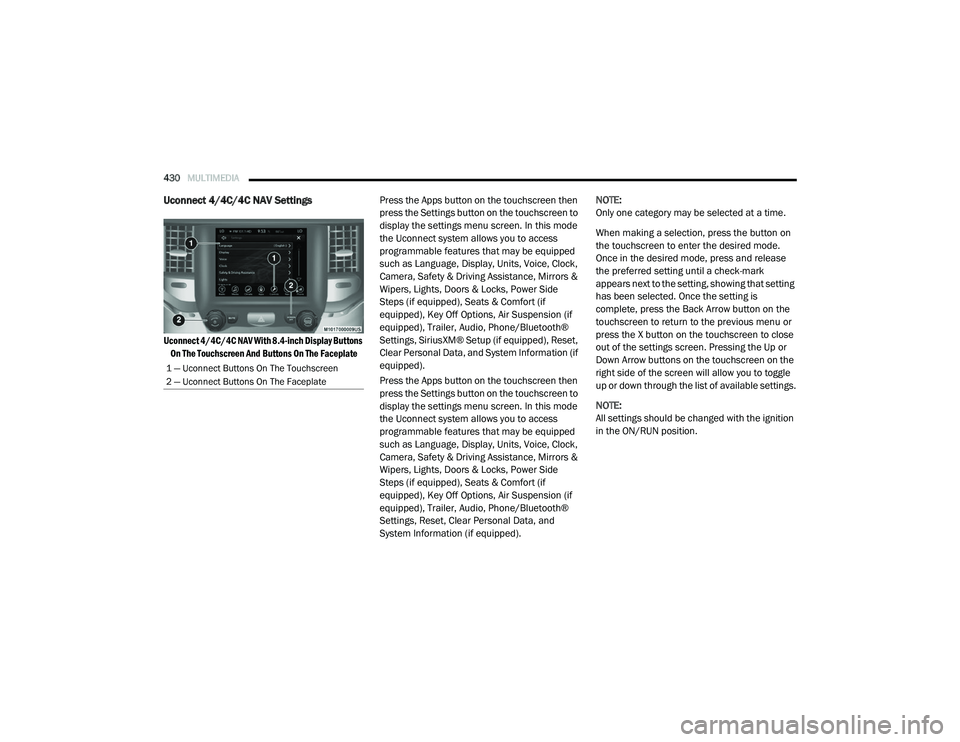
Uconnect 4/4C/4C NAV With 8.4-inch Display Buttons
On The Touchscreen And Buttons On The Faceplate
Press the Apps button on the touchscreen then
press the Settings button on the touchscreen to
display the settings menu screen. In this mode
the Uconnect system allows you to access
programmable features that may be equipped
such as Language, Display, Units, Voice, Clock,
Camera, Safety & Driving Assistance, Mirrors &
Wipers, Lights, Doors & Locks, Power Side
Steps (if equipped), Seats & Comfort (if
equipped), Key Off Options, Air Suspension (if
equipped), Trailer, Audio, Phone/Bluetooth®
Settings, SiriusXM® Setup (if equipped), Reset,
Clear Personal Data, and System Information (if
equipped).
Press the Apps button on the touchscreen then
press the Settings button on the touchscreen to
display the settings menu screen. In this mode
the Uconnect system allows you to access
programmable features that may be equipped
such as Language, Display, Units, Voice, Clock,
Camera, Safety & Driving Assistance, Mirrors &
Wipers, Lights, Doors & Locks, Power Side
Steps (if equipped), Seats & Comfort (if
equipped), Key Off Options, Air Suspension (if
equipped), Trailer, Audio, Phone/Bluetooth®
Settings, Reset, Clear Personal Data, and
System Information (if equipped). NOTE:
Only one category may be selected at a time.
When making a selection, press the button on
the touchscreen to enter the desired mode.
Once in the desired mode, press and release
the preferred setting until a check-mark
appears next to the setting, showing that setting
has been selected. Once the setting is
complete, press the Back Arrow button on the
touchscreen to return to the previous menu or
press the X button on the touchscreen to close
out of the settings screen. Pressing the Up or
Down Arrow buttons on the touchscreen on the
right side of the screen will allow you to toggle
up or down through the list of available settings.
NOTE:
All settings should be changed with the ignition
in the ON/RUN position.
1 — Uconnect Buttons On The Touchscreen
2 — Uconnect Buttons On The Faceplate
2020_RAM_CHASSIS_CAB_OM_USA=GUID-6C67832B-7839-4CCF-BEFC-CDF988F949EA=1=en=.book Page 430
Page 438 of 516

436MULTIMEDIA
Mirrors & Wipers
After pressing the Mirrors & Wipers button on the touchscreen, the following settings will be available:Forward Collision Warning
Sensitivity — If Equipped Near
Med Far
NOTE:
Sets the distance in which a Forward Collision Warning occurs. Front ParkSense Volume LowMed High
Rear ParkSense Volume LowMed High
Power Side Steps — If Equipped Auto Store
Blind Spot Alert OffLightsLights & Chime
Hill Start Assist — If Equipped On Off
Tire Fill Assist — If Equipped On Off
Setting Name Selectable Options
Setting NameSelectable Options
Tilt Side Mirrors In Reverse — If Equipped OnOff
NOTE:
When the “Tilt Side Mirrors In Reverse” feature is selected, the outside side-view mirrors will tilt downward when the ignition is in the ON/RUN position
and the transmission gear selector is in the REVERSE position. The mirrors will move back to their previous position when the transmission is shifted
out of REVERSE. Rain Sensing Auto Wipers — If Equipped OnOff
NOTE:
Automatically adjusts the wiper speed based on the amount of precipitation. Headlights with Wipers OnOff
2020_RAM_CHASSIS_CAB_OM_USA=GUID-6C67832B-7839-4CCF-BEFC-CDF988F949EA=1=en=.book Page 436
Page 439 of 516

MULTIMEDIA437
Lights
After pressing the Lights button on the touchscreen, the following settings will be available:
Setting Name Selectable Options
Headlight Off Delay–+
NOTE:
When the “Headlight Off Delay” feature is selected, the driver can choose to have the headlights remain on for 0, 30, 60, or 90 seconds when exiting
the vehicle. Headlight Illumination On Approach –+
NOTE:
When the “Headlight Illumination On Approach” feature is selected, the headlights will activate and remain on for 0, 30, 60, or 90 seconds when the
doors are unlocked with the key fob. Headlights With Wipers — If Equipped OnOff
NOTE:
When the “Headlights With Wipers” feature is selected, and the headlight switch is in the AUTO position, the headlights turn on approximately 10
seconds after the wipers are turned on. The headlights also turn off when the wipers are turned off if they were turned on by this feature. Auto Dim High Beams — If Equipped OnOff
NOTE:
When the “Auto Dim High Beams” feature is selected, the high beam headlights deactivate automatically under certain conditions. Daytime Running Lights OnOff
NOTE:
When the “Daytime Running Lights” feature is selected, the daytime running lights can be turned On or Off. This feature is only available if allowed by
law in the country of the vehicle purchase.
9
2020_RAM_CHASSIS_CAB_OM_USA=GUID-6C67832B-7839-4CCF-BEFC-CDF988F949EA=1=en=.book Page 437
Page 451 of 516
MULTIMEDIA449
Uconnect 4C NAV With 12-inch Display Settings
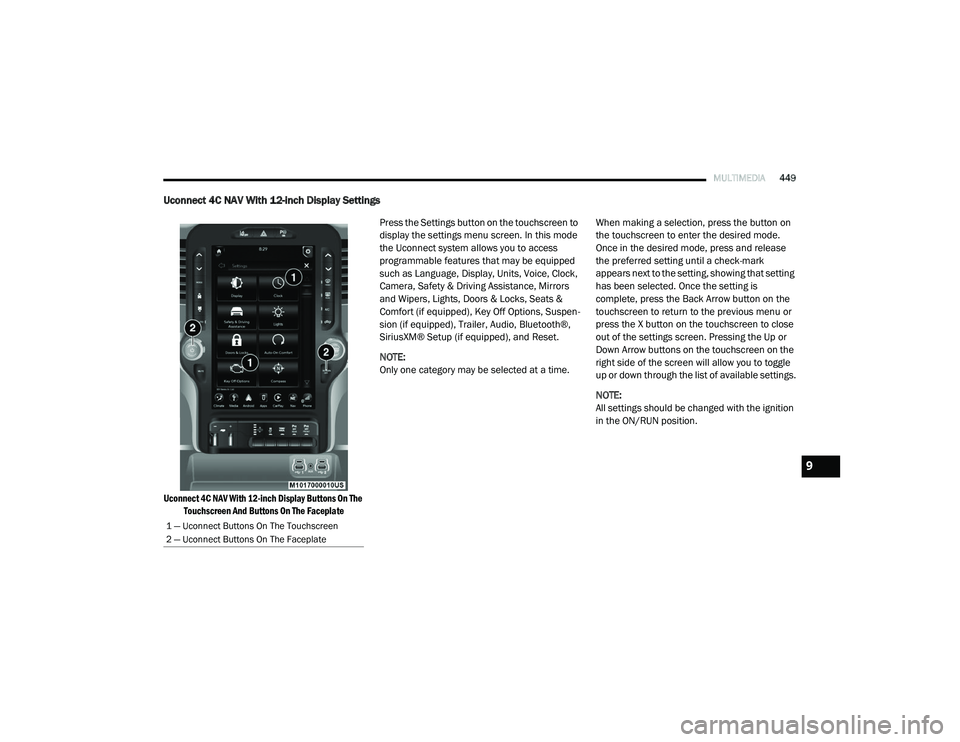
Uconnect 4C NAV With 12-inch Display Buttons On The
Touchscreen And Buttons On The Faceplate
Press the Settings button on the touchscreen to
display the settings menu screen. In this mode
the Uconnect system allows you to access
programmable features that may be equipped
such as Language, Display, Units, Voice, Clock,
Camera, Safety & Driving Assistance, Mirrors
and Wipers, Lights, Doors & Locks, Seats &
Comfort (if equipped), Key Off Options, Suspen
-
sion (if equipped), Trailer, Audio, Bluetooth®,
SiriusXM® Setup (if equipped), and Reset.
NOTE:
Only one category may be selected at a time. When making a selection, press the button on
the touchscreen to enter the desired mode.
Once in the desired mode, press and release
the preferred setting until a check-mark
appears next to the setting, showing that setting
has been selected. Once the setting is
complete, press the Back Arrow button on the
touchscreen to return to the previous menu or
press the X button on the touchscreen to close
out of the settings screen. Pressing the Up or
Down Arrow buttons on the touchscreen on the
right side of the screen will allow you to toggle
up or down through the list of available settings.
NOTE:
All settings should be changed with the ignition
in the ON/RUN position.
1 — Uconnect Buttons On The Touchscreen
2 — Uconnect Buttons On The Faceplate
9
2020_RAM_CHASSIS_CAB_OM_USA=GUID-6C67832B-7839-4CCF-BEFC-CDF988F949EA=1=en=.book Page 449
Page 458 of 516

456MULTIMEDIA
Mirrors & Wipers
After pressing the Mirror and Wipers button on the touchscreen, the following settings will be available:
Lights
After pressing the Lights button on the touchscreen, the following settings will be available:
Setting Name Selectable Options
Tilt Side Mirrors In Reverse — If Equipped OnOff
NOTE:
When the “Tilt Side Mirrors In Reverse” feature is selected, the outside side-view mirrors will tilt downward when the ignition is in the ON/RUN position
and the transmission gear selector is in the REVERSE position. The mirrors will move back to their previous position when the transmission is shifted
out of REVERSE. Rain Sensing Auto Wipers OnOff
NOTE:
Automatically adjusts the wiper speed based on the amount of precipitation. Headlights with Wipers OnOff
Setting Name Selectable Options
Headlight Illumination On Approach –+
NOTE:
When the “Headlight Illumination On Approach” feature is selected, the headlights will activate and remain on for 0, 30, 60, or 90 seconds when the
doors are unlocked with the key fob. Headlight Off Delay -+
NOTE:
When the “Headlight Off Delay” feature is selected, the driver can choose to have the headlights remain on for 0, 30, 60, or 90 seconds when exiting
the vehicle.
2020_RAM_CHASSIS_CAB_OM_USA=GUID-6C67832B-7839-4CCF-BEFC-CDF988F949EA=1=en=.book Page 456
Page 459 of 516

MULTIMEDIA457
Headlights With Wipers — If Equipped OnOff
NOTE:
When the “Headlights With Wipers” feature is selected, and the headlight switch is in the AUTO position, the headlights turn on approximately 10
seconds after the wipers are turned on. The headlights also turn off when the wipers are turned off if they were turned on by this feature. Auto Dim High Beams — If Equipped OnOff
NOTE:
When the “Auto Dim High Beams” feature is selected, the high beam headlights deactivate automatically under certain conditions. Daytime Running Lights OnOff
NOTE:
When the “Daytime Running Lights” feature is selected, the daytime running lights can be turned On or Off. This feature is only available if allowed by
law in the country of the vehicle purchase. Flash Lights with Lock OnOff
NOTE:
When the “Flash Lights With Lock” feature is selected, the exterior lamps flash when the doors are locked or unlocked with the key fob. This feature
may be selected with or without the “Sound Horn With Lock” feature selected. Steering Directed Lights OnOff
NOTE:
When the “Steering Directed Lights” feature is selected, the headlights turn with the direction of the steering wheel. Rear Guidance Lights w/ Cargo Lights — If Equipped On
Off
NOTE:
When the “Rear Guidance Lights w/ Cargo Lights” feature is selected, the lights in the cargo and bed of the truck will come on either when the head -
light switch is pressed, or the button on the back bed of the truck is pressed.
Setting Name Selectable Options
9
2020_RAM_CHASSIS_CAB_OM_USA=GUID-6C67832B-7839-4CCF-BEFC-CDF988F949EA=1=en=.book Page 457
Page 507 of 516
505
B-Pillar Location
....................................379Brake Assist System...............................121Brake Control System.............................121Brake Fluid...................................367, 409Brake System............................... 367, 397Fluid Check.......................................367Master Cylinder.................................367Parking............................................204Warning Light....................................109Brake/Transmission Interlock...................206Bulb Replacement.................................300Bulbs, Light.................................. 182, 300
C
Cab Top Clearance Lights........................305Camera...............................................258Camera, AUX................................ 261, 267Camera, Rear............................... 258, 261Capacities, Antifreeze (Engine Coolant).......405Capacities, Fluid....................................405Caps, Filler Oil (Engine)............................... 343, 348Power Steering..................................229Radiator (Coolant Pressure)..................365Car Washes..........................................394Carbon Monoxide Warning............... 180, 401Cargo Light.............................................47Cellular Phone......................................483Center High Mounted Stop Light................304Center Seat Storage Compartment..............73
Changing A Flat Tire............................... 314Charge Air Cooler................................... 366Chart, Tire Sizing................................... 376Check Engine Light (Malfunction Indicator Light)119Checking Your Vehicle For Safety.............. 180Checks, Safety...................................... 180Child Restraint...................................... 160Child RestraintsBooster Seats................................... 164Child Seat Installation................. 172, 174How To Stow An unused ALR Seat Belt.... 171Infant And Child Restraints................... 162Locating The LATCH Anchorages............ 169Lower Anchors And Tethers For Children.. 165Older Children And Child Restraints........ 163Seating Positions............................... 165Clean Air Gasoline................................. 399CleaningWheels............................................ 389Climate Control....................................... 51Automatic.......................................... 55Manual.............................................. 52Cold Weather Operation.......................... 187Compact Spare Tire............................... 387Contract, Service................................... 501Cooling Pressure Cap (Radiator Cap).......... 365Cooling System..................................... 363Adding Coolant (Antifreeze).................. 364Coolant Level............................ 363, 366
Cooling Capacity................................ 405Disposal Of Used Coolant.................... 365Drain, Flush, And Refill........................ 364Inspection........................................ 366Points To Remember.......................... 366Pressure Cap.................................... 365Radiator Cap.................................... 365Selection Of Coolant(Antifreeze)................... 364, 407, 410Corrosion Protection.............................. 393Cruise Control (Speed Control)......... 230, 232Cruise Light......................................... 117Cupholders............................................ 77Customer Assistance............................. 500Cybersecurity....................................... 414
D
Daytime Running Lights............................ 45Dealer Service...................................... 347Defroster, Rear Window............................ 52Defroster, Windshield....................... 52, 181Delay (Intermittent) Wipers........................ 50Diagnostic System, Onboard.................... 118Diesel Exhaust Brake............................. 203Diesel Fuel.......................................... 402Diesel Fuel Requirements....................... 402Bulk Storage Of................................. 269Diesel Fuel System, Re-Priming................ 358Differential, Limited Slip......................... 228
11
2020_RAM_CHASSIS_CAB_OM_USA=GUID-6C67832B-7839-4CCF-BEFC-CDF988F949EA=1=en=.book Page 505
Page 509 of 516

507
Four-Way Hazard Flasher
.........................294Freeing A Stuck Vehicle...........................324Front Axle (Differential)...........................370Fuel.................................... 269, 399, 402Adding.............................................268Additives..........................................400Capacity...........................................405Clean Air..........................................399Diesel.............................. 269, 402, 410Ethanol............................................400Filler Cap (Gas Cap)............................268Filter....................................... 354, 407Gasoline..........................................399Light...............................................113Materials Added.................................400Methanol.........................................400Octane Rating...................................399Requirements........................... 399, 402Specifications....................................402Tank Capacity....................................405Fuses..................................................305
G
Garage Door Opener (HomeLink).................67Gas Cap (Fuel Filler Cap).........................268Gasoline, Clean Air.................................399Gasoline, Reformulated...........................399Gauges Voltage............................................194Gear Ranges.........................................207
Gear Selector Override............................ 322General Information....................... 132, 140Glass Cleaning...................................... 396Gross Axle Weight Rating......................... 274Gross Vehicle Weight Rating.................... 274GuideBody Builders...................................... 11GVWR................................................. 273
H
HazardDriving Through Flowing, Rising, Or Shallow Standing Water
.............................. 292Hazard Warning Flashers........................ 294Head Restraints...................................... 36Head Rests............................................ 36Headlights........................................... 301Automatic High Beam........................... 45Cleaning.......................................... 394High Beam......................................... 45Lights On Reminder.............................. 47Passing............................................. 46Switch............................................... 44Heated Mirrors....................................... 43Hill Descent Control............................... 128Hill Descent Control Indicator................... 128Hill Start Assist..................................... 122HitchesTrailer Towing................................... 278Hoisting.............................................. 374
HomeLink (Garage Door Opener)................ 67Hood Prop............................................. 66Hood Release......................................... 66Hub Caps............................................ 318
I
Idle-Up Feature..................................... 198Ignition................................................. 17Switch............................................... 17Illuminated Entry..................................... 49In Vehicle HelpVehicle User Guide............................... 12Inside Rearview Mirror...................... 40, 294Instrument Cluster.................87, 88, 90, 91Descriptions..................................... 117Display.............................................. 92Engine Oil Reset.................................. 93Instrument Panel Lens Cleaning............... 396Integrated Trailer Brake Control................ 281Interior Appearance Care........................ 395Interior Lights......................................... 48Intermittent Wipers (Delay Wipers).............. 50Intervention Regeneration Strategy... 103, 359Inverter Outlet (115V).............................. 80iPod/USB/MP3 Control........................... 481
J
Jack Location....................................... 314Jack Operation..................................... 314Jacking And Tire Changing....................... 314
11
2020_RAM_CHASSIS_CAB_OM_USA=GUID-6C67832B-7839-4CCF-BEFC-CDF988F949EA=1=en=.book Page 507
Page 514 of 516
512
Minimum Requirements
......................279Mirrors..............................................42Tips................................................284Trailer And Tongue Weight....................279Wiring..............................................284Trailer Towing Guide...............................279Trailer Weight.......................................279Transfer Case.......................................371Electronically Shifted...................219, 222Fluid....................................... 409, 412Transmission........................................213Automatic......................... 207, 213, 368Fluid....................................... 409, 412Maintenance.....................................368Shifting............................................205Transporting Pets..................................179Tread Wear Indicators.............................385Turn Signals........................... 47, 117, 301
U
Uconnect Uconnect Settings
....................... 415, 423, 424,438, 440, 458, 459Uconnect PhoneCall Continuation................................480Uconnect SettingsCustomer Programmable Features.. 26, 423, 424, 438, 440, 458, 459
Passive Entry Programming.......... 26, 423, 438, 458Uconnect Voice Command....................... 485Uniform Tire Quality Grades..................... 392Universal Garage Door Opener (HomeLink).... 67Universal Transmitter............................... 67Unleaded Gasoline................................ 399Untwisting Procedure, Seat Belt................ 146USB.................................................... 481
V
Vehicle Identification Number (VIN)............ 397Vehicle Loading............................. 273, 379Vehicle Modifications/Alterations................ 11Vehicle Storage............................... 63, 393Vehicle User GuideIn Vehicle Help.................................... 12Navigation.......................................... 12Operating Instructions........................... 12Searching User Guide........................... 12Viscosity, Engine Oil............................... 348Voice Recognition System (VR)................. 485Voltmeter............................................ 194
W
Warning Lights (Instrument Cluster
Descriptions)
........................................ 112Warnings And Cautions............................. 11Warranty Information............................. 502Washers, Windshield........................ 50, 345
Washing Vehicle................................... 394WaterDriving Through................................. 292Water SeparatorDiesel Fuel....................................... 354Wheel And Wheel Tire Care...................... 389Wheel And Wheel Tire Trim...................... 389Wheel Covers....................................... 318Wind Buffeting........................................ 66Window Fogging...................................... 63Windows............................................... 64Power............................................... 64Rear Sliding....................................... 66Reset Auto-Up..................................... 65Windshield Defroster............................. 181Windshield Washers........................ 50, 345Fluid......................................... 50, 345Windshield Wiper Blades........................ 360Windshield Wipers................................... 50Wipers Blade Replacement..................... 360Wipers, Intermittent................................. 50Wipers, Rain Sensitive.............................. 51Wireless Charging Pad.............................. 81
2020_RAM_CHASSIS_CAB_OM_USA=GUID-6C67832B-7839-4CCF-BEFC-CDF988F949EA=1=en=.book Page 512