wheel torque RAM CHASSIS CAB 2022 User Guide
[x] Cancel search | Manufacturer: RAM, Model Year: 2022, Model line: CHASSIS CAB, Model: RAM CHASSIS CAB 2022Pages: 428, PDF Size: 20.18 MB
Page 161 of 428
STARTING AND OPERATING159
Use of the turn signal suppresses the warnings.
The system will not apply torque to the steering
wheel whenever a safety system engages
(Anti-Lock Brakes, Traction Control System,
Electronic Stability Control, Forward Collision
Warning, etc.).
PARKVIEW REAR BACK UP CAMERA
The ParkView Rear Back Up Camera allows you to
see an on-screen image of the rear surroundings of
your vehicle whenever the gear selector is put into
REVERSE. The image will be displayed on the
Uconnect display along with a caution note to
“Check Entire Surroundings” across the top of the
screen. After five seconds this note will disappear.
The ParkView Camera is located in the center of
the tailgate handle.
NOTE:For the 3500, 4500, and 5500 Chassis Cab
vehicles, the Rear Backup Camera is shipped
loose and not installed. Please refer to the Ram
Body Builder’s Guide for more information.
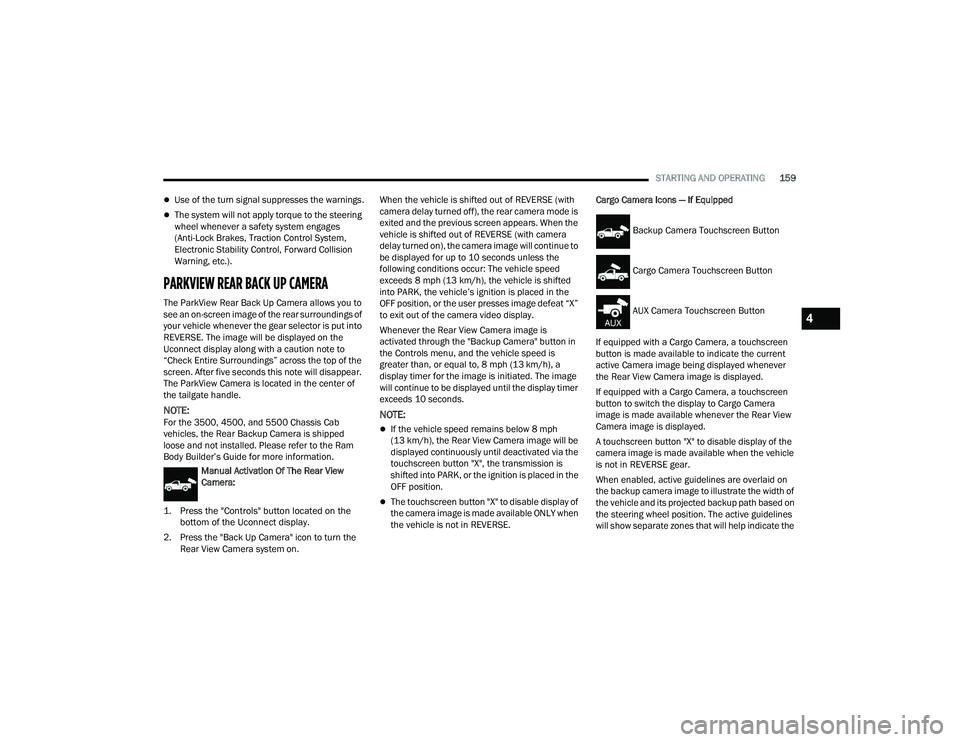
Manual Activation Of The Rear View
Camera:
1. Press the "Controls" button located on the bottom of the Uconnect display.
2. Press the "Back Up Camera" icon to turn the Rear View Camera system on. When the vehicle is shifted out of REVERSE (with
camera delay turned off), the rear camera mode is
exited and the previous screen appears. When the
vehicle is shifted out of REVERSE (with camera
delay turned on), the camera image will continue to
be displayed for up to 10 seconds unless the
following conditions occur: The vehicle speed
exceeds 8 mph (13 km/h), the vehicle is shifted
into PARK, the vehicle’s ignition is placed in the
OFF position, or the user presses image defeat “X”
to exit out of the camera video display.
Whenever the Rear View Camera image is
activated through the "Backup Camera" button in
the Controls menu, and the vehicle speed is
greater than, or equal to, 8 mph (13 km/h), a
display timer for the image is initiated. The image
will continue to be displayed until the display timer
exceeds 10 seconds.NOTE:
If the vehicle speed remains below 8 mph
(13 km/h), the Rear View Camera image will be
displayed continuously until deactivated via the
touchscreen button "X", the transmission is
shifted into PARK, or the ignition is placed in the
OFF position.
The touchscreen button "X" to disable display of
the camera image is made available ONLY when
the vehicle is not in REVERSE.
Cargo Camera Icons — If Equipped
If equipped with a Cargo Camera, a touchscreen
button is made available to indicate the current
active Camera image being displayed whenever
the Rear View Camera image is displayed.
If equipped with a Cargo Camera, a touchscreen
button to switch the display to Cargo Camera
image is made available whenever the Rear View
Camera image is displayed.
A touchscreen button "X" to disable display of the
camera image is made available when the vehicle
is not in REVERSE gear.
When enabled, active guidelines are overlaid on
the backup camera image to illustrate the width of
the vehicle and its projected backup path based on
the steering wheel position. The active guidelines
will show separate zones that will help indicate the
Backup Camera Touchscreen Button
Cargo Camera Touchscreen Button
AUX Camera Touchscreen Button
4
22_DPF_OM_EN_USC_t.book Page 159
Page 262 of 428

260SAFETY
Anti-Lock Brake System (ABS) Warning
Light
The yellow ABS Warning Light will turn on when the
ignition is placed in the ON/RUN mode and may
stay on for as long as four seconds.
If the ABS Warning Light remains on or comes on
while driving, it indicates that the anti-lock portion
of the brake system is not functioning and that
service is required. However, the conventional
brake system will continue to operate normally if
the ABS Warning Light is on.
If the ABS Warning Light is on, the brake system
should be serviced as soon as possible to restore
the benefits of anti-lock brakes. If the ABS Warning
Light does not come on when the ignition is placed
in the ON/RUN mode, have the light repaired as
soon as possible.
ELECTRONIC BRAKE CONTROL (EBC)
S
YSTEM
Your vehicle is equipped with an advanced
Electronic Brake Control (EBC) system. This system
includes Anti-Lock Brake System (ABS), Brake
Assist System (BAS), Electronic Brake Force
Distribution (EBD), Hill Start Assist (HSA),
Electronic Roll Mitigation (ERM), Electronic
Stability Control (ESC), and Traction Control
System (TCS). These systems work together to
enhance both vehicle stability and control in
various driving conditions. Your vehicle may also be equipped with Trailer
Sway Control (TSC) and Hill Descent Control (HDC).
Brake Assist System (BAS)
The BAS is designed to optimize the vehicle’s
braking capability during emergency braking
maneuvers. The system detects an emergency
braking situation by sensing the rate and amount
of brake application and then applies optimum
pressure to the brakes. This can help reduce
braking distances. The BAS complements the
Anti-Lock Brake System (ABS). Applying the brakes
very quickly results in the best BAS assistance. To
receive the benefit of the system, you must apply
continuous braking pressure during the stopping
sequence (do not “pump” the brakes). Do not
reduce brake pedal pressure unless braking is no
longer desired. Once the brake pedal is released,
the BAS is deactivated.
Brake System Warning Light
The red Brake System Warning Light will turn on
when the ignition is placed in the ON/RUN mode
and may stay on for as long as four seconds.
If the Brake System Warning Light remains on or
comes on while driving, it indicates that the brake
system is not functioning properly and that
immediate service is required. If the Brake System
Warning Light does not come on when the ignition
is placed in the ON/RUN mode, have the light
repaired as soon as possible.
Electronic Brake Force Distribution (EBD)
EBD manages the distribution of the braking
torque between the front and rear axles by limiting
braking pressure to the rear axle. This is done to
prevent overslip of the rear wheels to avoid vehicle
instability, and to prevent the rear axle from
entering ABS before the front axle.
Electronic Roll Mitigation (ERM)
ERM anticipates the potential for wheel lift by
monitoring the driver’s steering wheel input and
the speed of the vehicle. When ERM determines
that the rate of change of the steering wheel angle
and vehicle’s speed are sufficient to potentially
cause wheel lift, it then applies the appropriate
brake and may also reduce engine power to lessen
the chance that wheel lift will occur. ERM can only
reduce the chance of wheel lift occurring during
severe or evasive driving maneuvers; it cannot
WARNING!
The Brake Assist System (BAS) cannot prevent the
natural laws of physics from acting on the vehicle,
nor can it increase the traction afforded by pre
-
vailing road conditions. BAS cannot prevent colli -
sions, including those resulting from excessive
speed in turns, driving on very slippery surfaces,
or hydroplaning. The capabilities of a BAS-
equipped vehicle must never be exploited in a
reckless or dangerous manner, which could jeop -
ardize the user's safety or the safety of others.
22_DPF_OM_EN_USC_t.book Page 260
Page 264 of 428
262SAFETY
ESC Operating Modes
Depending upon model and mode of operation, the
ESC system may have multiple operating modes.
ESC On
This is the normal operating mode for the ESC
system. Whenever the vehicle is started, the ESC
system will be in this mode. This mode should be
used for most driving conditions. Alternate ESC
modes should only be used for specific reasons as
noted in the following paragraphs.
Partial Off
This mode may be useful if the vehicle becomes
stuck. This mode may modify TCS and ESC
thresholds for activation, which allows for more
wheel spin than normally allowed.
To enter the “Partial Off” mode, momentarily push
the ESC OFF button and the ESC OFF Indicator
Light will illuminate. To turn the ESC on again,
momentarily push the ESC OFF button and the ESC
OFF Indicator Light will turn off.
NOTE:For vehicles with multiple partial ESC modes, the
push and release of the button will toggle the ESC
modes. Multiple attempts may be required to
return to "ESC On" mode. Full Off — If Equipped
This mode is intended for off-highway or off-road
use only and should not be used on any public
roadways. In this mode, TCS and ESC features are
turned off. To enter the “Full Off” mode, push and
hold the ESC OFF button for five seconds while the
vehicle is stopped with the engine running. After
five seconds, a chime will sound, the ESC OFF
Indicator Light will illuminate, and the “ESC OFF”
message will display in the instrument cluster. To
turn ESC on again, momentarily push the ESC OFF
button.
NOTE:The system may switch from ESC “Full Off” to
“Partial Off” mode when the vehicle exceeds a
predetermined speed. When the vehicle speed
slows below the predetermined speed the system
will return to ESC “Full Off”.
ESC modes may also be affected by drive modes (if
equipped).WARNING!
When in “Partial Off” mode, the TCS function
-
ality of ESC, except for the limited slip feature
described in the TCS section, has been
disabled and the ESC OFF Indicator Light will
be illuminated. When in “Partial Off” mode,
the engine power reduction feature of TCS is
disabled, and the enhanced vehicle stability
offered by the ESC system is reduced.
Trailer Sway Control (TSC) is disabled when
the ESC system is in the “Partial Off” mode.
WARNING!
In the ESC “Full Off” mode, the engine torque
reduction and stability features are disabled.
Therefore, enhanced vehicle stability offered
by the ESC system is unavailable. In an emer -
gency evasive maneuver, the ESC system will
not engage to assist in maintaining stability.
ESC “Full Off” mode is intended for
off-highway or off-road use only.
The Electronic Stability Control (ESC) cannot
prevent the natural laws of physics from
acting on the vehicle, nor can it increase the
traction afforded by prevailing road condi -
tions. ESC cannot prevent all accidents,
including those resulting from excessive
speed in turns, driving on very slippery
surfaces, or hydroplaning. ESC also cannot
prevent collisions.
22_DPF_OM_EN_USC_t.book Page 262
Page 319 of 428

IN CASE OF EMERGENCY317
Jack Warning Label
1. If equipped, remove the spare wheel and tools from storage.
2. Using the lug wrench, loosen, but do not remove, the lug nuts by turning them counter -
clockwise one turn while the wheel is still on
the ground.
3. When changing the front wheel, place the jack under the axle as close to the tire as possible.
Front Jacking Locations
When changing a rear wheel, securely place
the jack under the sway bar bracket (unless
both tires are flat on one side, then place jack
under shock bracket) facing forward in vehicle.
Rear Jacking Location
Before raising the wheel off the ground, make
sure that the jack will not damage surrounding
truck parts and adjust the jack position as re
-
quired.
4. Raise the vehicle until the wheel just clears the surface.
5. Remove the lug nuts and pull the wheel off. For Single Rear-Wheel (SRW) models, Install the
spare wheel and lug nuts with the cone shaped
end of the nuts toward the wheel. For Dual
Rear-Wheel (DRW) models, the lug nuts are a
two-piece assembly with a flat face. Lightly
tighten the nuts. To avoid risk of forcing the
vehicle off the jack, do not fully tighten the
nuts until the vehicle has been lowered.
6. Using the lug wrench, finish tightening the nuts using a crisscross pattern Ú page 397. If in
doubt about the correct tightness, have them
checked with a torque wrench by an
authorized dealer or at a service station.
CAUTION!
Do not attempt to raise the vehicle by jacking on
locations other than those indicated in the
Jacking Instructions for this vehicle.
WARNING!
Raising the vehicle higher than necessary can
make the vehicle less stable. It could slip off the
jack and hurt someone near it. Raise the vehicle
only enough to remove the tire.
7
22_DPF_OM_EN_USC_t.book Page 317
Page 320 of 428
318IN CASE OF EMERGENCY
7. Install wheel center cap (if equipped) and remove wheel blocks. Do not install chrome or
aluminum wheel center caps on the spare
wheel. This may result in cap damage.
8. Lower the jack to its fully closed position. Stow the replaced tire and tools as previously
described.
9. Adjust the tire pressure when possible.
10. After 25 miles (40 km), check the lug nut torque Ú page 397 with a torque wrench to
ensure that all lug nuts are properly seated
against the wheel.
Dual Rear Wheels
Slots in the wheels will assist in properly orienting
the inner and outer wheels. Align these slots when
assembling the wheels for best access to the tire
valve on the inner wheel. The tires of both dual
wheels must be completely off the ground when
tightening to ensure wheel centering and
maximum wheel clamping. Dual wheel models require a special heavy-duty lug
nut tightening adapter (included with the vehicle)
to correctly tighten the lug nuts. Also, when it is
necessary to remove and install dual rear wheels,
use a proper vehicle lifting device.
NOTE:When installing a spare tire (if equipped) as part of
a dual rear wheel end combination, the tire
diameter of the two individual tires must be
compared. If there is a significant difference, the
larger tire should be installed in a front location.
The correct direction of rotation for dual tire instal
-
lations must also be observed.
It is recommended that wheel stud nuts be kept
torqued to specifications at all times. Torque wheel
stud nuts to specifications at each lubrication
interval Ú page 397.
Wheel Nuts
All wheel nuts should be tightened occasionally to
eliminate the possibility of wheel studs being
sheared or the bolt holes in the wheels becoming
elongated. This is especially important during the
first few hundred miles/kilometers of operation to
allow the wheel nuts to become properly set. All
wheel nuts should first be firmly seated against the
wheel. The wheel nuts should then be tightened to
recommended torque. Tighten the wheel nuts to
final torque in increments. Progress around the
bolt circle, tightening the wheel nut opposite to the wheel nut just previously tightened until final
torque is achieved Ú
page 397.
TO STOW THE FLAT OR SPARE —
I
F EQUIPPED
Refer to Upfitters Body Builder’s Guide for
information on stowing your spare tire (if
equipped).
HUB CAPS/WHEEL COVERS —
I
F EQUIPPED
The hub caps must be removed before raising the
vehicle off the ground.
For 3500 Single Rear-Wheel (SRW) models, use
the flat end of the lug wrench to hook and pull off
the hub cap. Find the opening in the hub cap,
insert the lug wrench, and pull off the cap. If you
need to pry against the wheel, protect the wheel
surface.
WARNING!
A loose tire or jack thrown forward in a collision
or hard stop, could endanger the occupants of
the vehicle. Always stow the jack parts and the
spare tire in the places provided.
CAUTION!
Use extreme caution when removing the front
and rear wheel covers. Damage can occur to the
center cap and/or the wheel if screwdriver type
tools are used. A pulling motion, not a pry off
motion, is recommended to remove the caps.
22_DPF_OM_EN_USC_t.book Page 318
Page 399 of 428
397
TECHNICAL SPECIFICATIONS
VEHICLE IDENTIFICATION NUMBER (VIN)
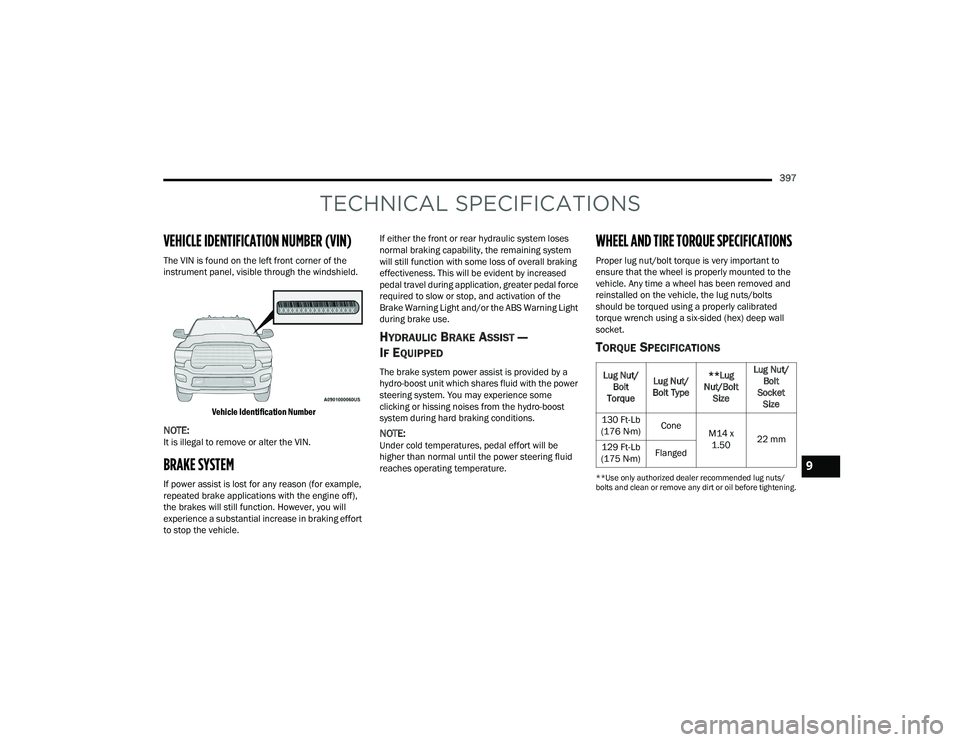
The VIN is found on the left front corner of the
instrument panel, visible through the windshield.
Vehicle Identification Number
NOTE:It is illegal to remove or alter the VIN.
BRAKE SYSTEM
If power assist is lost for any reason (for example,
repeated brake applications with the engine off),
the brakes will still function. However, you will
experience a substantial increase in braking effort
to stop the vehicle. If either the front or rear hydraulic system loses
normal braking capability, the remaining system
will still function with some loss of overall braking
effectiveness. This will be evident by increased
pedal travel during application, greater pedal force
required to slow or stop, and activation of the
Brake Warning Light and/or the ABS Warning Light
during brake use.
HYDRAULIC BRAKE ASSIST —
I
F EQUIPPED
The brake system power assist is provided by a
hydro-boost unit which shares fluid with the power
steering system. You may experience some
clicking or hissing noises from the hydro-boost
system during hard braking conditions.
NOTE:Under cold temperatures, pedal effort will be
higher than normal until the power steering fluid
reaches operating temperature.
WHEEL AND TIRE TORQUE SPECIFICATIONS
Proper lug nut/bolt torque is very important to
ensure that the wheel is properly mounted to the
vehicle. Any time a wheel has been removed and
reinstalled on the vehicle, the lug nuts/bolts
should be torqued using a properly calibrated
torque wrench using a six-sided (hex) deep wall
socket.
TORQUE SPECIFICATIONS
**Use only authorized dealer recommended lug nuts/
bolts and clean or remove any dirt or oil before tightening.
Lug Nut/
Bolt
Torque Lug Nut/
Bolt Type **Lug
Nut/Bolt Size Lug Nut/
Bolt
Socket Size
130 Ft-Lb
(176 N·m) Cone
M14 x
1.50 22 mm
129 Ft-Lb
(175 N·m) Flanged
9
22_DPF_OM_EN_USC_t.book Page 397
Page 400 of 428
398TECHNICAL SPECIFICATIONS
Inspect the wheel mounting surface prior to
mounting the tire and remove any corrosion or
loose particles.
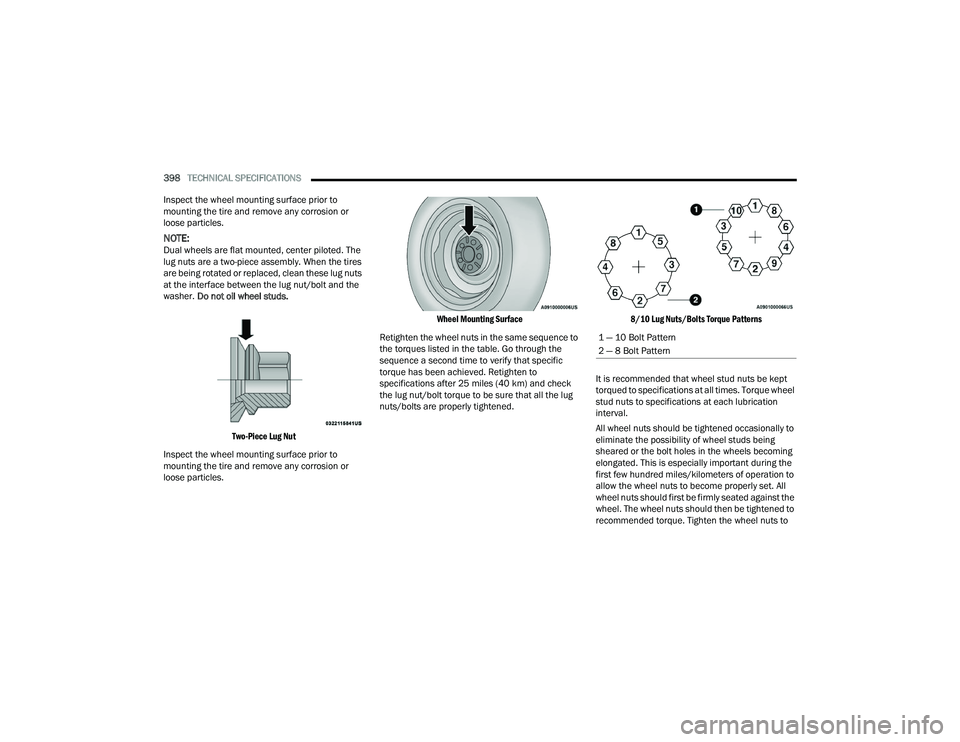
NOTE:Dual wheels are flat mounted, center piloted. The
lug nuts are a two-piece assembly. When the tires
are being rotated or replaced, clean these lug nuts
at the interface between the lug nut/bolt and the
washer. Do not oil wheel studs.
Two-Piece Lug Nut
Inspect the wheel mounting surface prior to
mounting the tire and remove any corrosion or
loose particles.
Wheel Mounting Surface
Retighten the wheel nuts in the same sequence to
the torques listed in the table. Go through the
sequence a second time to verify that specific
torque has been achieved. Retighten to
specifications after 25 miles (40 km) and check
the lug nut/bolt torque to be sure that all the lug
nuts/bolts are properly tightened.
8/10 Lug Nuts/Bolts Torque Patterns
It is recommended that wheel stud nuts be kept
torqued to specifications at all times. Torque wheel
stud nuts to specifications at each lubrication
interval.
All wheel nuts should be tightened occasionally to
eliminate the possibility of wheel studs being
sheared or the bolt holes in the wheels becoming
elongated. This is especially important during the
first few hundred miles/kilometers of operation to
allow the wheel nuts to become properly set. All
wheel nuts should first be firmly seated against the
wheel. The wheel nuts should then be tightened to
recommended torque. Tighten the wheel nuts to
1 — 10 Bolt Pattern
2 — 8 Bolt Pattern
22_DPF_OM_EN_USC_t.book Page 398
Page 401 of 428
TECHNICAL SPECIFICATIONS399
final torque in increments. Progress around the
bolt circle, tightening the wheel nut opposite to the
wheel nut just previously tightened until final
torque is achieved.
FUEL REQUIREMENTS— GASOLINE ENGINE
While operating on gasoline with the required
octane number, hearing a light knocking sound
from the engine is not a cause for concern.
However, if the engine is heard making a heavy
knocking sound, see a dealer immediately. Use of
gasoline with a lower than recommended octane
number can cause engine failure and may void or
not be covered by the New Vehicle Limited
Warranty.
Poor quality gasoline can cause problems such as
hard starting, stalling, and hesitations. If you
experience these symptoms, try another brand of
gasoline before considering service for the vehicle.
6.4L ENGINE
Do not use E-85 flex fuel or ethanol blends greater
than 15% in this engine. This engine is designed to meet all
emissions regulations and provide
satisfactory fuel economy and
performance when using high quality
unleaded gasoline having a posted octane number
of 87 as specified by the (R+M)/2 method.
REFORMULATED GASOLINE
Many areas of the country require the use of
cleaner-burning gasoline referred to as
“reformulated gasoline”. Reformulated gasoline
contains oxygenates and are specifically blended
to reduce vehicle emissions and improve air
quality.
The use of reformulated gasoline is recommended.
Properly blended reformulated gasoline will
provide improved performance and durability of
engine and fuel system components.
MATERIALS ADDED TO FUEL
Besides using unleaded gasoline with the proper
octane rating, gasolines that contain detergents,
corrosion and stability additives are
recommended. Using gasolines that have these
additives will help improve fuel economy, reduce
emissions, and maintain vehicle performance. Designated TOP TIER Detergent Gasoline
contains a higher level of detergents to
further aide in minimizing engine and
fuel system deposits. When available,
the usage of TOP TIER Detergent Gasoline is
recommended. Visit www.toptiergas.com for a list
of TOP TIER Detergent Gasoline Retailers.
Indiscriminate use of fuel system cleaning agents
should be avoided. Many of these materials
intended for gum and varnish removal may contain
active solvents or similar ingredients. These can
harm fuel system gasket and diaphragm materials.
GASOLINE/OXYGENATE BLENDS
Some fuel suppliers blend unleaded gasoline with
oxygenates such as ethanol.
WARNING!
To avoid the risk of forcing the vehicle off the
jack, do not tighten the lug nuts/bolts fully until
the vehicle has been lowered. Failure to follow
this warning may result in personal injury.
CAUTION!
DO NOT use E-85, gasoline containing methanol,
or gasoline containing more than 15% ethanol
(E-15). Use of these blends may result in starting
and drivability problems, damage critical fuel
system components, cause emissions to exceed
the applicable standard, and/or cause the
Malfunction Indicator Light to illuminate. Please
observe pump labels as they should clearly
communicate if a fuel contains greater than
15% ethanol (E-15).
9
22_DPF_OM_EN_USC_t.book Page 399
Page 423 of 428
421
Storage, Vehicle
...................................... 60, 393Store Radio Presets....................................... 219Storing Your Vehicle...................................... 393Sunglasses Storage......................................... 64Sway Control, Trailer...................................... 266Synthetic Engine Oil....................................... 342
T
Telescoping Steering Column.......................... 27Temperature Control, Automatic (ATC)............ 60Tilt Down........................................................... 32Up................................................................ 32Tilt Steering Column........................................ 27Tip Start............................................... 107, 109Tire And Loading Information Placard........... 380Tire Markings................................................. 376Tire Safety Information.................................. 376Tires................................... 309, 383, 387, 392Aging (Life Of Tires)................................... 385Air Pressure............................................... 383Chains....................................................... 390Changing................................................... 315Compact Spare......................................... 387Dual........................................ 318, 392, 397General Information........................ 383, 387High Speed................................................ 384Inflation Pressure...................................... 383Jacking...................................................... 315Life Of Tires............................................... 385
Load Capacity........................................... 380Pressure Monitoring System (TPMS)..99, 268Quality Grading......................................... 392Radial....................................................... 384Replacement............................................ 386Rotation.................................................... 391Safety.............................................. 376, 383Sizes......................................................... 377Snow Tires................................................ 387Spare Tires...................................... 387, 388Spinning................................................... 385Trailer Towing........................................... 178Tread Wear Indicators.............................. 385Wheel Nut Torque..................................... 397To Open Hood.................................................. 73Tongue Weight/Trailer Weight...................... 177Torque Converter Clutch............................... 131Tow Mode Mirror.............................................. 39Towing................................................. 173, 325Disabled Vehicle....................................... 325Guide........................................................ 176Recreational............................................. 185Weight...................................................... 176Towing Behind A Motorhome........................ 185Traction......................................................... 188Traction Control............................................ 265Trailer Sway Control (TSC)............................. 266Trailer Towing............................................... 173Hitches..................................................... 176Minimum Requirements........................... 177
Mirrors.........................................................42Tips........................................................... 182Trailer And Tongue Weight........................ 177Wiring....................................................... 181Trailer Towing Guide..................................... 176Trailer Weight................................................ 176Transfer Case................................................ 361Electronically Shifted....................... 132, 135Fluid.......................................................... 407Transmission................................................. 122Automatic............................... 122, 126, 358Fluid.......................................................... 407Maintenance............................................ 358Shifting..................................................... 121Transporting Pets.......................................... 307Tread Wear Indicators................................... 385Turn Signals.................................. 50, 102, 373
U
UconnectPhone Call Features
................................. 228Things You Should Know About Your Uconnect Phone................................... 231Uconnect Phone............................................ 225Answer Or Ignore An Incoming Call — Call Currently In Progress..................... 230Answer Or Ignore An Incoming Call — No Call Currently In Progress................ 229Bluetooth Communication Link................ 233Call Continuation...................................... 231
11
22_DPF_OM_EN_USC_t.book Page 421