lights RAM CHASSIS CAB 2022 Workshop Manual
[x] Cancel search | Manufacturer: RAM, Model Year: 2022, Model line: CHASSIS CAB, Model: RAM CHASSIS CAB 2022Pages: 428, PDF Size: 20.18 MB
Page 245 of 428

MULTIMEDIA243
Vehicle Finder
Description
The Vehicle Finder feature allows you to find the
location of your vehicle.
You can also sound the horn and flash the lights to
make finding your vehicle even easier.
How It Works
Select the Vehicle Finder function within the
Mobile App and select the Location tab at the
bottom of the App. Then, press the Vehicle icon to
find your vehicle.
Requirements
Vehicle must be properly equipped with the
Uconnect system.
Vehicle must have an operable LTE (voice/data)
or 3G or 4G (data) network connection compat -
ible with your device.
Vehicle must have an active subscription that
includes the applicable feature.
Vehicle ignition must have been turned on
within 14 days.
4G Wi-Fi Hotspot — If Equipped
Description
4G Wi-Fi Hotspot is an in-vehicle service that
connects your device to an LTE (voice/data) or 4G
(data) network that is ready to go wherever you are.
After you've made your purchase, turn on your
device’s Wi-Fi and connect your devices.
Enables all your passengers to be simultane -
ously connected to the web.
Connect several devices at one time.
Any Wi-Fi-enabled device — such as a laptop or
any other portable-enabled media — can
connect over your private in-vehicle network.
A high-speed, secured connection lets anyone
on your private network access the Web — great
for working and relaxing. Create A 4G Wi-Fi Hotspot For Use In Your Vehicle
How It Works
The 4G Wi-Fi Hotspot feature provides
the vehicle passengers with an internet
access hotspot in the vehicle, using the
radio as an access point. The hotspot will
allow Wi-Fi-enabled in-vehicle devices (such as a
laptop or any other portable-enabled media
device) to wirelessly connect to the internet.
Uconnect offers a complimentary 3-month trial
period that includes 1GB of total data. The trial can
be activated any time within the first year of new
vehicle ownership.
Use one of these three ways to purchase a
subscription to the 4G Wi-Fi Hotspot:
1. From your vehicle’s touchscreen, select the 4G Wi-Fi Hotspot App, and press the How To
Purchase button and follow the instructions.
2. Log onto your Owner’s Site and click the link to the AT&T portal to get set up.
3. For existing Connected Car customers: Push
the ASSIST button to be routed to an AT&T
Customer Care agent who will assist you.
WARNING!
The driver should NEVER use the 4G Wi-Fi
Hotspot while driving the vehicle as doing so
may result in an accident involving serious injury
or death.
5
22_DPF_OM_EN_USC_t.book Page 243
Page 251 of 428
MULTIMEDIA249
3. Can I select a different route than the most
recent one I sent to my vehicle? Yes, once you
enter the vehicle, and start the engine, the
pop-up message offers a “Locations” option.
Once “Locations” is selected, you can choose
from a list of recently sent destinations.
CONNECTED SERVICES VEHICLE FINDER
FAQ
S
1.
Can someone else locate my vehicle?
Your
vehicle may be located by anyone who has
your PIN and access to your account. It is your
responsibility to guard your PIN accordingly.
See the Uconnect and SiriusXM Guardian™
terms of service for more information.
2. How long does it take to sound my horn and
flash the lights? Depending on various
conditions, it can take three minutes or more
for the request to get through to your vehicle.
3. How do I turn off the horn and lights after I turn
them on? If you are close enough to the
vehicle, you can use the key fob to turn off the
horn and lights by pushing the red Panic
button.
CONNECTED SERVICES STOLEN VEHICLE
A
SSISTANCE FAQS — IF EQUIPPED
1.
Can someone locate my vehicle?
To enhance
your privacy, and the privacy of others using
your vehicle, a stolen vehicle police report is
required for you to activate this service. You
must involve local law enforcement to have
SiriusXM Guardian™ locate your vehicle. We
may also locate the vehicle for other law
enforcement or government agencies,
subject to a valid court order telling SiriusXM
Guardian™ to do so. We will also provide the
service for FCA entities to locate a vehicle that
you have purchased through them.
2. How will I know if my vehicle is recovered?
After you provide the SiriusXM Guardian™
Customer Care agent with the stolen vehicle
report, the agent will work together with law
enforcement to try to locate your vehicle. If
your vehicle is recovered, you will be contacted
by law enforcement.
3. Can SiriusXM Guardian™ lower my insurance
rates? Some insurance providers offer lower
rates on vehicles equipped with systems that
can deter auto theft. When shopping for
insurance, be sure to inform the insurance
provider of your SiriusXM Guardian™ connected services subscription to find out if
the insurance provider can offer you a lower
rate.NOTE:Neither FCA nor SiriusXM® are insurance
companies, and SiriusXM Guardian™ is not an
insurance product. You are responsible for
obtaining insurance coverage for your vehicle and
yourself.
CONNECTED SERVICES REMOTE VEHICLE
S
TART FAQS
1.
How long does it take to remotely start my
vehicle?
Depending on various conditions, it
can take three minutes or more for the
request to get through to your vehicle.
2. Which is faster, my key fob or the Mobile App?
Your key fob will remote start your vehicle
more quickly. However its range is limited. For
example, when you are leaving the stadium
after the game, you can use the Mobile App to
remote start your vehicle and have the inside
of your vehicle comfortable by the time you get
to it.
3. Will my vehicle be safe if I lose my wireless
device? People sometimes lose their wireless
devices, which is why security measures have
been engineered into the Mobile App. Asking
for your username, password and SiriusXM 5
22_DPF_OM_EN_USC_t.book Page 249
Page 252 of 428
250MULTIMEDIA
Guardian™ Security PIN help to ensure that
nobody can start your vehicle if they happen to
find your device.
4. Can someone drive off with my vehicle using
the App? No. Driving your vehicle still requires
the keys to be in the vehicle. The Remote Start
feature simply starts the engine to warm up or
cool down the interior before you arrive.
5. Can I stop a vehicle that is being driven with
the cancel Remote Vehicle Start command?
No. If the vehicle is in motion, the cancel
Remote Vehicle Start button will not stop the
vehicle.
6. Why can’t all mobile devices use the Mobile
App? The Mobile App has been designed to
work on most devices with the Apple® and
Android™ operating systems. The capabilities
of these devices allow us to remotely
command your vehicle. Other operating
systems may be supported in the future.
CONNECTED SERVICES REMOTE HORN
& L
IGHTS FAQS
1.
How long does it take to sound my horn and
flash the lights?
Depending on various
conditions, it can take three minutes or more
for the request to get through to your vehicle.
2.
Which is faster, my key fob or the Mobile App?
Your key fob will sound the horn and flash the
lights quicker; however, its range is limited.
3. How do I turn off the horn and lights after I turn
them on? If you are close enough to the
vehicle, you can use the key fob to turn off the
horn and lights by pressing the red Panic
button. Otherwise, Remote Horn & Lights will
continue for a maximum of three minutes.
4. Why can’t all mobile devices use the Mobile
App? The Mobile App has been designed to
work on most devices with the Apple® and
Android™ operating systems. The capabilities
of these devices allow us to remotely
command your vehicle. Other operating
systems may be supported in the future.
CONNECTED SERVICES ACCOUNT
FAQ
S — IF EQUIPPED
1.
How do I register for my SiriusXM Guardian™
account? There are three ways that you can
register your SiriusXM Guardian™ Account:
Push the ASSIST button. A call will be placed
to an agent who can assist in registering
your new account.
Press the Activate Services icon in the Apps
menu. Select the button to speak with an
agent, who can assist in registering your
new account.
Press the Activate Services icon in the Apps
menu. Enter your email on the touchscreen
and then follow the prompts from the
provided email. You will receive an email
with an activation link that will be good for
72 hours. Once you click the activation link,
you will be prompted to fill out your informa -
tion and accept Terms and Conditions.
Then, you will be directed to the SiriusXM
Guardian™ home page to complete your
profile and demo the remote services.
2. Why do I need an email address? Without an
email address, customers cannot register for
SiriusXM Guardian™. Customers need to
register so they can subscribe to receive
additional services and create a SiriusXM
Guardian™ Security PIN for remote command
requests.
3. How do I create a SiriusXM Guardian™ security
PIN? Set up your SiriusXM Guardian™ Security
PIN during the registration process. The
SiriusXM Guardian™ Security PIN will be
required to authenticate you when accessing
your account via SiriusXM Guardian™ Call or
performing any remote services, such as
Remote Door Lock/Unlock, Remote Horn &
Lights, or Remote Vehicle Start.
4. What if I forgot my SiriusXM Guardian™
security PIN? If you’ve already activated
services and forgot your SiriusXM Guardian™
22_DPF_OM_EN_USC_t.book Page 250
Page 288 of 428

286SAFETY
(Continued)
The first stage inflator is triggered immediately
during an impact that requires air bag deployment.
A low energy output is used in less severe
collisions. A higher energy output is used for more
severe collisions.
This vehicle may be equipped with a driver and/or
front passenger seat belt buckle switch that
detects whether the driver or front passenger seat
belt is buckled. The seat belt buckle switch may
adjust the inflation rate of the Advanced Front Air
Bags.
Front Air Bag Operation
Front Air Bags are designed to provide additional
protection by supplementing the seat belts. Front
air bags are not expected to reduce the risk of
injury in rear, side, or rollover collisions. The front
air bags will not deploy in all frontal collisions,
including some that may produce substantial
vehicle damage — for example, some pole
collisions, truck underrides, and angle offset
collisions.
On the other hand, depending on the type and
location of impact, front air bags may deploy in
crashes with little vehicle front-end damage but
that produce a severe initial deceleration.
Because air bag sensors measure vehicle
deceleration over time, vehicle speed and damage
by themselves are not good indicators of whether
or not an air bag should have deployed. Seat belts are necessary for your protection in all
collisions, and also are needed to help keep you in
position, away from an inflating air bag.
When the Occupant Restraint Controller (ORC)
detects a collision requiring the front air bags, it
signals the inflator units. A large quantity of
non-toxic gas is generated to inflate the front air
bags.
The steering wheel hub trim cover and the upper
passenger side of the instrument panel separate
and fold out of the way as the air bags inflate to
their full size. The front air bags fully inflate in less
time than it takes to blink your eyes. The front air
bags then quickly deflate while helping to restrain
the driver and front passenger.
Knee Impact Bolsters
The Knee Impact Bolsters help protect the knees
of the driver and front passenger, and position the
front occupants for improved interaction with the
front air bags.
WARNING!
No objects should be placed over or near the
air bag on the instrument panel or steering
wheel because any such objects could cause
harm if the vehicle is in a collision severe
enough to cause the air bag to inflate.
Do not put anything on or around the air bag
covers or attempt to open them manually. You
may damage the air bags and you could be
injured because the air bags may no longer be
functional. The protective covers for the air
bag cushions are designed to open only when
the air bags are inflating.
Relying on the air bags alone could lead to
more severe injuries in a collision. The air
bags work with your seat belt to restrain you
properly. In some collisions, air bags won’t
deploy at all. Always wear your seat belts even
though you have air bags.
WARNING!
WARNING!
Do not drill, cut, or tamper with the knee
impact bolsters in any way.
Do not mount any accessories to the knee
impact bolsters such as alarm lights, stereos,
citizen band radios, etc.
22_DPF_OM_EN_USC_t.book Page 286
Page 292 of 428

290SAFETY
NOTE:
Air bag covers may not be obvious in the interior
trim, but they will open during air bag deploy -
ment.
After any collision, the vehicle should be taken
to an authorized dealer immediately.
Enhanced Accident Response System
In the event of an impact, if the communication
network remains intact, and the power remains
intact, depending on the nature of the event, the
ORC will determine whether to have the Enhanced
Accident Response System perform the following
functions:
Cut off fuel to the engine (if equipped).
Cut off battery power to the electric motor (if
equipped).
Flash hazard lights as long as the battery has
power.
Turn on the interior lights, which remain on as
long as the battery has power or for 15 minutes
from the intervention of the Enhanced Accident
Response System.
Unlock the power door locks.
Your vehicle may also be designed to perform any
of these other functions in response to the
Enhanced Accident Response System:
Turn off the Fuel Filter Heater, Turn off the HVAC
Blower Motor, Close the HVAC Circulation Door
Cut off battery power to the:
Engine
Electric Motor (if equipped)
Electric power steering
Brake booster
Electric park brake
Automatic transmission gear selector
Horn
Front wiper
Headlamp washer pump (if equipped)
NOTE:After an accident, remember to place the ignition
to the STOP (OFF/LOCK) position and remove the
key from the ignition switch to avoid draining the
battery. Carefully check the vehicle for fuel leaks in
the engine compartment and on the ground near
the engine compartment and fuel tank before
resetting the system and starting the engine. If
there are no fuel leaks or damage to the vehicle
electrical devices (e.g. headlights) after an
accident, reset the system by following the
procedure described below. If you have any doubt,
contact an authorized dealer.
Enhanced Accident Response System
Reset Procedure
In order to reset the Enhanced Accident Response
System functions after an event, the ignition switch
must be changed from ignition START or ON/RUN
to ignition OFF. Carefully check the vehicle for fuel
leaks in the engine compartment and on the
ground near the engine compartment and fuel
tank before resetting the system and starting the
engine.
After an accident, if the vehicle will not start after
performing the reset procedure, the vehicle must
be towed to an authorized dealer to be inspected
and to have the Enhanced Accident Response
System reset.
WARNING!
Deployed air bags and seat belt pretensioners
cannot protect you in another collision. Have the
air bags, seat belt pretensioners, and the seat
belt retractor assemblies replaced by an
authorized dealer immediately. Also, have the
Occupant Restraint Controller System serviced
as well.
22_DPF_OM_EN_USC_t.book Page 290
Page 311 of 428

SAFETY309
PERIODIC SAFETY CHECKS YOU SHOULD
M
AKE OUTSIDE THE VEHICLE
Tires
Examine tires for excessive tread wear and uneven
wear patterns. Check for stones, nails, glass, or
other objects lodged in the tread or sidewall.
Inspect the tread for cuts and cracks. Inspect
sidewalls for cuts, cracks, and bulges. Check the
lug nuts/bolt torque for tightness. Check the tires
(including spare) for proper cold inflation pressure.
Lights
Have someone observe the operation of brake
lights and exterior lights while you work the
controls. Check turn signal and high beam
indicator lights on the instrument panel.
Door Latches
Check for proper closing, latching, and locking.
Fluid Leaks
Check area under the vehicle after overnight
parking for fuel, coolant, oil, or other fluid leaks.
Also, if gasoline fumes are detected or if fuel or
brake fluid leaks are suspected, the cause should
be located and corrected immediately.
EXHAUST GAS The best protection against carbon monoxide entry
into the vehicle body is a properly maintained
engine exhaust system.
Whenever a change is noticed in the sound of the
exhaust system, when exhaust fumes can be
detected inside the vehicle, or when the underside
or rear of the vehicle is damaged, have an
authorized dealer inspect the complete exhaust
system and adjacent body areas for broken,
damaged, deteriorated, or mispositioned parts.
Open seams or loose connections could permit
exhaust fumes to seep into the passenger
compartment. In addition, inspect the exhaust
system each time the vehicle is raised for
lubrication or oil change. Replace as required.
WARNING!
Exhaust gases can injure or kill. They contain
carbon monoxide (CO), which is colorless and
odorless. Breathing it can make you
unconscious and can eventually poison you. To
avoid breathing (CO), follow these safety tips:
Do not run the engine in a closed garage or in
confined areas any longer than needed to
move your vehicle in or out of the area.
If you are required to drive with the trunk/lift -
gate/rear doors open, make sure that all
windows are closed and the climate control
BLOWER switch is set at high speed. DO NOT
use the recirculation mode.
If it is necessary to sit in a parked vehicle with
the engine running, adjust your heating or
cooling controls to force outside air into the
vehicle. Set the blower at high speed.
6
22_DPF_OM_EN_USC_t.book Page 309
Page 330 of 428

328
SERVICING AND MAINTENANCE
SCHEDULED SERVICING — GASOLINE
ENGINE
Your vehicle is equipped with an automatic oil
change indicator system. The oil change indicator
system will remind you that it is time to take your
vehicle in for scheduled maintenance.
Based on engine operation conditions, the oil
change indicator message will illuminate. This
means that service is required for your vehicle.
Operating conditions such as frequent short-trips,
trailer tow, extremely hot or cold ambient
temperatures will influence when the “Oil Change
Required” message is displayed. Have your vehicle
serviced as soon as possible, within the next
500 miles (805 km).An authorized dealer will reset the oil change
indicator message after completing the scheduled
oil change. If a scheduled oil change is performed
by someone other than an authorized dealer, the
message can be reset by referring to the steps
described under Instrument Cluster Display
Ú
page 81.
Under no circumstances should oil change
intervals exceed 8,000 miles (13,000 km),
12 months or 350 hours of engine run time,
whichever comes first. The 350 hours of engine
run or idle time is generally only a concern for fleet
customers. Once A Month Or Before A Long Trip:
Check engine oil level.
Check windshield washer fluid level.
Check the tire inflation pressures and look for
unusual wear or damage. Rotate at the first sign
of irregular wear.
Check the fluid levels of the coolant reservoir,
brake master cylinder, power steering and auto
-
matic transmission (6-speed only), and fill as
needed.
Check function of all interior and exterior lights.
22_DPF_OM_EN_USC_t.book Page 328
Page 368 of 428
366SERVICING AND MAINTENANCE
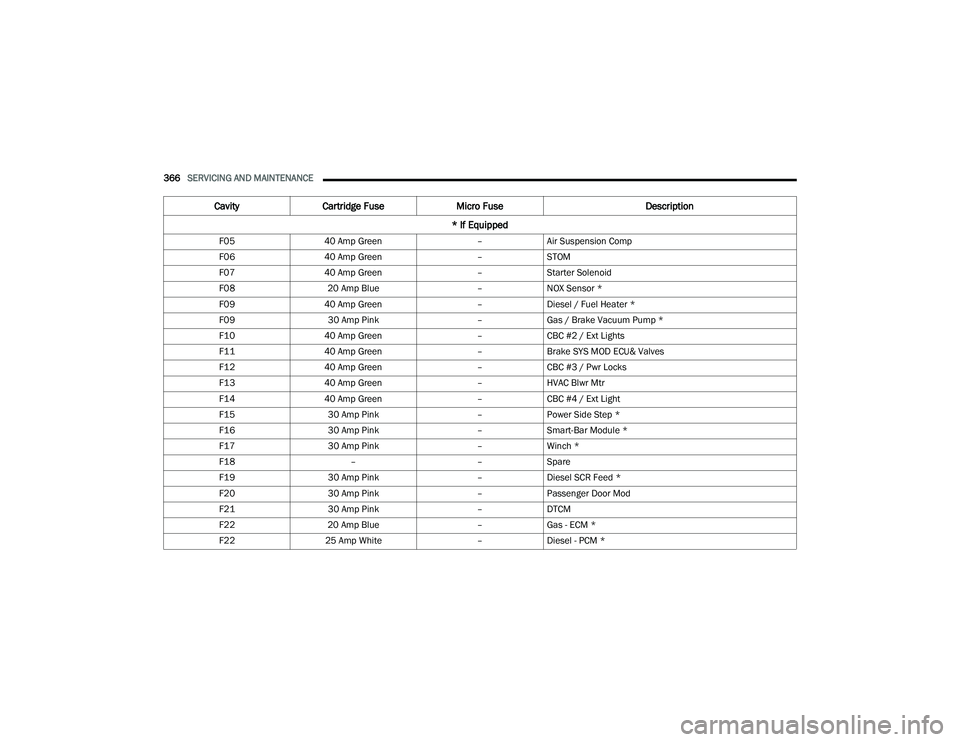
F05 40 Amp Green –Air Suspension Comp
F06 40 Amp Green –STOM
F07 40 Amp Green –Starter Solenoid
F08 20 Amp Blue –NOX Sensor *
F09 40 Amp Green –Diesel / Fuel Heater *
F09 30 Amp Pink –Gas / Brake Vacuum Pump *
F10 40 Amp Green –CBC #2 / Ext Lights
F11 40 Amp Green –Brake SYS MOD ECU& Valves
F12 40 Amp Green –CBC #3 / Pwr Locks
F13 40 Amp Green –HVAC Blwr Mtr
F14 40 Amp Green –CBC #4 / Ext Light
F15 30 Amp Pink –Power Side Step *
F16 30 Amp Pink –Smart-Bar Module *
F17 30 Amp Pink –Winch *
F18 ––Spare
F19 30 Amp Pink –Diesel SCR Feed *
F20 30 Amp Pink –Passenger Door Mod
F21 30 Amp Pink –DTCM
F22 20 Amp Blue –Gas - ECM *
F22 25 Amp White –Diesel - PCM *
Cavity Cartridge Fuse Micro Fuse Description
* If Equipped
22_DPF_OM_EN_USC_t.book Page 366
Page 396 of 428

394SERVICING AND MAINTENANCE
What Causes Corrosion?
Corrosion is the result of deterioration or removal
of paint and protective coatings from your vehicle.
The most common causes are:
Road salt, dirt and moisture accumulation.
Stone and gravel impact.
Insects, tree sap and tar.
Salt in the air near seacoast localities.
Atmospheric fallout/industrial pollutants.
BODY AND UNDERBODY MAINTENANCE
Cleaning Headlights
Your vehicle is equipped with plastic headlights
and fog lights that are lighter and less susceptible
to stone breakage than glass headlights.
Plastic is not as scratch resistant as glass and
therefore different lens cleaning procedures must
be followed.
To minimize the possibility of scratching the lenses
and reducing light output, avoid wiping with a dry
cloth. To remove road dirt, wash with a mild soap
solution followed by rinsing.
Do not use abrasive cleaning components,
solvents, steel wool or other aggressive material to
clean the lenses.
PRESERVING THE BODYWORK
Washing
Wash your vehicle regularly. Always wash your
vehicle in the shade using Mopar® Car Wash, or
a mild car wash soap, and rinse the panels
completely with water.
If insects, tar, or other similar deposits have
accumulated on your vehicle, use Mopar®
Super Kleen Bug and Tar Remover to remove.
Use a high quality cleaner wax, such as Mopar®
Cleaner Wax to remove road film, stains and to
protect your paint finish. Use precautions to not
scratch the paint.
Avoid using abrasive compounds and power
buffing that may diminish the gloss or thin out
the paint finish.
Special Care
If you drive on salted or dusty roads or if you
drive near the ocean, hose off the undercarriage
at least once a month.
It is important that the drain holes in the lower
edges of the doors, rocker panels, and trunk be
kept clear and open.
If you detect any stone chips or scratches in the
paint, touch them up immediately.
If your vehicle is damaged due to a collision or
similar cause that destroys the paint and protec -
tive coating, have your vehicle repaired as soon
as possible.
If you carry special cargo such as chemicals,
fertilizers, de-icer salt, etc., be sure that such
materials are well packaged and sealed.
If a lot of driving is done on gravel roads,
consider mud or stone shields behind each
wheel.
Use Mopar® Touch Up Paint on scratches as
soon as possible. An authorized dealer has
touch up paint to match the color of your
vehicle.
CAUTION!
Do not use abrasive or strong cleaning mate -
rials such as steel wool or scouring powder
that will scratch metal and painted surfaces.
Use of power washers exceeding 1,200 psi
(8,274 kPa) can result in damage or removal
of paint and decals.
22_DPF_OM_EN_USC_t.book Page 394
Page 415 of 428

413
INDEX
A
Adaptive Cruise Control (ACC) (Cruise
Control)
................................................ 141, 143Adding Engine Coolant (Antifreeze)............... 355Adding Fuel.................................................... 169Additives, Fuel............................................... 399AdjustDown........................................................... 32Forward....................................................... 32Rearward..................................................... 32Up................................................................ 32Adjustable Pedals............................................ 37Advance Phone Connectivity......................... 231Air BagAir Bag Operation...................................... 286Air Bag Warning Light................................ 284Enhanced Accident Response......... 290, 327Event Data Recorder (EDR)....................... 327If Deployment Occurs................................ 289Knee Impact Bolsters................................ 286Maintaining Your Air Bag System.............. 291Maintenance............................................. 291Redundant Air Bag Warning Light.............285Transporting Pets...................................... 307Air Bag Light..................................95, 284, 307
Air Cleaner, Engine (Engine Air Cleaner
Filter)................................................... 342, 361Air Conditioner Maintenance........................ 344Air Conditioner Refrigerant........................... 344Air Conditioner System................................. 344Air Conditioning................................................ 58Air Conditioning Filter....................................... 61Air Conditioning System................................... 60Air Conditioning, Operating Tips....................... 60Air Filter........................................................ 342Air PressureTires......................................................... 383AlarmSecurity Alarm...................................... 23, 96Alterations/ModificationsVehicle......................................................... 10Antifreeze (Engine Coolant).......................... 355Capacities................................................. 403Disposal................................................... 356Anti-Lock Brake System (ABS)...................... 259Anti-Lock Warning Light................................ 100Assist, Hill Start............................................. 264Audio Settings............................................... 219Audio Systems (Radio).................................. 190Auto Down Power Windows............................. 71Automatic Door Locks...................................... 26
Automatic Headlights.......................................48Automatic Temperature Control (ATC)..............60Automatic Transmission....................... 122, 360Adding Fluid.............................................. 360Fluid And Filter Change............................. 360Fluid Change............................................. 360Fluid Level Check............................. 358, 359Fluid Type........................................ 360, 407Shifting..................................................... 126Special Additives...................................... 358Automatic Transmission Limp Home Mode... 125AutoPark....................................................... 105AUX Camera......................................... 165, 168Auxiliary Driving Systems.............................. 266Axle Fluid.....................................360, 361, 407Axle Lubrication................................... 360, 361
B
Back-Up......................................................... 159Back-Up Camera........................................... 159Battery................................................... 96, 340Blanket..................................................... 114Charging System Light.................................96Keyless Key Fob Replacement....................16Battery Saver Feature......................................51Belts, Seat.................................................... 307
11
22_DPF_OM_EN_USC_t.book Page 413