tire pressure RAM CHASSIS CAB 2023 Owner's Manual
[x] Cancel search | Manufacturer: RAM, Model Year: 2023, Model line: CHASSIS CAB, Model: RAM CHASSIS CAB 2023Pages: 444, PDF Size: 20.51 MB
Page 286 of 444

284SAFETY
Once you repair or replace the original road tire
and reinstall it on the vehicle in place of the
non-matching full size spare or compact spare,
the TPMS will update automatically. In addition,
the TPMS Warning Light will turn off and the
graphic in the instrument cluster will display a
new pressure value instead of dashes (- -), as
long as no tire pressure is below the low-pres -
sure warning limit in any of the four active road
tires. The vehicle may need to be driven for up
to 20 minutes above 15 mph (24 km/h) in
order for the TPMS to receive this information.
Trailer Tire Pressure Monitoring System
(TTPMS) — If Equipped
The Trailer Tire Pressure Monitoring System
(TTPMS) is a feature that displays the trailer tire
pressure values and warns the driver of a low tire
pressure event based on the driver’s set target tire
pressure value, through TTPMS settings found in
the radio.
The TTPMS monitors the pressure of each tire and
warns the driver through the instrument cluster, when
either a low tire pressure condition falls below 25% of
the driver’s set pressure or if a system malfunction
occurs. The instrument cluster will display the actual
tire pressure or dashes for each of the trailer tires in
the correct trailer position, based on trailer
configuration. The TTPMS can support up to 12 trailer
tires per configured trailer on up to four configurable
trailers
Ú
page 199.
Trailer Tire Pressure Monitoring System
Trailer Tire Pressure Sensor Pairing
In order use this feature, the provided tire pressure
sensors must be installed in the desired trailer
tires and the sensors must be paired to the truck.
If the target trailer requires more than the provided
four sensors, additional sensors can be purchased
at an authorized Ram dealership.
With the sensors installed and the trailer near or
connected to your Ram truck, initiate the pairing
process by entering the settings menu in the radio
and select trailer. Select the desired trailer profile
to pair to, open the “Tire Pressure” menu, and hit
“Set Up All Tires” Ú page 199.
NOTE:The vehicle may not be driven until the pairing
process is complete.
Trailer Tire Pressure Settings
Trailer Tire Pressure Pairing
23_DPF_OM_EN_USC_t.book Page 284
Page 287 of 444

SAFETY285
Follow the on screen prompts to select the number
of axles (1-3), the number of trailer tires (2, 4, 6, 8,
or 12), and the set trailer tire pressure. The range
is selectable anywhere between 25-125 psi
(172-862 kPa).
Once psi (kPa) is programmed, the pairing screen
appears. Tire sensors must be paired in order
shown. Starting with Tire 1, deflate tire by 5 psi
(34 kPa) and wait for a horn chirp. It may take up
to three minutes for the chirp to occur, indicating
that the sensor has paired. Repeat process on
each tire, in order, until complete. Do not exit the
pairing screen until process is complete. If pairing
was unsuccessful, a double horn chirp will sound,
and a prompt on the touchscreen will allow you to
retry the procedure; “Retry” will only appear when
setup fails. Each tire must be successfully paired
during a single pairing process to receive the
success screen.
NOTE:If the pairing process times out after three minutes
of no communication with a sensor, a double horn
chirp will occur indicating the pairing has failed and
a message will display on the radio indicating the
process was unsuccessful. Under certain circum -
stances, the double horn chirp may continue to
happen every three minutes indicating the failed
pairing. If this happens, the horn chirping may be
canceled by cycling the ignition button OFF and
then back to ON/RUN position. Trailer Tire Pressure Monitoring System Low
Pressure Warnings
When a low tire pressure in one or more of the
active road tires is detected, the instrument cluster
will display a message stating “Trailer Tire
Pressure Low”. The instrument cluster will then
display the TTPMS graphic showing the pressure
values of each tire with the low tire pressure values
in a different color.
Should this occur, you should stop as soon as possible
and inflate the tires with a low pressure condition
(those in a different color in the instrument cluster
graphic) to the customer programmed target tire
pressure value as shown at the top of the TTPMS
instrument cluster graphic. Once the tire(s) are inflated,
the system will automatically update the graphic
display in the instrument cluster, returning to its
original color. The vehicle may need to be driven for up
to 10 minutes above 15 mph (24 km/h) in order for the
TTPMS to receive the updated information.
Service TTPMS Warning
If a system fault is detected, the instrument cluster
will display a “Trailer Tire Pressure System Service
Required” message for a minimum of five seconds.
Once the system fault is corrected the "Trailer Tire
Pressure System Service Required" message will
no longer be displayed. The vehicle may need to be
driven for up to 10 minutes above 15 mph
(24 km/h) in order for the TTPMS to receive the
trailer tire pressure information. Trailer Tire Pressure System Not Configured
A “Trailer Tire Pressure System Not Configured”
message will be displayed in the instrument
cluster on the TTPMS instrument cluster graphic
when a trailer number is selected that has not had
trailer tire pressure sensors paired Ú
page 199.
Trailer Sensors Detected Do Not Match Active
Trailer
The “Trailer Sensors Detected Do Not Match Active
Trailer” message will be displayed in the
instrument cluster when the trailer sensors being
received by the TTPMS module do not match the
trailer sensors paired to the current trailer number
selected. This message will be displayed when the
sensors being received completely match the
sensors paired to another trailer number
configured in the TTPMS module.
To correct this condition, the correct trailer number
must be selected in the radio Ú page 199.
System Limitations
The TTPMS may have difficulty transmitting
through steel-walled tires or on trailers longer than
30 ft. It is recommended to use standard tires and
trailers less than 30 ft long to avoid dropouts or
difficulty when pairing.
NOTE:The vehicle may not be driven until the pairing
process is complete.
6
23_DPF_OM_EN_USC_t.book Page 285
Page 288 of 444

286SAFETY
Tire Fill Alert — If Equipped
This feature notifies the user when the placard tire
pressure is attained while inflating or deflating the
tire.
The customer may choose to disable or enable the
Tire Fill Alert feature through use of the customer
settings in the radio.
NOTE:The Tire Fill Alert feature disables every time the
ignition is placed in the OFF position. The feature
must be re-enabled through the radio each time
the ignition is placed back in the ON/RUN position
Úpage 199.
NOTE:
Only one tire can be filled at a time when using
the Tire Fill Alert system.
The Tire Fill Alert feature cannot be entered if an
existing TPMS fault is set to “active” or if the
system is in deactivation mode (if equipped).
The system will be activated when the TPMS
receiver module detects a change in tire pressure.
The ignition must be in the RUN mode, with the
transmission in PARK (P).
NOTE:It is not required to have the engine running to
enter Tire Fill Alert mode. The hazard lamps will come on to confirm the
vehicle is in Tire Fill Alert mode.
If the hazard lamps do not come on while inflating
the tire, the TPMS sensor may be in a null spot
preventing the TPMS sensor signal from being
received. In this case, the vehicle may need to be
moved either forward or backward slightly to exit
the null spot.
When Tire Fill Alert mode is entered, the tire
pressure display screen will be displayed in the
instrument cluster.
Operation:
The horn will chirp once to let the user know
when to stop filling the tire, when it reaches
recommended pressure.
The horn will chirp three times if the tire is over
-
filled and will continue to chirp every five
seconds if the user continues to inflate the tire.
The horn will chirp once again when enough air
is let out to reach proper inflation level.
The horn will also chirp three times if the tire is
then underinflated and will continue to chirp
every five seconds if the user continues to
deflate the tire.
SELECTABLE TIRE FILL ALERT (STFA) —
IF EQUIPPED
The Selectable Tire Fill Alert (STFA) system is an
optional feature that is included as part of the
normal Tire Fill Alert system. The system is
designed to allow the customer to select a
pressure to inflate or deflate the vehicle's front and
rear axle tires to and to provide feedback to the
customer while inflating or deflating the vehicle's
tires.
In the Selectable Tire Fill Alert application, which is
located in the apps menu of the Uconnect system,
the customer will be able to select a pressure
setting for both the front and rear axle tire
pressures by scrolling through a pressure range
from XX to 15 psi in 1 psi increments for each axle
setting. XX = the vehicle’s cold placard pressure
values for the front and rear axles as shown on the
vehicle placard pressure label.
NOTE:The Tire Fill Alert feature disables every time the
ignition is placed in the OFF position. The feature
must be re-enabled through the radio each time
the ignition is placed back in the ON/RUN position
Ú page 199.
23_DPF_OM_EN_USC_t.book Page 286
Page 289 of 444

SAFETY287
The customer may also store the pressure values
chosen for each axle in the radio as a preset
pressure. The customer will be allowed to store up
to two sets of preset values in the radio for the
front and rear axle pressure values.
Once the customer selects the tire pressures for
the front and rear axles that they want to inflate or
deflate to, they can begin inflating or deflating one
tire at a time.
NOTE:The STFA system will only support inflating or
deflating one tire at a time.
The customer may choose to disable or enable the
STFA feature through use of the TFA settings in the
radio. If STFA appears grayed out it must be turned
on prior to selecting.
In order to use STFA, the Tire Fill Alert feature must
be enabled through the radio Ú page 199.
The system will be activated when the TPMS
receiver module detects a change in tire pressure.
The ignition must be in the RUN mode, with the
transmission in PARK (P).
The hazard lamps will come on to confirm the
vehicle is in Tire Fill Alert mode.
If the hazard lamps do not come on while inflating
or deflating the tire, the TPMS sensor may be in a
null spot preventing the TPMS sensor signal from
being received. In this case, the vehicle may need to be moved either forward or backward slightly to
exit the null spot.
When Tire Fill Alert mode is entered, the tire
pressure display screen will be displayed in the
instrument cluster.
Operation:
The horn will chirp once when the selected pres
-
sure is reached to let the user know when to
stop inflating or deflating the tire.
The horn will chirp three times if the tire is over -
inflated or over deflated and will continue to
chirp every five seconds if the user continues to
inflate or deflate the tire.
The horn will chirp once again when enough air
is added or removed to reach proper selected
pressure level.
Tire Pressure Information System (TPIS)
3500/4500/5500 Series Trucks
Your vehicle may be equipped with a Tire Pressure
Information System (TPIS).
The Tire Pressure Information System (TPIS) uses
wireless technology with wheel rim mounted
electronic sensors to transmit tire pressure levels.
Sensors mounted to each wheel as part of the
valve stem transmit tire pressure readings to the
receiver module.
NOTE:It is particularly important for you to check the tire
pressure in all of the tires on your vehicle monthly
and to maintain the proper pressure.
The TPIS consists of the following components:
Receiver module
Four TPMS sensors (Single Rear Wheel (SRW)
applications)
Six TPMS sensors (Dual Rear Wheel (DRW)
applications)
Pressure display in the instrument cluster
The TPIS will display all four (Single Rear Wheel
(SRW) applications) or six (Dual Rear Wheel (DRW)
applications) tire pressure values in the instrument
cluster display.
If a system fault is detected, the instrument cluster
will display a "SERVICE TPM SYSTEM" message for
a minimum of five seconds and then display
dashes (- -) in place of the pressure value to
indicate which sensor is not being received.
If the ignition switch is cycled, this sequence will
repeat, providing the system fault still exists. If the
system fault no longer exists, the "SERVICE TPM
SYSTEM" message will no longer be displayed, and
a pressure value will display in place of the dashes.
6
23_DPF_OM_EN_USC_t.book Page 287
Page 325 of 444

SAFETY323
(Continued)
(Continued)
PERIODIC SAFETY CHECKS YOU SHOULD
M
AKE OUTSIDE THE VEHICLE
Tires
Examine tires for excessive tread wear and uneven
wear patterns. Check for stones, nails, glass, or
other objects lodged in the tread or sidewall.
Inspect the tread for cuts and cracks. Inspect
sidewalls for cuts, cracks, and bulges. Check the
lug nuts/bolt torque for tightness. Check the tires
(including spare) for proper cold inflation pressure.
WARNING!
An improperly attached, damaged, folded, or
stacked floor mat, or damaged floor mat
fasteners may cause your floor mat to interfere
with the accelerator, brake, or clutch pedals and
cause a loss of vehicle control. To prevent
SERIOUS INJURY or DEATH:
ALWAYS securely attach your floor
mat using the floor mat fasteners. DO
NOT install your floor mat upside down
or turn your floor mat over. Lightly pull
to confirm mat is secured using the floor mat
fasteners on a regular basis.
ALWAYS REMOVE THE EXISTING
FLOOR MAT FROM THE VEHICLE
before installing any other floor mat.
NEVER install or stack an additional
floor mat on top of an existing floor mat.
ONLY install floor mats designed to fit your
vehicle. NEVER install a floor mat that cannot
be properly attached and secured to your
vehicle. If a floor mat needs to be replaced,
only use a FCA approved floor mat for the
specific make, model, and year of your
vehicle.
ONLY use the driver’s side floor mat on the
driver’s side floor area. To check for interfer -
ence, with the vehicle properly parked with the
engine off, fully depress the accelerator, the
brake, and the clutch pedal (if present) to
check for interference. If your floor mat inter -
feres with the operation of any pedal, or is not
secure to the floor, remove the floor mat from
the vehicle and place the floor mat in your
trunk.
ONLY use the passenger’s side floor mat on
the passenger’s side floor area.
ALWAYS make sure objects cannot fall or slide
into the driver’s side floor area when the
vehicle is moving. Objects can become
trapped under accelerator, brake, or clutch
pedals and could cause a loss of vehicle
control.
NEVER place any objects under the floor mat
(e.g., towels, keys, etc.). These objects could
change the position of the floor mat and may
cause interference with the accelerator,
brake, or clutch pedals.
WARNING!
If the vehicle carpet has been removed and
re-installed, always properly attach carpet to
the floor and check the floor mat fasteners are
secure to the vehicle carpet. Fully depress
each pedal to check for interference with the
accelerator, brake, or clutch pedals then
re-install the floor mats.
It is recommended to only use mild soap and
water to clean your floor mats. After cleaning,
always check your floor mat has been properly
installed and is secured to your vehicle using
the floor mat fasteners by lightly pulling mat.
WARNING!
6
23_DPF_OM_EN_USC_t.book Page 323
Page 333 of 444

IN CASE OF EMERGENCY331
1. If equipped, remove the spare wheel and tools from storage.
2. Using the lug wrench, loosen, but do not remove, the lug nuts by turning them counter -
clockwise one turn while the wheel is still on
the ground.
3. When changing the front wheel, place the jack under the axle as close to the tire as possible.
Front Jacking Locations
When changing a rear wheel, securely place
the jack under the sway bar bracket (unless
both tires are flat on one side, then place jack
under shock bracket) facing forward in vehicle.
Rear Jacking Location
Before raising the wheel off the ground, make
sure that the jack will not damage surrounding
truck parts and adjust the jack position as re -
quired.
4. Raise the vehicle until the wheel just clears the surface.
5. Remove the lug nuts and pull the wheel off. For Single Rear-Wheel (SRW) models, Install the
spare wheel and lug nuts with the cone shaped
end of the nuts toward the wheel. For Dual
Rear-Wheel (DRW) models, the lug nuts are a two-piece assembly with a flat face. Lightly
tighten the nuts. To avoid risk of forcing the
vehicle off the jack, do not fully tighten the
nuts until the vehicle has been lowered.
6. Using the lug wrench, finish tightening the nuts using a crisscross pattern Ú page 411. If in
doubt about the correct tightness, have them
checked with a torque wrench by an
authorized dealer or at a service station.
7. Install wheel center cap (if equipped) and remove wheel blocks. Do not install chrome or
aluminum wheel center caps on the spare
wheel. This may result in cap damage.
8. Lower the jack to its fully closed position. Stow the replaced tire and tools as previously
described.
9. Adjust the tire pressure when possible.
10. After 25 miles (40 km), check the lug nut torque Ú page 411 with a torque wrench to
ensure that all lug nuts are properly seated
against the wheel.
WARNING!
Raising the vehicle higher than necessary can
make the vehicle less stable. It could slip off the
jack and hurt someone near it. Raise the vehicle
only enough to remove the tire.
WARNING!
A loose tire or jack thrown forward in a collision
or hard stop, could endanger the occupants of
the vehicle. Always stow the jack parts and the
spare tire in the places provided.
7
23_DPF_OM_EN_USC_t.book Page 331
Page 340 of 444

338IN CASE OF EMERGENCY
To Reset The Manual Park Release:
1. Push the locking tab to the right, to unlock the lever.
2. Rotate the Manual Park Release lever forward to its original position, until the locking tab
snaps into place to secure the lever.
3. Pull gently on the tether strap to confirm that the lever is locked in its stowed position.
Manual Park Release Tether In Stowed Position
4. Reinstall the access cover.
FREEING A STUCK VEHICLE
If your vehicle becomes stuck in mud, sand, or
snow, it can often be moved using a rocking
motion. Turn the steering wheel right and left to
clear the area around the front wheels. Then shift
back and forth between DRIVE (D) and REVERSE
(R), while gently pressing the accelerator. Use the least amount of accelerator pedal pressure that
will maintain the rocking motion, without spinning
the wheels or racing the engine.
NOTE:
For trucks equipped with an 8–speed transmis
-
sion, shifts between DRIVE and REVERSE can
only be achieved at wheel speeds of 5 mph
(8 km/h) or less. Whenever the transmission
remains in NEUTRAL (N) for more than two
seconds, you must press the brake pedal to
engage DRIVE or REVERSE.
Push the ESC OFF button, to place the Electronic
Stability Control (ESC) system in “Partial Off”
mode, before rocking the vehicle Ú page 271.
Once the vehicle has been freed, push the ESC
OFF button again to restore ESC On mode.
WARNING!
Fast spinning tires can be dangerous. Forces
generated by excessive wheel speeds may
cause damage, or even failure, of the axle and
tires. A tire could explode and injure someone.
Do not spin your vehicle's wheels faster than
30 mph (48 km/h) or for longer than 30
seconds continuously without stopping when
you are stuck and do not let anyone near a
spinning wheel, no matter what the speed.
CAUTION!
Racing the engine or spinning the wheels may
lead to transmission overheating and failure.
Allow the engine to idle with the transmission
in NEUTRAL for at least one minute after every
five rocking-motion cycles. This will minimize
overheating and reduce the risk of transmis -
sion failure during prolonged efforts to free a
stuck vehicle.
When “rocking” a stuck vehicle by shifting
between DRIVE and REVERSE, do not spin the
wheels faster than 15 mph (24 km/h), or
drivetrain damage may result.
Revving the engine or spinning the wheels too
fast may lead to transmission overheating and
failure. It can also damage the tires. Do not
spin the wheels above 30 mph (48 km/h)
while in gear (no transmission shifting occur -
ring).
23_DPF_OM_EN_USC_t.book Page 338
Page 345 of 444

SERVICING AND MAINTENANCE343
Once A Month Or Before A Long Trip:
Check engine oil level.
Rotate tires at the first sign of irregular wear,
even if it occurs before the oil indicator system
turns on.
Check windshield washer fluid level.
Check the fluid levels of the coolant reservoir,
brake master cylinder and power steering and
fill as needed.
Check function of all interior and exterior lights. At Each Oil Change
Change the engine oil and filter.
Inspect the exhaust system.
Check tire pressure and look for unusual wear
or damage. Rotate tires at the first sign of irreg -
ular wear, even if it occurs before the oil indi -
cator system turns on.
Inspect the batteries, and clean and tighten the
terminals as required.
Inspect the CV/Universal joints.
Inspect brake pads, shoes, rotors, drums, hoses
and parking brake.
Inspect engine cooling system protection and
hoses.
Inspect front end, and lubricate — If equipped
with serviceable fittings.
Inspect engine air cleaner filter if using in dusty
or off-road conditions. If required, replace
engine air cleaner filter.
Inspect and replace the Evaporative System
Fresh Air Filter as necessary, replacement may
be more frequent if vehicle is operated in
extreme dusty conditions.
Inspection and service should also be performed
anytime a malfunction is observed or suspected.
Retain all receipts.
NOTE:Using white lithium grease, lubricate the door
hinge pivot joints twice a year to prevent
premature wear.
8
23_DPF_OM_EN_USC_t.book Page 343
Page 370 of 444

368SERVICING AND MAINTENANCE
(Continued)
To minimize the possibility of catalytic converter
damage:
Do not interrupt the ignition when the transmis
-
sion is in gear and the vehicle is in motion.
Do not try to start the vehicle by pushing or
towing the vehicle.
Do not idle the engine with any ignition compo -
nents disconnected or removed, such as when
diagnostic testing, or for prolonged periods
during very rough idle or malfunctioning oper -
ating conditions.
COOLING SYSTEM
Engine Coolant Checks
Check the engine coolant (antifreeze) protection
every 12 months (before the onset of freezing
weather, where applicable). If the engine coolant is
dirty or rusty in appearance, the system should be
drained, flushed and refilled with fresh coolant.
Check the front of the A/C condenser or radiator
for any accumulation of bugs, leaves, etc. If dirty,
clean by gently spraying water from a garden hose
vertically down the face of the A/C condenser or
the back of the radiator core.
Check the engine cooling system hoses for brittle
rubber, cracking, tears, cuts and tightness of the
connection at the coolant recovery bottle and
radiator. Inspect the entire system for leaks.
DO NOT REMOVE THE COOLANT PRESSURE CAP
WHEN THE COOLING SYSTEM IS HOT.
Cooling System — Drain, Flush And Refill
NOTE:Some vehicles require special tools to add coolant
properly. Failure to fill these systems properly could lead to severe internal engine damage. If any
coolant is needed to be added to the system
please contact an authorized dealer.
If the engine coolant (antifreeze) is dirty or
contains visible sediment, have an authorized
dealer clean and flush with Organic Additive
Technology (OAT) coolant (conforming to
MS.90032).
For the proper maintenance intervals
Úpage 344.
Selection Of Coolant
For further information Ú page 419.
NOTE:
Mixing of engine coolant (antifreeze) other than
specified Organic Additive Technology (OAT)
engine coolant, may result in engine damage
and may decrease corrosion protection. OAT
engine coolant is different and should not be
mixed with Hybrid Organic Additive Technology
(HOAT) engine coolant or any “globally compat -
ible” coolant. If a non-OAT engine coolant is
introduced into the cooling system in an emer -
gency, the cooling system will need to be
drained, flushed, and refilled with fresh OAT
coolant (conforming to MS.90032), by an autho -
rized dealer as soon as possible.
Do not use water alone or alcohol-based engine
coolant products. Do not use additional rust
inhibitors or anti-rust products, as they may not
WARNING!
You or others can be badly burned by hot
engine coolant (antifreeze) or steam from your
radiator. If you see or hear steam coming from
under the hood, do not open the hood until the
radiator has had time to cool. Never open a
cooling system pressure cap when the radi -
ator or coolant bottle is hot.
Keep hands, tools, clothing, and jewelry away
from the radiator cooling fan when the hood is
raised. The fan starts automatically and may
start at any time, whether the engine is
running or not.
When working near the radiator cooling fan,
disconnect the fan motor lead or turn the igni -
tion to the OFF position. The fan is tempera -
ture controlled and can start at any time the
ignition is in the ON position.
WARNING!
23_DPF_OM_EN_USC_t.book Page 368
Page 391 of 444
SERVICING AND MAINTENANCE389
Removing Bulb Socket From Clearance Lamp
3. Pull the bulb straight from it's socket and replace.
TIRES
TIRE SAFETY INFORMATION
Tire safety information will cover aspects of the
following information: Tire Markings, Tire
Identification Numbers, Tire Terminology and
Definitions, Tire Pressures, and Tire Loading.
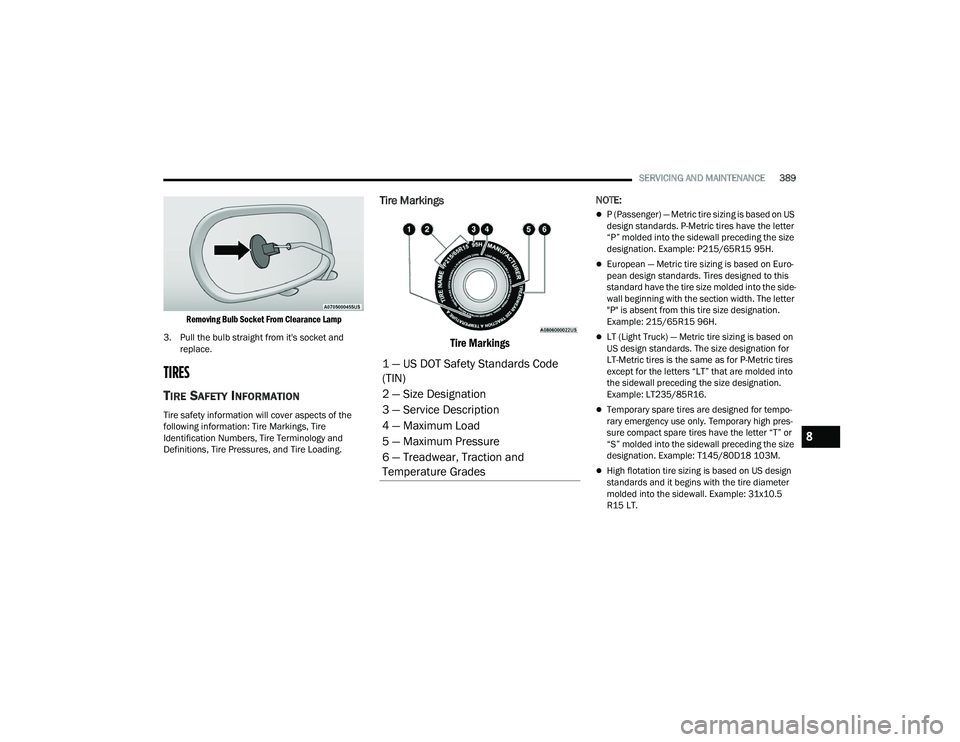
Tire Markings
Tire Markings
NOTE:
P (Passenger) — Metric tire sizing is based on US
design standards. P-Metric tires have the letter
“P” molded into the sidewall preceding the size
designation. Example: P215/65R15 95H.
European — Metric tire sizing is based on Euro -
pean design standards. Tires designed to this
standard have the tire size molded into the side -
wall beginning with the section width. The letter
"P" is absent from this tire size designation.
Example: 215/65R15 96H.
LT (Light Truck) — Metric tire sizing is based on
US design standards. The size designation for
LT-Metric tires is the same as for P-Metric tires
except for the letters “LT” that are molded into
the sidewall preceding the size designation.
Example: LT235/85R16.
Temporary spare tires are designed for tempo -
rary emergency use only. Temporary high pres -
sure compact spare tires have the letter “T” or
“S” molded into the sidewall preceding the size
designation. Example: T145/80D18 103M.
High flotation tire sizing is based on US design
standards and it begins with the tire diameter
molded into the sidewall. Example: 31x10.5
R15 LT.
1 — US DOT Safety Standards Code
(TIN)
2 — Size Designation
3 — Service Description
4 — Maximum Load
5 — Maximum Pressure
6 — Treadwear, Traction and
Temperature Grades
8
23_DPF_OM_EN_USC_t.book Page 389