lights Ram ProMaster 2020 Owner's Guide
[x] Cancel search | Manufacturer: RAM, Model Year: 2020, Model line: ProMaster, Model: Ram ProMaster 2020Pages: 264, PDF Size: 10.11 MB
Page 110 of 264
108STARTING AND OPERATING
While audible signals are emitted, the audio
system is not muted.
The audible signal is turned off immediately if
the distance increases. The tone cycle remains
constant if the distance measured by the inner
sensors is constant. If this condition occurs for
the external sensors, the signal is turned off
after three seconds (stopping warnings during
maneuvers parallel to walls).
ParkSense Rear Park Assist Failure
Indications
A malfunction of the ParkSense Rear Park
Assist sensors or system is indicated, during
REVERSE gear engagement, by the instrument
panel warning icon.
The warning icon is illuminated and a
message is displayed in the instru -
ment cluster display (if equipped).
Refer to “Warning Lights And
Messages” in “Getting To Know Your Instru -
ment Panel” for further information.
The sensors and wiring are tested continuously
when the ignition is in the MAR (ACC/ON/RUN)
position. Failures are indicated immediately if
they occur when the system is on. Even if the system is able to identify that a
specific sensor is in failure condition, the instru
-
ment cluster display shall indicate that the Park-
Sense Rear Park Assist system is unavailable,
without reference to the sensor in failure condi -
tion. If even a single sensor fails, the entire
system must be disabled. The system is turned
off automatically.
Cleaning The ParkSense System
Clean the Rear Park Assist sensors with water,
car wash soap and a soft cloth. Do not use
rough or hard cloths. In washing stations, clean
sensors quickly keeping the vapor jet/high pres -
sure washing nozzles at least 4 inches (10 cm)
from the sensors. Do not scratch or poke the
sensors. Otherwise, you could damage the
sensors.
ParkSense Rear Park Assist System Usage
Precautions
NOTE:
Ensure that the outer surface and the under -
side of the rear bumper is clean and clear of
snow, ice, mud, dirt or other obstruction to
keep the Rear Park Assist system operating
properly.
Jackhammers, large trucks, and other vibra -
tions could affect the performance of Rear
Park Assist.
Clean the Rear Park Assist sensors regularly,
taking care not to scratch or damage them.
The sensors must not be covered with ice,
snow, slush, mud, dirt or debris. Failure to do
so can result in the system not working prop -
erly. The Rear Park Assist system might not
detect an obstacle behind the fascia/
bumper, or it could provide a false indication
that an obstacle is behind the fascia/
bumper.
Objects such as bicycle carriers, etc., must
not be placed within 12 inches (30 cm) from
the rear fascia/bumper while driving the
vehicle. Failure to do so can result in the
system misinterpreting a close object as a
sensor problem, causing a failure indication
to be displayed in the instrument cluster
display.
20_VF_OM_EN_US_t.book Page 108
Page 120 of 264
118STARTING AND OPERATING
Towing Requirements — Trailer Lights And Wiring
Whenever you pull a trailer, regardless of the
trailer size, stoplights and turn signals on the
trailer are required for motoring safety.
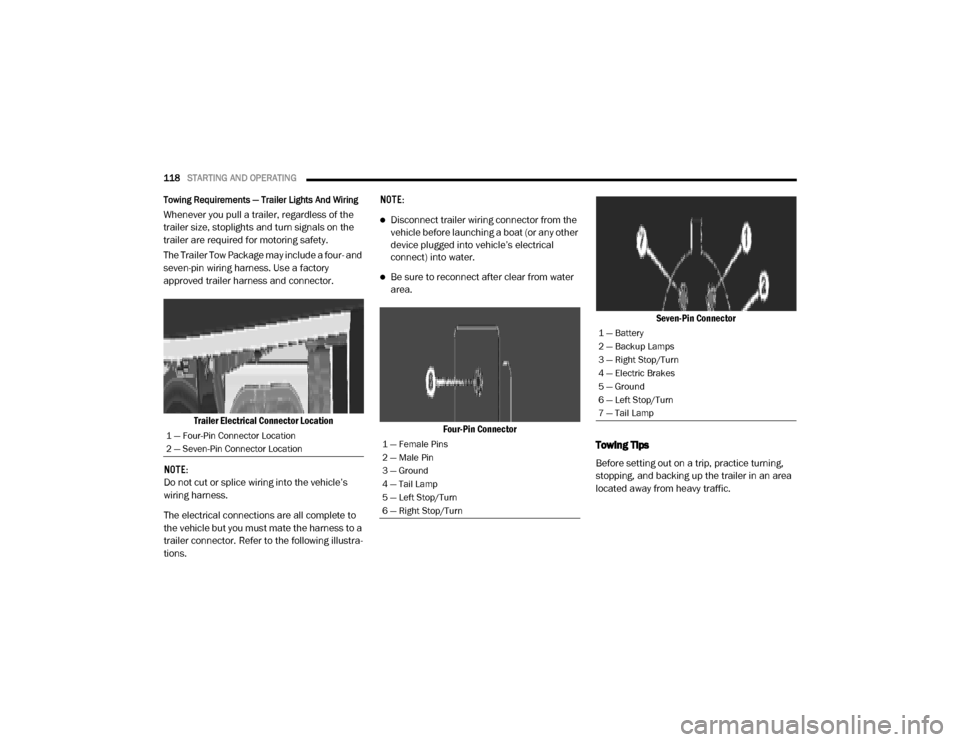
The Trailer Tow Package may include a four- and
seven-pin wiring harness. Use a factory
approved trailer harness and connector.
Trailer Electrical Connector Location
NOTE:
Do not cut or splice wiring into the vehicle’s
wiring harness.
The electrical connections are all complete to
the vehicle but you must mate the harness to a
trailer connector. Refer to the following illustra -
tions. NOTE:Disconnect trailer wiring connector from the
vehicle before launching a boat (or any other
device plugged into vehicle’s electrical
connect) into water.
Be sure to reconnect after clear from water
area.
Four-Pin Connector Seven-Pin Connector
Towing Tips
Before setting out on a trip, practice turning,
stopping, and backing up the trailer in an area
located away from heavy traffic.
1 — Four-Pin Connector Location
2 — Seven-Pin Connector Location1 — Female Pins
2 — Male Pin
3 — Ground
4 — Tail Lamp
5 — Left Stop/Turn
6 — Right Stop/Turn
1 — Battery
2 — Backup Lamps
3 — Right Stop/Turn
4 — Electric Brakes
5 — Ground
6 — Left Stop/Turn
7 — Tail Lamp
20_VF_OM_EN_US_t.book Page 118
Page 133 of 264
IN CASE OF EMERGENCY131
Interior Fuses
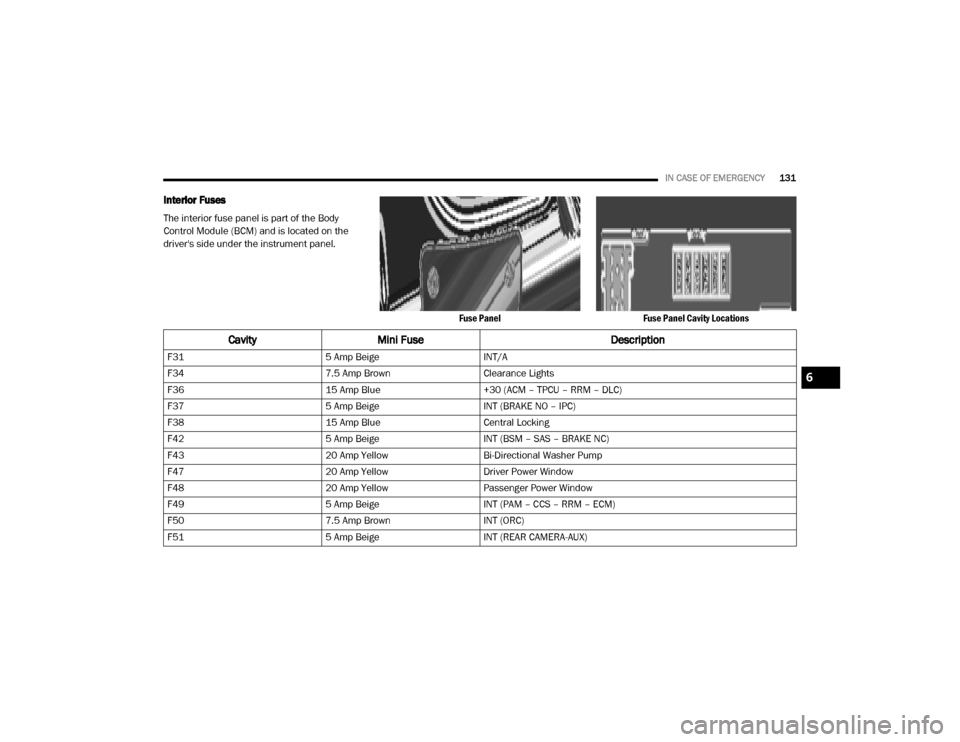
The interior fuse panel is part of the Body
Control Module (BCM) and is located on the
driver's side under the instrument panel.
Fuse PanelFuse Panel Cavity Locations
CavityMini Fuse Description
F315 Amp BeigeINT/A
F34 7.5 Amp BrownClearance Lights
F36 15 Amp Blue+30 (ACM – TPCU – RRM – DLC)
F37 5 Amp BeigeINT (BRAKE NO – IPC)
F38 15 Amp BlueCentral Locking
F42 5 Amp BeigeINT (BSM – SAS – BRAKE NC)
F43 20 Amp YellowBi-Directional Washer Pump
F47 20 Amp YellowDriver Power Window
F48 20 Amp YellowPassenger Power Window
F49 5 Amp BeigeINT (PAM – CCS – RRM – ECM)
F50 7.5 Amp BrownINT (ORC)
F51 5 Amp BeigeINT (REAR CAMERA-AUX)
6
20_VF_OM_EN_US_t.book Page 131
Page 154 of 264
152
SERVICING AND MAINTENANCE
SCHEDULED SERVICING
Your vehicle is equipped with an automatic oil
change indicator system. The oil change indi-
cator system will remind you that it is time to
take your vehicle in for scheduled maintenance.
Based on engine operation conditions, the oil
change indicator message will illuminate in the
instrument cluster. This means that service is
required for your vehicle. Operating conditions
such as frequent short-trips, trailer tow, and
extremely hot or cold ambient temperatures will
influence when the “Oil Change Required”
message is displayed. Severe Operating Condi-
tions can cause the change oil message to illu -
minate as early as 3,500 miles (5,600 km)
since last reset. Have the vehicle serviced as
soon as possible, within the next 500 miles
(805 km). An authorized dealer will reset the oil change
indicator message after completing the sched
-
uled oil change. If a scheduled oil change is
performed by someone other than an autho -
rized dealer, the message can be reset by refer -
ring to the steps described under “Instrument
Cluster Display” in “Getting To Know Your
Instrument Panel” for further information.
NOTE:
Under no circumstances should oil change
intervals exceed 10,000 miles (16,000 km),
12 months or 350 hours of engine run time,
whichever comes first. The 350 hours of engine
run or idle time is generally only a concern for
fleet customers.
Severe Duty All Models
Change Engine Oil at 4,000 miles (6,500 km) or
350 hours of engine run time if the vehicle is
operated in a dusty and off road environment or
is operated predominately at idle or only very
low engine RPM. This type of vehicle use is
considered Severe Duty. Once A Month Or Before A Long Trip:Check engine oil level
Check windshield washer fluid level
Check the tire inflation pressures and look
for unusual wear or damage. Rotate at the
first sign of irregular wear, even if it occurs
before the oil indicator system turns on
Check the fluid levels of the coolant reservoir,
brake master cylinder, and power steering
and fill as needed
Check function of all interior and exterior
lights
Maintenance Plan
Required Maintenance Intervals
Refer to the maintenance plan on the following
pages for the required maintenance intervals.
20_VF_OM_EN_US_t.book Page 152
Page 189 of 264

SERVICING AND MAINTENANCE187
(Continued)
BODYWORK
Protection From Atmospheric Agents
Vehicle body care requirements vary according
to geographic locations and usage. Chemicals
that make roads passable in snow and ice and
those that are sprayed on trees and road
surfaces during other seasons are highly corro -
sive to the metal in your vehicle. Outside
parking, which exposes your vehicle to airborne
contaminants, road surfaces on which the
vehicle is operated, extreme hot or cold
weather, and other extreme conditions will have
an adverse effect on paint, metal trim, and
underbody protection.
The following maintenance recommendations
will enable you to obtain maximum benefit from
the corrosion resistance built into your vehicle.
What Causes Corrosion?
Corrosion is the result of deterioration or
removal of paint and protective coatings from
your vehicle. The most common causes are:
Road salt, dirt and moisture accumulation
Stone and gravel impact
Insects, tree sap and tar
Salt in the air near seacoast localities
Atmospheric fallout/industrial pollutants
Body And Underbody Maintenance
Cleaning Headlights
Your vehicle is equipped with plastic headlights
and fog lights that are lighter and less suscep-
tible to stone breakage than glass headlights.
Plastic is not as scratch resistant as glass and
therefore different lens cleaning procedures
must be followed.
To minimize the possibility of scratching the
lenses and reducing light output, avoid wiping
with a dry cloth. To remove road dirt, wash with
a mild soap solution followed by rinsing.
Do not use abrasive cleaning components,
solvents, steel wool or other aggressive mate
-
rial to clean the lenses.
Preserving The Bodywork
Washing
Wash your vehicle regularly. Always wash
your vehicle in the shade using Mopar Car
Wash, or a mild car wash soap, and rinse the
panels completely with clear water.
If insects, tar, or other similar deposits have
accumulated on your vehicle, use Mopar
Super Kleen Bug and Tar Remover to
remove.
Use a high quality cleaner wax, such as
Mopar Cleaner Wax to remove road film,
stains and to protect your paint finish. Take
care never to scratch the paint.
Avoid using abrasive compounds and power
buffing that may diminish the gloss or thin
out the paint finish.
CAUTION!
Do not use abrasive or strong cleaning
materials such as steel wool or scouring
powder that will scratch metal and painted
surfaces.
7
20_VF_OM_EN_US_t.book Page 187
Page 201 of 264
MULTIMEDIA199
UCONNECT SETTINGS
The Uconnect system uses a combination of
buttons on the touchscreen and buttons on the
faceplate located on the center of the instru -
ment panel that allows you to access and
change the customer programmable features.
Many features can vary by vehicle.
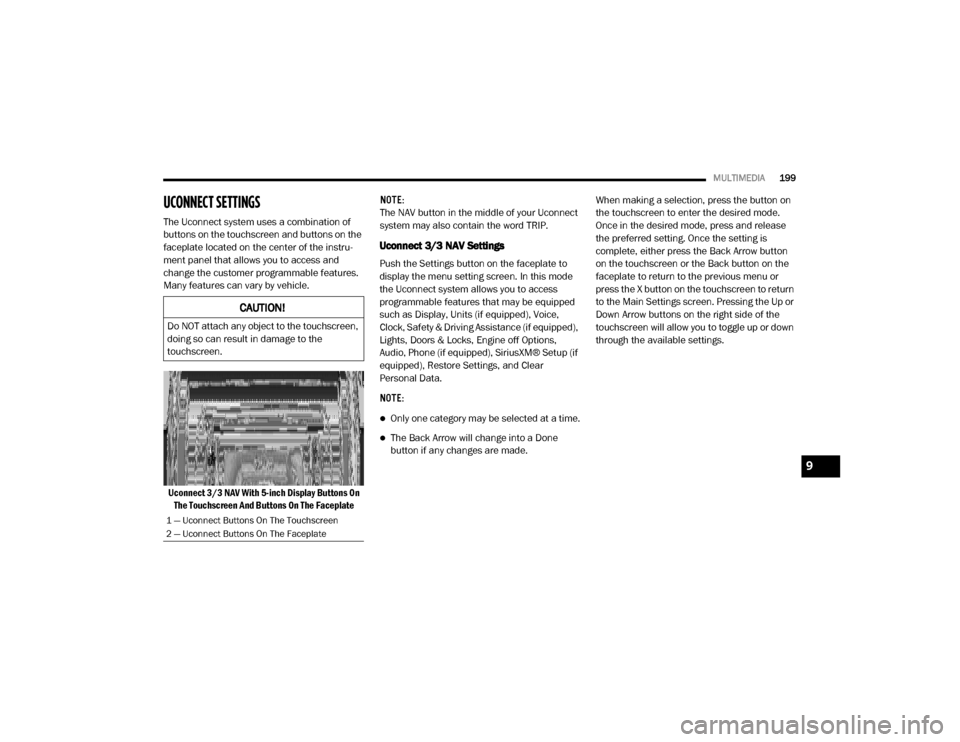
Uconnect 3/3 NAV With 5-inch Display Buttons On The Touchscreen And Buttons On The Faceplate NOTE:
The NAV button in the middle of your Uconnect
system may also contain the word TRIP.
Uconnect 3/3 NAV Settings
Push the Settings button on the faceplate to
display the menu setting screen. In this mode
the Uconnect system allows you to access
programmable features that may be equipped
such as Display, Units (if equipped), Voice,
Clock, Safety & Driving Assistance (if equipped),
Lights, Doors & Locks, Engine off Options,
Audio, Phone (if equipped), SiriusXM® Setup (if
equipped), Restore Settings, and Clear
Personal Data.
NOTE:
Only one category may be selected at a time.
The Back Arrow will change into a Done
button if any changes are made.
When making a selection, press the button on
the touchscreen to enter the desired mode.
Once in the desired mode, press and release
the preferred setting. Once the setting is
complete, either press the Back Arrow button
on the touchscreen or the Back button on the
faceplate to return to the previous menu or
press the X button on the touchscreen to return
to the Main Settings screen. Pressing the Up or
Down Arrow buttons on the right side of the
touchscreen will allow you to toggle up or down
through the available settings.
CAUTION!
Do NOT attach any object to the touchscreen,
doing so can result in damage to the
touchscreen.
1 — Uconnect Buttons On The Touchscreen
2 — Uconnect Buttons On The Faceplate
9
20_VF_OM_EN_US_t.book Page 199
Page 202 of 264

200MULTIMEDIA
Display
After pressing the Display button on the touchscreen, the following settings will be available:
Setting Name Selectable Options
Display ModeAuto Manual
Display Brightness With Headlights
ON Up Arrow Button
Down Arrow Button
NOTE:
This feature is only available in Manual Display Mode.
Display Brightness With the
Headlights Off Up Arrow Button
Down Arrow Button
NOTE:
This feature is only available in Manual Display Mode.
Language List Of Selectable Language
NOTE:
When the “Language” feature is selected, you may select one of multiple languages (English/Français/Español) for all display nomenclature including
the trip functions and the navigation system (if equipped). Press the Set Language button on the touchscreen, then press the desired language button
on the touchscreen until a check-mark appears next to the language, showing that setting has been selected.
Touchscreen Beep On Off
Display Trip B On Off
20_VF_OM_EN_US_t.book Page 200
Page 205 of 264
MULTIMEDIA203
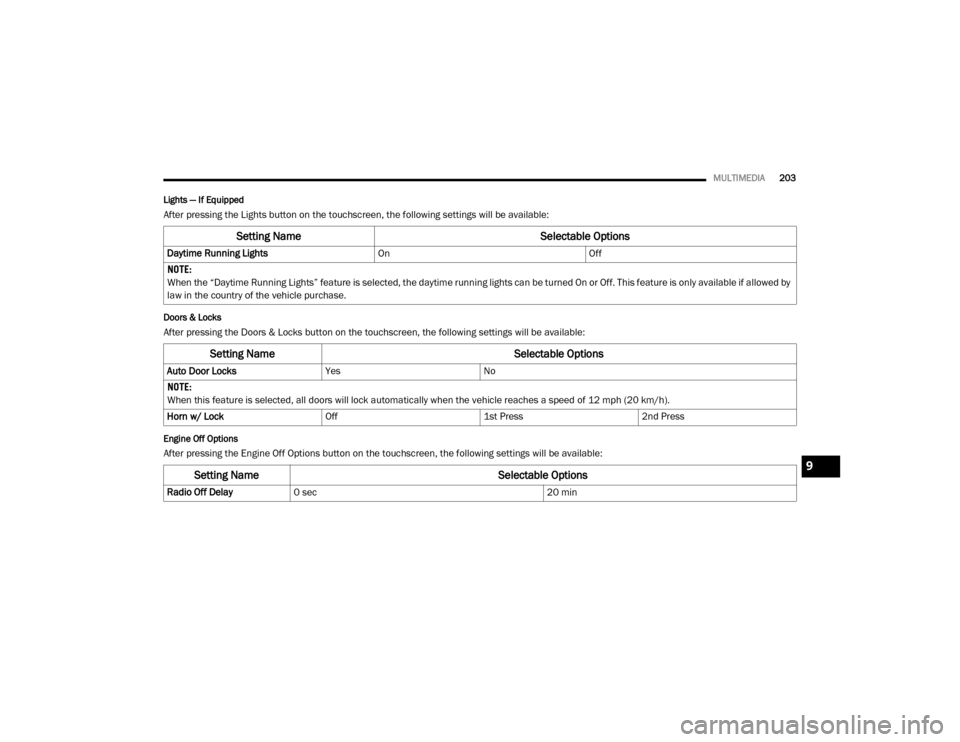
Lights — If Equipped
After pressing the Lights button on the touchscreen, the following settings will be available:
Doors & Locks
After pressing the Doors & Locks button on the touchscreen, the following settings will be available:
Engine Off Options
After pressing the Engine Off Options button on the touchscreen, the following settings will be available:
Setting Name Selectable Options
Daytime Running LightsOnOff
NOTE:
When the “Daytime Running Lights” feature is selected, the daytime running lights can be turned On or Off. This feature is only available if allowed by
law in the country of the vehicle purchase.
Setting Name Selectable Options
Auto Door LocksYesNo
NOTE:
When this feature is selected, all doors will lock automatically when the vehicle reaches a speed of 12 mph (20 km/h). Horn w/ Lock Off1st Press2nd Press
Setting Name Selectable Options
Radio Off Delay0 sec 20 min
9
20_VF_OM_EN_US_t.book Page 203
Page 254 of 264

252
Engine
................................................ 156Air Cleaner...................................... 159Block Heater..................................... 93Break-In Recommendations.................. 93Compartment.................................. 156Compartment Identification................ 156Coolant (Antifreeze)................... 163, 195Cooling........................................... 163Exhaust Gas Caution................... 89, 194Fails To Start..................................... 92Flooded, Starting................................ 92Fuel Requirements................... 192, 195Jump Starting.................................. 145Oil......................................... 158, 195Oil Filler Cap.................................... 156Oil Filter......................................... 159Oil Selection............................ 158, 195Oil Synthetic.................................... 159Overheating.................................... 147Starting............................................ 92
Engine Oil Viscosity
................................. 159
Engine Oil Viscosity Chart
.......................... 159
Enhanced Accident Response Feature
........... 151
Entry System, Illuminated
............................ 27
Ethanol
............................................... 193
Exhaust Gas Cautions
........................ 89, 194
Exhaust System
............................... 89, 162
Exterior Lights
................................... 23, 91
F
Filters
Air Cleaner
...................................... 159Air Conditioning.......................... 34, 160Engine Oil............................... 159, 195Engine Oil Disposal........................... 159
Flashers
Hazard Warning................................ 123Turn Signals................................ 53, 91
Flat Tire Changing
........................... 168, 181
Flat Tire Stowage
............................ 168, 181
Flooded Engine Starting
.............................. 92
Fluid Capacities
.....................................195
Fluid Leaks
............................................. 91
Fluid Level Checks
Automatic Transmission..................... 168Brake............................................. 166Cooling System................................ 163Power Steering................................. 103
Fluids And Lubricants
............................... 195
Fog Lights
.............................................. 25
Fold-Flat Seats
........................................ 15
Four-Way Hazard Flasher
........................... 123
Freeing A Stuck Vehicle
............................ 149
Fuel
.................................................. 192Additives........................................ 193Clean Air........................................ 192Ethanol.......................................... 193Filler Cap (Gas Cap).......................... 111Gasoline........................................ 192Materials Added.............................. 193Methanol....................................... 193Octane Rating..........................192, 195Requirements..........................192, 195Tank Capacity................................. 195
Fuses
................................................ 128
G
Gas Cap (Fuel Filler Cap)
.......................... 111
Gasoline, Clean Air
................................. 192
Gasoline, Reformulated
........................... 192
Gear Ranges
.......................................... 97
Gear Selector Override
............................. 148
Glass Cleaning
...................................... 190
Gross Axle Weight Rating
...................112, 113
Gross Vehicle Weight Rating
...............112, 113
Guide
Body Builders...................................... 8
GVWR
................................................ 112
20_VF_OM_EN_US_t.book Page 252
Page 255 of 264

253
H
Hazard
Driving Through Flowing, Rising,
Or Shallow Standing Water
................. 121
Hazard Warning Flashers
.......................... 123
Head Restraints
....................................... 20
Headlights
Cleaning......................................... 187High Beam........................................ 24High Beam/Low Beam Select Switch....... 24Passing............................................ 24Switch.............................................. 23
Heated Mirrors
........................................ 23
Heated Seats
.......................................... 18
Heater, Engine Block
................................. 93
High Beam/Low Beam Select (Dimmer) Switch
... 24
Hill Start Assist
........................................ 60
Hitches
Trailer Towing.................................. 114
Hood Prop
............................................. 36
Hood Release
......................................... 36
I
Ignition
.................................................11Key.............................................. 9, 11Switch.............................................. 11
Ignition Key Removal
.................................11
Illuminated Entry
......................................27
Immobilizer (Sentry Key)
............................. 12
Inside Rearview Mirror
................................21
Instrument Cluster
.............................. 41, 53Display............................................. 43
Instrument Panel Lens Cleaning
................... 189
Interior And Instrument Lights
.......................25
Interior Appearance Care
........................... 188
Interior Lights
..........................................25
Intermittent Wipers (Delay Wipers)
..................28
Introduction
..............................................7
iPod/USB/MP3 Control
............................. 238
J
Jack Location
........................................ 133
Jack Operation
.............................. 133, 168
Jacking And Tire Changing
......................... 133
Jacking And Tire Changing Instructions
...........135
Jump Starting
........................................ 145
K
Key Fob
Programming Additional Key Fobs
.......... 10
Key Fob Battery Service (Remote Keyless Entry)
.. 10
Key Fob Programming (Remote Keyless Entry)
.... 10
Key-In Reminder
...................................... 12
Keys
..................................................... 9Replacement.................................... 12Sentry (Immobilizer)............................ 12
L
Lane Change Assist
.................................. 25
Lap/Shoulder Belts
.................................. 67
Latches
................................................ 91Hood............................................... 36
Lead Free Gasoline
................................ 192
Leaks, Fluid
........................................... 91
Life Of Tires
......................................... 179
Light Bulbs
.....................................91, 123
Lights
.................................................. 91Air Bag................................. 47, 73, 90Brake Assist Warning.......................... 59Brake Warning.................................. 48Bulb Replacement............................ 123Cruise............................................. 53Daytime Running............................... 24Dimmer Switch, Headlight...............23, 2411
20_VF_OM_EN_US_t.book Page 253