Shut off RAM PROMASTER 2022 User Guide
[x] Cancel search | Manufacturer: RAM, Model Year: 2022, Model line: PROMASTER, Model: RAM PROMASTER 2022Pages: 268, PDF Size: 13.26 MB
Page 111 of 268

STARTING AND OPERATING109
NOTE:
Tighten the fuel filler cap until you hear a
“clicking” sound. This is an indication that the
fuel filler cap is properly tightened.
If the gas cap is not tightened properly, the MIL
may come on. Be sure the gas cap is tightened
every time the vehicle is refueled.
LOOSE FUEL FILLER CAP MESSAGE
If the vehicle diagnostic system determines that the
fuel filler cap is loose, improperly installed, or
damaged, a “Check Fuel Cap” message will be
displayed in the instrument cluster display
Ú
page 55.
Tighten the fuel filler cap until a “clicking” sound is
heard. This is an indication that the fuel filler cap is
properly tightened.
If the problem continues, the message will appear
the next time the vehicle is started. See an
authorized dealer as soon as possible.
VEHICLE LOADING
As required by National Highway Traffic Safety
Administration regulations, your vehicle has a
certification label affixed to the driver's side door or
B-pillar.
If seats are removed for carrying cargo, do not
exceed the specified GVWR and GAWR.
VEHICLE CERTIFICATION LABEL
Your vehicle has a Vehicle Certification Label
affixed to the driver’s side B-pillar or the rear of the
driver’s door.
The label contains the following information:
Name of manufacturer
Month and year of manufacture
Gross Vehicle Weight Rating (GVWR)
Gross Axle Weight Rating (GAWR) front and rear
Vehicle Identification Number (VIN)
Type of vehicle
Month, Day, and Hour (MDH) of manufacture
The bar code allows a computer scanner to read
the VIN.
GROSS VEHICLE WEIGHT RATING
(GVWR)
The GVWR is the total allowable weight of your
vehicle. This includes driver, passengers, and
cargo. The total load must be limited so that you do
not exceed the GVWR.
GROSS AXLE WEIGHT RATING (GAWR)
The GAWR is the maximum capacity of the front
and rear axles. Distribute the load over the front
and rear axles evenly. Make sure that you do not
exceed either front or rear GAWR.
TIRE SIZE
The tire size on the Vehicle Certification Label
represents the actual tire size on your vehicle.
Replacement tires must be equal to the load
capacity of this tire size.
A poorly fitting fuel filler cap may cause the
Malfunction Indicator Light (MIL) to turn on.
To avoid fuel spillage and overfilling, do not
“top off” the fuel tank after filling. When the
fuel nozzle “clicks” or shuts off, the fuel tank
is full.
CAUTION!
WARNING!
Because the front wheels steer the vehicle, it is
important that you do not exceed the maximum front
or rear GAWR. A dangerous driving condition can
result if either rating is exceeded. You could lose
control of the vehicle and have a collision.
4
22_VF_OM_EN_USC_t.book Page 109
Page 124 of 268
122MULTIMEDIA
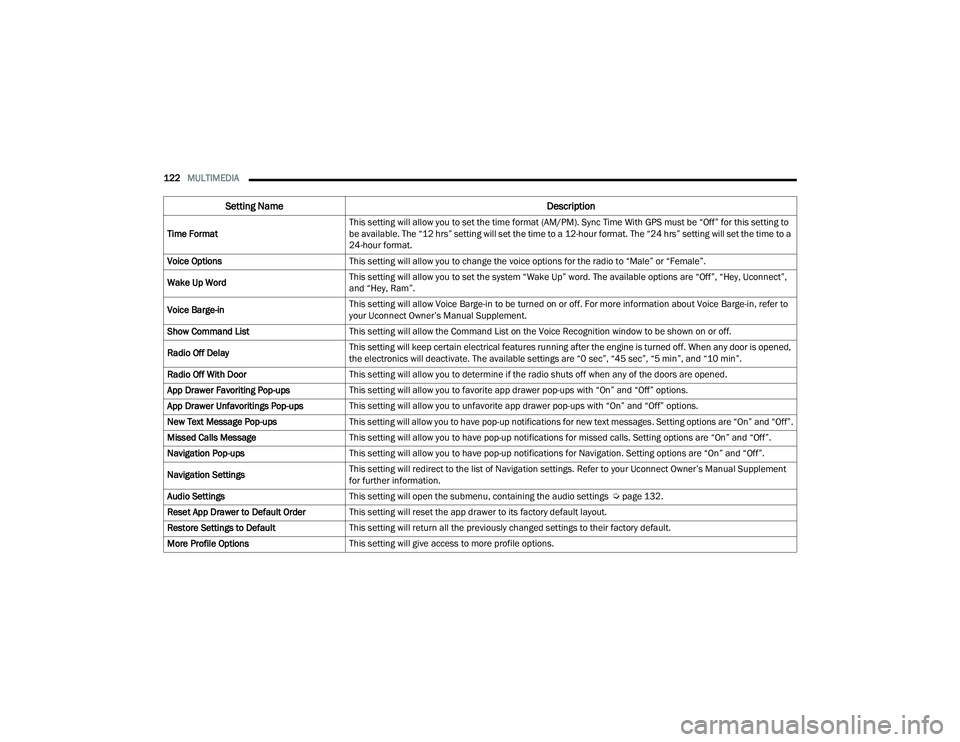
Time Format This setting will allow you to set the time format (AM/PM). Sync Time With GPS must be “Off” for this setting to
be available. The “12 hrs” setting will set the time to a 12-hour format. The “24 hrs” setting will set the time to a
24-hour format.
Voice Options This setting will allow you to change the voice options for the radio to “Male” or “Female”.
Wake Up Word This setting will allow you to set the system “Wake Up” word. The available options are “Off”, “Hey, Uconnect”,
and “Hey, Ram”.
Voice Barge-in This setting will allow Voice Barge-in to be turned on or off. For more information about Voice Barge-in, refer to
your Uconnect Owner’s Manual Supplement.
Show Command List This setting will allow the Command List on the Voice Recognition window to be shown on or off.
Radio Off Delay This setting will keep certain electrical features running after the engine is turned off. When any door is opened,
the electronics will deactivate. The available settings are “0 sec”, “45 sec”, “5 min”, and “10 min”.
Radio Off With Door This setting will allow you to determine if the radio shuts off when any of the doors are opened.
App Drawer Favoriting Pop-ups This setting will allow you to favorite app drawer pop-ups with “On” and “Off” options.
App Drawer Unfavoritings Pop-ups This setting will allow you to unfavorite app drawer pop-ups with “On” and “Off” options.
New Text Message Pop-ups This setting will allow you to have pop-up notifications for new text messages. Setting options are “On” and “Off”.
Missed Calls Message This setting will allow you to have pop-up notifications for missed calls. Setting options are “On” and “Off”.
Navigation Pop-ups This setting will allow you to have pop-up notifications for Navigation. Setting options are “On” and “Off”.
Navigation Settings This setting will redirect to the list of Navigation settings. Refer to your Uconnect Owner’s Manual Supplement
for further information.
Audio Settings This setting will open the submenu, containing the audio settings Ú page 132.
Reset App Drawer to Default Order This setting will reset the app drawer to its factory default layout.
Restore Settings to Default This setting will return all the previously changed settings to their factory default.
More Profile Options This setting will give access to more profile options.
Setting Name Description
22_VF_OM_EN_USC_t.book Page 122
Page 131 of 268

MULTIMEDIA129
Lights
When the Lights button is pressed on the touchscreen, the system displays the options related to the vehicle’s exterior and interior lights.
NOTE:
When the “Daytime Running Lights” feature is selected, the daytime running lights can be turned on or off. This feature is only allowed by law in the country
of the vehicle purchased.
Depending on the vehicle’s options, feature settings may vary.
Setting Name Description
Headlight Off DelayThis setting will allow you to set the amount of time it takes for the headlights to shut off after the vehicle is
turned off. The available settings are “0 sec”, “30 sec”, “60 sec”, and “90 sec”.
Greeting Lights When the “Greeting Lights” feature is selected, it allows the adjustment of the amount of time the headlights
remain on after the doors are unlocked with the key fob. The available settings are “0 sec”, “30 sec”, “60 sec”,
and “90 sec”.
Auto Dim High Beams This setting will allow you to turn the Auto Dim High Beams on or off.
Daytime Running Lights This setting will allow you to turn the Daytime Running Lights on or off.
Cornering Lights When this setting is selected, if the steering wheel rotation angle is large or the turn signal indicators are on, a
light (incorporated in the fog light) will turn on, on the relevant side to improve visibility at night.
Flash Lights With Lock
This setting will allow you to turn the flashing of the lights when the Lock button is pushed on the key fob on or off.
Headlights with Wipers This setting will turn the headlights on when the wipers are activated.
5
22_VF_OM_EN_USC_t.book Page 129
Page 133 of 268

MULTIMEDIA131
Key Off Options
Sound Horn With Lock This setting will sound the horn when the Lock button is pushed on the key fob. The “Off” setting will not sound
the horn when the Lock button is pushed. The “1st Press” setting will sound the horn when the Lock button is
pushed once. The “2nd Press” setting will sound the horn when the Lock button is pushed twice.
Sound Horn With Remote Start This setting will sound the horn when the remote start is activated from the key fob.
Remote Door Unlock, Door Lock/1st Press
Of Key Fob Unlocks This setting will change how many pushes of the Unlock button on the key fob are needed to unlock all the
doors. The “Driver Door” setting will only unlock the driver door on the first push on the Unlock button.
The “All Doors” setting will unlock all doors with only one push of the Unlock button.
Passive Entry
This setting will allow you to turn the Passive Entry feature (Keyless Enter ‘n Go™) between “Off”, “All”, or “Approach”.
Setting Name Description
When the Key Off Options Options button is pressed on the touchscreen, the system displays the options related to vehicle shutoff. These settings will only
activate when the ignition is set to OFF.
NOTE:Depending on the vehicle’s options, feature settings may vary.
Setting NameDescription
Radio Off DelayThis setting will keep the radio on for the selected amount of time after vehicle shut off. The available options
are “0 min”, or “20 min”.
Radio Off with Door This setting will keep the radio on when a door is opened or until the Radio Off Delay time is reached.
The available settings are “On” and “Off”.
5
22_VF_OM_EN_USC_t.book Page 131
Page 134 of 268
132MULTIMEDIA
Audio
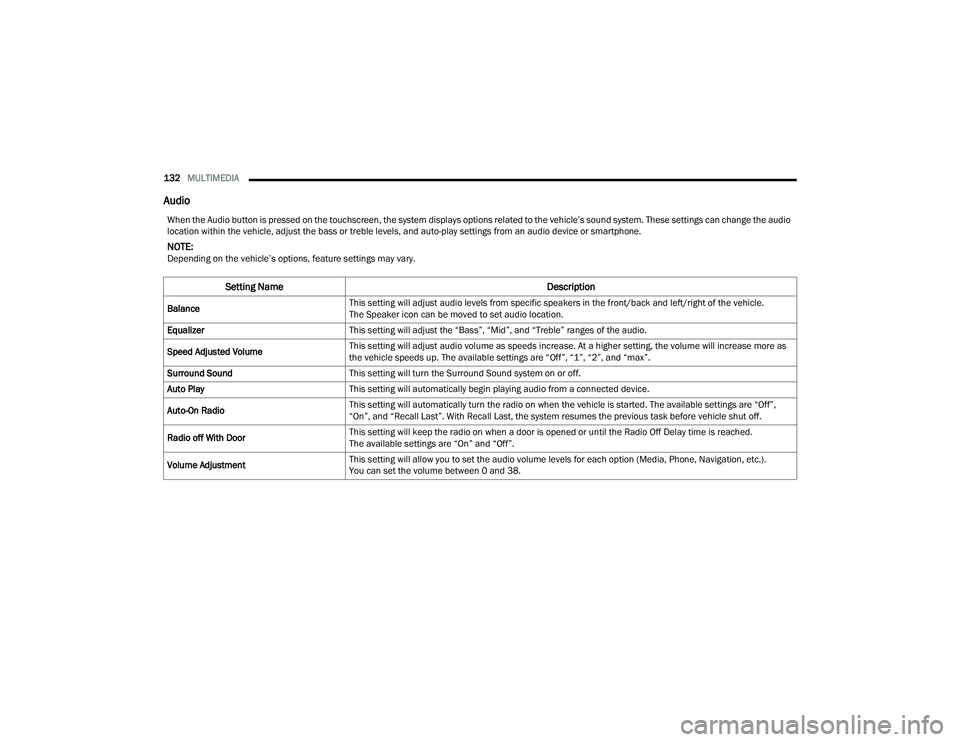
When the Audio button is pressed on the touchscreen, the system displays options related to the vehicle’s sound system. These settings can change the audio
location within the vehicle, adjust the bass or treble levels, and auto-play settings from an audio device or smartphone.
NOTE:Depending on the vehicle’s options, feature settings may vary.
Setting Name Description
BalanceThis setting will adjust audio levels from specific speakers in the front/back and left/right of the vehicle.
The Speaker icon can be moved to set audio location.
Equalizer This setting will adjust the “Bass”, “Mid”, and “Treble” ranges of the audio.
Speed Adjusted Volume This setting will adjust audio volume as speeds increase. At a higher setting, the volume will increase more as
the vehicle speeds up. The available settings are “Off”, “1”, “2”, and “max”.
Surround Sound This setting will turn the Surround Sound system on or off.
Auto Play This setting will automatically begin playing audio from a connected device.
Auto-On Radio This setting will automatically turn the radio on when the vehicle is started. The available settings are “Off”,
“On”, and “Recall Last”. With Recall Last, the system resumes the previous task before vehicle shut off.
Radio off With Door This setting will keep the radio on when a door is opened or until the Radio Off Delay time is reached.
The available settings are “On” and “Off”.
Volume Adjustment This setting will allow you to set the audio volume levels for each option (Media, Phone, Navigation, etc.).
You can set the volume between 0 and 38.
22_VF_OM_EN_USC_t.book Page 132
Page 147 of 268

SAFETY145
When RCP is on and the vehicle is in REVERSE (R),
the driver is alerted using both the visual and
audible alarms, including reducing the radio
volume.
NOTE:
In a parking lot situation, oncoming vehicles can be
blocked by vehicles parked on either side. If the
sensors are blocked by other structures or vehicles,
the system will not be able to alert the driver.
Blind Spot Modes
Blind Spot has three selectable modes of operation
that are available in the Uconnect system.
Blind Spot Alert Lights Only
When operating in Blind Spot Alert mode, the BSM
system will provide a visual alert in the appropriate
side view mirror based on a detected object.
However, when the system is operating in Rear
Cross Path (RCP) mode, the system will respond with
both visual and audible alerts when a detected
object is present. Whenever an audible alert is
requested, the radio is muted.
Blind Spot Alert Lights/Chime
When operating in Blind Spot Alert Lights/Chime
mode, the BSM system will provide a visual alert in
the appropriate side view mirror based on a
detected object. If the turn signal is then activated,
and it corresponds to an alert present on that side of
the vehicle, an audible chime will also be sounded.
Whenever a turn signal and detected object are
present on the same side at the same time, both the
visual and audible alerts will be issued. In addition to
the audible alert the radio (if on) will also be muted.
NOTE:Whenever an audible alert is requested by the
BSM system, the radio is also muted.
When the system is in RCP, the system shall
respond with both visual and audible alerts when
a detected object is present. Whenever an audible
alert is requested, the radio is also muted. Turn/
hazard signal status is ignored; the RCP state
always requests the chime.
Blind Spot Alert Off
When the BSM system is turned off there will be no
visual or audible alerts from either the BSM or RCP
systems.
NOTE:The BSM system will store the current operating
mode when the vehicle is shut off. Each time the
vehicle is started the previously stored mode will
be recalled and used.
WARNING!
Rear Cross Path Detection (RCP) is not a backup
aid system. It is intended to be used to help a
driver detect an oncoming vehicle in a parking
lot situation. Drivers must be careful when
backing up, even when using RCP. Always check
carefully behind your vehicle, look behind you,
and be sure to check for pedestrians, animals,
other vehicles, obstructions, and blind spots
before backing up. Failure to do so can result in
serious injury or death.
6
22_VF_OM_EN_USC_t.book Page 145
Page 205 of 268

SERVICING AND MAINTENANCE203
(Continued)
CHECKING OIL LEVEL
To ensure proper engine lubrication, the engine oil
must be maintained at the correct level. Check the
oil level at regular intervals, such as every fuel
stop. The best time to check the engine oil level is
about five minutes after a fully warmed up engine
is shut off.
Checking the oil while the vehicle is on level ground
will improve the accuracy of the oil level readings.
There are four possible dipstick types:
Crosshatched zone.
Crosshatched zone marked SAFE.
Crosshatched zone marked with MIN at the low
end of the range and MAX at the high end of the
range.
Crosshatched zone marked with dimples at the
MIN and the MAX ends of the range.
NOTE:Always maintain the oil level within the crosshatch
markings on the dipstick. Adding 1 quart (1 liter) of oil when the reading is at
the low end of the dipstick range will raise the oil
level to the high end of the range marking.
ADDING WASHER FLUID
The fluid reservoir is located in the engine
compartment and should be checked at regular
intervals. Fill the reservoir with windshield washer
solvent (not radiator antifreeze) and operate the
system for a few seconds to flush out any residual
water.
The washer fluid reservoir will hold a full gallon of
fluid when the Low Washer Fluid Light illuminates.
WARNING!
Never smoke while working in the engine
compartment: gas and inflammable vapors
may be present, with the risk of fire.
Be very careful when working in the engine
compartment when the engine is hot: you may
get burned. Do not get too close to the radiator
cooling fan: the electric fan may start; danger
of injury. Scarves, ties and other loose clothing
might be pulled by moving parts.
CAUTION!
Be careful not to confuse the various types of
fluids while topping up: they are not compatible
with each other! Topping up with an unsuitable
fluid could severely damage your car.
The oil level must never exceed the MAX mark.
Always top up using engine oil of the same
specifications as that already in the engine.
If the engine oil is being topped up, wait for the
engine to cool down before loosening the filler
cap, particularly for vehicles with aluminum
caps (if equipped). WARNING: risk of burns!
Overfilling or underfilling the crankcase
will cause aeration or loss of oil pressure.
This could damage your engine.
CAUTION!
CAUTION!
Overfilling or underfilling the crankcase will
cause aeration or loss of oil pressure. This could
damage your engine.
WARNING!
Commercially available windshield washer
solvents are flammable. They could ignite and
burn you. Care must be exercised when filling or
working around the washer solution.
8
22_VF_OM_EN_USC_t.book Page 203