lights Ram ProMaster City 2015 Owner's Guide
[x] Cancel search | Manufacturer: RAM, Model Year: 2015, Model line: ProMaster City, Model: Ram ProMaster City 2015Pages: 414, PDF Size: 2.86 MB
Page 141 of 414
position and the lights are always on. Leave the lens in
the center position, and the light is turned on and off
when the doors are opened or closed.Cargo Compartment Light — If Equipped
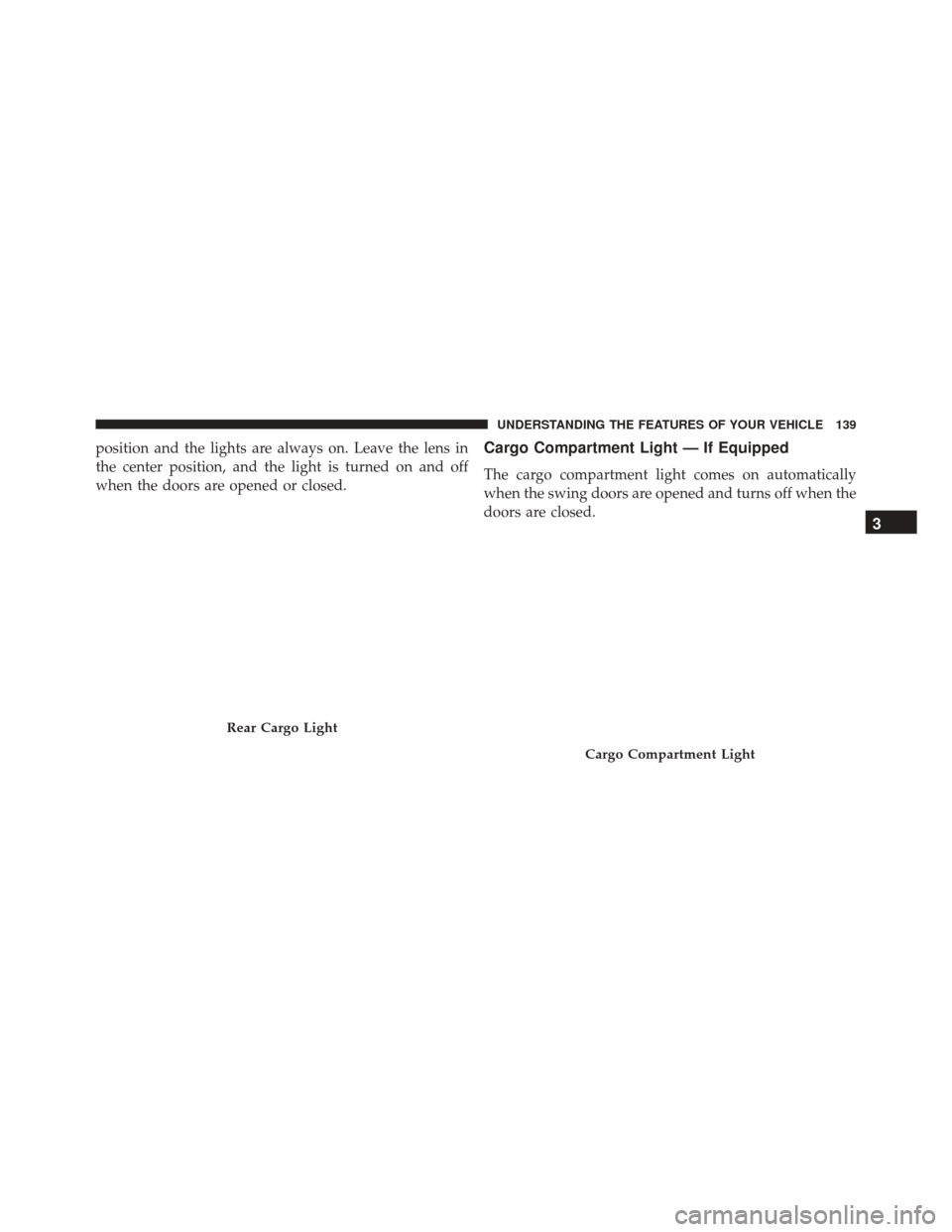
The cargo compartment light comes on automatically
when the swing doors are opened and turns off when the
doors are closed.
Rear Cargo Light
Cargo Compartment Light
3
UNDERSTANDING THE FEATURES OF YOUR VEHICLE 139
Page 147 of 414
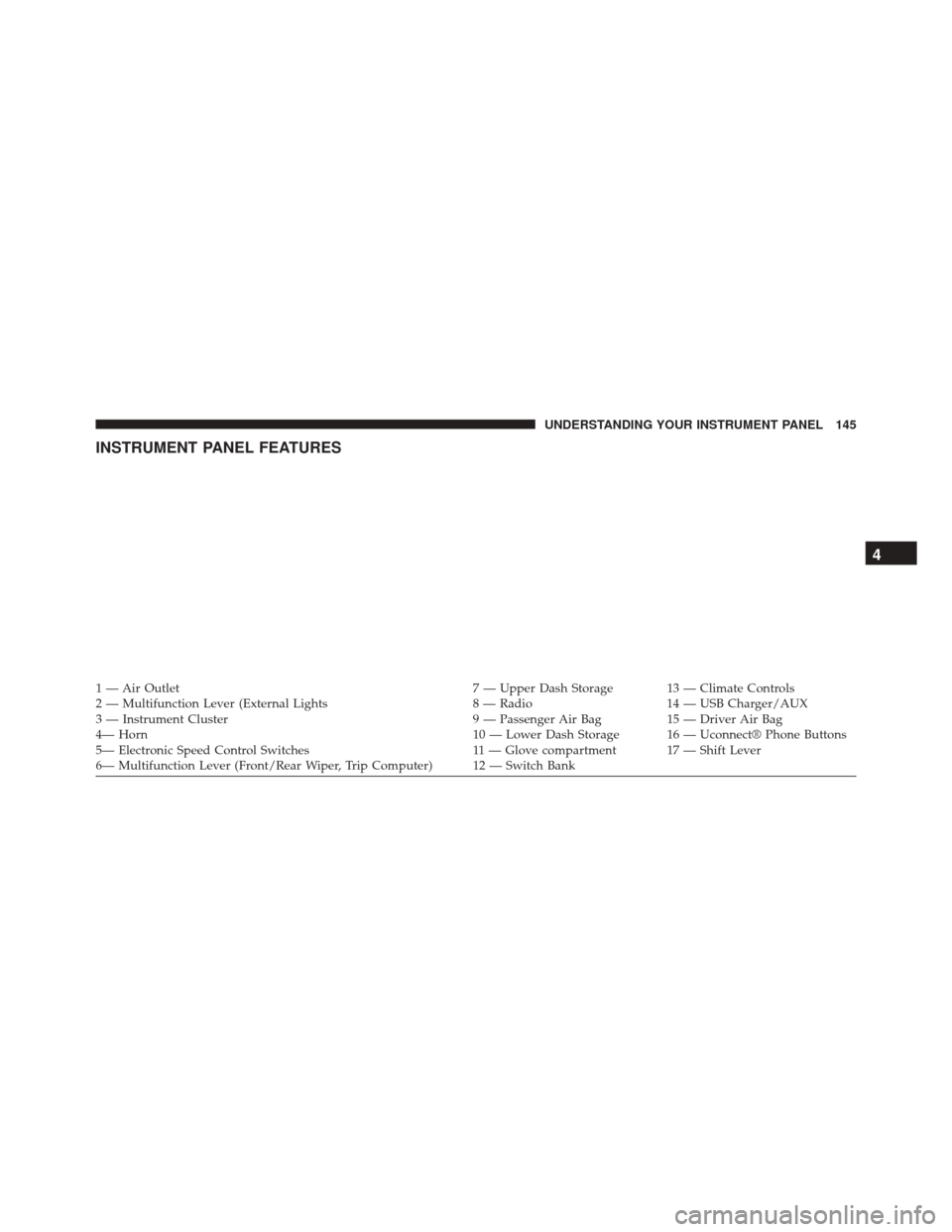
INSTRUMENT PANEL FEATURES
1 — Air Outlet7 — Upper Dash Storage 13 — Climate Controls
2 — Multifunction Lever (External Lights 8 — Radio14 — USB Charger/AUX
3 — Instrument Cluster 9 — Passenger Air Bag15 — Driver Air Bag
4— Horn 10 — Lower Dash Storage 16 — Uconnect® Phone Buttons
5— Electronic Speed Control Switches 11 — Glove compartment 17 — Shift Lever
6— Multifunction Lever (Front/Rear Wiper, Trip Computer) 12 — Switch Bank
4
UNDERSTANDING YOUR INSTRUMENT PANEL 145
Page 149 of 414
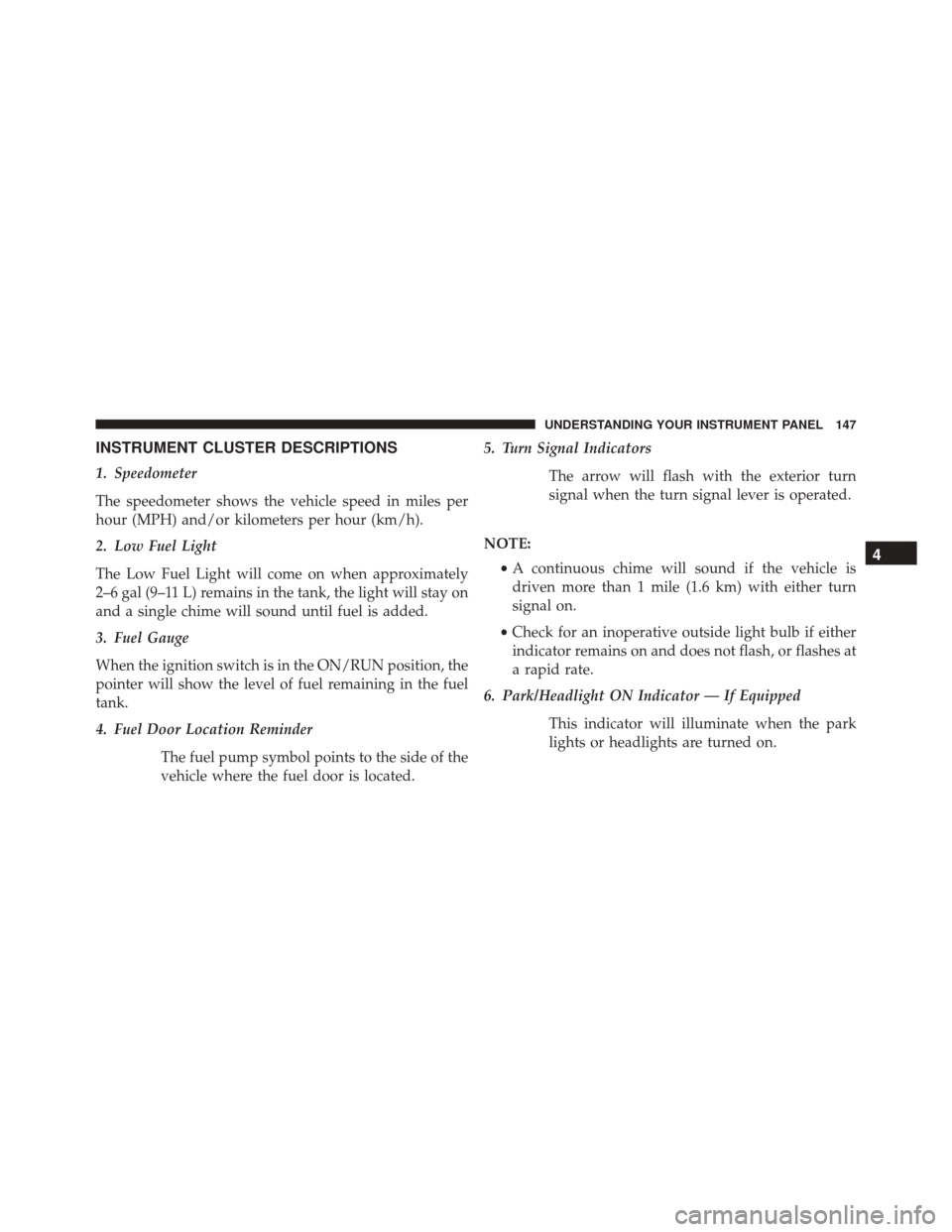
INSTRUMENT CLUSTER DESCRIPTIONS
1. Speedometer
The speedometer shows the vehicle speed in miles per
hour (MPH) and/or kilometers per hour (km/h).
2. Low Fuel Light
The Low Fuel Light will come on when approximately
2–6 gal (9–11 L) remains in the tank, the light will stay on
and a single chime will sound until fuel is added.
3. Fuel Gauge
When the ignition switch is in the ON/RUN position, the
pointer will show the level of fuel remaining in the fuel
tank.
4. Fuel Door Location ReminderThe fuel pump symbol points to the side of the
vehicle where the fuel door is located. 5. Turn Signal Indicators
The arrow will flash with the exterior turn
signal when the turn signal lever is operated.
NOTE: •A continuous chime will sound if the vehicle is
driven more than 1 mile (1.6 km) with either turn
signal on.
• Check for an inoperative outside light bulb if either
indicator remains on and does not flash, or flashes at
a rapid rate.
6. Park/Headlight ON Indicator — If Equipped
This indicator will illuminate when the park
lights or headlights are turned on.
4
UNDERSTANDING YOUR INSTRUMENT PANEL 147
Page 151 of 414
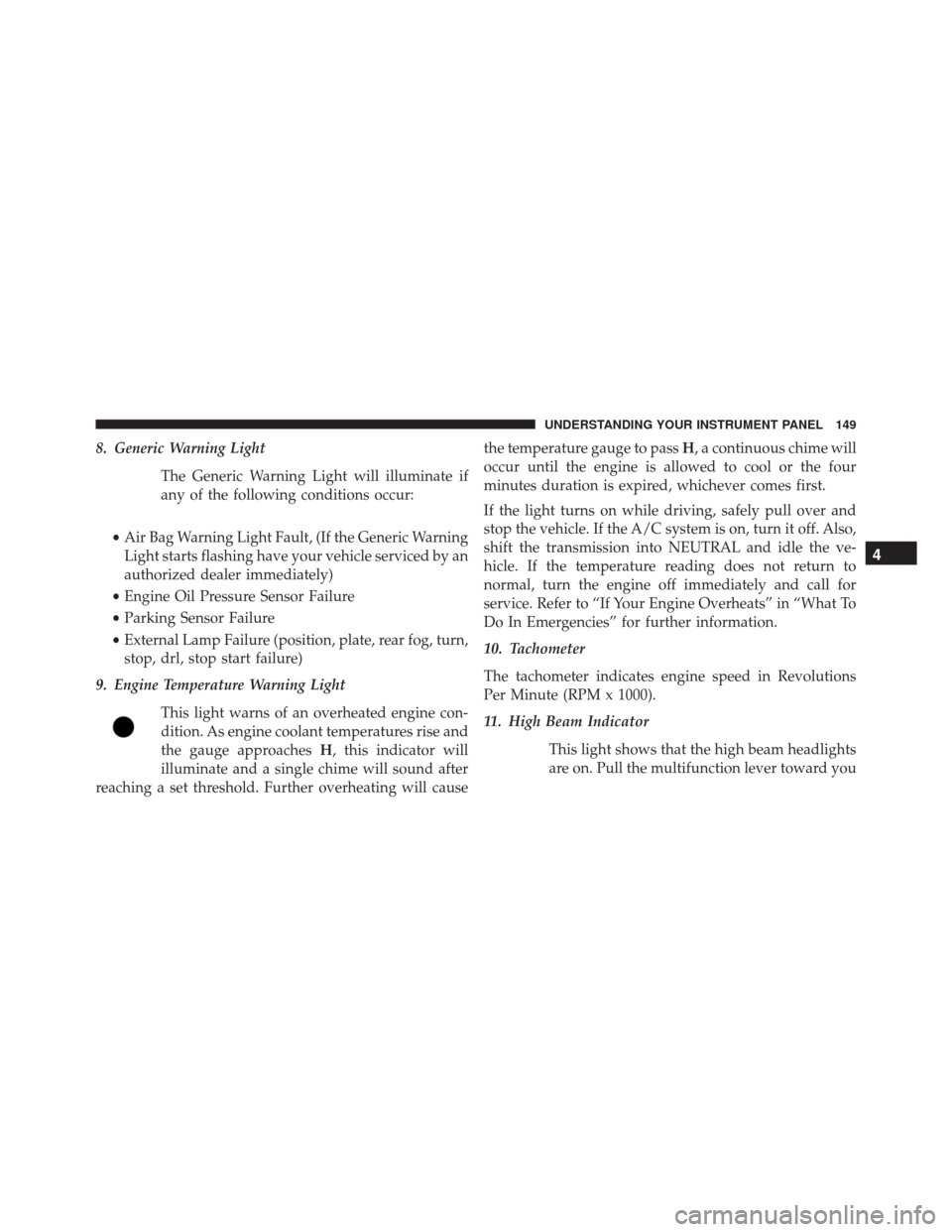
8. Generic Warning LightThe Generic Warning Light will illuminate if
any of the following conditions occur:
• Air Bag Warning Light Fault, (If the Generic Warning
Light starts flashing have your vehicle serviced by an
authorized dealer immediately)
• Engine Oil Pressure Sensor Failure
• Parking Sensor Failure
• External Lamp Failure (position, plate, rear fog, turn,
stop, drl, stop start failure)
9. Engine Temperature Warning Light
This light warns of an overheated engine con-
dition. As engine coolant temperatures rise and
the gauge approaches H, this indicator will
illuminate and a single chime will sound after
reaching a set threshold. Further overheating will cause the temperature gauge to pass
H, a continuous chime will
occur until the engine is allowed to cool or the four
minutes duration is expired, whichever comes first.
If the light turns on while driving, safely pull over and
stop the vehicle. If the A/C system is on, turn it off. Also,
shift the transmission into NEUTRAL and idle the ve-
hicle. If the temperature reading does not return to
normal, turn the engine off immediately and call for
service. Refer to “If Your Engine Overheats” in “What To
Do In Emergencies” for further information.
10. Tachometer
The tachometer indicates engine speed in Revolutions
Per Minute (RPM x 1000).
11. High Beam Indicator
This light shows that the high beam headlights
are on. Pull the multifunction lever toward you
4
UNDERSTANDING YOUR INSTRUMENT PANEL 149
Page 152 of 414
to switch the headlights to high beam. Pull the lever a
second time to switch the headlights back to low beam.
NOTE:If the driver’s door is open, and the headlights or
park lights are left on, the high beam indicator light will
remain illuminated and a chime will sound until lights
have been turned to the off position.
12. Glow Plug Light — If Equipped
If this icon blinks, it indicates that the engine
cranking is inhibited in order to prevent possible
engine damage while starting at low temperatures.
13. Engine Oil Level Warning Light
This warning light appears on the panel when the
engine oil level falls below the minimum recom-
mended value. Restore the correct engine oil level
or contact your authorized dealer for service.
14. Electronic Throttle Control (ETC) Light
This light informs you of a problem with the
Electronic Throttle Control (ETC) system. The
light will come on when the ignition is first
turned ON and remain on briefly as a bulb
check. If the light does not come on during starting, have
the system checked by an authorized dealer.
If a problem is detected, the light will come on while the
engine is running. Cycle the ignition key when the
vehicle has completely stopped and the gear selector is
placed in the 1st position. The light should turn off.
If the light remains lit with the engine running, your
vehicle will usually be drivable. However, see an autho-
rized dealer for service as soon as possible. If the light is
flashing when the engine is running, immediate service is
required. You may experience reduced performance, an
elevated/rough idle or engine stall and your vehicle may
require towing.
150 UNDERSTANDING YOUR INSTRUMENT PANEL
Page 157 of 414
CAUTION!(Continued)
driveability. If the MIL is flashing, severe catalytic
converter damage and power loss will soon occur.
Immediate service is required.
WARNING!
A malfunctioning catalytic converter, as referenced
above, can reach higher temperatures than in normal
operating conditions. This can cause a fire if you
drive slowly or park over flammable substances such
as dry plants, wood, cardboard, etc. This could result
in death or serious injury to the driver, occupants or
others.
22. Rear Fog Light Indicator — If Equipped This indicator will illuminate when the rear fog
lights are on. 23. Odometer/Trip Odometer/Electronic Vehicle Infor-
mation Center (EVIC) Display Area
This display indicates the total distance the vehicle has
been driven.
U.S. Federal regulations require that upon transfer of
vehicle ownership, the seller certify to the purchaser the
correct mileage that the vehicle has been driven. If your
odometer needs to be repaired or serviced, the repair
technician should leave the odometer reading the same
as it was before the repair or service. If s/he cannot do so,
then the odometer must be set at zero, and a sticker must
be placed in the door jamb stating what the mileage was
before the repair or service. It is a good idea for you to
make a record of the odometer reading before the repair/
service, so that you can be sure that it is properly reset, or
that the door jamb sticker is accurate if the odometer
must be reset at zero.
4
UNDERSTANDING YOUR INSTRUMENT PANEL 155
Page 158 of 414
Transmission Gear Range (PRND)
The transmission gear range (P,R,N,D) is displayed.
When operating in Electronic Range Select (ERS) mode,
the actual top gear limit (1,2,3, etc.) is displayed. For
further information on ERS, refer to “Nine-Speed Auto-
matic Transmission” in “Starting And Operating.”
24. Front Fog Light Indicator — If EquippedThis indicator will illuminate when the front
fog lights are on.
25. Door Ajar This telltale turns on when one or more doors
are ajar. The telltale will show which doors are
ajar. 26. Electronic Stability Control (ESC) Activation/
Malfunction Indicator Light — If Equipped
If this indicator light flashes during accelera-
tion, ease up on the accelerator pedal and
apply as little throttle as possible. Adapt your
speed and driving to the prevailing road con-
ditions, and do not switch off the Electronic Stability
Program (ESP). (Refer to “Electronic Stability Program”
in “Starting And Operating” for further information).
27. Electronic Stability Control (ESC) OFF Indicator
Light
This light indicates the Electronic Stability Con-
trol (ESC) is off.
156 UNDERSTANDING YOUR INSTRUMENT PANEL
Page 163 of 414
•Service
• Daylights
• Exit Menu
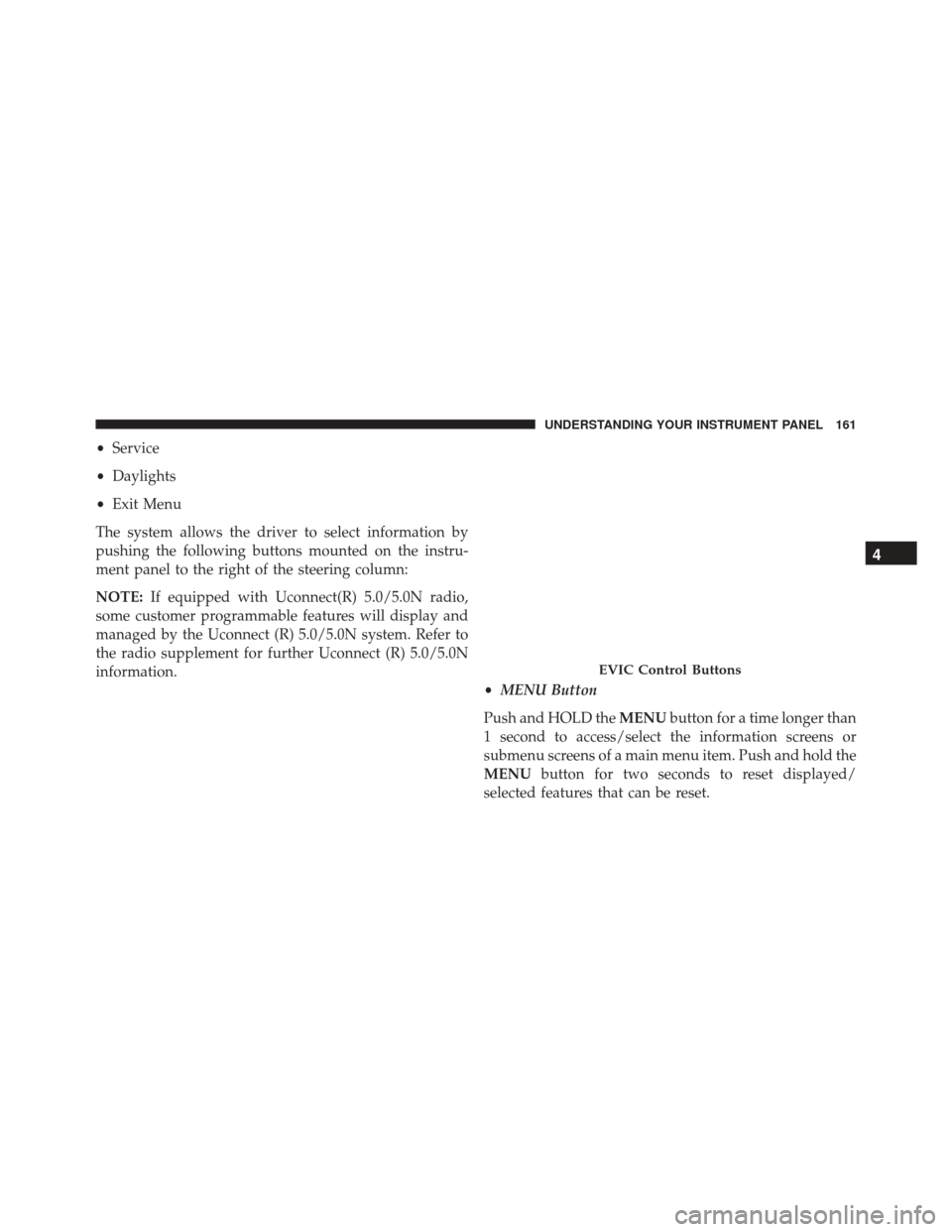
The system allows the driver to select information by
pushing the following buttons mounted on the instru-
ment panel to the right of the steering column:
NOTE: If equipped with Uconnect(R) 5.0/5.0N radio,
some customer programmable features will display and
managed by the Uconnect (R) 5.0/5.0N system. Refer to
the radio supplement for further Uconnect (R) 5.0/5.0N
information. •MENU Button
Push and HOLD the MENUbutton for a time longer than
1 second to access/select the information screens or
submenu screens of a main menu item. Push and hold the
MENU button for two seconds to reset displayed/
selected features that can be reset.
EVIC Control Buttons
4
UNDERSTANDING YOUR INSTRUMENT PANEL 161
Page 164 of 414
•UP Arrow Button
Push and release the UP arrow button to scroll
upward through the main menu and
submenus.
• DOWN Arrow Button
Push and release the DOWN arrow button to
scroll downward through the main menu and
submenus.
Dimmer:
With headlights on and without entering in the menu,
push the UP or DOWN arrow buttons to increase or
decrease the brightness of the instrument panel, graphics
and command buttons.
Selecting An Option Of The Main Menu With Submenu:
1. Briefly push and release the MENUbutton to display
the first submenu option. 2. Push and release the UPor DOWNbutton (by
single pushes) to scroll through all the submenu
options.
3. Briefly push and release the MENUbutton to select
the displayed submenu option and to open the rel-
evant setup menu.
4. Push and release the UP
or DOWNbutton (by
single pushes) to select the new setting for this
submenu option.
5. Briefly push and release the MENUbutton to store the
new setting and go back to the previously selected
submenu option.
6. Push and hold the MENUbutton to return to the main
menu (short hold) or the main screen (longer hold).
162 UNDERSTANDING YOUR INSTRUMENT PANEL
Page 170 of 414
Buttons On The Faceplate
Buttons on the faceplate are located below the Uconnect®
system in the center of the instrument panel. In addition,
there is a Scroll/Enter control knob located on the right
side. Turn the control knob to scroll through menus and
change settings (i.e., 30, 60, 90), push the center of the
control knob one or more times to select or change a
setting (i.e., ON, OFF).
Your Uconnect® system may also have a Screen Off and
Back buttons on the faceplate.
Push the Screen Off button on the faceplate to turn off the
Uconnect® screen. Push the Screen Off button on the
faceplate a second time to turn the screen on.
Push the Back button on the faceplate to exit out of a
Menu or certain option on the Uconnect® system.
Buttons On The Touchscreen
Buttons on the touchscreen are accessible on the
Uconnect® display.
Customer Programmable Features/Personal
Settings
Push the Settings button on the faceplate to display the
menu setting screen. In this mode the Uconnect® system
allows you to access programmable features that may be
equipped such as Display, Clock & Date, Safety & Driv-
ing Assistance (if equipped), Lights, Doors & Locks,
Audio, Phone/Bluetooth®, SiriusXM Setup (if
equipped), Restore Settings (if equipped).
NOTE:
•Only one category may be selected at a time.
• The Back arrow will change into a Done button if any
changes are made.
168 UNDERSTANDING YOUR INSTRUMENT PANEL