warning Ram ProMaster City 2015 Workshop Manual
[x] Cancel search | Manufacturer: RAM, Model Year: 2015, Model line: ProMaster City, Model: Ram ProMaster City 2015Pages: 414, PDF Size: 2.86 MB
Page 121 of 414
NOTE:In order to ensure proper operation, the Elec-
tronic Speed Control System has been designed to shut
down if multiple Speed Control functions are operated at
the same time. If this occurs, the Electronic Speed Control
System can be reactivated by pushing the ON/OFF
button and resetting the desired vehicle set speed.
To Activate
Push the ON/OFF button. The Cruise Indicator Light in
the instrument cluster will illuminate. To turn the system
off, push the ON/OFF button a second time. The Cruise
Indicator Light will turn off. The system should be
turned off when not in use.
WARNING!
Leaving the Electronic Speed Control system on
when not in use is dangerous. You could accidentally
set the system or cause it to go faster than you want.
You could lose control and have an accident. Always
leave the system OFF when you are not using it.
Electronic Speed Control Buttons
3
UNDERSTANDING THE FEATURES OF YOUR VEHICLE 119
Page 124 of 414
To Accelerate For Passing
Press the accelerator as you would normally. When the
pedal is released, the vehicle will return to the set speed.
Using Electronic Speed Control On Hills
The transmission may downshift on hills to maintain the
vehicle set speed.
NOTE:The Electronic Speed Control system maintains
speed up and down hills. A slight speed change on
moderate hills is normal.
On steep hills, a greater speed loss or gain may occur so
it may be preferable to drive without Electronic Speed
Control.
WARNING!
Electronic Speed Control can be dangerous where the
system cannot maintain a constant speed. Your ve-
hicle could go too fast for the conditions, and you
could lose control and have an accident. Do not use
Electronic Speed Control in heavy traffic or on roads
that are winding, icy, snow-covered or slippery.
PARKSENSE® REAR PARK ASSIST — IF
EQUIPPED
The ParkSense® Rear Park Assist system provides an
audible indication of the distance between the rear
fascia/bumper and a detected obstacle when backing up,
e.g. during a parking maneuver. Refer to ParkSense®
System Usage Precautions for limitations of this system
and recommendations.
122 UNDERSTANDING THE FEATURES OF YOUR VEHICLE
Page 128 of 414
While audible signals are emitted, the audio system is not
muted.
The audible signal is turned off immediately if the
distance increases. The tone cycle remains constant if the
distance measured by the inner sensors is constant. If this
condition occurs for the external sensors, the signal is
turned off after three seconds (stopping warnings during
maneuvers parallel to walls).
ParkSense® Rear Park Assist Failure Indications
A malfunction of the ParkSense® Rear Park Assist sen-
sors or system is indicated, during REVERSE gear en-
gagement, by the instrument panel warning icon.The warning icon is illuminated and a message
is displayed on the multifunction display (if
equipped). Refer to “Instrument Cluster De-
scriptions” in “Understanding Your Instrument
Panel” for further information. The sensors and wiring are tested continuously when the
ignition is in the ON/RUN position. Failures are indi-
cated immediately if they occur when the system is ON.
Even if the system is able to identify that a specific sensor
is in failure condition, the instrument cluster display
shall indicate that the ParkSense® Rear Park Assist
system is unavailable, without reference to the sensor in
failure condition. If even a single sensor fails, the entire
system must be disabled. The system is turned off
automatically.Cleaning The ParkSense® Rear Park Assist
System
Clean the ParkSense® Rear Park Assist sensors with
water, car wash soap and a soft cloth. Do not use rough
or hard cloths. In washing stations, clean sensors quickly
keeping the vapor jet/high pressure washing nozzles at
least 4 in (10 cm) from the sensors. Do not scratch or poke
the sensors. Otherwise, you could damage the sensors.
126 UNDERSTANDING THE FEATURES OF YOUR VEHICLE
Page 130 of 414
WARNING!
•Drivers must be careful when backing up even
when using ParkSense®. Always check carefully
behind your vehicle, look behind you, and be sure
to check for pedestrians, animals, other vehicles,
obstructions, and blind spots before backing up.
You are responsible for safety and must continue to
pay attention to your surroundings. Failure to do so
can result in serious injury or death.
• Before using ParkSense®, it is strongly recom-
mended that the ball mount and hitch ball assem-
bly is disconnected from the vehicle when the
vehicle is not used for towing. Failure to do so can
result in injury or damage to vehicles or obstacles
because the hitch ball will be much closer to the
obstacle than the rear fascia when the loudspeaker
sounds the continuous tone. Also, the sensors
(Continued)
WARNING! (Continued)
could detect the ball mount and hitch ball assem-
bly, depending on its size and shape, giving a false
indication that an obstacle is behind the vehicle.
If it’s necessary to keep the ball mount and hitch ball
assembly mounted for a long period, it is possible to filter
out the ball mount and hitch ball assembly presence in
sensor field of view. The filtering operation must be
performed only by an authorized dealer.
128 UNDERSTANDING THE FEATURES OF YOUR VEHICLE
Page 132 of 414
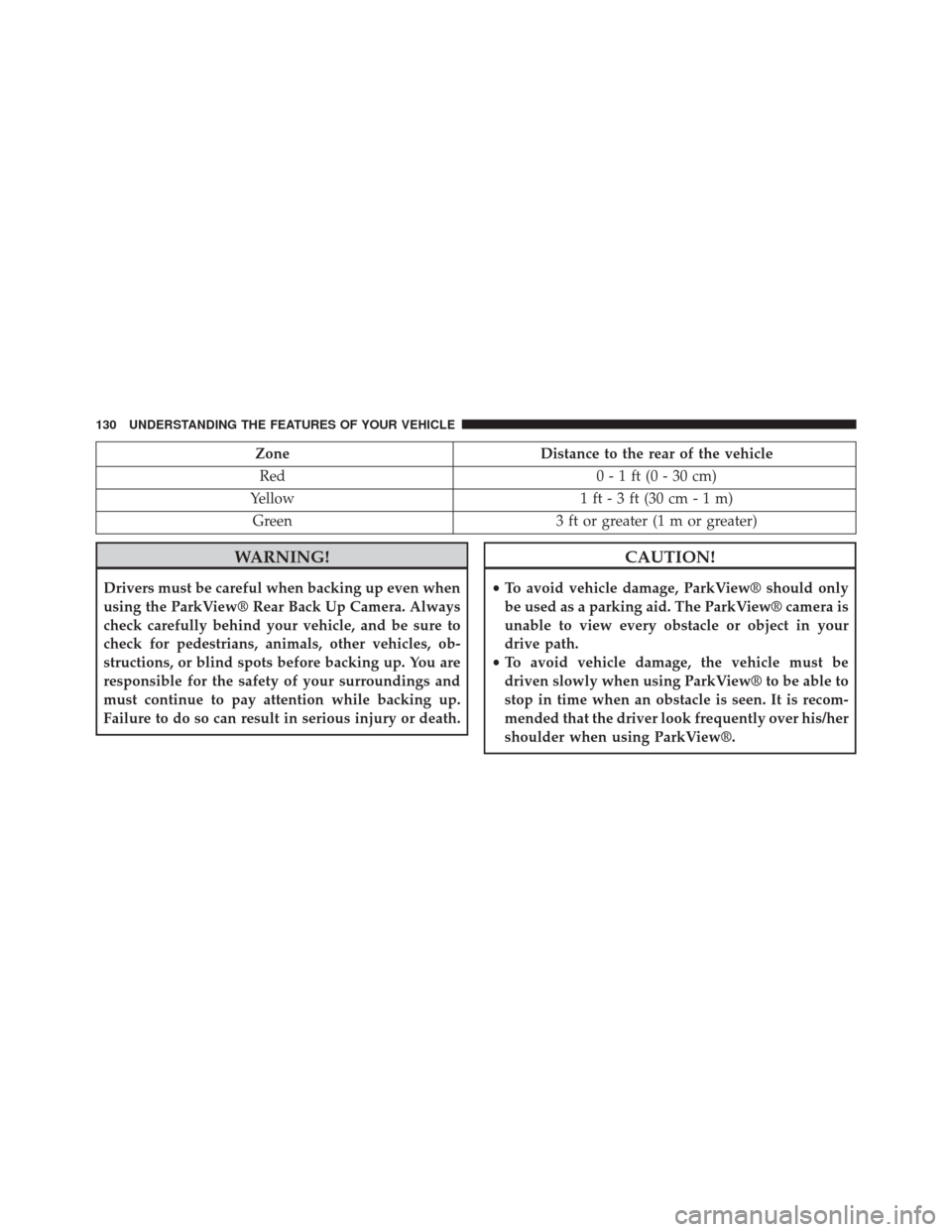
ZoneDistance to the rear of the vehicle
Red 0 - 1 ft (0 - 30 cm)
Yellow 1 ft - 3 ft (30 cm - 1 m)
Green 3 ft or greater (1 m or greater)
WARNING!
Drivers must be careful when backing up even when
using the ParkView® Rear Back Up Camera. Always
check carefully behind your vehicle, and be sure to
check for pedestrians, animals, other vehicles, ob-
structions, or blind spots before backing up. You are
responsible for the safety of your surroundings and
must continue to pay attention while backing up.
Failure to do so can result in serious injury or death.
CAUTION!
•To avoid vehicle damage, ParkView® should only
be used as a parking aid. The ParkView® camera is
unable to view every obstacle or object in your
drive path.
• To avoid vehicle damage, the vehicle must be
driven slowly when using ParkView® to be able to
stop in time when an obstacle is seen. It is recom-
mended that the driver look frequently over his/her
shoulder when using ParkView®.
130 UNDERSTANDING THE FEATURES OF YOUR VEHICLE
Page 135 of 414
WARNING!
To avoid serious injury or death:
•Only devices designed for use in this type of outlet
should be inserted into any 12 Volt outlet.
• Do not touch with wet hands.
• Close the lid when not in use and while driving the
vehicle.
• If this outlet is mishandled, it may cause an electric
shock and failure.
Interior Fuse Panel Power Outlet Fuse Location
1 — #05 Fuse 15A Blue Second IP Power Outlet 12V
3
UNDERSTANDING THE FEATURES OF YOUR VEHICLE 133
Page 136 of 414
CAUTION!
•Many accessories that can be plugged in draw
power from the vehicle’s battery, even when not in
use (i.e., cellular phones, etc.). Eventually, if
plugged in long enough, the vehicle’s battery will
discharge sufficiently to degrade battery life and/or
prevent the engine from starting.
• Accessories that draw higher power (i.e., coolers,
vacuum cleaners, lights, etc.) will degrade the bat-
tery even more quickly. Only use these intermit-
tently and with greater caution.
• After the use of high power draw accessories, or
long periods of the vehicle not being started (with
accessories still plugged in), the vehicle must be
driven a sufficient length of time to allow the
generator to recharge the vehicle’s battery.
CIGAR LIGHTER AND ASH RECEIVER — IF
EQUIPPED
A removable ash receiver and cigar lighter are available.
Push the cigar lighter button to activate the cigar lighter
when the ignition key is in the MAR position.
After a few seconds the button returns to its initial
position and the cigar lighter is ready for use.
NOTE: Always check that the cigar lighter has turned
itself off.
WARNING!
The cigar lighter becomes very hot. Handle it care-
fully and make sure children don’t touch it: risk of
fire and/or burning.
134 UNDERSTANDING THE FEATURES OF YOUR VEHICLE
Page 139 of 414
CARGO AREA FEATURES
Rear Cargo Tie-Downs
To make it easier to secure your load, there are hooks (if
equipped) fixed to the floor.
WARNING!
•To help protect against personal injury, passengers
should not be seated in the rear cargo area. The rear
cargo space is intended for load carrying purposes
(Continued)
Rear Cargo Tie-Downs (Cargo Version)
Rear Cargo Tie-Downs (Passenger Version)
3
UNDERSTANDING THE FEATURES OF YOUR VEHICLE 137
Page 140 of 414
WARNING!(Continued)
only, not for passengers, who should sit in seats
and use seat belts.
• Cargo tie-down hooks are not safe anchors for a
child seat tether strap. In a sudden stop or accident,
a hook could pull loose and allow the child seat to
come loose. A child could be badly injured. Use
only the anchors provided for child seat tethers.
The weight and position of cargo and passengers can
change the vehicle center of gravity and vehicle
handling. To avoid loss of control resulting in per-
sonal injury, follow these guidelines for loading your
vehicle:
• Do not carry loads which exceed the load limits
described on the label attached to the left door or
left door center pillar.
(Continued)
WARNING! (Continued)
•Always place cargo evenly on the cargo floor. Put
heavier objects as low and as far forward as pos-
sible.
• Place as much cargo as possible in front of the rear
axle. Too much weight or improperly placed weight
over or behind the rear axle can cause the rear of
the vehicle to sway.
• Do not pile luggage or cargo higher than the top of
the seatback. This could impair visibility or be-
come a dangerous projectile in a sudden stop or
accident.
Rear Cargo Lights
Your vehicle may be equipped with rear cargo lights that
can be set to three different positions (On/Left Position,
Center Position, On/Right Position). Using the interior
light lens, push the lens to the right or left from its center
138 UNDERSTANDING THE FEATURES OF YOUR VEHICLE
Page 144 of 414
CAUTION!
•To prevent damage to the roof of your vehicle, do
not carry any loads on the roof rack without the
crossbars installed. The load should be secured and
placed on top of the crossbars, not directly on the
roof. If it is necessary to place the load on the roof,
place a blanket or some other protection between
the load and the roof surface.
• To avoid damage to the roof rack and vehicle, do
not exceed the maximum roof rack load capacity of
150 lb (68 kg). Always distribute heavy loads as
evenly as possible and secure the load appropri-
ately.
• Long loads which extend over the windshield, such
as wood panels or surfboards, or loads with large
frontal area should be secured to both the front and
rear of the vehicle.
(Continued)
CAUTION! (Continued)
•Travel at reduced speeds and turn corners carefully
when carrying large or heavy loads on the roof
rack. Wind forces, due to natural causes or nearby
truck traffic, can add sudden upward lift to a load.
This is especially true on large flat loads and may
result in damage to the cargo or your vehicle.
WARNING!
Cargo must be securely tied before driving your
vehicle. Improperly secured loads can fly off the
vehicle, particularly at high speeds, resulting in per-
sonal injury or property damage. Follow the roof rack
cautions when carrying cargo on your roof rack.
142 UNDERSTANDING THE FEATURES OF YOUR VEHICLE