low Ram ProMaster City 2016 Owner's Manual
[x] Cancel search | Manufacturer: RAM, Model Year: 2016, Model line: ProMaster City, Model: Ram ProMaster City 2016Pages: 438, PDF Size: 3.26 MB
Page 2 of 438

VEHICLES SOLD IN CANADA
With respect to any Vehicles Sold in Canada, the name FCA
US LLC shall be deemed to be deleted and the name FCA
Canada Inc. used in substitution therefore.
DRIVING AND ALCOHOL
Drunken driving is one of the most frequent causes of
accidents.
Your driving ability can be seriously impaired with blood
alcohol levels far below the legal minimum. If you are
drinking, don’t drive. Ride with a designated non-
drinking driver, call a cab, a friend, or use public trans-
portation.
WARNING!
Driving after drinking can lead to an accident.
Your perceptions are less sharp, your reflexes are
slower, and your judgment is impaired when you
have been drinking. Never drink and then drive.
This manual illustrates and describes the operation of
features and equipment that are either standard or op-
tional on this vehicle. This manual may also include a
description of features and equipment that are no longer
available or were not ordered on this vehicle. Please
disregard any features and equipment described in this
manual that are not on this vehicle.
FCA US LLC reserves the right to make changes in design
and specifications, and/or make additions to or improve-
ments to its products without imposing any obligation
upon itself to install them on products previously manu-
factured.
Copyright © 2015 FCA US LLC
Page 6 of 438
INTRODUCTION
Congratulations on selecting your new FCA US LLC
vehicle. Be assured that it represents precision workman-
ship, distinctive styling, and high quality - all essentials
that are traditional to our vehicles.
This Owner’s Manual has been prepared with the assis-
tance of service and engineering specialists to acquaint
you with the operation and maintenance of your vehicle.
It is supplemented by Warranty Information, and various
customer-oriented documents. Please take the time to
read these publications carefully. Following the instruc-
tions and recommendations in this manual will help
assure safe and enjoyable operation of your vehicle.
NOTE: After reviewing the owner information, it
should be stored in the vehicle for convenient referenc-
ing and remain with the vehicle when sold.When it comes to service, remember that your authorized
dealer knows your vehicle best, has factory-trained tech-
nicians and genuine MOPAR® parts, and cares about
your satisfaction.
HOW TO USE THIS MANUAL
Consult the Table of Contents to determine which section
contains the information you desire.
Since the specification of your vehicle depends on the
items of equipment ordered, certain descriptions and
illustrations may differ from your vehicle’s equipment.
The detailed index at the back of this Owner’s Manual
contains a complete listing of all subjects.
Consult the following table for a description of the
symbols that may be used on your vehicle or throughout
this Owner’s Manual:
4 INTRODUCTION
Page 15 of 438
WARNING!
•Before exiting a vehicle, always shift the transmis-
sion into PARK, apply the parking brake, and
remove the Key Fob from the vehicle. When leav-
ing the vehicle, always lock your vehicle. In case
you switch off the vehicle and the transmission is
not in PARK position, a warning message will
appear on the cluster which suggests you to shift
the transmission into PARK position and, then, you
can remove the key within 15 seconds. If 15 sec-
onds expire, you have to rotate the key from
OFF/LOCK position to ON/RUN position and
come back to OFF/LOCK position in order to
remove the key.
• Never leave children alone in a vehicle, or with
access to an unlocked vehicle. Allowing children to
be in a vehicle unattended is dangerous for a
(Continued)
Ignition Switch Positions
1 — STOP (OFF/LOCK)
2 — MAR (ACC/ON/RUN)
3 — AVV (START)
2
THINGS TO KNOW BEFORE STARTING YOUR VEHICLE 13
Page 18 of 438
The VIN is required for authorized dealer replacement of
keys. Duplication of keys may be performed at an
authorized dealer.
General Information
The following regulatory statement applies to all Radio
Frequency (RF) devices equipped in this vehicle:
This device complies with Part 15 of the FCC Rules and
with Industry Canada license-exempt RSS standard(s).
Operation is subject to the following two conditions:
1. This device may not cause harmful interference, and
2. This device must accept any interference received,including interference that may cause undesired op-
eration.
NOTE: Changes or modifications not expressly approved
by the party responsible for compliance could void the
user ’s authority to operate the equipment.
VEHICLE SECURITY ALARM — IF EQUIPPED
The Vehicle Security Alarm monitors the vehicle doors
and ignition for unauthorized operation. When the Ve-
hicle Security Alarm is activated, interior switches for
door locks are disabled. The system provides both au-
dible and visible signals. Every intrusion attempt causes
three continuous alarm cycles. Every alarm cycle lasts for
30 seconds. For 26 seconds, the horn will sound, and the
turn signal lights will flash. For four seconds, it will
pause. After a maximum of 10 alarm cycles, only the turn
signal lights will flash until the next alarm activation.
16 THINGS TO KNOW BEFORE STARTING YOUR VEHICLE
Page 20 of 438
REMOTE KEYLESS ENTRY (RKE)
This system allows you to lock or unlock the doors from
distances up to approximately 66 ft (20 m) using a
hand-held Remote Keyless Entry (RKE) transmitter. The
RKE transmitter does not need to be pointed at the
vehicle to activate the system.
NOTE:The line of transmission must not be blocked with
metal objects.
Remote Keyless Entry Transmitter
1 – Mechanical Key Release Button
2 – Driver Passenger Unlock Button
3 – Lock Button
4 – Cargo Lock/Unlock Button
18 THINGS TO KNOW BEFORE STARTING YOUR VEHICLE
Page 22 of 438
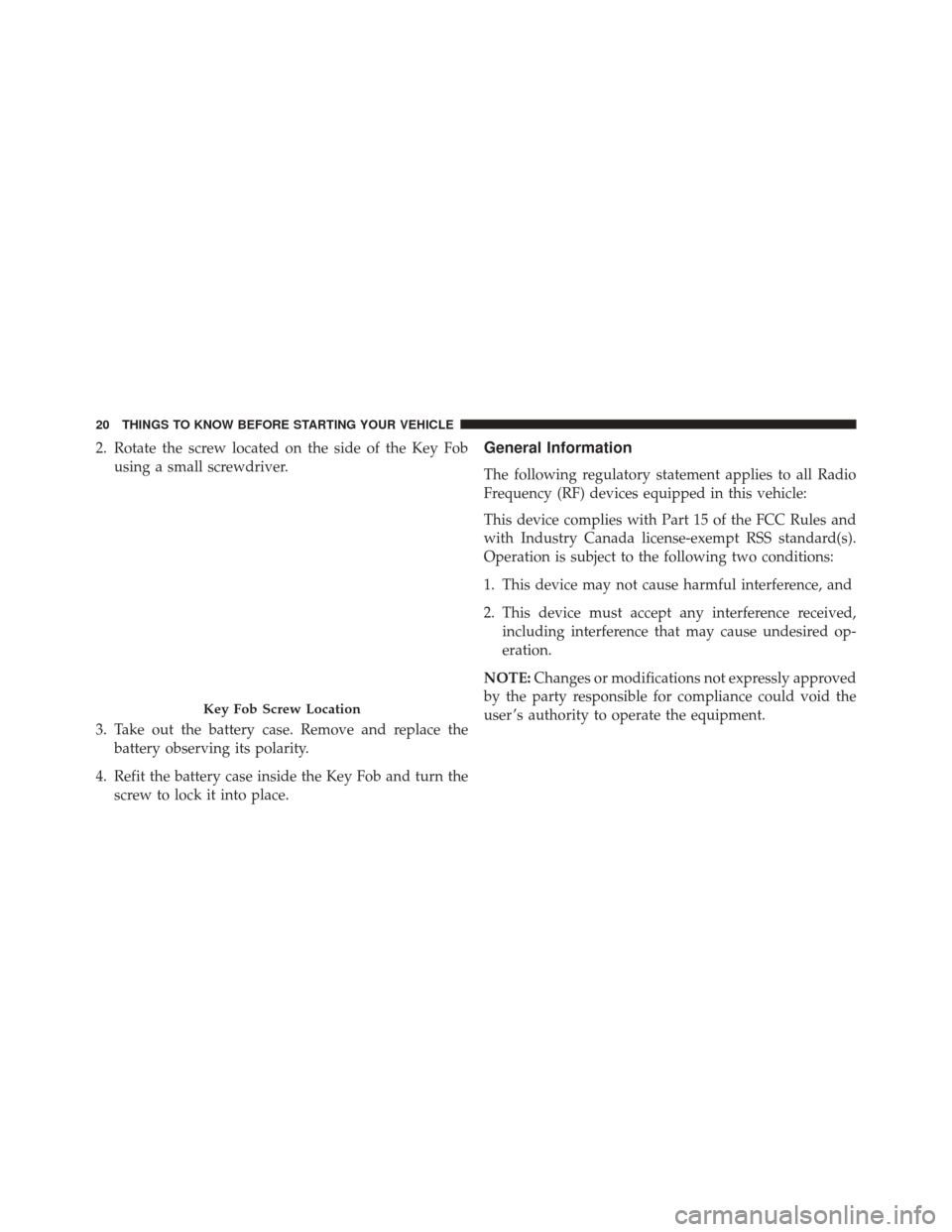
2. Rotate the screw located on the side of the Key Fobusing a small screwdriver.
3. Take out the battery case. Remove and replace the battery observing its polarity.
4. Refit the battery case inside the Key Fob and turn the screw to lock it into place.General Information
The following regulatory statement applies to all Radio
Frequency (RF) devices equipped in this vehicle:
This device complies with Part 15 of the FCC Rules and
with Industry Canada license-exempt RSS standard(s).
Operation is subject to the following two conditions:
1. This device may not cause harmful interference, and
2. This device must accept any interference received,including interference that may cause undesired op-
eration.
NOTE: Changes or modifications not expressly approved
by the party responsible for compliance could void the
user ’s authority to operate the equipment.
Key Fob Screw Location
20 THINGS TO KNOW BEFORE STARTING YOUR VEHICLE
Page 28 of 438
WINDOWS
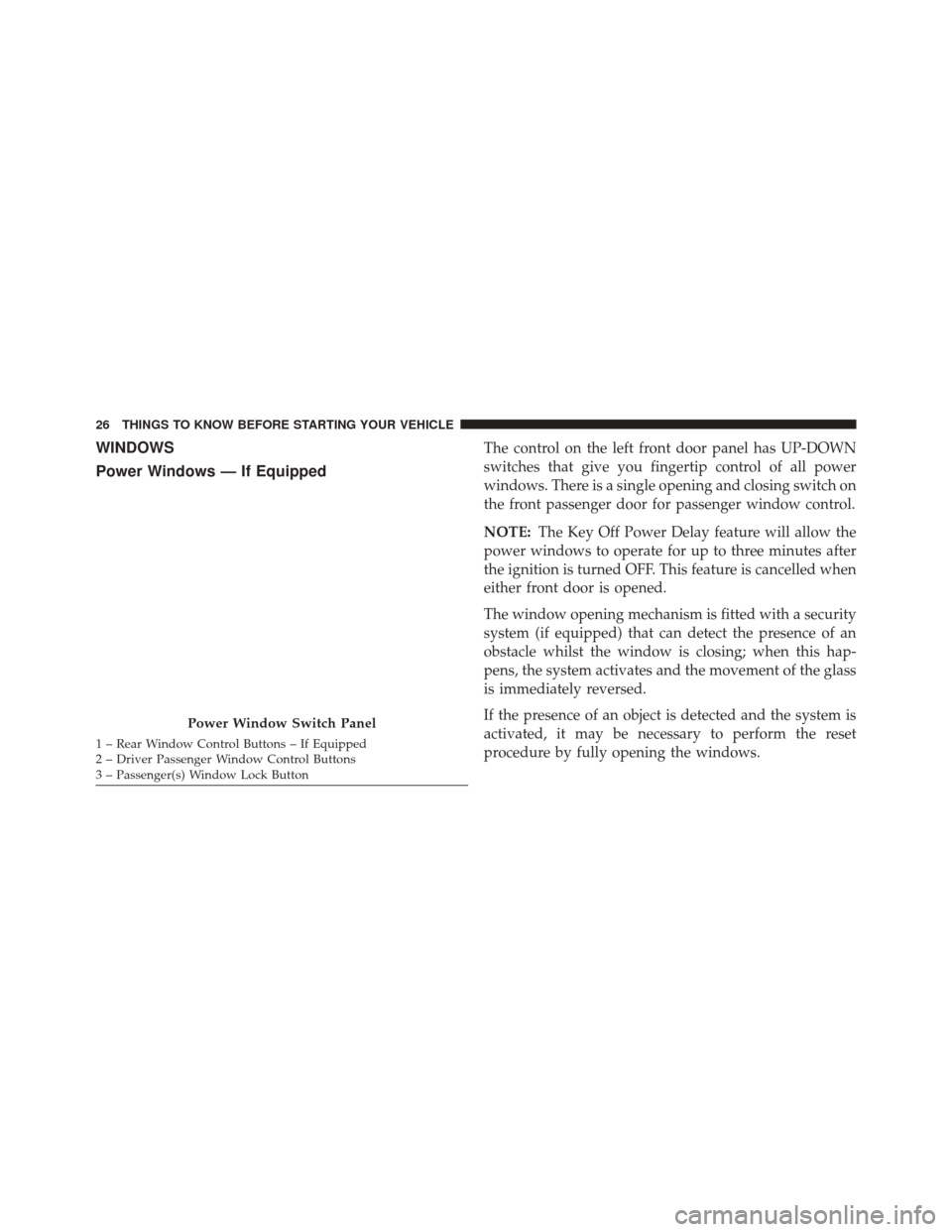
Power Windows — If EquippedThe control on the left front door panel has UP-DOWN
switches that give you fingertip control of all power
windows. There is a single opening and closing switch on
the front passenger door for passenger window control.
NOTE:The Key Off Power Delay feature will allow the
power windows to operate for up to three minutes after
the ignition is turned OFF. This feature is cancelled when
either front door is opened.
The window opening mechanism is fitted with a security
system (if equipped) that can detect the presence of an
obstacle whilst the window is closing; when this hap-
pens, the system activates and the movement of the glass
is immediately reversed.
If the presence of an object is detected and the system is
activated, it may be necessary to perform the reset
procedure by fully opening the windows.
Power Window Switch Panel
1 – Rear Window Control Buttons – If Equipped
2 – Driver Passenger Window Control Buttons
3 – Passenger(s) Window Lock Button 26 THINGS TO KNOW BEFORE STARTING YOUR VEHICLE
Page 29 of 438
WARNING!
•Never leave children alone in a vehicle, or with
access to an unlocked vehicle. Allowing children to
be in a vehicle unattended is dangerous for a
number of reasons. A child or others could be
seriously or fatally injured. Children should be
warned not to touch the parking brake, brake pedal
or the gear selector.
• Do not leave the Key Fob in or near the vehicle or
in a location accessible to children. A child could
operate power windows, other controls, or move
the vehicle.
Auto-Down Feature
The front window switches are equipped with an Auto-
Down feature. Push the window switch for a short period
of time, release, and the window will go down automati-
cally. To stop the Auto-Down motion part way, pull up on the
window switch briefly and release.
NOTE:
The power window switches remain active for up
to three minutes (depending on the accessory delay
setting) after the ignition switch has been turned OFF.
Opening either of the vehicle’s front doors will cancel this
feature.
Auto-Up Feature
Lift the window switch to the detent for half a second,
release, and the window will go up automatically.
To stop the window from going all the way up during the
AUTO-up operation, push down on the switch briefly.
To close the window part way, lift the window switch to
the detent for less than half a second and release it when
you want the window to stop.
2
THINGS TO KNOW BEFORE STARTING YOUR VEHICLE 27
Page 30 of 438
WARNING!
There is no anti-pinch protection when the window
is almost closed. Be sure to clear all objects from the
window before closing.
Power Windows System Initialization
The power windows may be reset if any of the following
occurs:
•On the front doors
• Fuse or battery are disconnected.
• Fuse or battery are disconnected when the window
is moving.
• 20 window movements without ever closing the
window.
• On the rear doors (in addition to the condition for the
front doors) •
One door opening movement with the window
moving, without ever closing the door.
Proceed as follows for initialization:
1. Completely close the driver’s door window, keeping the operating button pushed for at least five seconds
after the (upper) end of travel position.
2. Proceed in the same way on the passenger’s side door button and on the buttons of rear doors.
Wind Buffeting
Wind buffeting can be described as the perception of
pressure on the ears or a helicopter-type sound in the
ears. Your vehicle may exhibit wind buffeting with the
windows down in certain open or partially open posi-
tions. This is a normal occurrence and can be minimized.
If the buffeting occurs open the front windows together
to minimize the buffeting.
28 THINGS TO KNOW BEFORE STARTING YOUR VEHICLE
Page 32 of 438
Opening And Closing From The Inside
Opening:
Pull the interior door handle switch to unlock the door,
then pull the handle and slide the door towards the rear
of the vehicle until it can go no further.
Closing:
Pull the interior door handle switch to release the door
and then push it towards the front of the vehicle.
Child Lock System
This system prevents the sliding side doors being opened
from the inside.
It can be engaged only with the sliding side door open:
•Position 1 – engaged (door locked)
• Position 2 – disengaged (door can be opened from
inside) The device remains engaged even if the doors are un-
locked remotely.
Key Emergency Lock (KEL) Device
The sliding side doors are provided with a device for
locking all the doors using the lock in case of a power
fault.
The device can be engaged with the sliding side doors
open as follows:
•
Position 1– device not engaged (doors released)
• Position 2 – device engaged (fit the metal insert of the
ignition key in its seat and rotate clockwise), door
locked
The device is released and thus the doors can be opened
as follows:
If the power is restored:
• By remote control.
30 THINGS TO KNOW BEFORE STARTING YOUR VEHICLE