lock RENAULT CAPTUR 2014 1.G Workshop Manual
[x] Cancel search | Manufacturer: RENAULT, Model Year: 2014, Model line: CAPTUR, Model: RENAULT CAPTUR 2014 1.GPages: 244, PDF Size: 5.64 MB
Page 152 of 244
3.26
BOOT FITTINGS (1/2)
1
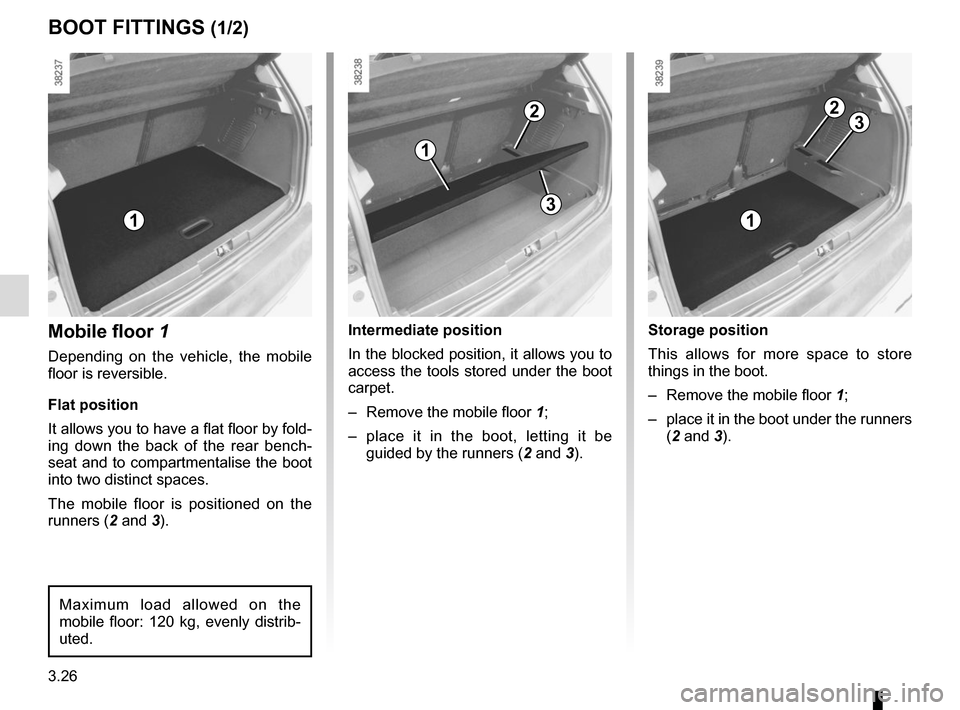
Mobile floor 1
Depending on the vehicle, the mobile
floor is reversible.
Flat position
It allows you to have a flat floor by fold-
ing down the back of the rear bench-
seat and to compartmentalise the boot
into two distinct spaces.
The mobile floor is positioned on the
runners (2 and 3).
Maximum load allowed on the
mobile floor: 120 kg, evenly distrib-
uted.
Storage position
This allows for more space to store
things in the boot.
– Remove the mobile floor 1;
– place it in the boot under the runners (2 and 3).
2
Intermediate position
In the blocked position, it allows you to
access the tools stored under the boot
carpet.
– Remove the mobile floor 1;
– place it in the boot, letting it be guided by the runners ( 2 and 3).
1
2
1
3
3
Page 160 of 244
4.2
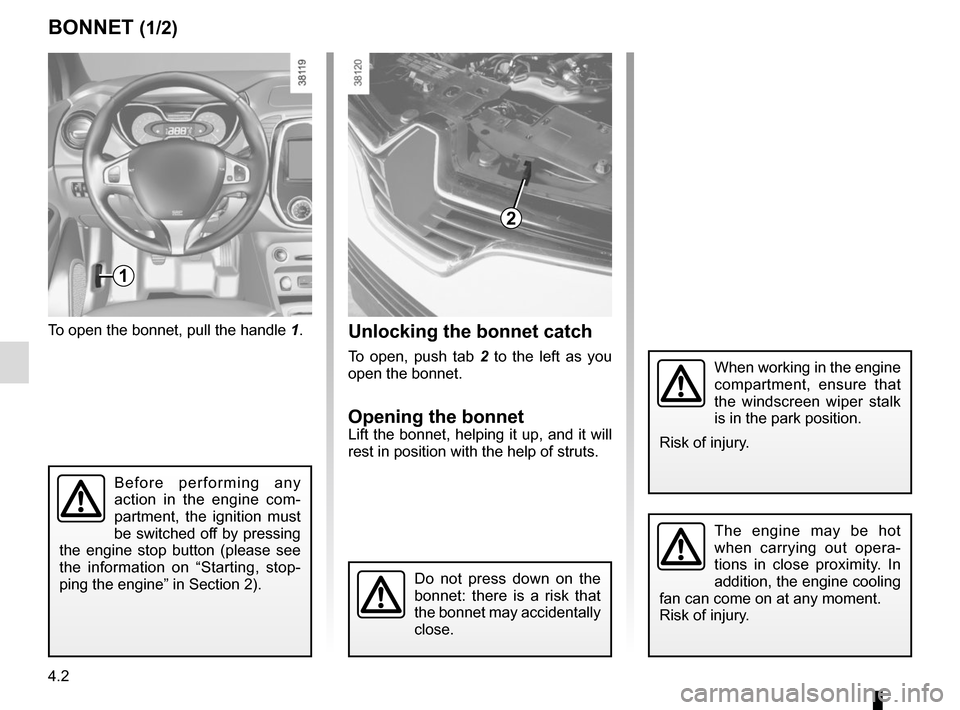
To open the bonnet, pull the handle 1.
BONNET (1/2)
1
The engine may be hot
when carrying out opera-
tions in close proximity. In
addition, the engine cooling
fan can come on at any moment.
Risk of injury.
Unlocking the bonnet catch
To open, push tab 2 to the left as you
open the bonnet.
Opening the bonnetLift the bonnet, helping it up, and it will
rest in position with the help of struts.
2
Do not press down on the
bonnet: there is a risk that
the bonnet may accidentally
close.
When working in the engine
compartment, ensure that
the windscreen wiper stalk
is in the park position.
Risk of injury.
Before performing any
action in the engine com-
partment, the ignition must
be switched off by pressing
the engine stop button (please see
the information on “Starting, stop-
ping the engine” in Section 2).
Page 161 of 244
4.3
BONNET (2/2)
Closing the bonnet
Check that nothing has been left in the
engine compartment.
To close the bonnet again, hold the
bonnet in the middle and lower it to
30 cm above the closed position, then
release it. It will latch automatically
under its own weight.
After carrying out any work
in the engine compart-
ment, check that nothing
has been left behind (cloth,
tools, etc.).
These may damage the engine or
cause a fire.
Ensure that the bonnet is
properly locked.
Check that nothing is pre-
venting the catch from lock-
ing (gravel, cloth, etc.).
In the event of even a slight
impact involving the radia-
tor grille or bonnet, have
the bonnet lock checked by
an approved dealer as soon as pos-
sible.
Page 173 of 244
4.15
Glass instrument panel(e.g.: instrument panel, clock, exterior
temperature display, radio display, mul-
timedia or multifunction display etc.)
Use a soft cloth (or cotton wool).
If this does not clean them properly,
use a soft cloth (or cotton wool) slightly
moistened with soapy water and then
wipe clean with another soft damp cloth
or cotton wool.
Finally, carefully dry off with a soft dry
cloth.
Do not use products containing alco-
hol and/or spray fluids on the area.
Seat belts
These must be kept clean.
Use products selected by our Technical
Department (Approved outlets) or
warm, soapy water and a sponge and
wipe with a dry cloth.
Detergents or dyes must not be used
under any circumstances.
INTERIOR TRIM MAINTENANCE (1/2)
Textiles (seats, door trim, etc)
For vehicles fitted with removable seat
covers, refer to the information on “Seat
covers” in Section 4.
Vacuum-clean the textiles regularly.
Liquid stain
Use soapy water.
Dab lightly (never rub) with a soft cloth,
rinse and remove the excess.
Solid or pasty stain
Carefully remove the excess solid or
pasty material immediately with a
spatula (working from the edges to the
centre to avoid spreading the stain).
Clean as for a liquid stain.
Special instructions for sweets or
chewing gum
Put an ice cube on the stain to solidify
it, then proceed as for a solid stain.
A well-maintained vehicle will last
longer. It is therefore recommended to
maintain the interior of the vehicle regu-
larly.
A stain should always be dealt with
swiftly.
Whatever type of stain is on the trim,
use
cold (or warm) soapy water with
natural soap.
Detergents (washing-up liquid, pow-
dered products, alcohol-based prod-
ucts) should not be used.
Use a soft cloth.
Rinse and soak up the excess.
For further recommendations for
maintaining the interior, and/or for
any unsatisfactory results, please
see an authorised dealer.
Page 178 of 244
4.20
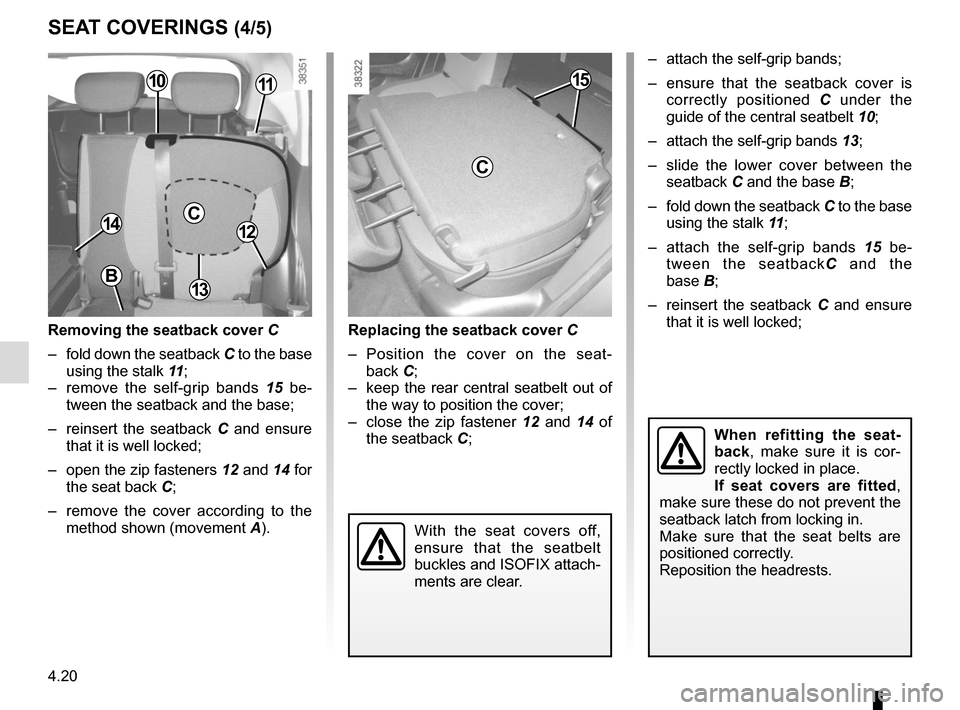
SEAT COVERINGS (4/5)
Removing the seatback cover C
– fold down the seatback C to the base
using the stalk 11 ;
– remove the self-grip bands 15 be-
tween the seatback and the base;
– reinsert the seatback C and ensure
that it is well locked;
– open the zip fasteners 12 and 14 for
the seat back C;
– remove the cover according to the method shown (movement A).
C1412
1115
C
Replacing the seatback cover C
– Position the cover on the seat- back C;
– keep the rear central seatbelt out of the way to position the cover;
– close the zip fastener 12 and 14 of the seatback C; – attach the self-grip bands;
– ensure that the seatback cover is
correctly positioned C under the
guide of the central seatbelt 10;
– attach the self-grip bands 13;
– slide the lower cover between the seatback C and the base B;
– fold down the seatback C to the base
using the stalk 11 ;
– attach the self-grip bands 15 be-
tween the seatback C and the
base B;
– reinsert the seatback C and ensure
that it is well locked;
10
13
When refitting the seat-
back, make sure it is cor-
rectly locked in place.
If seat covers are fitted ,
make sure these do not prevent the
seatback latch from locking in.
Make sure that the seat belts are
positioned correctly.
Reposition the headrests.
B
With the seat covers off,
ensure that the seatbelt
buckles and ISOFIX attach-
ments are clear.
Page 179 of 244
4.21
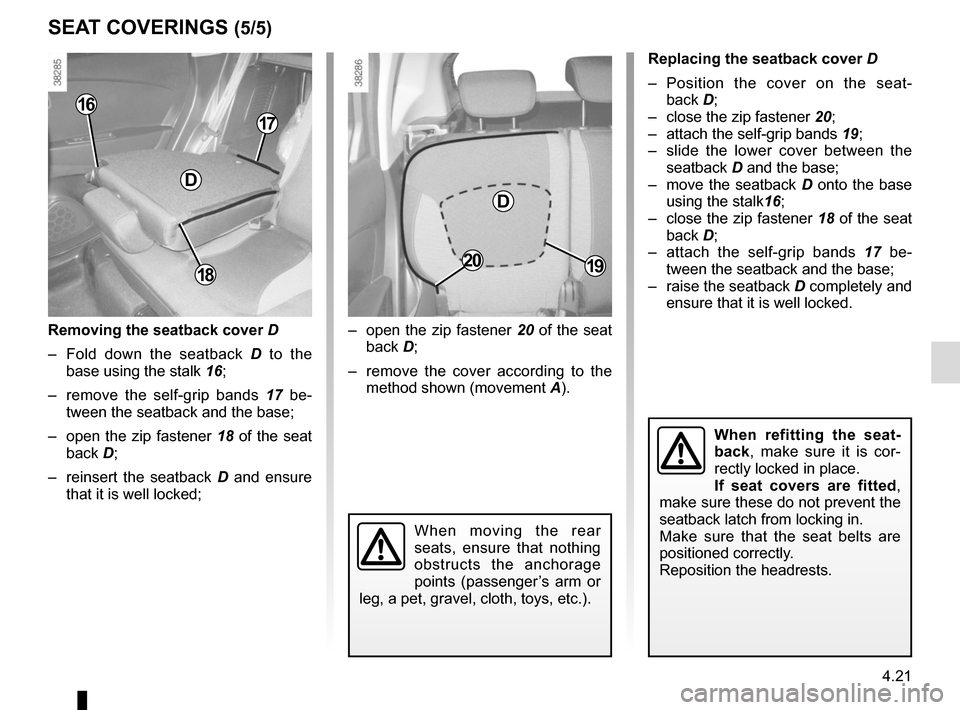
Replacing the seatback cover D
– Position the cover on the seat- back D;
– close the zip fastener 20;
– attach the self-grip bands 19;
– slide the lower cover between the seatback D and the base;
– move the seatback D onto the base using the stalk 16;
– close the zip fastener 18 of the seat
back D;
– attach the self-grip bands 17 be-
tween the seatback and the base;
– raise the seatback D completely and ensure that it is well locked.
SEAT COVERINGS (5/5)
– open the zip fastener 20 of the seat
back D;
– remove the cover according to the method shown (movement A).
20
D
18
17
D
16
Removing the seatback cover D
– Fold down the seatback D to the
base using the stalk 16;
– remove the self-grip bands 17 be-
tween the seatback and the base;
– open the zip fastener 18 of the seat
back D;
– reinsert the seatback D and ensure
that it is well locked;
19
When moving the rear
seats, ensure that nothing
obstructs the anchorage
points (passenger’s arm or
leg, a pet, gravel, cloth, toys, etc.).
When refitting the seat-
back, make sure it is cor-
rectly locked in place.
If seat covers are fitted ,
make sure these do not prevent the
seatback latch from locking in.
Make sure that the seat belts are
positioned correctly.
Reposition the headrests.
Page 186 of 244
5.6
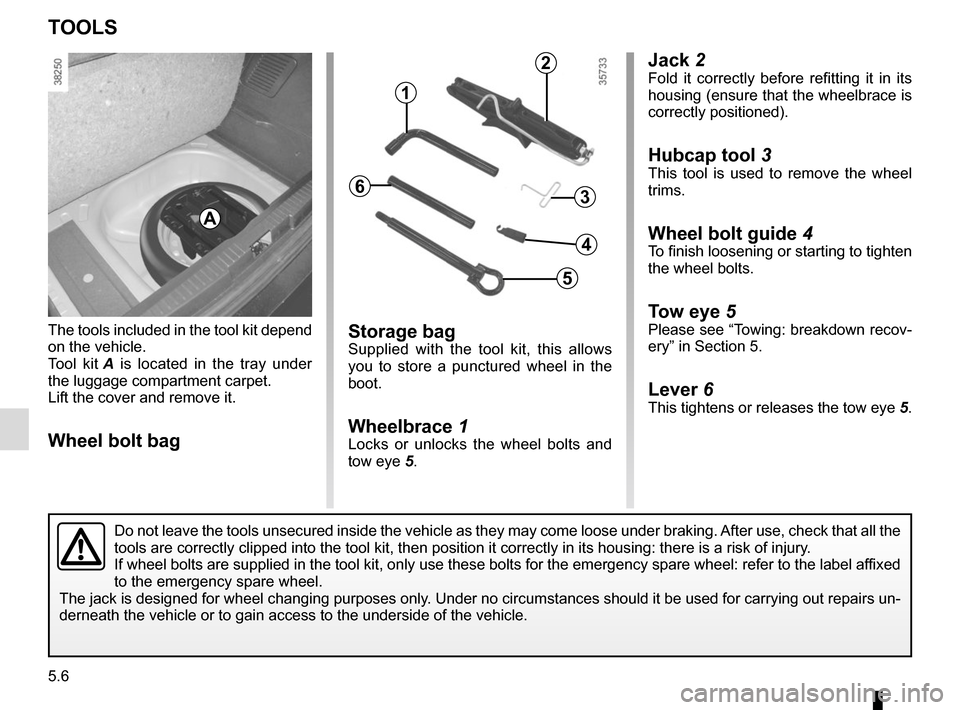
Jack 2Fold it correctly before refitting it in its
housing (ensure that the wheelbrace is
correctly positioned).
Hubcap tool 3
This tool is used to remove the wheel
trims.
Wheel bolt guide 4To finish loosening or starting to tighten
the wheel bolts.
Tow eye 5Please see “Towing: breakdown recov-
ery” in Section 5.
Lever 6This tightens or releases the tow eye 5.
Storage bagSupplied with the tool kit, this allows
you to store a punctured wheel in the
boot.
Wheelbrace 1Locks or unlocks the wheel bolts and
tow eye 5.
The tools included in the tool kit depend
on the vehicle.
Tool kit
A is located in the tray under
the luggage compartment carpet.
Lift the cover and remove it.Wheel bolt bag
TOOLS
A
Do not leave the tools unsecured inside the vehicle as they may come loo\
se under braking. After use, check that all the
tools are correctly clipped into the tool kit, then position it correctl\
y in its housing: there is a risk of injury.
If wheel bolts are supplied in the tool kit, only use these bolts for th\
e emergency spare wheel: refer to the label affixed
to the emergency spare wheel.
The jack is designed for wheel changing purposes only. Under no circumstances should it be used for carrying out repairs un-
derneath the vehicle or to gain access to the underside of the vehicle.
2
1
3
5
4
6
Page 196 of 244
5.16
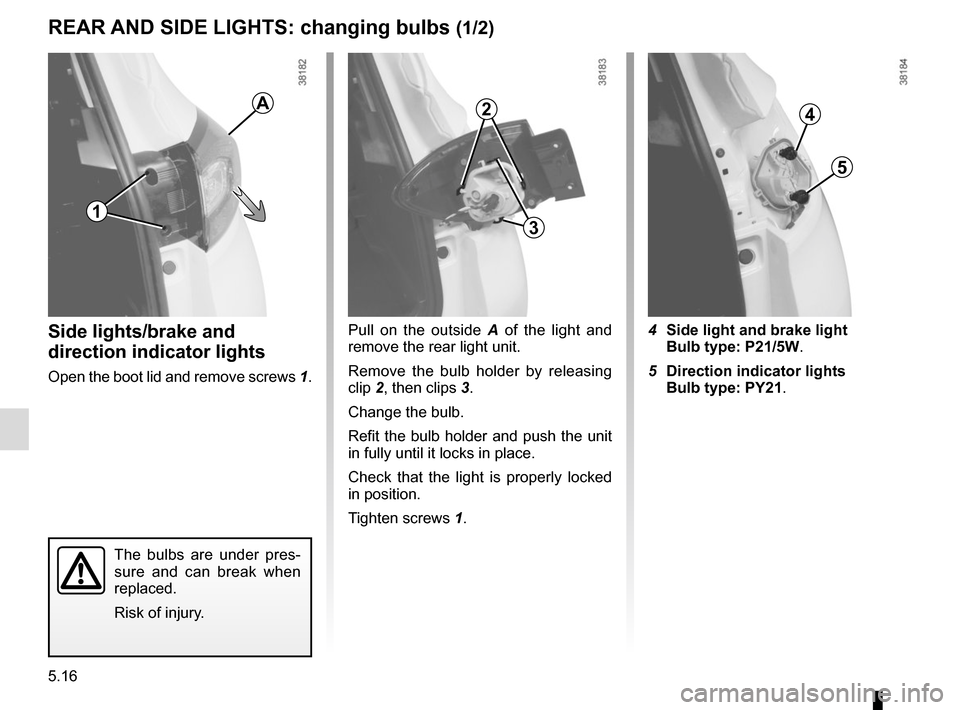
Pull on the outside A of the light and
remove the rear light unit.
Remove the bulb holder by releasing
clip 2, then clips 3.
Change the bulb.
Refit the bulb holder and push the unit
in fully until it locks in place.
Check that the light is properly locked
in position.
Tighten screws 1.
The bulbs are under pres-
sure and can break when
replaced.
Risk of injury.
4 Side light and brake light
Bulb type: P21/5W.
5 Direction indicator lights
Bulb type: PY21.Side lights/brake and
direction indicator lights
Open the boot lid and remove screws 1.
REAR AND SIDE LIGHTS: changing bulbs (1/2)
4
5
1
A2
3
Page 200 of 244
5.20
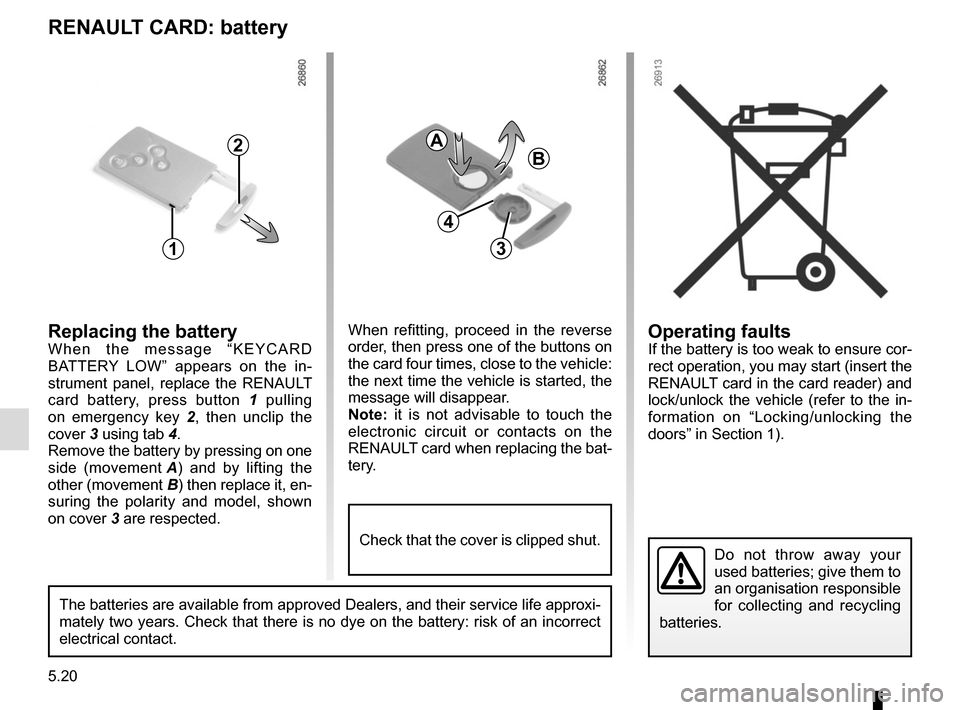
Operating faultsIf the battery is too weak to ensure cor-
rect operation, you may start (insert the
RENAULT card in the card reader) and
lock/unlock the vehicle (refer to the in-
formation on “Locking/unlocking the
doors” in Section 1).
RENAULT CARD: battery
Replacing the batteryWhen the message “KEYCARD
BATTERY LOW” appears on the in-
strument panel, replace the RENAULT
card battery, press button 1 pulling
on emergency key 2 , then unclip the
cover 3 using tab 4.
Remove the battery by pressing on one
side (movement A) and by lifting the
other (movement B) then replace it, en-
suring the polarity and model, shown
on cover 3 are respected.
Do not throw away your
used batteries; give them to
an organisation responsible
for collecting and recycling
batteries.
1
2
When refitting, proceed in the reverse
order, then press one of the buttons on
the card four times, close to the vehicle:
the next time the vehicle is started, the
message will disappear.
Note: it is not advisable to touch the
electronic circuit or contacts on the
RENAULT card when replacing the bat-
tery.
A
B
3
The batteries are available from approved Dealers, and their service lif\
e approxi-
mately two years. Check that there is no dye on the battery: risk of an \
incorrect
electrical contact.
4
Check that the cover is clipped shut.
Page 203 of 244
5.23
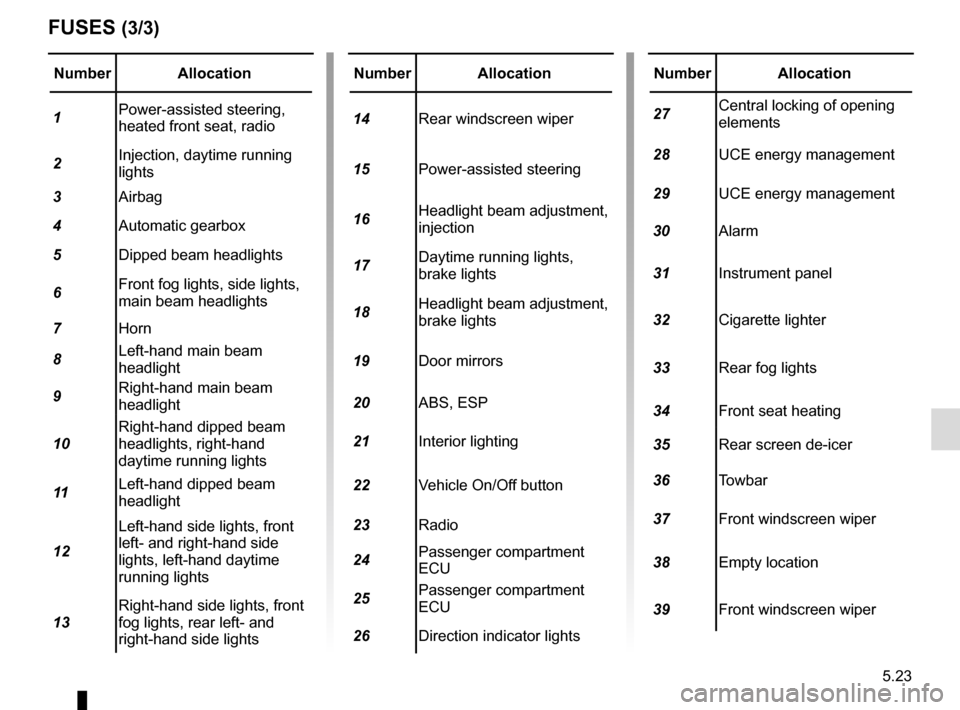
Number Allocation
1 Power-assisted steering,
heated front seat, radio
2 Injection, daytime running
lights
3 Airbag
4 Automatic gearbox
5 Dipped beam headlights
6 Front fog lights, side lights,
main beam headlights
7 Horn
8 Left-hand main beam
headlight
9 Right-hand main beam
headlight
10 Right-hand dipped beam
headlights, right-hand
daytime running lights
11 Left-hand dipped beam
headlight
12 Left-hand side lights, front
left- and right-hand side
lights, left-hand daytime
running lights
13 Right-hand side lights, front
fog lights, rear left- and
right-hand side lights
FUSES (3/3)
Number Allocation
14 Rear windscreen wiper
15 Power-assisted steering
16 Headlight beam adjustment,
injection
17 Daytime running lights,
brake lights
18 Headlight beam adjustment,
brake lights
19 Door mirrors
20 ABS, ESP
21 Interior lighting
22 Vehicle On/Off button
23 Radio
24 Passenger compartment
ECU
25 Passenger compartment
ECU
26 Direction indicator lightsNumber Allocation
27 Central locking of opening
elements
28 UCE energy management
29 UCE energy management
30 Alarm
31 Instrument panel
32 Cigarette lighter
33 Rear fog lights
34 Front seat heating
35 Rear screen de-icer
36 Towbar
37 Front windscreen wiper
38 Empty location
39 Front windscreen wiper