engine compartment RENAULT CAPTUR 2016 1.G Owners Manual
[x] Cancel search | Manufacturer: RENAULT, Model Year: 2016, Model line: CAPTUR, Model: RENAULT CAPTUR 2016 1.GPages: 246, PDF Size: 2.55 MB
Page 11 of 246
1.5
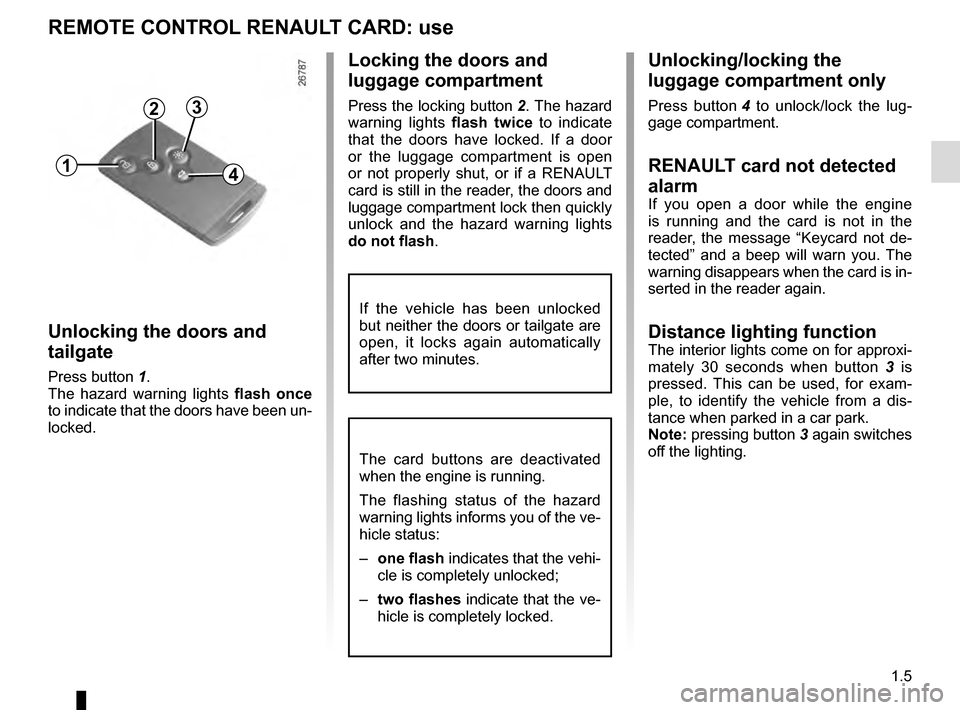
Unlocking/locking the
luggage compartment only
Press button 4 to unlock/lock the lug-
gage compartment.
RENAULT card not detected
alarm
If you open a door while the engine
is running and the card is not in the
reader, the message “Keycard not de-
tected” and a beep will warn you. The
warning disappears when the card is in-
serted in the reader again.
Distance lighting functionThe interior lights come on for approxi-
mately 30 seconds when button 3 is
pressed. This can be used, for exam-
ple, to identify the vehicle from a dis-
tance when parked in a car park.
Note: pressing button 3 again switches
off the lighting.
Locking the doors and
luggage compartment
Press the locking button 2. The hazard
warning lights flash twice to indicate
that the doors have locked. If a door
or the luggage compartment is open
or not properly shut, or if a RENAULT
card is still in the reader, the doors and
luggage compartment lock then quickly
unlock and the hazard warning lights
do not flash .
Unlocking the doors and
tailgate
Press button 1.
The hazard warning lights flash once
to indicate that the doors have been un-
locked.
REMOTE CONTROL RENAULT CARD: use
The card buttons are deactivated
when the engine is running.
The flashing status of the hazard
warning lights informs you of the ve-
hicle status:
– one flash indicates that the vehi-
cle is completely unlocked;
– two flashes indicate that the ve-
hicle is completely locked.
If the vehicle has been unlocked
but neither the doors or tailgate are
open, it locks again automatically
after two minutes.
1
2
4
3
Page 13 of 246
1.7
HANDS-FREE RENAULT CARD: use (2/4)
31
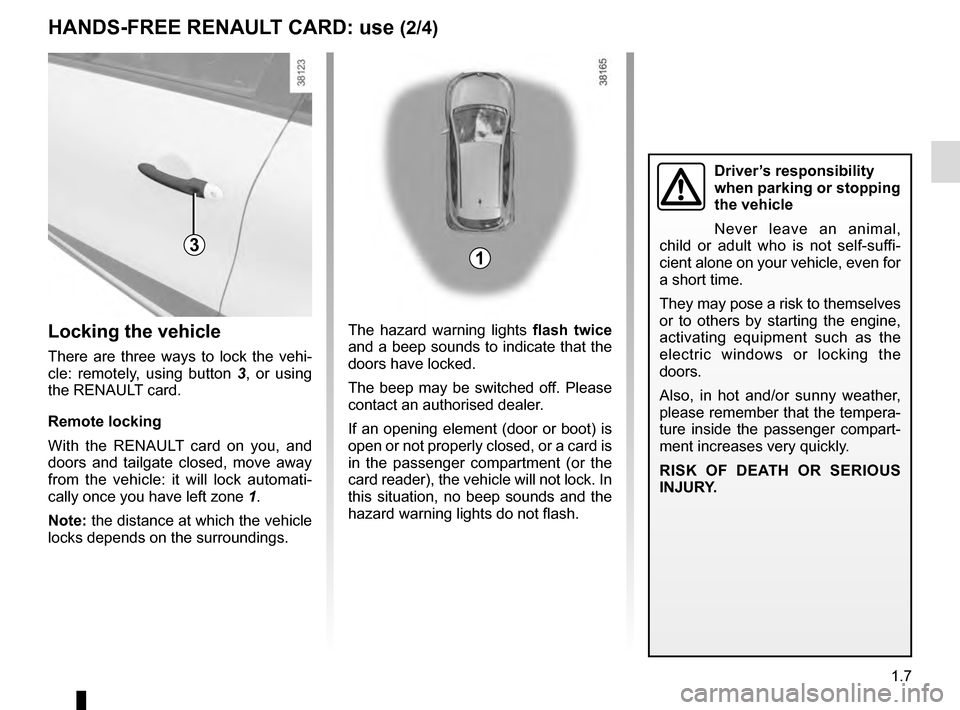
The hazard warning lights flash twice
and a beep sounds to indicate that the
doors have locked.
The beep may be switched off. Please
contact an authorised dealer.
If an opening element (door or boot) is
open or not properly closed, or a card is
in the passenger compartment (or the
card reader), the vehicle will not lock. In
this situation, no beep sounds and the
hazard warning lights do not flash.Locking the vehicle
There are three ways to lock the vehi-
cle: remotely, using button 3 , or using
the RENAULT card.
Remote locking
With the RENAULT card on you, and
doors and tailgate closed, move away
from the vehicle: it will lock automati-
cally once you have left zone 1.
Note: the distance at which the vehicle
locks depends on the surroundings.
Driver’s responsibility
when parking or stopping
the vehicle
Never leave an animal,
child or adult who is not self-suffi-
cient alone on your vehicle, even for
a short time.
They may pose a risk to themselves
or to others by starting the engine,
activating equipment such as the
electric windows or locking the
doors.
Also, in hot and/or sunny weather,
please remember that the tempera-
ture inside the passenger compart-
ment increases very quickly.
RISK OF DEATH OR SERIOUS
INJURY.
Page 20 of 246
1.14
LOCKING/UNLOCKING THE DOORS (2/2)
Door and tailgate status
indicator
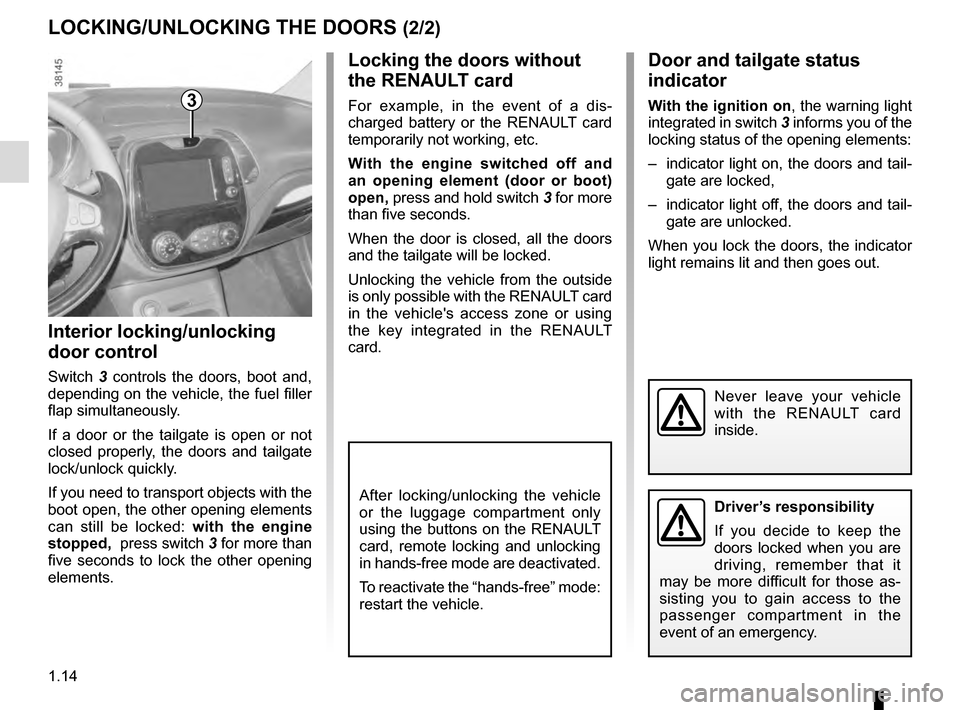
With the ignition on, the warning light
integrated in switch 3 informs you of the
locking status of the opening elements:
– indicator light on, the doors and tail- gate are locked,
– indicator light off, the doors and tail- gate are unlocked.
When you lock the doors, the indicator
light remains lit and then goes out.
Locking the doors without
the RENAULT card
For example, in the event of a dis-
charged battery or the RENAULT card
temporarily not working, etc.
With the engine switched off and
an opening element (door or boot)
open, press and hold switch 3 for more
than five seconds.
When the door is closed, all the doors
and the tailgate will be locked.
Unlocking the vehicle from the outside
is only possible with the RENAULT card
in the vehicle's access zone or using
the key integrated in the RENAULT
card.
Interior locking/unlocking
door control
Switch 3 controls the doors, boot and,
depending on the vehicle, the fuel filler
flap simultaneously.
If a door or the tailgate is open or not
closed properly, the doors and tailgate
lock/unlock quickly.
If you need to transport objects with the
boot open, the other opening elements
can still be locked: with the engine
stopped, press switch 3 for more than
five seconds to lock the other opening
elements.
3
Driver’s responsibility
If you decide to keep the
doors locked when you are
driving, remember that it
may be more difficult for those as-
sisting you to gain access to the
passenger compartment in the
event of an emergency.
Never leave your vehicle
with the RENAULT card
inside.
After locking/unlocking the vehicle
or the luggage compartment only
using the buttons on the RENAULT
card, remote locking and unlocking
in hands-free mode are deactivated.
To reactivate the “hands-free” mode:
restart the vehicle.
Page 21 of 246
1.15
Operating principle
After the vehicle is started, the system
automatically locks the doors when
you are driving at approximately 6 mph
(10 km/h) and over.
The door can be unlocked:
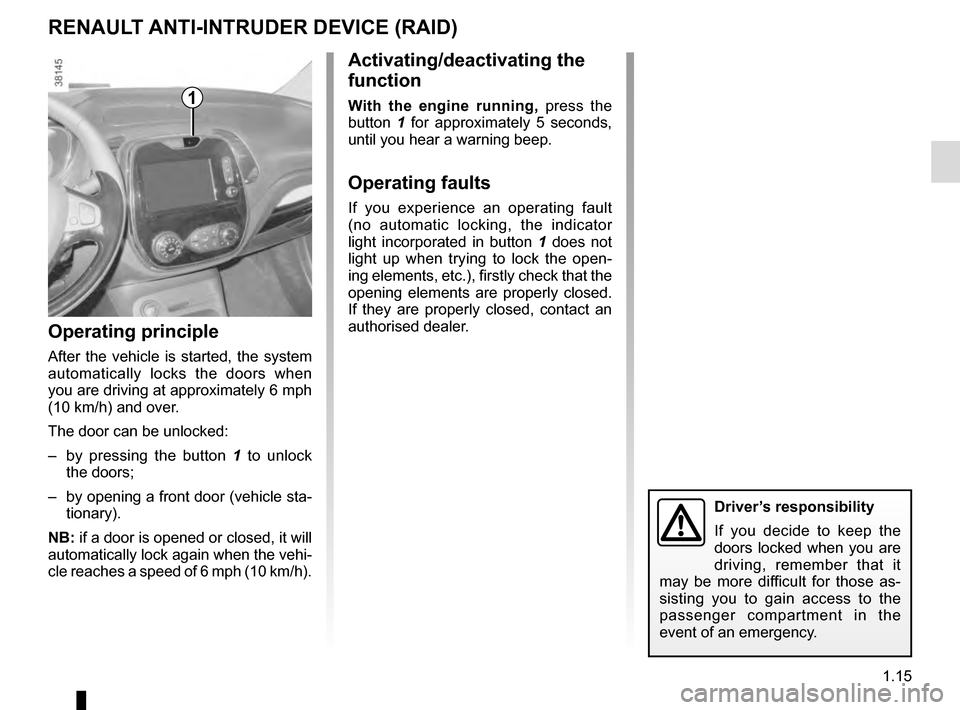
– by pressing the button 1 to unlock
the doors;
– by opening a front door (vehicle sta- tionary).
NB: if a door is opened or closed, it will
automatically lock again when the vehi-
cle reaches a speed of 6 mph (10 km/h).
Activating/deactivating the
function
With the engine running, press the
button 1 for approximately 5 seconds,
until you hear a warning beep.
Operating faults
If you experience an operating fault
(no automatic locking, the indicator
light incorporated in button 1 does not
light up when trying to lock the open-
ing elements, etc.), firstly check that the
opening elements are properly closed.
If they are properly closed, contact an
authorised dealer.
RENAULT ANTI-INTRUDER DEVICE (RAID)
1
Driver’s responsibility
If you decide to keep the
doors locked when you are
driving, remember that it
may be more difficult for those as-
sisting you to gain access to the
passenger compartment in the
event of an emergency.
Page 78 of 246
1.72
Before any action involving
the windscreen (washing
the vehicle, de-icing,
cleaning the windscreen,
etc.) return stalk 1 to position A
(park).
Risk of injury and/or damage.
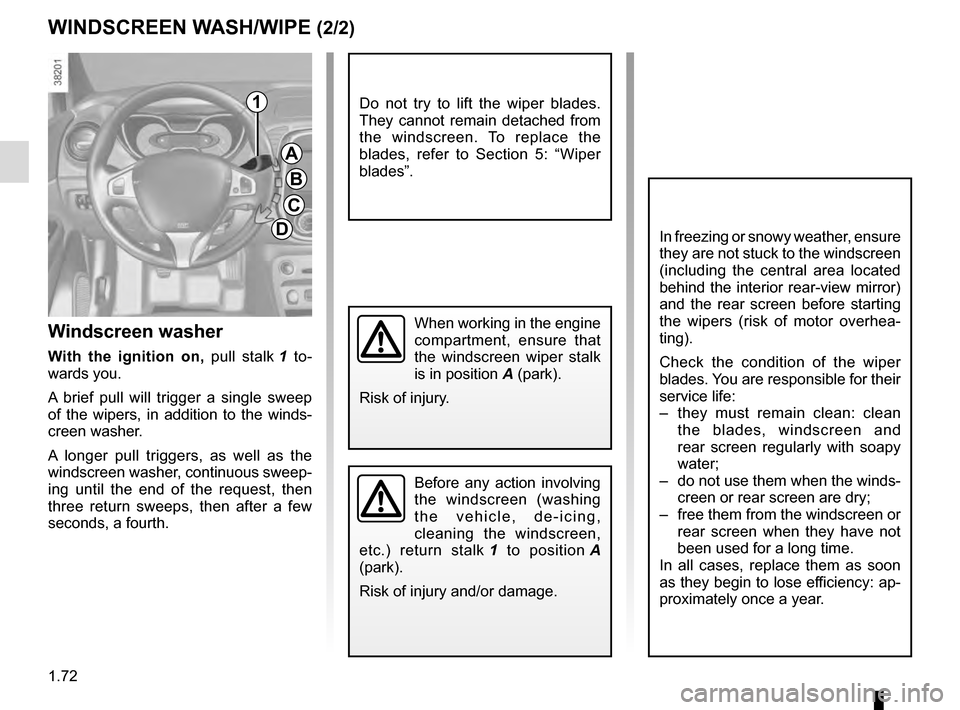
Windscreen washer
With the ignition on, pull stalk 1 to-
wards you.
A brief pull will trigger a single sweep
of the wipers, in addition to the winds-
creen washer.
A longer pull triggers, as well as the
windscreen washer, continuous sweep-
ing until the end of the request, then
three return sweeps, then after a few
seconds, a fourth.
WINDSCREEN WASH/WIPE (2/2)
A
B
C
D
1
In freezing or snowy weather, ensure
they are not stuck to the windscreen
(including the central area located
behind the interior rear-view mirror)
and the rear screen before starting
the wipers (risk of motor overhea-
ting).
Check the condition of the wiper
blades. You are responsible for their
service life:
– they must remain clean: clean the blades, windscreen and
rear screen regularly with soapy
water;
– do not use them when the winds- creen or rear screen are dry;
– free them from the windscreen or rear screen when they have not
been used for a long time.
In all cases, replace them as soon
as they begin to lose efficiency: ap-
proximately once a year.
When working in the engine
compartment, ensure that
the windscreen wiper stalk
is in position A (park).
Risk of injury.
Do not try to lift the wiper blades.
They cannot remain detached from
the windscreen. To replace the
blades, refer to Section 5: “Wiper
blades”.
Page 86 of 246
2.4
Operating faults
In certain cases, the hands-free
RENAULT card may not work:
– when the RENAULT card battery is drained, flat battery, etc.
– near to appliances operating on the same frequency as the card (moni-
tor, mobile phone, video game, etc.);
– vehicle located in a high electroma- gnetic radiation zone.
The message “PLEASE INSERT
KEYCARD” appears on the instrument
panel.
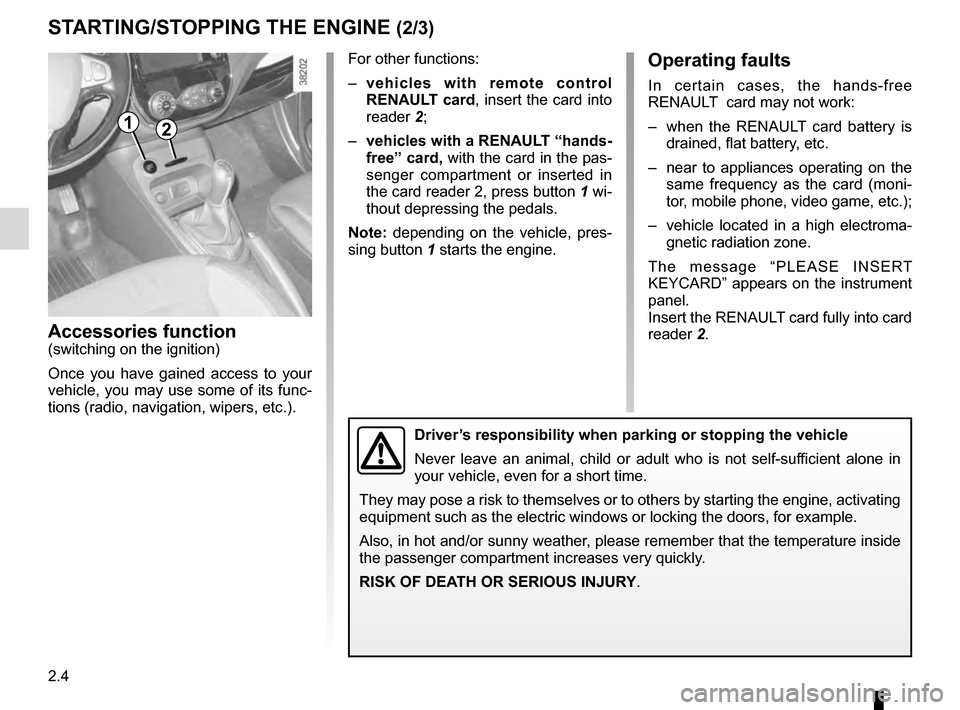
Insert the RENAULT card fully into card
reader 2.
Accessories function(switching on the ignition)
Once you have gained access to your
vehicle, you may use some of its func-
tions (radio, navigation, wipers, etc.).
STARTING/STOPPING THE ENGINE (2/3)
Driver’s responsibility when parking or stopping the vehicle
Never leave an animal, child or adult who is not self-sufficient alone in
your vehicle, even for a short time.
They may pose a risk to themselves or to others by starting the engine, \
activating
equipment such as the electric windows or locking the doors, for example\
.
Also, in hot and/or sunny weather, please remember that the temperature inside
the passenger compartment increases very quickly.
RISK OF DEATH OR SERIOUS INJURY.
For other functions:
– vehicles with remote control
RENAULT card, insert the card into
reader 2;
– vehicles with a RENAULT “hands-
free” card, with the card in the pas-
senger compartment or inserted in
the card reader 2, press button 1 wi-
thout depressing the pedals.
Note: depending on the vehicle, pres-
sing button 1 starts the engine.
12
Page 87 of 246
2.5
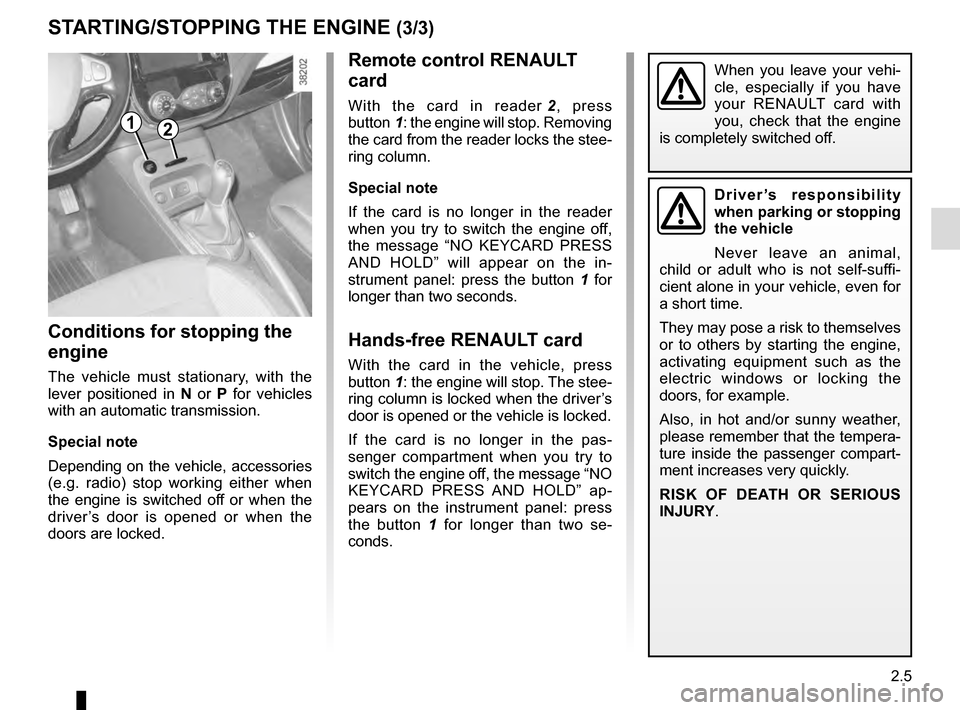
Remote control RENAULT
card
With the card in reader 2, press
button 1: the engine will stop. Removing
the card from the reader locks the stee-
ring column.
Special note
If the card is no longer in the reader
when you try to switch the engine off,
the message “NO KEYCARD PRESS
AND HOLD” will appear on the in-
strument panel: press the button 1 for
longer than two seconds.
Hands-free RENAULT card
With the card in the vehicle, press
button 1: the engine will stop. The stee-
ring column is locked when the driver’s
door is opened or the vehicle is locked.
If the card is no longer in the pas-
senger compartment when you try to
switch the engine off, the message “NO
KEYCARD PRESS AND HOLD” ap-
pears on the instrument panel: press
the button 1 for longer than two se-
conds.
Conditions for stopping the
engine
The vehicle must stationary, with the
lever positioned in N or P for vehicles
with an automatic transmission.
Special note
Depending on the vehicle, accessories
(e.g. radio) stop working either when
the engine is switched off or when the
driver’s door is opened or when the
doors are locked.
STARTING/STOPPING THE ENGINE (3/3)
Driver’s responsibility
when parking or stopping
the vehicle
Never leave an animal,
child or adult who is not self-suffi-
cient alone in your vehicle, even for
a short time.
They may pose a risk to themselves
or to others by starting the engine,
activating equipment such as the
electric windows or locking the
doors, for example.
Also, in hot and/or sunny weather,
please remember that the tempera-
ture inside the passenger compart-
ment increases very quickly.
RISK OF DEATH OR SERIOUS
INJURY.
12
When you leave your vehi-
cle, especially if you have
your RENAULT card with
you, check that the engine
is completely switched off.
Page 90 of 246
2.8
FUNCTION STOP AND START (3/4)
Conditions preventing the
standby of the engine
Certain conditions prevent the system
from using the engine standby function,
including when:
– reverse gear is engaged;
– the bonnet is not locked;
– the driver’s door is not closed;
– the driver’s seatbelt is not fastened;
– the outdoor temperature is too low or too high (less than around 0 °C or
higher than around 30 °C);
– the battery is not sufficiently charged;
– the difference between the vehicle interior temperature and the auto-
matic climate control instruction is
too high; – for vehicles with automatic gear-
boxes, the gradient is steeper than
approximately 12%;
– the “Clear View” function is activated (please see “Automatic Climate
Control” in Section 3);
– the engine temperature is too low;
– the emission control system is being regenerated;
or
– ...
The warning light
or, depend-
ing on the vehicle, the message “AUTO
STOP UNAVAILABLE” appears on the
instrument panel indicating that engine
standby is not available.
Deactivate the Stop and
Start function when per-
forming any operations in
the engine compartment.
Special cases
With the engine on standby (traffic jam,
traffic lights, etc.), if the driver unfastens
their seat belt, opens the driver’s door
or gets out of their seat, the ignition will
be switched off.
To restart and reactivate the Stop and
Start system, press the start button
(please see “Starting, stopping the
engine” in Section 2).
Page 134 of 246
3.6
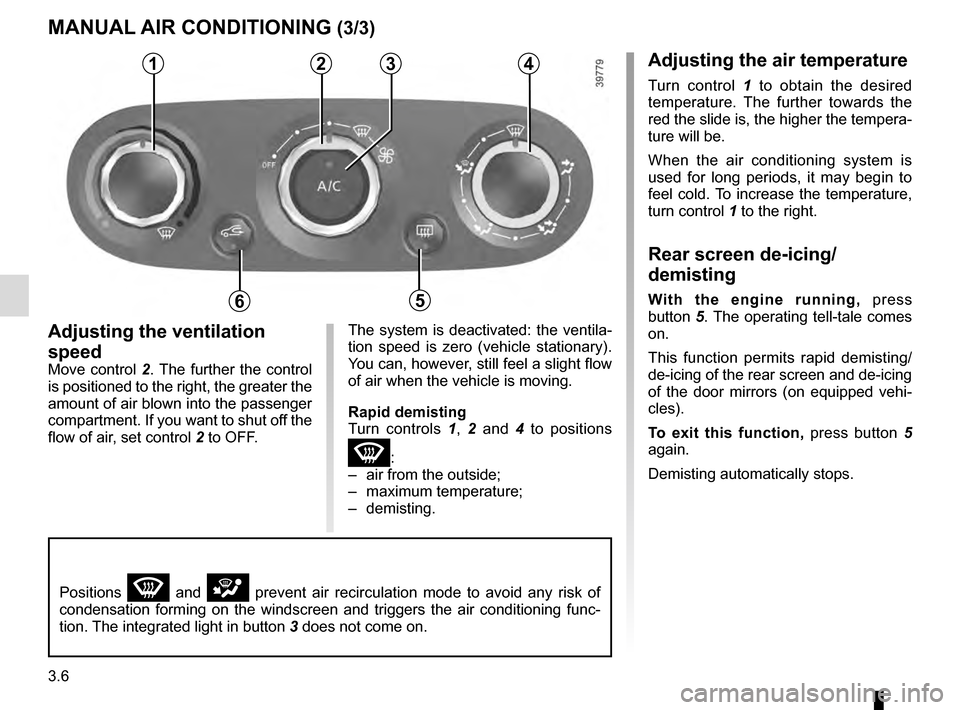
Adjusting the ventilation
speed
Move control 2. The further the control
is positioned to the right, the greater the
amount of air blown into the passenger
compartment. If you want to shut off the
flow of air, set control 2 to OFF.
4
5
MANUAL AIR CONDITIONING (3/3)
The system is deactivated: the ventila-
tion speed is zero (vehicle stationary).
You can, however, still feel a slight flow
of air when the vehicle is moving.
Rapid demisting
Turn controls 1, 2 and 4 to positions
W:
– air from the outside;
– maximum temperature;
– demisting.
1234
65
Positions W and i prevent air recirculation mode to avoid any risk of
condensation forming on the windscreen and triggers the air conditioning\
func-
tion. The integrated light in button 3 does not come on.
Adjusting the air temperature
Turn control 1 to obtain the desired
temperature. The further towards the
red the slide is, the higher the tempera-
ture will be.
When the air conditioning system is
used for long periods, it may begin to
feel cold. To increase the temperature,
turn control 1 to the right.
Rear screen de-icing/
demisting
With the engine running, press
button 5. The operating tell-tale comes
on.
This function permits rapid demisting/
de-icing of the rear screen and de-icing
of the door mirrors (on equipped vehi-
cles).
To exit this function, press button 5
again.
Demisting automatically stops.
Page 139 of 246
3.11
Operating faults
As a general rule, contact your ap-
proved dealer in the event of an oper-
ating fault.
– Reduction in de-icing, demisting or air conditioning performance.
This may be caused by the passen-
ger compartment filter cartridge be-
coming clogged.
– No cold air is being produced .
Check that the controls are set cor-
rectly and that the fuses are sound.
Otherwise, switch off the system.
Presence of water under the
vehicle
After prolonged use of the air condi-
tioning system, it is normal for water
to be present under the vehicle. This is
caused by condensation.
AIR CONDITIONING: information and advice on use
Do not open the refriger-
ant fluid circuit. The fluid
may damage eyes or skin.
Fuel consumption
You will normally notice an increase in
fuel consumption (especially in town)
when the air conditioning is operating.
For vehicles fitted with air conditioning
with no automatic mode, switch off the
system when it is not required.
Advice for reducing consumption
and helping to preserve the environ-
ment
Drive with the air vents open and the
windows closed.
If the vehicle has been parked in the
sun, open the doors for a few moments
to let the hot air escape before starting
the engine.
Advice on use
In some situations, (air conditioning
off, air recirculation activated, ventila-
tion speed at zero or low, etc.) you may
notice that condensation starts to form
on the windows and windscreen.
If there is condensation, use the “Clear
View” function to remove it, then use
the air conditioning in automatic mode
to stop it forming again.
Maintenance
Refer to the Maintenance Document
for your vehicle for the inspection fre-
quency.
Do not add anything to the
vehicle’s ventilation circuit
(for example, to remove
bad odours).
There is a risk of damage or of
fire.