Condition RENAULT CAPTUR 2017 1.G Owner's Manual
[x] Cancel search | Manufacturer: RENAULT, Model Year: 2017, Model line: CAPTUR, Model: RENAULT CAPTUR 2017 1.GPages: 248, PDF Size: 6.56 MB
Page 99 of 248
2.17
DRIVING ADVICE, ECO DRIVING (5/5)
Advice on use
– Opt for ECO mode.
– Electricity is fuel; switch off all the electrical components which are
not really needed. However (safety
first), keep your lights on when the
visibility is bad (“see and be seen”).
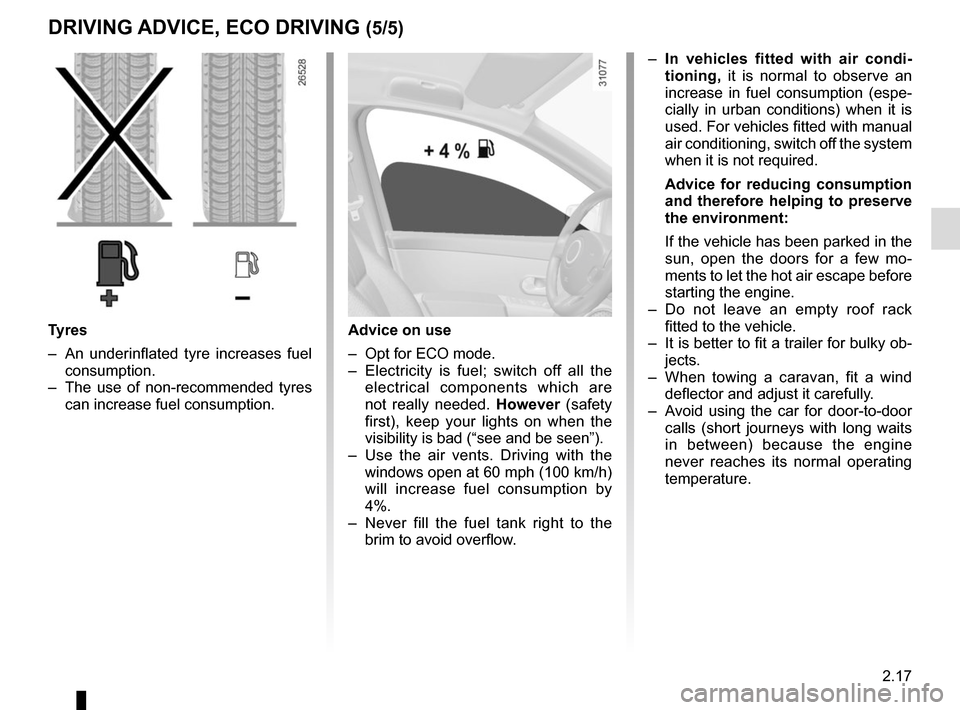
– Use the air vents. Driving with the windows open at 60 mph (100 km/h)
will increase fuel consumption by
4%.
– Never fill the fuel tank right to the brim to avoid overflow.
– In vehicles fitted with air condi-
tioning, it is normal to observe an
increase in fuel consumption (espe-
cially in urban conditions) when it is
used. For vehicles fitted with manual
air conditioning, switch off the system
when it is not required.
Advice for reducing consumption
and therefore helping to preserve
the environment:
If the vehicle has been parked in the
sun, open the doors for a few mo-
ments to let the hot air escape before
starting the engine.
– Do not leave an empty roof rack fitted to the vehicle.
– It is better to fit a trailer for bulky ob- jects.
– When towing a caravan, fit a wind deflector and adjust it carefully.
– Avoid using the car for door-to-door calls (short journeys with long waits
in between) because the engine
never reaches its normal operating
temperature.
Tyres
– An underinflated tyre increases fuel consumption.
– The use of non-recommended tyres can increase fuel consumption.
Page 103 of 248
2.21
TYRE PRESSURE LOSS WARNING (2/7)
Operating conditions
The system should be reset with an
inflation pressure equal to that given
on the tyre inflation pressure label.
Otherwise it risks not giving a reliable
warning in the event of a significant loss
of pressure. Please refer to the informa-
tion on “Tyre pressures” in Section 4.
In the following situations, the system
risk coming into action late or not func-
tioning correctly:
– system not reset after reinflation or any operation on the wheels;
– system badly reset: different inflation pressures from the recommended
pressures;
– significant change in load or distribu- tion of load on one side of the vehi-
cle;
– sporty driving with strong accelera- tion;
– driving on snowy or slippery surface;
This function is an addi-
tional driving aid.
However, the function does
not take the place of the
driver. It cannot, therefore, under
any circumstances replace the vig-
ilance or the responsibility of the
driver.
Check the tyre pressures, including
the emergency spare wheel, once a
month.
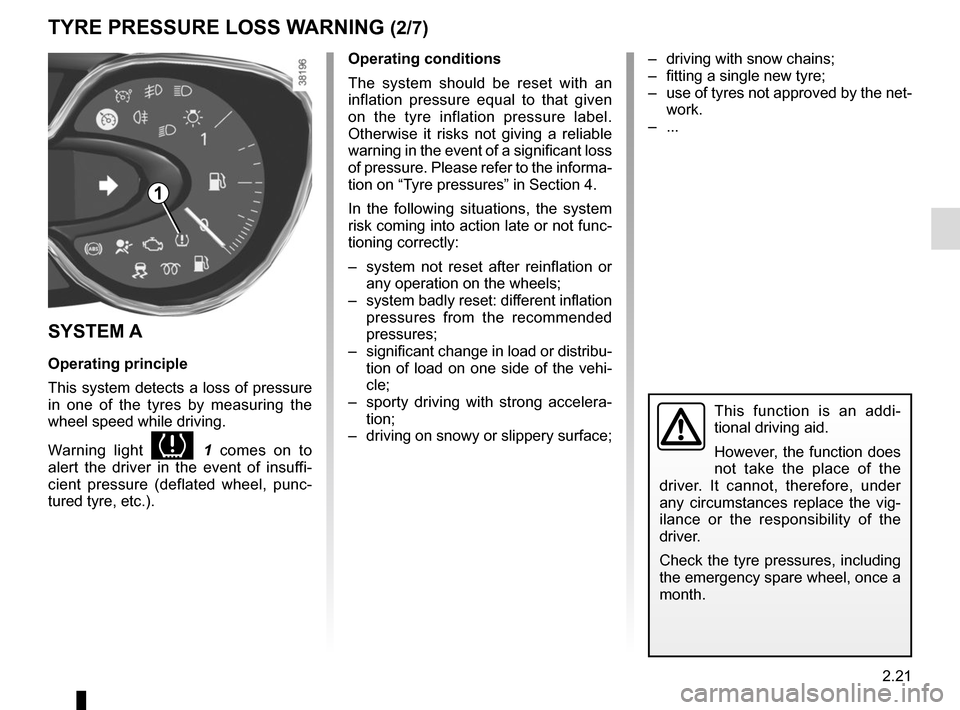
1
– driving with snow chains;
– fitting a single new tyre;
– use of tyres not approved by the net- work.
– ...
SYSTEM A
Operating principle
This system detects a loss of pressure
in one of the tyres by measuring the
wheel speed while driving.
Warning light
1 comes on to
alert the driver in the event of insuffi-
cient pressure (deflated wheel, punc-
tured tyre, etc.).
Page 104 of 248
2.22
SYSTEM A (cntd.)
Resetting the standard level for the
tyre pressures
This should be done:
– after each reinflation or readjustment of the pressure of one of the tyres;
– when the standard tyre pressure needs to be changed to adapt to
usage conditions (empty, carrying a
load, motorway driving, etc.);
– after changing a wheel;
– after using the tyre inflation kit;
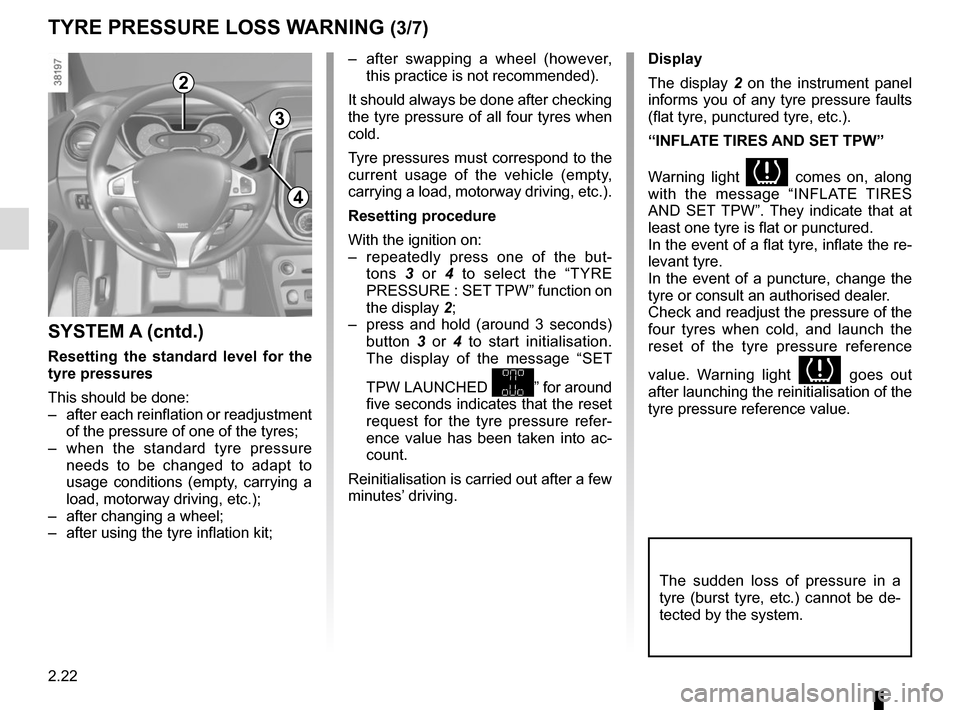
2
3
4
– after swapping a wheel (however, this practice is not recommended).
It should always be done after checking
the tyre pressure of all four tyres when
cold.
Tyre pressures must correspond to the
current usage of the vehicle (empty,
carrying a load, motorway driving, etc.).
Resetting procedure
With the ignition on:
– repeatedly press one of the but- tons 3 or 4 to select the “TYRE
PRESSURE : SET TPW” function on
the display 2;
– press and hold (around 3 seconds) button 3 or 4 to start initialisation.
The display of the message “SET
TPW LAUNCHED
” for around
five seconds indicates that the reset
request for the tyre pressure refer-
ence value has been taken into ac-
count.
Reinitialisation is carried out after a few
minutes’ driving.
TYRE PRESSURE LOSS WARNING (3/7)
Display
The display 2 on the instrument panel
informs you of any tyre pressure faults
(flat tyre, punctured tyre, etc.).
“INFLATE TIRES AND SET TPW”
Warning light
comes on, along
with the message “INFLATE TIRES
AND SET TPW”. They indicate that at
least one tyre is flat or punctured.
In the event of a flat tyre, inflate the re-
levant tyre.
In the event of a puncture, change the
tyre or consult an authorised dealer.
Check and readjust the pressure of the
four tyres when cold, and launch the
reset of the tyre pressure reference
value. Warning light
goes out
after launching the reinitialisation of the
tyre pressure reference value.
The sudden loss of pressure in a
tyre (burst tyre, etc.) cannot be de-
tected by the system.
Page 106 of 248
2.24
TYRE PRESSURE LOSS WARNING (5/7)
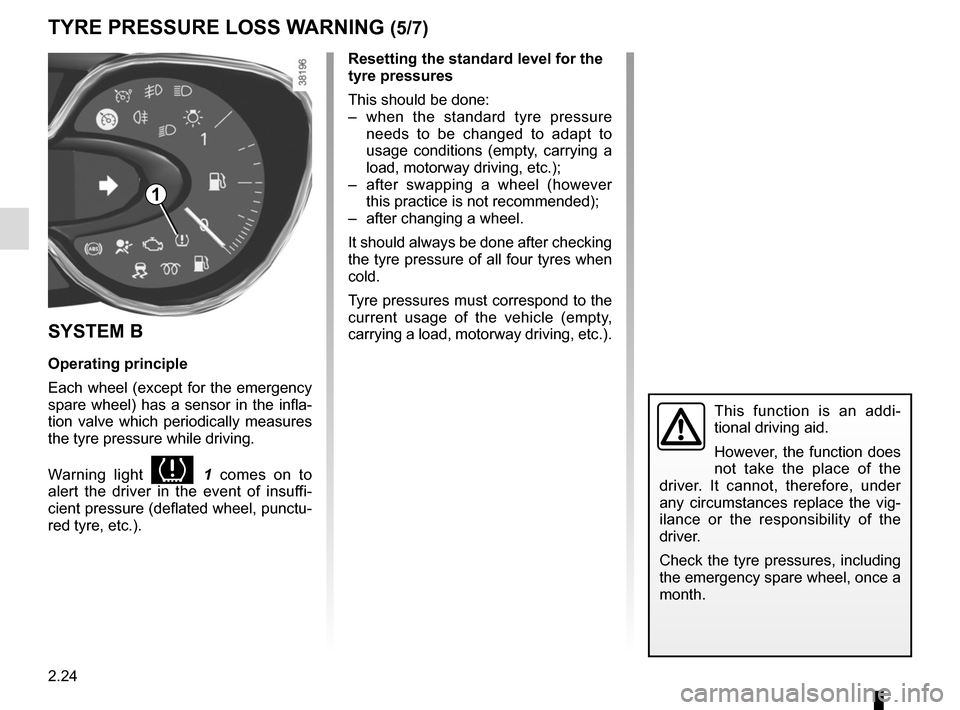
SYSTEM B
Operating principle
Each wheel (except for the emergency
spare wheel) has a sensor in the infla-
tion valve which periodically measures
the tyre pressure while driving.
Warning light
1 comes on to
alert the driver in the event of insuffi-
cient pressure (deflated wheel, punctu-
red tyre, etc.).
Resetting the standard level for the
tyre pressures
This should be done:
– when the standard tyre pressure needs to be changed to adapt to
usage conditions (empty, carrying a
load, motorway driving, etc.);
– after swapping a wheel (however this practice is not recommended);
– after changing a wheel.
It should always be done after checking
the tyre pressure of all four tyres when
cold.
Tyre pressures must correspond to the
current usage of the vehicle (empty,
carrying a load, motorway driving, etc.).
This function is an addi-
tional driving aid.
However, the function does
not take the place of the
driver. It cannot, therefore, under
any circumstances replace the vig-
ilance or the responsibility of the
driver.
Check the tyre pressures, including
the emergency spare wheel, once a
month.
1
Page 107 of 248
2.25
TYRE PRESSURE LOSS WARNING (6/7)
2
3
4
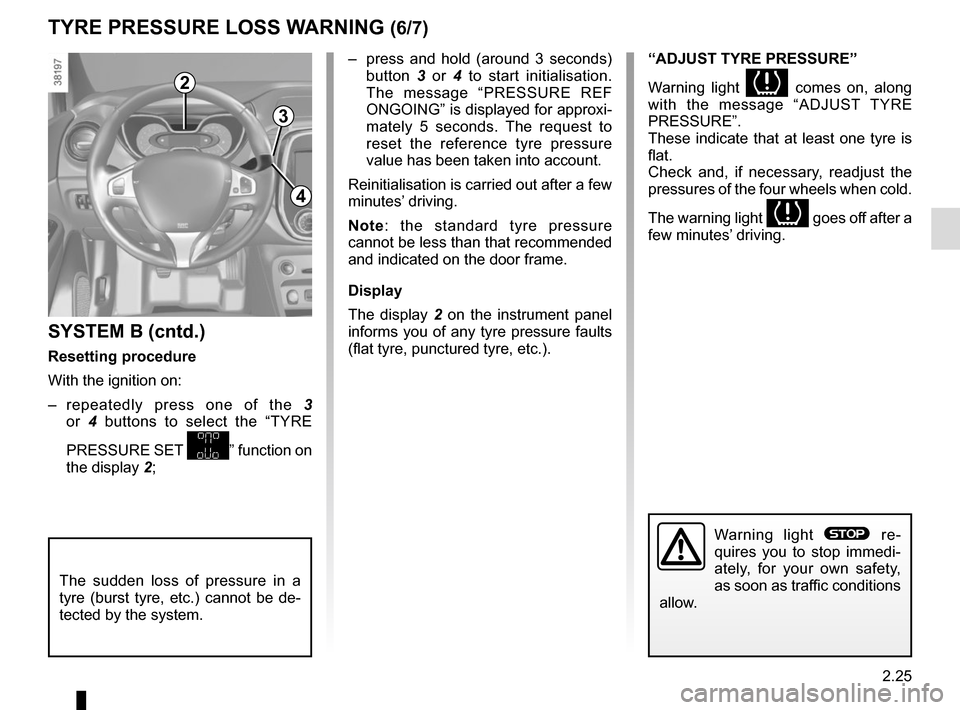
– press and hold (around 3 seconds) button 3 or 4 to start initialisation.
The message “PRESSURE REF
ONGOING” is displayed for approxi-
mately 5 seconds. The request to
reset the reference tyre pressure
value has been taken into account.
Reinitialisation is carried out after a few
minutes’ driving.
Note: the standard tyre pressure
cannot be less than that recommended
and indicated on the door frame.
Display
The display 2 on the instrument panel
informs you of any tyre pressure faults
(flat tyre, punctured tyre, etc.).
SYSTEM B (cntd.)
Resetting procedure
With the ignition on:
– repeatedly press one of the 3
or 4 buttons to select the “TYRE
PRESSURE SET
” function on
the display 2;
“ADJUST TYRE PRESSURE”
Warning light
comes on, along
with the message “ADJUST TYRE
PRESSURE”.
These indicate that at least one tyre is
flat.
Check and, if necessary, readjust the
pressures of the four wheels when cold.
The warning light
goes off after a
few minutes’ driving.
The sudden loss of pressure in a
tyre (burst tyre, etc.) cannot be de-
tected by the system.
Warning light ® re-
quires you to stop immedi-
ately, for your own safety,
as soon as traffic conditions
allow.
Page 109 of 248
2.27
DRIVING CORRECTION DEVICES AND AIDS (1/5)
Anti-lock braking system
(ABS)
Under heavy braking, the ABS prevents
the wheels from locking, allowing the
stopping distance to be managed and
keeping control of the vehicle.
Under these circumstances, the vehi-
cle can be steered to avoid an obstacle
whilst braking. In addition, this system
can increase stopping distances, par-
ticularly on roads with low surface grip
(wet ground etc.).
You will feel a pulsation through the
brake pedal each time the system is
activated. The ABS does not in any
way improve the vehicle's physical per-
formance relating to the road surface
and road-holding. It is still essential to
follow the rules of good driving practice
(such as driving at a safe distance from
the vehicle in front etc.).
In an emergency, apply firm and
continuous pressure to the brake
pedal. There is no need to pump
it repeatedly. The ABS will modu-
late the force applied in the braking
system.
Your braking systems
are partially operational.
However, it is dangerous
to brake suddenly and
it is essential to stop immediately,
as soon as traffic conditions allow.
Contact an approved dealer.
Depending on the vehicle, this is com-
posed of:
– anti-lock braking system (ABS);
– electronic stability program (ESC) with understeer control and trac-
tion control;
– driver assistance with a trailer;
– emergency brake assist;
– grip control;
– hill start assistance. Operating faults:
– The
© and x come on
and the messages “Check ABS”,
“CHECK BRAKING SYSTEM” and,
depending on the vehicle, “Check
ESC” appear on the instrument
panel: the ABS, the ESC and emer-
gency brake assist are deactivated.
Braking is always enabled;
– The
x, D, © and
® come on and the message
“BRAKING SYSTEM FAULT” is dis-
played on the instrument panel: this
indicates a failure in the braking
system.
In both cases, please consult an
Authorised Dealer.
Page 110 of 248
2.28
DRIVING CORRECTION DEVICES AND AIDS (2/5)
Electronic stability program
(ESC) with understeer control
and traction control
Electronic stability control ESC
This system helps you to keep control
of the vehicle in critical driving condi-
tions (avoiding an obstacle, loss of grip
on a bend, etc.).
Operating principle
A sensor in the steering wheel detects
the direction selected by the driver.
Other sensors throughout the vehicle
measure the actual direction.
The system compares driver input to
the actual trajectory of the vehicle and
corrects the trajectory if necessary by
controlling the braking of certain wheels
and/or engine power. In the event that
the system is engaged, indicator light
flashes on the instrument panel.Understeer control
This system optimises the action of the
ESC in the case of pronounced under-
steer (loss of front axle road holding).
Traction control
This system helps to limit wheelspin of
the drive wheels and to control the ve-
hicle when pulling away accelerating or
decelerating.
Operating principle
Using the wheel sensors, the system
measures and compares the speed of
the drive wheels at all times and slows
down their over-rotation. If a wheel is
starting to slip, the system brakes au-
tomatically until the drive supplied be-
comes compatible with the level of grip
under the wheel again.
The system also adjusts the engine
speed to the grip available under the
wheels, independently of the pressure
exerted on the accelerator pedal.
These functions are an ad-
ditional aid in the event of
critical driving conditions,
enabling the vehicle behav-
iour to be adapted to suit the driving
conditions.
However, the functions do not take
the place of the driver. They do
not increase the vehicle’s limits
and should not encourage you
to drive more quickly. Therefore,
they can under no circumstances
replace the vigilance or responsibil-
ity of the driver when manoeuvring
the vehicle (the driver must always
be ready for sudden incidents which
may occur when driving).
Operating faults
When the system detects an operat-
ing fault, the
© and warn-
ing lights come on and, depending on
the vehicle, the message “Check ESC”
appears on the instrument panel. In
this case, the ESC and traction control
system are deactivated.
Consult an approved dealer.
Page 111 of 248
2.29
DRIVING CORRECTION DEVICES AND AIDS (3/5)
Emergency brake assist
This system supplements the ABS
and helps reduce vehicle stopping dis-
tances.
Operating principle
The system allows an emergency brak-
ing situation to be detected when the
brake pedal is pressed. In this case, the
braking assistance immediately devel-
ops maximum power and may trigger
ABS regulation.
ABS braking is maintained as long as
the brake pedal is applied. Hazard warning lights switching on
Depending on the vehicle, these may
light up in the event of sudden decel-
eration.
Braking anticipation
Depending on the vehicle, when you
rapidly release the accelerator, the
system anticipates the braking ma-
noeuvre in order to reduce stopping
distances.
When using the cruise control:
– if you use the accelerator, when you
release it, the system may be trig-
gered;
– if you do not use the accelerator, the system will not be triggered.
Operating faults
When the system detects an operating
fault the message “CHECK BRAKING
SYSTEM” appears on the instrument
panel along with the
© warning
light.
Consult an approved dealer.
These functions are an ad-
ditional aid in the event of
critical driving conditions,
enabling the vehicle behav-
iour to be adapted to suit the driving
conditions.
However, the functions do not take
the place of the driver. They do
not increase the vehicle’s limits
and should not encourage you
to drive more quickly. Therefore,
they can under no circumstances
replace the vigilance or responsibil-
ity of the driver when manoeuvring
the vehicle (the driver must always
be ready for sudden incidents which
may occur when driving).
Page 112 of 248
2.30
Grip control
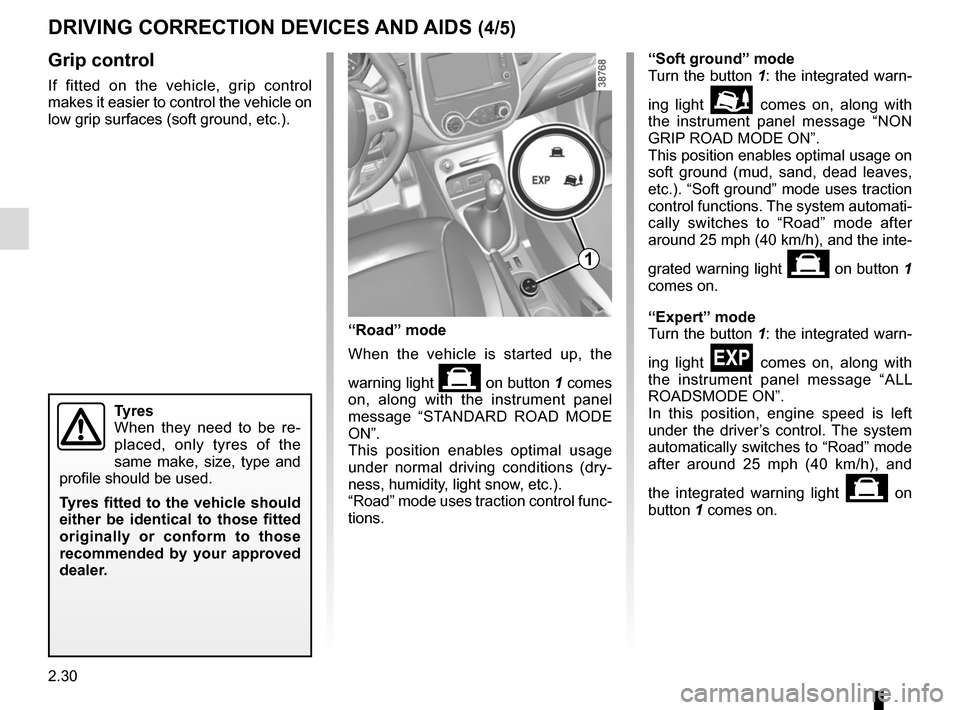
If fitted on the vehicle, grip control
makes it easier to control the vehicle on
low grip surfaces (soft ground, etc.).
Tyres
When they need to be re-
placed, only tyres of the
same make, size, type and
profile should be used.
Tyres fitted to the vehicle should
either be identical to those fitted
originally or conform to those
recommended by your approved
dealer.
“Soft ground” mode
Turn the button 1: the integrated warn-
ing light
\b comes on, along with
the instrument panel message “NON
GRIP ROAD MODE ON”.
This position enables optimal usage on
soft ground (mud, sand, dead leaves,
etc.). “Soft ground” mode uses traction
control functions. The system automati-
cally switches to “Road” mode after
around 25 mph (40 km/h), and the inte-
grated warning light
on button 1
comes on.
“Expert” mode
Turn the button 1: the integrated warn-
ing light
comes on, along with
the instrument panel message “ALL
ROADSMODE ON”.
In this position, engine speed is left
under the driver’s control. The system
automatically switches to “Road” mode
after around 25 mph (40 km/h), and
the integrated warning light
on
button 1 comes on.
“Road” mode
When the vehicle is started up, the
warning light
on button 1 comes
on, along with the instrument panel
message “STANDARD ROAD MODE
ON”.
This position enables optimal usage
under normal driving conditions (dry-
ness, humidity, light snow, etc.).
“Road” mode uses traction control func-
tions.
1
DRIVING CORRECTION DEVICES AND AIDS (4/5)
Page 120 of 248
2.38
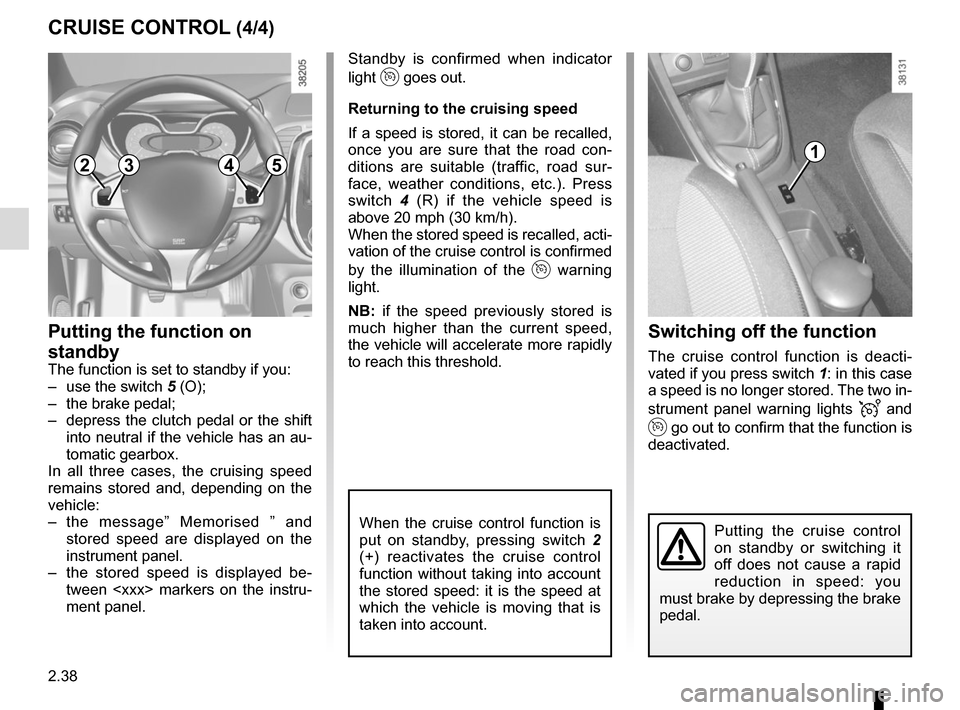
Switching off the function
The cruise control function is deacti-
vated if you press switch 1: in this case
a speed is no longer stored. The two in-
strument panel warning lights
and
go out to confirm that the function is
deactivated.
Standby is confirmed when indicator
light
goes out.
Returning to the cruising speed
If a speed is stored, it can be recalled,
once you are sure that the road con-
ditions are suitable (traffic, road sur-
face, weather conditions, etc.). Press
switch 4 (R) if the vehicle speed is
above 20 mph (30 km/h).
When the stored speed is recalled, acti-
vation of the cruise control is confirmed
by the illumination of the
warning
light.
NB: if the speed previously stored is
much higher than the current speed,
the vehicle will accelerate more rapidly
to reach this threshold.
When the cruise control function is
put on standby, pressing switch 2
(+) reactivates the cruise control
function without taking into account
the stored speed: it is the speed at
which the vehicle is moving that is
taken into account.
Putting the function on
standby
The function is set to standby if you:
– use the switch 5 (O);
– the brake pedal;
– depress the clutch pedal or the shift into neutral if the vehicle has an au-
tomatic gearbox.
In all three cases, the cruising speed
remains stored and, depending on the
vehicle:
– the message” Memorised ” and stored speed are displayed on the
instrument panel.
– the stored speed is displayed be- tween
ment panel.
CRUISE CONTROL (4/4)
Putting the cruise control
on standby or switching it
off does not cause a rapid
reduction in speed: you
must brake by depressing the brake
pedal.
23541