key RENAULT CAPTUR 2018 User Guide
[x] Cancel search | Manufacturer: RENAULT, Model Year: 2018, Model line: CAPTUR, Model: RENAULT CAPTUR 2018Pages: 258, PDF Size: 7.15 MB
Page 67 of 258

1.61
TRIP COMPUTER AND WARNING SYSTEM: operating fault messages
These appear with the © warning light and mean that you should drive very carefully to an author\
ised dealer as
soon as possible. If you fail to follow this recommendation, you risk da\
maging your vehicle.
They disappear when the display selection key is pressed or after severa\
l seconds and are stored in the computer log. The
© warning light stays on. Examples of operating fault messages are given \
in the following pages.
Examples of messages Interpreting the display selected
« CLEAN DIESEL FILTER » Indicates the presence of water in the diesel filter; contact an approve\
d Dealer
as soon as possible.
« CHECK VEHICLE » Indicates a fault in one of the pedal sensors, battery management system\
or oil
level sensor.
« CHECK AIRBAG » Indicates a fault in the restraint system in addition to the seat belts.\
In the event
of an accident, it is possible that they may not be triggered.
« CHECK ANTI-POLLUTION SYSTEM » Indicates a fault in the vehicle’s particle filter system.
Page 87 of 258

2.3
Hands-free RENAULT card
The RENAULT card must be inserted
in card reader 2 or in detection zone 3.
To start, depress the brake or clutch
pedal and press button 1. If a gear
is engaged, the vehicle may only be
started by depressing the clutch pedal.
Starting with the boot open in
hands-free mode
In this case, the RENAULT card must
not be located in the luggage compart-
ment.
Remote control RENAULT
card
When you get into the vehicle, insert
the RENAULT card integrated key,
pointing towards you, fully into the card
reader 2.
To start, press button 1. If a gear is en-
gaged, depress the clutch pedal to start
the vehicle.
STARTING, STOPPING THE ENGINE (1/3)
3
Special features
vehicles with an automatic gearbox
The lever should be in position P.
All vehicles
– If one of the starting conditions is not met, the message “Press brake
+ START” or “PRESS CLUTCH +
START” or “SELECT PARK” is dis-
played and, depending on the vehi-
cle, flashes on the instrument panel;
– in some cases, it will be necessary to move the steering wheel whilst
pressing the start button 1 to help
unlock the steering column; the mes-
sage “TURN STEERINGWHEEL +
START” will warn you of this;
– in the event of starting the engine in very low exterior temperatures
(lower than -10°C): hold down the
clutch pedal until the engine starts.
12
Page 88 of 258

2.4
Operating faults
In certain cases, the hands-free
RENAULT card may not work:
– when the RENAULT card battery is drained, flat battery, etc.
– near to appliances operating on the same frequency as the card (moni-
tor, mobile phone, video game, etc.);
– vehicle located in a high electromag- netic radiation zone.
The message “PLEASE INSERT
KEYCARD” appears on the instrument
panel.
Insert the RENAULT card fully into card
reader 2.
Accessories function(switching on the ignition)
Once you have gained access to your
vehicle, you may use some of its func-
tions (radio, navigation, wipers, etc.).
STARTING, STOPPING THE ENGINE (2/3)
Driver’s responsibility when parking or stopping the vehicle
Never leave an animal, child or adult who is not self-sufficient alone in
your vehicle, even for a short time.
They may pose a risk to themselves or to others by starting the engine, \
activating
equipment such as the electric windows or locking the doors, for example\
.
Also, in hot and/or sunny weather, please remember that the temperature inside
the passenger compartment increases very quickly.
RISK OF DEATH OR SERIOUS INJURY.
For other functions:
– vehicles with remote control
RENAULT card, insert the card into
reader 2;
– vehicles with a RENAULT “hands-
free” card, with the card in the pas-
senger compartment or inserted in
the card reader 2, press button 1
without pressing the pedals.
Note: depending on the vehicle, press-
ing button 1 starts the engine.
12
Page 89 of 258

2.5
Remote control RENAULT
card
With the card in reader 2, press
button 1: the engine will stop. Removing
the card from the reader locks the steer-
ing column.
Special note
If the card is no longer in the reader
when you try to switch the engine off,
the message “NO KEYCARD PRESS
AND HOLD” appears on the instrument
panel: press button 1 for longer than
two seconds.
Hands-free RENAULT card
With the card in the vehicle, press
button 1: the engine stops. The steer-
ing column is locked when the driver’s
door is opened or the vehicle is locked.
If the card is no longer in the pas-
senger compartment when you try to
switch the engine off, the message “NO
KEYCARD PRESS AND HOLD” ap-
pears on the instrument panel: press
button 1 for longer than two seconds.
Conditions for stopping the
engine
The vehicle must stationary, with the
lever positioned in N or P for vehicles
with an automatic transmission.
Special note
Depending on the vehicle, accessories
(e.g. radio) stop working either when
the engine is switched off or when the
driver’s door is opened or when the
doors are locked.
STARTING, STOPPING THE ENGINE (3/3)
Driver’s responsibility
when parking or stopping
the vehicle
Never leave an animal,
child or adult who is not self-suffi-
cient alone in your vehicle, even for
a short time.
They may pose a risk to themselves
or to others by starting the engine,
activating equipment such as the
electric windows or locking the
doors, for example.
Also, in hot and/or sunny weather,
please remember that the tempera-
ture inside the passenger compart-
ment increases very quickly.
RISK OF DEATH OR SERIOUS
INJURY.
12
When you leave your vehi-
cle, especially if you have
your RENAULT card with
you, check that the engine
is completely switched off.
Page 147 of 258
3.13
ELECTRIC WINDOWS (1/2)
1
2
34
5
6
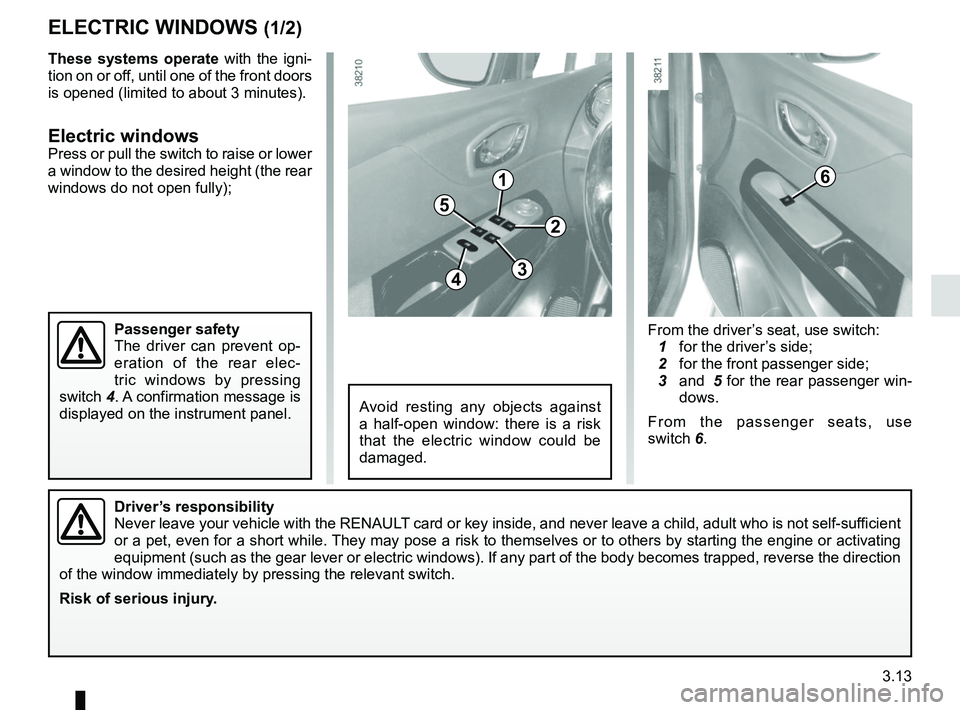
From the driver’s seat, use switch:
1 for the driver’s side;
2 for the front passenger side;
3 and 5 for the rear passenger win-
dows.
From the passenger seats, use
switch 6.
Avoid resting any objects against
a half-open window: there is a risk
that the electric window could be
damaged.
Driver’s responsibility
Never leave your vehicle with the RENAULT card or key inside, and never leave a child, adult who is not self-sufficient
or a pet, even for a short while. They may pose a risk to themselves or to others by starting the engine o\
r activating
equipment (such as the gear lever or electric windows). If any part of\
the body becomes trapped, reverse the direction
of the window immediately by pressing the relevant switch.
Risk of serious injury.
These systems operate with the igni-
tion on or off, until one of the front doors
is opened (limited to about 3 minutes).
Electric windowsPress or pull the switch to raise or lower
a window to the desired height (the rear
windows do not open fully);
Passenger safety
The driver can prevent op-
eration of the rear elec-
tric windows by pressing
switch 4. A confirmation message is
displayed on the instrument panel.
Page 218 of 258
5.28
Operating faultsIf the battery is too weak to ensure cor-
rect operation, you can still start (insert
the RENAULT card in the card reader)
and lock/unlock the vehicle (refer to the
information on "Locking/unlocking the
doors" in Section 1).
RENAULT CARD: battery
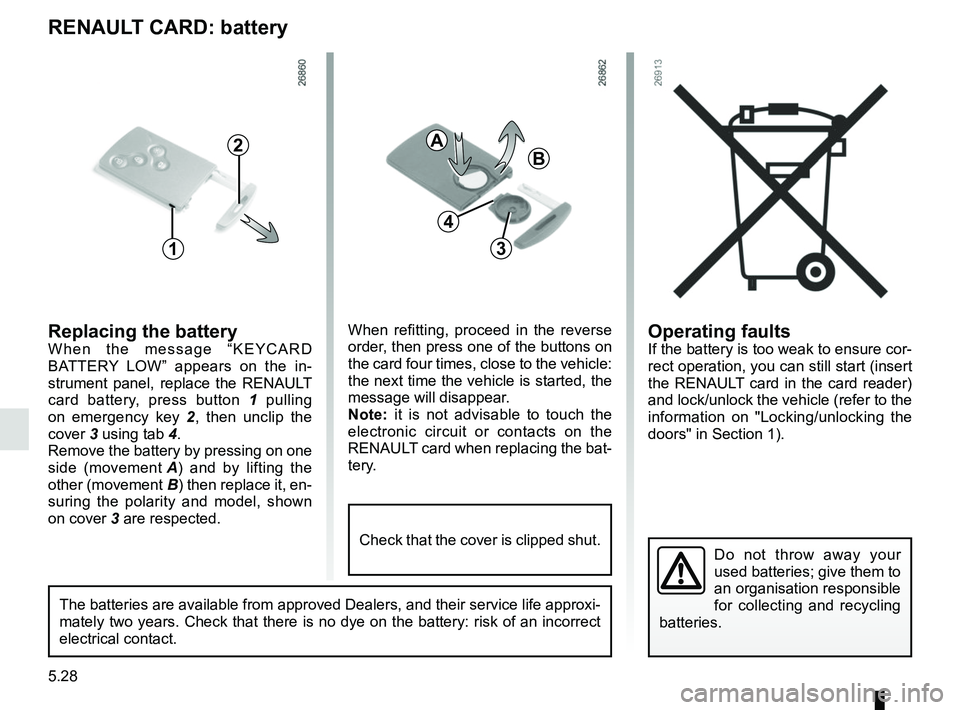
Replacing the batteryWhen the message “KEYCARD
BATTERY LOW” appears on the in-
strument panel, replace the RENAULT
card battery, press button 1 pulling
on emergency key 2 , then unclip the
cover 3 using tab 4.
Remove the battery by pressing on one
side (movement A) and by lifting the
other (movement B) then replace it, en-
suring the polarity and model, shown
on cover 3 are respected.
Do not throw away your
used batteries; give them to
an organisation responsible
for collecting and recycling
batteries.
1
2
When refitting, proceed in the reverse
order, then press one of the buttons on
the card four times, close to the vehicle:
the next time the vehicle is started, the
message will disappear.
Note: it is not advisable to touch the
electronic circuit or contacts on the
RENAULT card when replacing the bat-
tery.
A
B
3
The batteries are available from approved Dealers, and their service lif\
e approxi-
mately two years. Check that there is no dye on the battery: risk of an \
incorrect
electrical contact.
4
Check that the cover is clipped shut.
Page 225 of 258
5.35
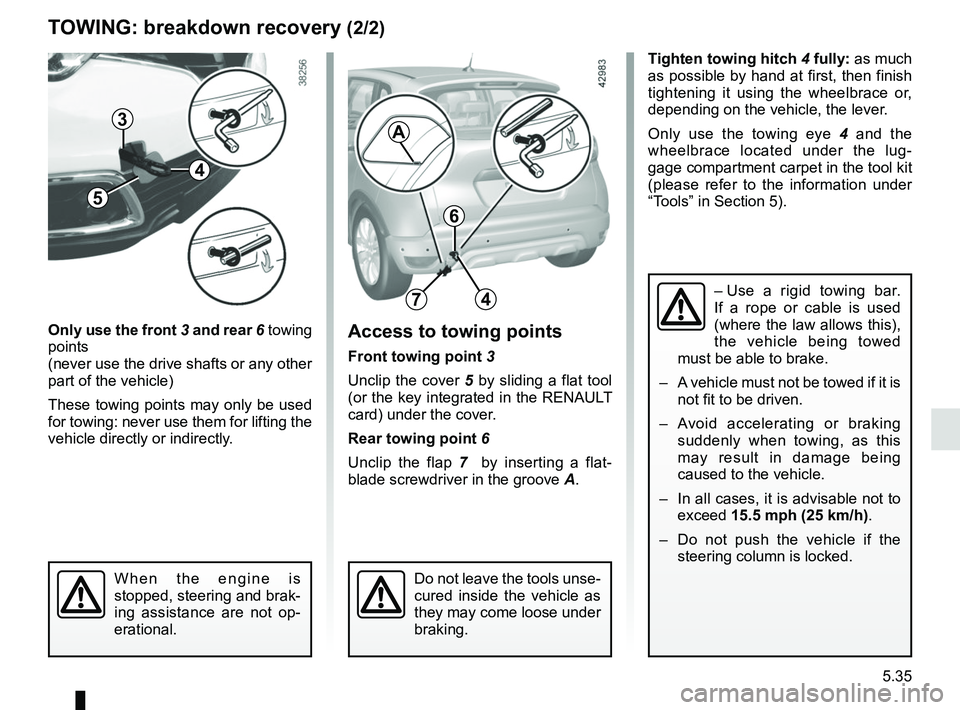
Tighten towing hitch 4 fully: as much
as possible by hand at first, then finish
tightening it using the wheelbrace or,
depending on the vehicle, the lever.
Only use the towing eye 4 and the
wheelbrace located under the lug-
gage compartment carpet in the tool kit
(please refer to the information under
“Tools” in Section 5).
TOWING: breakdown recovery (2/2)
Only use the front 3 and rear 6 towing
points
(never use the drive shafts or any other
part of the vehicle)
These towing points may only be used
for towing: never use them for lifting the
vehicle directly or indirectly.Access to towing points
Front towing point 3
Unclip the cover 5 by sliding a flat tool
(or the key integrated in the RENAULT
card) under the cover.
Rear towing point 6
Unclip the flap 7 by inserting a flat-
blade screwdriver in the groove A.
When the engine is
stopped, steering and brak-
ing assistance are not op-
erational.Do not leave the tools unse-
cured inside the vehicle as
they may come loose under
braking.
6
74– Use a rigid towing bar.
If a rope or cable is used
(where the law allows this),
the vehicle being towed
must be able to brake.
– A vehicle must not be towed if it is not fit to be driven.
– Avoid accelerating or braking suddenly when towing, as this
may result in damage being
caused to the vehicle.
– In all cases, it is advisable not to exceed 15.5 mph (25 km/h).
– Do not push the vehicle if the steering column is locked.
5
4
3A
Page 226 of 258

The following advice will enable you to carry out quick, temporary repai\
rs. For safety reasons you should always contact
an approved Dealer as soon as possible.
Using th")
5.36
OPERATING FAULTS (1/6)
The following advice will enable you to carry out quick, temporary repai\
rs. For safety reasons you should always contact
an approved Dealer as soon as possible.
Using the RENAULT cardPOSSIBLE CAUSES WHAT TO DO
The RENAULT card does not lock or
unlock the doors. Card battery is flat.
Replace the battery or have it replaced.
You can still lock/unlock and start your ve-
hicle (refer to the information on “Locking/
unlocking the doors” in Section 1 and
“Starting/Stopping the engine” in
Section 2).
Use of appliances operating on the
same frequency as the card (mobile
phone, etc.). Stop using the equipment or use the in-
tegrated key (refer to the information on
“Locking, unlocking the opening elements”
in Section 1).
Vehicle located in a high electromag-
netic radiation zone.
Vehicle battery flat. Use the key integrated in the card (refer to
the information on “Locking, unlocking the
opening elements” in Section 1).
The vehicle is started. With the engine running, the card’s locking/
unlocking device is blocked. Turn off the ig-
nition.
Page 252 of 258

doors/tailgate .........................................................\
..1.2 → 1.15
driver assistance....................................................2.23 → 2.4")
7.2
ALPHABETICAL INDEX (2/5)
doors/tailgate .........................................................\
..1.2 → 1.15
driver assistance....................................................2.23 → 2.47
driver’s position .....................................................1.42 → 1.50
driving ........2.2 → 2.5, 2.10 – 2.11, 2.13 → 2.17, 2.20 → 2.27,
2.31 → 2.41, 2.48 → 2.50
driving aids ............................................................2.23 → 2.47
driving position settings ............................................................1.19 → 1.22
driving recommendations ......................................2.13 → 2.17
E
ECO driving ...........................................................2.13 → 2.17
ECO mode ........................................................................\
. 2.15
electric beam height adjustment ............................. 1.71 – 1.72
electric windows ..................................................... 3.13 – 3.14
electronic stability control: ESC .............................2.23 → 2.27
emergency brake assist.........................................2.23 → 2.27
emergency braking ................................................2.23 → 2.27
emergency key ..........................................................1.2 → 1.4
emergency spare wheel ............................................. 5.2 – 5.3
engine technical specifications .................................................. 6.5
engine coolant ..................................................................... 4.7
engine oil ...................................................................4.4 → 4.6
engine oil capacity ...................................................... 4.5 – 4.6
engine oil level ...........................................................4.4 → 4.6
engine specifications .................................................... 6.3, 6.5
engine standby ..........................................................2.6 → 2.9
engine start/stop button .............................................2.3 → 2.5
environment ............................................................\
........... 2.19
ESC: electronic stability control ....................1.48, 2.23 → 2.27
external temperature ......................................................... 1.65
F
faults operating faults ................................................5.36 → 5.41filter
air filter ........................................................................\
... 4.9
oil filter .................................................................. 4.5 – 4.6
passenger compartment filter ........................................ 4.9
fitting a radio ...................................................................... 5.22
fittings ...............................................................\
.....3.18 → 3.22
front passenger air bag deactivation ................................. 1.39
front seat adjustment .............................................. 1.17 – 1.18
front seats ........................................................................\
.. 4.18 adjustment .......................................................1.16 → 1.19
fuel advice on fuel economy ...................................2.13 → 2.17
consumption ....................................................2.13 → 2.17
filling ........................................................1.46, 1.76 → 1.78
grade ................................................................1.76 → 1.78
fuel consumption ...................................................2.13 → 2.17
fuel economy .........................................................2.13 → 2.17
fuel filler cap ..........................................................1.76 →
1.78
fuel level ................................................................1.46 →
1.51
fuel tank capacity ...............................................................\
......... 1.76
fuel tank capacity ...................................................1.76 → 1.78
fuses ..................................................................\
....5.23 → 5.27
G
gear lever........................................................................\
... 2.12
H
handbrake........................................................................\
.. 2.12
hands-free telephone integrated control ............................ 3.34
hazard warning lights signal .............................................. 1.70
headlight beam adjustment .................................... 1.71 – 1.72
headrest.................................................................... 1.16, 3.24
heated seats ...................................................................... 1.17
heated windscreen ..................................................3.7 → 3.10
heating and air conditioning system ........................ 3.4 → 3.11