driving RENAULT CAPTUR 2018 Owner's Manual
[x] Cancel search | Manufacturer: RENAULT, Model Year: 2018, Model line: CAPTUR, Model: RENAULT CAPTUR 2018Pages: 258, PDF Size: 7.15 MB
Page 69 of 258

1.63
Power Assisted Steering
Never drive with an inadequately
charged battery.
Variable power assisted
steering
The variable power assisted steering
system is equipped with an electronic
control system which alters the level of
assistance to suit the vehicle speed.
Steering is made easier during parking
manoeuvres (for added comfort) whilst
the force needed to steer increases
progressively as the speed rises (for
enhanced safety at high speeds).
Adjusting the steering wheel
height and depth
Pull lever 1 and place the steering
wheel in the required position; push the
lever beyond the point of resistance to
lock the steering wheel in place.
Make sure that the steering wheel is
correctly locked.
For safety reasons, only
adjust the steering wheel
when the vehicle is station-
ary.
STEERING WHEEL/POWER-ASSISTED STEERING
1
Never switch off the igni-
tion when travelling down-
hill, and avoid doing so in
normal driving (assistance
is not provided).
With the engine switched off, or if
there is a system fault, it is still pos-
sible to turn the steering wheel. The
force required will be greater.
Never leave the steering wheel at
full lock while stationary.
Page 70 of 258

1.64
Wait a few seconds, the minutes will
flash: repeatedly press or press and
hold button 3 or 4 to set the time.
When setting is complete, the hours
and minutes remain displayed conti-
nuously for 2 seconds: your setting is
registered.
You may change the display.Display A
To access the display 2 for setting the
time, press button 3 or 4 on the stalk 1.
Wait a few seconds; the hours and min-
utes will begin to flash. You are now in
setting mode, press and hold button 3
or 4 to set the hour.
Once the minutes flash, repeatedly
press or press and hold button 3 ou 4
to set the time.
CLOCK AND EXTERIOR TEMPERATURE (1/2)
3
4
If the power supply is cut (battery
disconnected, supply wire cut, etc.),
the clock must be reset.
We recommend that you do not
adjust these settings while driving.
9°C 12:00
2
A
1
1
Page 71 of 258

1.65
Display B
Vehicles fitted with touch-screen
multimedia, navigation aid systems,
telephones, etc.
Refer to the separate instructions for
the function to understand the special
features of this equipment.
External temperature
indicator
Special note:
When the exterior temperature is - 3°C
to + 3°C, the °C characters flash (si-
gnalling a risk of ice on the road).
External temperature in-
dicator
As ice formation is related
to climatic exposure, local
air humidity and temperature, the
external temperature alone is not
sufficient to detect ice.
CLOCK AND EXTERIOR TEMPERATURE (2/2)
If the power supply is cut (battery disconnected, supply wire cut, etc.\
), the clock
must be reset.
We recommend that you do not adjust these settings while driving.
B
Page 72 of 258
1.66
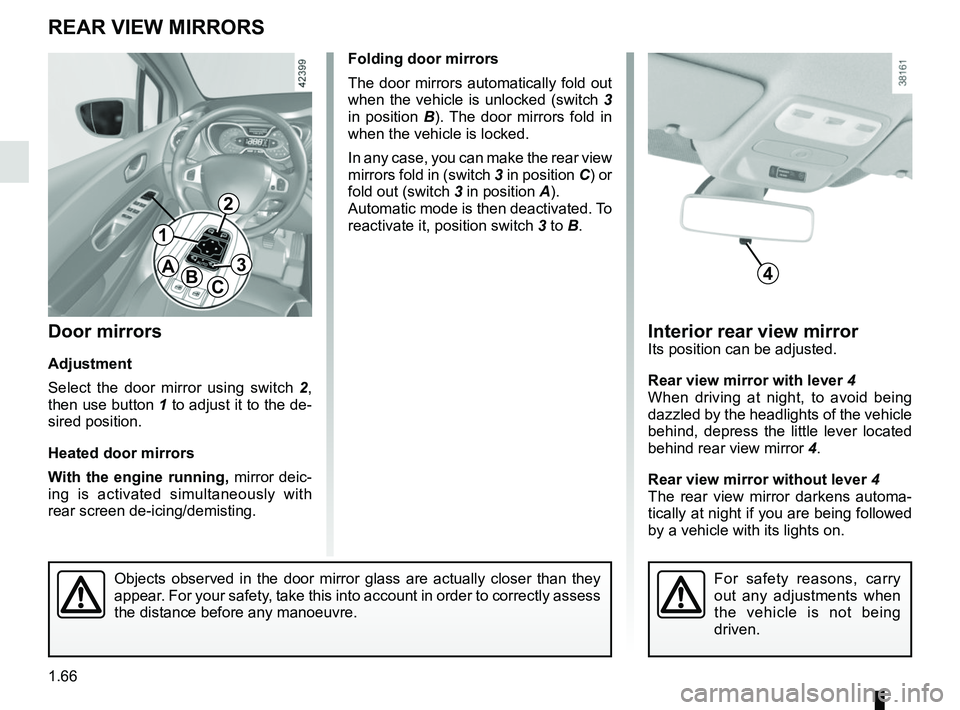
Interior rear view mirrorIts position can be adjusted.
Rear view mirror with lever 4
When driving at night, to avoid being
dazzled by the headlights of the vehicle
behind, depress the little lever located
behind rear view mirror 4.
Rear view mirror without lever 4
The rear view mirror darkens automa-
tically at night if you are being followed
by a vehicle with its lights on.
Folding door mirrors
The door mirrors automatically fold out
when the vehicle is unlocked (switch 3
in position B). The door mirrors fold in
when the vehicle is locked.
In any case, you can make the rear view
mirrors fold in (switch 3 in position C) or
fold out (switch 3 in position A).
Automatic mode is then deactivated. To
reactivate it, position switch 3 to B.
Door mirrors
Adjustment
Select the door mirror using switch 2 ,
then use button 1 to adjust it to the de-
sired position.
Heated door mirrors
With the engine running, mirror deic-
ing is activated simultaneously with
rear screen de-icing/demisting.
REAR VIEW MIRRORS
For safety reasons, carry
out any adjustments when
the vehicle is not being
driven.
4
1
2
3ABC
Objects observed in the door mirror glass are actually closer than they \
appear. For your safety, take this into account in order to correctly assess
the distance before any manoeuvre.
Page 73 of 258

1.67
Daytime running lights
function
The daytime running lights come on
automatically with no action on stalk 1
when the engine is started, and they go
off once the engine is switched off.
EXTERIOR LIGHTING AND SIGNALS (1/3)
šSide lights
Turn the ring 2 until the symbol
is opposite mark 3.
An indicator light on the instrument
panel will come on.
1
Before driving at night, check that the electrical equipment is operatin\
g
correctly and adjust the headlight beams (if your vehicle is not carryi\
ng
its normal load). As a general precaution, check that the lights are not ob-
scured (by dirt, mud, snow or objects being transported).
kDipped beam
headlights
Manual operation
Turn the ring 2 until the symbol is oppo-
site mark 3. This indicator light on the
instrument panel comes on.
Automatic operation
(depending on vehicle)
Turn ring 2 until the AUTO symbol is op-
posite mark 3: with the engine running,
the dipped beam headlights switch on
or off automatically depending on the
brightness of the light outside, without
any action on stalk 1.
When driving on the left in a left-
hand drive vehicle (or vice versa),
drivers must re-adjust their lights
throughout their stay (see “Adjusting
headlight beams” in Section 1).
312
Page 75 of 258

1.69
EXTERIOR LIGHTING AND SIGNALS (3/3)
fRear fog light
Turn the centre ring 4 on
the stalk until the symbol is opposite
mark 5, then release it.
Depending on the vehicle, the stalk re-
turns to the initial position or stays in
position.
Operation of the fog lights depends on
the exterior lighting selected, and an in-
dicator light will light up on the instru-
ment panel.
To avoid inconveniencing other road
users, remember to switch off the rear
fog light when it is no longer needed.
Cornering lights
Whenever the dipped beam headlights
are on and under certain conditions (at
speed, the steering wheel at an angle,
in forward gear, the indicator lights on,
etc.), when taking a corner one of the
front fog lights will come on to light the
inside of the bend.
Turning off the fog lights
There are two possibilities:
– manually, depending on the vehi- cle, turn the ring 4 again to bring the
mark 5 opposite the symbol for the
fog light that you want to switch off,
or bring the ring 4 into position -. The
corresponding indicator light will go
out on the instrument panel;
– the lights will go out automati- cally when the engine is switched
off or the vehicle is locked, and the
fog lights when the driver’s door is
opened.
The front and rear fog lights switch off
when the exterior lights are switched
off.
415
gFront fog lights
Turn the centre ring 4 on the
stalk 1 until the symbol is opposite
mark 5, then release it.
Operation of the fog lights depends on
the exterior lighting position selected,
and an indicator light will light up on the
instrument panel.
When driving in fog or snow, or when transporting objects which are higher than the roof, the headl\
ights do not come on au-
tomatically.
Switching on the fog lights remains the responsibility of the driver: th\
e indicator lights on the instrument panel inform you
whether the fog lights are lit (indicator light on) or not (indicator\
light not on).
Page 76 of 258

1.70
éHazard warning lights
Press switch 2.
This switch activates all four direction
indicators and the side indicator lights
simultaneously. It must only be used in
an emergency to warn drivers of other
vehicles that you have had to stop in
an area where stopping is prohibited or
unexpected, or that you are obliged to
drive under special conditions.
Depending on the vehicle, the hazard
warning lights may come on auto-
matically under heavy deceleration.
You can switch them off by pressing
switch 2 once.
Direction indicators
Move stalk 1 parallel to the steering
wheel and in the direction you are going
to turn it.
One-touch mode
When driving, it is possible that the
steering wheel may not be turned suf-
ficiently to return the stalk automatically
to its starting position.
In this case, move the stick 1 to half-
way, then release it: it will return to its
initial position and the indicator light
flashes three times.
Horn
Press steering wheel boss A.
Headlight flasher
Pull stalk 1 towards you to flash the
headlights.
AUDIBLE AND VISUAL SIGNALS
A
1
2
Page 78 of 258

1.72
HEADLIGHT BEAM ADJUSTMENT (2/2)
Temporary adjustment
Open the bonnet and identify the mark-
ing B next to one of the front headlight
projectors.
For each halogen headlight, use a
screwdriver to turn the screw 1 by a
quarter turn towards the - symbol to
lower the beams.
Return to the original position once your
trip is over: turn the screw 1 a quarter of
a turn towards the + symbol to raise the
beams.
When driving on the left in a left-
hand drive vehicle (or vice versa),
you must adjust your lights tempo-
rarily during your stay.
B
1
For an LED headlight, use a screw-
driver to turn the bolt 1 by a half turn to-
wards the - symbol to lower the beams.
Return to the original position once
your trip is over: turn the bolt 1 by a half
turn towards the + symbol to raise the
beams.
Page 79 of 258

1.73
WINDSCREEN WASH/WIPE (1/2)
A
B
C
D
1
With the ignition on, move stalk 1
– A park.
– B intermittent wiping.
The wipers will pause for several
seconds between sweeps. It is
possible to change the time be-
tween sweeps by turning ring 2.
– C normal wiping speed.
– D fast wiping speed.
Positions B, C and D are accessible
with the ignition on.
Vehicles with automatic wiper
function
With the engine running, move stalk 1
– A park.
– B automatic wiper function
When this position is selected, the
system detects water on the wind-
screen and triggers the wipers at a
suitable wiping speed. It is possi-
ble to change the triggering thresh-
old and the time sweeps by turning
ring 2:
– E: minimum sensitivity
– F: maximum sensitivity
NB: in foggy weather or during
snowfalls, the wiping is not automati-
cally triggered and remains under
the driver’s control.
– C normal wiping speed.
– D fast wiping speed.
Position C is accessible with the ig-
nition on. Positions B and D are ac-
cessible only with the engine run-
ning.
12E
F
Special note
When driving, the wiping speed slows
down whenever the vehicle stops. For
example: the speed will change from
a fast wiping speed to normal wiping
speed.
As soon as the vehicle moves off,
wiping will return to the speed originally
selected.
Any action on stalk 1 overrides and
cancels automatic operation.
Starting the vehicle with the stalk in
position D triggers a slow continuous
sweeping movement. Adjusting the
stalk to position D is necessary to trig-
ger a rapid continuous sweeping move-
ment.
Page 85 of 258

Running in . . . . . . . . . . . . . . . . . . . . . . . . . . . . . . . . . . . . \
. . . . . . . . . . . . . . . .")
2.1
Section 2: Driving
(Advice on use relating to fuel economy and the environment)
Running in . . . . . . . . . . . . . . . . . . . . . . . . . . . . . . . . . . . . \
. . . . . . . . . . . . . . . . . . . . . . . . . . . . . . . . . 2.2
Starting/stopping the engine . . . . . . . . . . . . . . . . . . . . . . . . . . . . . . . . . . . .\
. . . . . . . . . . . . . . . . . . . 2.3
Stop and Start Function . . . . . . . . . . . . . . . . . . . . . . . . . . . . . . . . . . . . \
. . . . . . . . . . . . . . . . . . . . . . . 2.6
Special features of petrol versions . . . . . . . . . . . . . . . . . . . . . . . . . . . . . . . . . . . .\
. . . . . . . . . . . . . . 2.10
Special features of Diesel versions . . . . . . . . . . . . . . . . . . . . . . . . . . . . . . . . . . . . \
. . . . . . . . . . . . . . 2.11
Gear lever/Handbrake . . . . . . . . . . . . . . . . . . . . . . . . . . . . . . . . . . . . \
. . . . . . . . . . . . . . . . . . . . . . . . 2.12
Driving advice, Eco-driving . . . . . . . . . . . . . . . . . . . . . . . . . . . . . . . . . . . .\
. . . . . . . . . . . . . . . . . . . . 2.13
Maintenance and antipollution advice . . . . . . . . . . . . . . . . . . . . . . . . . . . . . . . . . . . . \
. . . . . . . . . . . . 2.18
Environment . . . . . . . . . . . . . . . . . . . . . . . . . . . . . . . . . . . .\
. . . . . . . . . . . . . . . . . . . . . . . . . . . . . . . 2.19
Tyre pressure loss warning . . . . . . . . . . . . . . . . . . . . . . . . . . . . . . . . . . . .\
. . . . . . . . . . . . . . . . . . . . 2.20
Driver correction devices/aids . . . . . . . . . . . . . . . . . . . . . . . . . . . . . . . . . . . . \
. . . . . . . . . . . . . . . . . . 2.23
Blind spot warning . . . . . . . . . . . . . . . . . . . . . . . . . . . . . . . . . . . . \
. . . . . . . . . . . . . . . . . . . . . . . . . . . 2.28
Speed limiter . . . . . . . . . . . . . . . . . . . . . . . . . . . . . . . . . . . .\
. . . . . . . . . . . . . . . . . . . . . . . . . . . . . . . 2.31
Cruise control . . . . . . . . . . . . . . . . . . . . . . . . . . . . . . . . . . . .\
. . . . . . . . . . . . . . . . . . . . . . . . . . . . . . 2.34
Parking distance control . . . . . . . . . . . . . . . . . . . . . . . . . . . . . . . . . . . .\
. . . . . . . . . . . . . . . . . . . . . . 2.38
Reversing camera . . . . . . . . . . . . . . . . . . . . . . . . . . . . . . . . . . . . \
. . . . . . . . . . . . . . . . . . . . . . . . . . . 2.42
Assisted parking . . . . . . . . . . . . . . . . . . . . . . . . . . . . . . . . . . . .\
. . . . . . . . . . . . . . . . . . . . . . . . . . . . 2.44
Automatic gearbox. . . . . . . . . . . . . . . . . . . . . . . . . . . . . . . . . . . . \
. . . . . . . . . . . . . . . . . . . . . . . . . . . 2.48